OKFy
Health Pass
- License — License: MIT
- Description — Repository has a description
- Active repo — Last push 0 days ago
- Community trust — 17 GitHub stars
Code Fail
- exec() — Shell command execution in dist/chunk-JA6B2QIM.js
- os.homedir — User home directory access in dist/chunk-JA6B2QIM.js
- process.env — Environment variable access in dist/chunk-JA6B2QIM.js
- network request — Outbound network request in dist/chunk-JA6B2QIM.js
Permissions Pass
- Permissions — No dangerous permissions requested
No AI report is available for this listing yet.
Turn docs into agent-readable knowledge bundles using Open Knowledge Format (OKF)

Open Knowledge Format for AI agents.
Turn docs into agent-readable knowledge bundles.
OKF bundles | MCP server | local-first | no LLM key | Git-diffable context



Use with agents | Keep sources fresh | Create a bundle | CLI install | Why OKF | More clients
Agents are bad at reading docs when the only options are "paste everything" or "trust a hidden vector index".
okfy converts documentation websites and local Markdown folders into Open Knowledge Format v0.1-conformant bundles: typed Markdown concept files with frontmatter, reserved navigation files, source URLs, internal links, backlinks, and a read-only MCP server. It can also remember third-party docs sources locally and refresh their bundles when they go stale.
Use it when you want Claude, Codex, Cursor, or another MCP-capable agent to search your docs, read only the relevant pages, traverse neighbors, and cite sources without dumping the whole docs site into context.
Use With Agents
okfy is meant to sit behind your coding agent as a local MCP server. Register a docs source once, then Claude, Codex, Cursor, or any MCP client can search and read the local OKF bundle on demand.
Register a third-party docs source and serve it by name:
npx -y okfy-ai add stripe https://docs.stripe.com/checkout --max-pages 100 --max-depth 4
npx -y okfy-ai serve stripe --mcp --auto-refresh
The MCP server uses the cached local bundle immediately. When the source is stale, --auto-refresh refreshes it according to the source policy while keeping freshness metadata visible through bundle_summary.
Claude Code
claude mcp add --transport stdio stripe-okf -- npx -y okfy-ai serve stripe --mcp --auto-refresh
Claude Desktop Or Cursor
Add this to claude_desktop_config.json, .cursor/mcp.json, or any client that accepts mcpServers JSON:
{
  "mcpServers": {
    "stripe-okf": {
      "command": "npx",
      "args": ["-y", "okfy-ai", "serve", "stripe", "--mcp", "--auto-refresh"]
    }
  }
}
Codex
Add this to ~/.codex/config.toml or a trusted project config:
[mcp_servers.stripe_okf]
command = "npx"
args = ["-y", "okfy-ai", "serve", "stripe", "--mcp", "--auto-refresh"]
startup_timeout_sec = 20
tool_timeout_sec = 60
enabled = true
Now ask:
Use the stripe-okf MCP server. Search for Checkout Sessions, read the most relevant concepts, inspect neighbors if needed, and explain the minimum backend flow with source URLs.
More setup details: docs/mcp-clients.md.
Keep Sources Fresh
Registered sources are the local-first workflow for third-party docs sites that change over time:
npx -y okfy-ai add stripe https://docs.stripe.com/checkout --max-pages 100 --max-depth 4
npx -y okfy-ai sources
npx -y okfy-ai check stripe
npx -y okfy-ai update stripe
npx -y okfy-ai remove stripe
npx -y okfy-ai serve stripe --mcp --auto-refresh
By default, okfy stores registered sources under ~/.okfy. Set OKFY_HOME to use a different local cache for CI, tests, or per-project isolation:
$OKFY_HOME/
  sources/
    stripe/
      source.json
      state.json
      bundle/
        index.md
        ...
source.json records the seed URL, crawl options, refresh policy, and bundle location. state.json records freshness, the last successful refresh, refresh failures, validation summary, and whether a refresh is in progress.
There is no OKFY cloud registry, account, hosted ranking, or cloud refresh worker. Refresh runs on your machine, using the stored source manifest and the same crawler safety defaults as crawl.
Freshness is age-based. A registered bundle is fresh when it exists, validates, and was successfully refreshed within its configured max age. The default mode is stale-while-refresh: if the bundle is stale, MCP search and read tools keep serving the current cached bundle while a background refresh runs. Use blocking mode when you want the server to refresh before answering tool calls:
npx -y okfy-ai serve stripe --mcp --auto-refresh --refresh-mode blocking
Use --refresh-mode off when MCP serving should never trigger network fetches; you can still run npx -y okfy-ai update stripe manually.
Create A Bundle
The original crawl/import path still works for one-off snapshots and project-local bundles.
Docs website snapshot:
npx -y okfy-ai crawl https://docs.stripe.com/checkout --out ./stripe-checkout-okf --max-pages 25
npx -y okfy-ai validate ./stripe-checkout-okf
npx -y okfy-ai inspect ./stripe-checkout-okf
Local Markdown:
npx -y okfy-ai import ./docs --out ./docs-okf --source-name "Project docs" --force
npx -y okfy-ai validate ./docs-okf
Serve an existing bundle path when you already manage the bundle yourself:
npx -y okfy-ai serve ./docs-okf --mcp
Direct bundle paths do not use source auto-refresh. Do not run serve --mcp as a normal interactive terminal session. MCP clients start it as a subprocess and communicate over stdin/stdout.
Optional CLI Install
You do not need global install for MCP configs. npx -y okfy-ai ... is usually better because the MCP client can launch okfy directly.
Install only if you want shorter local commands:
npm install -g okfy-ai
okfy demo
okfy-ai is the npm package name. okfy is the installed CLI command.
Package: okfy-ai on npm
Requires Node.js 20+.
After installing, this MCP config is equivalent:
{
  "mcpServers": {
    "stripe-okf": {
      "command": "okfy",
      "args": ["serve", "stripe", "--mcp", "--auto-refresh"]
    }
  }
}
Demo
npx -y okfy-ai demo
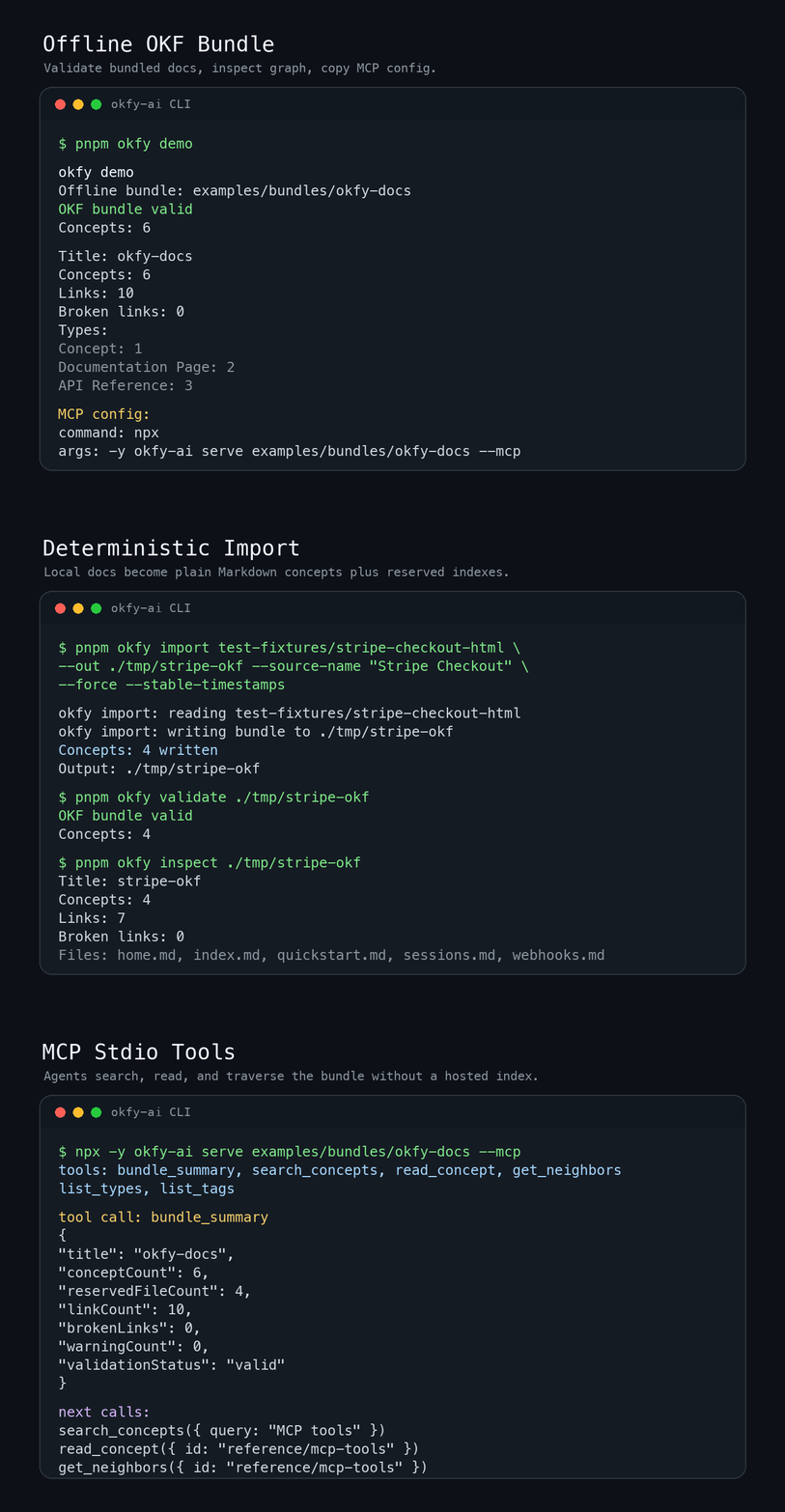
The offline demo validates the bundled OKF fixture and prints a ready MCP config.
Expected shape:
OKF bundle valid
Concepts: 6
Links: 10
Broken links: 0
MCP config:
What You Get
registered docs source or Markdown folder
  -> local OKF bundle: Markdown files + YAML frontmatter + links
  -> MCP server: search_concepts, read_concept, get_neighbors
  -> source-backed agent answers
| Output | Why it matters |
|---|---|
| Plain Markdown concepts | Humans can read, review, diff, and commit the knowledge. |
| OKF frontmatter | Agents get type, title, description, tags, source, and timestamp. |
| Links and backlinks | Agents can traverse related docs instead of reading everything. |
| MCP stdio server | Local clients can search and read the bundle with no hosted index. |
| Deterministic validation | Malformed concept docs fail; broken links and missing indexes warn. |
MCP Tools
| Tool | Purpose |
|---|---|
bundle_summary |
Show bundle stats, validation status, and source freshness when available. |
search_concepts |
Search concept previews by query, type, or tags. |
read_concept |
Read one concept body, frontmatter, links, backlinks, and source. |
get_neighbors |
Traverse outbound links and backlinks around a concept. |
list_types |
List concept types and counts. |
list_tags |
List tags and counts. |
The server is read-only in v0.1. Auto-refresh is server-side maintenance for registered sources, not an agent-callable write tool. okfy serve --mcp writes MCP JSON-RPC to stdout, so launch it through an MCP client rather than as a normal terminal command.
Bundle Format
---
type: "Guide"
title: "Import Local Markdown"
description: "Convert a local Markdown folder into an OKF bundle."
resource: "guides/import-local-markdown.md"
tags:
  - "okfy"
  - "import"
timestamp: "2026-06-14T00:00:00.000Z"
---

# Import Local Markdown

Run `okfy import <path> --out <dir>`.
Each non-reserved source page or file becomes one concept in v0.1. index.md and log.md are reserved OKF files, not concepts. Generated indexes are plain Markdown directory listings with no concept frontmatter, so concept counts, type counts, tag counts, search results, graph nodes, backlinks, and read_concept all exclude reserved files.
Validation follows Google OKF v0.1 conformance rules:
- Error: non-reserved
.mdconcept missing parseable YAML frontmatter. - Error: concept frontmatter missing non-empty string
type. - Error: present
index.mdorlog.mddoes not follow reserved-file structure. - Warning: broken internal link, missing folder index, or optional-field shape issue.
Unknown concept types, extra frontmatter keys, missing optional fields, broken links, and missing indexes do not make a bundle invalid.
Why OKF
Most RAG systems hide knowledge inside an index. That can work, but it is hard to inspect, review, or ship with a repo.
OKF keeps knowledge as typed, linked Markdown files:
- humans can read it
- Git can diff it
- agents can search, read, and traverse it through MCP
- teams can keep source URLs and provenance visible
llms.txt is a useful entry point. OKF is a fuller bundle: one concept per file, typed frontmatter, internal links, backlinks, and progressive disclosure for agents.
Security Defaults
- Crawls respect
robots.txtby default. - Crawls stay same-origin by default.
- Page count, depth, response size, and concurrency are capped.
- Private network URL literals and redirects to private targets are rejected by default for URL crawls.
- Preflight DNS-resolved private targets are rejected before fetch; fetch-time DNS is not IP-pinned.
--forcerefuses unsafe output directories such as.,/, the home dir, repo root, input path, input parent, and symlink output dirs unless an explicit dangerous override is provided.- HTML and Markdown are treated as text. Scripts are not executed.
- MCP tools are read-only in v0.1.
Commands
okfy add <name> <url>
okfy sources
okfy check <name-or-bundle>
okfy update <name>
okfy remove <name>
okfy crawl <url> --out <dir>
okfy import <path> --out <dir>
okfy validate <bundle>
okfy inspect <bundle>
okfy serve <name-or-bundle> --mcp
okfy demo
Common options:
okfy add stripe https://docs.stripe.com/checkout --max-pages 100 --max-depth 4 --max-age 24h
okfy serve stripe --mcp --auto-refresh --refresh-mode stale-while-refresh
okfy check stripe --json
okfy update stripe --json
okfy crawl https://docs.example.com --out ./docs-okf --max-pages 100 --max-depth 4
okfy import ./docs --out ./docs-okf --source-name "Project docs" --force
okfy validate ./docs-okf --json
okfy serve ./docs-okf --mcp --max-result-chars 12000
Examples
- examples/local-markdown: offline input fixture.
- examples/bundles/okfy-docs: committed OKF bundle used by
okfy demo. - examples/bundles/stripe-checkout-small: small saved Stripe Checkout sample.
- examples/README.md: commands, expected counts, validation status, and suggested agent questions.
Run From Source
Use this path when developing okfy itself:
git clone https://github.com/0dust/OKFy.git
cd OKFy
pnpm install
pnpm build
pnpm demo
Before sending a PR:
pnpm lint
pnpm typecheck
pnpm test
pnpm build
pnpm demo
Keep generated OKF output deterministic so bundle diffs stay reviewable.
Current Limits
- No GitHub repo URL importer yet. Use a local checkout or docs folder.
- No hosted OKFY registry or cloud refresh worker.
- Local file imports are explicit snapshots; website source registration is the auto-refresh path.
- One source page or file becomes one concept.
- HTML cleanup quality varies by docs site.
- MCP support is stdio-first.
- Search is deterministic lexical search, not embeddings.
Roadmap
- GitHub repo import.
- Docusaurus, Mintlify, and MkDocs adapters.
- Heading-based concept splitting for long pages.
- Optional LLM enrichment for better descriptions and tags.
- More real-world example bundles.
License
MIT. See LICENSE.
Reviews (0)
Sign in to leave a review.
Leave a reviewNo results found