dotagent.nvim
Health Warn
- License — License: MIT
- Description — Repository has a description
- Active repo — Last push 0 days ago
- Low visibility — Only 8 GitHub stars
Code Pass
- Code scan — Scanned 2 files during light audit, no dangerous patterns found
Permissions Pass
- Permissions — No dangerous permissions requested
This Neovim plugin provides auto-completion for local agent commands, skills, and prompts directly within the Neovim editor. It is designed to enhance workflows using tools like Claude Code and Codex by scanning local directories for available agent configurations.
Security Assessment
Overall risk: Low. The tool operates entirely locally by reading specific markdown and configuration files from your local directories to generate completions. The automated code scan found no dangerous patterns, no hardcoded secrets, and no excessive or dangerous permissions are requested. It requires an environment variable (`DOTAGENT_EDITOR_PROMPT=1`) to auto-activate, ensuring it does not attach to unintended editing sessions. It does not make external network requests or execute unseen shell commands.
Quality Assessment
The project is actively maintained, with its most recent push occurring today. It is properly licensed under the permissive and standard MIT license. However, it currently has low community visibility with only 8 GitHub stars, meaning it has not been widely battle-tested by a large audience. The provided README is excellent, offering clear documentation, explicit configuration requirements, and safe usage guidelines.
Verdict
Safe to use.
Neovim completion for local agent commands and skills, with env-gated Claude/Codex editor integration
dotagent.nvim
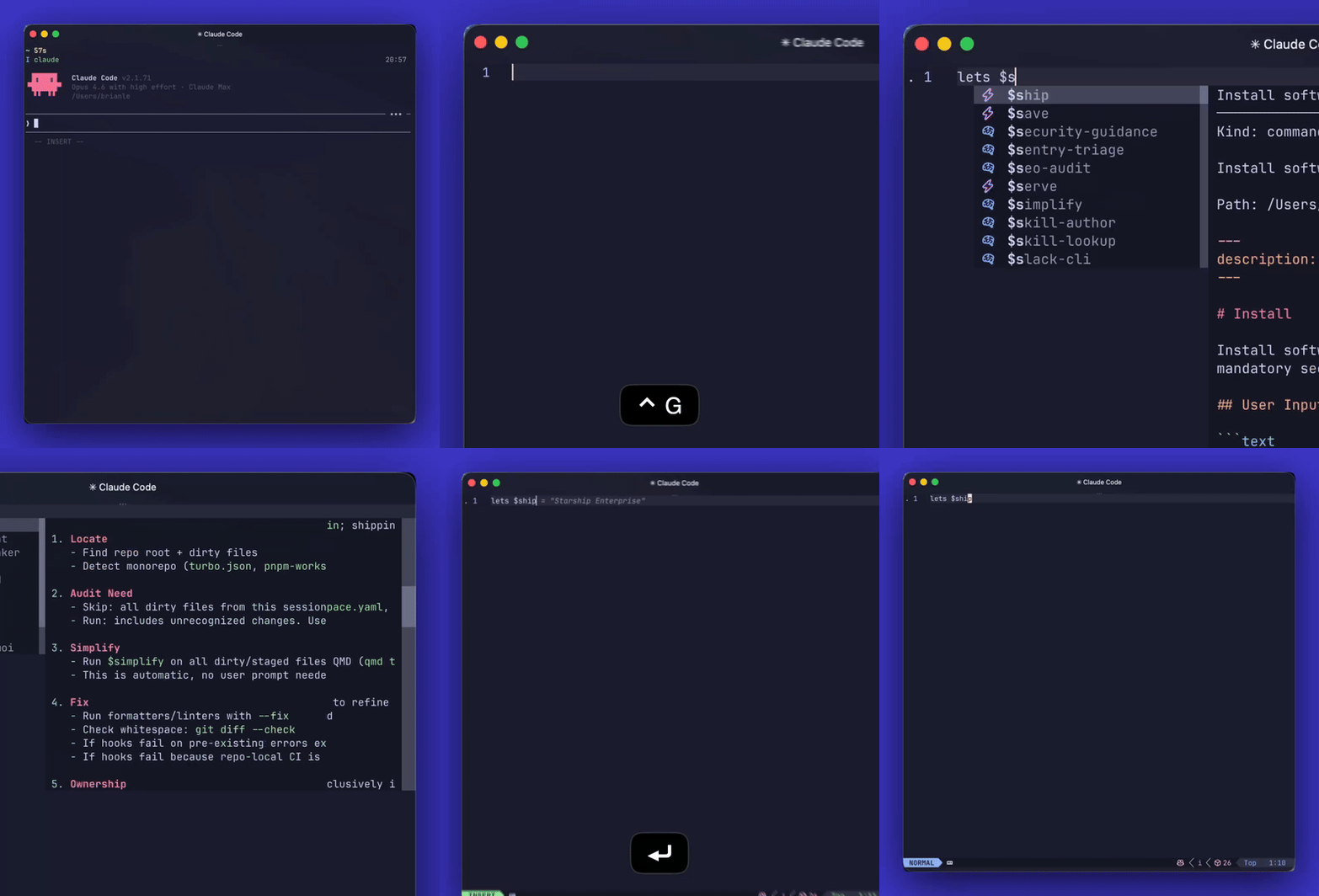
dotagent.nvim adds Claude Code and Codex-style /command, /skill, and/prompt completion to your Ctrl+G prompt editor in Neovim, configured to your
local agent directories.
Requirements
- Neovim 0.10+
saghen/blink.cmp
Release Status
The current recommended public tag is v0.4.0.
The plugin uses git tags for releases. There is no separate version file in the
repo.
Features
- Scans native agent roots for
commands/,skills/, and optionalprompts/ - Supports explicit
command_dirs,skill_dirs, andprompt_dirsoverrides - Provides a Blink source for
/command,/skill, and/promptcompletion - Uses distinct Dotagent menu icons by default:
⚡for commands,for
skills,for prompts - Auto-attaches only when the editor session is launched with
DOTAGENT_EDITOR_PROMPT=1 - Supports manual
:DotagentAttachand:DotagentDetach - Includes
:DotagentRefresh,:DotagentBrowse, and:DotagentHealth
Install
Lazy example:
{
  "0xble/dotagent.nvim",
  config = function()
    require("dotagent").setup()
  end,
}
By default dotagent.nvim looks for native Codex and Claude roots:
~/.agent/shared~/.agent/runtimes/codex~/.agent/runtimes/claude~/.claude
For each root it reads:
commands/*.mdskills/*/SKILL.mdprompts/*.md, only when theprompts/folder exists
Blink setup:
{
  "saghen/blink.cmp",
  opts = function(_, opts)
    opts.sources = opts.sources or {}
    opts.sources.default = function()
      local sources = { "lsp", "path", "snippets" }
      if require("dotagent").is_buffer_enabled(0) then
        table.insert(sources, 1, "dotagent")
      elseif vim.bo.filetype ~= ""
        and vim.bo.filetype ~= "markdown"
        and vim.bo.filetype ~= "text"
        and vim.bo.filetype ~= "gitcommit"
      then
        table.insert(sources, "buffer")
      end
      return sources
    end

    opts.sources.providers = opts.sources.providers or {}
    opts.sources.providers.dotagent =
      require("dotagent.completion.blink").provider()
  end,
}
Recommended Integration
The best integration is an external-editor flow where Claude Code or a Codex
launcher opens Neovim for prompt composition.
By default the plugin uses /, which is the more common command prefix in
editor and agent UIs.
Use one shared launcher for those flows:
#!/bin/sh
export DOTAGENT_EDITOR_PROMPT=1
exec nvim "$@"
Then point your agent surface at that launcher:
- Claude Code: configure its external editor, then use
Ctrl+G - Codex or an editor-backed wrapper like
ai: setEDITORto the same launcher
When Neovim starts with DOTAGENT_EDITOR_PROMPT=1, dotagent.nvim attaches
only to the initial prompt buffer. Additional buffers opened later in that
session stay unaffected.
Default Behavior
Without DOTAGENT_EDITOR_PROMPT=1, the plugin does not auto-attach in regular
buffers.
The fallback path is manual:
:DotagentAttach:DotagentDetach
That keeps slash completion out of normal code editing by default.
Commands
:DotagentAttach [bufnr]:DotagentDetach [bufnr]:DotagentRefresh:DotagentBrowse:DotagentHealth
Configuration
require("dotagent").setup({
icons = {
command = "⚡",
skill = "",
prompt = "",
},
activation = {
mode = "contextual",
env_var = "DOTAGENT_EDITOR_PROMPT",
},
agent_dirs = {
vim.fn.expand("~/.claude"),
},
sources = {
{
type = "items",
items = {
{
name = "ship",
kind = "command",
description = "Example Lua-defined item",
},
},
},
},
})
If your agent root has a custom prompt folder, dotagent.nvim reads it
automatically:
~/.claude/
  commands/
  skills/
  prompts/
Use per-type overrides when one kind lives elsewhere:
require("dotagent").setup({
  agent_dirs = {
    vim.fn.expand("~/.claude"),
  },
  prompt_dirs = {
    vim.fn.expand("~/custom-prompts"),
  },
})
Legacy sources path definitions still work. If you provide agent_dirs,command_dirs, skill_dirs, or prompt_dirs, those directory lists become the
authoritative path configuration for their type, while items sources still
merge normally.
icons is optional. Override either kind if you want a different
source-specific menu icon, or set a value to "" to fall back to Blink's normal
kind icon for
that item kind.
If you want a different prefix, override it explicitly.
My setup keeps $:
require("dotagent").setup({
  prefixes = { "$" },
  activation = {
    mode = "contextual",
    env_var = "DOTAGENT_EDITOR_PROMPT",
  },
  command_dirs = {
    vim.fn.expand("~/.claude/commands"),
  },
  skill_dirs = {
    vim.fn.expand("~/.claude/skills"),
  },
})
activation.mode values:
"contextual": attach only when launched with the editor prompt env marker"manual": never auto-attach"global": enable in every non-terminal buffer
Reviews (0)
Sign in to leave a review.
Leave a reviewNo results found