darc
Health Pass
- License — License: MIT
- Description — Repository has a description
- Active repo — Last push 0 days ago
- Community trust — 11 GitHub stars
Code Pass
- Code scan — Scanned 12 files during light audit, no dangerous patterns found
Permissions Pass
- Permissions — No dangerous permissions requested
No AI report is available for this listing yet.
grep-like session search tool for coding agents with Git-backed sharing (Codex, Claude Code)
Darc: grep-like memory search tool for coding agents




A CLI search tool over past agent work + Git-backed sharing
Darc does NOT summarize prior work, decide what matters, or choose which memories to inject.
It indexes prior agent sessions so your agents can do iterative search and recover past decisions on demand, backed by exact evidence.
Demo 1: Let your agent recover past bug fixes with Darc
https://github.com/user-attachments/assets/9dc89da1-45d5-4d9c-9169-5887f62976eb
Demo 2: Share agent session indexes with your team via GitHub
https://github.com/user-attachments/assets/09b91e62-6698-44c1-bf32-8ee6c674e5e0
How Darc Works
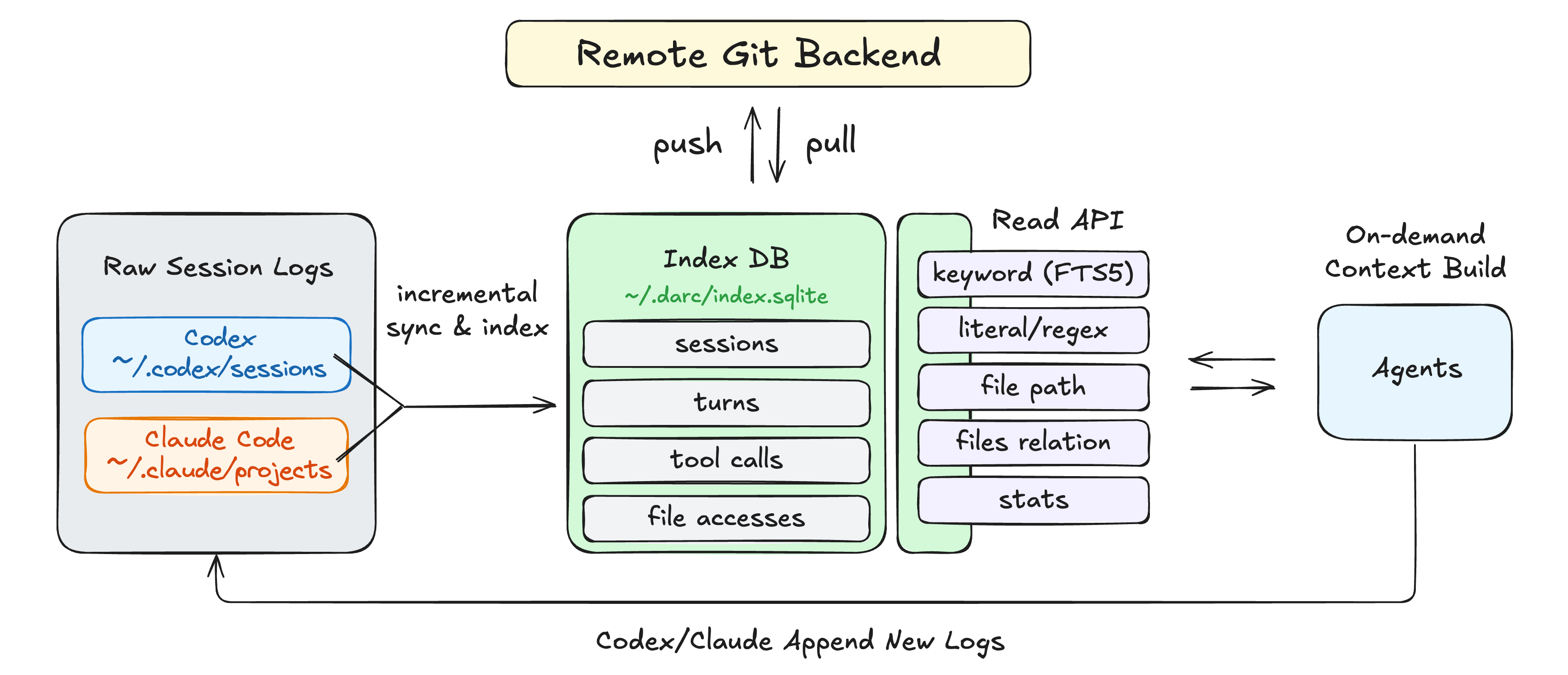
Darc indexes your agent sessions so you can grep them like code, then open exact evidence from prior work.
The indexed sessions can be shared with others via Git backend. See Team Sharing section.
Quickstart
# 1. Install (macOS/Linux)
curl -fsSL https://github.com/0xjunha/darc/releases/latest/download/darc-installer.sh | sh

# 2. Go to a project where you use Claude Code or Codex
cd /path/to/project

# 3. Register the project in your local Darc workspace
darc init

# 4. Sync and index existing agent sessions once
darc refresh

# 5. Teach your agents when to use Darc
#    Adds guidance to recover prior-session evidence when relevant and verify it against current files/tests.
darc agent-help --agents-md-line >> AGENTS.md
# or:
darc agent-help --agents-md-line >> CLAUDE.md

# 6. Test Darc manually
darc search "something you worked on before" --limit 5
Optional: keep the index fresh automatically on macOS.
darc refresh --auto
After that, future agents can use Darc to recover prior evidence before making changes.
A typical agent workflow:
- Check the active project with
darc statusordarc status --json. - Discover candidates with small
darc search,darc list, ordarc statsreads. - Skim a candidate session with
darc list turns <SESSION_ID> --view oneline. - Open the exact evidence with
darc show turn <SESSION_ID> <TURN_ORDINAL>. - Pivot through related files with
darc list files --co-touched-with <path>ordarc list sessions --touching <glob>.
Example: Search and Drill Down
Search prior agent work:
darc search "auth refresh bug" --since 30d --limit 3
Example output, trimmed:
{
  "schema": "darc.query.search.turns.v1",
  "data": {
    "hits": [
      {
        "provider": "codex",
        "session_id": "11111111-1111-4111-8111-111111111111",
        "turn_ordinal": 18,
        "snippet": "Investigated token refresh failure in src/auth/session.rs",
        "matched_paths": [
          "src/auth/session.rs",
          "tests/auth_refresh.rs"
        ]
      }
    ],
    "has_more": false
  }
}
Then drill into the exact evidence:
darc show turn 11111111 18 --step-limit 10
Or skim the surrounding session first:
darc list turns 11111111 --view oneline --limit 20
Team Sharing
Teams can share encrypted Darc session indexes with the Git backend of their choice.
Each team member selects which sessions to export;
Darc redacts the index projection, encrypts it for configured age recipients, and pushes only encrypted artifacts to a
Git branch. Darc does not publish your raw SQLite index or plaintext session archives.
Quick setup:
# Show or create your public recipient, then add a team member's age public key.
darc share key
darc share recipient add <AGE_PUBLIC_KEY>

# Choose what this project exports.
darc share include <SESSION_ID>
darc share include --all
darc share exclude <SESSION_ID>

# Publish and import the team index.
darc push <SHARE_BRANCH>
darc pull <SHARE_BRANCH>
Read commands stay local unless you ask for shared history:
darc search "migration decision" --shared
darc list sessions --scope all
darc show session <SESSION_ID> --shared
By default, darc push <SHARE_BRANCH> uses the active project's Git upstream or origin and writes to darc/<SHARE_BRANCH> branch.
To use a
separate index-only repository:
darc remote add <REMOTE_NAME> <REMOTE_URL>
darc push <SHARE_BRANCH> --remote <REMOTE_NAME>
darc pull <SHARE_BRANCH> --remote <REMOTE_NAME>
Example:
darc share key
darc share recipient add age1...
darc share include --all

# Publish encrypted session indexes to `darc/team` branch of `exmaple/darc-index` GitHub repo.
darc remote add team-index https://github.com/example/darc-index.git
darc push team --remote team-index
darc pull team --remote team-index
Notes:
- Configure Git authentication ahead of time; Darc uses the local
gitexecutable and disables interactive credential
prompts. - Encrypted share objects are stored as normal Git blobs by default. Set
DARC_SHARE_ENABLE_LFS=1for larger exports. - Author filters accept stable Darc share user ids. Display names and emails are convenience labels from each exporter's
local Git config, not authenticated identity.
Why Darc?
Coding agents often uncover useful context once, then lose it across sessions.
Darc lets you ask:
- "Did we already debug this
database is lockedfailure?" - "Why did we keep this compatibility fallback instead of deleting it?"
- "What alternatives did we reject before landing this implementation?"
- "Which exact turn explains this workaround in
src/auth/session.rs?" - "Which files usually changed together with
src/auth/session.rs?"
Instead of dumping raw transcript logs into a prompt, Darc gives agents small, structured, evidence-backed reads they
can chain safely.
Useful Prompts With Darc
The AGENTS.md / CLAUDE.md guidance teaches agents to use Darc when prior context may matter. You can also invoke
Darc explicitly in a prompt when you want an agent to investigate prior sessions.
Darc provides exact prior-session evidence; the agent synthesizes it and verifies current facts against the repository.
Example prompts:
Use Darc CLI to review the last 30 days of agent sessions. Group the work
into distinct workstreams, summarize what looks resolved or open, and cite
the key session/turn evidence.
Use Darc CLI to find important implementation decisions that are not
obvious from current code or docs. Explain the rationale and cite evidence.
Use Darc CLI to investigate repeated failures around <module-or-feature>.
Identify recurring patterns, fixes already tried, and risks that still
need verification.
For broad investigations, add this line to the end of the prompt:
In your answer, separate Darc evidence, current source/test verification, and remaining uncertainty.
Common Workflows
Search Prior Debugging
darc search "panic unwrap" --since 30d --limit 5
darc list turns <SESSION_ID> --view oneline --limit 20
darc show turn <SESSION_ID> <TURN_ORDINAL> --step-limit 10
Find Sessions That Touched a File
darc list sessions --touching "src/auth/session.rs" --limit 10
darc list turns <SESSION_ID> --view oneline --limit 20
Find Related Files
darc list files --co-touched-with src/auth/session.rs --limit 10
Search Exact Text
darc search \
  --mode literal \
  --query "database is locked" \
  --include-tool-output \
  --limit 5
Search Tool Output
darc search \
  --mode regex \
  --query "error\s+code" \
  --include-tool-output \
  --since 7d \
  --limit 5
Resolve a Quoted Session
darc resolve session <SESSION_PREFIX> --pick-one
darc show session <SESSION_ID> --turn-limit 5 --step-limit 10
Why Not Just rg the Raw Logs?
You can. For simple text search, raw rg is often enough.
Darc becomes useful when you need structured recovery, not just matching lines.
Raw rg over logs |
Darc |
|---|---|
| Follow-up context is ad hoc | Provides stable schema ids and evidence handles |
| You infer the surrounding context | Links the hit to the original turn, session, files, and metrics |
| Finds matching log text | Returns session_id and turn_ordinal |
| File pivots are manual | Queries sessions, files, co-touched paths, and related work |
| Project identity is implicit | Preserves registered project identity across checkout moves, worktrees, and renames |
| Returns raw log lines | Returns bounded, agent-safe JSON |
Darc is not trying to replace rg. It gives rg-like discovery over agent history plus the structured handles needed
to recover exact prior work and build context.
Darc Is Not Another Memory System
Darc does not summarize your work, decide what is important, or rewrite agent state.
Agent memory is useful, but it is selective by design. Summaries are lossy, and every memory layer has to decide what
is worth keeping.
Darc takes a different path: agents are already good at using tools, so Darc gives them a local search tool over prior
sessions. They can build context on demand from exact evidence instead of relying only on distilled memory.
Use Darc with:
AGENTS.mdorCLAUDE.mdfor explicit, versioned project instructions- Codex and Claude Code memory for preferences, corrections, workflows, and high-level context
- Darc for exact prior-session evidence: sessions, turns, tool-call evidence, files, and citations
The goal is not "remember everything forever." The goal is to let agents ask narrow questions, retrieve bounded
evidence, and avoid repeating old work.
Core Commands
| Need | Command |
|---|---|
| Register the current project | darc init |
| Sync and index sessions once | darc refresh |
| Keep sessions fresh automatically on macOS | darc refresh --auto |
| Check project state and freshness | darc status |
| Show agent-facing usage guidance | darc agent-help |
| Browse recent sessions | darc list sessions |
| Search indexed turns | darc search <query> |
| Skim turns in one session | darc list turns <SESSION_ID> --view oneline |
| Inspect exact turn evidence | darc show turn <SESSION_ID> <TURN_ORDINAL> |
| Inspect a bounded session bundle | darc show session <SESSION_ID> |
| Rank touched files | darc list files |
| Find sessions touching a path | darc list sessions --touching "src/**/*.rs" |
| Find files often touched together | darc list files --co-touched-with src/auth/session.rs |
| Resolve a partial UUID | darc resolve session <prefix> |
| Show project metrics | darc stats project |
| Show workspace metrics | darc stats workspace |
Run darc --help or darc help <command> for the current CLI surface.
Documentation
- Documentation index
- Query protocol: JSON envelopes, command contracts, search modes, payload semantics, and
error contracts. - Background refresh service: macOS auto-refresh service behavior and watch settings.
- Project rename and linking: keep history across checkout moves and repository renames.
- Upgrade and uninstall
Privacy and Local-First Behavior
Darc reads local agent rollouts and writes archive/query state under ~/.darc.
- Session archives and query indexes stay local.
- Indexed data is best-effort redacted before it is stored, including common secrets, credential-shaped values, local
home-directory prefixes, and bulky data blobs. - Raw SQLite index files are local cache artifacts, not sharing artifacts;
darc shareexports fresh encrypted,
redacted projections from the index instead of publishing the SQLite database. - Read commands query your local SQLite index.
- Optional upgrade checks contact GitHub only for release metadata and require explicit opt-in.
Current Limitations
- Darc currently supports Claude Code and Codex local session histories.
- macOS and Linux are supported.
darc refresh --autois macOS-only for now.- Linux users can run
darc refreshmanually or wire it into their own watcher. - Darc retrieves exact evidence; it does not summarize or rank durable decisions for you.
- File analytics are best-effort, derived from normalized tool calls and observed command text, not syscall-level
tracing.
Development
Darc is split into focused Rust crates:
crates/cli: command-line surface.darc-core: thin facade and orchestration layer.darc-sync: source discovery, sync planning, and archive copy execution.darc-store: SQLite schema, migrations, and derived-index analytics shared by indexing and query.darc-index: normalized archive ingestion and duplicate resolution.darc-query: read-only query, search, and stats over indexed data.darc-rollout: provider transcript models and parsers.darc-paths,darc-rollout-audit, anddarc-test-utils: shared support, maintainer audits, and tests.
Useful checks:
cargo +nightly fmt
cargo +stable clippy --locked --workspace --all-targets --all-features -- -D warnings -W clippy::all
cargo +stable test --locked --workspace
cargo +stable check --locked --workspace --all-targets --all-features --profile dist
Reviews (0)
Sign in to leave a review.
Leave a reviewNo results found