hercules-mcp
Health Warn
- License — License: MIT
- Description — Repository has a description
- Active repo — Last push 0 days ago
- Low visibility — Only 5 GitHub stars
Code Pass
- Code scan — Scanned 12 files during light audit, no dangerous patterns found
Permissions Pass
- Permissions — No dangerous permissions requested
No AI report is available for this listing yet.
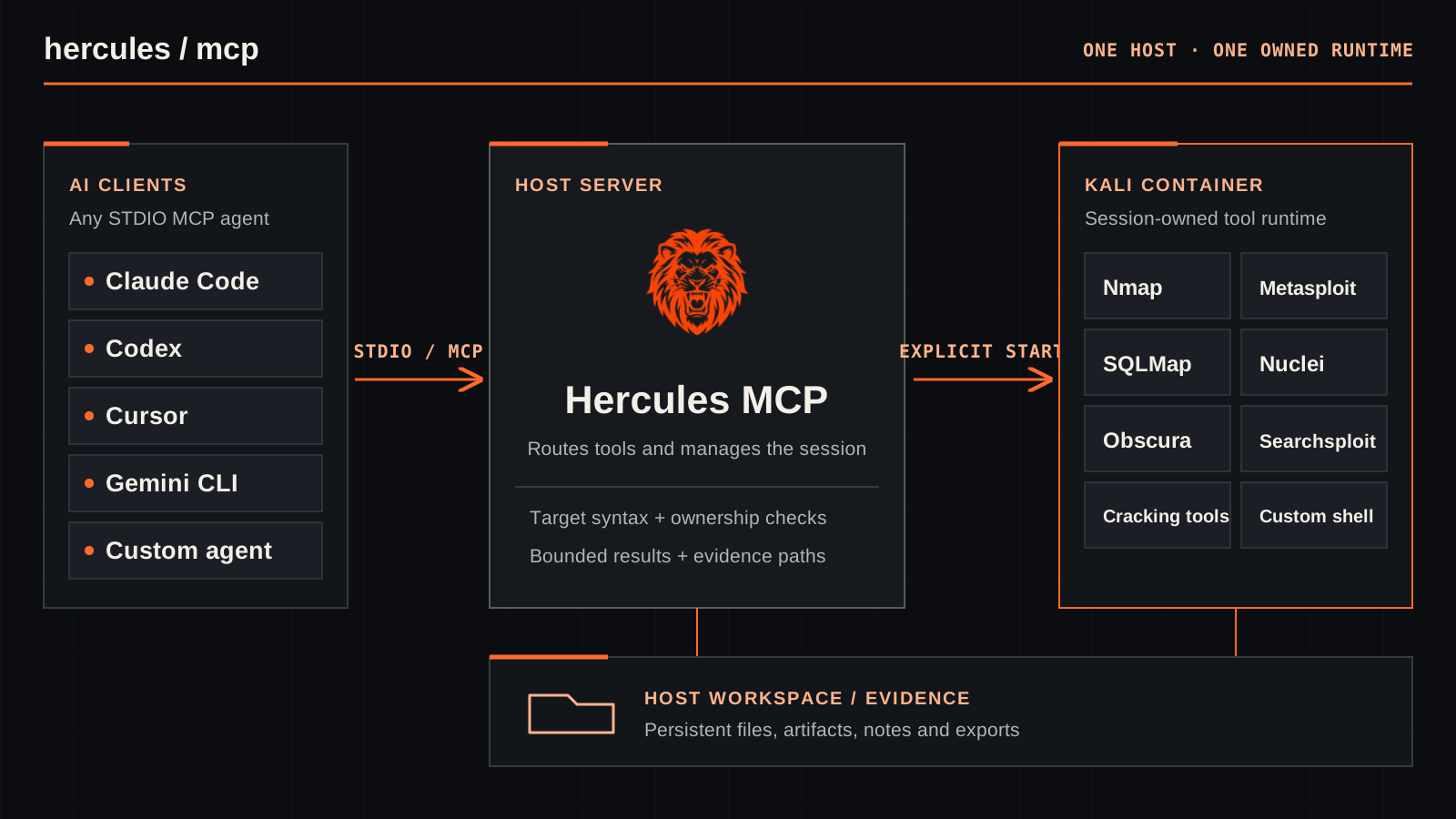
Hercules MCP is a Model Context Protocol server that gives AI Agents, the ability to perform professional penetration testing. It orchestrates a fully containerized Kali Linux environment, exposing industry-standard offensive security tools as structured MCP tools that agents can reason about and drive autonomously.

Hercules MCP
A Kali workspace for your AI agent.
Explore the website · Install or update · Detailed guide
Hercules connects terminal-capable AI agents to structured security tools and an explicitly started, session-owned Kali container. The host workspace retains evidence after the container stops. Tools return bounded results and report when output or evidence is incomplete.
Authorized use only. Use Hercules only on systems you are permitted to test. A full Kali image and privileged shell are powerful; Docker does not supply target authorization.
Install with your AI agent
Paste this prompt into the terminal-capable agent you want to configure:
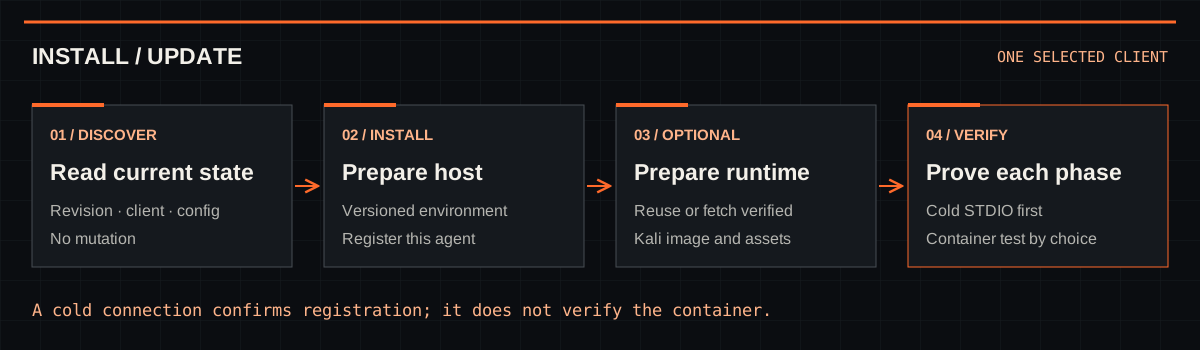
Install or update Hercules MCP via https://github.com/0xMihirK/hercules-mcp/blob/main/install.md. Configure only this agent. Run host setup without starting a container; offer prebuilt image (recommended) or local build. Prepare runtime after my choice. Report results.
The setup guide covers supported clients, Windows/macOS/Linux bootstrap commands, repair, updates, recovery, and Claude Code auto mode. Host installation does not start Docker. The agent asks you to choose a pinned prebuilt image (recommended) or a local build before runtime preparation; container verification is a separate step. Existing client settings, secrets, workspaces, and evidence are preserved during an update; an incompatible replacement stays pending while the working version remains active.
From request to retained evidence
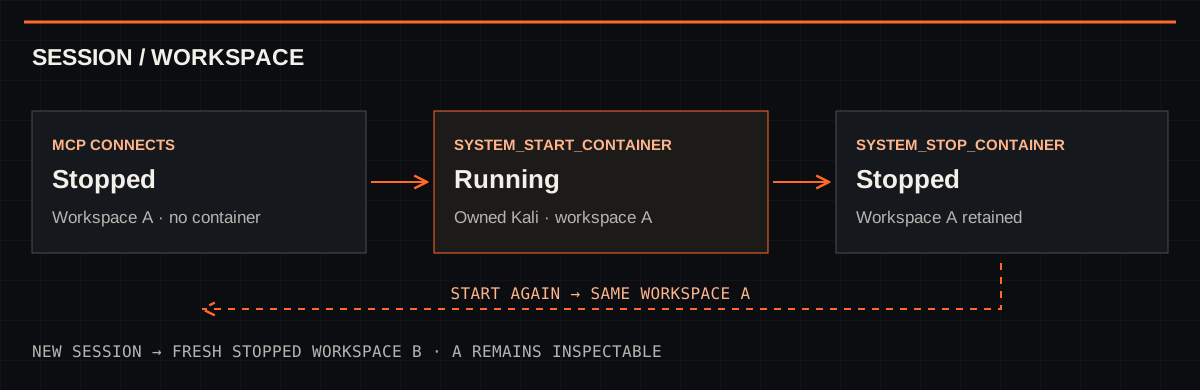
Connecting an MCP client exposes tools and resources without creating a container. Call system_start_container before the first Docker-backed operation. Repeated starts reuse the same owned container; system_stop_container stops it while retaining its workspace. system_start_new_session creates a fresh, stopped workspace. workspace_inspect can read current or retained owned evidence without Docker.
| What the agent needs | Where to begin |
|---|---|
| Network and service discovery | recon_dns, nmap_scan, network_curl |
| Web and browser testing | fuzz_dirs, nuclei_run, browser_open, browser_snapshot |
| Exploit and version research | searchsploit, optional Metasploit, and current vendor/CVE sources through the agent’s own search |
| Files, binary triage, and custom tools | workspace_inspect, Binwalk, shell_exec |
| Evidence and cleanup | Workspace read/write tools, jobs, system_stop_container |
The full profile exposes 47 tools, 5 resources, and 2 lookup templates. Disabling Metasploit exposes 42 tools; core-only exposes 12. One image contains the tool bundles; capability choices change MCP visibility, not installed packages. The plugin also ships nine focused skills, including operator guidance, NSE and Nuclei authoring, and domain references.
Important limits
- Hercules does not enforce a target allowlist. Structured tools check target syntax, and the host-network browser has no SSRF boundary. Keep every operation within your authorized scope.
- Obscura does not enforce CSP and does not support native browser downloads. Use HTTP or shell workflows for authorized downloads, then verify the saved file. Browser behavior is not proof of Chromium-equivalent behavior.
shell_execand advanced browser commands can bypass structured-tool safeguards. Container-layer tool installs are temporary; keep scripts, virtual environments, and dependency notes in the workspace.- Output can be filtered or paged. Preserve complete diagnostics and check
output_complete,evidence_complete, and cleanup confirmation before drawing conclusions.
For configuration, security details, workspace migration, troubleshooting, and development checks, use the detailed guide. For the exact setup workflow, use install.md.
License
MIT. Built with Kali Linux, FastMCP, Metasploit, ProjectDiscovery tools, agent-browser, and Obscura; see the acknowledgements.
Support
If Hercules has helped your work, buy me a beer to support its continued development.
Reviews (0)
Sign in to leave a review.
Leave a reviewNo results found