qemu-mcp
Health Warn
- License — License: MIT
- Description — Repository has a description
- Active repo — Last push 0 days ago
- Low visibility — Only 5 GitHub stars
Code Pass
- Code scan — Scanned 12 files during light audit, no dangerous patterns found
Permissions Pass
- Permissions — No dangerous permissions requested
No AI report is available for this listing yet.
MCP server that lets AI agents boot and drive QEMU VMs - keystrokes, screenshots, serial console. Built for OS developers: no SSH or guest agent needed, works on a bare kernel.
qemu-mcp
Let your AI agent boot an operating system and drive it.
qemu-mcp is an MCP server that gives AI agents (Claude Code, or any MCP client) hands on a QEMU virtual machine: boot an ISO or a raw kernel, press keys, take screenshots, read the serial console, and wait for boot markers — all headless, with zero cooperation from the guest. No SSH, no guest agent, no network. If it boots in QEMU, an agent can drive it.
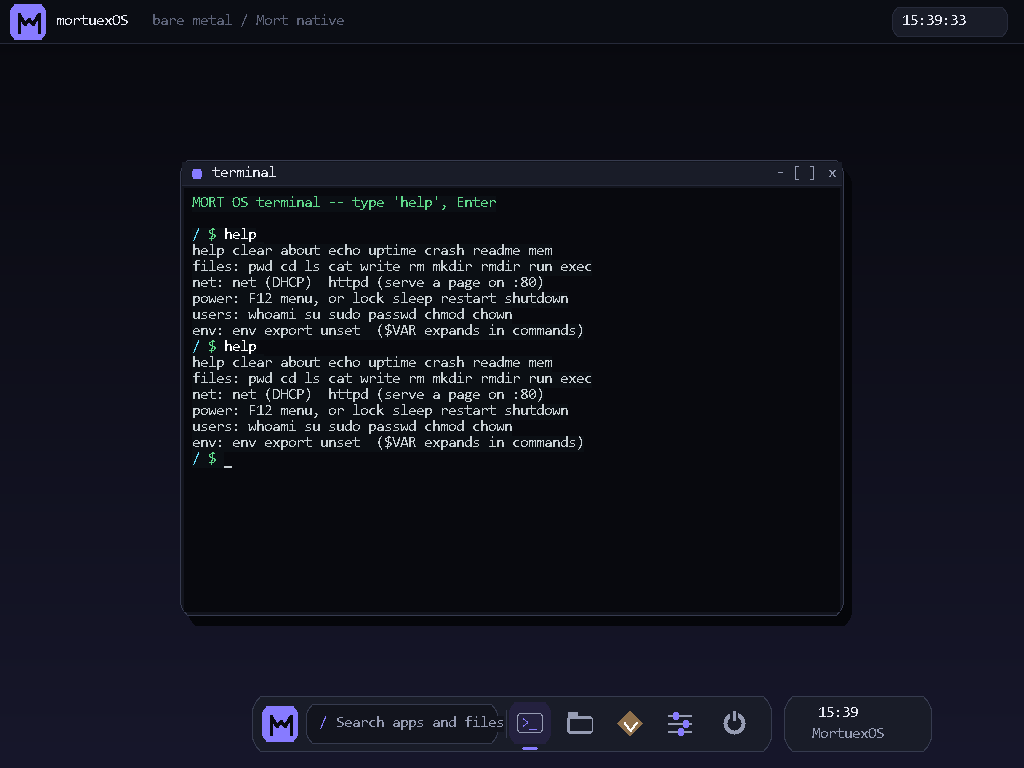
This screenshot was taken by an AI agent: it booted MORT OS (a hobby kernel with no SSH, no agent, no TCP required) headless, pressed Esc, typed help, and captured the framebuffer — four tool calls.
Who this is for
OS developers and hobby kernel hackers. The osdev inner loop is: edit kernel → build → boot in QEMU → look at the screen → type something → read serial → repeat. An AI agent can already do the edit and build steps; qemu-mcp gives it the rest of the loop, so it can boot-test its own kernel changes and actually see the triple fault.
It's equally useful for anyone who needs an agent to poke at a VM below the OS level: bootloaders, installers, BIOS/UEFI menus, recovery consoles, firmware.
Why another QEMU MCP server?
The existing ones assume a full, running guest OS — they exec commands over SSH or a guest agent. That's useless when your guest is a 40 KB kernel you wrote yourself, an installer ISO, or anything pre-boot. qemu-mcp is built for the boot-test loop instead:
- Serial console capture — continuously logged to a file, readable at any time (
qemu_serial), and writable too (qemu_serial_send) qemu_wait_serial— block until"kernel ready"(or"login:", or your panic string) appears, the reliable way to sequence an automated boot test-kernelboot — boot a multiboot/bzImage kernel directly, withappend/initrd- Screenshots of the VGA framebuffer — works headless, shows exactly what a monitor would
- Raw QMP escape hatch — the full QEMU Machine Protocol when you need
memsave,system_reset,device_add…
Tools
| Tool | What it does |
|---|---|
qemu_boot |
Boot a VM headless from iso, kernel (+append/initrd), and/or disk. Any arch QEMU supports (x86_64, i386, aarch64, riscv64…), an optional machine (QEMU -M, required on some archs), an optional smp (QEMU -smp, number of virtual CPUs, for testing SMP-aware guest code) plus optional smp_cores/smp_threads/smp_sockets/smp_maxcpus (QEMU -smp topology qualifiers cores=/threads=/sockets=/maxcpus= combined onto the same flag, for shaping a guest's CPU topology rather than just its total count), an optional accel (QEMU -accel, e.g. "kvm:tcg"/"hvf:tcg"/"whpx:tcg", to opt into hardware acceleration), an optional cpu (QEMU -cpu, e.g. "qemu64,+avx"/"max"/"host", to select or customize the emulated CPU model for testing a specific feature set), an optional hostfwd (QEMU's hostfwd rule, e.g. "tcp::2222-:22", to reach a guest service like SSH from the host without needing QEMU's own NIC/chipset flags), arbitrary extra QEMU args (networking, devices…), and overridable qmp_connect_timeout_s/qmp_read_timeout_s for slow hosts or long-running QMP commands |
qemu_version |
Report the installed qemu-system-<arch> --version output, without booting a VM |
qemu_screenshot |
PNG of the guest's display, straight from the framebuffer |
qemu_type |
Type text as keyboard input (\n = Enter, shifted symbols handled, tunable keystroke delay) |
qemu_key |
Press a key or chord: enter, esc, f12, ctrl-alt-f2… |
qemu_mouse |
Move the absolute pointer (fractions of screen width/height) and optionally click left/right/middle, scroll with wheel-up/wheel-down/wheel-left/wheel-right, or press a 5-button mouse's side/extra buttons |
qemu_snapshot_save |
Save a full RAM+device snapshot under a tag (needs a qcow2 disk). Reports failure if QEMU's savevm rejects it (e.g. a raw disk) instead of claiming success |
qemu_snapshot_load |
Restore a VM to a previously saved snapshot tag. Reports failure if QEMU's loadvm rejects it (e.g. an unknown tag) instead of claiming success |
qemu_snapshot_delete |
Delete a previously saved snapshot tag, freeing its space in the qcow2 disk. Reports failure if QEMU's delvm rejects it (e.g. an unknown tag) instead of claiming success |
qemu_snapshot_list |
List snapshot tags saved on the VM's qcow2 disk (raw info snapshots output), so you can see what's available before loading or deleting one |
qemu_serial |
Tail the serial console (COM1) output — works after the VM has exited too, to see what it printed right before dying |
qemu_serial_send |
Write text to the serial console (COM1) |
qemu_wait_serial |
Block until given text appears on serial, or timeout. Each wait only searches output after the previous match, so waiting for a prompt after a command finds the new one (from_start=True searches the whole log) |
qemu_wait_screen |
Block until the display stops changing (for VGA-only guests with no serial output), or timeout. A blinking text cursor counts as settled (max_changed_pixels, default 64) |
qemu_list |
All managed VMs with state, arch, machine, hostfwd, pid, uptime |
qemu_stop |
Graceful ACPI powerdown, or force=true to kill. graceful_timeout_s/kill_timeout_s override the default 10s/3s waits |
qemu_qmp |
Run any raw QMP command on the VM |
Multiple named VMs can run at once.
Every tool declares all four MCP behaviour hints, so your client knows which calls to
confirm with you. Only the waiting and reading tools (qemu_screenshot, qemu_serial,qemu_wait_serial, qemu_wait_screen, qemu_snapshot_list, qemu_version) are
read-only. qemu_boot and qemu_list are marked destructive because they clean up VMs
that exited on their own, deleting their serial logs; read a crashed guest's output withqemu_serial first. qemu_boot and qemu_qmp are open-world: extra_args and raw QMP
can reach anything QEMU can.
Install
Requirements: Python 3.10+, and QEMU on your PATH (on Windows, C:\Program Files\qemu is found automatically, or set QEMU_DIR).
pip install git+https://github.com/0xmortuex/qemu-mcp
Claude Code:
claude mcp add qemu -- qemu-mcp
Any other MCP client (stdio transport):
{
  "mcpServers": {
    "qemu": {
      "command": "qemu-mcp"
    }
  }
}
Or without installing, via uv: claude mcp add qemu -- uvx --from git+https://github.com/0xmortuex/qemu-mcp qemu-mcp
Example session
you: boot build/os.iso and check the shell works
agent:
qemu_boot(name="test", iso="build/os.iso", arch="i386")→ bootedqemu_wait_serial(name="test", text="boot ok")→ FOUNDqemu_type(name="test", text="help\n")qemu_screenshot(name="test")→ sees the help output renderedqemu_stop(name="test", force=true)
"Your ISO boots, the shell responds tohelp, and the new command is listed. Screenshot attached."
A typical kernel test the agent can run by itself:
qemu_boot(name="k", kernel="build/kernel.elf", arch="i386",
          extra_args="-device rtl8139,netdev=n0 -netdev user,id=n0")
qemu_wait_serial(name="k", text="MORTNET READY", timeout_s=20)
qemu_serial_send(name="k", text="net\n")  # guest has no keyboard driver, only a serial shell
qemu_serial(name="k")          # did DHCP bind?
qemu_screenshot(name="k")      # what does the console show?
Non-x86 archs
x86_64 and i386 boot with no machine argument. Other archs have no
default machine in QEMU and need -M set explicitly, or they'll fail to
boot:
qemu_boot(name="a", kernel="build/kernel-aarch64.elf", arch="aarch64", machine="virt")
qemu_boot(name="r", kernel="build/kernel-riscv64.elf", arch="riscv64", machine="virt")
Check qemu-system-<arch> -M help for the full list of machines an arch supports.
virt has no default display device — unlike the PC-family boards x86_64/i386 boot with, it doesn't wire up VGA on its own. qemu_screenshot/qemu_wait_screen against a virt VM will see an empty/black framebuffer (or
a QMP error, depending on QEMU version) unless the guest itself sets one up,
which most bare-metal aarch64/riscv64 kernels don't. Add a display device
explicitly if you need screenshots:
qemu_boot(name="a", kernel="build/kernel-aarch64.elf", arch="aarch64",
          machine="virt", extra_args="-device virtio-gpu-pci")
(This is documented QEMU virt-board behavior, not verified against a real
boot in this environment — no QEMU available here.)
Hardware acceleration
qemu_boot defaults to TCG (QEMU's software emulator) with no accel given -
correct on any host, but a real slowdown for anything beyond a trivial kernel.
Opt into your host's accelerator with accel, falling back to TCG if it's
unavailable so the boot doesn't hard-fail on a host without it:
qemu_boot(name="fast", kernel="build/kernel.elf", accel="kvm:tcg")   # Linux
qemu_boot(name="fast", kernel="build/kernel.elf", accel="hvf:tcg")   # macOS
qemu_boot(name="fast", kernel="build/kernel.elf", accel="whpx:tcg")  # Windows
If the requested accelerator genuinely isn't usable on the host (no /dev/kvm
permission, virtualization disabled in firmware, etc.) QEMU itself reports why
QEMU exited, and qemu_boot surfaces that in the error it raises.
CPU model
qemu_boot defaults to QEMU's own default CPU model for the arch/machine.
Pass cpu (QEMU -cpu) to test guest code against a specific model or
feature set instead:
qemu_boot(name="k", kernel="build/kernel.elf", cpu="qemu64,+avx")  # base model + one extra feature
qemu_boot(name="k", kernel="build/kernel.elf", cpu="max")          # every feature QEMU/TCG can emulate
qemu_boot(name="k", kernel="build/kernel.elf", accel="kvm", cpu="host")  # pass the host CPU through under KVM
Check qemu-system-<arch> -cpu help for the full list of models/features an
arch supports.
CPU topology
smp alone sets a flat vCPU count. For guest code that cares about the
socket/core/thread shape (ACPI MADT entries, CPUID topology leaves,
per-socket vs. per-core scheduling), pass smp_cores/smp_threads/smp_sockets/smp_maxcpus too - they're combined onto the same -smp flag:
qemu_boot(name="k", kernel="build/kernel.elf",
          smp=8, smp_cores=4, smp_threads=2, smp_sockets=1)
# -> -smp 8,cores=4,threads=2,sockets=1
smp itself is optional when the topology params are given - QEMU can infer
the total CPU count from cores/threads/sockets.
Host port forwarding
To reach a guest service (SSH, a web server under test) from the host without
needing QEMU's NIC/chipset flags, pass hostfwd (QEMU's hostfwd rule):
qemu_boot(name="k", disk="build/linux.qcow2", hostfwd="tcp::2222-:22")
# host:2222 -> guest:22, e.g. ssh -p 2222 user@localhost
This adds -netdev user,id=net0,hostfwd=... and -device e1000,netdev=net0
for you - the guest needs its own e1000 driver, which most general-purpose
OSes (Linux included) already have built in. For a bare-metal kernel with its
own NIC driver (like the rtl8139 example above), use extra_args instead -hostfwd is for forwarding a port to a guest that already has working
networking, not for picking which NIC a from-scratch kernel talks to.
Debugging the kernel
qemu-mcp lets an agent see a crash. To find out why it happened, pair it with
gdbstub-mcp. Boot with QEMU's gdbstub on
and an interrupt log:
qemu_boot(name="k", kernel="build/kernel.elf",
          extra_args="-s -S -d int,cpu_reset -D int.log -no-reboot")
Then the agent can debug_connect with the kernel ELF, set breakpoints on symbols
or file.c:line, read registers and memory, and get backtraces. If the VM triple
faults, debug_explain_fault turns int.log into the exception chain and its root
cause. No gdb binary is needed.
Tests

Unit tests for the character/key-name -> QMP qcode translation in keys.py,
the screen-fraction -> QMP pointer-event translation in mouse.py, the
serial chardev args and reconnect logic in serial.py, the framebuffer
stability tracker in screen.py, the snapshot tag validation and HMP
command-line building in snapshot.py, the QMP client's error handling inqmp.py, the missing-binary error path, the __version__/pyproject.toml
version-drift guard in test_version.py, the pinned tool behaviour hints
(readOnlyHint/destructiveHint/idempotentHint/openWorldHint) intest_tool_hints.py, and an MCP stdio handshake smoke test all need no QEMU
install - this is what CI runs on every push:
pip install -e ".[test]"
ruff check src tests
mypy --strict src
pytest tests/test_keys.py tests/test_mouse.py tests/test_screen.py tests/test_snapshot.py tests/test_serial.py tests/test_qmp.py tests/test_vm.py tests/test_stdio_handshake.py tests/test_tool_hints.py tests/test_version.py
There's also an end-to-end test that boots a real ISO and exercises every tool:
QEMU_MCP_TEST_ISO=path/to/anything-bootable.iso python tests/smoke_test.py
qemu_snapshot_save/qemu_snapshot_load need a qcow2 disk rather than an
ISO, so they're only exercised if you also set QEMU_MCP_TEST_QCOW2 to a
qcow2 disk image (booted as a second VM alongside the ISO one).
Notes
- VMs run headless (
-display none); screenshots still work because QEMU keeps rendering the VGA framebuffer. - Serial output requires the guest to write to COM1 (most hobby kernels and all Linux
console=ttyS0setups do). Guests that only draw to VGA are still fully drivable via screenshots + keys. qemu_stoptries ACPI powerdown first; hobby kernels usually ignore it and get killed after a grace period — useforce=trueto skip the wait, or raisegraceful_timeout_s(default 10s) for a guest that legitimately needs longer to shut down cleanly.qemu_stopwaits briefly (up to 5s, best-effort) for any in-flightqemu_wait_serial/qemu_wait_screen/qemu_screenshot/qemu_serial_send/qemu_qmpcall against the same VM to finish before closing its QMP/serial connections and removing its temp directory, so a call racing a concurrent stop sees a clean result instead of an error from a handle closed out from under it.- This server launches QEMU processes on your machine with files you point it at.
extra_argsis passed to QEMU verbatim — same trust level as running QEMU yourself.
Changelog
See CHANGELOG.md.
Contributing
See CONTRIBUTING.md for the exact local setup and checks
CI runs.
License
MIT
Reviews (0)
Sign in to leave a review.
Leave a reviewNo results found