tabby
Health Warn
- License — License: MIT
- Description — Repository has a description
- Active repo — Last push 0 days ago
- Low visibility — Only 5 GitHub stars
Code Fail
- process.env — Environment variable access in .github/workflows/release.yml
- fs module — File system access in .github/workflows/release.yml
- crypto private key — Private key handling in .github/workflows/release.yml
- exec() — Shell command execution in bin/tabby.js
- process.env — Environment variable access in bin/tabby.js
- rm -rf — Recursive force deletion command in install.sh
- fs module — File system access in install.sh
Permissions Pass
- Permissions — No dangerous permissions requested
No AI report is available for this listing yet.
Every Claude Code tab, at a glance, and Claude keeps working with the lid closed. AI tab names, calm colors and live status for each session; a macOS island (or menu bar) with Focus mode, tiling, history and stale-process cleanup. Install by asking Claude.

tabby
Every Claude Code tab, at a glance.
An AI-written name, a calm color and a live status for every Claude Code session,
and a Mac island that shows them all. Free, local and open source.





Website · Install · Commands · Island · Troubleshooting · Contributing
🟢 ✳ Stripe Webhook Retries 🔵 ◐ Dark Mode Settings 🟣 🔔 Flaky Auth Tests 🟠 ✳ Release Notes
With five Claude sessions running, every tab looks the same. tabby gives each one:
- a name that Claude Haiku writes from what you're doing, in about 2 s;
- a color, with a background tinted to match, different from your other open sessions;
- a live status in the title:
◐working (animated),✳your turn,🔔needs you (blinking); - one-line control with
/tab, launch flags and keyboard shortcuts.
tabby is in beta: it works day to day, and it still changes quickly. Tell us what breaks.
On a Mac, Tabby Island lists every session at the top of your screen (or, if you prefer, from the menu bar). It can also keep your Mac running with the lid closed until every session is done (Awake), hide what Claude writes in the windows you're not using (Focus mode), tile sessions across the screens you choose, and start a new session in a recent folder with one shortcut.
Install
Paste this into Claude Code and let Claude do it:
Install tabby for me: run `curl -fsSL https://claude-tabby.vercel.app/install.md` and follow it.
Claude shows you the terms (short version: local, free, no telemetry), installs tabby, checks every piece with tabby doctor and walks you through the Mac permissions. It handles what gets in the way on its own: no Node.js, no Xcode, no git, or a terminal other than Terminal.app.
Or in a terminal:
curl -fsSL https://claude-tabby.vercel.app/install | bash
Or with Claude Code's plugin commands:
/plugin marketplace add 0xNtive/tabby
/plugin install tabby@tabby
/reload-plugins
/tabby:setup
All three need Claude Code on macOS or Linux, and take about 15 seconds. Every Claude session is on from then on, including the ones already open: they get their color right away, and their name, status and /tab with their next prompt, without a restart or /reload-plugins.
tabby uninstall)
| What | Why |
|---|---|
CLAUDE_CODE_DISABLE_TERMINAL_TITLE=1 in settings.json (backed up first) |
tabby draws the title (color marker, animated status) instead of Claude |
a statusLine, only if you don't have one |
name, color and context used inside Claude |
~/.claude/commands/tab.md |
the short /tab; plugin commands are namespaced as /tabby:tab |
a 3-line block in ~/.zshrc / ~/.bashrc |
the claude --tab --color --theme flags and the tabby command |
| Terminal.app: each Claude tab uses a " · tabby" copy of its profile while it runs | windows and tabs read 🔵 ◐ Dark Mode Settings, not api — 🔵 ◐ Dark Mode Settings — caffeinate ◂ claude --dangerously-skip-permissions — 80×24 |
tabby's hooks in settings.json, only while sessions that were open at setup are still running |
Claude Code loads a plugin's hooks when a session starts; these reach the sessions that were already open, do nothing in any other, and are taken out when the last of them ends |
~/.claude/tabby/bin/ |
a launcher that runs the newest installed copy with a Node.js it finds wherever it lives |
~/.claude/tabby/node/, only if you have no Node.js 18+ |
a private Node.js 22 (checksum-verified) that only tabby uses |
~/Applications/Tabby Island.app and a login item (macOS) |
the island, downloaded ready-made from the latest release and installed only if its signature checks out |
Other ways: from a checkout, git clone https://github.com/0xNtive/tabby && node tabby/bin/tabby.js install. For one session only, claude --plugin-dir ./tabby.
Something not working? Ask Claude to "fix tabby", or run tabby doctor.
Updating
When a new version is out, the island shows an Update button, and a new Claude session mentions it once a day. Update from wherever you are:
- In the island: click Update at the top (or Update to tabby x.y.z… in its menu-bar menu, or Settings › General › Updates). The island restarts on the new version.
- In Claude:
/tab update(it runs in the background). - In a terminal:
tabby update, ortabby update --checkto only look.
An update gets the plugin, refreshes the parts of setup you have (nothing you turned off comes back) and Tabby Island. Afterwards, type /reload-plugins in the sessions that were already open.
Use it
In Claude. /tab is answered by a hook, so it's instant and never costs tokens.
/tab Auth refactor           rename (pauses AI naming)     /tab auto       back to AI names
/tab color teal              red orange yellow green teal blue purple pink · next · #hex
/tab theme nord              this tab                      /tab theme nord all   every tab
/tab ls                      every session: status, context, summary
/tab note waiting on design  a note shown in the island
/tab tile active             tile the sessions that are working or need you
/tab tile colors off         tile without recoloring the windows (on brings it back)
/tab focus-mode on           cover the Terminal windows you're not in while Claude works
/tab focus-mode idle off     show the whole reply when Claude is done, not just its gist
/tab watermark off           hide the watermarks (on brings them back)
/tab update                  get the newest tabby, in the background
/tab procs                   dev servers and leftovers, and what they use   /tab procs stop   stop the stale ones
/tab history                 sessions you ran before   /tab resume 3   back to one
/tab awake 4h                keep the Mac running with the lid closed (done: until every session is done)
/tab reset · /tab off · /tab on · /tab themes · /tab colors
At launch:
claude --tab "Auth refactor" --color teal --theme nord
claude -n "Auth refactor"                       # Claude's own flag works too; so does /rename
tabby new api -n "API" --dangerous              # a new window in your recent "api" folder, permissions skipped
Anywhere:
tabby ls                  # every running session: name, status, context %, summary
tabby next                # jump to the next session that needs you
tabby focus 2             # jump to session 2
tabby tile 4              # 2, 3, 4, 6 or 8 session windows, on the screens you chose
tabby tile --active       # only the sessions working or waiting on you (--only 1,3,auth to pick)
tabby tile --dry-run      # where each window would go and its new color; moves nothing
tabby tile screens        # list your displays; tabby tile screens 2 puts sessions on display 2
tabby new --list          # recent and frequent folders, best first
tabby history             # the sessions you ran before; tabby resume 3 (or a name) opens one where it ended
tabby procs               # dev servers, leftovers and heavy processes your terminals started
tabby procs stop          # stop the stale ones (or: tabby procs stop 4821, or all)
tabby awake 4h            # keep the Mac running with the lid closed (done, +1h, off; macOS)
tabby themes              # preview all 57 themes
tabby doctor              # check every part of the install, with the fix for each
tabby update              # the newest tabby: plugin, setup and island (--check to only look)
Tabby Island
A Dynamic-Island-style overlay at the top center of your Mac. It idles under 1% CPU.
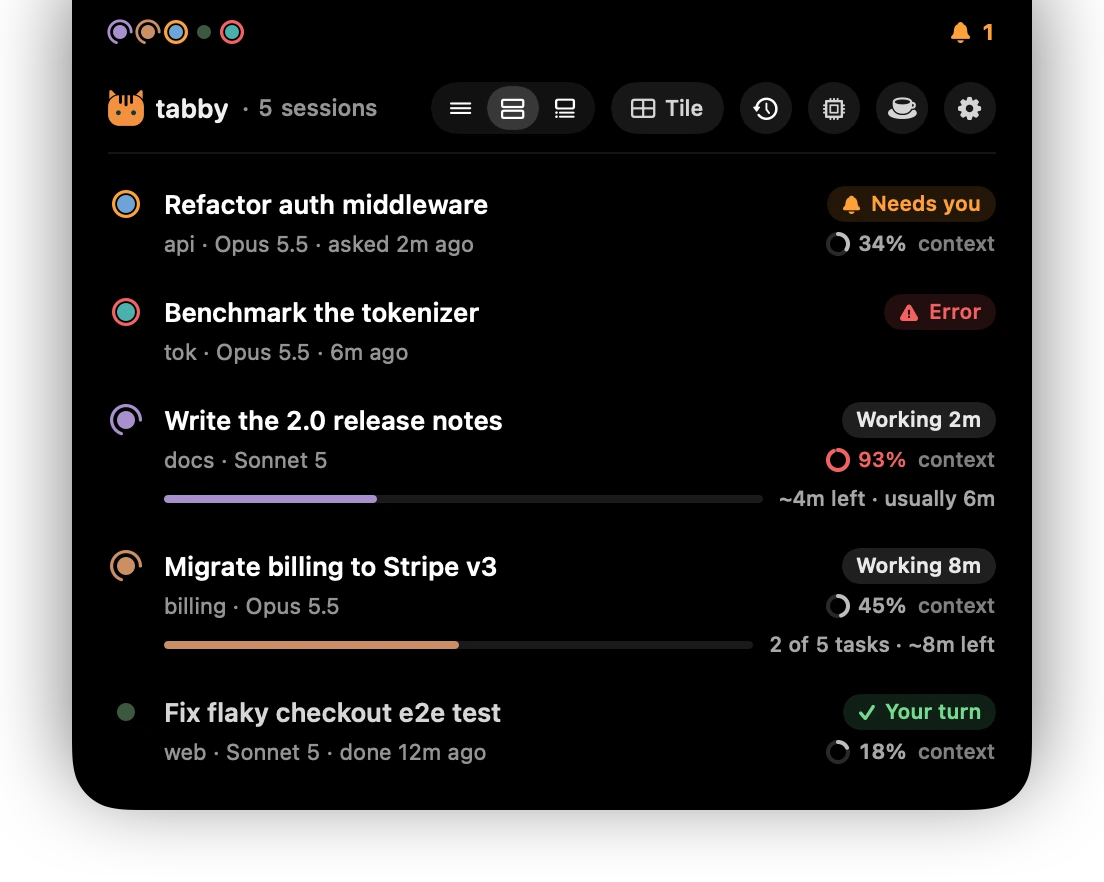
- Collapsed: one dot per session. A working session's dot spins inside a ring of its color, one that needs you rings amber, and one waiting for your next prompt rests, dimmed. When a session finishes or needs you, the island says which (its name, never Claude's stand-in like "api-4f") and grows a second line with the project and what Claude did: "web · The checkout spec now waits for the cart request: 20 runs passed." Click it to go there. It also speaks up when a session's context passes 80% and again at 95%, once each.
- Open (hover, or ⌃⌥Space): every session's name and status ("Working 3m", "Your turn", "Needs you"), context used, and for a working session, an estimate of how far along it is. That estimate is "2 of 5 tasks · ~3m left" from Claude's task list, or "~2m left · usually 6m" from how long that session's turns take.
- Hover a session for the full picture: what it's doing or waiting for, and what to do about it; its current task, summary, your last prompt, tokens and cost, folder and terminal. Open Tab jumps there. End Session… stops Claude and closes its tab, but only after you confirm;
claude --resumebrings the conversation back. - Modes: Minimal (one line per session), Standard, and Detailed (summary, last prompt, tokens and cost for every session).
- History (the clock): the sessions you ran in the last 30 days, newest first, each with its project and what it was about. Click one and it opens in a new window, right where it ended (
claude --resume, in its folder, with its name and color, and with permissions skipped only if it ran that way). One that's still open comes to the front instead. - Processes (the chip): dev servers on localhost, leftovers from sessions you closed, and anything else your terminals started that's using CPU or memory, with what each one uses and whose it is. Stop all stops the stale ones in one click: what a closed Claude session left running, dev servers and scripts left behind by a closed terminal, and those of a session that has been idle for 2 hours. Databases, VMs and tunnels you started (Postgres, Colima, Ollama, ngrok…) are listed but never counted as stale. Every row has its own stop button too. A badge on the button counts the stale ones, and when leftovers weigh 500 MB or more the island says so once.
- Awake (the cup): close the lid and Claude keeps working. Keep the Mac running for 1, 2, 4 or 8 hours, or until every session is done; sleep comes back on by itself. See Awake.
- Watermark: each Terminal.app session's topic in large, faint letters over its window, in the session's color. Clicks and typing go straight through.
- Settings (the cog, ⌃⌥, or the menu-bar icon): the island, tab names, tint, markers, themes, the watermark, Focus mode, screens and tiling, shortcuts and permissions.
- Not sure what a button does? Rest the pointer on it: a card under the toolbar says what it does and its shortcut.
Menu bar only
Rather have nothing at the notch? Choose In the menu bar in Settings › General (or Menu Bar Only in the menu-bar menu, tabby island menubar, /tab island menubar). The island goes away, and the cat in the menu bar shows a dot per session: a ring while one works, amber when one needs you, red on an error, dimmed when it's your turn, with the number waiting beside it. Click the cat and the same list drops down under it, with every page and button; click anywhere else or press Esc to close it. Right-click (or ⌃-click) the cat for the menu. "Done" and "needs you" news drops down from the icon as a small pill. tabby island notch brings the island back.
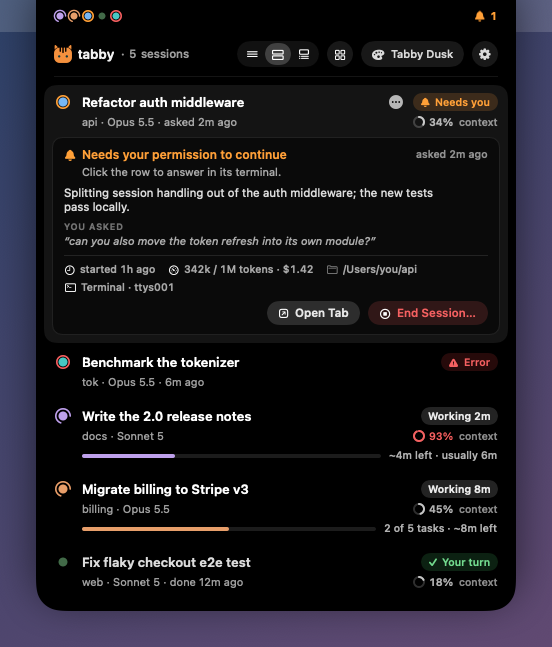 |
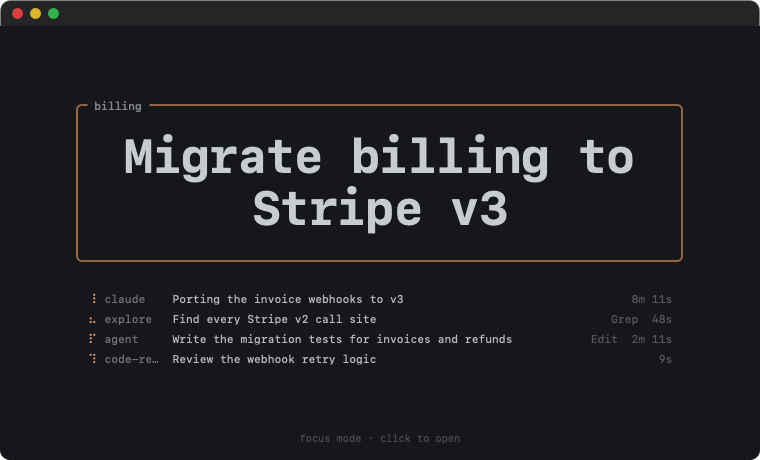 |
| Hover: what a session needs, at a glance. | Focus mode: just the topic and what's running. |
Focus mode
With several sessions running, their scrolling output competes for your eyes. Turn on Focus mode (Settings › Focus, the menu-bar menu, or /tab focus-mode on), and while Claude works, every Terminal window you're not in shows only its topic in a big box. Below it, one line per running agent (Claude and each subagent) has a small spinner, the step it's on ("Editing tile.js", "Run the test suite", "Searching for “retry”"), its task when it keeps a task list, and how long it has run. A window opens as soon as Claude needs you, and the window you're typing in is never covered. Click a covered window to go to it.
When Claude is done, you don't get a wall of text: the cover stays and shows how its reply opens, the question it ends on (if any), how long it took and a Show full reply button. tabby reads all of this from the session's transcript on your Mac; nothing is sent anywhere. Click the button (or anywhere on the cover) to open the window and reply. Untick Stay covered when it's your turn in Settings › Focus (or /tab focus-mode idle off) to see the whole reply right away. Windows where Claude asks a question or hits an error still open on their own.
Awake: close the lid, Claude keeps working
A Mac goes to sleep when you close the lid, and every Claude session on it stops mid-turn. caffeinate can't prevent that (it only stops idle sleep). Awake can: open the island, click the cup, and pick how long. Then close the lid and walk away.
- For a while, or until the work is done. Pick 1, 2, 4 or 8 hours. With Sleep as soon as every session is done ticked (the default), the Mac sleeps as soon as no session has worked for 5 minutes, and the hours are only the most it may take.
- It turns itself off. Sleep comes back on when the time is up, when the work is done, or when the battery drops below 10% on battery power. A watcher process keeps time; the island and every new Claude session check on it too, so a crash or a restart never leaves sleep off. If you had already turned sleep off yourself, tabby leaves it that way.
- You see it. A small cup sits beside the dots while it's on, the cup button glows, and the page shows a ring with the time left, +1h and Stop. When it ends while the lid is closed, the island tells you the next time you open it: "Sleep is back on · Every session is done · 4 sessions worked · at 3:12 AM".
- From anywhere:
/tab awake 4h,/tab awake done,/tab awake off, ortabby awake 4h | done | +1h | offin a shell, or Keep Awake in the menu-bar menu.
How: only pmset disablesleep keeps a Mac awake with the lid closed, and it needs an administrator. The first time, macOS asks for your password once (its own prompt, through authopen), and tabby adds a rule to /etc/sudoers.d/tabby-awake that lets your user run exactly two commands without a password: /usr/bin/pmset -a disablesleep 1 and … 0. Nothing else. tabby awake forget takes it away again. A closed laptop runs warmer: don't leave it in a bag.
Tiling across your screens
⌃⌥G (or the Tile button) fills the screen with session windows, and tabs become windows. Choose which screens get them in Settings › Windows: the screen you're on, all of them, or the ones you pick. Pick only your vertical monitor, for example, and your main screen stays free. Sessions spread across the chosen screens by size, and a portrait screen stacks them in rows. Tile every session, only the active ones (working or waiting on you), or pick them with checkboxes from the tile menu.
While it works, the island shows each step ("Splitting tabs · 2 of 4") with a ring that fills up, then "Tiled 4 windows". It works the same when you tile with /tab tile.
Tiling also gives each window its own color, picked as a set: every window a different hue, and windows side by side as far apart on the color wheel as the theme allows. Colors you picked yourself (/tab color, /tab theme, or the island's menus) stay, and tiling again keeps colors that are already a good set. In themes mode each window also gets its own theme. Turn it off in the tile menu, in Settings › Windows, or with /tab tile colors off.
Quick launch
⌃⌥L opens a launcher with your recent and most-used project folders. Type to filter, add a name if you like, and press Enter: a new window opens there, running Claude, on your chosen screen. Tick Skip permissions (⌘D) to start it with --dangerously-skip-permissions; it applies to that launch only and warns you while it's ticked. Start with “Skip permissions” ticked in Settings › Windows makes it the default.
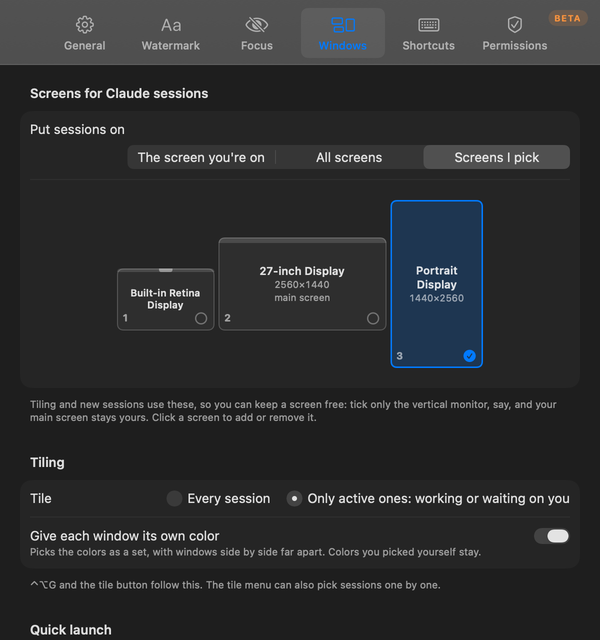 |
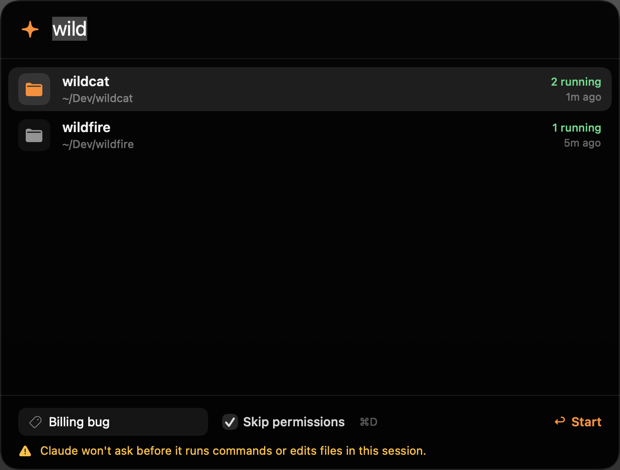 |
| Screens: keep the main one free. | Quick launch: a session in two keystrokes. |
Shortcuts
All of them can be changed in Settings › Shortcuts.
| Shortcut | Action |
|---|---|
| ⌃⌥Space | open the island with the keyboard (↑↓ ↩, esc) |
| ⌃⌥N | next session that needs you |
| ⌃⌥1–9 | jump to a session |
| ⌃⌥L | new session in a recent folder |
| ⌃⌥G | tile windows |
| ⌃⌥M | switch mode |
| ⌃⌥W | watermark on or off |
| ⌃⌥, | Settings |
Permissions
The island asks macOS only for what your terminal needs, and its setup window checks each permission live, with Allow All to ask for them in turn:
- Terminal.app: Accessibility (tiling splits tabs into windows), Control Terminal (jump to a tab, the watermark, Focus mode), Control System Events (tiling).
- iTerm2: Accessibility and Control iTerm2.
- VS Code, Cursor, Ghostty, Warp and others: nothing at all.
tabby island permissions (or Setup & Permissions… in its menu) opens that window again. tabby island starts the island, tabby island install reinstalls it, and tabby island login --off stops it opening at login.
Colors that don't hurt
- Contrast stays fixed. A session's background is its theme's background, shifted toward the session color in OKLCH at the same lightness, so text contrast doesn't move. tabby also never lets a tint make text less readable than the theme itself.
- Every theme is WCAG AA or better, and cursors stay at 3:1 or more. Tests enforce both, and the numbers are in the contrast audit.
- Claude's own UI stays legible. Claude Code draws its own colored text (dim gray, suggestions, its orange, diffs). 30 themes keep at least 80% of its intended contrast, including all five of tabby's own; they're marked ✓ in the audit, and automatic theme variety only uses them.
- Match the mode. Claude's dark theme (the default) draws white text, and its light theme black. With a light tabby theme, switch Claude to light with
/theme. tabby warns you if they don't match. - No two open sessions share a color. A project gets its last color back when that color is free.
- 57 themes in six groups:
- Signature: Tabby Dusk, Midnight, Ember, Paper, Mist.
- Calm: Nord, Everforest, Kanagawa, Rosé Pine, Catppuccin Frappé and Macchiato, Flexoki, Iceberg, Selenized, Gruvbox Material and more.
- Classic: Catppuccin Mocha, Tokyo Night, Gruvbox, One Dark, Oxocarbon, Poimandres and more.
- Vivid, Light and High contrast (Modus).
| Command | Effect |
|---|---|
/tab strength subtle|medium|bold |
tint intensity |
tabby config auto themes |
a different theme per session |
tabby config animate false |
turn off the title spinner and bell |
Terminal support
| title | background | tab color | jump to tab | tile | |
|---|---|---|---|---|---|
| Terminal.app | ✓ only the name (how) | ✓ (bold text too) | emoji marker | ✓ | ✓ (tabs → windows with Accessibility) |
| iTerm2 | ✓ (if the profile lets applications change the title) | ✓ | ✓ native, pulses when waiting | ✓ | partial: moves windows only |
| Ghostty, WezTerm, kitty, Alacritty | ✓ | ✓ | emoji marker | – | – |
| VS Code / Cursor | ✓ with "terminal.integrated.tabs.title": "${sequence}" |
✓ | emoji marker | – | – |
| tmux | window name | pane style | status-bar color | ✓ | – |
| Zellij | pane title | ✓ | emoji marker | – | – |
| GNU screen | window hardstatus | – | emoji marker | – | – |
The watermark and Focus mode cover Terminal.app windows. Tiling iTerm2 moves its windows into place, but doesn't split tabs into windows or leave full-screen windows alone the way it does for Terminal.app. Inside screen or Zellij, tabby talks to the multiplexer, not the terminal around it, so there's no jumping to the tab; screen shows the title where your .screenrc puts the hardstatus.
Troubleshooting
In Claude, "fix tabby" runs tabby doctor --json and works through whatever it finds. By hand:
tabby doctor                              # every check, with the fix for each
sh ~/.claude/tabby/bin/tabby doctor       # the same, in a shell without the tabby command
| What you see | What to do |
|---|---|
| A tab has no name or color | That session started before tabby and setup couldn't reach it: tabby adopt brings it in (it says why if it can't). /reload-plugins in it, or a restart (claude --continue keeps the conversation), always works. |
| The island shows no sessions | Same: only sessions started after the install are tracked. |
| No macOS permission prompt | tabby island permissions, then Allow. It starts the app it asks about first, so macOS can prompt. Ask Again resets an earlier "Don't Allow". |
tabby needs Node.js 18 |
Run the installer again: it sets up a private Node.js. |
| The island isn't there | tabby island. If it isn't installed, tabby island install. It needs macOS 14 or newer. |
Running the installer again is always safe: it repairs in place. Logs are in ~/.claude/tabby/install.log and ~/.claude/tabby/tabby.log (sessions starting, with their folder's name, the names the AI picks, and errors; capped at 512 KB).
How it works
- Hooks.
SessionStart,UserPromptSubmit,Stop,Notification,PermissionRequest,PostToolUseandSessionEndkeep~/.claude/tabby/sessions/<id>.jsonup to date. They write OSC escape codes straight to the session's TTY. Everything after the prompt is an async hook; the per-tool fast path is a ~10 ms shell script. Hooks start throughbin/tabby.sh, which finds a Node.js wherever it lives, so Claude started from the Dock or an editor works too. - Names. A background
claude -p --safe-mode --model haikucall (thinking off, no hooks, plugins or MCP) returns a 2–4 word title and a one-line summary. It's handed back to Claude via the hooksessionTitlefield, so/resumeshows it too.tabby config namer heuristicnames tabs with no model call. - Animation. While a session works or waits, one small background process redraws those titles about 6 times a second, then exits a minute after everything is idle.
- Status comes from the hooks, plus Claude's own session registry. Context comes from the status line, or else from the transcript. Subagents (for Focus mode) come from each session's
subagents/transcripts. - Terminal.app titles. Terminal adds the folder, process, arguments and size to every title, and reads its title settings only at launch. So while a session runs, its tab uses a copy of its own profile ("Basic · tabby") with just those title parts turned off.
tabby terminal-titles offputs the tabs back and deletes the copies. - Processes are read with
psandlsofon your Mac. To tell what a terminal or Claude started from a launchd service or an app, tabby looks at a few environment variable names in each candidate (TERM_SESSION_ID,CLAUDECODE,CLAUDE_CODE_SESSION_ID,CLAUDE_PID,XPC_SERVICE_NAME) and nothing else; it keeps none of it. Services, apps, Claude itself and its MCP servers, shells you type in,ssh-agent,tmuxand other accounts' processes are never offered. Stopping sends SIGTERM to the process and its children, then SIGKILL to what's still there after 2 seconds, and only to processes whose start time still matches the list you saw. - The island is a native SwiftUI + AppKit app. It reads
~/.claude/tabbyand Claude's registry, and runs the tabby CLI for anything that changes state. Each release ships it universal (Apple silicon and Intel), signed by the release workflow (tabby checks the Ed25519 signature before installing it, and builds from source when it doesn't match), with a SHA-256 checksum and a build attestation (gh attestation verify TabbyIsland.zip --repo 0xNtive/tabby). - Exit. On exit a tab gets its profile colors back (
OSC 110/111/112), and in Terminal.app its own profile;/clearkeeps its identity.
Privacy, cost and terms
- Nothing you typed leaves your machine except the naming request: that session's last few prompts (trimmed), a short excerpt of Claude's last reply and the project folder's name go to Claude Haiku through your own Claude Code login, to the provider you already use. About 500 tokens (roughly $0.001), covered by Pro and Max. The request can use no tools, reads only your own Claude settings and returns only a name.
/tab namer heuristicnames tabs on your machine instead;offnot at all. - Update checks ask github.com where tabby's latest release is, every 6 hours at most: a plain request that sends nothing about you.
tabby config updateCheck false(or Settings › General) turns them off. Tabby Island and its updates are downloaded from this repository's releases. - No servers, no telemetry. Tabby Island has no network code at all, and a test fails the build if network code appears anywhere but the updater, the island download and the installer.
- Your files stay yours. tabby's state in
~/.claude/tabby(session names, the last few prompts, settings) is readable only by your account. Records of ended sessions go after 30 days, each folder's remembered color after 90 days unused, andtabby uninstall --purgedeletes all of it. - What it trusts, and what it doesn't yet do (the island isn't notarized while tabby is in beta) is in SECURITY.md.
- tabby is free. Future versions may show clearly labeled sponsored messages in tabby's own UI, never in your prompts, conversations or model context. See the Terms of Use, which setup asks you to accept.
- tabby is an independent project, not affiliated with Anthropic. Claude is a trademark of Anthropic.
Contributing
tabby is open source under the MIT license, and contributions are welcome: bug reports (the form asks for tabby doctor output), themes, terminal support, and ideas for working with many sessions at once.
npm test                 # node --test, zero dependencies
npm run export           # regenerate docs/contrast.md and site/themes.json from lib/themes.js
bash island/build.sh     # build the island (Xcode Command Line Tools); bash island/test.sh checks it
"island/build/Tabby Island.app/Contents/MacOS/TabbyIsland" --snapshot /tmp/snaps   # render every island screen to PNGs
claude --plugin-dir .    # try local changes in one session
CONTRIBUTING.md explains how the pieces fit, how to test the installer in a throwaway home, and how releases work. Please read the Code of Conduct, and report security issues privately (SECURITY.md). What changed and when is in the changelog.
MIT © 2026 tabby contributors
Reviews (0)
Sign in to leave a review.
Leave a reviewNo results found