papercut-explainer
Health Warn
- License — License: MIT
- Description — Repository has a description
- Active repo — Last push 0 days ago
- Low visibility — Only 9 GitHub stars
Code Fail
- rm -rf — Recursive force deletion command in install.sh
Permissions Pass
- Permissions — No dangerous permissions requested
No AI report is available for this listing yet.
Claude Code skills + a Remotion library for short vertical cut-paper explainer reels: strategy, hook, script, storyboard, voice, build, QA.
papercut-explainer
Make short vertical explainer reels that look like layered construction paper, with Claude Code doing the work.
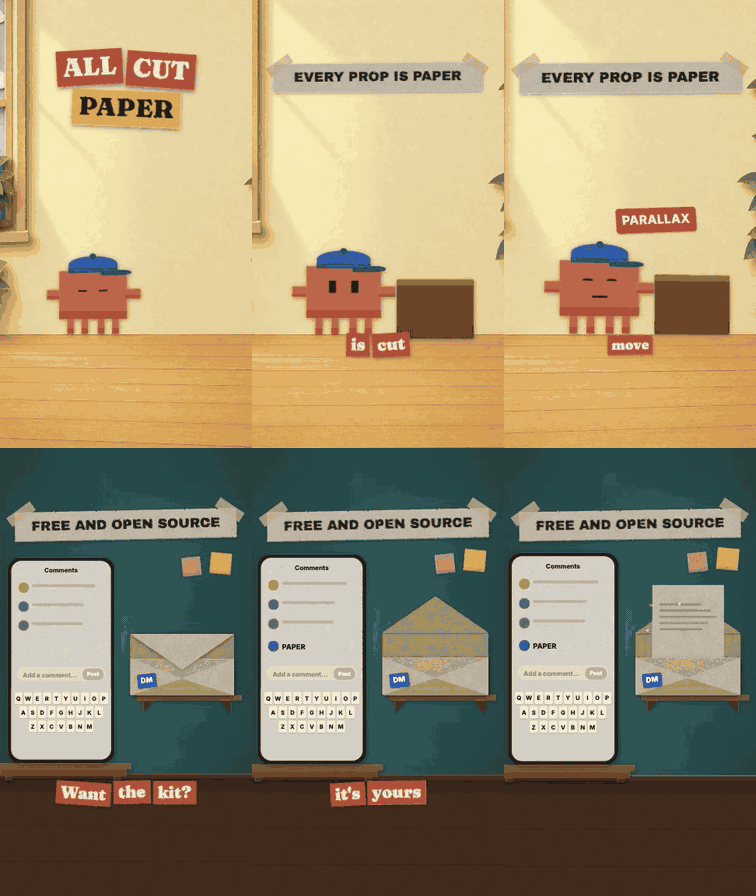
The bundled example reel (examples/hello-reel), rendered from this repo. Silent placeholder voice, real captions, camera and cuts.
This repo is two things that work together:
- Nine Claude Code skills that run the whole pipeline: strategy, hook, script, storyboard, voice, build, QA, and an installer. Ask for a reel, or run one stage on its own.
- A Remotion library the skills build on: a paper-cut component kit, 24 backdrops, 17 camera moves, 10 scene transitions, film-look layers, 79 sound effects and 8 music beds, plus the scripts that tie them into an episode.
You describe the video ("explain this repo in 25 seconds"). The skills research it, write a script on a fixed spoken spine, plan every camera move and cut, make or fake the voiceover, and build the scenes in Remotion. You review stills and the final cut.
Contents
What is in the box · Install · Use it · Examples · How the workflow runs · Voice · Customising · Requirements · Cost · Troubleshooting · Limits · Licence
What is in the box
| Skills | papercut-explainer (router), papercut-setup, papercut-strategy, papercut-hook, papercut-script, papercut-storyboard, papercut-voice, papercut-build, papercut-qa |
| Subagent | papercut-scene, a scene builder with only file and shell tools, so parallel scene agents start small |
| Backdrops | 24 paper-diorama sets at 1080×1920 with measured floor lines (sheet) |
| Camera | OrbitCamera + Depth, SnapZoom, Crane, CrabTrack, DollyZoom, RackFocus, ForegroundPass, PullBack, FreezeFrame, PovMask, TimeRamp, DutchTilt, TiltShift, FocusPulse, FocusHunt, Handheld, CameraPush |
| Cuts | whip, zoomThrough, pageTurn, tearAway, tapePull, stampCut, infiniteZoom, popUpBook, keyhole, burnAway, chained with CutSeries |
| Film look | gate weave and flicker, moving felt fibre, lens dirt, lamp flicker, halftone, graph paper |
| Overlays | taped headline banner, word-by-word torn caption tags, hook title, real-screenshot proof card with marker circles |
| Kit | 188 exports in library/papercut/kit: paper primitives (Paper, Slab, Disc, Pill, Card), a base critter with accessories, prop sets, rough UI rebuilds, a comment-keyword CTA scene |
| Sound | 79 synthesised SFX and 8 music beds, picked by name, rendered with Web Audio (no audio files to license) |
| Tools | scaffold, cue sheets, cached renders, QA contact sheets, catalog generator, placeholder narration, optional local TTS setup |
Each camera move and cut, with its props and when to use it, is in library/papercut/CATALOG.md (sections paper/camera.tsx and paper/transitions.tsx).
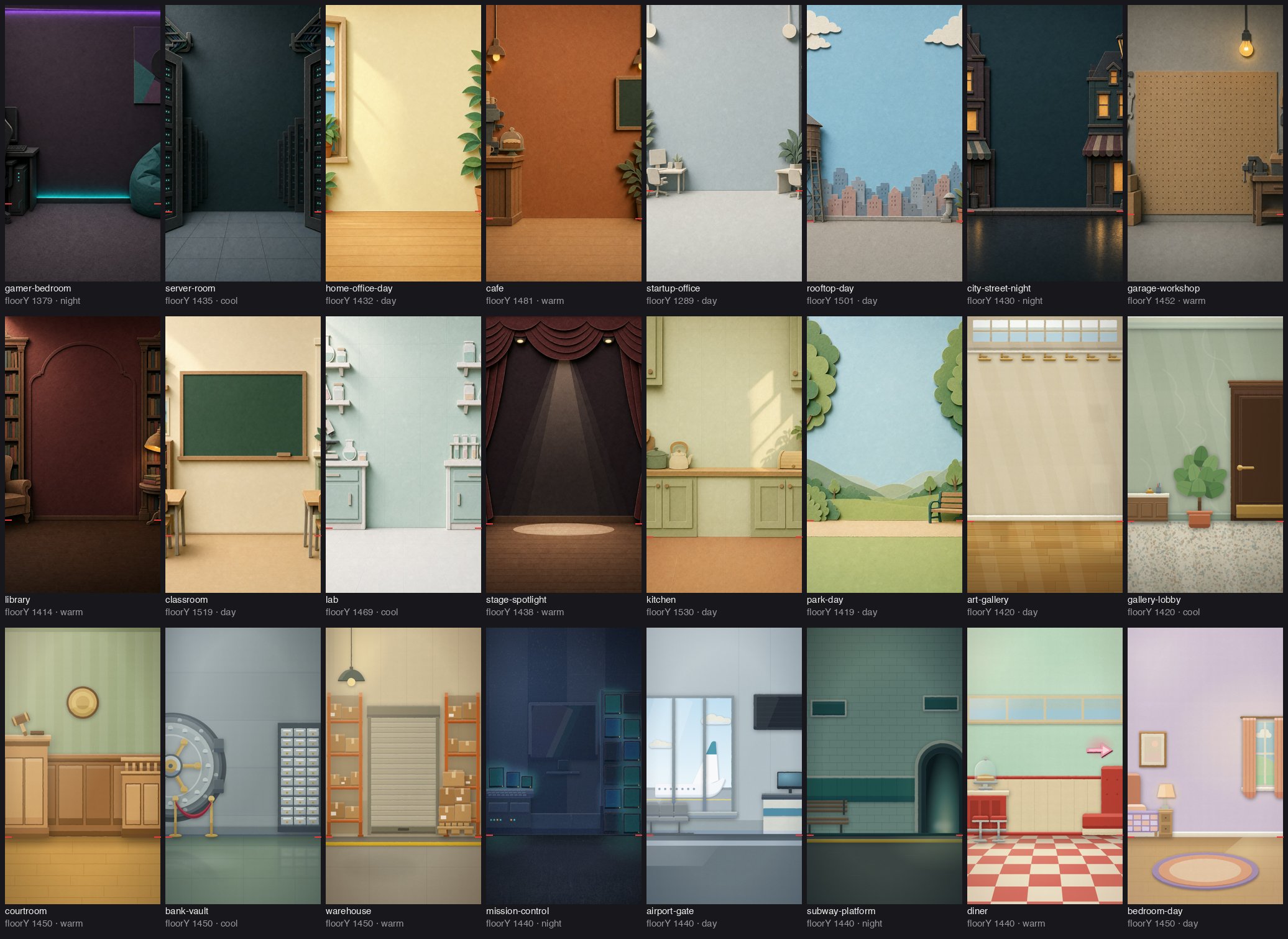
Install
You need Node 20+, npm, ffmpeg, rsync and Python 3. Claude Code is the front end.
With npx skills (skills only, fastest):
npx skills add 0xS4N4TG/papercut-explainer
This installs the nine skills into your agents' skill folders (Claude Code and the others the CLI supports). It does not fetch the Remotion library or the scripts. Open Claude Code and say "set up papercut-explainer": papercut-setup clones the repo, asks how much you want (Minimal, Standard, Full) and installs it. Add -g for a user-wide install, --skill papercut-hook to take one skill.
With git (everything, including the library):
git clone https://github.com/0xS4N4TG/papercut-explainer
cd papercut-explainer
./install.sh
The installer asks how much you want to set up and does only that.
| Mode | What you get | Cost |
|---|---|---|
| 1. Minimal | The skills, the scene-builder subagent and the config file. Strategy, hook, script, storyboard and style prompts work. Nothing renders. | seconds |
| 2. Standard | Minimal, plus: a dependency check, the Remotion agent skills, a Python venv for QA sheets, and a self-test that scaffolds a project, typechecks it and renders a still. You can build and render full reels with a placeholder voice (silent, or macOS say). |
about 0.7 GB (the first project's node_modules) and a few minutes |
| 3. Full | Standard, plus local voiceover: a Qwen3-TTS venv, the model download, an ASR backend for word timings, and a smoke test that generates a line and checks the audio. | 4–6 GB more (1.5 GB venv plus a 2.3 or 4.2 GB model) |
| 4. Custom | Pick any of: skills, deps, remotion-skills, pytools, tts, verify. |
varies |
You can move up later: ./install.sh --mode custom --components deps,remotion-skills,pytools,verify.
Non-interactive and scoped installs:
./install.sh --mode standard --yes                       # no questions
./install.sh --mode full --tts-model 0.6B --yes          # lighter voice model (2.3 GB)
./install.sh --mode minimal --project ~/code/my-videos   # skills for one project only
./install.sh --mode minimal --copy                       # copy skills instead of symlinking
./install.sh --dry-run --mode full                       # print what would happen
./install.sh --doctor                                    # check what is installed
./install.sh --uninstall                                 # remove the links it made
By default skills are symlinked into ~/.claude/skills and the subagent into ~/.claude/agents, so a git pull updates them. The installer writes ~/.config/papercut-explainer/config.env with PAPERCUT_LIB and the Python paths it created; the library scripts and the skills read it. It never installs system packages (it prints the brew or apt line instead), replaces an identical existing skill folder (such as one from npx skills add) and moves a different one to ~/.config/papercut-explainer/backups/ instead of the skills folder, and does not touch your shell profile.
Prefer to let Claude do it? Open Claude Code in this folder and say "set up papercut-explainer". The papercut-setup skill asks which mode you want, confirms any large download, runs the installer with the right flags and checks the result.
Install by hand: symlink or copy each folder in skills/ into ~/.claude/skills/, agents/papercut-scene.md into ~/.claude/agents/, then export PAPERCUT_LIB="$PWD/library".
Use it
Open Claude Code in any folder you want the episode to live in and ask for a reel:
Make a papercut explainer about https://github.com/example/echolark. 25 seconds, comment keyword PAPER.
The papercut-explainer skill takes the lead. It asks only for what is missing (the one claim the video proves, the audience level, what a commenter gets), then walks the stages below, handing each to its skill. Every stage writes a file, so you can stop, edit and resume.
You can also call one stage directly:
| Say | Skill | Writes |
|---|---|---|
| "set up papercut-explainer", "check my install" | papercut-setup |
installed components, a --doctor report with the install level |
| "what should this reel be about? what format?" | papercut-strategy |
the BRIEF block at the top of research/facts.md: topic, familiar format, audience, funnel |
| "write 5 hooks for this fact list" | papercut-hook |
the HOOK block (SAY / WRITE / SHOW / ALIGN) at the top of papercut/STORYBOARD.md |
| "script this", "write the banner track" | papercut-script |
research/facts.md, narration/script.json, the staging table (banner, set and gag per beat) in STORYBOARD.md |
| "storyboard this script" | papercut-storyboard |
the camera and cut table, frame-level scene blocks and SFX plan in STORYBOARD.md |
| "set up the voice", "re-voice with another speaker" | papercut-voice |
narration/voice/, public/vo/captions.json, src/plan.json |
| "scaffold the episode", "build scenes S03 to S06", "render it" | papercut-build |
the project, episode.json, scenes, SFX cues, audio, out/<name>.mp4 |
| "QA the reel", "check the stills" | papercut-qa |
contact sheets, a pass/fail checklist, fixes |
Run modes the router offers at the start: full reel, script only, storyboard from a script you already have, style prompt for another tool (Sora, Runway, an image model), or fix one scene.
More prompts, with what each one loads and writes: examples/prompts.md.
What works in which install mode
| Stage | Minimal | Standard | Full |
|---|---|---|---|
| Strategy, hook, script, storyboard, style prompts | yes | yes | yes |
| Scaffold, build scenes, SFX and music, stills QA, render to mp4 | no | yes, placeholder voice | yes |
| Voiceover from text, word-timed captions from real audio | no | placeholder timing only | yes |
If a stage needs more than you installed, the skill says so in one line and hands over to papercut-setup rather than improvising.
Examples
| Example | What it is |
|---|---|
examples/hello-reel |
A two-scene reel that runs through the real pipeline: script, placeholder narration, plan, scenes, SFX cues. It is what library/tools/selftest.sh builds and what the GIF above shows. |
examples/paper-trail |
Every file one episode produces, for an invented product: BRIEF and facts with sources, HOOK block, script on the 10-beat spine, storyboard with camera and cut table, episode.json, cue sheet, voice.json. Read it to see what each stage hands the next. |
examples/prompts.md |
Copy-paste prompts for every skill and for common edits. |
Run the first one yourself:
library/tools/selftest.sh ~/papercut-test     # builds it in a folder you keep
cd ~/papercut-test/series/episodes/01-selftest/papercut
npx remotion studio                            # scrub it
How the workflow runs
 idea or link
     │
     ▼
 papercut-strategy ──► BRIEF            topic, "what show is this secretly?", audience, funnel
     │                 (top of research/facts.md)
     ▼
 papercut-hook ──────► HOOK block       SAY / WRITE / SHOW / ALIGN, tested before any scene exists
     │                 (top of papercut/STORYBOARD.md)
     ▼
 papercut-script ────► facts.md         every number traces to a sourced fact
     │                 script.json      75-95 words on a 10-beat spine
     │                 staging table    one visual-pun set per banner, one gag each
     ▼
 papercut-storyboard ► STORYBOARD.md    camera and cut table, frame-level events, SFX plan
     │
     ▼
 papercut-build ─────► project          scaffold from the template, episode.json
     │
     ▼
 papercut-voice ─────► voiceover.wav    local TTS, your own recording, or a placeholder
     │                 captions.json    word timings
     │                 plan.json        scene boundaries on word onsets
     ▼
 papercut-build ─────► scenes, audio, mp4    scene agents in parallel, cached renders
     │
     ▼
 papercut-qa ────────► stills + checklist, then fixes
The style has three tracks per beat: the voiceover tells the story, a taped banner states one hard fact the voiceover does not repeat, and a fresh paper set acts out the voiceover's concrete noun. Everything is paper (grain, rough cut edge, drop shadow, stacked shading), the camera moves through a diorama, and only the banner and labels boil in steps. The full rules live in skills/papercut-explainer/references/style-guide.md.
State lives in files, not chat, so every stage can run in a fresh session. A series folder looks like this:
my-series/
  SERIES.md                   audience level, voice, palette, mascot, CTA style (optional)
  voice/voice.json            speaker and tempo (optional, for local TTS)
  papercut-assets/            textures and props laid over the library defaults (optional)
  episodes/01-slug/
    research/facts.md
    narration/script.json     [{"id": "l1_hook", "text": "..."}, ...]
    narration/voice/          takes, final lines, timing
    papercut/                 the Remotion project: episode.json, STORYBOARD.md, src/scenes, out/
Voice
Three ways to get a voice, chosen by papercut-voice at the start:
- Local Qwen3-TTS (Full install).
library/voice/setup_tts.shbuilds a venv, downloads the model and runs a smoke test. Apple Silicon usesmps, NVIDIA usescuda, anything else falls back to CPU, which works but takes minutes per line. Generates three takes per line, picks by ASR match and pitch movement, trims, normalises to −16 LUFS and writes word timings. On an M-series Mac the smoke test line (4 s of audio) took 40 s including model load. - Your own recording, or another TTS. Drop takes in
narration/voice/takes/narrator/<line>_<n>.wavand runfinalize.sh(it needs an ASR backend for word timings). - Placeholder.
python3 library/tools/placeholder_vo.py(from the narration folder) writes silent lines, or--sayfor the macOS voice, with word times spread over each line. Build and time the whole reel first, re-voice later: the scenes key off words, so the cues follow.
Details, the voice.json fields and the pickers: library/voice/README.md.
Cloning a voice needs a reference clip you have the right to use.
Customising
- Palette and mascot.
library/papercut/kit/tokens.tsholds the colour roles;hero/heroLois the critter colour.Crittertakes colour, accessory (cap, headset, monocle…), expression and a name pill. Per-series overrides go in an episode's ownsrc/theme.ts; never edit the syncedsrc/lib/copy in a project. - Backdrops. Drop a 1080×1920 JPEG into
library/papercut/public/bg/backdrops/, add its name,floorY, mood andbestFortobackdrops.json, then runpython3 library/tools/catalog.py. Image prompts are inskills/papercut-explainer/references/asset-prompts.md; the code-drawn ones are inlibrary/papercut/backdrops-src/. - Sound. A new effect is one file,
library/audio/sfx/<name>.js, whose first line is// @sfx name | tags | seconds | description | origin. A new mood is one JSON file inlibrary/audio/beds/. - Fonts.
library/papercut/kit/fonts.tsloads local woff2 files, so renders never touch the network. - Giving back. After an episode,
python3 library/tools/harvest.py <project>lists what to promote into the library (library/HARVEST.md); then regenerate the catalogs.
Projects keep a snapshot of the kit in src/lib/, so an old episode renders the same after the library changes. Re-sync with library/papercut/sync_kit.sh <project> when you want the new version.
Requirements
| OS | macOS (tested) or Linux (scripts are bash; not run end to end). Windows: use WSL. |
| Node, npm | Node 20+ |
| ffmpeg | 4.4+ on PATH |
| rubberband | only if you set a voice tempo other than 1.0 (brew install rubberband) |
| rsync | on PATH (kit sync) |
| Python | 3.9+ for the tools; 3.10–3.12 for the voice venv (the installer uses uv if you have it, else python3.12/3.11/3.10) |
| Chrome or Chromium | for the SFX and music render only (CHROME_PATH to override). Video renders use Remotion's own headless browser, downloaded on first render. |
| Disk | about 0.7 GB per project for node_modules (shared by APFS cloning on macOS; plain copy elsewhere, or set DONOR); 4–6 GB for local voice |
| Claude Code | the skills and subagent target it |
Cost
About $14-19 in Claude API costs per 25-30 s reel, at API list prices. Treat it as a yardstick, not a bill.
Nothing else is metered. The voice runs locally (or use the placeholder), and the 24 backdrops and all sounds ship in the repo. Make more backdrops and sounds as you need them: a backdrop is a 1080x1920 JPEG (from any image tool, or drawn in code like the sources in library/papercut/backdrops-src/) and a sound is one small JS file in library/audio/sfx/. Remotion is free for individuals and small teams (see THIRD_PARTY.md).
What moves the cost, largest first:
- The lead session's context. Every call re-reads the whole conversation. Start each episode in a fresh session, or compact before production starts. Strategy and research chat belong in a different session from the build.
- Scene agents. Fewer agents with 2-3 scenes each beat many agents with one. The bundled
papercut-scenesubagent has only file and shell tools, so each one starts small. - Effort level.
highis enough for scenes;xhighcosts noticeably more per scene. - Image reads. Contact sheets at 200 px, one QA command per scene, two QA rounds at most.
- Reading the kit source. Agents read
papercut/CATALOG.md, not the kit.
Troubleshooting
./install.sh --doctor shows what is missing. The usual causes:
| Symptom | Fix |
|---|---|
node 18 (need 20+) |
Install Node 20 or newer. |
No Chrome/Chromium found from render.mjs |
Install Chrome, or set CHROME_PATH. Only the SFX and music render needs it. |
| Voice venv fails: no Python 3.10–3.12 | brew install [email protected], or install uv and rerun. |
| Model download stalls | Rerun library/voice/setup_tts.sh; finished files are kept. It already sets HF_HUB_DISABLE_XET=1. |
| First render is slow | Remotion downloads its headless browser (about 200 MB) once. |
--gl=angle rejected |
Edit the flag in library/tools/render.py and qa.sh for your Chrome build. |
| A skill does not trigger | Check ls ~/.claude/skills; restart Claude Code after installing. |
Limits
- Written and run end to end on macOS (Apple Silicon). The CUDA and faster-whisper paths exist but were not run on real hardware.
- The voice pipeline is optional and the least tested part.
render.pywrites ProRes intermediates, several GB per episode inout/cache.- Two-speaker dialogue helpers ship (
dialogue_timeline.py,SPEAKER/ROLEoptions) with no template. - The base
Critteris a boxy creature with four leg stubs and two tall eyes. Swap its drawing inkit/cast/Critter.tsxif you want your own mascot.
Licence
MIT for everything here except where THIRD_PARTY.md says otherwise. Remotion has its own licence (free for individuals and small teams, paid above a size threshold): read https://www.remotion.dev/license before using this commercially. Fonts are SIL OFL 1.1. The backdrops include AI-generated images; see the note in THIRD_PARTY.md.
Reviews (0)
Sign in to leave a review.
Leave a reviewNo results found