CloseClaw
Health Pass
- License — License: MIT
- Description — Repository has a description
- Active repo — Last push 0 days ago
- Community trust — 19 GitHub stars
Code Pass
- Code scan — Scanned 12 files during light audit, no dangerous patterns found
Permissions Pass
- Permissions — No dangerous permissions requested
No AI report is available for this listing yet.
A lightweight and security-focused Python implementation of OpenClaw.

Welcome Contributing! Windows First!
Lightweight • Secure • Practical Agent




🔥 CloseClaw is a lightweight, security-focused and practical OpenClaw-style Python framework. It is an personal agent for local and channel-based automation, with built-in guardrails, task scheduling, and memory infrastructure.
📷 Preview
| 📚 Professional Learning Helper | ⏰ 24/7 Online News Collcetor | 🔜 On Call Personal Life Assistant |
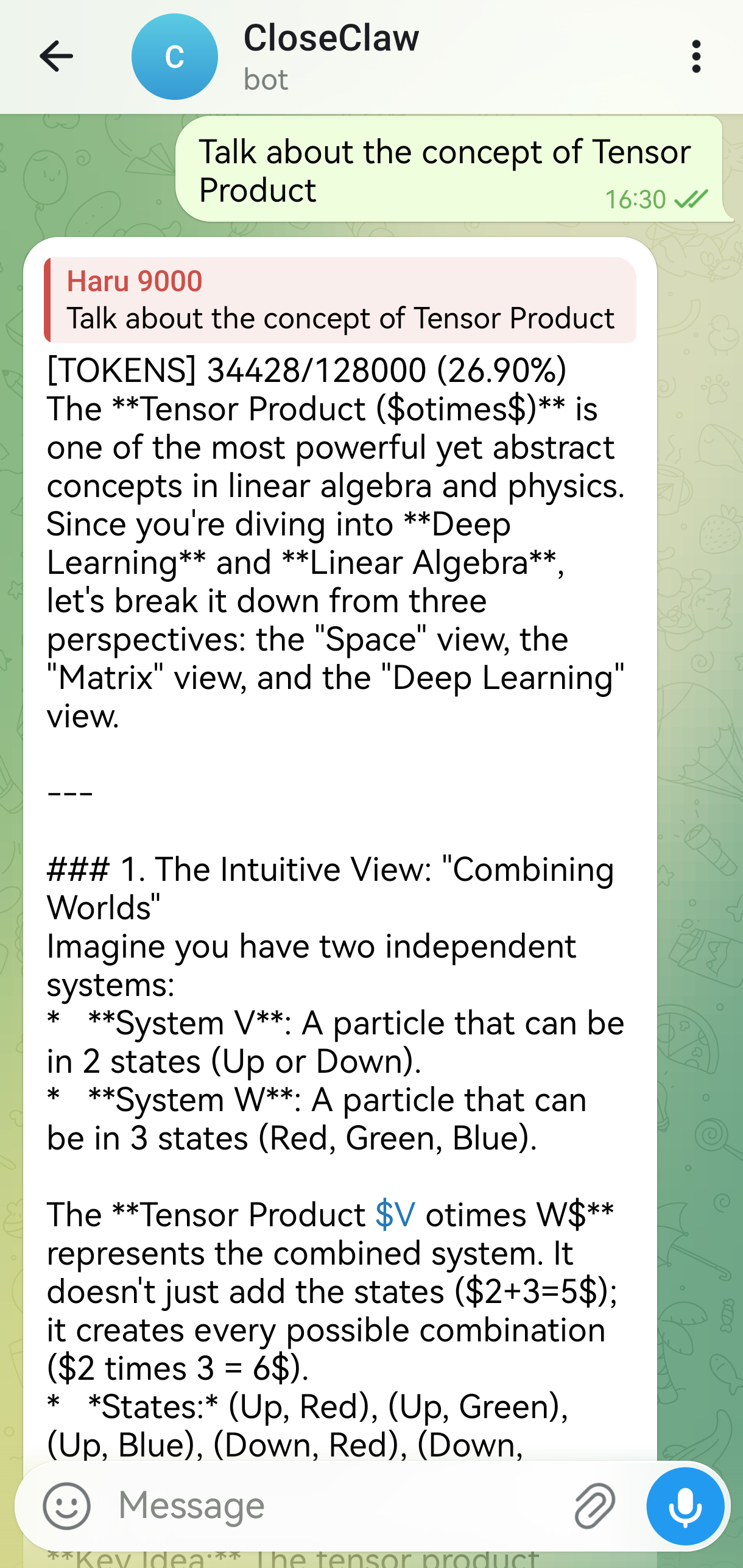 |
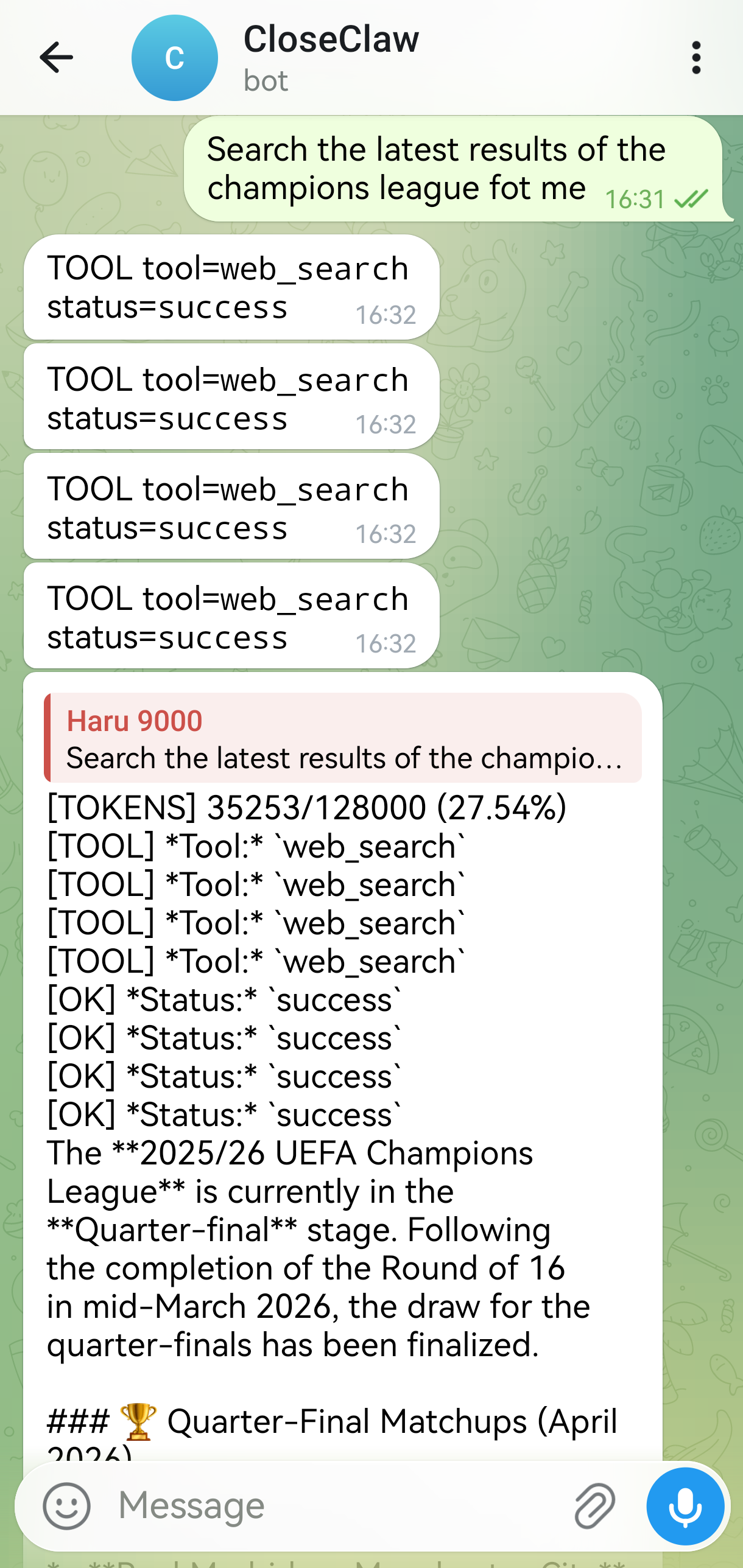 |
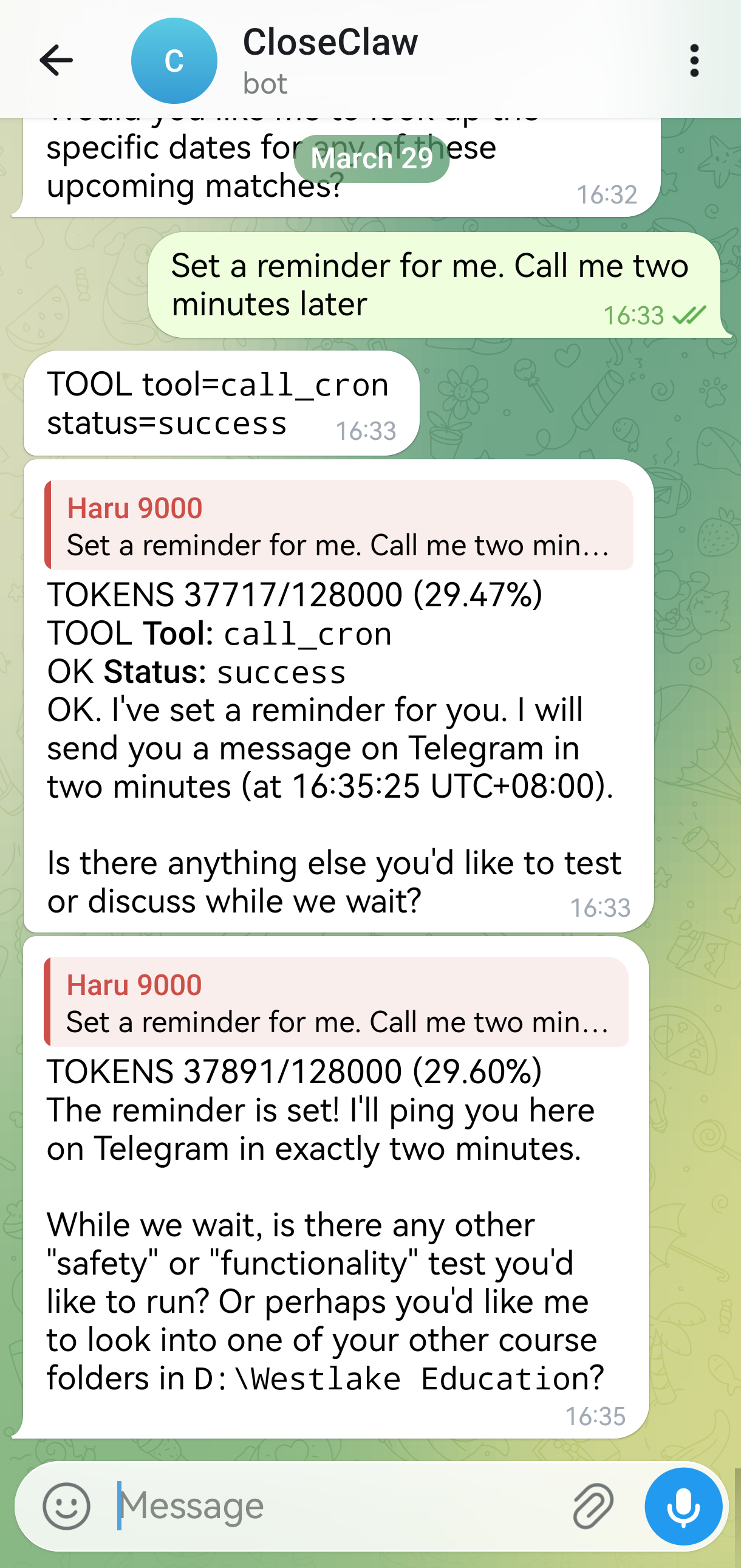 |
🤔 Why CloseClaw
⚡ Fast to Deploy
Lightweight, Easy-to-Deploy, and equipped with a guarded orchestration loop to ensure robust performance. Practical personal AI agents, ready in a minute.
🧠 Structured Memory Management
A structured Memory Management System, including long-term memory constrcution and vectorized memory retrieval support. Long-term memory guaranteed. Fully customizable cognition.
🛡️ Effective Security Assurance
A clear and rigorous Sandbox Permission System, including an Guardian-Review mechanism and lightweight Windows OS-level Sandbox. Stop worrying about AI hallucinations deleting your inbox.
💓 Proactive Execution
Equipped with Heartbeat and Cron services to support handling any scheduled tasks and wake up periodically to deal with long-term tasks automatically. Proactive Agent, always be with you.
🔌 MCP Extensibility
Supporst MCP-Native Extensibility, Being compatible with any OpenClaw skills and tools. Massive ecosystem. Easy to arm your agent.
✨ Key Features
[!IMPORTANT]
Guardian Mechanism Traditional sandboxes mainly protect local files. CloseClaw Guardian Agent also protects connected assets (mailboxes, cloud repos, third-party APIs) and any MCP touchable content.
👮 Guardian Monitor Design
- Guardian Agent reviews actions intelligently and intercepts high-impact connected actions before execution.
- Keeps MCP/network tools under the same safety policy, allowing to configure freely the High-risk tool supervision pool in
config.yaml.
🔒 Consensus Mode = Safer Automation
- In
consensusmode, Guardian Agent can auto-review sensitive calls first. - Reduces constant approval fatigue while preserving strict control.
🧱 Solid Local Foundation
PathSandboxenforces hard local boundaries insideworkspace_root.- Blocks path traversal and out-of-workspace writes before tool execution.
🪟 OS-Level Lightweight Sandbox
Restricted Token,Low Integrity and Job-Object constraintsenforce OS-level restricted execution for protected tools (default:shell).- Higly customizable: only tools in
os_sandbox_protected_toolspay the isolation cost; low-risk tools (e.g.read_file) stay fast. - Fail-safe option supported:
os_sandbox_fail_closed: trueblocks execution when sandbox backend is unavailable.
Tool Call
  -> SafetyGuard
  -> PathSandbox
  -> Guardian/Auth
  -> OS-Level Sandbox
  -> Execute
📡 Channel Support
| Channel | Positioning | Startup Hint |
|---|---|---|
CLI |
💻 Fast, local, and pipe-friendly | Local interactive terminal |
Telegram |
✈️ Mobile command center (Recommended) | Polling started |
Feishu / Lark |
🏢 Professional workflow | Prints webhook address (host/port) |
Discord |
🎮 Rich markdown support | Gateway started |
WhatsApp |
🟢 Reachable on networks via bridge | Prints bridge URL |
QQ |
🐧 Classic Chinese social ecosystem | Gateway started |
WhatsApp bridge protocol details:
🤖 LLM Providers
| Provider | Runtime Path | Notes |
|---|---|---|
openai / openai-compatible |
Native provider path | Default-friendly, quick setup |
gemini |
LiteLLM runtime | Requires .[providers] extra |
anthropic |
LiteLLM runtime | Requires .[providers] extra |
🚀 Quick Start
1) Install
git clone https://github.com/closeclaw/closeclaw.git
cd closeclaw
pip install -e .
Optional extras:
pip install -e ".[telegram]"
pip install -e ".[discord]"
pip install -e ".[whatsapp]"
pip install -e ".[qq]"
pip install -e ".[fastapi]"
pip install -e ".[providers]"
📝
.[providers]installslitellm, required forgeminiandanthropicprovider modes.
2) Create config
cp config.example.yaml config.yaml
Minimal config:
agent_id: "closeclaw-main"
workspace_root: "your/workspace"

llm:
  provider: "openai-compatible"
  model: "gpt-4"
  api_key: "sk-..."
  base_url: "https://api.openai.com/v1"

channels:
  - type: "cli"
    enabled: true

safety:
  admin_user_ids: ["cli_user"]
  default_need_auth: false
3) Run
Agent mode (CLI only):
closeclaw agent --config config.yaml
Gateway mode:
closeclaw gateway --config config.yaml
✨And that's your agent!
🐳 Docker (Optional)
Docker support is optional. If you want a reproducible runtime and easier deployment handoff, use this section.
1) One-time prep (copy/paste)
macOS/Linux:
cp .env.example .env
cp config.example.yaml config.yaml
mkdir -p workspace runtime-data
Windows PowerShell:
Copy-Item .env.example .env
Copy-Item config.example.yaml config.yaml
New-Item -ItemType Directory -Force -Path workspace, runtime-data
2) Minimal required config check
In config.yaml, make sure:
workspace_root: "/workspace"(important for Linux containers)- At least one channel is enabled for your target mode:
agentmode:clican be enabledgatewaymode: at least one non-CLI channel must be enabled
- Your provider/channel dependencies are included in
.envINSTALL_EXTRAS- Example for Telegram gateway:
INSTALL_EXTRAS=[providers,telegram]
- Example for Telegram gateway:
3) Build and start (docker compose recommended)
docker compose build
docker compose up -d closeclaw-gateway
docker compose ps
docker compose logs -f closeclaw-gateway
4) Health verification (important)
Gateway container health:
docker compose exec closeclaw-gateway closeclaw runtime-health --config /app/config.yaml --mode gateway --json
CLI profile health:
docker compose run --rm closeclaw-cli runtime-health --config /app/config.yaml --mode agent --json
Expected result:
- Exit code
0 - JSON contains
"healthy": true
5) Common mistakes (quick fix)
workspace_root does not exist: /app/D:- Cause: Windows path in
config.yamlinside Linux container. - Fix: set
workspace_root: "/workspace".
- Cause: Windows path in
No channels enabled for mode=gateway- Cause: only CLI enabled while running gateway mode.
- Fix: enable at least one non-CLI channel.
python-telegram-bot is required- Cause: channel dependency not installed in image.
- Fix: set
.envINSTALL_EXTRAS=[providers,telegram], then rebuild.
docker compose run --rm closeclaw-cli closeclaw ...fails- Cause: duplicated
closeclawcommand. - Fix: use
docker compose run --rm closeclaw-cli runtime-health ....
- Cause: duplicated
6) Stop and cleanup
docker compose down
7) Optional smoke test script
Run with Bash:
bash tests/test_docker.sh
On PowerShell, call Bash explicitly:
bash tests/test_docker.sh
Operational hardening details are documented in docs/Docker_Runbook.md.
🎯 Run Modes
| Mode | What runs | Typical usage |
|---|---|---|
agent |
CLI only | Local interactive debugging / development |
gateway |
Non-CLI channels only | Bot gateway deployment |
all |
CLI + all enabled channels | Full local integration run |
🧱 Architecture Overview
closeclaw/
├─ runner.py                              # Runtime entry + channel/heartbeat/cron orchestration
├─ agents/
│  └─ core.py                             # AgentCore: orchestration loop and execution lifecycle
├─ services/
│  ├─ tool_execution_service.py           # Tool routing + middleware + auth handling
│  └─ context_service.py                  # Context shaping, compaction, transcript windowing
├─ memory/
│  └─ memory_manager.py                   # Memory retrieval and persistence coordination
├─ channels/                              # CLI / Telegram / Feishu / Discord / WhatsApp / QQ adapters
├─ tools/                                 # File / Shell / Web / Scheduler / Memory helper tools
└─ mcp/                                   # MCP transport, pool, bridge, and health integration
Core responsibilities
runner: startup orchestration (channels, heartbeat, cron, agent lifecycle)AgentCore: orchestration loop + tool decision and execution flowToolExecutionService: tool routing, middleware, auth interactionsContextService: transcript shaping and compaction policyMemoryManager: memory retrieval and persistence layer
Main modules
closeclaw/runner.pycloseclaw/agents/core.pycloseclaw/services/tool_execution_service.pycloseclaw/services/context_service.pycloseclaw/memory/memory_manager.py
🔐 Security Model
CloseClaw applies layered controls:
- ✅ Human authorization
- Tools with
need_auth=Truerequire explicit approval.
- Tools with
- ✅ Workspace sandbox
- File paths normalized and constrained to
workspace_root.
- File paths normalized and constrained to
- ✅ Command blacklist
- High-risk shell patterns blocked before execution.
- ✅ Audit logging
- Runtime operations logged to
safety.audit_log_path.
- Runtime operations logged to
🧰 Built-in Tooling
Tool groups:
- 📁 File tools: read/write/edit/delete/list/exists/size/line-range ops
- 🖥️ Shell tools: shell execution + pwd
- 🌍 Web tools: web_search + fetch_url
- ⏲️ Scheduler helper: call_cron
- 🧠 Memory helpers: write/edit memory file
Web search behavior:
- Provider currently targets Brave Search API
- Disabled by default until
web_search.enabled=trueand key is configured
⚙️ Configuration Reference
llm
Key fields: provider, model, api_key, base_url, temperature, max_tokens, timeout_seconds
Gemini example:
llm:
  provider: "gemini"
  model: "gemini-2.5-flash"
  api_key: "YOUR_GEMINI_API_KEY"
  temperature: 0.2
  max_tokens: 4096
Anthropic example:
llm:
  provider: "anthropic"
  model: "claude-3-7-sonnet"
  api_key: "YOUR_ANTHROPIC_API_KEY"
  temperature: 0.2
  max_tokens: 4096
web_search
web_search:
  enabled: false
  provider: "brave"
  brave_api_key: "BSA-..."
  timeout_seconds: 30
Other high-impact sections
safety: admins, default auth, blacklist, audit settingscontext_management: token windows, thresholds, retentionorchestrator: steps, wall-time, no-progress limitsheartbeat: interval, quiet-hours, queue guards, routingcron: store path, timezone, enable/disable
Memory and Soul (workspace personalization)
After first run, go to your workspace-local folder:
<workspace_root>/CloseClaw Memory/
You can personalize runtime behavior by editing these files:
AGENTS.md: agent policy/persona and collaboration preferencesSOUL.md: long-term identity, tone, and behavioral styleUSER.md: user-specific preferences and constraintsTOOLS.md: tool usage conventions and boundariesSKILLS.md: skill-level guidance and trigger conventionsHEARTBEAT.md: periodic proactive behavior instructionsmemory/YYYY-MM-DD.md: day-level memory notes and context snapshots
Tips:
- Keep instructions concise, explicit, and conflict-free.
- Prefer stable rules in
SOUL.mdand task-scoped guidance in dailymemory/notes. - If behavior drifts, review
AGENTS.md+SOUL.mdfirst, then prune conflicting notes.
📦 MCP Setup Tutorial
CloseClaw supports:
- MCP server health diagnostics
- MCP tool projection via
MCPBridge
Step 0: Plan server layout
<repo-root>/
  mcp_servers/
    weather_server/
    docs_server/
Step 1: Prepare servers
- Python server in repo, or
- npm-hosted server via
npx/npx.cmd
Step 2: Configure in config.yaml
mcp:
  servers:
    - id: "local-stdio"
      transport: "stdio"
      command: "python"
      args: ["-m", "your_mcp_server"]
      timeout_seconds: 30

    - id: "remote-http"
      transport: "http"
      base_url: "https://example.com"
      endpoint: "/mcp"
      timeout_seconds: 15
      max_retries: 2
      retry_backoff_seconds: 0.2
Step 3: Verify health
closeclaw mcp --config config.yaml
closeclaw mcp --config config.yaml --json
Step 4: Start runtime
closeclaw agent --config config.yaml
✅ Runner auto-loads configured MCP servers and syncs tool schemas into runtime.
Step 5: Troubleshoot quickly
- stdio unhealthy: verify command and args manually
- http unhealthy: verify base_url + endpoint reachability
- config ignored: verify same file passed via
--config - tools not selected: check bootstrap path and tool-name conflicts
🧠 Memory Layout
<workspace_root>/
  CloseClaw Memory/
    state.json
    audit.log
    memory.sqlite
    HEARTBEAT.md
    MEMORY.md
    AGENTS.md
    SOUL.md
    USER.md
    TOOLS.md
    SKILLS.md
    memory/
      YYYY-MM-DD.md
Why this layout:
- Keeps operational artifacts out of source roots
- Makes backup and migration easier
- Supports deterministic upgrades from legacy scattered paths
🧪 Testing
Focused suites:
python -m pytest tests/test_config.py -q
python -m pytest tests/test_tools.py tests/test_tool_execution_service.py -q
python -m pytest tests/test_runner.py tests/test_heartbeat_service.py tests/test_cron_service.py -q
Full suite:
python -m pytest tests -q
🔁 Migration Notes
Compatibility behavior includes:
- legacy
state.jsonupgrade toCloseClaw Memory/state.json - legacy
phase5config key mapped toorchestrator - memory artifacts migrated into unified layout when possible
🩺 Troubleshooting
- Web search key missing
- set
web_search.enabled=true - set
web_search.provider=brave - set valid
web_search.brave_api_key
- Tool calls require approval unexpectedly
- check
safety.default_need_auth - check tool-level
need_authbehavior
- Heartbeat not firing
- check
heartbeat.enabled - check
CloseClaw Memory/HEARTBEAT.md - check quiet-hours + queue guard settings
- Cron inactive
- check
cron.enabled - check
cron.store_filewrite permissions - use cron list/run-now diagnostics
🪟 Windows Notes (Entry Command Not Found)
If PowerShell says closeclaw is not recognized:
- Activate your virtual environment.
- Reinstall editable package so scripts are generated.
- Use module mode as fallback.
pip install -e .
python -m closeclaw agent --config config.yaml
Get-Command closeclaw
ℹ️ If
Get-Command closeclawreturns nothing, current shell PATH does not include the generated entrypoint.
🤝 Contributing Guide
Contributions are welcome and appreciated.
1) Fork and create a feature branch
git checkout -b feat/your-change-name
2) Run tests locally before opening a Pull Request
Focused suites:
python -m pytest tests/test_config.py -q
python -m pytest tests/test_tools.py tests/test_tool_execution_service.py -q
python -m pytest tests/test_runner.py tests/test_heartbeat_service.py tests/test_cron_service.py -q
Full suite:
python -m pytest tests -q
3) Submit a Pull Request
Please include:
- clear problem statement and scope
- what changed and why
- test evidence (commands + results)
- migration notes if behavior/config changed
4) What we currently welcome most
- 🐞 bug discovery, issue reports, and direct fixes
- 🧪 stronger test coverage for channels/providers/integration paths
- 🪟🍎 cross-platform hardening, including macOS compatibility improvements
- 📚 documentation clarity, onboarding improvements, and examples
5) Issue quality checklist
For bug reports, please attach:
- runtime command used and full error output
- minimal config (redacted secrets)
- environment details (OS, Python version, optional dependencies)
Thanks for helping improve CloseClaw.
CloseClaw: Small runtime, strong guardrails, serious automation.
Reviews (0)
Sign in to leave a review.
Leave a reviewNo results found