cli2skill
Health Warn
- License — License: MIT
- Description — Repository has a description
- Active repo — Last push 0 days ago
- Low visibility — Only 6 GitHub stars
Code Pass
- Code scan — Scanned 9 files during light audit, no dangerous patterns found
Permissions Pass
- Permissions — No dangerous permissions requested
This tool parses a command-line application's `--help` output and generates a markdown file. This markdown file acts as an "Agent Skill" that instructs AI models on how to use the CLI tool, allowing developers to replace persistent MCP servers with on-demand bash commands to save memory.
Security Assessment
Overall Risk: Low. The codebase was scanned and contains no dangerous patterns, hardcoded secrets, or requests for excessive permissions. The primary function is parsing help text and creating markdown files locally. However, by design, it creates instructions for AI agents to execute shell commands. The security risk depends entirely on the external CLI tools you convert into skills and whether those tools handle sensitive data or perform harmful network requests.
Quality Assessment
The project is very new and has low community visibility with only 6 GitHub stars. Despite this, it is actively maintained, with the most recent push occurring today. It is a lightweight utility that boasts zero external dependencies, which is a significant positive factor for security and reliability. The repository is properly licensed under the MIT license, making it safe for personal and commercial use.
Verdict
Safe to use, though you should expect early-stage software quirks and personally verify the safety of any CLI tools you convert into agent skills.
🔧 Turn any CLI or MCP server into an Agent Skill — zero process overhead, 98% fewer tokens. Kill MCP zombie processes. Works with Claude Code, Codex, Gemini CLI & 26+ platforms.
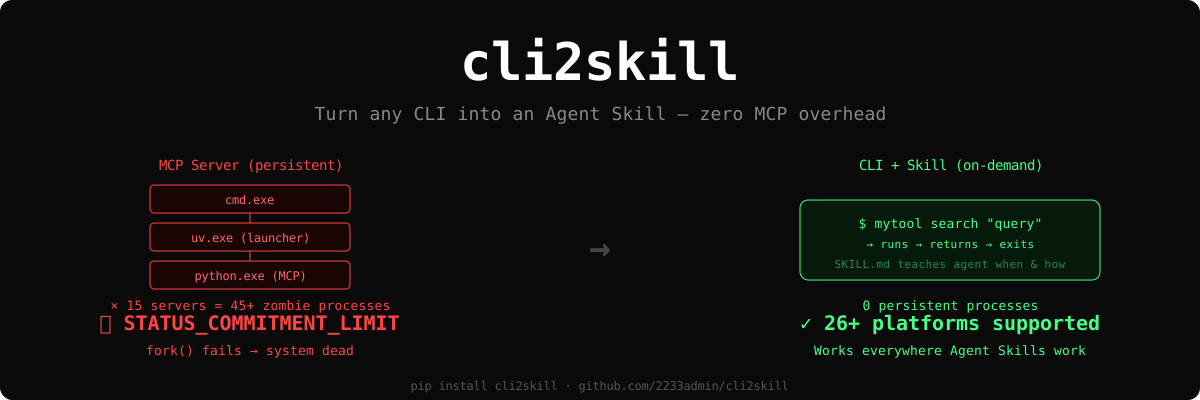
🔧 Turn any MCP into an Agent Skill — zero MCP overhead
把任意 MCP 变成 Agent Skill —— 告别 MCP 进程泄漏
Quick Start · Why Not MCP · Examples · Full Story (血案全文)




The Problem · 问题
EN: 15 MCP servers accumulated 400+ zombie processes on a 32GB Windows machine, exhausting virtual memory commit charge (0xC000012D). Every fork() failed. The system was completely dead.
CN: 15 个 MCP server 在 32GB Windows 机器上积累了 400+ 僵尸进程,耗尽虚拟内存 commit charge(0xC000012D),所有 fork() 失败,系统彻底死机。
Each MCP server spawns a 3-layer process tree that never exits:
每个 MCP server 产生一个三层进程树,session 结束后不回收:
cmd.exe          ← shell wrapper / 壳
  └── uv.exe       ← Python launcher / 启动器
       └── python.exe  ← MCP server / 服务进程
× 15 servers = 45+ persistent processes → system dead in 5-10 sessions
"Software as a tool 结论是别用 MCP... 这玩意是拿去忽悠子刊审稿人用的"
—— 某大厂 RL 团队工程师的非公开评论
Bug report: anthropics/claude-code#38228
The Solution · 解决方案
Don't run a server. Just run a command.
别跑服务器,跑命令就行。
# Before (MCP): persistent process, leaks memory, hard to debug
# 之前 (MCP): 常驻进程,泄漏内存,难调试
Agent --JSON-RPC--> MCP Server (persistent) --API--> Backend

# After (CLI + Skill): runs, returns, exits
# 之后 (CLI + Skill): 跑完退出,零开销
Agent --Bash tool--> CLI (on-demand) --API--> Backend
cli2skill parses any CLI's --help and generates an Agent Skill — a markdown file that teaches your AI agent when and how to call your tool.
cli2skill 解析任意 CLI 的 --help,生成 Agent Skill —— 一个教 AI agent 何时、如何调用你工具的 markdown 文件。
Works with 26+ platforms · 兼容 26+ 平台: Claude Code · Codex CLI · Gemini CLI · Cursor · Copilot · VS Code...
Quick Start · 快速开始
# ClawHub (recommended for Claude Code users)
clawhub install cli2skill

# PyPI
pip install cli2skill
# Generate a skill from any CLI / 从任意 CLI 生成 Skill
cli2skill generate gh --name github-cli -o ~/.claude/skills/

# Preview parsed metadata / 预览解析结果
cli2skill preview mytool

# Custom executable path / 自定义可执行路径
cli2skill generate "python my_tool.py" --name my-tool \
  --exe-path "python /full/path/my_tool.py"

# Parse from saved help text / 从文件解析
cli2skill generate mytool --help-file help_output.txt
That's it. Drop the generated .md into ~/.claude/skills/ (or your platform's skill directory), and your agent can use the CLI immediately.
就这样。把生成的 .md 放进 ~/.claude/skills/(或你平台的 skill 目录),agent 立刻就能用。
Why Not MCP · 为什么不用 MCP
| MCP Server | CLI + Skill | |
|---|---|---|
| 🔴 Processes / 进程 | 3 per server, persistent | 1 per call, exits immediately |
| 🔴 Memory / 内存 | Accumulates across sessions | Zero when idle |
| 🔴 Debugging / 调试 | JSON-RPC over stdio pipes | Plain stderr |
| 🔴 Token cost / Token 开销 | 150k per workflow | 2k per workflow* |
| 🟢 Platforms / 平台 | Claude Code only | 26+ via Agent Skills spec |
* Anthropic's own benchmark: code execution vs direct MCP tool calls = 98.7% token savings.
When MCP IS right · MCP 仍然适用的场景
- 🟢 Persistent browser sessions / 持久化浏览器会话
- 🟢 Multi-client shared servers / 多客户端共享服务
- 🟢 Streaming notifications / 流式通知推送
- 🟢 Remote HTTP endpoints (Slack, GitHub, Notion) / 远程 HTTP 端点
Rule of thumb / 经验法则: If your tool is "call → return result", use CLI + Skill. If it needs persistent state or push notifications, MCP is fine.
如果你的工具是"调用 → 返回结果",用 CLI + Skill。如果需要持久状态或推送通知,MCP 是对的。
Examples · 示例
Generated: GitHub CLI
cli2skill generate gh --name github-cli --no-subcommands
---
name: github-cli
description: Work seamlessly with GitHub from the command line.
user-invocable: false
allowed-tools: Bash(gh *)
---

# github-cli

## Commands

gh auth
gh browse
gh issue
gh pr
gh repo
gh release
...

## When to use
- Work seamlessly with GitHub from the command line.
- Available commands: `auth`, `browse`, `issue`, `pr`, `repo`
Generated: Custom Python Tool
cli2skill generate "python memu-cli.py" --name memu \
  --exe-path "python /path/to/memu-cli.py"
---
name: memu
description: memU memory CLI
user-invocable: false
allowed-tools: Bash(python /path/to/memu-cli.py *)
---

# memu

## Commands

python /path/to/memu-cli.py search
python /path/to/memu-cli.py query
python /path/to/memu-cli.py add
python /path/to/memu-cli.py categories

### search
Semantic search

### query
Search + categories

### add
Memorize content

### categories
List categories
Real Migration: 4 MCP Servers → 0 Persistent Processes
实际迁移:4 个 MCP Server → 0 个常驻进程
| Tool / 工具 | Before (MCP) | After (CLI) | Processes / 进程 |
|---|---|---|---|
| memU (memory) | uv → python MCP | python memu-cli.py search |
3 → 0 |
| PageIndex (docs) | python MCP | python pageindex-cli.py search |
1 → 0 |
| GitNexus (code graph) | node MCP | gitnexus query (already a CLI!) |
1 → 0 |
| Obsidian (notes) | node MCP | python obsidian-cli.py read |
1 → 0 |
Supported Formats · 支持的格式
| Framework / 框架 | Language / 语言 | Detection / 检测方式 |
|---|---|---|
| argparse / Click / Typer | Python | command description |
| Cobra | Go | command: description |
| Commander.js | TypeScript | command description |
| clap | Rust | command description |
| Any CLI / 任意 | Any / 任意 | Generic --help parsing |
How It Works · 工作原理
graph LR
    A["Your CLI<br/>你的 CLI"] -->|--help| B["cli2skill<br/>解析器"]
    B -->|parse| C["CLIMetadata<br/>命令元数据"]
    C -->|generate| D["SKILL.md<br/>Agent Skill"]
    D -->|drop in| E["~/.claude/skills/<br/>技能目录"]
    E -->|auto-discover| F["Agent uses CLI<br/>Agent 调用 CLI"]
Background · 背景
This tool was born from a real production incident on 2026-03-24. Full technical writeup with process snapshots, root cause analysis, and references:
这个工具诞生于 2026-03-24 的一次真实生产事故。完整技术分析(含进程快照、根因分析、引用):
📖 Read the full story → ARTICLE.md
References · 参考
- Agent Skills Specification — Anthropic, 2025-12
- Code Execution with MCP — Anthropic (98.7% token savings)
- Skills vs Dynamic MCP Loadouts — Armin Ronacher
- CLI-Anything — HKU, 22.3k stars
- anthropics/claude-code#38228 — MCP process leak bug
License
MIT · Zero dependencies · Python 3.10+
Reviews (0)
Sign in to leave a review.
Leave a reviewNo results found