Vibe3DScene
mcp
Pass
Health Pass
- License — License: Apache-2.0
- Description — Repository has a description
- Active repo — Last push 0 days ago
- Community trust — 43 GitHub stars
Code Pass
- Code scan — Scanned 12 files during light audit, no dangerous patterns found
Permissions Pass
- Permissions — No dangerous permissions requested
Purpose
This tool is a 3D scene agent that connects to Blender, allowing users to generate and manipulate 3D environments using natural language prompts via an MCP interface.
Security Assessment
Overall Risk: Low. The automated code scan inspected 12 files and found no dangerous patterns, hardcoded secrets, or requests for dangerous permissions. However, because the tool integrates with external systems, developers should be aware of its underlying architecture. It makes network requests to operate, specifically relying on a FastAPI backend and Redis for state management. Furthermore, it interfaces directly with external tool services and can execute local applications, notably launching Blender in headless mode or communicating with a local Blender client.
Quality Assessment
Quality is good. The project is licensed under the permissive Apache-2.0 license and is actively maintained, with its most recent code push occurring today. It has garnered 43 GitHub stars, indicating a fair level of early community trust and interest. The repository is well-documented, featuring clear architecture maps and instructions for various deployment topologies, including Docker.
Verdict
Safe to use, though administrators should ensure proper network isolation due to its external API calls and Redis integration.
This tool is a 3D scene agent that connects to Blender, allowing users to generate and manipulate 3D environments using natural language prompts via an MCP interface.
Security Assessment
Overall Risk: Low. The automated code scan inspected 12 files and found no dangerous patterns, hardcoded secrets, or requests for dangerous permissions. However, because the tool integrates with external systems, developers should be aware of its underlying architecture. It makes network requests to operate, specifically relying on a FastAPI backend and Redis for state management. Furthermore, it interfaces directly with external tool services and can execute local applications, notably launching Blender in headless mode or communicating with a local Blender client.
Quality Assessment
Quality is good. The project is licensed under the permissive Apache-2.0 license and is actively maintained, with its most recent code push occurring today. It has garnered 43 GitHub stars, indicating a fair level of early community trust and interest. The repository is well-documented, featuring clear architecture maps and instructions for various deployment topologies, including Docker.
Verdict
Safe to use, though administrators should ensure proper network isolation due to its external API calls and Redis integration.
Create your own 3D scene with words anywhere.
README.md
Vibe3DScene: Vibe Creating Your Own 3D Scene With Words Anywhere





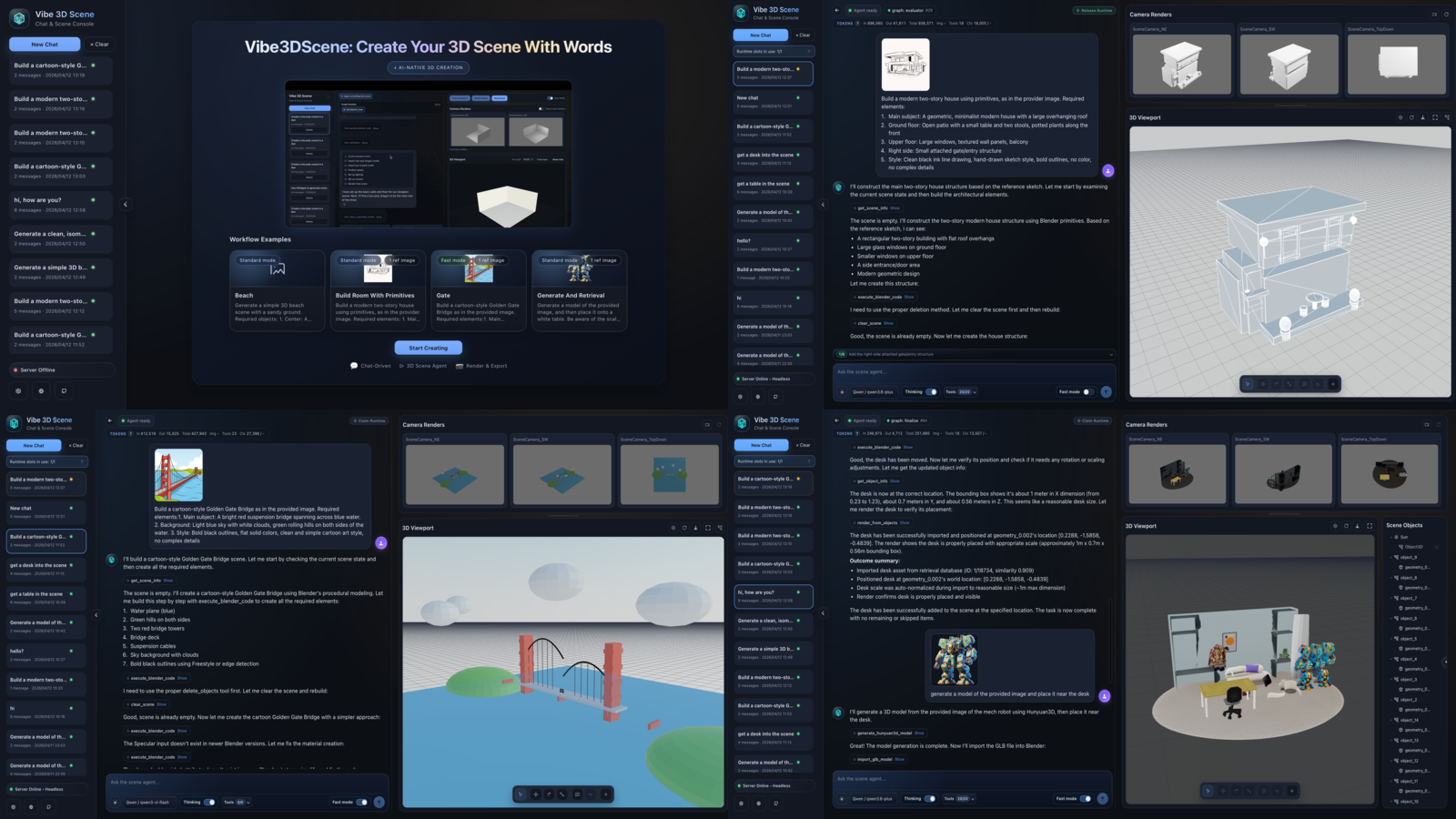
Table of Contents
- 1. Overview
- 2. Quickstart
- 3. Repository Structure
- 4. Documentation Map
- 5. Acknowledgements
- License
- Contributing
1. Overview
Video Demo
Introduction
Vibe3DScene is a Blender-connected 3D scene agent built around a modular LangGraph runtime, MCP tools, and web/API/CLI interfaces.
- From the workflow perspective, the project now uses a router-driven agentic runtime that can choose between
direct_modeandplan_mode, manage todos explicitly, run infast_modewhen full verification is unnecessary, and optionally switch into an experimental dual-agent topology. - From the systems perspective, the backend can run Blender in
headlessmode behind an API or pair with a local Blender client. Redis-backed ownership, checkpointing, and persisted session state support single-worker and multi-worker deployments. - From the tooling perspective, the MCP layer unifies scene control, rendering, retrieval, reconstruction, and 3D generation tools, while external tool servers are decoupled into the sibling
3DAgentToolsstack.
High-Level Runtime
flowchart LR
    U[Web UI / CLI / Blender client] --> API[FastAPI]
    API --> ROUTER[Request router and LangGraph runtime]
    ROUTER --> MCP[MCP tools]
    MCP --> BLENDER[Blender addon socket or headless session]
    MCP --> TOOLS[External tool services]
    BLENDER --> OUT[Scene / Render / Assets]
    TOOLS --> OUT
For the exact runtime graph and deployment topologies, see:
2. Quickstart
2.1 Prerequisites
- Python 3.11+
- Blender 3.6+
- Node.js 18+ for the frontend
- Redis for recommended persistence and multi-worker coordination
- Docker if you want to run external tool services in containers
2.2 Install
git clone --recurse-submodules https://github.com/3DSceneAgent/Vibe3DScene
cd Vibe3DScene

python -m venv .venv
source .venv/bin/activate
pip install -r requirements.txt

cp .env.example .env
# fill in provider keys and runtime configuration
If you also want the optional external tool stack:
git clone --recurse-submodules https://github.com/3DSceneAgent/3DAgentTools ../3DAgentTools
2.3 Common Run Modes
| Goal | Command |
|---|---|
| Run API in headless mode | ./scripts/run_headless.sh |
| Run API for a local Blender client | ./scripts/run_local_client.sh |
| Run API manually | python main.py --mode api --port 8000 |
| Run CLI | python main.py --mode cli |
| Run frontend dev server | cd web && npm install && npm run dev |
| Run tests | pytest |
After the backend starts, open the web app and point it at http://localhost:8000.
If you want single-agent verify to add internal geometry penetration checks on top of the existing VLM visual check, enable:
SCENE_AGENT_ENABLE_PENETRATION_VERIFY=true- optional tuning via
SCENE_AGENT_PENETRATION_THRESHOLD_M(default0.02),SCENE_AGENT_PENETRATION_MAX_CANDIDATE_PAIRS, andSCENE_AGENT_PENETRATION_MAX_REPORTED_PAIRS
2.4 Setup References
- Installation, runtime modes, single-worker and multi-worker startup: Startup and Deployment Guide
- Tool servers and external services: Tool Servers
- MCP server, tool categories, and gating: MCP Server and Tools
- Environment variables and provider configuration: Configuration Reference
- Major project version updates: CHANGELOG
- Near-term priorities and known issues: Roadmap
- Design discussion versus
blender-mcp + cc: How This Differs fromblender-mcp + cc
3. Repository Structure
scene_agent/     Core runtime: graph, sessions, memory, providers, API/CLI
mcp_server/      MCP server runtime, tool gating, and tool registry
web/             React + TypeScript frontend (Vite)
addon/           Blender addon code and packaging for headless runtime support
tests/           Unit, integration, contract, and manual test suites
scripts/         Local helpers, smoke tests, validation, and cleanup tools
../3DAgentTools/ Optional sibling checkout for external tool services
4. Documentation Map
- Runtime Workflow
- Exact runtime graph, state flow,
direct_modevsplan_mode, single-agent vs dual-agent, evaluator behavior, image routing, and persistence touchpoints.
- Exact runtime graph, state flow,
- System Architecture
- High-level layers, single-worker vs multi-worker deployment, owner-proxy behavior, Redis coordination, and persisted sessions.
- Startup and Deployment Guide
- Local setup, macOS/Linux prerequisites, single-worker and multi-worker startup flows, and Docker entry points.
- MCP Server and Tools
- MCP server role, tool categories, runtime gating, mode constraints, and optional external services.
- Tool Servers
- External
3DAgentToolsstack, expected services, startup options, and host/port coordination.
- External
- Configuration Reference
- Provider, API, session, persistence, tool, and frontend-related environment variables.
- Roadmap
- Near-term workflow improvements, product expansion directions, local-client priorities, and currently known UI/runtime issues.
- How This Differs from
blender-mcp + claude code- Design differences in agent orchestration, headless execution, multimodal tooling, and web-side editing support.
- CHANGELOG
- Date-based summary of major updates.
5. Acknowledgements
- Blender-MCP
- VIGA
- LangGraph
- LangChain
- FastAPI
- Model Context Protocol (MCP)
- langchain-mcp-adapters
- Blender
- PolyHaven
- TRELLIS.2
- Sketchfab
- Hyper3D Rodin
- Tripo AI
License
Apache License 2.0. See LICENSE.
Contributing
Please read CONTRIBUTING.md before opening pull requests.
Reviews (0)
Sign in to leave a review.
Leave a reviewNo results found