agent-taskboard
Health Warn
- License — License: MIT
- Description — Repository has a description
- Active repo — Last push 0 days ago
- Low visibility — Only 6 GitHub stars
Code Fail
- process.env — Environment variable access in cli/task.ts
- network request — Outbound network request in cli/task.ts
- exec() — Shell command execution in client/src/api.ts
- network request — Outbound network request in client/src/api.ts
Permissions Pass
- Permissions — No dangerous permissions requested
No AI report is available for this listing yet.
A local-first board for every project on your machine — and a task queue your coding agents pull work from. Run 'board here' in any project directory.
agent-taskboard


English · 简体中文
Note: the UI, code comments, and commit history are in Chinese. This README is not.
board here
Ask any project directory: what's on my plate?
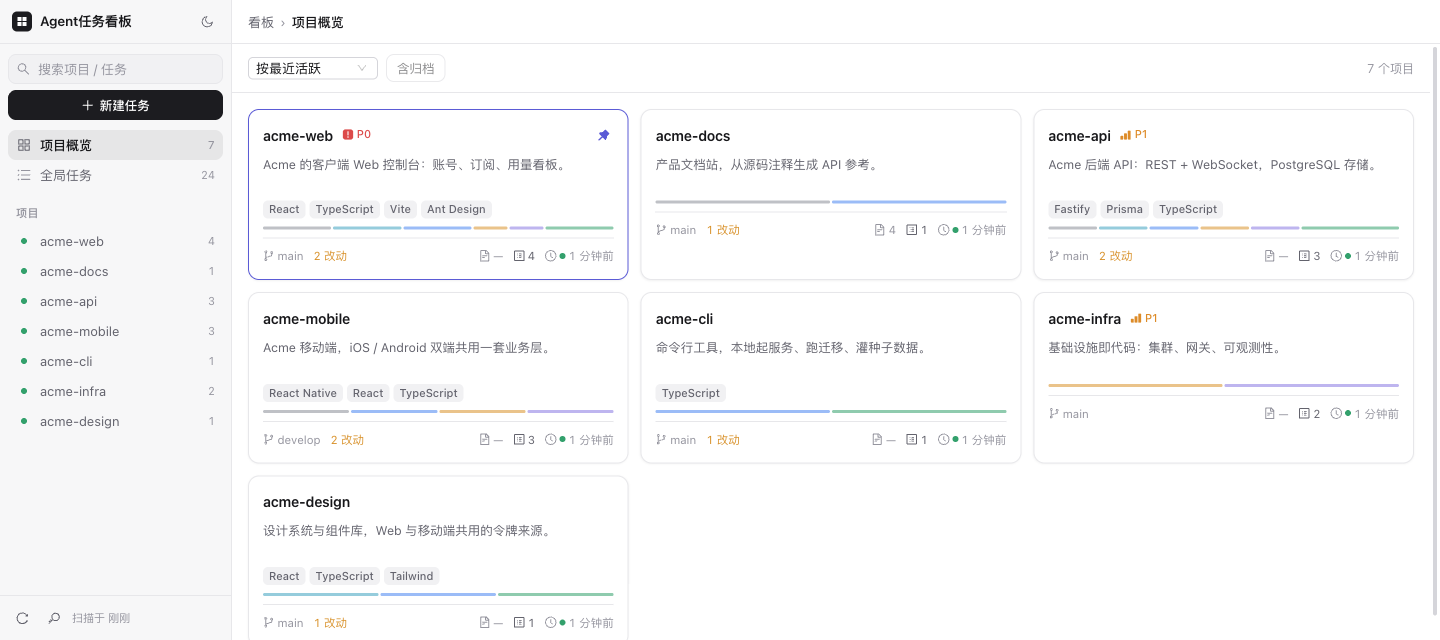
A local-first board for every project on your machine — and a task queue your coding agents pull work from.
It scans the project directories on your machine and shows, at a glance, what branch each one is on,
whether it has uncommitted changes, what stack it uses, and how many todos are left. On top of that sits
a six-column task board — and your coding agent can claim those tasks with a single command, do the work,
and write the status back.
How this differs from yet another todo app
Most boards require an agent to know a "project ID" and a "task ID" before it can do anything. This one doesn't:
cd ~/projects/some-app
board here                      # figures out which project this directory belongs to, lists its tasks
board here doing 42 --as codex  # claim it, signed
# ...do the work...
board here review 42            # hand it back — by convention agents don't close tasks themselves
The agent works inside the project directory, and board here resolves the project from cwd — no config,
no IDs to remember. That single command is the handoff point between you and your agents.
Why a board instead of a plan in the context window
A plan an agent writes for itself lives in the context window, and the context window is lossy: it gets
summarized as the session grows, and it's gone when the session ends. An external board isn't.
- State survives compaction.
board herere-reads the full current state on every call. The agent
doesn't have to remember what it was working on — it asks. - State survives the session. What was
doingyesterday is stilldoingtoday, assignee and all. - Rejections close the loop.
board reject <id> "reason"is restricted to tasks under review, and the
reason is fed back into theboard hereoutput the agent reads when it picks the task up again — you
don't re-explain anything. - One task, one commit. Task boundaries become commit boundaries, so review and rollback stay per-task.
Be clear on what's enforced and what isn't. The API validates status values and restricts rejection to
tasks under review. Marking a task done no longer goes through the general PATCH — it is refused there
and must use a dedicated POST /api/tasks/:id/accept, which stamps accepted_at/accepted_by. That makes
completion a deliberate, auditable action and stops a stray status update from silently closing a task —
but it is a guardrail, not a lock: this is a single-user tool where the human and the agent share one
token, so nothing technically stops an agent from calling accept itself. That agents claim only todo
and hand work back at review rather than closing it remains a workflow convention in AGENTS.md and
the Claude Code skill.
Features
Project scanning (read-only, live)
- Git branch, uncommitted change count, last commit time
- Tech-stack detection, README summary,
tasks/todo.mdparsing - Multi-repo workspaces: a wrapper directory holding several git repos (say
acme/withacme-app,acme-server,acme-sdk) becomes one workspace plus one project per inner repo; the workspace board shows every repo's tasks with a repo tag, and cross-repo tasks live on the workspace itself
Task board
- Workspace UI: a persistent left sidebar (search / project list / global tasks) with a breadcrumb header and per-page toolbar; light and dark themes
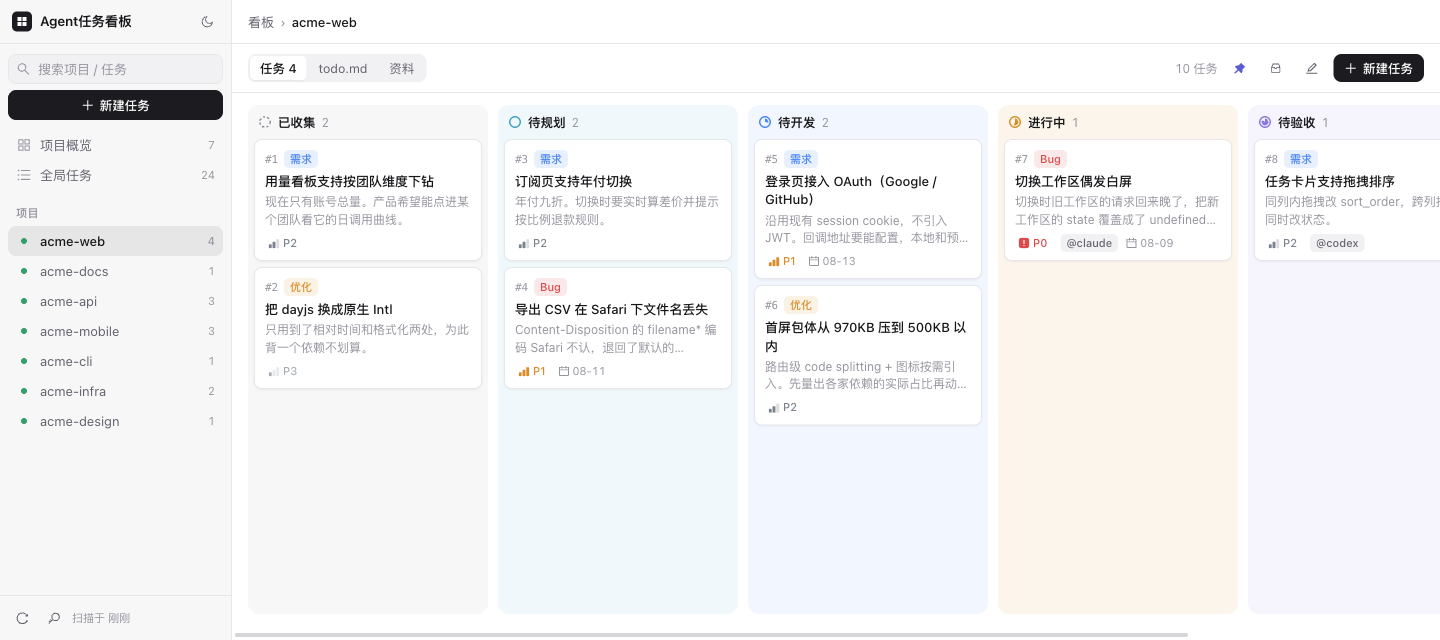
- Six columns: collected → backlog → todo → doing → review → done — each column carries its own status
tint, and you can create a card straight from a column header (except done: only a human can accept a
task from review into it) - Priority / type (feature · bug · optimize) / assignee / due date / image attachments
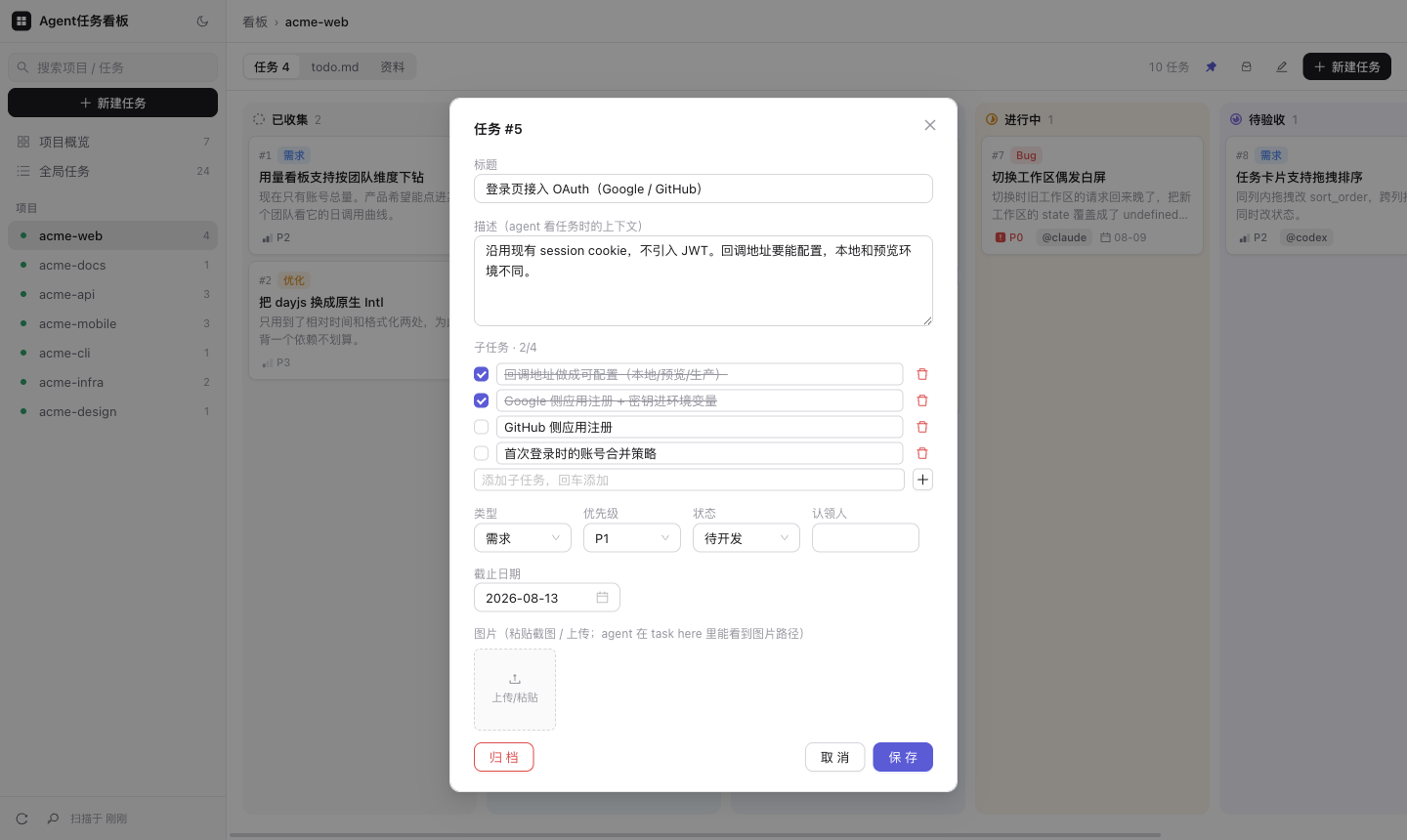
- Subtasks: a lightweight checklist per task (progress on the card, ticked off in the detail view, listed under
board here) - Rejection flow: bouncing a task from review back to todo carries a reason, and that reason is fed
back intoboard hereoutput where the agent will see it; you can attach screenshots while
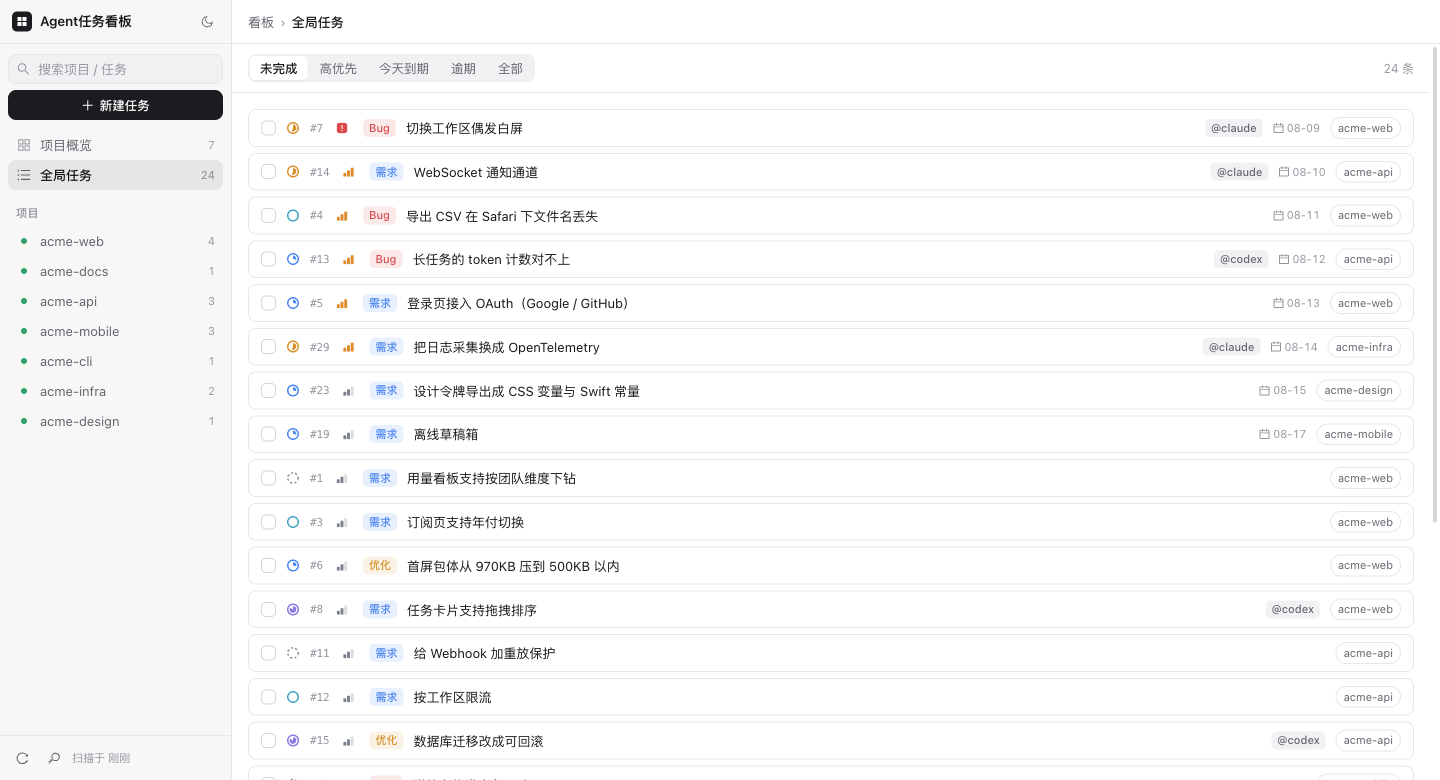
rejecting, and revise the reason afterwards - Cross-project global task view
Open a card and you get the task detail — the description is the context your agent reads, subtasks are
ticked off in place, and screenshots paste straight in (agents get the absolute image path fromboard here):
Everything across every project, in one list:
Remote access (optional)
- Bearer token auth behind a Tailscale tunnel
Workflows this enables
Two agents, one board. Different agents claim different tasks — board here doing 42 --as codex puts@codex on the card, the next one shows @claude. Who did what stays visible after the fact, which is
what you need when reviewing work you didn't watch happen. Nothing about the board is tied to one vendor,
so mixing them costs nothing.
Asynchronous review. An agent finishes and moves the task to review — by convention it doesn't close
it. You go through the board whenever suits you and bounce what isn't right:
board reject 42 "empty-input case has no test"
The task drops back to todo carrying that reason, and the next agent to pick it up sees it in yellow at
the top of board here, before the description. You stop re-explaining the same correction in chat, and
review stops having to happen while the agent waits.
An inbox you don't have to triage on the spot. Two of the six columns sit upstream of anything an
agent can touch, and that's deliberate:
| Column | Means | Who acts |
|---|---|---|
collected 已收集 |
Caught, not yet judged | nobody yet — it's an inbox |
backlog 待规划 |
Decided to do, not scheduled | you, when planning |
todo 待开发 |
Triaged and actionable | agents claim from here |
The point is to separate the moment of capture from the moment of decision. An idea at 1am goes
straight in — board here add "..." defaults to collected — with no prompt to rank it or justify it.
You triage in a batch later, when you're in the right frame of mind for it.
It matters more with agents in the loop. When an agent hits something out of scope mid-task, it files
the finding instead of either silently expanding the work or losing it. And because new items land incollected rather than todo, an agent can't create its own next task — the queue it pulls from
only ever contains work you put there.
What the board doesn't do: it doesn't assign work, launch agents, or judge results. It records who
holds what, what state it's in, and why something came back. Orchestration stays wherever you already do
it — your own prompts, a CI job, whatever agent runner you use.
Quick start
Requires Node 22+ and git.
Let your coding agent install it
This is a tool for people who work with coding agents, so the fastest setup is to hand the job to yours.
Paste this into Claude Code, Codex, or whatever you use:
Set up agent-taskboard (https://github.com/52216108/agent-taskboard) on this machine.

1. Clone it somewhere sensible. Build the frontend: cd client && npm install && npm run build
   Then install backend deps: cd ../server && npm install
2. Ask me which directories hold my projects (the default is ~/projects) and start the server
   with BOARD_ROOTS set accordingly. Confirm http://127.0.0.1:7788 responds and that the
   projects it lists are actually mine.
3. Symlink bin/board into my PATH, then verify `board ls` works and `board here` correctly
   identifies the project when run inside one of my project directories.
4. Wire yourself up so you can pull work from the board:
   - Claude Code: install docs/agents/board-tasks-skill.md to ~/.claude/skills/board-tasks/SKILL.md
   - Codex: follow docs/agents/codex-setup-prompt.md to write the board conventions into the
     global ~/.codex/AGENTS.md (the repo's own AGENTS.md only applies when working inside this
     repo — you won't see it from other projects)
5. On macOS, ask whether I want it running at login. If yes: bash deploy/setup.sh
   (pass BOARD_PROJECTS=... if I have projects outside the scan roots).

Constraint: keep the server bound to 127.0.0.1. Do not expose it to the network unless I
explicitly ask — and if I do, set BOARD_TOKEN.
Step 4 is the part worth having an agent do: it's the step people forget, and it's what turns the
board from a list you look at into a queue your agent pulls from.
Or do it manually
git clone https://github.com/52216108/agent-taskboard.git
cd agent-taskboard

# Build the frontend (the backend serves it)
cd client && npm install && npm run build

# Start the backend
cd ../server && npm install && npm run start
Open http://127.0.0.1:7788 . By default it scans directories under ~/projects.
Install the CLI (optional, but it's how agents interact with the board):
cd /path/to/agent-taskboard                  # the repo root — the block above left you in server/
ln -sf "$PWD/bin/board" ~/.local/bin/board   # make sure that directory is on your PATH
board help
On macOS, bash deploy/setup.sh installs it as a launchd service that starts at login —
see deploy/README.md.
CLI
board                       list projects
board <project>             show a project's tasks (--json for structured output)
board here                  show tasks for the project owning the current directory
board here add <title>      file a task against the current project (--bug / --optimize)
board here add <title> --repo <sub>   inside a workspace: file it against a specific inner repo
board here add <title> --repo a --repo b   touches several repos: lands on the workspace, tagged with the repos involved
board here doing <id> --as <name>   claim a task
board here review <id>      hand it back for review when done
board [here] reject <id> "reason"   bounce a task back, reason is fed to the agent
board move <id> <project>   re-home a task (e.g. from a workspace down to acme/acme-app)
board tags <id> [repo...]   set which inner repos a workspace-level task touches (no args = clear)
board merge <#id> <project> fold a stale project row (renamed remote etc.) into the live one; backs up first
board backup                back up the database
Inside a workspace, board here lists the workspace's own cross-repo tasks and then each inner repo's;
inside an inner repo it lists that repo's tasks plus the workspace's cross-repo ones that touch it (untagged
ones count as touching every repo) — so an agent started at either level sees everything it may need to touch.
Wiring up your coding agent
Teach your agent the workflow once, and it can pull work from the board on its own:
- Codex — paste the prompt from docs/agents/codex-setup-prompt.md
into it once; it writes the conventions into your global~/.codex/AGENTS.md, which Codex loads in
every session. The repo-root AGENTS.md only covers work inside this repo — Codex won't
see it from your own projects. - Claude Code — paste the prompt from docs/agents/claude-setup-prompt.md
into it once; it installs board-tasks-skill.md as a skill on its own.
Or install the file manually, or fold its conventions into yourCLAUDE.md. - Anything else — point it at board-tasks-skill.md; it's plain
markdown describing the same conventions. (Codex is the only agent that must go through its setup
prompt — its rules only take effect from the global~/.codex/AGENTS.md. The Claude Code prompt
is just a shortcut that automates the install.)
Why any agent works
The board never launches an agent and never calls a model API. Agents are the active party: they runboard here (or hit the HTTP API) to see what's assigned, claim it, and write the status back.
That inverts the usual integration problem. There is no adapter layer, no argv template, no
per-vendor permission flag to get right — so there is no compatibility matrix to maintain either.
The only requirement is that your agent can run a shell command. Claude Code, Codex, Gemini CLI,
Qwen Code, Aider, or something you wrote yourself all qualify equally, whatever model sits behind
them. It doesn't even have to be an AI: a shell script or a CI job can drive the same CLI.
What each agent does need is to know the conventions — claim only todo, hand back at review,
one commit per task. That's what the files above carry.
What triggers a run
Pull, not push — and you trigger the pull. The board has no webhooks and holds no connections open;
agents don't poll it either. A run starts when you tell your agent to work the board, it callsboard here once, and takes it from there.
That's a consequence of how these agents exist: a session is a process that ends. There's nothing
persistent for a board to push to. Agents also don't self-assign — the skill and AGENTS.md both say
to wait for you — because task state is shared, and an agent claiming work on its own would collide
with your own triage.
One thing does behave like a push, though: a rejection reason isn't lost in a chat log. It's attached
to the task, so whichever agent picks it up next reads it at the top of board here output. Delivery is
guaranteed; it just happens when the agent comes to collect, not when you wrote it.
If you want runs to start on their own, wrap it from outside — a cron job or CI step can pollboard here --json and launch an agent when something is waiting. That's what the JSON output is for.
The board stays out of that layer.
Configuration
Backend environment variables:
| Variable | Default | Description |
|---|---|---|
BOARD_ROOTS |
~/projects |
Scan roots, comma-separated |
BOARD_PROJECTS |
empty | Extra project paths outside the scan roots, comma-separated |
BOARD_PORT |
7788 |
Listen port |
BOARD_HOST |
127.0.0.1 |
Bind address (see Security below) |
BOARD_DB |
~/.project-board/board.db |
SQLite database path |
BOARD_TOKEN |
empty | Bearer token; required when binding to a network address |
BOARD_ALLOWED_HOSTS |
empty | Extra Host values to accept, comma-separated. Required behind a reverse proxy or tunnel — otherwise the anti-DNS-rebinding check returns 403 bad host |
BOARD_SCAN_TTL |
60000 |
Scan result cache, ms |
BOARD_GIT_TIMEOUT |
5000 |
Per-repo git timeout, ms |
BOARD_CONCURRENCY |
6 |
Scan concurrency limit |
BOARD_TASK_IMAGES_DIR |
~/.project-board/task-images |
Task image storage. The CLI reads images from the same path, so if you override it, both must agree |
CLI environment variables: BOARD_URL (default http://127.0.0.1:7788), BOARD_TOKEN,BOARD_ACTOR (default signature for claiming tasks).
⚠️ Security
The server doesn't execute anything on your behalf. But the tasks it stores become instructions a
coding agent acts on, so write access to the board is worth about as much as shell access. It's
defended accordingly:
- The server binds to
127.0.0.1only by default — reachable from your machine alone. - Binding to any network-reachable address (including
0.0.0.0) requiresBOARD_TOKEN, or the server
refuses to start. This is a hard check, not a warning. - Even on loopback, browsers can reach it. Every
/api/request validates theHostheader against
a whitelist (blocking DNS rebinding) and rejects browser-initiated cross-site requests. Without this,
any page you visited could rewrite your tasks — atext/plainPOST is a CORS simple request and never
triggers a preflight. Behind a reverse proxy or tunnel, add your domain toBOARD_ALLOWED_HOSTS. - Even with a token set, don't expose it directly to the public internet. For remote access, use
Tailscale or an SSH tunnel — the server still binds to loopback and the tunnel handles encryption and identity. - Token checking: writes accept only the
Authorization: Bearerheader (preserving CSRF protection); reads
additionally accept a?token=query parameter, because<img>tags can't set custom headers. Comparison
is constant-time, and tokens are redacted from access logs.
See SECURITY.md for the full threat model.
The database, logs, and task images all live under ~/.project-board/ and never enter version control.
Platform support
- macOS — the primary development and usage platform; the launchd autostart scripts under
deploy/are macOS-only. - Linux — core features (scanning / board / CLI) should work but are not well tested;
you'll need to write your own systemd unit for autostart. - Windows — untested.
The only native dependency is better-sqlite3, which ships prebuilt binaries for mainstream platforms,
so a local toolchain is usually not required.
Development
cd server && npm run dev    # backend with hot reload (tsx watch)
cd client && npm run dev    # frontend dev server, proxies /api to the backend

cd server && npm run typecheck && npm test
Code layout in DIRECTORY.md, schema in SCHEMA.md, API in API.md.
Note that code comments and the UI are in Chinese.
License
Reviews (0)
Sign in to leave a review.
Leave a reviewNo results found