cache-maxxing
Health Pass
- License — License: MIT
- Description — Repository has a description
- Active repo — Last push 0 days ago
- Community trust — 39 GitHub stars
Code Fail
- exec() — Shell command execution in hooks/handoff.ts
- exec() — Shell command execution in hooks/logic.ts
- network request — Outbound network request in hooks/register.tsx
- rm -rf — Recursive force deletion command in scripts/dev-sync.sh
Permissions Pass
- Permissions — No dangerous permissions requested
No AI report is available for this listing yet.
A bar above your chat to see when Claude's prompt cache expires, and what your next message will cost, before you send it.

cache-maxxing
See when Claude's prompt cache expires, and what your next message will cost, before you send it.



About
Ever feel like your Claude subscription quota disappears way faster than it should? Usually, it's not how much you're building - it's when you hit Send.
Claude keeps your chat "warm" only for a while so follow-up messages barely dent your limit. But wait too long between messages, and Claude has to re-read your entire chat history at full cost - up to 80× more quota than a normal reply.
cache-maxxing puts an easy-to-read bar right above your chat box (in the desktop app, VS Code, and terminal) to protect your quota while you build:
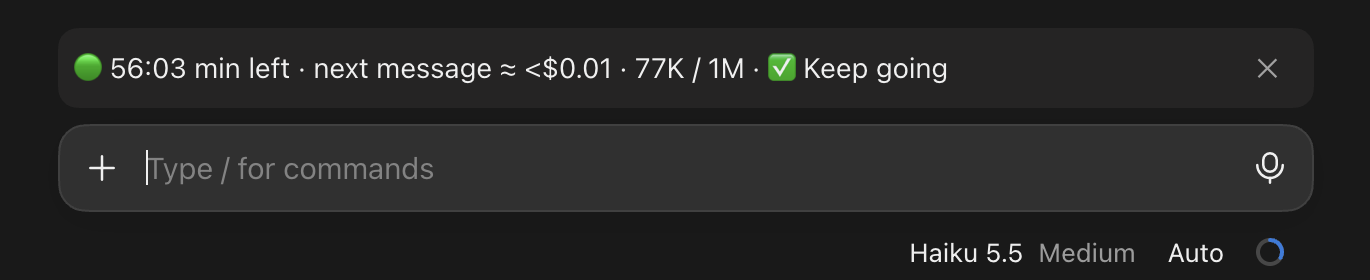
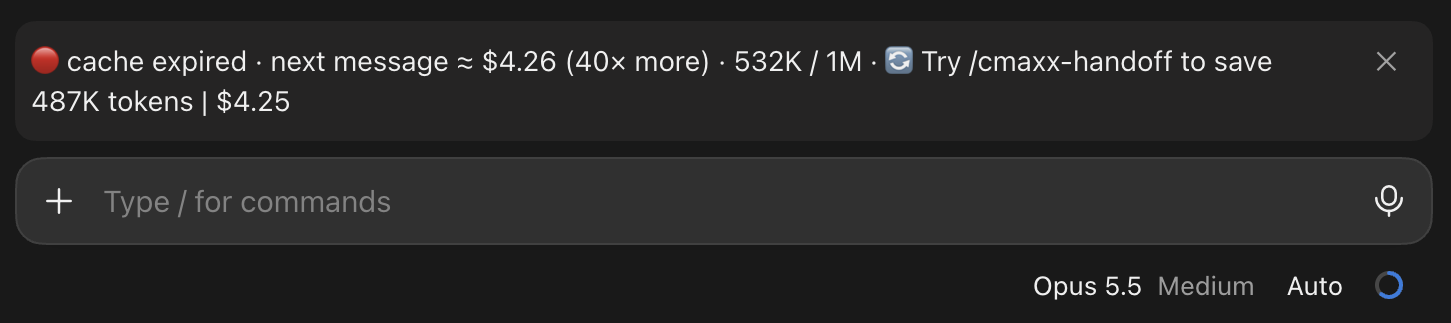
- Know before you hit Send: See a live countdown timer and whether your next message is cheap (🟢), running out of time (🟡), or about to take a huge bite out of your limit (🔴).
- Never lose your flow with
/cmaxx-handoff: When a long chat gets too expensive to continue, run one command to hand off a smart summary of your progress into a fresh chat—no re-explaining your project, and no massive quota spike. - Zero setup headaches, zero slowdown: Everything is calculated right on your machine using numbers Claude Code already tracks. The bar sends nothing anywhere.
 |
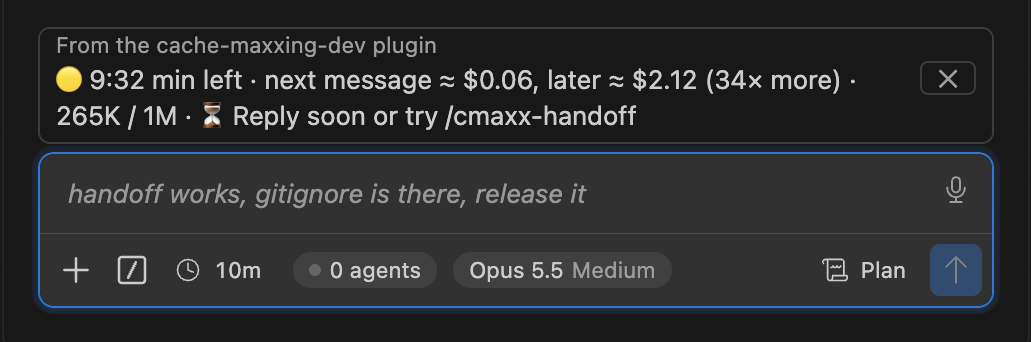 |
| 🟢 Cache active. Messages are cheap right now. | 🟡 Ending soon. The cheap moment to reply. |
 |
 |
| 🔴 Expired. What a rebuild costs, and what a handoff saves. | 🟠 Expired. But the rebuild cost is low. |
Features
| ⏱️ Live countdown | Minutes left on the cache, ticking every second; it survives restarts, sleep and switching chats. |
| 💲 Next-message cost | In dollars (API prices) or as "× more" (better for subscriptions), plus how full the chat is (290K / 1M). |
| 🚦 One clear tip | 🟢 keep going · 🟡 reply soon · 🟠 expired small chat, fine · 🔴 expired, with what a handoff would save. |
| 🔔 One pop-up | A single warning when a big chat's cache expires, and a heads-up if you send into it. Your message is never stopped. |
🔄 /cmaxx-handoff |
Haiku (effort: High) writes a briefing of the chat; a fresh chat picks up from it. The expired chat is never resent to the main model. |
📊 /cmaxx-stats |
Money and tokens saved, cache hit rate, rebuilds paid: for this chat and for all chats. |
⬆️ /cmaxx-update |
Updates the plugin, or at least its model and price list, so new models are priced on day one. |
| 🔒 Local by default | No network and no model calls, except the two commands above, and only when you run them. |
Install
Requires a recent Claude Code: the desktop app, the VS Code extension, or the CLI. It's tested on 2.1.325 and later.
Any application
Just paste this repository's link (https://github.com/5m0k3/cache-maxxing) in the chat window and ask Claude to install it for you.
or see below for your specific application:
Desktop app
- Click + next to the chat box, then Plugins → Manage Plugins.
- On top right press + Add → Add marketplace → Add from a repository and enter
5m0k3/cache-maxxing. - Add plugin → cache-maxxing.
Terminal or VS Code (at the Claude Code prompt)
/plugin install cache-maxxing --marketplace 5m0k3/cache-maxxing
Answer y to add the marketplace and press Enter for the user scope. The bar shows after your next message (may need a restart).
Usage
| Command | What it does |
|---|---|
/cmaxx |
Hide or show the bar in this chat (the ✕ on the bar hides it too). |
/cmaxx-handoff |
Write a briefing of this chat with Haiku and start a fresh chat from it. (Doesn't trigger the old chat's model) |
/cmaxx-stats |
Show savings, cache hit rate, rebuilds and replies: this chat and all chats. |
/cmaxx-update |
Update to the latest version, or refresh the model and price list. |
What each light means, the exact texts and the rules behind them: How the bar decides.
Settings
In the plugin's settings, under cache-maxxing:
| Setting | Default | What it changes |
|---|---|---|
| Rebuild limit ($) | 0.50 | Above this rebuild cost, the bar suggests a handoff instead of carrying on. |
| Warning time (minutes) | 15 | How early the bar turns 🟡 before the 1-hour cache expires. |
| Long chat size (tokens) | 300000 | When the 🟢 bar starts suggesting a handoff once you're done. |
| Show cost as | dollars | times shows "40× more" instead of dollars, which suits subscription plans. |
| Memory time | auto | auto is 1 hour (every Claude subscription chat). Choose 5 with an API key. |
Keep it updated
Plugins from GitHub don't update by themselves: Claude Code auto-updates only Anthropic's own marketplaces by default.
- Once: in a terminal session,
/plugin→ Marketplaces → cache-maxxing → Enable auto-update. - Any time: run
/cmaxx-update. If a newer version is out, it updates the plugin (in the terminal) or tells you how (desktop app, VS Code). Either way it refreshes the model and price list, so a newly released model is priced at once. - A chat on a newly launched model ends with
new model? try /cmaxx-update.
How the bar decides
From top to bottom, the first rule that fits:
- No reply yet in this chat: ⚪️ "cache-maxxing will start after you send a message".
- Cache expired or reset, and the rebuild costs more than the rebuild limit: 🔴, suggesting
/cmaxx-handoffwith what it would save. - Cache expired or reset, rebuild below the limit: 🟠 small chat, fine to keep going.
- Under 15 minutes left on the 1-hour cache: 🟡 reply soon.
- Active, but the chat is past the long-chat size: 🟢 with a handoff suggestion for when you're done.
- Otherwise: 🟢 keep going.
🟢 48 min left · next message ≈ $0.01 · 50K / 1M · ✅ Keep going
🟡 12:30 min left · next message ≈ $0.05, later ≈ $1.82 (40× more) · 228K / 1M · ⏳ Reply soon or try /cmaxx-handoff
🔴 cache expired · next message ≈ $2.32 (40× more) · 290K / 1M · 🔄 Try /cmaxx-handoff to save 232K tokens | $2.21
Costs are estimates at standard API list prices, and a floor: a reply that uses tools sends several requests. On a subscription you don't pay these dollars; read them as how much of your usage a message takes. "Active" means very likely active: in our measurements about 2 in 100 messages missed the cache even within the time limit.
Privacy
- The bar sends nothing anywhere and never calls a model. Everything it shows is worked out on your computer.
- Two commands reach outside, only when you run them:
/cmaxx-handoffsends Claude Haiku an abbreviated copy of the chat (the last 120 messages, long ones cut, tool output left out). The briefing is saved in your project under.claude/handoffs/, which gets its own.gitignore, so briefings are never committed./cmaxx-updatedownloads this plugin's version number and price list from this repository and sends nothing. GitHub sees your IP address, as for any download.
- Stored on your computer: a small record per chat (time of the last reply, chat size, model) for 7 days, and counts for
/cmaxx-stats(numbers only, each chat's for 90 days, the totals for good). Never the chat's text!
Limitations
- If your organization blocks Haiku,
/cmaxx-handoffwrites a facts-only briefing that keeps your last message, and says why. - The handoff's saving is an estimate: Haiku's share and a fresh chat's start are taken from measured medians, priced as Claude Haiku 5.5.
- Switching model and back within the hour shows "cache reset", although the first model's cache may still be warm.
/cmaxx-statsreads an older chat's history from its transcript only up to 4 MiB; a bigger chat that started before you installed the plugin is counted from when the plugin first saw it.- A brand-new chat in the desktop app shows the bar only after your first message: the app starts the chat, and its plugins, at that point.
FAQ
Does it cost anything to run? The bar, no. /cmaxx-handoff makes one small Haiku call, typically about a cent at API prices.
I'm on a subscription. Are the dollar amounts real? They're API list prices, a way to compare. Set Show cost as to times to see "40× more" instead.
Contributing
Issues and pull requests are welcome. See CONTRIBUTING.md for setup, tests and the project rules, and SECURITY.md to report a vulnerability privately. Changes are listed in CHANGELOG.md.
License
MIT © 5m0k3
Reviews (0)
Sign in to leave a review.
Leave a reviewNo results found