pi-signal
Health Warn
- License — License: NOASSERTION
- Description — Repository has a description
- Active repo — Last push 0 days ago
- Low visibility — Only 5 GitHub stars
Code Fail
- exec() — Shell command execution in extensions/signal.ts
- process.env — Environment variable access in extensions/signal.ts
Permissions Pass
- Permissions — No dangerous permissions requested
No AI report is available for this listing yet.
Connect pi to Signal Messenger for two-way messaging. Send a Note-to-Self message from your phone → pi receives it, the LLM processes it, and pi replies back automatically.
@aalzubidy/pi-signal
Connect pi to Signal Messenger for two-way messaging. Send a Note-to-Self message from your phone → pi receives it, the LLM processes it, and pi replies back automatically.
Only Note-to-Self messages are processed. Messages from other senders are silently ignored for security.
How It Works
Phone (Note-to-Self) → signal-cli daemon (SSE in-memory) → pi extension
    → 👀 reaction → LLM processes → auto-reply → ✅ reaction
The extension connects directly to the signal-cli daemon's SSE endpoint over HTTP — no log file on disk (messages are streamed in-memory).
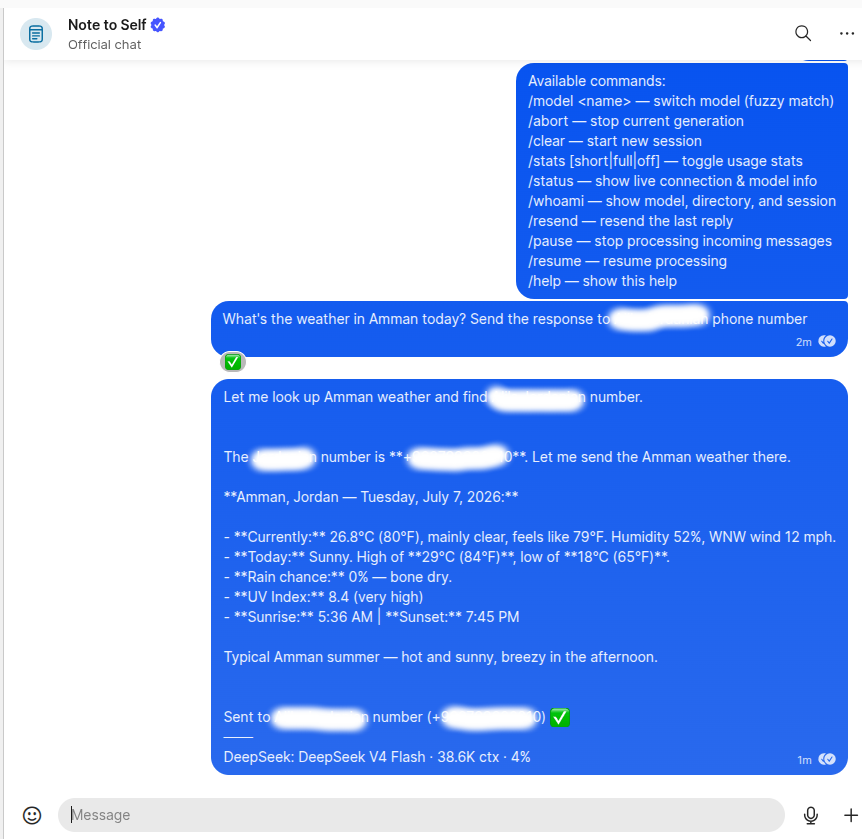
Commands (/model, /abort, /clear, /stats, /status, /whoami, /resend, /pause, /resume, /help) are handled locally without LLM. Everything else is forwarded to the LLM.
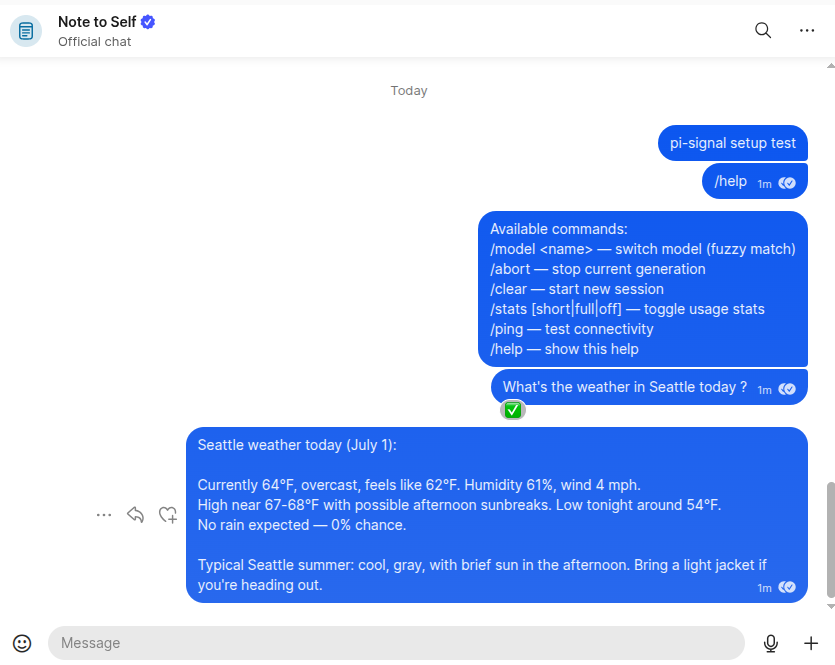
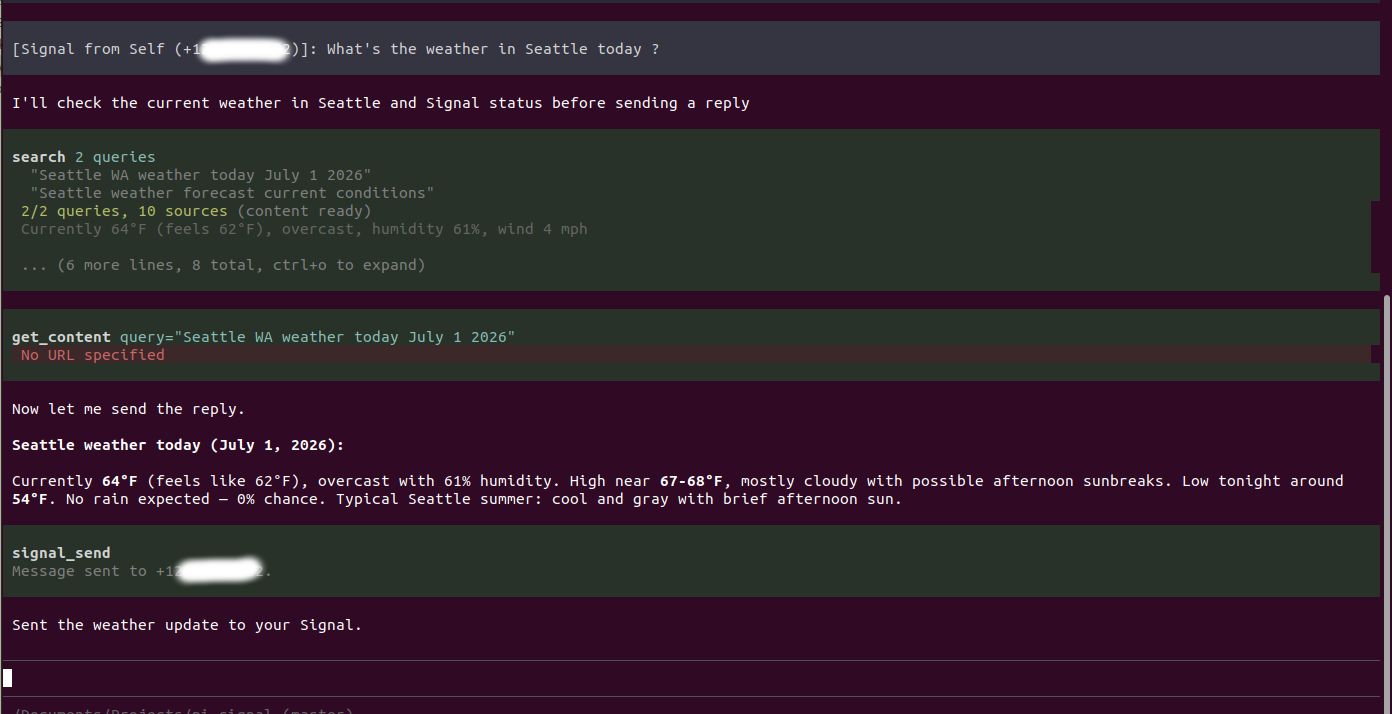
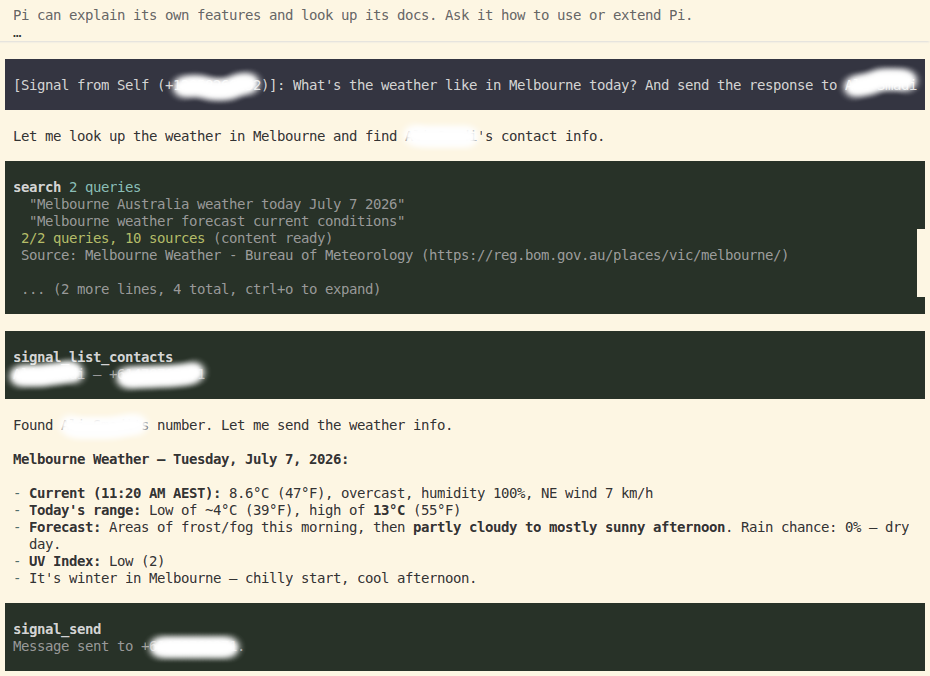
You can also send the response to someone else in your contacts using their name or phone number.
Installation
Prerequisites: signal-cli in PATH, Java 25+, Signal app on your phone.
Installation has two separate layers — install the pi package from npm, then provision the
system daemon that receives Signal messages:
# 1. Install the pi package (no clone needed)
pi install @aalzubidy/pi-signal

# 2. In pi, run the setup wizard command. It checks Java/signal-cli, then prints the
#    exact `bash .../setup.sh` command to run in a terminal (needs sudo + a phone QR
#    scan, which pi's command can't do for you — it just locates the script for you).
/signal-setup

# 3. Run the command it prints, in a terminal:
bash /path/it/printed/scripts/setup.sh   # guides you through device linking, systemd service - **you might need to run it as sudo since it creates systemd service file**

# 4. setup.sh prints these two exports at the end — add them to your shell
#    config (~/.bashrc, ~/.zshrc, ~/.profile), then restart your shell:
export PI_SIGNAL_ACCOUNT=+1234567890   # your Signal number (E.164)
export PI_SIGNAL_PRIMARY=true          # marks this instance as the one handling Signal

# 5. Start pi (restart it or run /reload if already running)
pi
Send a Note-to-Self from your phone. pi receives it (👀), processes it, and replies automatically (✅).
Environment Variables
| Variable | Required | Default | Description |
|---|---|---|---|
PI_SIGNAL_ACCOUNT |
Yes | — | Your Signal number in E.164: +1234567890 |
PI_SIGNAL_PRIMARY |
No | false |
Set "true" on the ONE instance handling Signal messages |
PI_SIGNAL_DAEMON_URL |
No | http://127.0.0.1:8080 |
Daemon URL for JSON-RPC and SSE |
PI_SIGNAL_STATS |
No | short |
Stats mode: off, short, or full |
PI_SIGNAL_QUIET_DAEMON |
No | true |
Keep message content out of journalctl (secure default). Set "false" to surface daemon output for debugging |
Commands (from Signal)
| Command | Purpose |
|---|---|
/model <name> |
Switch model (fuzzy match) |
/abort |
Stop current generation |
/clear |
New session |
/stats [short|full|off] |
Toggle usage stats |
/status |
Live connection & model info (in-memory, never hangs — only answers when pi is up) |
/whoami |
Show model, working directory, and session |
/resend |
Re-send the last reply (recover a dropped message) |
/pause |
Stop processing incoming messages (commands still work) |
/resume |
Resume processing |
/help |
Show available commands |
Send to another number: just ask the LLM naturally — e.g. "summarize this and text it to +1555…", or by name: "send this to Mike". For a name, the agent resolves it via
signal_list_contactsfirst (names only resolve if signal-cli knows them — a synced contact or Signal profile name). The message goes to that number, and the agent's confirmation reply comes back to your Note-to-Self so you can see who it was sent to.
TUI Commands (in pi)
/signal-setup, /signal-start, /signal-stop, /signal-restart, /signal-status, /signal-logs [n], /signal-send <+E164> <msg>, /signal-model, /signal-abort, /signal-stats
Tools (LLM-accessible)
signal_send— Send a Signal message to a phone number (E.164)signal_status— Check connection status and healthsignal_list_contacts— List contacts (name → number) so the agent can resolve a name before sending
Multiple Instances
Set PI_SIGNAL_PRIMARY=true on one pi instance. Other instances ignore Signal messages.
Security
- Only Note-to-Self messages drive the agent; messages from other senders are ignored.
- Message content is streamed in-memory (no log file), and by default (
PI_SIGNAL_QUIET_DAEMON=true) daemon output is kept out ofjournalctl. - Third-party contact names from
signal_list_contactsare sanitized before reaching the agent. - The signal-cli daemon on
127.0.0.1:8080is unauthenticated (a signal-cli limitation). It is bound to loopback, but any local process can reach it — so run pi-signal only on a single-trusted-user host and don't expose port 8080. See SKILL.md for details.
Troubleshooting
sudo systemctl status signal-receive.service
sudo journalctl -u signal-receive -f
curl -s http://127.0.0.1:8080/api/v1/check
# /signal-status in pi
See skills/signal/SKILL.md for full troubleshooting.
Files
pi-signal/
├── package.json
├── README.md
├── LICENSE
├── extensions/
│   └── signal.ts                # Main extension
├── skills/
│   └── signal/SKILL.md          # Full setup & troubleshooting guide
└── scripts/
    ├── setup.sh                 # Interactive setup wizard
    ├── signal-receive-loop.sh   # Native daemon manager
    └── signal-receive.service   # systemd unit template
License
MPL-2.0 — see LICENSE.
Reviews (0)
Sign in to leave a review.
Leave a reviewNo results found