bnot
Health Warn
- License — License: NOASSERTION
- Description — Repository has a description
- Active repo — Last push 0 days ago
- Low visibility — Only 5 GitHub stars
Code Warn
- fs module — File system access in .github/workflows/release.yml
Permissions Pass
- Permissions — No dangerous permissions requested
This is a macOS desktop application that integrates with Claude Code sessions. It turns your MacBook's notch into a control panel for monitoring active sessions, managing git worktrees, and approving permission requests without switching to your terminal.
Security Assessment
The application inherently requires access to sensitive system resources to function. It performs local process scanning to detect running Claude sessions, interacts with your local file system and git worktrees, and reads terminal data (such as exact token counts). While no hardcoded secrets were found and no dangerous global permissions are requested, there is file system access present within the automated release workflow. The core functionality (spawning processes, approving permission requests from the notch) carries an elevated local privilege level by design. Given its low community visibility and requirement to deeply hook into local developer tools, the overall risk is rated as Medium.
Quality Assessment
The project is actively maintained, with its most recent push occurring today. However, it has extremely low community visibility, currently sitting at only 5 GitHub stars. This indicates that the codebase has not been widely reviewed by the broader developer community. Additionally, the repository uses a NOASSERTION license, meaning the legal terms for using or modifying the code are completely unclear.
Verdict
Use with caution — the active maintenance is encouraging, but the deep local system access and complete lack of community review or clear licensing warrant caution; it is best to thoroughly inspect the source code yourself before adopting it.
Claude Code, live in your notch. Every session, every worktree. One glance, one keystroke away.

Bnot
Claude Code, live in your notch.
Every session, every worktree — one glance, one keystroke away.

Bnot turns your MacBook's notch into mission control for Claude Code. Every running session, every worktree you've ever spun up, every pending approval — all alive in a panel that lives where your eyes already are. No more hunting through terminal tabs to find the agent waiting on you. No more re-typing git worktree add to remember where that half-finished refactor went. No more guessing how close you are to blowing the context window.
One glance — you know. One keystroke — you're back in the code.
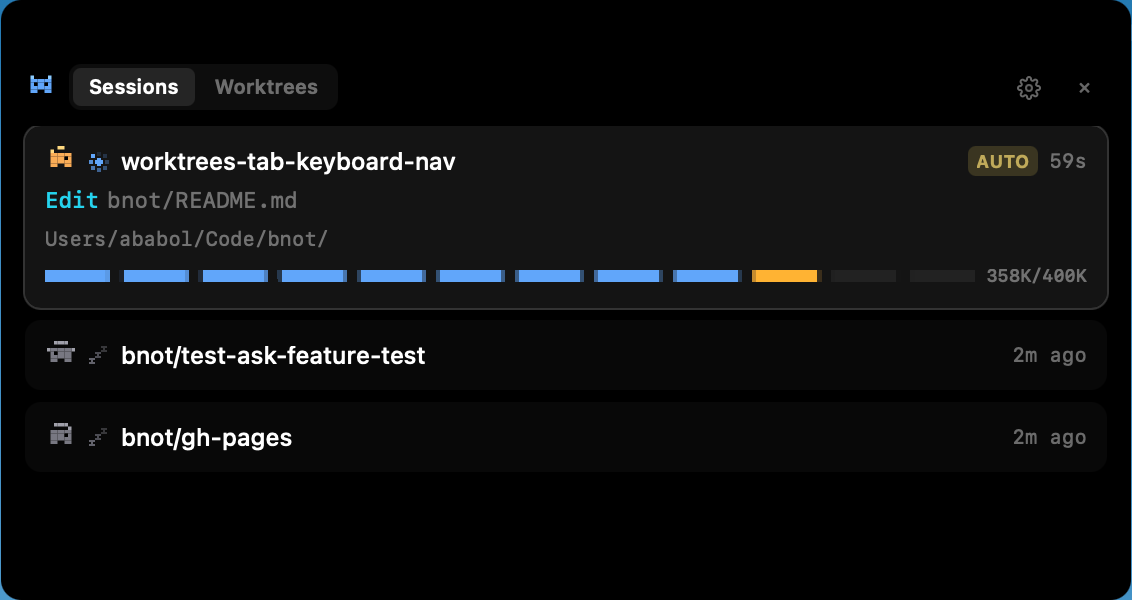
Sessions, worktrees, and approvals — one keystroke away.
Features
- Live session radar — auto-detects every running Claude Code session via process scanning and hook integration. Zero setup.
- Worktrees, always at your fingertips — a dedicated tab lists every worktree you've spun up, ranked by the one you touched most recently. Live sessions get an Active badge. Dormant ones are one keystroke away from a fresh terminal.
- Keyboard-first panel —
←/→flip between Sessions and Worktrees,↑/↓pick a row,Enteropens it,Esccollapses. No mouse required. - One-keystroke jump or spawn — hit
Enteron a live worktree, Bnot jumps straight to its terminal tab. HitEnteron a dormant one, Bnot spawnsclaudethere for you. - Exact context window readout — token counts pulled from the source of truth, not estimated. Auto-compact window respected. You'll see the wall before you hit it.
- Approve from the notch — Claude's permission requests show up with diff previews. Approve, deny, or allow-always without leaving the notch.
- Plan-mode aware — sessions in plan mode show an animated
PLANbadge, so you know when Claude is drafting vs. executing. - Answer questions instantly —
AskUserQuestionprompts render inline, with multi-select checkboxes and step-by-step flows for multi-question asks. No context switch. - Worktree-first PRs — the optional Chrome extension adds an "Open in worktree" button on GitHub PR pages that spins up a git worktree and opens it in your terminal.
- A bnot per session — deterministic pixel-art character (color, hat, ears) hashed from your repo + branch, with its color auto-synced to the Claude Code tab via
/color. The notch and your terminal match at a glance. - Usage & health at a glance — settings menu surfaces your Claude 5h/7d quota with reset time, hook health with one-click repair, and a check-for-updates button.
- Knows when to rest — idle detection puts the bnot to sleep with a gentle Zzz animation when nothing's running.
Built for Claude Code
Bnot is optimized for Claude Code running in Ghostty. iTerm and Warp work, with reduced fidelity for tab/pane jumping.
Install
Download the DMG
- Download the latest
.dmgfrom the Releases page. - Open it and drag
Bnot.appto/Applications. - Launch Bnot.
Bnot auto-updates in the background — new releases install on next launch, or you can trigger a check from the settings menu.
Build from source
pnpm install
pnpm build
Produces a .app bundle in apps/desktop/target/release/bundle/.
Accessibility permission
CGEvent keyboard injection (for terminal tab jumping) requires macOS Accessibility permission. The OS will prompt on first use.
Development
pnpm install
pnpm dev
Requires macOS 14+, Rust, Node.js 22+, and pnpm (npm install -g pnpm).
Tauri v2 (Rust) + React 19 + Tailwind v4 on the front, a Node.js sidecar and a small Rust CLI bridge on the back. Architecture details, IPC protocol, and internals are in CLAUDE.md.
Inspiration
Bnot is inspired by vibeisland.app — go check it out.
License
Source Available — free to use, modify, and share. Cannot be resold or offered as a competing commercial product.
Reviews (0)
Sign in to leave a review.
Leave a reviewNo results found