okf
Health Warn
- License — License: Apache-2.0
- Description — Repository has a description
- Active repo — Last push 0 days ago
- Low visibility — Only 6 GitHub stars
Code Fail
- rm -rf — Recursive force deletion command in Taskfile.yml
- rm -rf — Recursive force deletion command in install.sh
Permissions Pass
- Permissions — No dangerous permissions requested
No AI report is available for this listing yet.
The OKF-go provides a high-performance suite of utilities to validate bundles, harvest metadata from databases and APIs, assemble context for Large Language Models (LLMs), and run an MCP Server.
OKF-go — Open Knowledge Format Tool
The Open Knowledge Format (OKF) is a vendor-neutral, lightweight specification for structuring organizational knowledge (documentation, runbooks, metrics, database schemas, and API definitions) into machine-readable, human-friendly Markdown files.
By representing knowledge as a directory of Markdown files with structured YAML frontmatter, OKF bridges the gap between structured metadata repositories and unstructured text documentation, serving as an ideal substrate for AI agents, Retrieval-Augmented Generation (RAG) pipelines, and the Model Context Protocol (MCP).
📄 Knowledge Format Specification
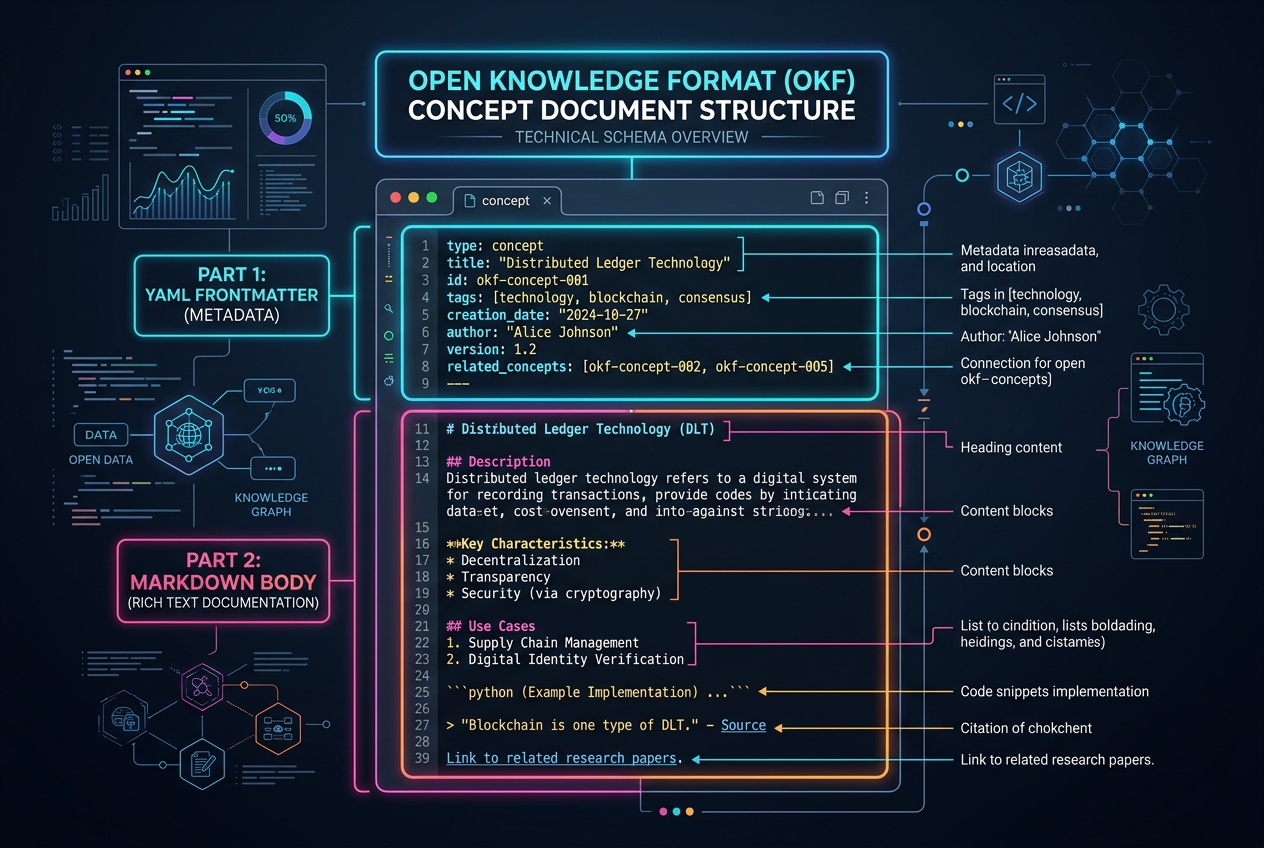
The Open Knowledge Format (OKF) is an open, vendor-neutral specification developed by Google Cloud for representing structured metadata as plain Markdown files with YAML frontmatter. For the full format specification, conventions, schema details, and reference examples, see the official Google Cloud OKF Specification.
The OKF-go provides a high-performance suite of utilities to validate bundles, harvest metadata from databases and APIs, assemble context for Large Language Models (LLMs), and run an MCP Server.
📜 OKF v0.2 Concept Examples
OKF v0.2 introduces a trust layer (status, stale_after, sources, generated, verified) and Attested Computation (type: Attestation).
1. Metric Concept with OKF v0.2 Trust Signals
---
type: "Metric"
title: "Monthly Recurring Revenue (MRR)"
description: "Total normalized monthly subscription revenue generated by active customers."
resource: "analytics.mrr_daily"
tags:
  - "finance"
  - "revenue"
  - "kpi"

# --- OKF v0.2 Trust Signals ---
status: "stable"
stale_after: "2027-01-01T00:00:00Z"

sources:
  - uri: "https://stripe.com/docs/billing/subscriptions"
    title: "Stripe Subscription Lifecycle Specs"
    author: "Billing Architecture Team"
    usage_count: 142
    last_modified: "2026-06-15T10:00:00Z"

generated:
  by: "okf-harvester/v0.2"
  at: "2026-08-01T12:00:00Z"

verified:
  - by: "[email protected]"
    at: "2026-08-01T12:15:00Z"
    tier: "human"
---

# Monthly Recurring Revenue (MRR)

MRR measures the predictable and recurring revenue components of a subscription business.
2. OKF v0.2 Attested Computation Concept
---
type: "Attestation"
title: "Sanctioned MRR Calculation Query"
description: "Audited and attester-approved BigQuery SQL for computing MRR."
resource: "bigquery.analytics.mrr_query"
status: "stable"

attestation:
  query: |
    SELECT
      DATE_TRUNC(created_at, MONTH) AS revenue_month,
      SUM(amount) AS total_mrr
    FROM `my-project.analytics.subscriptions`
    WHERE status = 'active'
    GROUP BY 1
  executor: "BigQuery / SQL-2024"
  attester: "[email protected]"

generated:
  by: "okf-ai-curator"
  at: "2026-08-01T12:00:00Z"

verified:
  - by: "[email protected]"
    at: "2026-08-01T12:20:00Z"
    tier: "certified"
---

# Sanctioned MRR Calculation Query

This concept defines the sanctioned computation logic for financial reporting.
- OKF v0.2 Trust Signals & Attestation: Native support for the v0.2 Trust Layer, including Provenance (
sources), Trust Verification (generated/verified), Freshness Expiration (stale_after), Lifecycle Status (status), and Attested Computation (type: Attestation). - Conformance Engine & Linter (
okf lint): Validates knowledge bundles for YAML frontmatter correctness, required attributes, broken internal links, and OKF v0.2 trust signal compliance. - Metadata Harvesters (
okf harvest): Automatically extracts and converts schemas from databases (PostgreSQL, MySQL, Cloud Spanner, BigQuery), OpenAPI specs, Protobuf files, Git repositories, and web pages into OKF concept documents. - Context Assembler (
okf assemble): Performs graph-based Breadth-First Search (BFS) starting from a core concept, resolving related concepts within a specified character/token budget to build pruned, high-quality prompt context. - Model Context Protocol Server (
okf mcp): Exposes your knowledge base directly to MCP-compatible AI clients (e.g. Claude Desktop, Cursor, Antigravity) via Stdio or SSE transport. - Bundle Operations (
okf diff/okf merge): Compare two OKF bundles for structural and content differences, or merge them to unify distributed knowledge bases. - AI Curator (
--ai-enrichflag): AI-powered concept curation during metadata harvesting to automatically generate business descriptions and categorize concepts using Gemini models. - JSON-LD Export (
okf export): Export your OKF graph into JSON-LD format for the semantic web. - Interactive HTML Portal Compiler (
okf doc): Compiles an OKF bundle into an interactive static web application with search, tagging, and link relationship graphs. - Language Server Protocol Daemon (
okf lsp) & VS Code Extension: Runs an LSP server over Standard I/O to publish diagnostic errors/warnings in real-time inside IDEs. A dedicated VS Code Extension is also available. - Bi-directional Sync Daemon (
okf sync): Automatically synchronizes local concepts with remote document nodes in Notion, Confluence, Jira, and Google Drive. - Blazing Fast Performance: Highly optimized Go architecture parsing ~97k concepts/sec, completing full 200-node graph BFS traversals in <40µs, and validating 100-concept bundles in ~125µs.
📦 Installation and Distribution
This section details how to install and run the pre-built okf CLI binaries, how developers can automate releases, and how to structure and bundle OKF repositories.
1. Installing the Pre-Built CLI
You can install the okf CLI without building it from source using the options below:
Option A: One-Line Shell Installer (macOS & Linux)
Run the automated installer script to download, verify, and install the correct binary for your OS and CPU architecture:
curl -sSfL https://okfgo.dev/install.sh | sh
By default, this installs to /usr/local/bin (if writeable), ~/.local/bin, or ./bin (fallback).
Option B: GitHub Releases (Manual Download)
Go to the Releases page on GitHub and download the appropriate archive for your operating system:
- macOS (Apple Silicon / M-series):
okf_<version>_darwin_arm64.tar.gz - macOS (Intel):
okf_<version>_darwin_amd64.tar.gz - Linux (64-bit AMD64):
okf_<version>_linux_amd64.tar.gz - Linux (ARM64 / Graviton):
okf_<version>_linux_arm64.tar.gz - Windows (64-bit):
okf_<version>_windows_amd64.zip
Extract the binary and add it to your system's PATH.
Option C: Go Install (Build from Source)
If you have Go installed, you can compile and install the CLI directly from the GitHub repository:
go install github.com/abcubed3/okf@latest
Ensure your GOBIN directory (typically $HOME/go/bin or $GOPATH/bin) is in your system's PATH.
2. Packaging an OKF Knowledge Bundle
An OKF Knowledge Bundle is a structured directory of Markdown files. Bundles can be versioned, archived, and distributed easily.
Folder Structure Layout
A typical bundle layout looks like this:
my-knowledge-bundle/
├── index.md                  # Optional directory index for progressive disclosure
├── log.md                    # Optional change history log
├── tables/                   # Conceptual namespace for DB tables
│   ├── users.md
│   └── orders.md
├── apis/                     # Conceptual namespace for API routes
│   └── create_user.md
└── playbooks/                # Runbooks and guides
    └── database_cleanup.md
Compressing the Bundle for Distribution
To distribute a bundle (e.g., to upload to an ingestion pipeline, send to an agent, or attach to a deployment artifact), you can compress the bundle folder:
Using tar (Gzipped Tarball):
# Compress the bundle
tar -czvf my-bundle-v1.0.tar.gz -C my-knowledge-bundle/ .

# Extract the bundle
tar -xzvf my-bundle-v1.0.tar.gz -C /path/to/destination/
Using zip:
# Compress the bundle
zip -r my-bundle-v1.0.zip my-knowledge-bundle/

# Extract the bundle
unzip my-bundle-v1.0.zip -d /path/to/destination/
[!TIP]
GitOps Distribution: Because OKF bundles are plain-text Markdown files, the recommended way to distribute, track changes, and review updates to your knowledge graph is via Git. You can runokf lintas a pre-commit hook or CI/CD workflow step.
💻 CLI Commands & Detailed Documentation
1. Linter & Validator (lint)
Ensures that the knowledge bundle conforms to the specification. It verifies YAML syntax, ensures required fields are set, and checks that internal Markdown links are not broken.
# Lint the bundle in the current directory
./okf lint

# Lint a bundle at a specific directory
./okf lint /path/to/my-bundle
- Hard Rules (Fails with Error):
- Syntactically valid YAML frontmatter.
- Presence of the
typefield in frontmatter.
- Soft Rules (Emits Warning):
- Presence of recommended fields (
title,description). - Resolves and verifies all relative Markdown links (e.g.
[Users](users.md)) to guarantee the graph is fully connected and lacks orphaned links.
- Presence of recommended fields (
2. Schema Harvester (harvest)
Extracts metadata from databases, API specs, protobuf files, git repositories, and web pages, generating structured OKF concepts automatically.
A. Database Schema Harvesting (harvest db)
Supports PostgreSQL, MySQL, Cloud Spanner, and BigQuery. Connects to the database, queries the information schema, and generates tables, columns, constraints, and relationships as OKF concepts.
# PostgreSQL Example
./okf harvest db \
  --driver postgres \
  --conn "postgresql://postgres:password@localhost:5432/my_db?sslmode=disable" \
  --schema public \
  --output ./my-bundle/tables

# MySQL Example
./okf harvest db \
  --driver mysql \
  --conn "user:password@tcp(localhost:3306)/my_db" \
  --output ./my-bundle/tables

# Cloud Spanner Example
./okf harvest db \
  --driver spanner \
  --conn "projects/my-project/instances/my-instance/databases/my-db" \
  --output ./my-bundle/tables

# BigQuery Example
./okf harvest db \
  --driver bigquery \
  --conn "projects/my-project" \
  --dataset "my_dataset" \
  --output ./my-bundle/tables
B. OpenAPI Spec Harvesting (harvest openapi)
Parses OpenAPI spec documents (JSON/YAML) and generates OKF concepts representing API endpoints.
# Harvest an OpenAPI spec and output to a bundle
okf harvest openapi
  --spec ../openapi-sample.yaml
  --output harvested-endpoints
C. Protobuf Schema Harvesting (harvest proto)
Extracts messages, RPC services, and field definitions from .proto schemas.
okf harvest proto \
  --path ./protos/user_service.proto \
  --output ./my-bundle/protobufs
D. Git Repository Harvesting (harvest git)
Extracts metadata from a Git repository, turning commits, file structures, and architecture documents into OKF concepts.
./okf harvest git \
  --repo https://github.com/abcubed3/okf.git \
  --output ./my-bundle/git
E. Web Harvesting (harvest web)
Crawls target URLs to scrape documentation and structure it as OKF concepts. Optionally powered by the AI Curator (--ai-enrich flag) to automatically generate business descriptions and enrich concepts using Gemini models.
./okf harvest web \
  --url https://example.com/docs \
  --output ./my-bundle/web \
  --ai-enrich
3. Context Assembler (assemble)
Traverses the concept relationship graph starting from a target concept ID. Follows relative markdown links up to a configured traversal depth to compile a unified context document for LLMs.
./okf assemble tables/orders \
  --bundle ./testdata/sample \
  --depth 2 \
  --direction bidirectional \
  --format xml \
  --max-chars 16000
CLI Flags
--bundle: Path to the OKF bundle (default:.or current directory).--depth: Maximum depth of link traversal (default:2).--direction: Traverseoutbound,inbound, orbidirectionallinks (default:bidirectional).--format: Output format, eitherxmlormarkdown(default:xml).--max-chars: Maximum character budget for the output. If exceeded, traversal stops to prevent context overflow (default:16000).
4. Model Context Protocol Server (mcp)
Exposes the OKF graph as an MCP Server. This allows LLM clients (like Antigravity, Claude Desktop or Cursor) to dynamically discover, search, retrieve, and assemble context from the bundle.
Stdio Transport (Standard Input/Output)
Ideal for local IDE and Desktop applications:
./okf mcp --bundle ./testdata/sample --transport stdio
SSE Transport (HTTP Server-Sent Events)
Ideal for remote integrations or network-based MCP clients:
./okf mcp --bundle ./testdata/sample --transport sse --port 8080
Claude Desktop Configuration
To register the OKF-go MCP server with Claude Desktop, add the server to your claude_desktop_config.json (typically located at ~/Library/Application Support/Claude/claude_desktop_config.json on macOS or %APPDATA%\Claude\claude_desktop_config.json on Windows):
{
  "mcpServers": {
    "okf-knowledge": {
      "command": "/Users/abcubed3/okf-go/okf",
      "args": [
        "mcp",
        "--bundle",
        "/Users/abcubed3/okf-go/testdata/sample"
      ]
    }
  }
}
Exposed MCP Capabilities
- Resources:
okf://index: A text/markdown list of all concepts in the bundle.okf://concept/{id}: Resolves the complete document for a concept by its ID.
- Prompts:
okf_concept_context: Automatically generates an analysis prompt for a concept along with its assembled subgraph.
- Tools:
list_concepts: Returns summaries of all concepts.search_concepts: Search matching terms in concept IDs, titles, descriptions, and tags.get_concept: Fetch raw contents of a concept.assemble_context: Run depth-traversal context assembly dynamically from the LLM.
5. Interactive HTML Portal Compiler (doc)
Compiles an OKF knowledge bundle into a fully self-contained static HTML documentation portal featuring search, tagging, and link graphs.
# Compile bundle in current directory to docs/ folder
./okf doc

# Compile specific bundle to custom directory
./okf doc --bundle /path/to/my-bundle --output /var/www/okf-portal
--bundle: Path to the OKF bundle (default:.).--output: Output path for the static website files (default:docs).
6. Language Server Protocol Daemon (lsp)
Integrates OKF validation directly into your IDE. The LSP daemon runs over standard input/output to report conformance linter diagnostics (missing types, broken relative links) as you type.
# Start Language Server over Stdio
./okf lsp
To use with Cursor or VS Code, configure your LSP client to invoke ./okf lsp for markdown files.
7. Bi-directional Sync Daemon (sync)
Keeps your OKF knowledge bundle in sync with remote document nodes. The sync daemon queries local changes and pushes them, while pulling remote updates from your workspace.
# Perform a single sync cycle
./okf sync --config okf.yaml

# Run continuously as a daemon
./okf sync --config okf.yaml --daemon --interval 300
Configuration (okf.yaml)
Create an okf.yaml file in the bundle directory to define connector credentials:
connectors:
  google_drive:
    folder_id: "1234567890abcdef"
    service_account: "[email protected]"
  notion:
    token: "secret_notion_api_token"
    parent_id: "notion_page_parent_uuid"
  confluence:
    domain: "your-company.atlassian.net"
    email: "[email protected]"
    token: "jira_api_token_here"
    space_key: "SPACEKEY"
  jira:
    domain: "your-company.atlassian.net"
    email: "[email protected]"
    token: "jira_api_token_here"
🤝 Contributing
Contributions are welcome! Please read our Contributing Guide to learn how to set up your development environment, run linters, execute unit tests, and submit pull requests.
👥 Authors
- abcubed3 — Creator & Maintainer — GitHub Profile
📄 License
This project is licensed under the Apache License 2.0. See the LICENSE file for the full text.
Reviews (0)
Sign in to leave a review.
Leave a reviewNo results found