worklog
Health Pass
- License — License: MIT
- Description — Repository has a description
- Active repo — Last push 0 days ago
- Community trust — 12 GitHub stars
Code Fail
- exec() — Shell command execution in hooks/calcul.ts
- exec() — Shell command execution in hooks/register.tsx
- network request — Outbound network request in hooks/register.tsx
- exec() — Shell command execution in scripts/importer.mjs
- fs.rmSync — Destructive file system operation in scripts/importer.mjs
- exec() — Shell command execution in tests/calcul.test.ts
- fs.rmSync — Destructive file system operation in tests/importer.test.mjs
- exec() — Shell command execution in tests/mod.test.tsx
Permissions Pass
- Permissions — No dangerous permissions requested
No AI report is available for this listing yet.
Claude Code mod to automatically track time, tokens and API price for each project, with a yearly activity heatmap and 8 themes.
Worklog
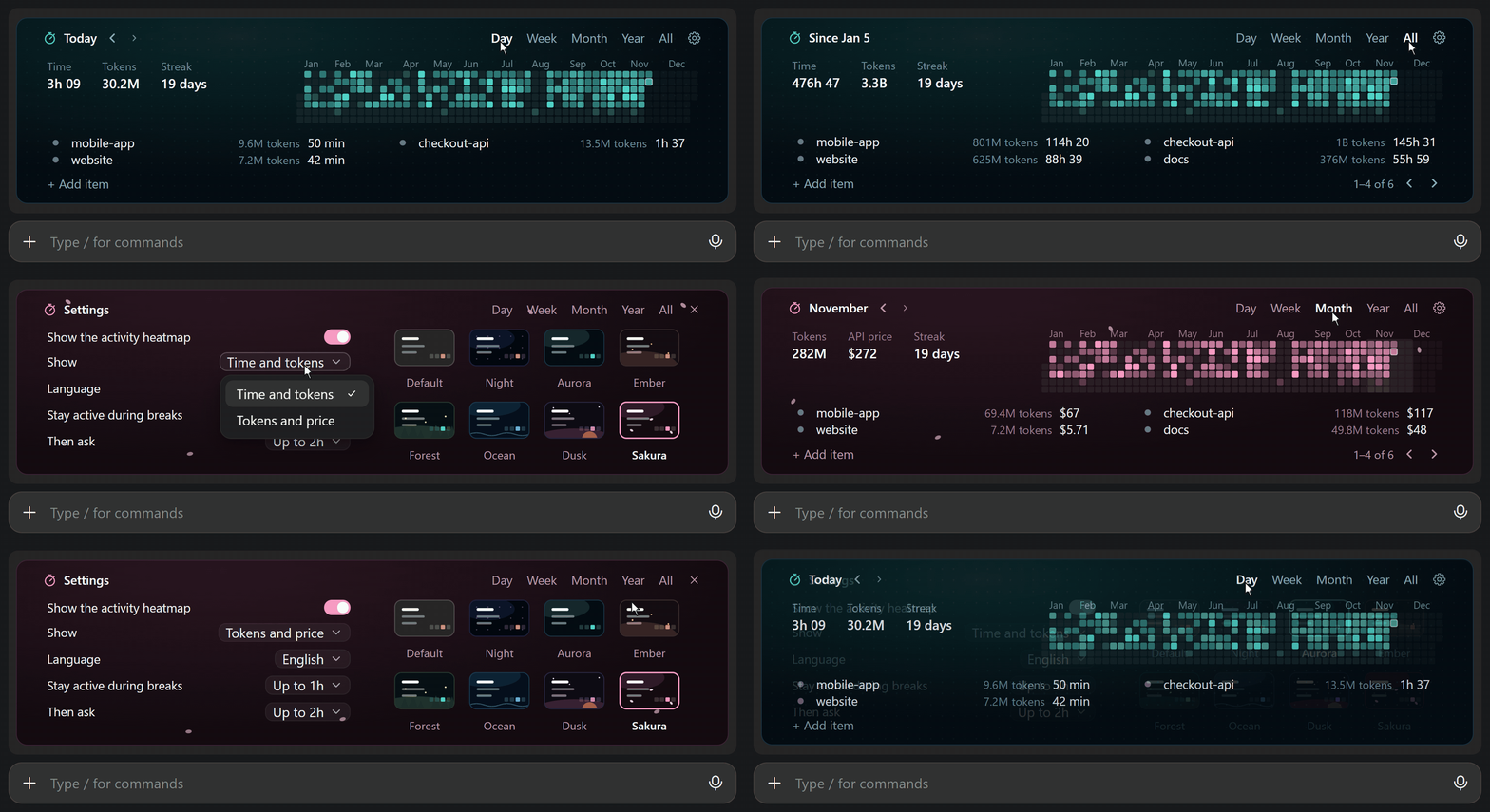
Automatically track the time, tokens and API price of each project in Claude Code, with a yearly activity heatmap and 8 themes.



Quick start · How the timer works · Tokens and price · Breaks · Project names · Themes · Terminal · Settings · FAQ · Privacy
You work with Claude on several projects, sometimes for hours without a break. Where did the time go? Which project used the most tokens? How much would they cost on the API?
With Worklog, you can see the time, the tokens and the API price of each project, right above the prompt. Worklog tracks everything automatically for you.
Quick start
claude plugin marketplace add Abdoul-sudo/worklog
claude plugin install worklog@worklog
Restart Claude Code, then work as usual. A chip at the bottom shows the name of the session and its time today, for example ⏱ mobile-app · 1h 12. Click the chip to open Worklog, or type /worklog.
Worklog needs Claude Code 2.1.325 or later. Node.js is optional: Worklog uses it once, to read your past history.
How the timer works
- The timer starts with your first message in a session. Opening a session does not count.
- The timer runs while Claude works: answers, subagents, workflows, Ultracode and background commands, even when they work alone for hours.
- When Claude is done, a break starts. When you come back, Worklog decides if the break counts as work.
- In one project: if several things work at the same time, the time counts only once. For example, if 3 subagents work for 10 minutes, the project gets 10 minutes, not 30.
- Across projects: if two projects work at the same time, each project gets its time, and the total adds them up. For example, if projects A and B both work for 1 hour at the same time, each gets 1 hour and the total is 2 hours. Worklog then shows "incl. 1h 00 in parallel", so you can still see the real time.
Tokens and price
Do you look at your tokens more than at your time? Set Show to Tokens and price in the settings. The API price then takes the place of the time: in the stats, in each line and in the heatmap.
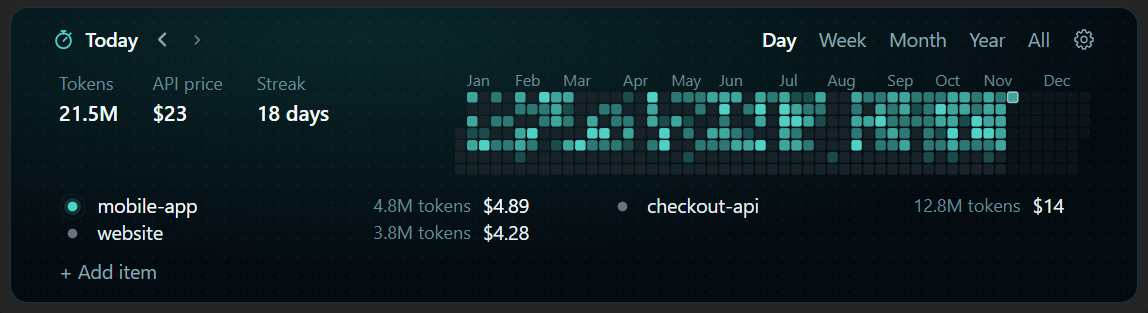
- The price is what your tokens cost at the Anthropic API list prices, for each model and each answer.
- Worklog always counts the price, also when it shows the time. So when you switch, your past days have their price too.
- To see the details, point to Tokens, API price or the tokens of a name. A box shows the tokens of each type (input, output, cache write and cache read) and of each model, with their price.
- With a Pro or Max plan, the API price is not your bill. It shows what your work would cost on the API.
Breaks
A break is the time between the end of Claude's work and your next message. A short break counts as work. For a long break, Worklog asks you. A very long break does not count.
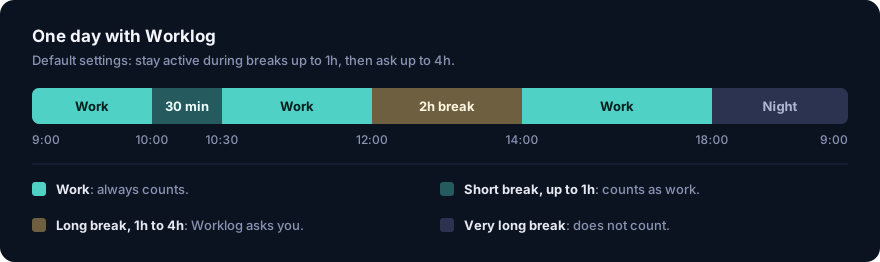
Example. Claude finishes at 10:00. You stop for a coffee. At 10:30, you send a new message. Worklog adds the 30 minutes at that moment. During the break, the total does not change. It catches up when you come back.
| Break | What Worklog does |
|---|---|
| Short: up to 1h | Counts the break as work. |
| Long: from 1h to 4h | Asks you if the break was work. |
| Very long: more than 4h | Does not count the break as work, and does not ask. |
If you close Claude Code during a short break, the break counts as work up to the moment you close Claude Code.
When Worklog asks, click Count to add the break, or Ignore to leave it out.
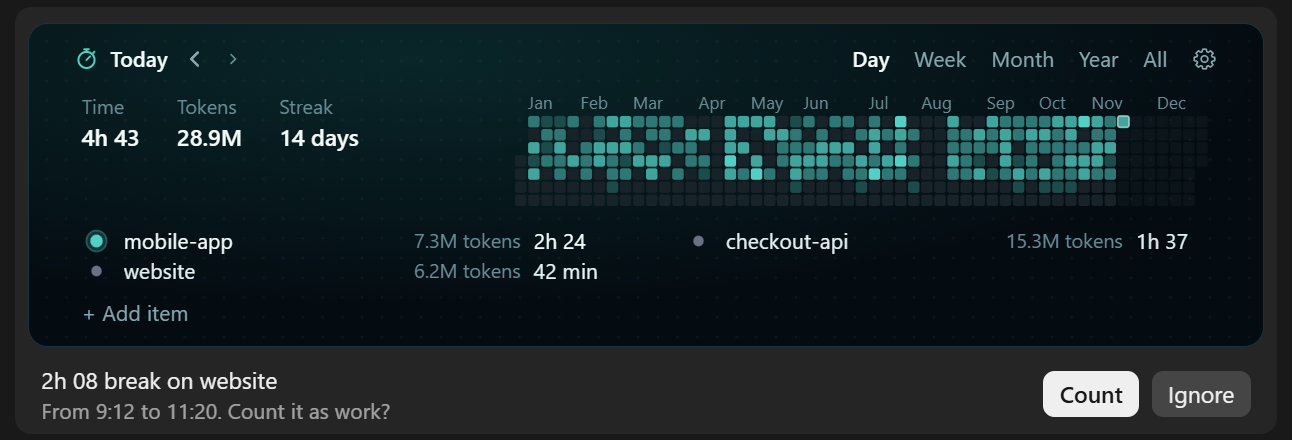
You can change the 1h and the 4h in the settings. To never get the question, set Then ask to Never.
Project names
The time of each session goes to one name, such as a project or a task. Worklog decides on the name in this order:
- The name that you choose, with
/worklog <name>or in the list. - An ID in your messages, such as
PROJ-142. - An ID in the name of your Git branch, such as
feature/PROJ-142-login. - The name of the project folder. In a Git worktree, the name of the main project.
When Worklog finds the first ID of a session, the time before it also goes to this ID.
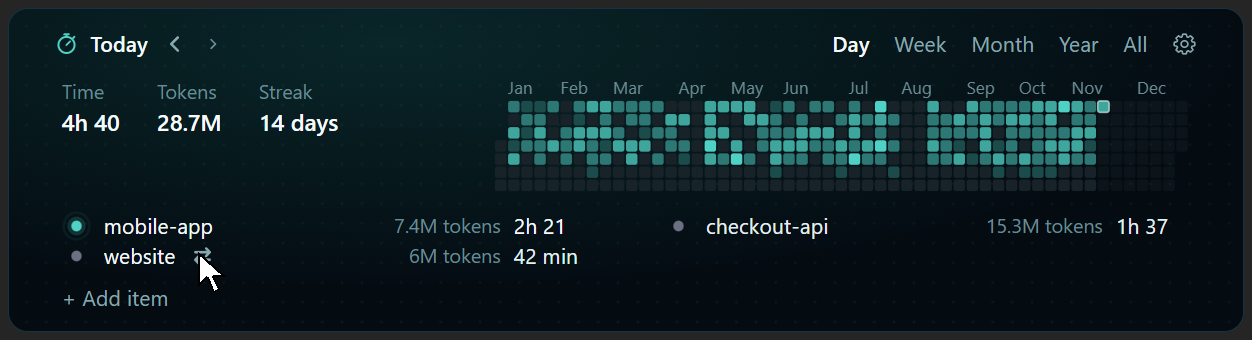
To count this session for another name from now on, point to the name in the list, then click ⇄.
Themes
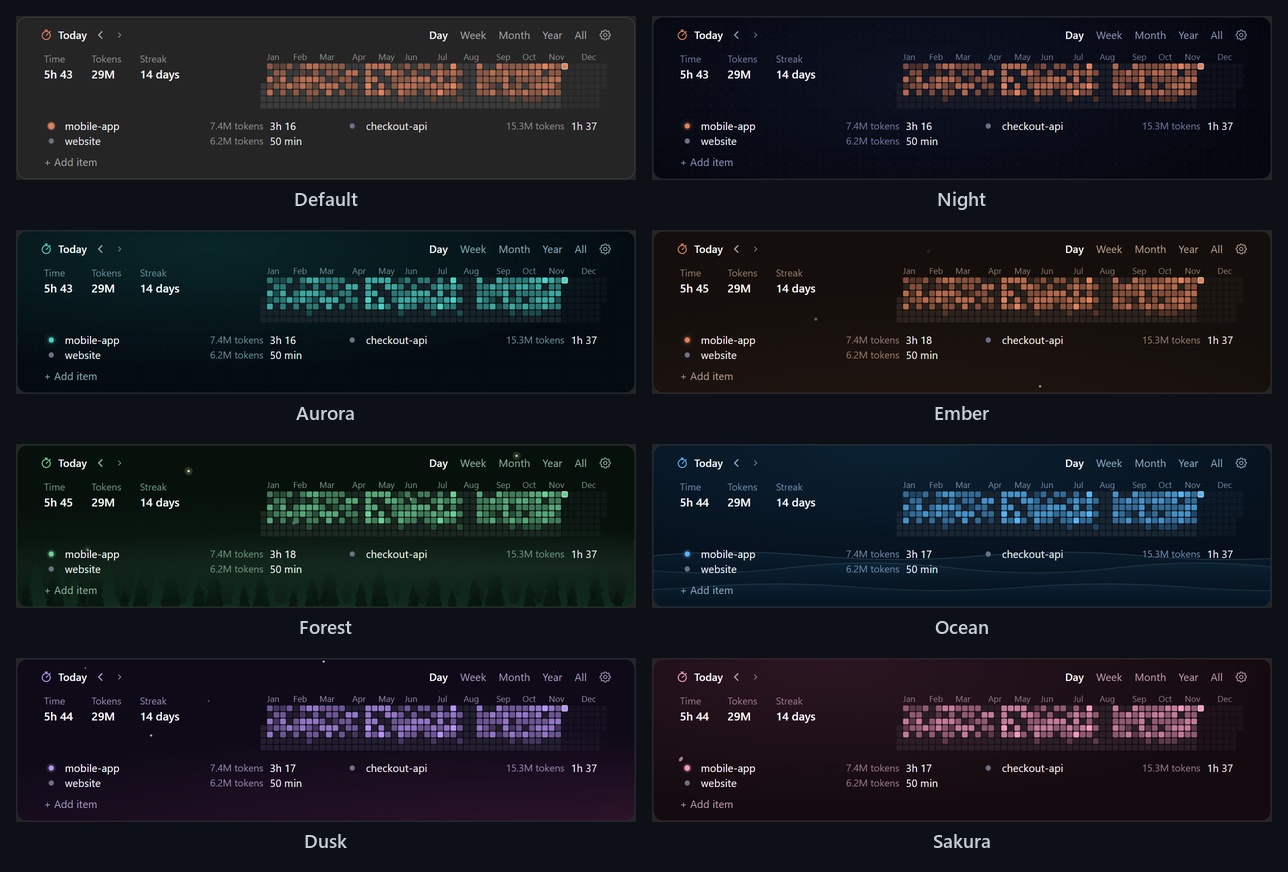
Worklog has eight themes in the desktop app. Click the gear, then click a theme.
In the terminal
Worklog works in the terminal too, with the same data. In a wide terminal, the heatmap shows one square for each day.
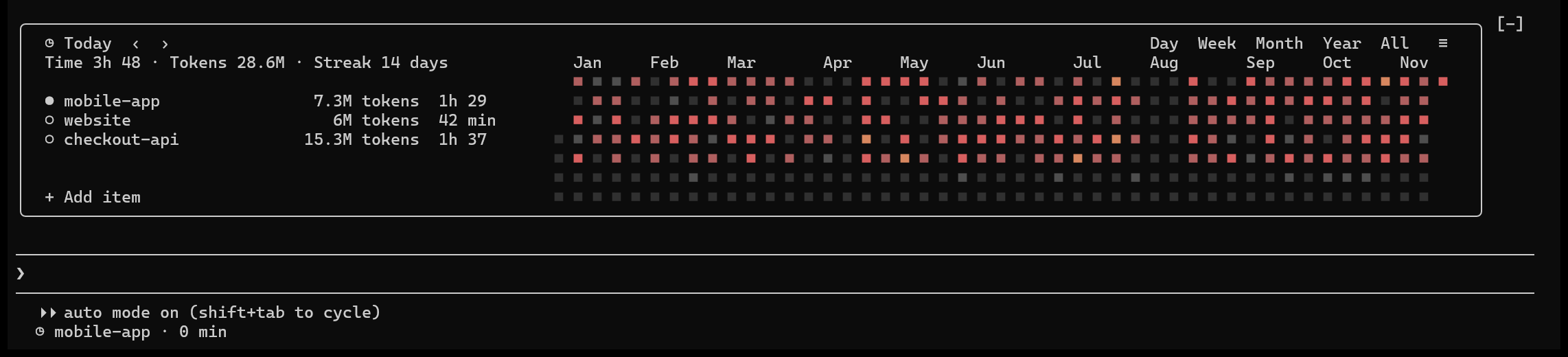
To click in Worklog in the terminal, use the fullscreen mode: /tui fullscreen.
Usage
| Task | Action |
|---|---|
| See another period | Click Day, Week, Month, Year or All. Click ‹ or › to go back or forward. |
| See the details of the tokens | Point to Tokens, API price or the tokens of a name. Desktop app only. |
| See one day | Point to its square in the heatmap. Desktop app only. |
| Count this session for another name, from now on | Point to the name, then click ⇄. In the terminal, click the name. |
| Count this session for a new name, from now on | Click + Add item, type the name, then press Enter. |
| Rename | Click ✎ next to the name. The new name also replaces the old one on past days. |
| Open the settings | Click the gear. In the terminal, click ≡. |
| Command | What it does |
|---|---|
/worklog |
Shows or hides Worklog. |
/worklog <name> |
Counts this session for <name>, from now on. For example: /worklog PROJ-142. |
Settings
| Setting | Default | What it does |
|---|---|---|
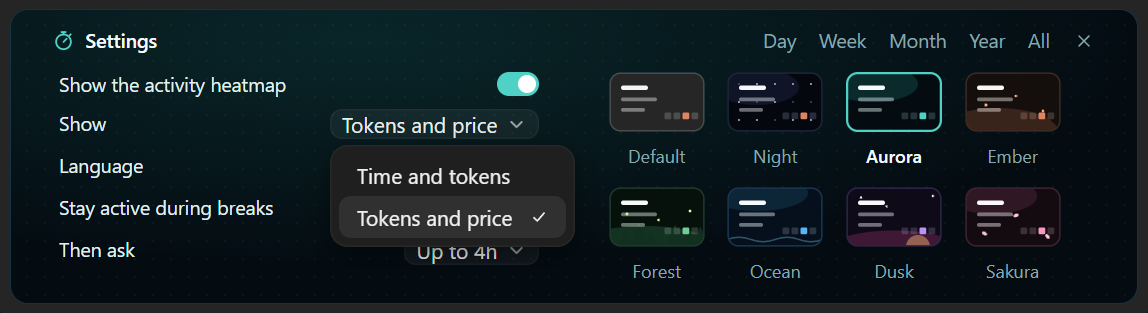
| Show the activity heatmap | On | Shows one square for each day of the year. |
| Show | Time and tokens | Shows the time and the tokens, or the tokens and their API price. |
| Language | English | English or French. |
| Stay active during breaks | Up to 1h | A break up to this length is short: it counts as work. |
| Then ask | Up to 4h | For a long break, up to this length, Worklog asks you if it was work. A very long break does not count. Never turns off the question. |
| Theme | Night | Default, Night, Aurora, Ember, Forest, Ocean, Dusk or Sakura. Desktop app only. |
Update
claude plugin marketplace update worklog
claude plugin update worklog@worklog
Then restart Claude Code, or type /reload-plugins.
Uninstall
claude plugin uninstall worklog@worklog
Your data stays in ~/.claude/worklog/. To remove it, delete this folder.
FAQ
Does the timer stop when I leave?Yes. The timer runs only while Claude works. When you come back, Worklog decides if your break counts as work.
I take a 30-minute break, then I send a message. Does the total grow by 30 minutes?Yes, with the default settings. Worklog adds the 30 minutes when you send the message. During the break, the total does not move.
Do subagents, Ultracode and background commands count?Yes. The timer runs while they work, even when you do not type. Their tokens count too.
While Claude waits for a background command to end, the time counts as work. If you come back before it ends, such as with a dev server that never stops, the wait is a break.
Does Worklog see my past work?Yes, if Node.js is installed. On the first start, Worklog reads your Claude Code history. Without Node.js, Worklog counts from the day you install it.
Where does the API price come from?Worklog takes the prices from the public LiteLLM price list. It gets the list again once a day.
For your past work, Worklog reads the details of each answer in your Claude Code history. If Claude Code deleted an old conversation, the tokens of that conversation have no price.
Do all tokens have the same price?No. The API gives a different price to each type of token, and Worklog uses each price:
- Input tokens (what Claude reads): the normal price.
- Output tokens (what Claude writes): about 5 times the input price.
- Cache writes (Claude saves your conversation for later): 1.25 times the input price for 5 minutes, 2 times for 1 hour.
- Cache reads (Claude reads the saved conversation again): only 0.1 times the input price.
In long sessions, most tokens are cache reads. They are cheap, so many tokens can still cost little.
Does a resumed or forked conversation count twice?No. When you resume or fork a conversation, Claude Code can copy old messages into the new file. Worklog counts each message only once.
What does Worklog not count?Work outside Claude Code: meetings, calls and other tools.
Privacy and access
Worklog runs on your computer and keeps its data there. This is all that it can do:
| Access | What Worklog does |
|---|---|
| Reads files | Its own data in ~/.claude/worklog/. Your Claude Code history in ~/.claude/projects/, for the time, the tokens and the model of each answer. |
| Writes files | Only its own data, in ~/.claude/worklog/. |
| Runs commands | git branch --show-current, to find an ID in the branch name. node, to read your past history. |
| Network | Once a day, it downloads the public LiteLLM price list. It sends nothing about you or your work. |
| Your messages | It reads each message to find an ID, such as PROJ-142. It does not keep your messages. |
To stop the price download, set the environment variable WORKLOG_PRICES to off. To keep the data in another folder, set the environment variable WORKLOG_DATA_DIR.
License
Reviews (0)
Sign in to leave a review.
Leave a reviewNo results found