ultimate-real-estate-calculator
Health Pass
- License — License: NOASSERTION
- Description — Repository has a description
- Active repo — Last push 0 days ago
- Community trust — 12 GitHub stars
Code Fail
- network request — Outbound network request in skills/offplan-report/kit/tools/dda-plots.js
- eval() — Dynamic code execution via eval() in skills/offplan-report/kit/tools/domtest.js
- fs module — File system access in skills/offplan-report/kit/tools/domtest.js
- eval() — Dynamic code execution via eval() in skills/offplan-report/kit/tools/dump.js
- fs module — File system access in skills/offplan-report/kit/tools/dump.js
- eval() — Dynamic code execution via eval() in skills/offplan-report/kit/tools/sheetcheck.js
- fs module — File system access in skills/offplan-report/kit/tools/sheetcheck.js
Permissions Pass
- Permissions — No dangerous permissions requested
No AI report is available for this listing yet.
Claude skills that turn Dubai / UAE property deals into client-ready evaluation reports — real market data, clear verdicts, every calculation shown.
The Ultimate Real Estate Calculator

Version 1.1 · Changelog · Releases
by Abdulla Alzarooni · Real Estate with Abdulla Alzarooni ·
Instagram
A set of Claude skills that turn Dubai / UAE property deals into client-ready reports —
real market data, clear verdicts, every calculation shown. Install once, get every calculator,
and new ones arrive with a single update.
See it
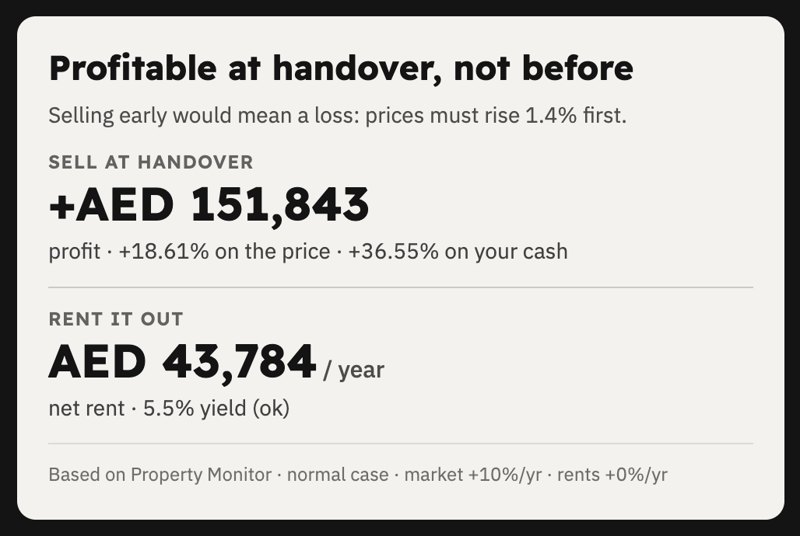
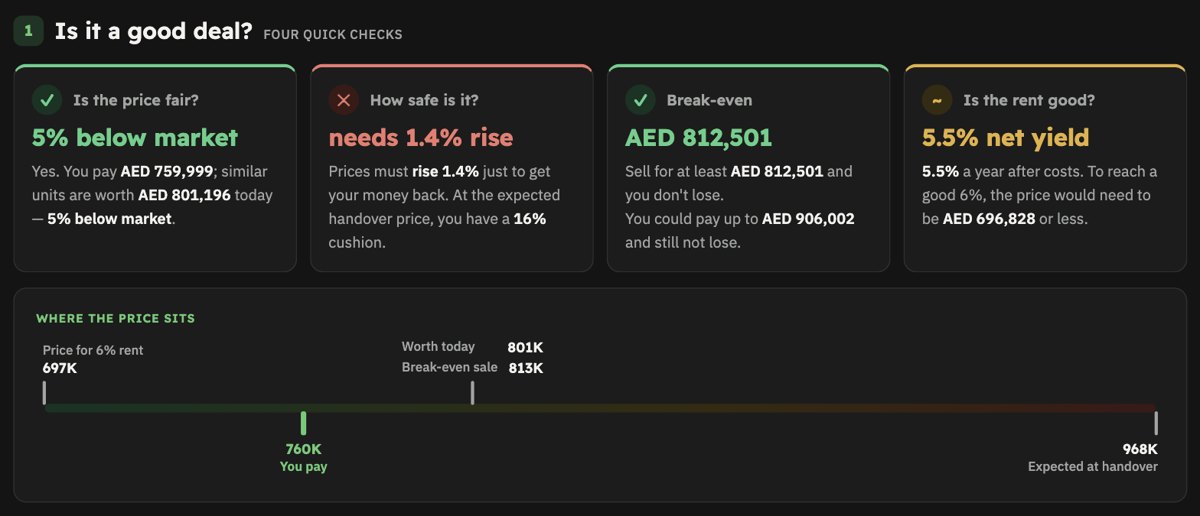
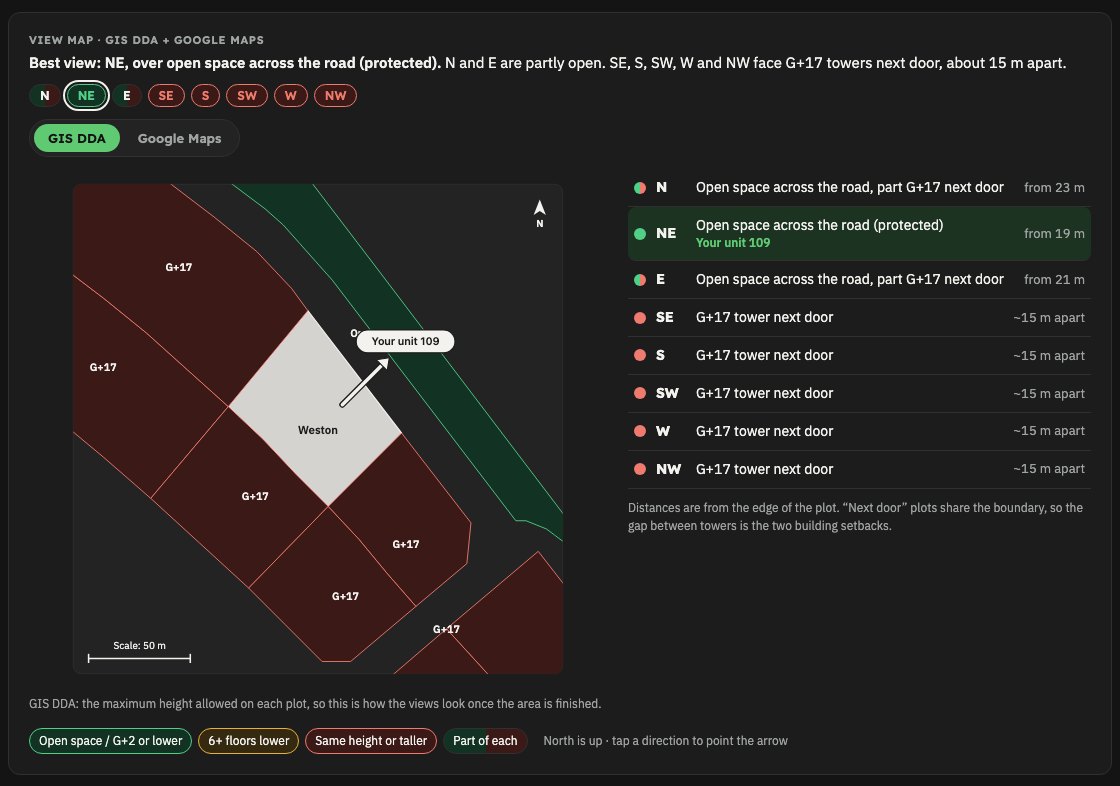
An example report (Binghatti Starfall studio, Al Jaddaf). Every number links back to its source and
all the maths is shown step by step.
More screenshots on the Off-plan Report page.
Calculators
| Calculator | What it does | Version |
|---|---|---|
| Off-plan Report | Sales offer / brochure / Reelly or GenieMap link → full off-plan evaluation (profit at handover, yield, what-ifs, supply & demand, payment plan, view map, location, PDF) | 1.2.0 |
| Post-Handover Report | Units on a post-handover payment plan (60/40, 50/50…) → everything in the off-plan report plus: does the rent cover the instalments after handover, monthly top-up, yield on your cash, empty-months slider | 1.0.0 |
| Ready property | coming soon | – |
| Mortgage | coming soon | – |
| Airbnb / holiday home | coming soon | – |
| Distressed deal | coming soon | – |
Install guide (step by step)
Takes about 15 minutes the first time. Built and tested on macOS; Windows and Linux should work but
haven't been tested yet.
Step 1 · Get the Claude desktop app (recommended)
- Download the Claude desktop app for Mac or Windows and sign in.
- Open the Code tab. That's where the calculators run: you chat, attach the sales offer, and see the
finished report and files right there, no terminal needed.
Why the desktop app: Claude can open the report it built, look at it and check it before handing it to
you, show the report and PDF beside the chat, and preview pages in its own browser panel. It's the easiest
way to use the calculators.
A paid Claude plan is needed for the Code tab.
Technical users: terminal insteadInstall the claude command from claude.com/claude-code and run it in
any folder. Everything below works the same.
Step 2 · Connect Claude to your Chrome
Claude reads the property data sites (Property Monitor, DXB Interact, Bayut, Reelly, GenieMap, Google Maps,
GIS DDA) in your own Chrome, where you are already logged in.
- Install Google Chrome if you don't have it.
- Add the Claude in Chrome extension from the Chrome Web Store and sign in with the same Claude account.
- Log in to the data sites you pay for (Property Monitor, DXB Interact, Reelly…) in that Chrome.
You type your own passwords; Claude never does.
Step 3 · Install the calculators
In the Code tab, paste this message:
Install The Ultimate Real Estate Calculator: https://github.com/AbdullaAlzarooni/ultimate-real-estate-calculator
Claude downloads it, installs every calculator, and checks the tools it needs:
Python 3 (with pymupdf and pillow), Node.js and Chrome. If one is missing, it explains what it
is and walks you through installing it from the official site.
git clone https://github.com/AbdullaAlzarooni/ultimate-real-estate-calculator.git ~/.claude/ultimate-real-estate-calculator
bash ~/.claude/ultimate-real-estate-calculator/install.sh
pip3 install pymupdf pillow
Start a new session after installing so Claude picks up the calculators.
Step 4 · First report (one-time setup included)
Ask for a report and attach what you have, for example:
Make an off-plan report for this unit (attach the sales offer PDF, brochure, or a Reelly / GenieMap link)
Make a post-handover report for this 60/40 plan (attach the sales offer)
The first time, Claude asks a few setup questions and saves the answers so it never asks again:
- your details for the report footer: name, company, BRN, WhatsApp, social links (anything you skip is hidden)
- optional branding: your logo (light and dark versions) and a square photo
- which data accounts you have, so it only uses those
- a folder for your reports (default:
Documents)
Then it collects the data, builds the report, checks every number, and gives you the report page plus a
client PDF.
Step 5 · Keep it updated
Now and then, paste this into the Code tab:
Update The Ultimate Real Estate Calculator
or run it yourself:
cd ~/.claude/ultimate-real-estate-calculator && git pull && bash install.sh
Updates bring fixes and new calculators. Your details and reports live in your own folder, so they are
never touched.
If something doesn't work
- Claude doesn't use the calculator: start a new session, then ask again by name ("use the off-plan report").
- Claude can't open a data site: check the Claude in Chrome extension is connected and you are logged in to that site.
- Something else: open an issue or message me on Instagram.
Each calculator's page lists the websites and accounts it uses.
Instructions for Claude
If someone pastes this repository's link into Claude Code (with or without other words), they want it
installed. Do this, explaining each step in plain words and asking before downloading anything:
- Clone it and link the calculators:
git clone https://github.com/AbdullaAlzarooni/ultimate-real-estate-calculator.git ~/.claude/ultimate-real-estate-calculator && bash ~/.claude/ultimate-real-estate-calculator/install.sh
(already cloned →git pullthere and runinstall.shagain). - Check
python3,node, Google Chrome, the Python packagespymupdfandpillow, and that the
Claude in Chrome extension is connected. Help install anything missing, one item at a time, from official sites only. - Tell them it's installed, list the calculators (see the table above), and say they may need to start a
new session. Then offer to make their first report; each calculator's SKILL.md handles the first-run setup. - "Update The Ultimate Real Estate Calculator" →
cd ~/.claude/ultimate-real-estate-calculator && git pull && bash install.sh,
then say what changed (from CHANGELOG.md). Never touch their own reports folder.
Feedback
Found a problem or have an idea? Open an issue or message
@abdulla.al.zarooni on Instagram.
License & credit
© 2026 Abdulla Alzarooni (Real Estate with Abdulla Alzarooni). All rights reserved.
Free to use for your own client reports. Keep the credit line
("The Ultimate Real Estate Calculator · … © 2026 Abdulla Alzarooni") on every report and the notices
in the code. No resale. Full terms: LICENSE.
Disclaimer
Reports are estimates based on market data and developers' documents — not financial advice.
Reviews (0)
Sign in to leave a review.
Leave a reviewNo results found