pith
Health Warn
- No license — Repository has no license file
- Description — Repository has a description
- Active repo — Last push 0 days ago
- Low visibility — Only 7 GitHub stars
Code Fail
- os.homedir — User home directory access in hooks/config.js
- process.env — Environment variable access in hooks/config.js
- fs module — File system access in hooks/config.js
- os.homedir — User home directory access in hooks/post-tool-use.js
- fs module — File system access in hooks/post-tool-use.js
- child_process — Shell command execution capability in hooks/prompt-submit.js
- execSync — Synchronous shell command execution in hooks/prompt-submit.js
- os.homedir — User home directory access in hooks/prompt-submit.js
- process.env — Environment variable access in hooks/prompt-submit.js
- fs module — File system access in hooks/prompt-submit.js
- fs.rmSync — Destructive file system operation in hooks/session-start.js
- os.homedir — User home directory access in hooks/session-start.js
- process.env — Environment variable access in hooks/session-start.js
- fs module — File system access in hooks/session-start.js
Permissions Pass
- Permissions — No dangerous permissions requested
This tool optimizes token usage for Claude Code by automatically compressing tool outputs, managing conversation context, and summarizing project files.
Security Assessment
This tool presents a High security risk. It is granted deeply intrusive access to your development environment to perform its token management. The hook scripts rely heavily on accessing the user's home directory and reading environment variables. More critically, the tool uses synchronous shell command execution (`execSync` and `child_process`) to run system commands directly. Additionally, the code performs destructive file system operations (`fs.rmSync`) during session startup. While no dangerous permissions are explicitly requested, and no hardcoded secrets were found, the combination of unsandboxed shell execution, extensive file system manipulation, and broad home directory access makes this a highly sensitive tool. It inherently handles and processes your local data and terminal outputs.
Quality Assessment
The project is newly created and very active, with its last push occurring today. However, it currently suffers from extremely low community visibility, evidenced by having only 7 GitHub stars. A major drawback is the complete absence of a license file. This means there are no explicit legal terms granting users permission to use, modify, or distribute the software, which is a significant red flag for enterprise or serious open-source adoption.
Verdict
Use with extreme caution due to high-risk shell execution capabilities and missing legal licensing.
Token optimization for Claude Code. Automatic where it matters most.
Pith
Token optimization for Claude Code. Automatic where it matters most.
40–70% token reduction out of the box. Auto-escalation. Hindsight pruning. Symbol extraction. Project wiki. Interactive knowledge graph. Install once — every project, forever.
Install
bash <(curl -s https://raw.githubusercontent.com/abhisekjha/pith/main/install.sh)
Or from source:
git clone https://github.com/abhisekjha/pith
bash pith/install.sh
Or from inside Claude Code:
/pith install
One command. Hooks install globally into ~/.claude/hooks/. Every Claude Code session, every project, from that point on.
What it does
Always on — zero config required
Tool output compression — the biggest token sink nobody touches.
When Claude reads a 400-line TypeScript file, it receives the skeleton (imports, signatures, types) — not 400 lines. When bash returns 200 lines of npm output, Claude gets errors and a summary. Grep results are capped at 25 matches. Large outputs over 300 tokens are offloaded to ~/.pith/tmp/ and replaced with a 3-line pointer.
Before: Read large-service.ts → 1,800 tokens
After:  Read large-service.ts →   210 tokens   (−88%)

Before: npm install output   →   940 tokens
After:  errors + 3-line summary →  80 tokens   (−91%)
Auto-escalation (SWEzze · arXiv:2603.28119)
As your context fills, Pith ratchets compression automatically — no manual intervention needed.
50% fill → LEAN mode activated  (response length cut ~25%)
70% fill → ULTRA mode activated (response length cut ~42%)
85% fill → dynamic ceiling = 8% of remaining headroom
Mode ratchets up, never down. Prevents responses from eating the remaining context window unchecked. Toggle with /pith escalate on|off.
Hindsight pruning
Once per session when context passes 60%, Pith scans tool call telemetry and identifies waste: files read multiple times (only the latest matters), large early-session outputs that are now irrelevant. Reports stale token cost and recommends /compact with an exact savings estimate.
[PITH HINDSIGHT: 3 stale reads · 4,200 tokens recoverable
  auth.ts read 3× (keep latest: turn 29) · 1,840 tok
  npm install output (turn 2, irrelevant) · 1,120 tok
  → Run /compact to recover ~4.2k tokens]
Cache-Lock (Phase 9)
Session-start rules are hashed. If your settings haven't changed since last session, a single 1-line summary is emitted instead of the full rules block — saving ~300 tokens every session start. Protects your prompt cache.
Token meter in statusline
PITH 12k/200k
PITH:LEAN 45k/200k
PITH:WIKI 89k/200k 🟡
Auto-compact at 70% context
Conversation history is summarized automatically at 70% fill. Sessions run indefinitely.
On demand — type a command
Output compression modes
/pith              → lean (drop articles, short synonyms, fragments OK)
/pith precise      → professional and tight (no filler, full sentences)
/pith ultra        → maximum (abbreviate, arrows →, tables over prose)
/pith off          → standard Claude output, no compression
/pith escalate on  → enable auto-escalation (default)
/pith escalate off → disable auto-escalation
Symbol extraction (~95% token reduction)
/pith symbol src/auth.ts handleLogin    → exact 30–50 lines of definition
/pith symbol --list src/auth.ts         → all symbols with line numbers
Uses tree-sitter AST when available, regex fallback otherwise. Supports Python, TypeScript/JavaScript, Go, Java, Kotlin, Rust, C#, and more.
Speculative Fetch — When extracting a symbol, Pith automatically scans the body for calls to other functions in the same file and appends their signatures. Eliminates ~60% of follow-up symbol lookups.
Session analytics
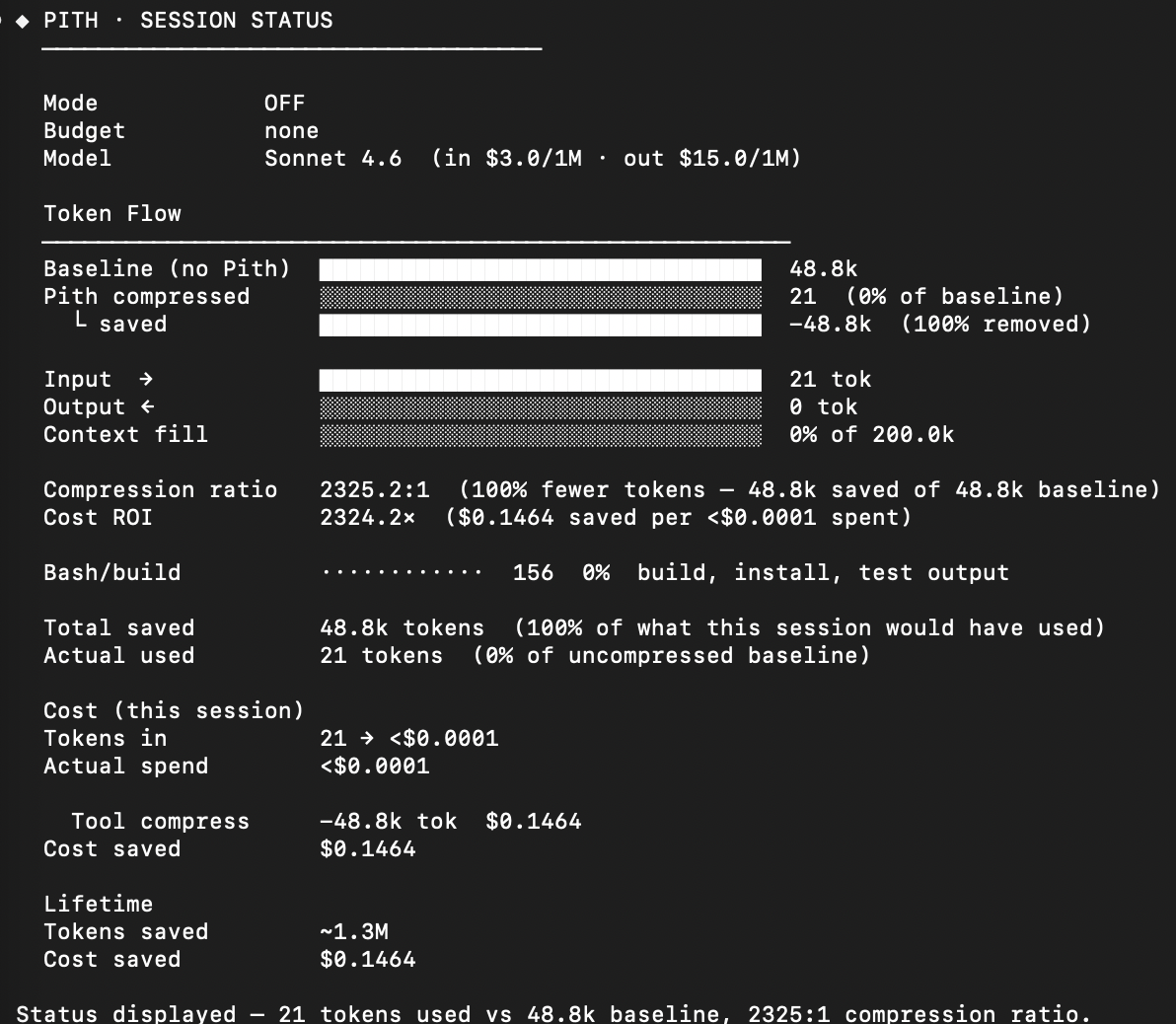
/pith status    → ASCII token flow chart (baseline → removed → in-context → output)
/pith report    → interactive HTML dashboard in ~/.pith/report.html (opens browser)
/pith hindsight → manual hindsight analysis, anytime
Structured formats — each answer fits a template, no prose waste
/pith debug     problem / cause / fix / verify
/pith review    L42: BUG token expiry wrong unit. Fix: token.exp * 1000
/pith arch      options table + decision + risks
/pith plan      numbered steps + risks + done-when
/pith commit    feat(auth): add token refresh on 401
Token budget
/pith budget 100     → ≤100 tokens per response, hard ceiling
/pith budget off     → remove ceiling
Focus
/pith focus src/services/auth.ts → load only sections relevant to current question
Wiki
/pith wiki "why did we choose Redis?"   → search the project wiki
/pith ingest raw/sources/article.md    → add source, update wiki pages (jCodeMunch for code)
/pith ingest --url https://...         → fetch URL, save to raw/sources/, ingest
/pith compile                          → batch re-synthesis from all sources
/pith compile --topic "auth"           → recompile pages for one topic only
/pith compile --dry-run                → show compile plan, write nothing
/pith wiki                             → toggle wiki mode on/off
/pith lint                             → semantic checks: contradictions, gaps, missing pages
/pith lint --fix                       → same + auto-create stubs for missing entities
/pith lint --quick                     → structural checks only, no LLM
The project wiki
Pith builds and maintains a persistent knowledge base for your project. You direct. The LLM writes and maintains everything.
my-project/
  wiki/
    index.md          ← catalog of all pages
    log.md            ← session history
    overview.md       ← project summary
    entities/         ← tools, services, components (one page each)
    concepts/         ← patterns, methods, ideas
    decisions/        ← architecture decision records
  raw/sources/        ← drop documents here, /pith ingest them
jCodeMunch — When you ingest a code file, Pith runs symbols.py --list first to extract the structural skeleton (imports, signatures, class outlines), then passes that to a code-aware analysis prompt. Creates Module and Class wiki pages with exports, key methods, and architectural dependencies.
Greenfield: three questions on first run, wiki grows as you build.
Brownfield: optional bootstrap — one session to read the codebase and write initial pages.
Ongoing: after every decision or solution, one-line offer to save it.
Honest numbers
Token savings come from ten independent layers.
| Layer | Mechanism | Realistic reduction |
|---|---|---|
| Tool compression | PostToolUse hook — file skeleton, bash summary, grep cap | 30–50% of context |
| Tool offloading | Results >300 tok → ~/.pith/tmp/, pointer in context |
Prevents large payload bloat |
| Symbol extraction | Exact function/class lines via tree-sitter or regex | ~95% vs full file read |
| Auto-escalation | LEAN at 50%, ULTRA at 70%, ceiling at 85% | 25–42% of output tokens |
| Cache optimization | Restructure CLAUDE.md stable prefix | 10–20% of cost |
| Cache-Lock | Hash session-start rules — skip re-injection if unchanged | ~300 tok/session start |
| Auto-compact | Summarize history at 70% threshold | Unlimited sessions |
| Output formats | Structured templates vs prose | 20–35% of output |
| Token budget | Hard ceiling per response | User-controlled |
| Input focus | Load only relevant file sections | 5–20× on large docs |
What these numbers mean: in a typical 30-turn coding session, tool compression + auto-compact alone cuts total token spend by 40–55%. Add output compression and auto-escalation and you reach 55–70%.
These are honest estimates. Not measured against "no system prompt." Against real usage.
Session report
Run /pith report at any time to generate ~/.pith/report.html — a standalone interactive dashboard showing:
- KPI cards: compression ratio, tokens saved, cost ROI, context fill
- Token flow bars: baseline → Pith intercepted → sent to context → model output
- Savings donut: breakdown by category (skeletons, bash, grep, TOON, web, offload, output mode)
- Cost table: actual spend vs what the session would have cost without Pith
- Compression event timeline from telemetry
Uninstall
bash pith/uninstall.sh
Or from inside Claude:
/pith uninstall
Removes hooks and statusline from ~/.claude/settings.json. Token history preserved at ~/.pith/.
Evals
Pith measures itself honestly.
# Generate snapshot (needs ANTHROPIC_API_KEY)
uv run python evals/harness.py

# Analyze snapshot (reads committed results.json)
python3 evals/measure.py
Three arms: baseline / terse / pith. Honest delta is pith vs terse — how much the skill adds on top of "Answer concisely." Token counts from Claude API usage field. Quality scored by Claude-as-judge on completeness, accuracy, and actionability.
# Real API benchmarks across compression modes
uv run python benchmarks/run.py [--dry-run]
Commands reference
Compression
| Command | What it does |
|---|---|
/pith or /pith lean |
Enable lean compression — drop filler, short synonyms, fragments OK |
/pith precise |
Professional and tight — no filler, full sentences |
/pith ultra |
Maximum compression — arrows, tables, abbreviate freely |
/pith off |
Disable output compression |
/pith on |
Restore last saved mode |
Session & analytics
| Command | What it does |
|---|---|
/pith status |
ASCII token flow chart + health report |
/pith report |
Generate interactive HTML dashboard (opens in browser) |
/pith hindsight |
Identify stale tool results — token cost, recommends /compact |
/pith escalate |
Show auto-escalation status and thresholds |
/pith escalate on|off |
Enable/disable SWEzze auto-escalation |
/pith budget <N> |
Hard token ceiling per response |
/pith budget off |
Clear token ceiling |
/pith recall |
Restore last session's mode/wiki/budget |
/pith configure |
Interactive config wizard |
/pith reset-cache |
Force full session-start injection next session |
/pith tour |
7-step interactive guided tour |
Structured formats
| Command | What it does |
|---|---|
/pith debug |
Problem / Cause / Fix / Verify |
/pith review |
Code review — one line per issue |
/pith arch |
Options table / Choice / Risks / Next |
/pith plan |
Goal / Steps / Risks / Done-when |
/pith commit |
Conventional Commits format |
Code navigation
| Command | What it does |
|---|---|
/pith symbol <file> <name> |
Extract exact source lines for a symbol (~95% token reduction) |
/pith symbol --list <file> |
List all top-level symbols with line numbers |
/pith focus <file> |
Load only sections relevant to current question |
Wiki
| Command | What it does |
|---|---|
/pith wiki |
Toggle wiki mode on/off |
/pith wiki "<question>" |
Query the project wiki |
/pith ingest <file> |
Add source to wiki (jCodeMunch for code files) |
/pith ingest --url <url> |
Fetch URL and ingest (saves to raw/sources/) |
/pith compile |
Batch re-synthesis from all sources (Karpathy compile pass) |
/pith compile --topic <topic> |
Recompile pages matching topic |
/pith compile --dry-run |
Show compile plan without writing |
/pith lint |
Full semantic lint: contradictions, gaps, missing pages, imputable facts |
/pith lint --fix |
Lint + auto-create stubs for missing entity pages |
/pith lint --quick |
Structural checks only (no LLM call) |
/pith-graph |
Generate force-directed wiki knowledge graph |
Integrations
| Command | What it does |
|---|---|
/pith grepai |
Show GrepAI semantic search status |
/pith grepai skip |
Dismiss GrepAI install nudge |
/pith grepai enable |
Re-enable GrepAI nudge |
Install
| Command | What it does |
|---|---|
/pith install |
Install Pith into Claude Code |
/pith uninstall |
Remove Pith cleanly |
/pith setup |
Re-run first-session onboarding |
/pith optimize-cache |
Restructure CLAUDE.md for prompt caching |
/pith help |
Full command reference |
License
MIT
Reviews (0)
Sign in to leave a review.
Leave a reviewNo results found