self-doc
Health Warn
- License — License: MIT
- Description — Repository has a description
- Active repo — Last push 0 days ago
- Low visibility — Only 6 GitHub stars
Code Fail
- rm -rf — Recursive force deletion command in deploy/install.sh
Permissions Pass
- Permissions — No dangerous permissions requested
No AI report is available for this listing yet.
Self-hosted documentation RAG pipeline that serves semantic search to LLM agents over the Model Context Protocol.
self-docs

A self-hosted documentation RAG pipeline for LLM agents — crawl static docs
sites or upload files directly, embed them locally with pgvector, and serve
semantic search over the Model Context Protocol.


self-docs gives your coding agents (Cursor, Claude Code, Antigravity, or any
MCP client) a private, always-current reference library. It crawls upstream
documentation sites and indexes uploaded documents, chunks and embeds them locally — no third-party embedding
API — and exposes hybrid semantic search as MCP tools over streamable HTTP.
Contents
- Why self-docs
- Architecture
- Quickstart — Local Development
- Quickstart — Pre-Built Images (No Clone)
- Go CLI & Progressive Disclosure Skill (
doc-cli) - Quickstart — Production (Home-Lab + Traefik)
- MCP Tools & REST Endpoints
- Managing Sources
- Documentation
- Development
- License
Why self-docs
- Broad Indexing. The pipeline indexes both crawled sites and uploaded documents (Markdown/text, HTML, PDF, zip bundles).
- Local-first embeddings. FastEmbed runs in-process on CPU (ONNX, no
GPU/torch); documentation never leaves your network. The model is selectable
from a registry (config/models.yaml) —make configurederives the vector
dimension and container memory limits from your choice. Default:BAAI/bge-small-en-v1.5(384-dim) — compose defaults, both Dockerfiles'
buildARGs, both services' code-level fallbacks, and the committeddb/init/01_schema.sqlschema all agree on this out of the box, with no.envrequired. - Hybrid retrieval. Vector similarity + per-source-language Postgres
full-text search overpgvector, so exact terms and semantic matches both
surface. - Efficient re-crawling. Sources can prefer a site's
llms.txt index over HTML crawling, and re-syncs use
HTTP conditional GET (ETag/If-Modified-Since) to skip unchanged pages
before download — see ADR-003. An optional headlessrendererservice is also available for single-page applications. - Agent-native. Ships as MCP tools (
search_docs,list_doc_sources,propose_doc_source,upload_doc_text) over streamable HTTP — wire it into any MCP client. - Operator-friendly. Crawl targets and upload sources live in the database, managed through a
loopback-only admin UI or proposed by agents for human approval. - Self-hostable. One
docker composestack; a Traefik overlay for
home-lab ingress. CI publishes pre-built multi-arch images
(linux/amd64+linux/arm64), one per embedding model, so you can run
the whole thing without cloning this repo or building anything — see
Quickstart — Pre-Built Images.
Architecture
  Cursor ──┐            ┌─────────┐   ┌──────────────┐
  Claude ──┼─ HTTP ──▶  │ Traefik │──▶│ FastMCP srv  │──┐
  Antigrav ┘  /mcp      └─────────┘   │ (search,     │  │ SQL
                               │      │  propose,    │  │
  doc-cli (Go CLI / Skill) ───▶│      │  upload)     │  ▼
  (/api/v1/search, /get)       │      └──────────────┘ ┌────────┐
  operator ── loopback ───────▶│      │ Ingestion    │▶│ pg16 + │
  (/admin UI, 127.0.0.1:8080)  └─────▶│ svc (FastAPI)│ │pgvector│
  internal scheduler ────────────────▶└─────────┬────┘ └────────┘
  (opt-in, per-source cron)                     │
                                                ▼
                                      ┌─────────────────┐
                                      │ headless        │
                                      │ renderer (opt)  │
                                      └─────────────────┘
| Layer | Technology | Description |
|---|---|---|
| Store | PostgreSQL 16 + pgvector 0.8.2 | Stores metadata, crawl/upload sources, and embeddings. |
| Embeddings | FastEmbed | BAAI/bge-small-en-v1.5 (registry default, selectable via config/models.yaml) |
| MCP server | FastMCP 3.x (streamable HTTP) | Exposes search, proposal, and upload tools to AI agents. |
| CLI & Skill | doc-cli Go binary + embedded skill |
Progressive disclosure AI agent skill for token-efficient retrieval. |
| Ingestion | FastAPI crawler & API | Handles crawling, document uploads, chunking, and progressive disclosure endpoints (/api/v1/*). |
| Renderer | Headless Browser (Optional) | Resolves JavaScript-heavy or SPA documentation sources. |
| Ingress | Traefik | Production overlay for secure home-lab routing. |
Source configuration (crawl targets, URL prefixes, upload sources, schedule) lives in the doc_sources table — not a YAML file.
Sources can be of two source_types: crawl or upload. They are managed through the loopback-only admin UI at /admin, or (for crawl sources) proposed by an agent via the propose_doc_source MCP tool (which queues a pending row for human approval and never crawls on its own). The ingestion service includes an opt-in in-process cron scheduler (app.scheduler) for automated re-crawling; see the Runbook for configuration details.
Quickstart — Local Development
cp .env.example .env        # fill in real values
make configure              # optional — pick an embedding model (see below)
make up                     # db + ingestion (:8080) + mcp-server (:8081)
make sync                   # trigger the initial documentation sync
make configure is optional: with no .env overrides both services already use
the registry default. Run it to choose a different model —make configure MODEL=BAAI/bge-base-en-v1.5 — and it resolves that model's
vector dimension, query/passage prompts, and per-service memory limits into.env, then re-renders db/init/01_schema.sql. Switching models on an existing
deployment requires a re-embed; see
Runbook → switch the embedding model.
Point local MCP clients at http://127.0.0.1:8081/mcp (streamable HTTP). The
server requires an Authorization: Bearer <MCP_TOKEN> header — see
Client Setup for per-client configuration.
Quickstart — Pre-Built Images (No Clone)
Every push to main publishes ready-to-run images for both services to GitHub
Container Registry. You do not need this repository, a build toolchain, ormake to run self-docs — only Docker, a compose file, and the database's init
SQL.
ghcr.io/adamrussak/self-docs-ingestion
ghcr.io/adamrussak/self-docs-mcp-server
Which tag do I pull?
The embedding model is baked into the image at build time (the ONNX weights
are pre-downloaded so the container works offline and pays no cold-start
download), so one image cannot serve more than one model. The model is encoded
in the tag instead:
| Tag | What it is |
|---|---|
latest |
The registry-default model — BAAI/bge-small-en-v1.5, 384-dim. Start here. |
bge-small-en-v1.5 |
Same model, named explicitly — pin this instead of latest for reproducibility. |
bge-base-en-v1.5 |
BAAI/bge-base-en-v1.5, 768-dim. |
mxbai-embed-large-v1 |
mixedbread-ai/mxbai-embed-large-v1, 1024-dim. |
multilingual-e5-large |
intfloat/multilingual-e5-large, 1024-dim. |
Version-pinned forms exist too — v1.2.3-<model-tag> and sha-<commit>-<model-tag>
for every model, plus bare v1.2.3 / sha-<commit> for the default one. The
full scheme, and the always-current model list, live in
Runbook → Pre-built Container Images.
[!WARNING]
Both services must run the same model tag, and the database schema'svector(N)must match that model's dimension. Mixing them — e.g. pulling:latest(384-dim) against a schema created for a 1024-dim model — fails
every insert and every query with a pgvector dimension mismatch. The
installer below handles this for you (it verifies the pulled image's labels
against the schema it renders and refuses to start on a mismatch); the
manual path does not, so get it right by hand there.
These tags have been live since release v0.1.0 (the release that
introduced the per-model image matrix — see
Runbook → Pre-built Container Images).
[!WARNING]
Ignore anyv0.0.1,v0.0.2, or other0.0.xtag you see in GHCR.
Those predate the per-model matrix: they were built withmixedbread-ai/mxbai-embed-large-v1(1024-dim) regardless of what you pass
for--model/EMBEDDING_MODEL_NAME, and they carry noio.self-docs.*labels at all. Pulling one against, say, the default
384-dim schema is a silent dimension mismatch waiting to happen. The
installer's label check (below) refuses images with no labels and fails
closed, but the safe move is simpler: don't pass--version 0.0.xin the
first place — use>= v0.1.0.
Verify what a pulled image actually contains before trusting it:
docker buildx imagetools inspect ghcr.io/adamrussak/self-docs-ingestion:latest \
  --format '{{json (index .Image "linux/amd64").Config.Labels}}'
# → includes io.self-docs.embedding-model and io.self-docs.embedding-dim
Install with deploy/install.sh
The deploy/ kit is one installer script plus the compose file and manifest
it copies for you. Download it, read it, then run it — this is
deliberately not a curl … | bash one-liner; you should know what a script
you pulled off the network is about to do before it touches Docker or your
filesystem:
curl -fsSL https://raw.githubusercontent.com/AdamRussak/self-doc/<tag>/deploy/install.sh -o install.sh
less install.sh    # read it — no external deps beyond curl/docker
chmod +x install.sh
./install.sh --model bge-base-en-v1.5 --dir ./self-docs --version 0.1.0
[!WARNING]
The<tag>URL above is not live yet.deploy/— this installer,docker-compose.yml, andmodels.tsv— exists only on this feature
branch as of today; the latest release,v0.1.0, predates it. So.../v0.1.0/deploy/install.sh404s, and no other tag today hasdeploy/models.tsvordeploy/docker-compose.ymleither.install.sh's own network fallback (used once you already have the
script, to fetch everything else) points at.../main/..., which doesn't
havedeploy/yet either. This will become a real, working command once
this branch merges tomainand the next release tag (v0.1.1or later —
tags are cut automatically by the release workflow's patch-bump step)
containsdeploy/; use that tag in place of<tag>once it exists.
Until then, run the installer from a
local checkout instead — everything else below (flags, behavior, output)
is identical:git clone https://github.com/AdamRussak/self-doc.git && cd self-doc deploy/install.sh --source-dir . --model bge-base-en-v1.5 --dir ../self-docs
--source-dir <path>makes the installer readdeploy/models.tsv,deploy/docker-compose.yml, anddb/init/*.sqlfrom<path>instead of
the network — seedeploy/README.md.
The three flags a first run actually needs:
| Flag | Default | Why you'd set it |
|---|---|---|
--model <name|slug> |
registry default (bge-small-en-v1.5) |
Pick the embedding model — slug or full HF name, e.g. bge-base-en-v1.5 or BAAI/bge-base-en-v1.5. |
--dir <path> |
./self-docs |
Where .env, docker-compose.yml, and db/init/ get written. Lets you keep more than one install (e.g. one per model) side by side. |
--version <X.Y.Z> |
unset (floats the moving <slug> tag) |
Pin to a specific release instead of whatever currently carries that model's slug tag. Must be >= 0.1.0 — see the stale-tag warning above. |
install.sh also validates ports are free, that Docker Compose v2 is
present, renders db/init/01_schema.sql for the chosen model's dimension,
writes a 0600 .env with generated secrets, pulls both images, verifies
their io.self-docs.* labels match the selected model before starting
anything, then brings the stack up and waits for it to report healthy. The
full flag list, what each installed file is, and the exit-code table are indeploy/README.md (or run deploy/install.sh --help).
Fetching over HTTPS and checking image labels are not the same as verifying
who built what you're running — seedeploy/README.md → What this installer trusts
before you point --owner at anything you don't control.
Do this instead of running install.sh if you'd rather see every step, or if
you're scripting your own install tooling around the raw images/SQL/compose
file. It reaches the same end state, by hand.
1. Fetch the database init SQL
Postgres applies these once, on an empty volume, to create the schema the
services expect. They are the only files you need from this repo:
mkdir -p self-docs/db/init && cd self-docs
base=https://raw.githubusercontent.com/AdamRussak/self-doc/main/db/init
for f in 01_schema.sql 02_sources_config.sql 03_fix_embedding_dim.sql 04_upload_sources.sql 05_injection_quarantine.sql; do
  curl -fsSL "$base/$f" -o "db/init/$f"
done
Unlike deploy/, db/init/ already exists on main today, so this base
URL (unpinned to a tag) works right now.
The committed 01_schema.sql is rendered vector(384) — correct for the
registry-default model, bge-small-en-v1.5 (what :latest currently points
at — see the warning below on why this walkthrough pins the slug instead).
For a different model, render the schema for its dimension instead (768 forbge-base-en-v1.5, 1024 for mxbai-embed-large-v1 and multilingual-e5-large):
curl -fsSL "$base/01_schema.sql.template" \
  | sed 's/__EMBEDDING_DIM__/1024/' > db/init/01_schema.sql
2. Write .env
cat > .env <<'EOF'
POSTGRES_USER=self_docs
POSTGRES_DB=self_docs
POSTGRES_PASSWORD=                      # openssl rand -hex 32
SYNC_TOKEN=                              # openssl rand -hex 32 — also gates the /admin UI
MCP_TOKEN=                               # openssl rand -hex 32 — mcp-server refuses to start without it
SELF_DOCS_IMAGE_TAG=bge-small-en-v1.5    # keep in lockstep with EMBEDDING_* below
EMBEDDING_MODEL_NAME=BAAI/bge-small-en-v1.5
EMBEDDING_DIM=384
EMBEDDING_QUERY_PROMPT="Represent this sentence for searching relevant passages: "
EMBEDDING_PASSAGE_PROMPT=""
EOF
[!NOTE]
SELF_DOCS_IMAGE_TAGis pinned to the model's slug (bge-small-en-v1.5),
notlatest— see the tag table and WARNING above for why floating onlatestis unsafe once a future release moves it to a different
model/dimension. This matters more here than in the installer path:install.shverifies the pulled image'sio.self-docs.*labels against
the schema it renders and refuses to start on a mismatch, but this manual
walkthrough has no equivalent check — a stale.env/schema pairing here
fails silently at the pgvector layer instead of at startup.
Quote the prompts: bge/mxbai expect a trailing space before the query text,
and quoting is what keeps it from being stripped.
For a non-default model, set all five model variables together — the tag, the
name, the dimension, and the two prompts. The per-model prompt and memory
values are listed inconfig/models.yaml (query_prompt / passage_prompt
are applied by the services and differ per family: bge and mxbai prompt the
query only, e5 prompts both sides).
3. Write docker-compose.yml and start
services:
  db:
    image: pgvector/pgvector:0.8.2-pg16
    restart: unless-stopped
    environment:
      POSTGRES_USER: ${POSTGRES_USER}
      POSTGRES_PASSWORD: ${POSTGRES_PASSWORD}
      POSTGRES_DB: ${POSTGRES_DB}
    volumes:
      - pgdata:/var/lib/postgresql/data
      - ./db/init:/docker-entrypoint-initdb.d:ro
    healthcheck:
      test: ["CMD-SHELL", "pg_isready -U ${POSTGRES_USER} -d ${POSTGRES_DB}"]
      interval: 10s
      timeout: 5s
      retries: 5
      start_period: 20s

  ingestion:
    image: ghcr.io/adamrussak/self-docs-ingestion:${SELF_DOCS_IMAGE_TAG:-bge-small-en-v1.5}
    restart: unless-stopped
    depends_on:
      db: { condition: service_healthy }
    environment:
      SYNC_TOKEN: ${SYNC_TOKEN}
      SELF_DOCS_LISTENERS: 127.0.0.1:8080
      POSTGRES_USER: ${POSTGRES_USER}
      POSTGRES_PASSWORD: ${POSTGRES_PASSWORD}
      POSTGRES_DB: ${POSTGRES_DB}
      POSTGRES_HOST: db
      POSTGRES_PORT: 5432
      EMBEDDING_MODEL_NAME: ${EMBEDDING_MODEL_NAME}
      EMBEDDING_DIM: ${EMBEDDING_DIM}
      EMBEDDING_PASSAGE_PROMPT: "${EMBEDDING_PASSAGE_PROMPT}"
    ports:
      - "127.0.0.1:8080:8080"       # REST API + /admin — loopback only
    deploy:
      resources:
        limits:
          memory: 1500m             # per-model sizing: config/models.yaml

  mcp-server:
    image: ghcr.io/adamrussak/self-docs-mcp-server:${SELF_DOCS_IMAGE_TAG:-bge-small-en-v1.5}
    restart: unless-stopped
    depends_on:
      db: { condition: service_healthy }
    environment:
      MCP_TOKEN: ${MCP_TOKEN}
      POSTGRES_USER: ${POSTGRES_USER}
      POSTGRES_PASSWORD: ${POSTGRES_PASSWORD}
      POSTGRES_DB: ${POSTGRES_DB}
      POSTGRES_HOST: db
      POSTGRES_PORT: 5432
      EMBEDDING_MODEL_NAME: ${EMBEDDING_MODEL_NAME}
      EMBEDDING_QUERY_PROMPT: "${EMBEDDING_QUERY_PROMPT}"
    ports:
      - "127.0.0.1:8081:8000"       # /mcp streamable HTTP

volumes:
  pgdata:
docker compose up -d
curl -sS -X POST http://localhost:8080/sync -H "Authorization: Bearer $SYNC_TOKEN"
Whichever path you used, add sources at http://127.0.0.1:8080/admin (or
your --port-api) and point MCP clients at http://127.0.0.1:8081/mcp (or
your --port-mcp) with an Authorization: Bearer <MCP_TOKEN> header
(Client Setup). install.sh prints both URLs, plus a
ready-to-run sync-trigger curl command, when it finishes.
[!NOTE]
Changing the model later means new vectors and a new column width, so it is
not a tag swap: pull the new tag, re-render01_schema.sql, recreate the
volume, and re-sync. See
Runbook → switch the embedding model
and, for an installer-created deployment specifically,
Runbook → operating an installer-created deployment.
For LAN-wide access behind Traefik with TLS, use the repo'sdocker-compose.prod.yml overlay — see
Quickstart — Production. (Thedeploy/ kit is loopback-only by design and does not include Traefik; see
Runbook → operating an installer-created deployment.)
Go CLI & Progressive Disclosure Skill (doc-cli)
doc-cli is a high-performance Go CLI and progressive disclosure skill that allows terminal AI agents (and human operators) to query self-docs efficiently over the REST API (/api/v1/*).
# Install binary (~/.local/bin/doc-cli) and register global AI skill (~/.gemini/config/skills/doc-cli/SKILL.md)
make install
Agent Progressive Disclosure Protocol (3-Step Workflow)
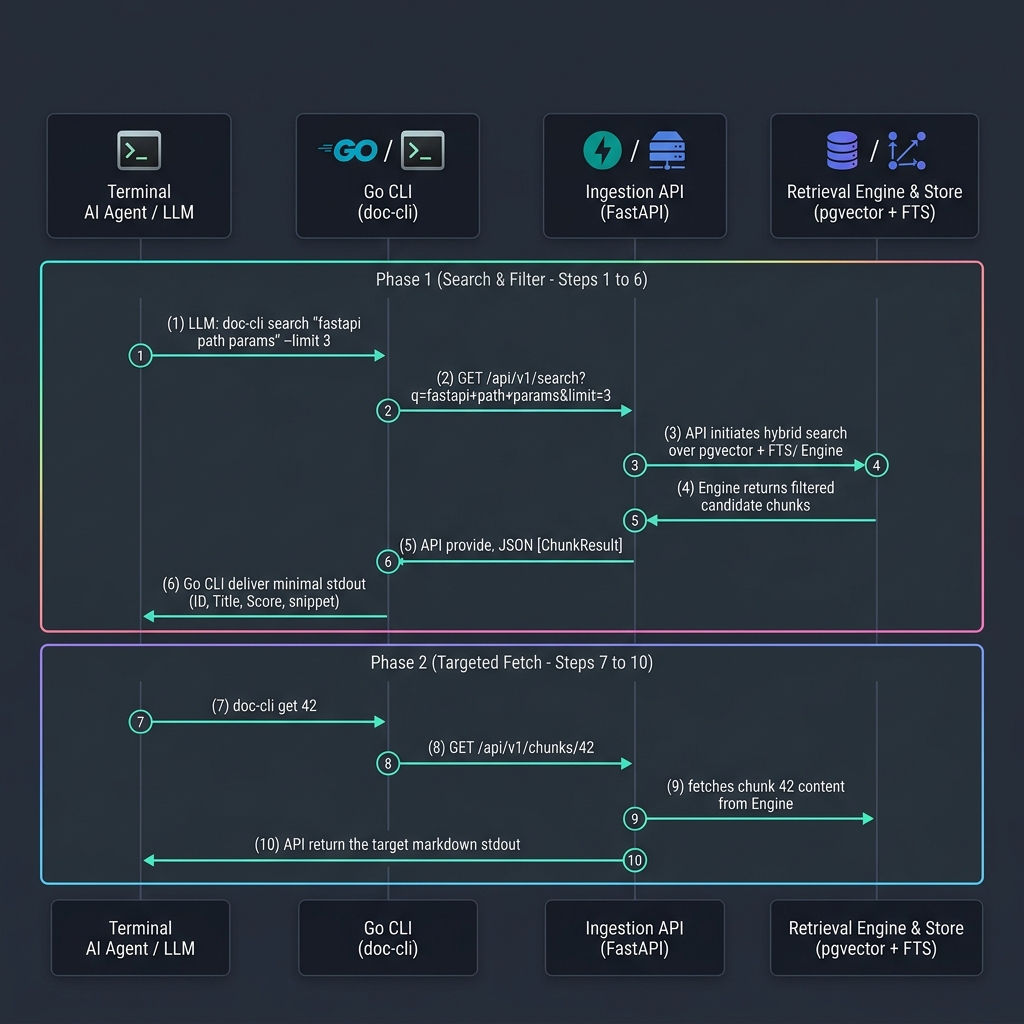
Search First (Token-Efficient Candidate Fetch):
doc-cli search "fastapi dependency injection" --limit 3Returns candidate chunk IDs, heading paths, relevance scores, and 1-line snippets.
Inspect Candidate IDs:
Agent evaluates the candidate IDs and heading paths returned.Targeted Fetch by ID:
doc-cli get 42Fetches exact markdown content for the specified chunk ID.
Skill Diagnostics & Management
doc-cli skill status         # Check global/project skill installation and API health
doc-cli skill install        # Install skill globally (~/.gemini/config/skills/doc-cli/SKILL.md)
doc-cli skill install --project # Install skill locally (.agents/skills/doc-cli/SKILL.md)
Quickstart — Production (Home-Lab + Traefik)
Deploy behind Traefik ingress on a home-lab server:
cp .env.example .env                    # set credentials + DOCS_MCP_HOSTNAME
export MCP_TOKEN=$(openssl rand -hex 32)  # required — persist this in .env
make up-prod                            # applies docker-compose.prod.yml overlay
make sync                               # trigger the initial documentation sync
[!IMPORTANT]
MCP_TOKENis mandatory. If it is missing from.env,mcp-server
fails fast on startup and restart-loops. When upgrading an existing
deployment, update every client config with theAuthorizationheader
before or alongside restartingmcp-server. Follow the
MCP_TOKEN upgrade checklist
in the runbook.
MCP Tools & REST Endpoints
MCP Server Tools (Streamable HTTP)
| Tool | Description |
|---|---|
search_docs(query, source?, limit?) |
Hybrid vector + full-text search over indexed docs. (Note: upload:// URLs from uploaded sources render as plain text) |
list_doc_sources() |
List indexed documentation sets with sync status. Now reports source_type (crawl or upload). |
propose_doc_source(name, base_url, max_pages, ...) |
Propose a new source; lands as pending and stays uncrawlable until approved in the admin UI — never crawls itself. |
upload_doc_text(source, title, content) |
Writes a page of Markdown/text into an existing upload-type source. Limits: 1 MB content, 200-character title. Re-uploading the same title replaces the page. |
Ingestion Service REST Endpoints (/api/v1/*)
| Endpoint | Subcommand / Usage | Description |
|---|---|---|
GET /api/v1/search?q=<query>&limit=3 |
doc-cli search "<query>" |
Fast hybrid search returning candidate IDs, scores, and snippets (~50–150 tokens) |
GET /api/v1/chunks/{id} |
doc-cli get <id> |
Targeted retrieval returning full markdown content for a specific chunk |
GET /api/v1/tree |
doc-cli tree |
Hierarchy overview of indexed doc sources, page counts, and sync timestamps |
Managing Sources
| Action | How |
|---|---|
| Add / edit / remove a source | Admin UI at http://127.0.0.1:8080/admin (loopback only). |
| Create an upload source | Admin UI "Create Source" form using the "Uploaded files" radio button. |
| Populate an upload source | 1. Admin UI: Edit-page upload form. 2. CLI: make upload SOURCE=<name> PATH=<file_or_dir>3. MCP Tool: upload_doc_text(source, title, content) |
| Agent-proposed source | propose_doc_source MCP tool → pending → human approval. |
| Trigger a sync | make sync (or the per-source internal scheduler). |
| Approval workflow | Runbook → adding sources |
Documentation
| Guide | What's inside |
|---|---|
| Client Setup | Connect Cursor, Claude Code, and Antigravity |
| Runbook | DB migration, adding sources, upload sources, injection quarantine, pre-built images & tag scheme, scheduler, backup/restore, troubleshooting |
| Deploy Kit | Reference for deploy/install.sh — file manifest, full flag list, and exit codes for the standalone image-based install kit |
| Architecture Decisions | ADRs documenting key design choices, including ADR-005: Uploads as a Source Type and ADR-007: Quarantine Untrusted Doc Content. |
Development
# Start an isolated db for testing
docker compose -f docker-compose.yml -f docker-compose.test.yml up -d db

# Run the full suite (unit + integration + e2e)
make test

# Run the retrieval-quality eval (requires a synced db)
make eval

# Lint and static type checks (also enforced in CI)
make lint
make typecheck
Data & System Operations
| Command | Action |
|---|---|
make upload SOURCE=<name> PATH=<file_or_dir> |
Uploads local files or directories to an upload-type source. |
make purge |
Purges the database of indexed chunks for a source. |
make refresh |
Purges then immediately recrawls a source. |
make stop |
Stops an active sync. |
make reindex |
Re-embeds the entire corpus (e.g. after changing models). |
make test-db-up |
Brings up the testing database. |
make test-db-down |
Tears down the testing database. |
make test-db-reset |
Resets the testing database to a fresh state. |
[!WARNING]
Backup and restore are available viamake backup,make backup-prune, andmake restore FILE=backups/docs_<timestamp>.dump— see the
Runbook for the full procedure. Note thatmake purgeor restoring a database withoutpg_dumpbackup will permanently lose any uploaded documents unless you have the original files.
License
Released under the MIT License.
Reviews (0)
Sign in to leave a review.
Leave a reviewNo results found