Orchestra-Board
Health Warn
- License — License: MIT
- Description — Repository has a description
- Active repo — Last push 0 days ago
- Low visibility — Only 9 GitHub stars
Code Fail
- child_process — Shell command execution capability in electron/agentsHandlers.cjs
- fs.rmSync — Destructive file system operation in electron/agentsHandlers.cjs
- os.homedir — User home directory access in electron/agentsHandlers.cjs
- process.env — Environment variable access in electron/agentsHandlers.cjs
- fs module — File system access in electron/agentsHandlers.cjs
- fs.rmSync — Destructive file system operation in electron/claudeHooks.cjs
- fs module — File system access in electron/claudeHooks.cjs
- os.homedir — User home directory access in electron/claudeTrust.cjs
- process.env — Environment variable access in electron/claudeTrust.cjs
- fs module — File system access in electron/claudeTrust.cjs
- os.homedir — User home directory access in electron/codexProfile.cjs
- process.env — Environment variable access in electron/codexProfile.cjs
- fs module — File system access in electron/codexProfile.cjs
- os.homedir — User home directory access in electron/fsHandlers.cjs
Permissions Pass
- Permissions — No dangerous permissions requested
No AI report is available for this listing yet.
🎼 Be the maestro of your AI orchestra. A desktop canvas where you drop Claude Code, Codex and other CLI agents, each in a real terminal, and link them: relay work, delegate tasks, let an agent drive a terminal. Roles, exchange log, Git worktrees. Windows, local-only.

Be the maestro of your AI orchestra.
A big canvas where you drop AI coding agents (Claude Code, Codex…), each in its own real terminal,
and wire them together so they hand work to each other.



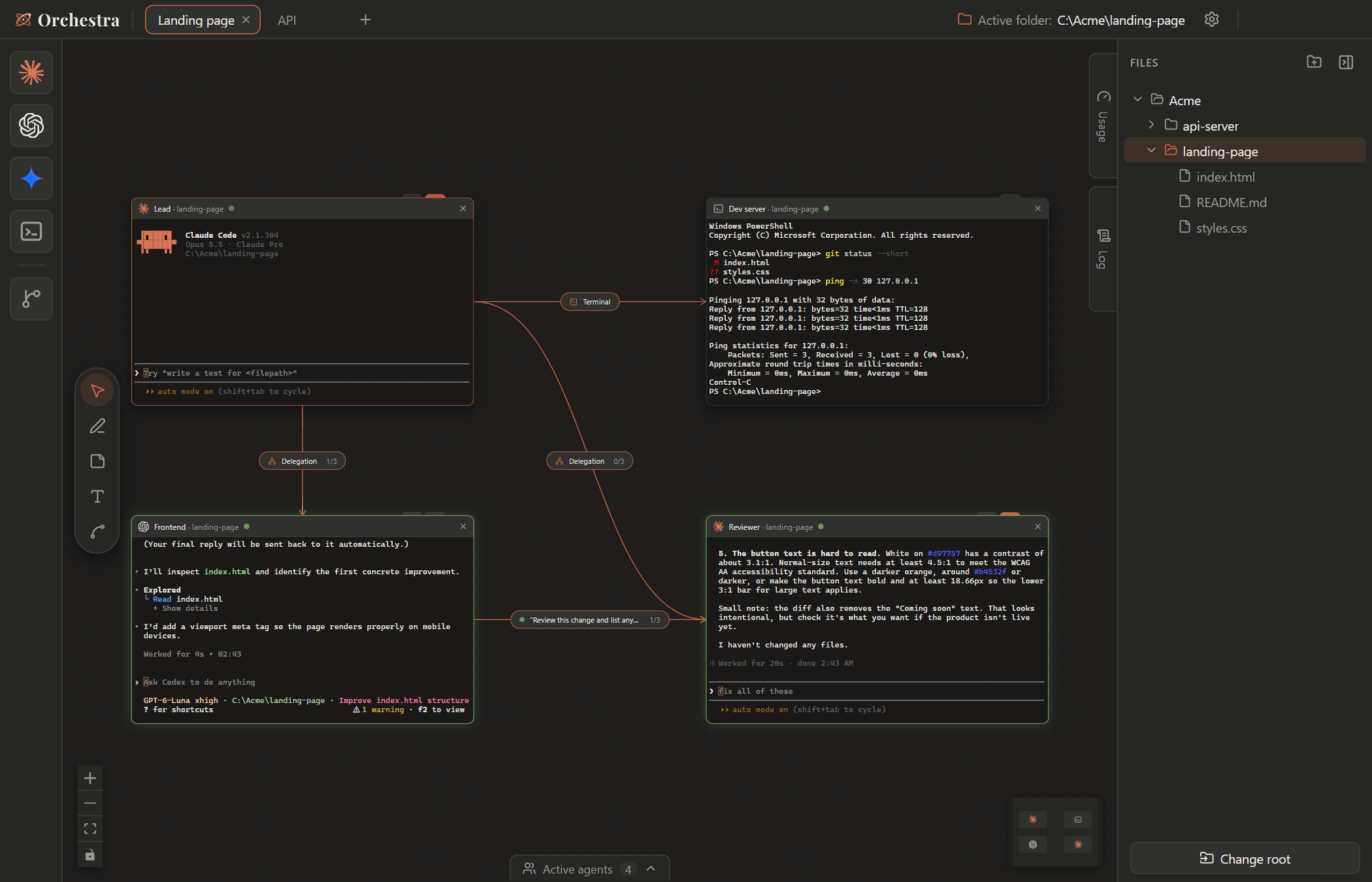
What is Orchestra?
You already run Claude Code or Codex in a terminal. Orchestra puts as many of them as you want side by side on an infinite map, each one in a real terminal, and lets you link them:
- a Lead agent can delegate tasks to other agents and collect their answers by itself,
- a Frontend agent can relay its finished work to a Reviewer automatically,
- an agent can drive a terminal you can see (
npm run dev, tests, builds) instead of running hidden commands.
Everything stays on your machine. Orchestra only starts the CLIs you already use, with your own accounts.
Features
| 🗺️ Infinite map | Drag agents from the dock onto a canvas with pan, zoom and minimap. Several boards in tabs; agents keep running in the background. |
| 💻 Real terminals | Every tile is a real terminal (xterm.js + node-pty), started in the folder you picked in the file explorer. |
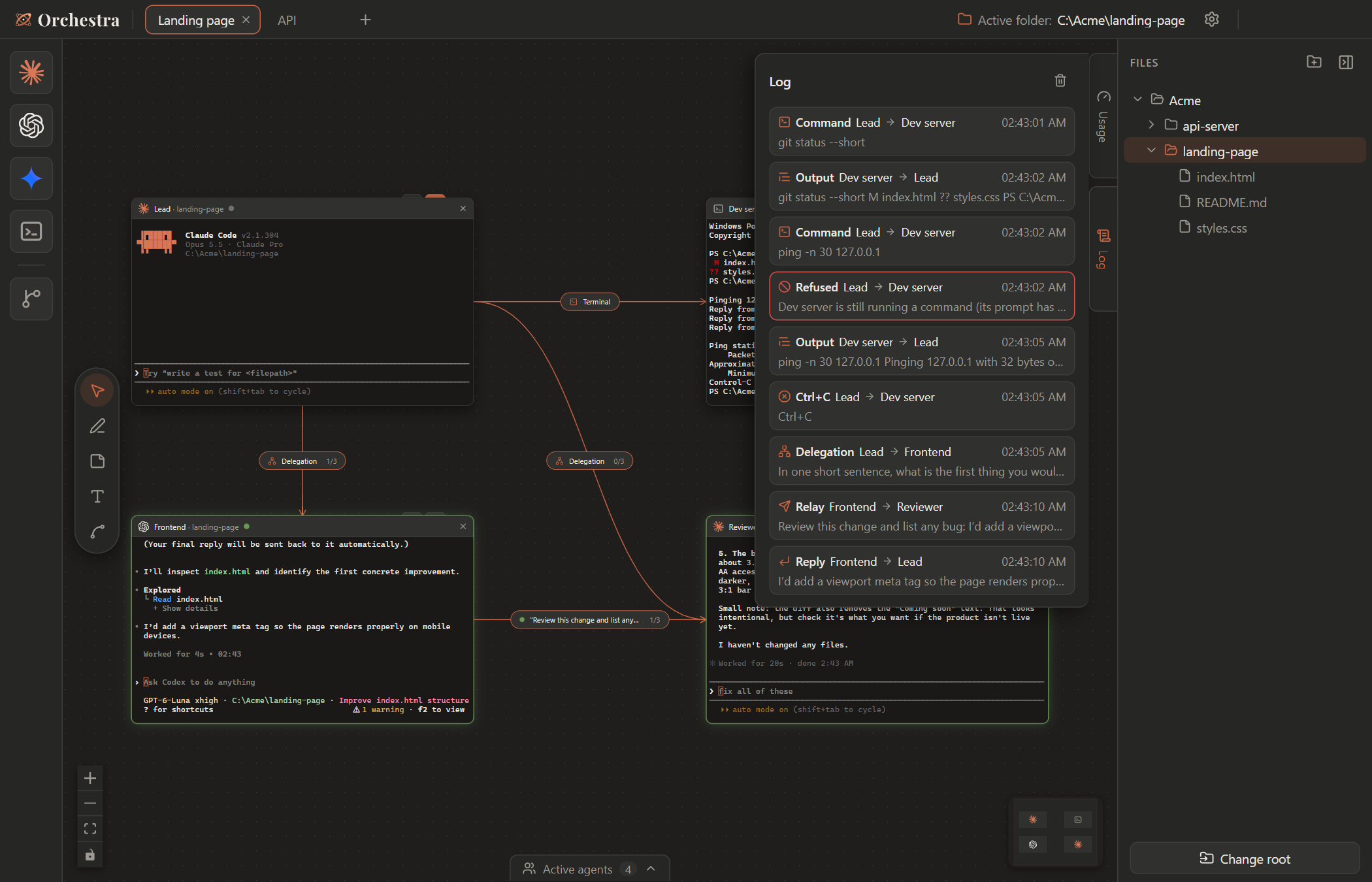
| 🔗 Links between agents | Relay (automatic hand-off), Delegation (an agent talks to other agents through tools) and Terminal (an agent runs commands in a visible terminal). Turn limits prevent endless loops. |
| 🎭 Roles | Give each agent a lasting role (“You are the reviewer, you never edit files…”). |
| 📜 Exchange log | See every message, reply, command and refusal that went through a link. |
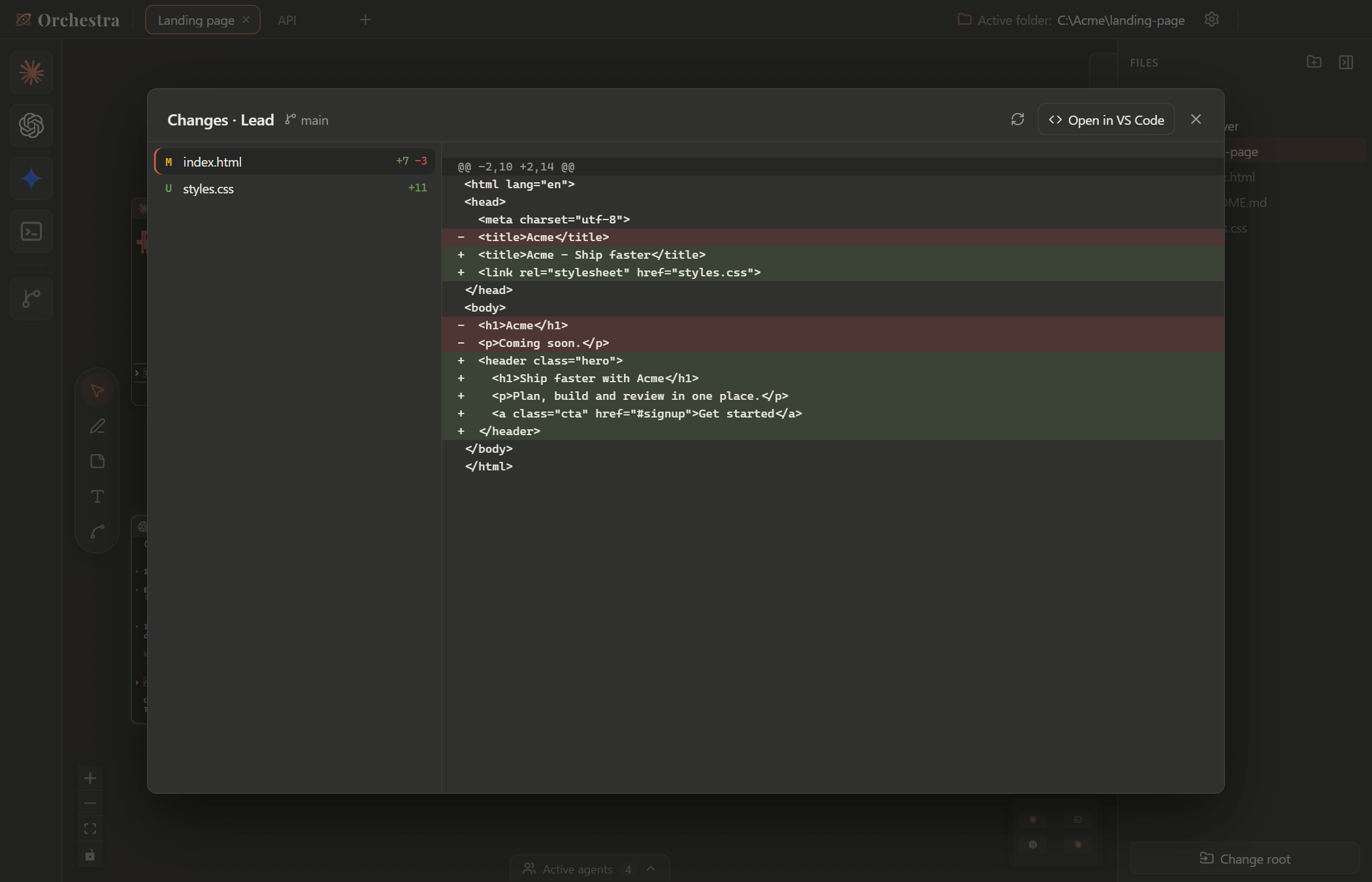
| 🔍 Changes | Review the files an agent changed, with a colored diff, and open them in VS Code. |
| 🌿 Git branches | Drop the Branch square on a tile to move its agent to another branch, in its own git worktree. |
| 🟢 Status & notifications | Working / waiting for permission / done, with a green glow, a sound and a Windows notification when an agent finishes. |
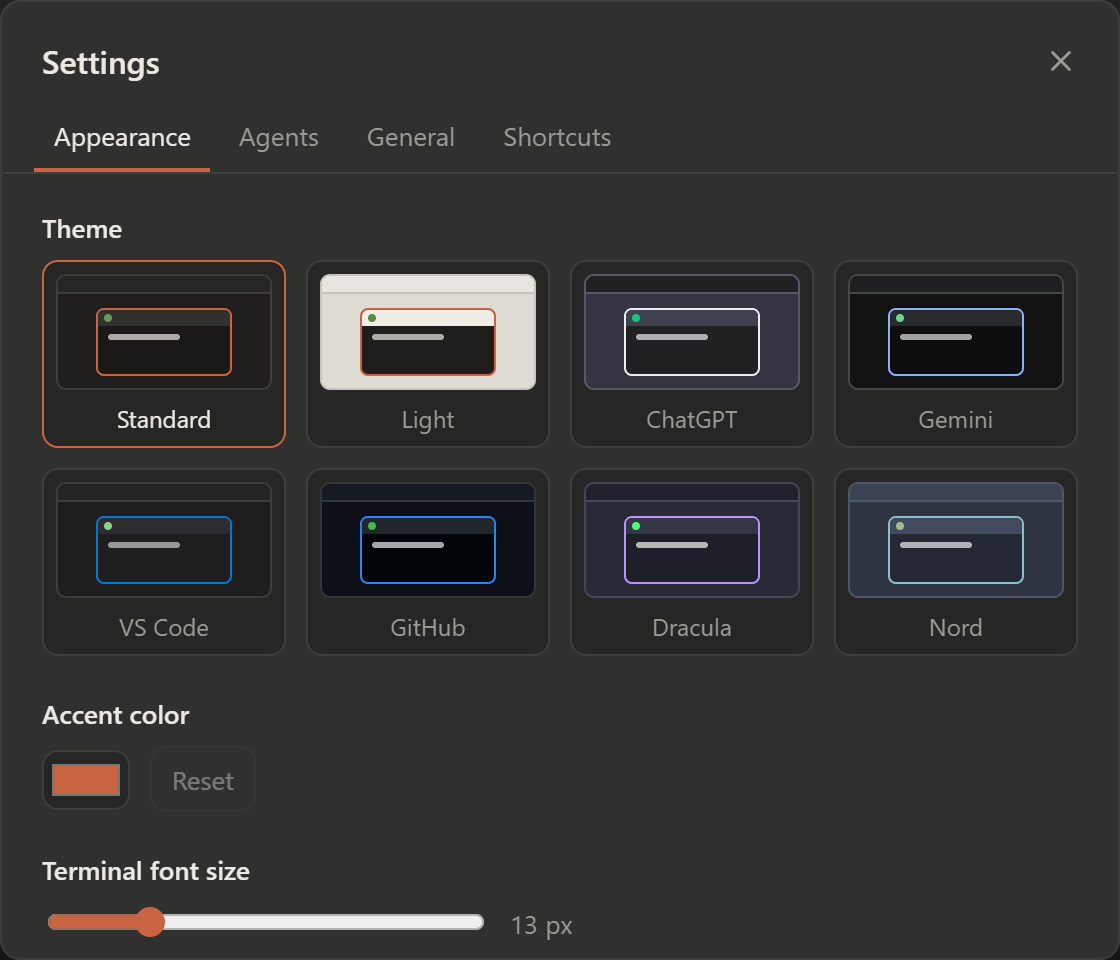
| 🎨 Themes | Standard, Light, ChatGPT, Gemini, VS Code, GitHub, Dracula and Nord, plus your own accent color. English and French. |
| 🧭 Guided tour | A one-minute tutorial on first launch, available again in the settings. |
Getting started
1. Install
- Download
Orchestra-Setup-<version>.exefrom the latest release and run it. - Windows may say “Windows protected your PC” (the app is not code-signed yet): click More info → Run anyway.
Requirements: Windows 10 or 11, and the agent CLIs you want to use, installed and logged in: claude and/or codex must work in a normal terminal.
2. Take the tour
On first launch, Orchestra offers a short guided tour. It walks you through everything below, on your own board.
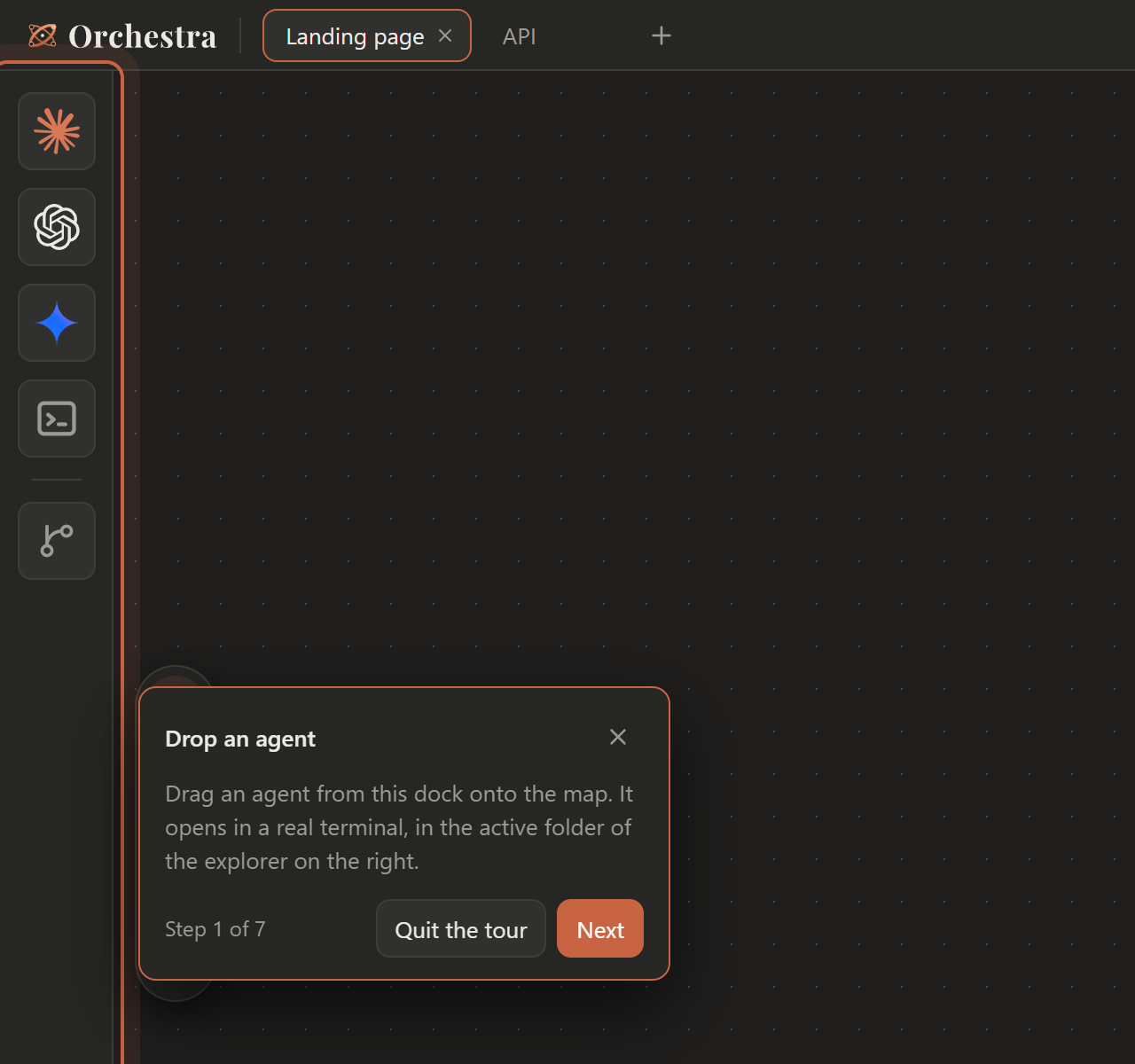
Tutorial
Drop your agents
- In the file explorer on the right, click the folder you want to work in: it becomes the active folder.
- Drag an agent from the dock on the left onto the map. It starts in a real terminal, in the active folder.
- Drop a second one. Each tile can be moved, resized (click its title bar first) and renamed (double-click its name).
Link them
Pick the Link tool (L) in the toolbar, click the first tile, then the second one. Then, with the Select tool (V), click the label in the middle of the link to choose how they talk:
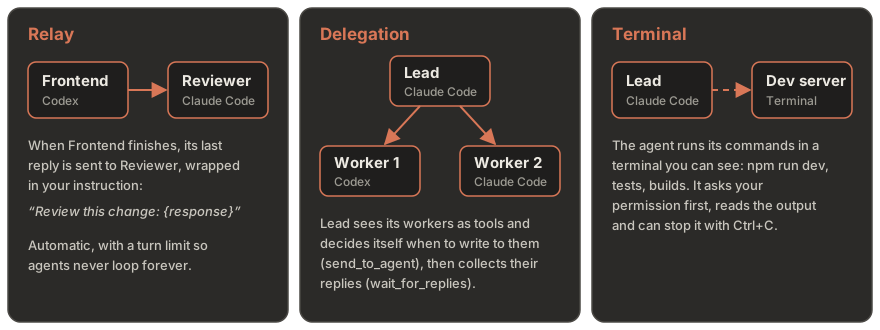
| Link | What happens | Good for |
|---|---|---|
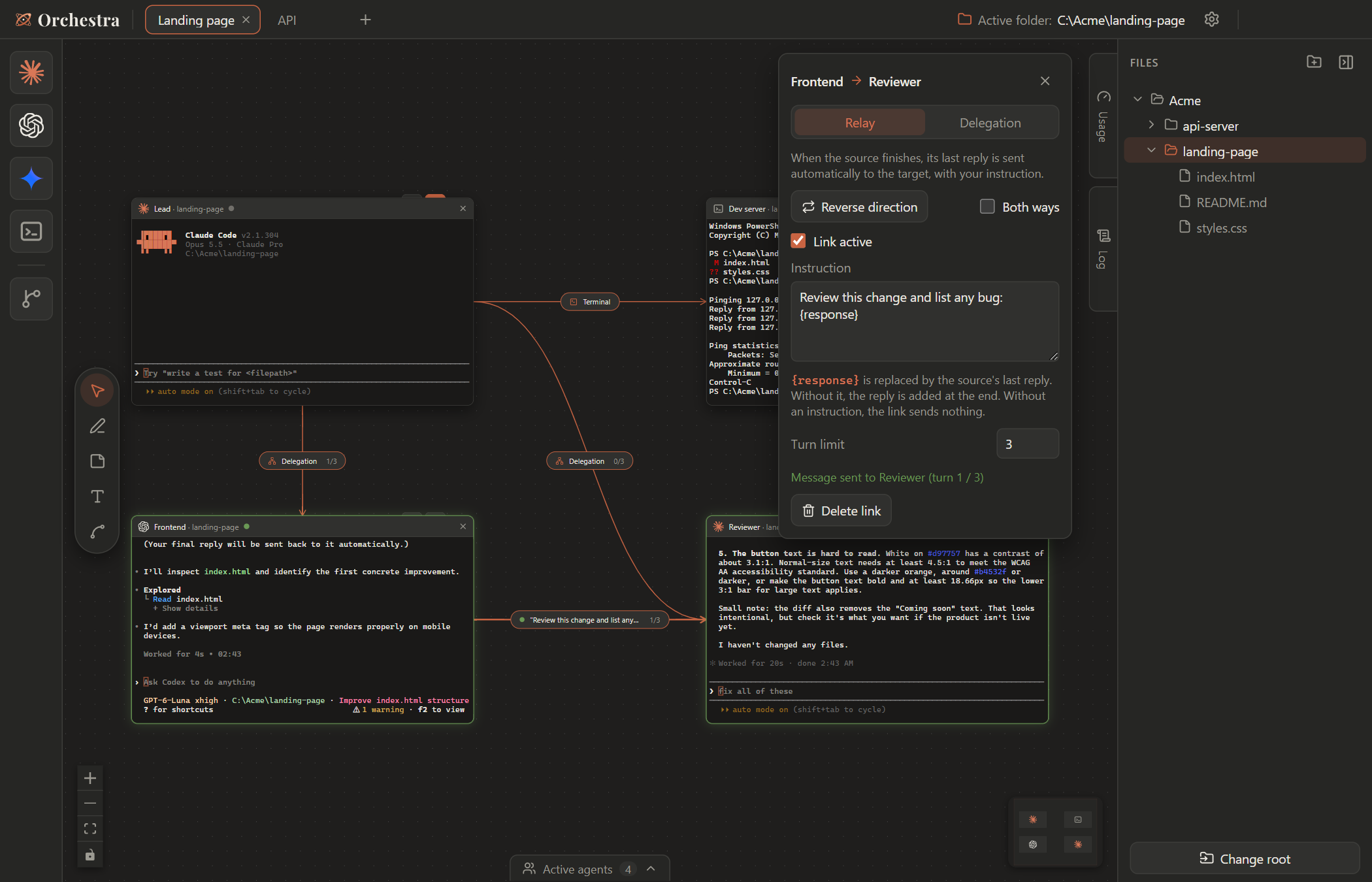
| Relay | When A finishes, its last reply is pasted into B with your instruction ({response} is replaced by the reply). |
Dev → reviewer, writer → translator |
| Delegation | A sees B in its tools and decides itself when to write to it; B's reply comes back to A. | A lead that splits work between several agents |
| Terminal | A runs commands in a Terminal tile you can watch, after asking your permission. | Dev servers, tests, builds |
Links can be reversed or made two-way, and every link has a turn limit (3 by default).
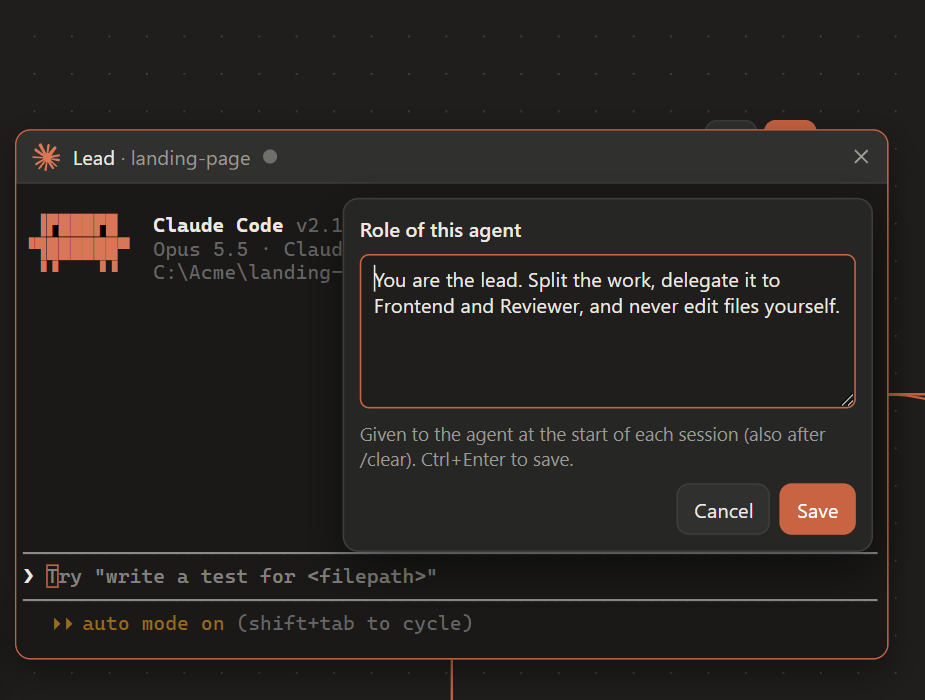
Give a role
Hover the small tab peeking above a Claude Code or Codex tile and click the mask. The role is given to the agent at the start of each session (and again after /clear). A tile with a role shows an orange tab.
Follow the exchanges
Open the Log tab on the right edge of the map (Ctrl+Shift+J). It lists everything that went through a link: relayed messages, delegated tasks and their replies, terminal commands and their output, and refusals in red (turn limit reached, busy terminal…). Click a name to jump to its tile.
Review the changes
When a tile works in a Git repository, a second tab above it opens the Changes window: every file changed since the last commit, with a colored diff and an Open in VS Code button. Orchestra only reads Git here.
Recipes
A lead and two workers — Put a Claude Code Lead above a Codex and a Claude Code, linked with Delegation. Ask the lead: “Ask each of your agents for a short poem and tell me which one is best.” It writes to both, waits for their replies and answers you.
Dev + reviewer — Link a Frontend agent to a Reviewer with a Relay and the instruction “Review this change and list any bug: {response}”. Give the reviewer the role “You never edit files.” Every time the frontend agent finishes, the reviewer checks its work.
An agent that runs your dev server — Link an agent to a Terminal tile, then ask: “Start the dev server in the linked terminal and tell me when it's ready.” You see the command run; the agent reads the output and can stop it with Ctrl+C.
Keyboard shortcuts
| Everywhere (even in a terminal) | |
|---|---|
Ctrl+Tab / Ctrl+Shift+Tab |
Next / previous board |
Ctrl+1…9 |
Go to board |
Ctrl+Shift+T |
New board |
Ctrl+, |
Settings |
Ctrl+Shift+E / A / U / J |
Files / active agents / usage / log |
| On the map | |
|---|---|
V P N T L |
Select, pen, sticky note, text, link |
F |
Fit everything in view |
Del |
Delete the selection (with confirmation) |
F2 |
Rename the selected tile |
Ctrl+Z / Ctrl+Y |
Undo / redo |
In a terminal, Ctrl+C copies when text is selected (otherwise it interrupts) and Ctrl+V pastes. The full list is in Settings › Shortcuts.
Themes
Privacy and safety
- Local only. Orchestra talks to agents through a small server bound to
127.0.0.1, protected by a secret token that changes at every launch. Nothing is sent anywhere by Orchestra itself. - Your permissions stay yours. Orchestra never approves a permission request for an agent. Its own tools are pre-approved, except
run_in_terminal, which always asks. - Git, read-mostly. Orchestra only runs
git fetchandgit worktree add(when you pick a branch) and read-only commands. It never commits or pushes. - What it writes outside its folder:
~/.claude.json: marks a folder as trusted before launching Claude Code in it (can be turned off in Settings › General);~/.codex/orchestra.config.toml(an Orchestra profile with its MCP server, used ascodex -p orchestra) and Orchestra's own entries in~/.codex/hooks.json. They do nothing when Codex runs outside Orchestra.
- App data (settings, boards) lives in
%APPDATA%\Orchestra. The exchange log stays in memory only.
FAQ
Codex asks me to approve “5 hooks”That's Orchestra's status hooks (working / done). Choose Trust all and continue once; Codex remembers it.
Which agents can use links?Claude Code and Codex can relay, delegate and drive a terminal. Any other CLI (Aider, Gemini CLI, your own…) works in a tile and can receive relayed messages, but cannot send them. Gemini CLI is no longer maintained by Google and has no orchestration.
Can I add another CLI?Yes: Settings › Agents. Pick a known agent (Google Antigravity, Aider, Qwen Code, OpenCode, GitHub Copilot CLI, Cursor CLI, Goose, Amp, Kimi CLI…) or add your own command, logo and color. Test checks that the command exists.
macOS / Linux?Windows comes first. The code is cross-platform and should run from source elsewhere, but it is not tested or packaged yet.
Build from source
Requires Node.js 20+.
npm install      # node-pty ships prebuilt binaries: no Visual Studio or Python needed
npm run dev      # Vite + Electron with hot reload
npm run dist     # Windows installer in release/Orchestra-Setup-<version>.exe
launcher.exe at the root rebuilds the interface and opens the app without a terminal window (npm run build:launcher to recompile it).
If Windows' ransomware protection (Controlled folder access) is on and the project is in Documents, it may block the installer build: allow makensis.exe or build elsewhere.
electron/            Node side: windows, terminals, files, local server, MCP
  main.cjs           window, IPC routes, notifications
  preload.cjs        the only bridge to the UI (window.pty, fs, settings, workspace, git…)
  ptyManager.cjs     one real PTY per tile
  hookServer.cjs     local server (127.0.0.1 + token) for agent hooks and MCP tools
  mcpServer.cjs      the "orchestra" MCP server started by each agent (stdio)
  linkRelay.cjs      Relay links
  delegation.cjs     Delegation links (list_agents, send_to_agent, wait_for_replies)
  terminalLink.cjs   Terminal links (run_in_terminal, read_terminal, interrupt_terminal)
  activityLog.cjs    exchange log (memory only)
  claudeHooks.cjs    per-tile Claude Code settings and MCP config
  codexProfile.cjs   Codex profile and hooks
  git.cjs            branches, worktrees, read-only changes and diffs
src/                 React interface (map, tiles, panels, settings, tutorial)
docs/images/         README images
The path of a keystroke: xterm.js → window.pty.write → IPC → node-pty → the CLI, and back through pty:data:<id>.
Feedback & support
Found a bug or have an idea? Open an issue: there is a short form for bugs and one for feature requests. Questions, feedback and stories about how you use Orchestra are welcome in Discussions.
For anything else: orchestraboardai [at] gmail [dot] com
License
Reviews (0)
Sign in to leave a review.
Leave a reviewNo results found