agentcordon
Health Warn
- License — License: AGPL-3.0
- Description — Repository has a description
- Active repo — Last push 0 days ago
- Low visibility — Only 9 GitHub stars
Code Pass
- Code scan — Scanned 12 files during light audit, no dangerous patterns found
Permissions Pass
- Permissions — No dangerous permissions requested
No AI report is available for this listing yet.
Self-hosted credential broker for AI agents: agents ask for an API call by credential name; a policy engine decides; secrets never reach the agent.




AgentCordon is a self-hosted credential broker for AI agents. An agent asks for an API
call by name; AgentCordon decides whether it is allowed, injects the credential, makes the
call, and hands back the response with any leaked secret scrubbed out. The agent never
holds the key. It is for teams running agents against real APIs who want one place to grant,
revoke and audit that access.
Status: pre-1.0, under active development. A minor version may change the wire
formats between CLI, broker and server — 0.4.0 changed both — so upgrade the three in
lockstep; Upgrading says what moved and what persists. The storage
format has forward-only migrations that run at startup, so a database moves up and never
back. Releases are tag-driven rather than scheduled: onecargo releasecommand, and
everything else happens because of the tag (Releasing).
The problem
Agents need API keys, so the keys end up in prompts, environment variables and MCP config
files. Each one is long-lived, copied into several places, readable by whatever the agent
reads, and invisible once it leaves. There is no per-agent scope, no record of use, and no
way to cut one agent off without rotating a secret everywhere it was pasted.
The model
Three processes, and a boundary the secret does not cross.
The CLI in each project directory has an Ed25519 keypair and no credentials. It signs
every request to the broker, a daemon on the same machine that holds the workspace's
OAuth tokens but no provider secrets. The broker asks the control plane — the server —
for one credential, naming the method and URL it is about to call. The server evaluates
Cedar policy, opens the credential from its encrypted vault, and re-seals it for that
broker alone. The broker injects it, makes the call, and scans the response on the way back.
Grants are per workspace and per credential, and a credential can name the URLs it may be
sent to. Cutting an agent off is a switch on its workspace page, not a rotation.
flowchart LR
    Agent["AI agent<br/>+ agentcordon CLI"]
    Broker["Broker daemon<br/>on your machine"]
    Server["Server<br/>the control plane"]
    Cedar["Cedar<br/>policy engine"]
    Vault[("Vault<br/>AES-256-GCM")]
    Upstream["Your APIs and<br/>MCP servers"]

    Agent -- "1. signed request (Ed25519)" --> Broker
    Broker -- "2. vend: name, method, URL" --> Server
    Server -- "3. authorize" --> Cedar
    Server -- "4. decrypt, re-seal" --> Vault
    Server -- "5. sealed envelope (ECIES)" --> Broker
    Broker -- "6. call with credential injected" --> Upstream
    Upstream -- "7. response" --> Broker
    Broker -- "8. response, leak-scanned" --> Agent

    classDef agentside fill:#f8f9fa,stroke:#495057,color:#212529
    classDef secrets fill:#e7f5ff,stroke:#1971c2,color:#0b3d66
    class Agent,Broker,Upstream agentside
    class Server,Cedar,Vault secrets
Blue is the control plane: the only place a stored secret exists in plaintext. The envelope
in step 5 is sealed to the broker's own key and bound to that one vend. For the upstream
OAuth credential types the plaintext never even reaches the broker — the server runs the
provider's token exchange itself and seals only a short-lived access token.
The vend at step 2 and the policy decision at step 3 are each an audit row, correlated.
System Architecture draws the same path in full,
with every check in the order the code runs it.
See it in action
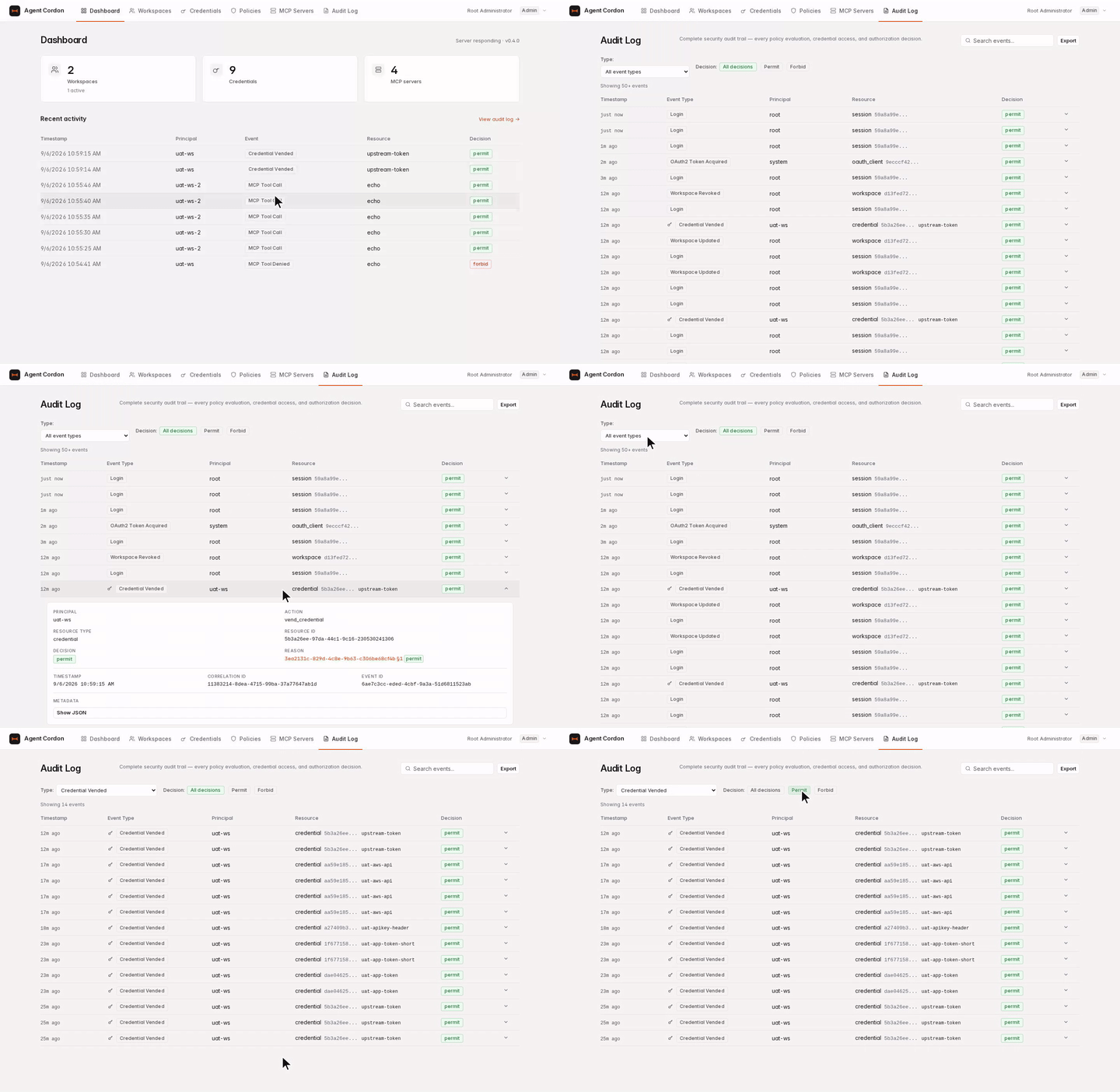
Every credential access, and the policy decision behind it, in the audit log:
Quick start
Three commands: one for the admin, two for each developer. Everything below assumes port
3140, the server's default.
1. Start the server
docker run -d --name agentcordon -p 3140:3140 \
  -v agentcordon-data:/data \
  ghcr.io/agentcordon/agentcordon:0.4.0
Open http://localhost:3140. The admin username is root; the password is generated on
first boot and printed once to the container log (docker logs agentcordon).
Set
AGTCRDN_BASE_URLbefore anyone enrolls. The server builds the device-flow
activation URL and theGET /install.shscript from it. Unset, it falls back tohttp://
plus its listen address, which in the shipped container ishttp://0.0.0.0:3140— an
address no browser can open. Replace the container, adding-e AGTCRDN_BASE_URL=https://agentcordon.example.com. Nothing is lost: the database, the
generated.secretand the first-boot.root_passwordall live in the named volume.
Installation covers Docker Compose, a build from a clone, the
Tailscale sidecar, and a source build. Deployment covers the
production shape.
2. Install the CLI and the broker
Your server serves an installer for both binaries, pinned to its own version:
curl -fsSL https://agentcordon.example.com/install.sh | sh
It detects your OS and architecture, downloads both binaries from the matching GitHub
release, verifies them against the release's SHA256SUMS, and installs them to~/.local/bin. It then adds that directory to your login shell's startup file and records
the server it came from in ~/.agentcordon/config.toml — which is why nothing after this
asks you for a URL. On Windows, irm https://agentcordon.example.com/install.ps1 | iex.
Installation has what it writes, the
opt-outs, and the manual routes.
3. Set up a project
From your agent's project directory:
agentcordon init
init asks which coding agents you use — Claude Code, Codex, Cursor, Kiro and eleven more —
pre-checking the ones it can see, and writes the AgentCordon skill where each of them looks
for it. Then it enrolls this workspace: it starts the broker if none is running and prints a
four-word code and an activation URL. Open it in any browser, on any machine, sign in, and
click Approve. This is the
RFC 8628 device authorization grant, the
same flow as gh auth login — there is no loopback callback and nothing to port-forward.init finishes on its own once you approve.
--no-register sets the directory up without enrolling; agentcordon register enrolls
later, or re-enrolls. See the CLI reference.
init starts a broker in the background if none is running. For a long-lived setup, runagentcordon-broker --server-url https://agentcordon.example.com yourself, in its own
terminal or under a service manager; it binds 127.0.0.1 on a port it picks and writes the
URL to ~/.agentcordon/broker.port, which is how the CLI finds it.
Use it
agentcordon credentials                                                    # what this workspace may use
agentcordon proxy github-token GET https://api.github.com/repos/org/repo   # a proxied call
agentcordon mcp-tools                                                      # tools across every bound MCP server
agentcordon mcp-call github list_repos --arg owner=myorg                   # one tool call
proxy takes a full URL, not a path: the broker needs the origin to check the credential's
URL pattern and to run its SSRF check. CLI Reference has every
command and flag.
Features
- Credential proxy. Agents call APIs by credential name. The credential is injected in
the broker and never reaches the agent. - Cedar policy engine. Deny by default. Grants are per workspace, per credential, per
action, with a tester page that shows which rules decided. - Encrypted vault. AES-256-GCM at rest under a versioned master key, with a re-seal
path for rotation and per-vend ECIES envelopes to the broker. - Vaults. Named, owned groupings for credentials, shareable read-only with another
user, who sees what is in the vault and never a secret. - URL-fenced credentials. A credential can name the URLs it may be sent to. The pattern
is checked structurally on the server at vend time and again in the broker before
injection. - MCP servers. Install one from the marketplace, bind it to any of your workspaces, and
let the broker front it. Tool calls are policy-checked per call and leak-scanned on the
way back. - OAuth 2.0 for MCP. Discovery, dynamic client registration and the authorization-code
flow with PKCE, so an MCP server that needs a delegated token gets one — refreshed
server-side, so the refresh token never leaves the control plane. - Workspace identity. One project directory, one Ed25519 keypair, one set of grants.
Enrollment is a device flow approved in a browser; there is no password and no shared
secret. - OIDC sign-in. The admin console accepts any OpenID Connect provider for SSO.
- AWS SigV4. An AWS credential is signed as a SigV4 request rather than injected as a
header, so an agent gets a signed call and never an access key. - Response leak scanning. Anything injected is scrubbed out of what comes back — raw,
base64, URL-safe base64 or percent-encoded. - Audit trail. Every vend, policy decision and token operation is an append-only row
with a correlation id, exportable as CSV, syslog or JSONL. - Self-hosted. One binary, one SQLite file, a multi-arch container image, no external
services.
Why not …
- Environment variables or a
.envfile. The agent holds the secret, so anything it
reads, logs or pastes can leak it, and there is no per-call decision and no record. - A secrets manager — Vault, Infisical. It stores, scopes and rotates the secret well,
then hands it to the agent, which is where the problem starts; the audit row is the
fetch, not the API call. - Per-vendor scoped API keys. Real scoping, but it is one vendor's scope per key, with
no policy per request, no single trail across vendors, and revocation means rotating the
key everywhere it was pasted. - 1Password-style service accounts. Good provisioning and a real audit of retrieval —
and after retrieval the agent has the secret and the trail stops.
AgentCordon instead makes the call itself: the credential is injected in the broker, one
Cedar decision per request, and the audit row is the API call rather than the fetch. It is
not a general secrets manager, not a network proxy, and not a hosted service today.
Supported platforms
| Server | Container image for linux/amd64 and linux/arm64, or the native binary for x86_64-unknown-linux-gnu and aarch64-unknown-linux-gnu (built against glibc 2.35) |
| CLI and broker | x86_64-unknown-linux-gnu, aarch64-unknown-linux-gnu, x86_64-apple-darwin, aarch64-apple-darwin, x86_64-pc-windows-msvc |
| Admin UI | Tested in Chromium and Firefox |
| Storage | SQLite only (ADR 0001) |
Security
Deny by default: every access needs an explicit Cedar grant, and a policy that errors is
treated as a denial rather than skipped. Credentials are AES-256-GCM encrypted at rest and
released only as a single-use ECIES envelope sealed to one broker's key. The CLI signs
every request to the broker with Ed25519 over a nonce the broker will not accept twice. A
resolving SSRF check refuses every reserved address range in front of each outbound call,
and the leak scanner strips injected values out of every response. Upstream OAuth secrets —
provider client secrets and refresh tokens — never leave the server.
Authorization & Cedar Policy,
Credential Encryption and Master Key
go through each of these. To report a vulnerability, open a private
security advisory
rather than a public issue; SECURITY.md has the supported versions, the
response times and what is in scope.
Documentation
| Page | What is in it |
|---|---|
| Documentation index | Everything below, grouped |
| Installation | Every way to install the server, the CLI and the broker, including Windows and a source build |
| Configuration | Every environment variable for all three binaries, with defaults |
| Deployment | Reverse proxy, base URL, volumes, the single-instance lock, backups |
| Workspace Enrollment | Ed25519 identity, the device-code flow, the approval screens |
| Admin UI | A map of the console: every screen and what is behind each menu |
| Granting MCP Server Access | Installing an MCP server, marketplace templates, OAuth provider clients |
| Authorization & Cedar Policy | Entity types, the default policy, the policy pages and tester |
| Credential Encryption | AES-256-GCM at rest, ECIES vending, transforms, vaults |
| Master Key | Key derivation, rotation, re-sealing |
| CLI Reference | Every command and flag |
| System Architecture | Crates, routes, middleware, the vend and MCP OAuth flows |
| Upgrading | Migrations, backups, rollback |
| Releasing | Cutting a release with one cargo release command |
| Domain glossary and decision records | Every domain term as the code uses it, and one ADR per architectural decision |
Contributing
Contributions are welcome. Open an issue before starting anything large, and readCONTEXT.md first — it is the vocabulary the codebase uses, written from the
code.
cargo test --workspace
cargo clippy --workspace -- -D warnings
cargo fmt --all
CONTRIBUTING.md has the rest: where tests are allowed to live, the
conventional-commit convention, the UAT harness, and where a design decision goes.
Contributions are accepted under the Contributor Licence Agreement — one comment
on your first pull request, and CLA.md explains why an AGPL project asks. The
Code of Conduct is Contributor Covenant 2.1.
Licence
GNU Affero General Public License v3.0 only (AGPL-3.0-only). See LICENSE,
and THIRD_PARTY_NOTICES.md for the material that ships inside the
binaries but is not ours. Contributions are accepted under the
Contributor Licence Agreement. "AgentCordon" and its logo are trademarks; seeTRADEMARK.md.
Reviews (0)
Sign in to leave a review.
Leave a reviewNo results found