Jantt
Health Gecti
- License — License: MIT
- Description — Repository has a description
- Active repo — Last push 0 days ago
- Community trust — 6237 GitHub stars
Code Uyari
- process.env — Environment variable access in .github/workflows/release.yml
- fs module — File system access in .github/workflows/release.yml
Permissions Gecti
- Permissions — No dangerous permissions requested
Bu listing icin henuz AI raporu yok.
Create interactive Gantt charts with AI — no code required, free forever. Built-in BYOK AI Copilot (10 providers + Ollama), free cloud rooms, working-calendar CPM, 6 views, React/Vue/Svelte/Python/MCP.

Create Interactive Gantt Charts with AI — No Code Required.
Simple enough to organize your semester, wedding, or team meeting in 60 seconds.
Powerful enough for working-calendar Critical Path analysis, 100,000-task Canvas rendering, and Microsoft Project / Primavera P6 teams.








Launch Free Live App (No Sign-Up Required)
Create with AI • Who Uses Jantt • 6 Synced Views • Compare Tools • Free Cloud Sync • Developer Quickstarts • Docs
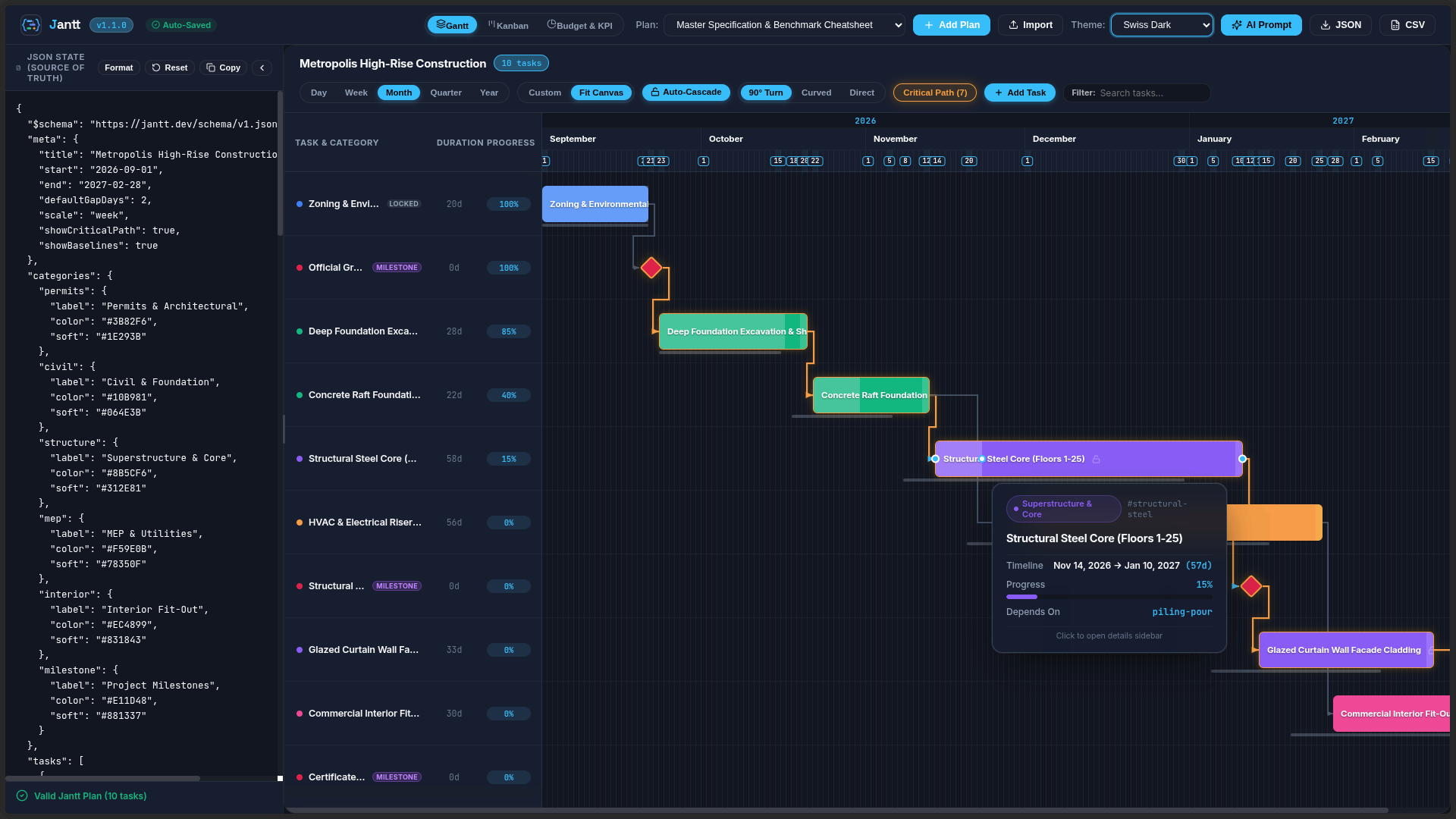
Simple on the Surface. Rocket Engine Underneath.
Most timeline tools force an unfair trade-off: spreadsheets break the moment one date slips, commercial Gantt suites lock basic features behind $15–$49/user/month paywalls, and asking ChatGPT to code an HTML/Mermaid chart gives you a static, broken picture you cannot drag or update.
Jantt removes every barrier at once:
| Promise | What It Means for You |
|---|---|
| No Code Needed | Drag bars visually, resize deadlines, connect arrows, or describe your plan in plain English to the built-in AI Copilot. You never have to write a single line of code or JSON unless you want to. |
| Free Forever + Free Cloud Rooms | 100% MIT open source. Use offline in your browser with zero sign-up, or sign in free with GitHub for real-time multi-user cloud rooms, shareable links, and unlimited exports. |
| 100% Client-Side Privacy | Your local schedules stay in your browser. BYOK AI calls go directly from your browser to your provider (or run 100% offline and free with Ollama). Zero lock-in: every plan is clean, portable JSON you own. |
| Grows With Your Ambition | Start with a 5-task study checklist today; unlock working-calendar Critical Path analysis, Earned Value Management (EVM), Monte Carlo risk simulation, 60 FPS Canvas, and MS Project / Primavera P6 interop whenever you need them. |
Create and Edit Gantt Charts with AI (Built-In Copilot)
Stop wrestling with spreadsheet rows or begging chatbots for fragile SVG/React code. Jantt ships a built-in AI Copilot directly inside the live workspace — just open the Copilot drawer and describe what you want in plain English.
How It Works in 3 Steps
- Describe or Paste Anything in Plain English: Type a goal, paste messy meeting notes, or ask to push deadlines, flag urgent risks, rebalance workloads, or add milestones.
- Review the Visual Diff Preview: Jantt validates the AI's structured output against its strict schema and displays an exact added / updated / removed diff preview before touching your schedule. Zero surprise overwrites.
- Apply in One Click: Accept the change with full Undo / Redo support. Dependencies automatically cascade, working days recalculate, and all 6 views update immediately.
Bring Your Own Key (10 Providers) or Run 100% Free & Local
Your API keys stay strictly in your browser's localStorage and connect directly to your provider — never through a Jantt proxy. Live dynamic model discovery (/models and Ollama /api/tags) automatically fetches the latest models from your account with instant search and context-window tags.
| Provider Category | Supported Providers |
|---|---|
| Generous Free Tiers | Google Gemini (Google AI Studio), Groq, OpenRouter |
| Frontier Cloud Models | OpenAI, Anthropic Claude, DeepSeek, Mistral, xAI Grok |
| 100% Free & Offline Local | Ollama (Llama, Qwen, DeepSeek, Gemma running privately on your own machine) |
| Custom Endpoints | Any OpenAI-compatible gateway, corporate endpoint, or local server (LM Studio, vLLM) |
Try Prompts Like These Right Now
- Student Thesis & Exams: "Build a 12-week Master's thesis timeline from literature review to final defense, Monday through Friday only, with advisor review milestones and exam prep buffer."
- Personal Life & Moving: "Organize a 6-week apartment move with packing rooms, utility transfers, lease handoff, and a budget under $2,500."
- Team Meeting to Action Plan: "Turn these meeting notes into a 4-week product launch Gantt chart with owners, dependencies, and urgent blockers highlighted."
- Live Schedule Surgery: "Push the QA phase back by 5 working days, mark the security audit urgent, and tell me what just became the bottleneck."
Built for Everyone: Real-World Use Cases
Jantt is not just for Fortune 500 schedulers or software engineers. Open the live app and start organizing whatever matters to you right now:
Organizing for Students, PhD/MS Applicants & Researchers
- University & Scholarship Pipelines: Track PhD/MS deadlines, GRE/IELTS prep, Statement of Purpose drafts, recommendation letter reminders, and application fees in one calm timeline.
- Semester, Thesis & Exam Planning: Map coursework, lab experiments, advisor sign-off milestones, and revision weeks — then flip to Checklist View each morning to tick off today's work with one click.
- Zero Cost for Students: Free forever, instant browser auto-save, and one-click JSON/CSV/PDF backup for advisor check-ins.
Personal Life Organizers, Freelancers & Everyday Planning
- Life Milestones Made Visual: Plan weddings, moving apartments, home renovations, international travel itineraries, fitness/learning sprints, or side-hustle launches without fighting messy spreadsheets.
- See What Matters Today: Hit the Today jump button or toggle the 1-click focus bar (Today, This Week, Date Range) with Dim Mode (softly fades other tasks) or Hide Mode so big plans never feel overwhelming.
- Built-In Budget Tracking: Track estimated vs. actual spending on every task to see whether your personal project is under or over budget at a glance.
Meetings, Standups, Agencies & Small Teams
- Turn Chaotic Meetings Into Clear Commitments: Paste raw meeting minutes into the AI Copilot to generate tasks, owners, dates, and dependencies before the call even ends.
- Collaborate in Free Cloud Rooms: Sign in free with GitHub to turn any local plan into a live shared room with Owner, Editor, and Viewer permissions,
@usernamementions, and instant multi-user sync. - Share Anywhere in One Click: Send a compressed read-only snapshot link, embed an interactive chart, or export a clean multi-page Executive HTML/PDF report for clients and leadership.
- Notes Right Next to Tasks: Keep Markdown meeting notes, specs, and decisions pinned alongside the timeline with clickable
@personand/taskreferences.
Engineering Teams & Program Managers
- Working-Calendar-Aware Critical Path (CPM): Schedule cascades, Critical Path, float calculations, Resource Leveling, and DCMA-14 audits all honor the same working calendars — Mon–Fri (
standard), Mon–Thu (compressed_4x10), 24/7 (continuous), US/UK/EU/CA/AU regional statutory holidays, custom named calendars, and per-person calendars. - Full ANSI/PMI Dependency Math: Finish-to-Start (
FS), Start-to-Start (SS), Finish-to-Finish (FF), and Start-to-Finish (SF) links with positive lags, negative leads, andlocked: truehard milestones. - No More Expensive Legacy Viewer Seats: Import and export Microsoft Project
.xmland Oracle Primavera P6.xerschedules directly in the browser or CLI. - Executive Analytics Built In: Earned Value Management (EVM — ANSI/EIA-748), DCMA-14 schedule health grading (
A–F), PERT 3-point estimates, 5,000-run Monte Carlo risk simulation, and automated Resource Leveling with preview before apply.
Developers & Autonomous AI Agents
- JSON-as-Interface (10x Fewer LLM Tokens): Instead of asking AI models to hallucinate brittle React JSX or SVG coordinate math, models emit clean, validated Jantt JSON conforming to a formal JSON Schema (
schema/v1.json). - Official MCP Server (
@jantt/mcp): Connect Claude Desktop, Cursor, Gemini, or custom AI agents directly to 6 deterministic scheduling tools (jantt_inspect_plan,jantt_add_task,jantt_reschedule_task,jantt_audit_schedule,jantt_diff_plans,jantt_export_csv). - Embed Anywhere: First-class packages for React, Vue 3, Svelte 4/5, Web Components, Plain HTML, Python / Jupyter / Streamlit, Yjs CRDT, 60 FPS Canvas, and a two-way live-sync CLI.
One Plan, Six Synchronized Views
Edit a task in any view and every other view updates instantaneously. Every page remembers your layout, scroll position, zoom level, filters, and toggles automatically across tabs and reloads.
| View | Best For | Key Capabilities |
|---|---|---|
| Interactive Gantt Timeline | Visual scheduling & dependency flow | Drag bars to move, drag edges to resize, drag anchor ports for 90-degree CAD orthogonal links, inline progress slider, baseline comparison bars, 5 zoom scales (Day to Year) + continuous zoom, one-click Jump to Today, strict right-aligned Swiss micro-pills (Urgent, Critical, circular avatars, locks). |
| 60 FPS Canvas View | Massive enterprise plans (10k–100k+ tasks) | Hardware-accelerated 2D virtualized canvas, live minimap, red Today guide line, working-calendar Critical Path overlay, smooth pan & zoom. |
| Agile Kanban Board | Daily execution & sprint standups | 4 workflow columns (Pending, In Progress, Blocked, Completed), drag-and-drop status cards, multi-rule sorting (Priority, Start Date, Assignee, WBS). |
| Tasks Checklist & Grid | Quick morning focus & bulk editing | 1-click [x] completion checkboxes, expandable cards, quick status/priority controls, inline Resource Leveling preview and apply. |
| Health & PM Dashboard | Tracking budgets, bottlenecks & risk | Dual-mode UI: Essential (clean readiness, velocity, blockers) and Advanced (EVM CPI/SPI/EAC, Critical Path slack, DCMA-14 health grade, PERT, Monte Carlo simulation). |
| Collaborative Notes | Meeting minutes, specs & study docs | Live Markdown editor & preview, @person and /task mentions, pinned notes, color coding, attached task cross-links saved directly inside the plan. |
Visual Showcase & Curated Themes
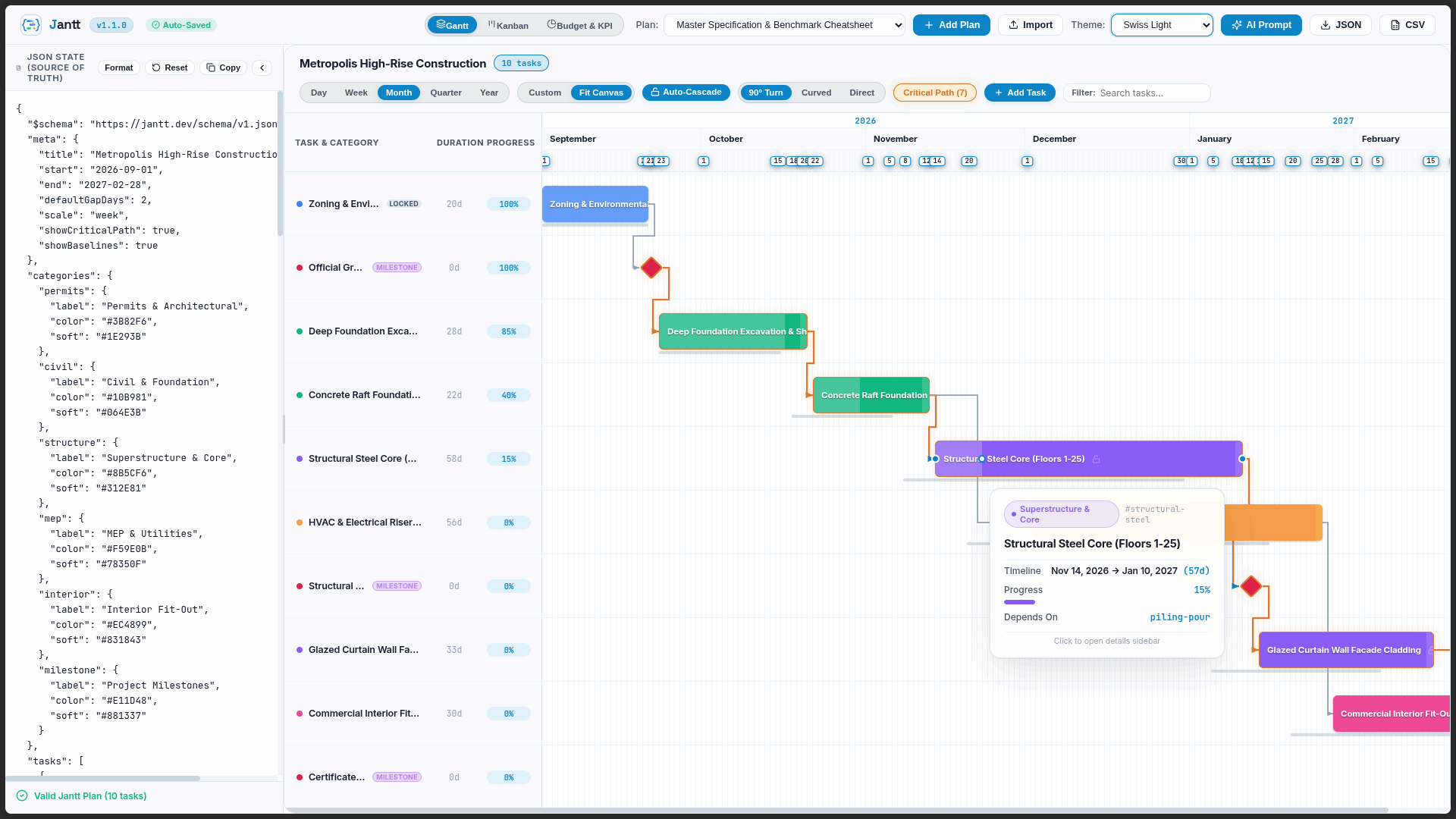
Jantt features 7 handcrafted Swiss Modernism themes (grouped cleanly into Dark and Light palettes) powered by CSS custom properties — zero visual clutter, zero emojis, crisp OLED readability.
Swiss Light Mode
Daylight clarity, crisp contrast typography, and clean glassmorphic hover cards.
Swiss Dark Mode (Swiss Noir)
True dark obsidian canvas with crisp critical path highlights and 90-degree right-angle routing.
Color Theme Gallery
Cyber Emerald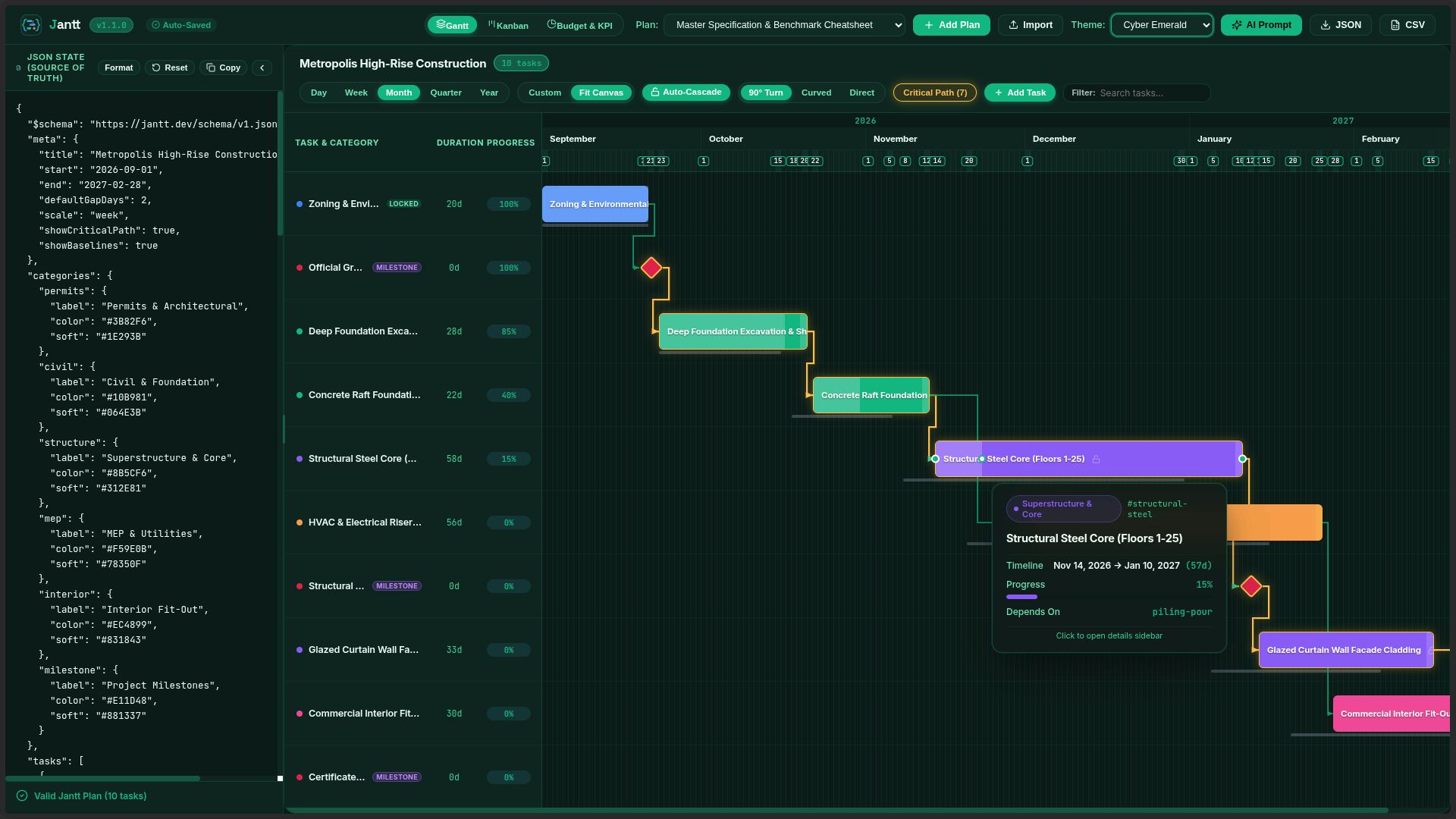
|
Midnight Rose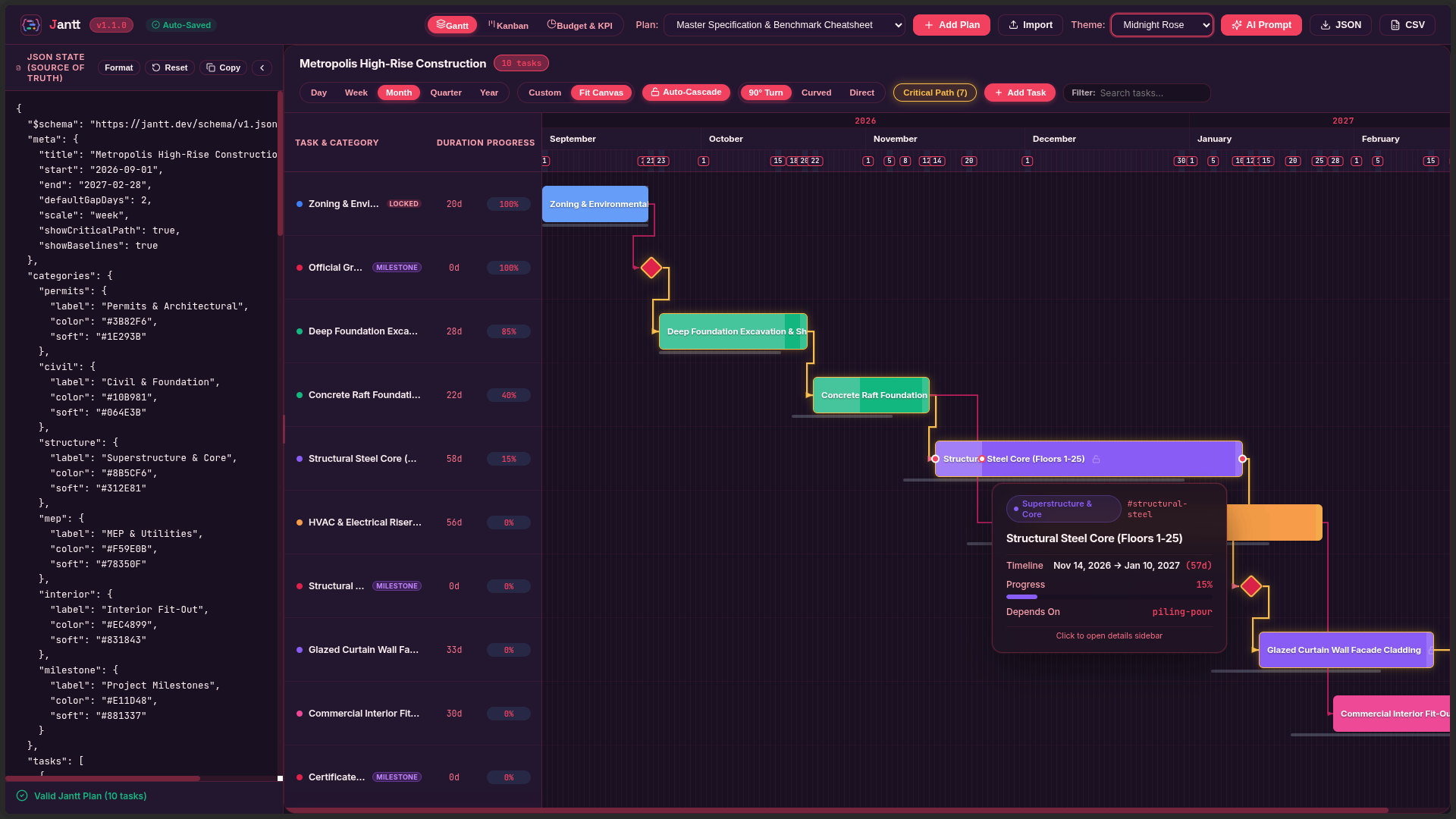
|
Sunset Crimson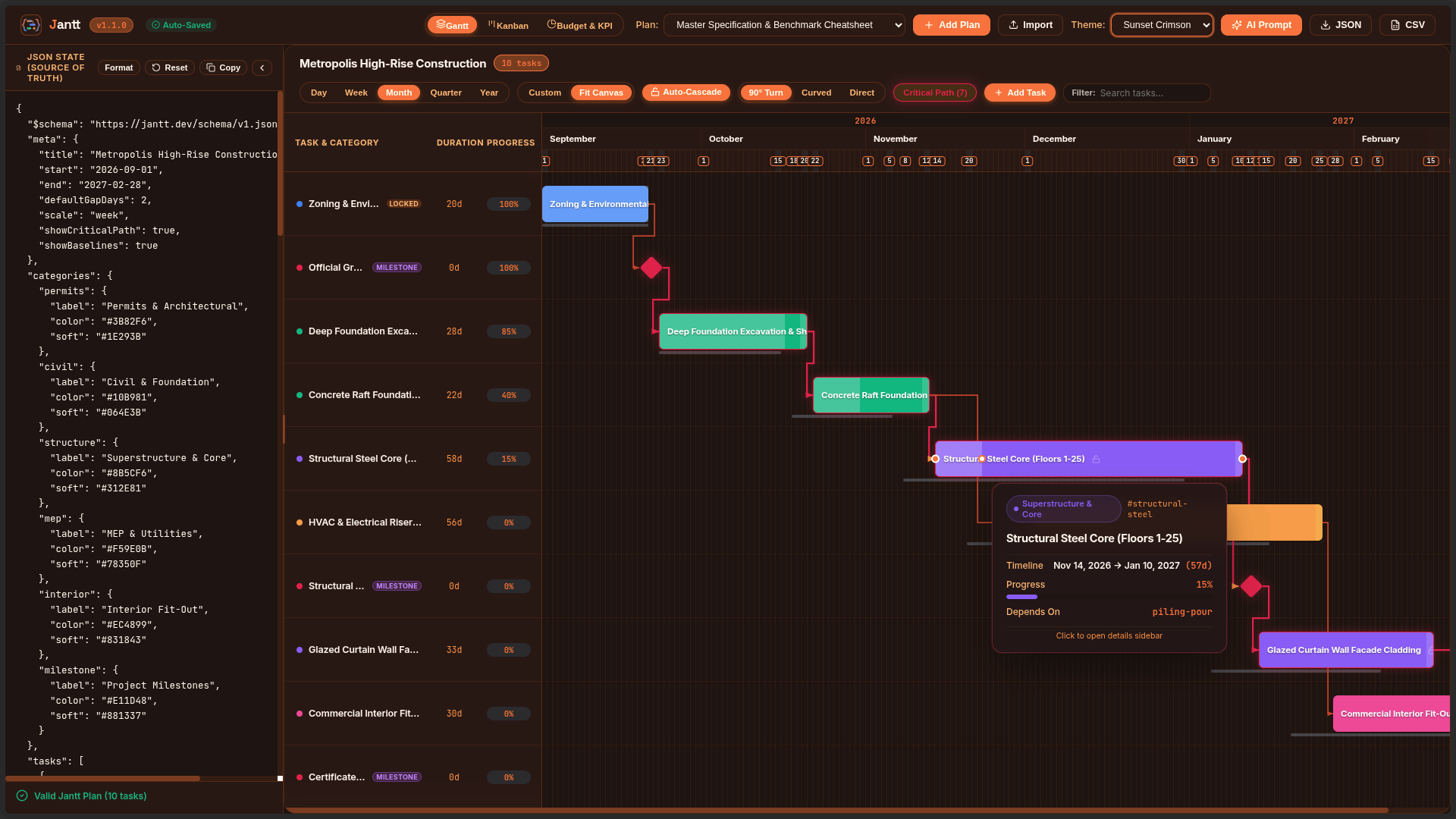
|
Master Specification Benchmark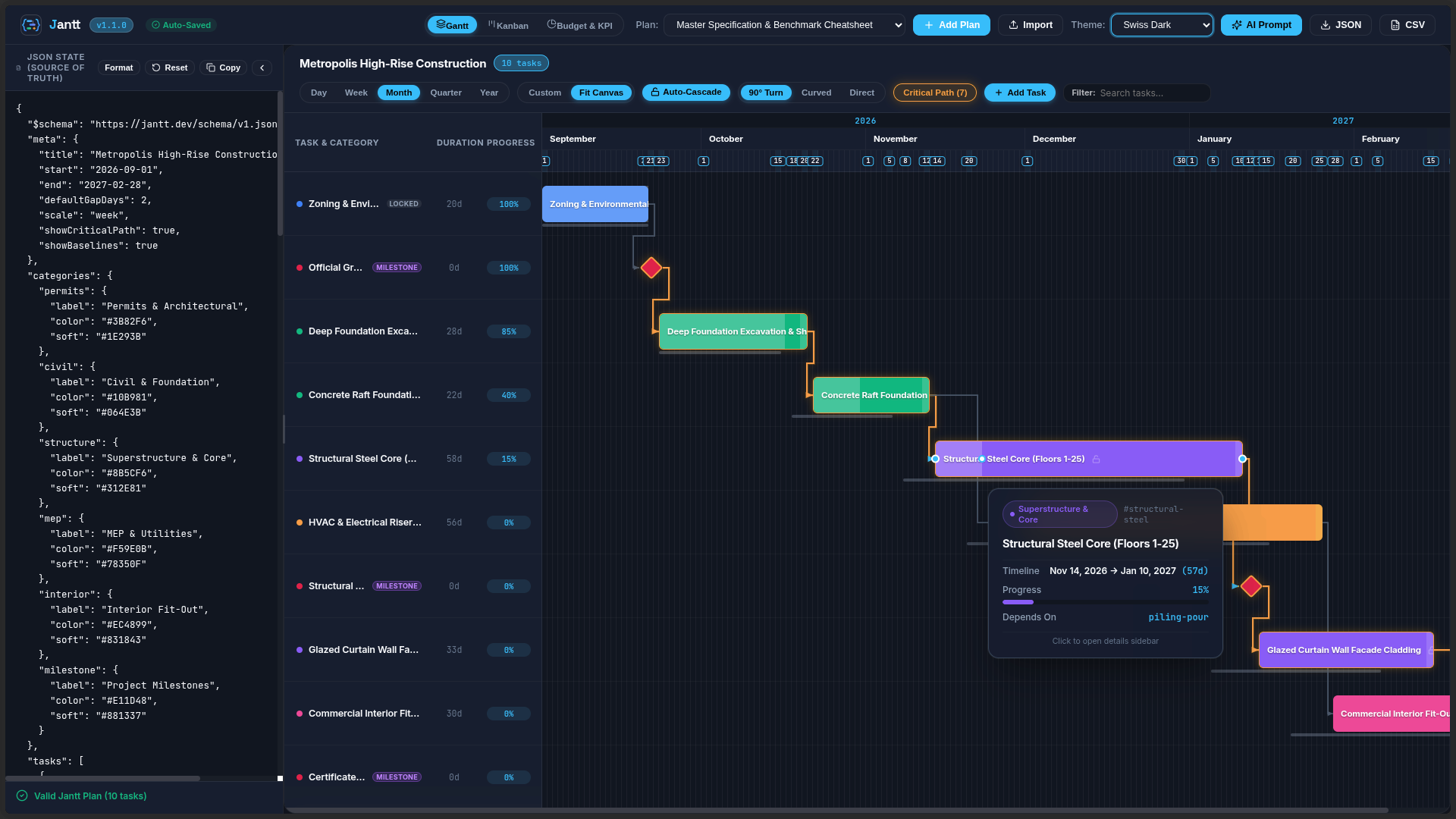
|
How Jantt Compares
For Everyday Users, Students & Teams
| Capability | Jantt (Live App) | Spreadsheets (Excel / Sheets) | Commercial PM Suites (TeamGantt / Asana / Monday) | ChatGPT HTML / Mermaid |
|---|---|---|---|---|
| Price | Free Forever (MIT) | Free / Subscription | $15–$49+ / user / month | Free / Subscription |
| No Code Required | Yes (Drag & AI) | Manual formulas | Yes | Requires code / DSL |
| Built-In AI Gantt Generator | Yes (10 BYOK + Free Ollama + Diff Preview) | Limited add-ons | Paid AI add-on | Static / brittle layout |
| Free Cloud Collaboration | Yes (Live Rooms + Roles) | Yes | Paywalled seats / limits | No |
| No Sign-Up Needed to Start | Yes (Instant Local Mode) | Account required | Account required | Account required |
| Auto-Cascading Dependencies | Yes (FS / SS / FF / SF) | Breaks easily | Often paid tier | No |
| Working-Calendar Critical Path | Yes (Holidays + Shifts) | Manual setup | Enterprise tier only | No |
| Gantt + Kanban + Checklist + Notes | All 6 Views Synced | Separate sheets | Split / gated tiers | Static chart only |
| MS Project / Primavera / PDF Export | Free & Built-In | No | Enterprise tier / None | No |
For Developers & Technical Teams
| Capability | Jantt (@jantt/core) |
DHTMLX Gantt | Bryntum Gantt | Frappe Gantt | Mermaid.js |
|---|---|---|---|---|---|
| License & Pricing | MIT (Free Forever) | GPL / Commercial ($1k+/yr) | Commercial ($940+/yr) | MIT | MIT |
| Core Runtime Dependencies | 1 tiny (fflate) |
Multiple | Multiple | Multiple | Multiple |
| State Paradigm | 100% Declarative JSON | Imperative JS API | Imperative JS API | Imperative JS API | Text DSL |
| Working-Calendar CPM & Float | Built-In (Mixed Calendars) | Pro / Commercial tier | Commercial tier | Not supported | Not supported |
| EVM, DCMA-14, Monte Carlo, Leveling | Built-In | Not included | Partial | Not supported | Not supported |
| 60 FPS 2D Canvas (100k+ tasks) | Included (@jantt/render-canvas) |
Commercial tier | DOM virtualization | Not supported | Static SVG |
| Official AI MCP Server + Copilot | Included (@jantt/mcp) |
Not included | Not included | Not included | Not included |
| Frameworks | React, Vue, Svelte, WC, HTML, Python | Wrappers | Wrappers | Vanilla JS | Static render |
| Core Bundle Size (gzip) | ~89 KB JS + 9 KB CSS | ~200+ KB | ~300+ KB | ~35 KB | ~800 KB |
Free Cloud Collaboration and Zero-Lock-In Privacy
Use Jantt completely offline with zero account, or collaborate live with teammates for free:
- Instant Local Mode (Zero Account): Open the web app and start building immediately. Every edit auto-saves locally in your browser, and every view remembers your scroll, zoom, and filters.
- Free Real-Time Cloud Rooms: Sign in with GitHub OAuth (minimal
read:userscope — no passwords, no Google tracking) to claim your@username, create live shared cloud rooms, invite collaborators with Owner, Editor, or Viewer roles, and merge concurrent edits safely via ACID transactions and a 3-way CRDT reconciler. - Compressed Share Links: Share any plan as a self-contained,
fflate-compressed URL snapshot — zero server required for read-only viewing. - Zero Database ID Leakage:
sanitizePlanForJsonrecursively strips private UIDs, secrets, and room tokens before any write or export. Only clean canonical@usernamementions appear in JSON. - Dual-Mode People Manager: Assign tasks to real
@usernamecollaborators or offline personas (clients, contractors, advisors) without requiring them to create an account. - Portable Forever: Import or export raw JSON, RFC-4180 CSV, Microsoft Project
.xml, Oracle Primavera P6.xer, standalone SVG, or print-ready Executive HTML/PDF Booklets anytime.
- GitHub-Only Auth: Restricted to GitHub OAuth 2.0 (
read:userscope). Automatically registers your verified GitHub handle into/usernames/{username}on first sign-in. - Security Rules (
database.rules.json):/users: Indexed onusername(.indexOn: ["username"]) for live prefix search; users may only write their own record./usernames: Atomic handle registration preventing username collisions./user_rooms: Fast dashboard listing of owned and shared cloud rooms./rooms: ACID transactions viarunTransactionwith 3-way CRDT reconciliation; only owners and editors can mutate plan state.
- Optional Verification Gate:
ENABLE_GITHUB_VERIFICATION_GATEinapps/playground/src/firebase/githubVerificationService.ts(off by default) supports optional public follower/star checks using no additional OAuth scopes.
Enterprise Scheduling Engine Under the Hood
Every calculation is written in strict TypeScript, verified by 1,290+ automated unit and integration tests plus Python bridge tests:
| Algorithmic Engine | Standard / Math | What It Does |
|---|---|---|
| Topological DAG Cascade | $O(V + E)$ Tarjan SCC + topological sort | Cascades FS/SS/FF/SF links with lags/leads; respects locked: true milestones and isolates cycles safely without crashing. |
| Working-Calendar CPM | 2-pass AON + mixed-calendar longest-path | Computes ES, EF, LS, LF, Total Float, and Free Float on each task's resolved calendar (task -> person -> project -> Mon–Fri), honoring regional holidays (US, UK/GB, EU, CA, AU) and custom shifts without splitting mixed-calendar critical paths. |
| Resource Leveling | Priority- & float-aware capacity solver | Detects resource over-allocations per person/capacity and previews conflict-free schedule shifts before you apply them. |
| Earned Value (EVM) | ANSI/EIA-748 (PV, EV, AC, CPI, SPI, EAC, TCPI) |
Tracks cost and schedule variance across your budget with honest forecasting. |
| DCMA-14 Schedule Audit | Selected DCMA 14-point checks (A–F grade) |
Flags missing logic, leads, lags, non-FS links, hard constraints, high float (>44 working days), negative float, high duration, out-of-sequence progress, and broken links. |
| PERT & Monte Carlo Risk | $\mu = \frac{O + 4M + P}{6}$, 5,000+ stochastic runs | Computes probabilistic completion dates (P50 / P80 / P90), on-time deadline confidence, and task criticality index off the main thread in a Web Worker. |
Developer and AI Agent Quickstarts
Embed Jantt into any web app, notebook, CLI pipeline, or AI agent in under 60 seconds:
1. React (@jantt/react)
npm install @jantt/react @jantt/core
import { Jantt } from "@jantt/react";
import "@jantt/core/theme.css";

const projectData = {
  meta: { title: "Product Launch", calendar: "standard", showCriticalPath: true },
  categories: { core: { label: "Core Engineering", color: "#38BDF8" } },
  tasks: [
    { id: "t1", label: "Architecture RFC", category: "core", start: "2026-09-01", end: "2026-09-14", progress: 1.0 },
    { id: "t2", label: "Core Implementation", category: "core", start: "2026-09-15", end: "2026-10-15", dependsOn: "t1" }
  ]
};

export default function Timeline() {
  return <Jantt data={projectData} themeClassName="jantt-theme-dark" onCommit={(next) => console.log(next)} />;
}
2. Vue 3 (@jantt/vue)
npm install @jantt/vue @jantt/core
<script setup>
import { JanttTimeline } from "@jantt/vue";
import "@jantt/core/theme.css";

const props = defineProps(["plan"]);
const handleCommit = (updatedPlan) => console.log("Committed:", updatedPlan);
</script>

<template>
  <JanttTimeline :data="props.plan" theme-class-name="jantt-theme-dark" @commit="handleCommit" />
</template>
3. Svelte 4 / 5 (@jantt/svelte)
npm install @jantt/svelte @jantt/core
<script>
  import { janttAction } from "@jantt/svelte";
  import "@jantt/core/theme.css";
  export let plan;

  const options = {
    themeClassName: "jantt-theme-dark",
    onCommit: (next) => (plan = next)
  };
</script>

<div use:janttAction={{ data: plan, options }} style="width: 100%; height: 600px;" />
4. Framework-Agnostic Web Component (@jantt/elements)
Drop directly into PHP, Ruby on Rails, Django, Laravel, WordPress, or plain HTML:
<script type="module" src="https://unpkg.com/@jantt/elements/dist/jantt-elements.js"></script>
<link rel="stylesheet" href="https://unpkg.com/@jantt/core/dist/theme.css" />

<jantt-timeline
  data-src="/api/plan.json"
  theme="swiss-dark"
  scale="day"
  show-critical-path="true">
</jantt-timeline>
5. Plain HTML / Script Tag (@jantt/standalone)
No bundler or build step required:
<link rel="stylesheet" href="https://unpkg.com/@jantt/standalone/dist/style.css" />
<script src="https://unpkg.com/@jantt/standalone/dist/jantt.standalone.iife.js"></script>

<div id="timeline" style="width: 100vw; height: 600px;"></div>

<script>
  window.Jantt.mount("#timeline", projectData, { themeClassName: "jantt-theme-dark" });
</script>
6. Python, Jupyter & Streamlit (pip install jantt)
import jantt
import pandas as pd

df = pd.DataFrame([
    {"id": "t1", "label": "Design System", "category": "design", "start": "2026-11-01", "end": "2026-11-05"},
    {"id": "t2", "label": "API Engine", "category": "dev", "start": "2026-11-06", "end": "2026-11-15", "dependsOn": "t1"}
])

# Inside Jupyter Notebook:
jantt.show(df, theme="dark")

# Inside Streamlit app:
# jantt.streamlit(df)
7. AI Agent MCP Server (@jantt/mcp)
Connect Claude Desktop, Cursor, Gemini, or any MCP-compatible AI agent to Jantt's deterministic scheduler:
{
  "mcpServers": {
    "jantt": {
      "command": "npx",
      "args": ["-y", "@jantt/mcp"]
    }
  }
}
Exposes 6 verified tools: jantt_inspect_plan, jantt_add_task, jantt_reschedule_task, jantt_audit_schedule, jantt_diff_plans, jantt_export_csv.
8. Terminal CLI with Two-Way Live Sync (@jantt/cli)
Always invoke via the scoped package (npx @jantt/cli), or install globally with npm install -g @jantt/cli for the jantt binary:
# Open interactive browser timeline with live 2-way auto-save back to disk
npx @jantt/cli open ./project.json --port 3000

# Run DCMA-14 schedule health, working-calendar CPM & EVM audit
npx @jantt/cli audit ./project.json

# Run 5,000 Monte Carlo probabilistic risk iterations
npx @jantt/cli monte-carlo ./project.json --runs 5000

# Export to MS Project XML, Primavera P6 XER, CSV, SVG, or Executive HTML/PDF
npx @jantt/cli export ./project.json --format xml --out ./project.xml
npx @jantt/cli export ./project.json --format html --out ./executive-report.html

# Import enterprise schedules back into Jantt JSON
npx @jantt/cli import ./schedule.xer --out ./project.json
9. Headless Engine (@jantt/core), Interop (@jantt/interop), Canvas (@jantt/render-canvas) & CRDT (@jantt/yjs)
Show code snippets for Headless Core, MS Project / Primavera Interop, 60 FPS Canvas & Yjs Multiplayer
Headless Core Engine (@jantt/core)
import { resolveSchedule, calculateCriticalPath, validate, exportToCsv } from "@jantt/core";

const validation = validate(rawJson);
if (!validation.valid) console.error("Schema errors:", validation.errors);

const options = {
  defaultGapDays: rawJson.meta?.defaultGapDays ?? 2,
  calendar: rawJson.meta?.calendar,
  useWorkingDays: rawJson.meta?.useWorkingDays,
  calendars: rawJson.calendars,
  people: rawJson.people
};

const resolvedTasks = resolveSchedule(rawJson.tasks, options);
const { criticalTaskIds, projectTotalFloat } = calculateCriticalPath(resolvedTasks, {
  ...options,
  targetDate: rawJson.meta?.targetDate
});
const csvData = exportToCsv({ ...rawJson, tasks: resolvedTasks });
Enterprise MS Project, Primavera P6 & Executive Report Interop (@jantt/interop)
import {
  exportMsProjectXml,
  importMsProjectXml,
  exportPrimaveraXer,
  importPrimaveraXer,
  exportExecutiveReportHtml
} from "@jantt/interop";

const msXml = exportMsProjectXml(plan);
const p6Xer = exportPrimaveraXer(plan);
const reportHtml = exportExecutiveReportHtml(plan.tasks, {
  title: plan.meta?.title ?? "Executive Status Report",
  theme: "corporate",
  defaultGapDays: plan.meta?.defaultGapDays,
  targetDate: plan.meta?.targetDate,
  calendar: plan.meta?.calendar,
  useWorkingDays: plan.meta?.useWorkingDays,
  calendars: plan.calendars,
  people: plan.people
});
const importedPlan = importMsProjectXml(msXml);
High-Performance 60 FPS Canvas Engine (@jantt/render-canvas)
import { CanvasTimelineRenderer } from "@jantt/render-canvas";

const renderer = new CanvasTimelineRenderer(hugePlan, {
  dayWidth: 36,
  rowHeight: 34,
  showCriticalPath: true
});
renderer.render(ctx, { scrollX, scrollY, width, height });
Real-Time Multiplayer CRDT (@jantt/yjs)
import * as Y from "yjs";
import { bindJanttToYDoc, createJanttUndoManager } from "@jantt/yjs";

const doc = new Y.Doc();
const binding = bindJanttToYDoc(doc, {
  initialPlan,
  onPlanChange: (plan) => render(plan)
});

binding.updateTask("t1", { progress: 0.85 });
const undoManager = createJanttUndoManager(doc);
undoManager.undo();
AI Prompting & JSON Schema Reference
Prefer generating plans externally with ChatGPT, Claude, Gemini, Cursor, or an autonomous pipeline? Hand any model the formal schema contract (schema/jantt.schema.json · JSON Cheatsheet):
flowchart LR
    A["<b>Step 1: Describe Plan or Feed Schema</b><br/>Plain English in Copilot or compact JSON contract"] --> B["<b>Step 2: AI Outputs Validated JSON</b><br/>10x fewer tokens than JSX, 0 layout hallucinations"]
    B --> C["<b>Step 3: Instant 6-View Workspace</b><br/>Working-calendar CPM, Gantt, Kanban, Notes & Health"]
    C --> D["<b>Step 4: Bidirectional Loop</b><br/>Drag visually, sync clean JSON back to cloud, disk or AI"]
    D --> B
You are a precision project management schedule generator.
Output ONLY raw, valid JSON conforming strictly to the Jantt JSON Schema (https://ahmadhassan-bted.github.io/Jantt/schema/v1.json).

# JANTT JSON SCHEMA SPECIFICATION CHEATSHEET

## 1. Top-Level Root Structure
{
  "$schema": "https://ahmadhassan-bted.github.io/Jantt/schema/v1.json",
  "meta": {
    "title": "<Project Title>",
    "description": "<Project narrative and objectives>",
    "person": "<Lead Owner>",
    "organization": "<Organization Name>",
    "start": "YYYY-MM-DD",
    "end": "YYYY-MM-DD",
    "targetDate": "YYYY-MM-DD",
    "calendar": "standard",
    "useWorkingDays": true,
    "defaultGapDays": 2,
    "scale": "day" | "week" | "month" | "quarter" | "year",
    "linkRouting": "orthogonal" | "curved" | "direct",
    "showCriticalPath": false,
    "showBaselines": false,
    "autoCascade": true,
    "currency": "USD",
    "budget": 450000
  },
  "categories": {
    "<category_id>": {
      "label": "<Category Display Name>",
      "color": "#HEX_COLOR",
      "soft": "#BG_TINT_HEX",
      "icon": "<lucide_icon_name>"
    }
  },
  "calendars": {
    "site": { "workingDays": [1, 2, 3, 4, 5], "region": "US", "holidays": ["2026-11-09"] }
  },
  "people": [
    { "id": "@alex", "name": "Alex Mercer", "username": "@alex", "role": "Lead Architect", "teamId": "core-team", "color": "#3B82F6" }
  ],
  "teams": [
    { "id": "core-team", "name": "Core Platform Squad", "color": "#3B82F6" }
  ],
  "notes": [
    { "id": "note-1", "title": "Kickoff Notes", "content": "Markdown notes with @alex and task links.", "pinned": true, "task_ids": ["t1"] }
  ],
  "tasks": [
    {
      "id": "t1",
      "wbs": "1.1",
      "label": "Task Title",
      "category": "<matching_category_id>",
      "start": "YYYY-MM-DD",
      "end": "YYYY-MM-DD",
      "assignee": "@alex",
      "priority": "low" | "medium" | "high" | "urgent",
      "estimatedCost": 12000,
      "actualCost": 5000,
      "dependsOn": "prereq-id" | ["prereq-1:FS+2d", "prereq-2:SS"] | null,
      "gapDays": 2,
      "locked": false,
      "progress": 0.5,
      "milestone": false,
      "status": "not-started" | "in-progress" | "submitted" | "completed" | "blocked",
      "urgent": false,
      "baseline": { "start": "YYYY-MM-DD", "end": "YYYY-MM-DD" },
      "notes": "Acceptance criteria and details.",
      "fields": { "deliverable": "v1" }
    }
  ]
}

## 2. Validation Rules
1. DATES: ISO "YYYY-MM-DD" format; "end" must be >= "start".
2. CATEGORIES: Every task "category" must match a key in "categories".
3. DEPENDENCIES (DAG): Valid task IDs only; no circular loops; supports FS/SS/FF/SF with lag/lead shorthand (e.g. "t1:FS+2d", "t1:SS-1d").
4. MILESTONES: Set "milestone": true and "start" === "end".
5. PROGRESS: Decimal float from 0.0 to 1.0.
6. NO DATABASE IDS: Never include internal UIDs, tokens, or secrets; use canonical "@username" handles for real accounts.
{
  "$schema": "https://ahmadhassan-bted.github.io/Jantt/schema/v1.json",
  "meta": {
    "title": "Master Delivery Plan",
    "start": "2026-09-01",
    "end": "2027-02-28",
    "calendar": "standard",
    "scale": "week",
    "linkRouting": "orthogonal",
    "currency": "USD",
    "budget": 250000
  },
  "categories": {
    "core": { "label": "Core Dev", "color": "#38BDF8" },
    "qa": { "label": "QA & Release", "color": "#10B981" }
  },
  "tasks": [
    {
      "id": "t1",
      "wbs": "1.0",
      "label": "Engine Architecture",
      "category": "core",
      "start": "2026-09-01",
      "end": "2026-09-20",
      "progress": 1.0,
      "status": "completed"
    },
    {
      "id": "gate-1",
      "wbs": "1.1",
      "label": "Architecture Approved",
      "category": "core",
      "start": "2026-09-21",
      "end": "2026-09-21",
      "milestone": true,
      "dependsOn": "t1"
    },
    {
      "id": "t2",
      "wbs": "2.0",
      "label": "Core Implementation",
      "category": "core",
      "start": "2026-09-23",
      "end": "2026-10-30",
      "dependsOn": "gate-1",
      "gapDays": 2,
      "progress": 0.4,
      "status": "in-progress"
    }
  ]
}
Architecture, Theming & Accessibility
System Architecture, Interaction Lifecycle & Monorepo Directory Structureflowchart TD
classDef input fill:#0B111E,stroke:#38BDF8,stroke-width:2px,color:#F1F5F9;
classDef core fill:#141D2F,stroke:#24324B,stroke-width:1px,color:#F1F5F9;
classDef algo fill:#1E293B,stroke:#10B981,stroke-width:1px,color:#ECFDF5;
classDef render fill:#1A263D,stroke:#F59E0B,stroke-width:1px,color:#FFFBEB;
classDef target fill:#0F172A,stroke:#EC4899,stroke-width:1px,color:#FFF1F2;
JSON["Declarative JSON Document<br/>(Jantt v1 Schema)"]:::input
subgraph CoreEngine ["@jantt/core (1 runtime dependency: fflate)"]
VAL["1. Schema & Graph Validator<br/>(Cycle & Integrity Diagnostics)"]:::core
RES["2. Schedule Resolver & Working-Calendar CPM<br/>(DAG Cascade, Critical Path, Leveling, EVM, DCMA)"]:::algo
LAY["3. Multi-Scale Layout Engine<br/>(90-deg Orthogonal Line Routing)"]:::algo
subgraph Renderers ["Modular Presentation Layer"]
REN_TBAR["Toolbar Subsystem"]:::render
REN_GRID["Sticky Data Grid & Splitter"]:::render
REN_HEAD["Multi-Tier Date Header"]:::render
REN_BARS["Task Bars & Milestones"]:::render
REN_SVG["SVG 90-deg Dependency Overlay"]:::render
REN_TIP["Glassmorphic Tooltips"]:::render
end
CTRL["4. Interaction Controller<br/>(Pointer Event State Machine)"]:::core
end
JSON --> VAL --> RES --> LAY --> Renderers --> CTRL
CTRL -- "Immutable Commit" --> JSON
subgraph Targets ["Deployment Surfaces"]
T_PLAY["Live Playground + Built-In AI Copilot<br/>(6 Views, Free Cloud Rooms)"]:::target
T_REACT["@jantt/react · vue · svelte · elements · standalone"]:::target
T_CANVAS["@jantt/render-canvas · @jantt/yjs · @jantt/interop"]:::target
T_CLI["@jantt/cli · @jantt/mcp · Python Bridge"]:::target
end
Renderers --> Targets
Jantt/
├── packages/
│   ├── core/                  # Pure TypeScript engine (1 runtime dependency: fflate)
│   │   ├── src/
│   │   │   ├── date-math.ts   # Pure UTC date arithmetic
│   │   │   ├── calendar.ts    # Working calendars & regional statutory holidays
│   │   │   ├── validator.ts   # Schema, cycle, and integrity validator
│   │   │   ├── dependencies.ts# FS/SS/FF/SF links with lead/lag
│   │   │   ├── resolver.ts    # Dependency cascade resolver
│   │   │   ├── cpm.ts         # Working-calendar Critical Path Method & float
│   │   │   ├── evm.ts, pert.ts, monte-carlo.ts, schedule-health.ts, resource-leveler.ts
│   │   │   ├── layout.ts      # Multi-scale layout engine & 90-degree router
│   │   │   ├── controller/    # Pointer gesture strategies (move, resize, link, pan)
│   │   │   ├── rendering/, renderers/ # DOM/SVG presentation subsystems
│   │   │   ├── reconciliation/, firebase-sync.ts, share-coder.ts # Sync & sharing
│   │   │   └── index.ts       # Public API exports
│   │   └── tests/             # Vitest test suites
│   ├── react/                 # React component (<Jantt />)
│   ├── vue/                   # Vue 3 component (<JanttTimeline />)
│   ├── svelte/                # Svelte action (use:janttAction)
│   ├── elements/              # Web Component (<jantt-timeline>)
│   ├── standalone/            # UMD & IIFE script-tag bundles
│   ├── yjs/                   # Yjs CRDT collaboration binding
│   ├── interop/               # MS Project XML, Primavera XER, CSV, executive reports
│   ├── render-canvas/         # 2D 60 FPS virtualized canvas renderer
│   └── mcp/                   # Official Model Context Protocol server
├── cli/                       # Node.js CLI (@jantt/cli, binary `jantt`)
├── apps/
│   └── playground/            # Interactive 6-view workspace + BYOK AI Copilot (GitHub Pages)
├── worker/                    # Cloudflare Worker CORS proxy for remote plans
├── python/                    # Python / Jupyter / Streamlit bridge (pip install jantt)
├── assets/                    # Vector logos & curated theme screenshots
├── schema/                    # Formal JSON Schema v1 specification
├── examples/                  # Validated JSON planning templates
└── docs/                      # Architecture, algorithms, API reference & security docs
:root {
  --jantt-bg: #0B111E;              /* Chart background */
  --jantt-surface: #141D2F;         /* Toolbar & left table surface */
  --jantt-surface-hover: #1A263D;   /* Row hover state */
  --jantt-border: #24324B;          /* Border lines */
  --jantt-text: #F1F5F9;            /* Primary text */
  --jantt-text-muted: #94A3B8;      /* Secondary text */
  --jantt-accent: #38BDF8;          /* Active selection & ports */
  --jantt-today: #F43F5E;           /* Today indicator line */
  --jantt-critical: #F59E0B;        /* Critical path highlight */
  --jantt-bar-radius: 6px;          /* Task bar corner radius */
}
| Key | Action |
|---|---|
| Tab / Shift+Tab | Navigate focus across task bars |
| ArrowLeft / ArrowRight | Move task start & end by 1 day (or defaultGapDays with Alt) |
| Shift+ArrowLeft / Right | Resize task duration |
| Enter or Space | Open task detail drawer |
| Escape | Close drawer / cancel active drag |
Documentation
- Live Interactive Playground (Free)
- JSON Cheatsheet for Humans & AI
- Schema Specification
- Scheduling & CPM Algorithms
- System Architecture
- API Reference
- Security & Privacy
- Roadmap · Changelog
Local Development & Contributing
Contributions are warmly welcomed. Please review CONTRIBUTING.md and CODE_OF_CONDUCT.md.
# Clone the repository
git clone https://github.com/AhmadHassan-BTed/Jantt.git
cd Jantt

# Use the pinned Node 22 LTS toolchain (see .nvmrc) and install exact locked versions
nvm use
npm ci

# Build all packages (typecheck and downstream tests consume built @jantt/core)
npm run build

# Run static typecheck across all 10 TypeScript projects and CLI syntax checks
npm run lint

# Run all workspace test suites and Python tests
npm test
npm run test:python

# Launch local interactive workspace with AI Copilot
npm run dev
Contributors need Node.js ^22.22.2 || ^24.15.0 || >=26 for the Vite 8 / Vitest 5 / jsdom toolchain; the published npm packages run on Node.js ^20.19.0 || >=22.12.0.
Author & Maintainer
Ahmad Hassan (B-Ted)
- Email: [email protected]
- GitHub: @AhmadHassan-BTed
- Repository: https://github.com/AhmadHassan-BTed/Jantt
If Jantt saves you hours of fighting spreadsheets or expensive project management tools, consider starring the repository to help others discover it.
License
Licensed under the MIT License — see LICENSE for details.
Yorumlar (0)
Yorum birakmak icin giris yap.
Yorum birakSonuc bulunamadi