eslint-plugin-ai-guard
Health Pass
- License — License: MIT
- Description — Repository has a description
- Active repo — Last push 0 days ago
- Community trust — 19 GitHub stars
Code Warn
- process.env — Environment variable access in .github/workflows/integrity-e2e.yml
- fs module — File system access in .github/workflows/integrity-e2e.yml
Permissions Pass
- Permissions — No dangerous permissions requested
No AI report is available for this listing yet.
Guardrails for AI-written JavaScript and TypeScript: 27 ESLint rules, checks for weakened tests, npm package checks, and hooks for Claude Code, Cursor and Codex. SARIF for GitHub Code Scanning.
AI Guard
Deterministic AST safety layer and CI guardrails for AI-assisted JavaScript and TypeScript code.
Website • npm Package • GitHub Repository • Rules Catalog • Benchmarks • Claude Code • Documentation



What is AI Guard?
AI Guard (eslint-plugin-ai-guard) provides:
- ESLint plugin with 27 deterministic rules and 4 presets (
recommended,strict,security,agent) - CLI (
ai-guard) for terminal, changed-file, and CI scanning - GitHub Action with native SARIF 2.1.0 output for GitHub Code Scanning
- Check integrity (
ai-guard integrity) — detects changes that weaken checks: new suppressions, skipped or removed tests, lowered ESLint/TypeScript/coverage settings, removed CI steps - Agent safety:
ai-guard verify(one verdict for a change),ai-guard scan-agent-config(hidden text and prompt injection inCLAUDE.md, skills and MCP config), andchanged --test-integrity(weakened tests) - Hooks for Claude Code, Cursor and Codex (
ai-guard init-hooks): findings go back to the agent as it works, and it is stopped once before finishing on weakened checks or problems it introduced - A pre-commit gate (
ai-guard init-git-hook) that checks every commit, whichever agent or person wrote it - Works with Oxlint as a JS plugin, with identical results checked in CI (
ai-guard init-oxlint) - Package checks (
ai-guard verify-deps, an opt-in pre-install hook, and theai_guard_check_packageMCP tool): names that do not exist on npm, typosquats and npm security placeholders are blocked; install scripts, deprecations and releases from the last day are flagged - MCP server (
ai-guard-mcp, 9 tools) for local AI-agent workflows over STDIO
Results on real projects
Measured on 12 November 2026 with 1.4.6. Methods, raw numbers and the commands to reproduce them: docs/evidence.md.
- 0 of 1,361 real dependencies blocked (763 from 15 large open-source projects, 598 from 9 apps)
- 34 of 36 names from the 2017 crossenv malware campaign blocked
- 3.0% of the 5,000 most-downloaded packages had a latest release under a day old, the window the fresh-release check covers
- 27 of 27 rules give identical results in ESLint and Oxlint, checked in CI
It is engineered to detect reliability bugs, async hazards, security vulnerabilities, and code-scaffolding defects frequently introduced during AI-assisted development (GitHub Copilot, Cursor, Claude Code, Gemini Code Assist, etc.).
AI Guard analyzes Abstract Syntax Trees (AST) using ESLint's native engine. It runs locally in your editor, in your terminal via the zero-config CLI, and in your CI/CD pipelines via native SARIF 2.1.0 integration with GitHub Code Scanning.
What AI Guard is NOT
[!IMPORTANT]
- AI Guard is NOT an AI detector. It does not attempt to predict whether code was authored by an LLM or a human.
- AI Guard detects dangerous or fragile code patterns that LLMs repeatedly introduce due to incomplete context, hallucinated patterns, or probabilistic generation.
- AI Guard does NOT replace ESLint. It extends ESLint with 27 specialized, high-impact rules that core ESLint and standard configurations omit.
Why AI Guard?
AI coding assistants write code at remarkable velocity, but generated code repeatedly suffers from predictable reliability and security anti-patterns that conventional linters miss:
| Pattern | Why AI Assistants Generate It | Real-World Impact |
|---|---|---|
| Floating Promises | Omits await, return, or .catch() on async calls |
Unhandled promise rejections, silent failures in background jobs |
| Async Array Iteration | Passes async callbacks into array.map() or .filter() |
Returns unawaited Promise[] instead of resolved values |
| Sequential Awaits in Loops | Loops over items with sequential await |
Significant latency bottlenecks; blocks event loop execution |
| Empty Catch Blocks | Inserts generic try { ... } catch (e) {} blocks |
Swallows production exceptions silently without telemetry |
| Hardcoded Secrets | Injects placeholder or real API keys/tokens | Credential leakage in version control and deployment bundles |
Dynamic eval() |
Generates dynamic function compilation | Arbitrary code execution and code injection |
| Raw SQL Concatenation | Concatenates query strings with variables | Severe SQL injection vulnerabilities |
| Unsafe Deserialization | Calls JSON.parse(req.body) directly without schema checks |
Denial of service and unhandled runtime crashes |
| Missing Route Auth & Authz | Emits boilerplate endpoints without auth middleware | Unprotected API endpoints and IDOR privilege escalations |
| Dead Branches & Scaffolding | Leaves if (true) or conflicting conditions from prompt iterations |
Bloated bundles and dead code paths |
AI Guard provides an instantaneous, deterministic feedback loop that catches these issues before they reach pull requests or production.
Architecture & Workflow
flowchart TD
    subgraph Dev["1. Development & Prompt Phase"]
        A["Developer + AI Coding Assistant\n(Copilot, Cursor, Claude Code)"] --> B["JavaScript / TypeScript Code"]
    end

    subgraph ShiftLeft["Shift Left — Context Injection"]
        SL["npx ai-guard init-context"] -.-> CTX["CLAUDE.md\n.cursorrules\ncopilot-instructions.md"]
        CTX -.-> A
    end

    subgraph Analysis["2. Deterministic AST Analysis"]
        B --> C["ESLint Parser\n(espree / @typescript-eslint/parser)"]
        C --> D["AST Representation"]
        D --> E["AI Guard Rules Engine\n(27 Deterministic Rules)"]
    end

    subgraph Tiers["3. Classification & Presets"]
        E --> F{"Active Preset\n(recommended | strict | security | agent)"}
        F --> G["Confidence Tiering & AST Filtering"]
    end

    subgraph Outputs["4. Output & Remediation"]
        G --> H["Local CLI Scanning\n(ai-guard run / changed)"]
        G --> I["Autofix Remediation\n(eslint --fix)"]
        G --> J["HTML Dashboard\n(ai-guard report)"]
        G --> K["SARIF 2.1.0 Artifact\n(ai-guard --sarif)"]
    end

    subgraph CI["5. GitHub Pull Request & CI/CD"]
        K --> L["GitHub Action\nai-guard-dev/eslint-plugin-ai-guard@v1"]
        L --> M["GitHub Code Scanning Alerts"]
        L --> N["Inline PR Code Annotations"]
        L --> O["PR Status Check (Blocks Merge)"]
    end
Rules Catalog
AI Guard includes 27 deterministic rules divided into four specialized categories. Every rule is engineered with low false-positive heuristics and validated against real-world production codebases:
🔴 Security (10 Rules)
| Rule | Recommended | What It Catches | Fixable? |
|---|---|---|---|
no-hardcoded-secret |
error |
API keys, bearer tokens, passwords, and private keys committed directly in source code. | Yes (process.env.*) |
no-eval-dynamic |
error |
eval(), new Function(), and setTimeout/setInterval with dynamic/non-literal string expressions. |
No |
no-sql-string-concat |
warn |
SQL queries constructed by string concatenation or raw template literals — SQL injection risks. | No |
no-unsafe-deserialize |
warn |
Unchecked JSON.parse() called directly on HTTP request inputs (req.body, req.query, req.params). |
No |
require-auth-middleware |
warn |
Express and Fastify route definitions exposed without authentication middleware. | No |
require-authz-check |
warn |
Endpoints accessing sensitive resources or user IDs without tenant/ownership authorization checks. | No |
no-client-exposed-secret |
error |
Server secrets that reach the browser: NEXT_PUBLIC_/VITE_/EXPO_PUBLIC_ prefixes on secret keys, server secrets in "use client" files, dangerouslyAllowBrowser with the app's own key. |
No |
no-invisible-unicode |
error |
Trojan Source bidi overrides, zero-width and Hangul-filler characters, and Unicode tag characters that hide instructions for AI tools (decoded in the message). | Yes (escapes in strings, removal in comments) |
no-unsanitized-html |
warn |
Dynamic values in innerHTML, insertAdjacentHTML, document.write and dangerouslySetInnerHTML, with sharper messages for URL input, LLM output, markdown and JSON-LD. |
No |
no-undeclared-import |
warn |
Imports of packages missing from package.json: hallucinated names (slopsquatting) and phantom dependencies. Offline and monorepo-aware. | No |
🟠 Reliability (5 Rules)
| Rule | Recommended | What It Catches | Fixable? |
|---|---|---|---|
no-empty-catch |
error |
Empty catch (e) {} blocks that silently swallow exceptions without logging or rethrowing. |
No (editor suggestion: rethrow) |
no-broad-exception |
warn |
Catching broad exception types like catch (e: any) that mask system faults and typing. |
No |
no-catch-log-rethrow |
off* |
Catch blocks that only log to console and rethrow without adding context or diagnostic info. |
No |
no-catch-without-use |
off* |
Caught error variables that are declared in catch parameters but never referenced. | No |
no-silent-fallback |
warn |
Secret env vars with hardcoded fallbacks (process.env.JWT_SECRET || 'secret') and catch { return [] } around awaited I/O. |
No |
🟡 Async Stability (5 Rules)
| Rule | Recommended | What It Catches | Fixable? |
|---|---|---|---|
no-floating-promise |
error |
Async function invocations without await, .catch(), or return — leading to silent dropped errors. |
No (editor suggestions: await, or void if intended) |
no-async-array-callback |
warn |
Async callbacks passed to map(), filter(), forEach(), or reduce() returning Promise[]. |
No |
no-await-in-loop |
warn |
Sequential await in loops where iterations can be safely executed concurrently with Promise.all. |
Yes (rewrites to Promise.all) |
no-async-without-await |
warn |
Functions declared async that never execute an await expression, adding unnecessary Promise overhead. |
No |
no-redundant-await |
off* |
Redundant return await statements outside of try...catch blocks. |
No |
🔵 AI Patterns (7 Rules)
| Rule | Recommended | What It Catches | Fixable? |
|---|---|---|---|
no-dead-branch |
warn |
Unreachable or tautological branches (if (true), if (false), x && !x) left behind from LLM code synthesis. |
No |
no-duplicate-logic-block |
off* |
Consecutive duplicate code blocks or repeated conditional branches duplicated during AI edits. | No |
no-console-in-handler |
off* |
Unstructured console.log statements left in HTTP route handlers instead of production loggers. |
No |
no-placeholder-implementation |
warn |
Code an agent left unfinished: // ... rest of the code elisions that delete code, TODO-only stubs, throw new Error('Not implemented') bodies, and mock data served from production code. |
No |
no-tautological-assertion |
warn |
Assertions that always pass: expect(true).toBe(true), expect(x).toEqual(x), assert.ok(1). |
No |
no-assertionless-test |
warn |
Test cases with no assertion, which pass whatever the code does. | No |
no-test-env-branch |
warn |
Production code that returns a canned result under a test runner (if (NODE_ENV === 'test') return true). |
No |
* Enabled at error level in the strict preset.
Agent Safety
Linting checks the code. These check the agent:
| Feature | What it does |
|---|---|
ai-guard verify |
One verdict for the current change: lint findings it introduced, weakened tests, and agent-config issues. Pre-existing problems never block. |
ai-guard integrity |
Everything that weakens checks vs a base revision: new suppressions, skipped or removed tests, lowered coverage and TypeScript settings, removed CI steps. |
ai-guard changed --test-integrity |
A test-focused comparison: focused, skipped, removed or weakened tests, rewritten snapshots, and test commands that can no longer fail. Overlaps with integrity; use integrity for the full set. |
ai-guard verify-deps |
Checks npm packages before they are installed: names that don't exist (invented by assistants), look-alikes of popular packages, new or rarely used packages, install scripts, deprecations, and releases published in the last day (skipped when the package manager enforces a release cooldown). Also as a pre-install hook for Claude Code, Cursor and Codex (init-hooks --check-installs) and the ai_guard_check_package MCP tool. Uses the npm registry; private registries are skipped. |
ai-guard scan-agent-config |
Scans CLAUDE.md, AGENTS.md, .cursorrules, skills and MCP configs for hidden text, prompt injection, unpinned MCP servers and inline secrets. |
| Agent hooks: Claude Code, Cursor, Codex | ai-guard init-hooks sets up every agent a project uses. Findings reach the agent after edits; before it finishes, the whole change is verified once; git commit --no-verify and risky installs are caught before they run. |
| Pre-commit gate | ai-guard init-git-hook runs verify --staged on every commit through husky, lefthook, simple-git-hooks or pre-commit. Only problems the commit introduces block it. |
| MCP tools | ai_guard_scan_file, ai_guard_scan_diff, ai_guard_scan_project, ai_guard_rules, ai_guard_check_integrity, ai_guard_verify_change, ai_guard_scan_agent_config, ai_guard_check_package, and ai_guard_fix (a diff, unless apply is set). |
Presets
AI Guard exports four official configurations ready for flat config or legacy setups:
| Preset | Description | Configuration Focus |
|---|---|---|
recommended |
Default. Balanced adoption preset. Enables 6 high-confidence critical rules at error, 16 context-sensitive rules at warn, and disables 5 noisy rules. Zero noise on day one. |
Production codebases, new teams |
strict |
Enforces all 27 rules at error. Designed for zero-tolerance CI gates, high-assurance software, and mature teams. |
Strict CI/CD quality gates |
security |
Focuses on the 11 security-relevant rules (secrets, eval, SQL, client-exposed secrets, invisible Unicode and HTML sinks at error; the rest at warn). |
AppSec auditing & security scans |
agent |
8 high-signal rules at error. Optimized for AI-agent editing workflows where lint feedback runs immediately after each file edit (e.g., PostToolUse hooks). |
Claude Code, Cursor, real-time agent loops |
Quick Start & Installation
Install the package as a development dependency using your package manager:
# npm
npm install --save-dev eslint-plugin-ai-guard

# pnpm
pnpm add -D eslint-plugin-ai-guard

# yarn
yarn add -D eslint-plugin-ai-guard

# bun
bun add -d eslint-plugin-ai-guard
Requirements
- Node.js:
>= 20.0.0 - ESLint:
>= 8.0.0(Supports both Flat Config and legacy configs) - TypeScript (optional):
@typescript-eslint/parser >= 6.0.0for TypeScript AST parsing
ESLint Configuration
1. Modern Flat Config (eslint.config.mjs / eslint.config.js)
AI Guard exports full native support for modern ESLint Flat Config:
// eslint.config.mjs
import aiGuard from 'eslint-plugin-ai-guard';

export default [
  {
    plugins: {
      'ai-guard': aiGuard,
    },
    rules: {
      ...aiGuard.configs.recommended.rules,
      // Custom overrides if desired:
      'ai-guard/no-floating-promise': 'error',
    },
  },
];
To use the strict or security preset in flat config:
// Strict preset — all 27 rules at error
rules: {
  ...aiGuard.configs.strict.rules,
}

// Security preset — security rules only
rules: {
  ...aiGuard.configs.security.rules,
}
2. Legacy Config (.eslintrc.js / .eslintrc.json)
// .eslintrc.js
module.exports = {
  plugins: ['ai-guard'],
  extends: ['plugin:ai-guard/recommended'],
};
CLI Reference
AI Guard includes a full-featured CLI binary (ai-guard) that runs out of the box with zero ESLint configuration files required:
npx ai-guard <command> [options]
Core Commands
| Command | Purpose | Common Options |
|---|---|---|
run |
Scan your workspace using AI Guard AST rules | --path <dir>, --strict, --security, --json, --sarif, --fail-on <level>, --max-warnings <n>, --inline-suppressions <mode> |
changed |
Fast CI scan — only scans modified files in git | --pr, --staged, --base <branch>, --baseline [file], --integrity <off|report|enforce>, --test-integrity, --inline-suppressions <mode>, --strict, --sarif, --sarif-output <file>, --fail-on <level> |
verify |
One verdict for the current change (docs) | --base <ref>, --staged, --preset <name>, --strict, --json |
verify-deps |
Check npm packages before they are installed (docs) | [packages...], --base <ref>, --staged, --all, --json, --sarif, --fail-on <level> |
scan-agent-config |
Scan agent instructions and MCP config (docs) | --path <dir>, --json, --sarif, --fail-on <level>, --update-lock |
integrity |
Detect changes that weaken checks vs a base revision (docs) | --base <ref>, --pr, --staged, --enforce, --json, --sarif, --accept <fingerprints|all> |
init |
Automatically detect environment & configure ESLint | --preset <name>, --flat, --dry-run, -y, --yes |
init-hooks |
Hooks for Claude Code, Cursor and Codex (docs) | --agent <list>, --check-installs, --no-stop-hook, --no-bash-guard, --dry-run |
init-git-hook |
Pre-commit gate running verify --staged (docs) |
--manager <name>, --check-deps, --dry-run |
init-oxlint |
Add AI Guard to .oxlintrc.json (docs) |
--preset <name>, --dry-run |
init-context |
Generate prompt instruction files for AI coding agents | -a, --all, --force, --dry-run, --rules <categories> |
doctor |
Diagnose your ESLint, parser, and plugin environment | (No options needed — prints actionable diagnostic report) |
baseline |
Record existing findings, then report only new ones | create, check, --fail-on <level>, --json, --mode <strict|stable>, --preset <name> |
report |
Generate an interactive standalone HTML audit report | --path <dir>, --preset <name>, --output <file>, --no-open, --json |
preset |
Interactively select and switch active preset in config | (Interactive prompt with automatic config patch & backup) |
ignore |
Add standard ignore paths (.next, dist, build) to config |
(Patches flat config or legacy ignores safely) |
run exit codes: 0 no errors · 1 errors found (or --max-warnings exceeded) · 2 scan did not run — the file passed to --path matches a built-in ignore pattern (node_modules/, dist/, build/, generated/, vendor/, …), so nothing was analyzed. Directory scans skip ignored files silently and never exit 2.
CLI Usage Examples
# 1. Immediate scan of current directory
npx ai-guard run

# 2. Strict CI scan failing only on high-confidence issues
npx ai-guard run --strict --fail-on high

# 3. Pull Request scan (diffs against PR target branch)
npx ai-guard changed --pr --sarif --sarif-output results.sarif

# 4. Generate AI agent guardrails for Cursor, Claude Code, and Copilot
npx ai-guard init-context --all

# 5. Generate interactive HTML diagnostic report
npx ai-guard report --output ai-guard-report.html

# 6. Save existing issues as baseline and only fail on new regressions
npx ai-guard baseline create                 # writes .ai-guard-baseline.json (commit it)
npx ai-guard baseline check                  # exit 1 if any new finding
npx ai-guard baseline check --fail-on high   # fail only on new high-confidence findings
npx ai-guard baseline check --json           # machine-readable new findings

# 7. Fail a PR that skips tests, adds eslint-disable, or lowers coverage thresholds
npx ai-guard changed --pr --integrity enforce
Inline suppressions never hide findings silently
AI Guard reads eslint-disable directives itself; ESLint's own inline config is disabled in AI Guard's private ESLint instance, so a comment cannot make a finding vanish without a trace. --inline-suppressions selects the policy:
| Mode | Effect |
|---|---|
allow (default) |
A covering directive hides the finding from totals and exit codes; it is listed under "Hidden by inline directives" (JSON suppressedIssues, step summary, SARIF suppressedFindingsCount) |
require-reason |
Only directives with a -- reason hide findings (used by the Claude Code hook) |
ignore |
Directives never hide AI Guard findings (always used by the MCP server) |
This applies to ai-guard run, changed, the GitHub Action, the Claude Code hook and MCP. It does not change how your own eslint . treats directives. TypeScript comments (@ts-ignore, @ts-nocheck) never affect AI Guard findings; ai-guard integrity reports newly added ones.
AI Agent Integration (init-context)
Standard linters only run after code has already been written. The init-context command shifts your guardrails left by embedding AI Guard's rules directly into the instruction files loaded by your AI coding tools:
npx ai-guard init-context --all
This generates three targeted context files:
CLAUDE.md— Automatically loaded by Claude Code.cursorrules— Automatically loaded by Cursor.github/copilot-instructions.md— Automatically loaded by GitHub Copilot
How Shift-Left Works
AI Guard (init-context)
       ↓
Generates project guardrail files (CLAUDE.md, .cursorrules, copilot-instructions.md)
       ↓
AI coding assistant reads safety rules before generating code
       ↓
Model avoids floating promises, empty catches, and hardcoded secrets at prompt time
       ↓
AI Guard CLI & GitHub Action deterministically verifies the output in CI
This dual-layer defense minimizes review friction and ensures generated code meets your security standard on the first pass.
Claude Code Integration
Using Cursor or Codex too? npx ai-guard init-hooks sets up every agent the project uses; see Agent hooks.
Two ways to use it with Claude Code. Pick one:
- In a project (recommended):
npm install --save-dev eslint-plugin-ai-guard, thennpx ai-guard init-claude. This writes the hooks into the project's.claude/settings.json, so everyone on the project gets them. - As a Claude Code plugin (adds the MCP tools and the
/ai-guard:verify-changesskill, and works in projects without AI Guard installed):claude plugin marketplace add ai-guard-dev/eslint-plugin-ai-guard, thenclaude plugin install ai-guard@ai-guard-plugins.
AI Guard integrates directly with Claude Code through hooks:
# One-command setup
npx ai-guard init-claude
- PostToolUse — after each edit, findings from the
agentpreset and newly weakened checks in the edited file are sent back to Claude (decision: "block"+reason, per the hooks protocol). Earlier versions printed plain stdout, which Claude Code does not show to Claude. - SessionStart + Stop — before Claude finishes, check integrity runs on everything changed in the session. High-confidence weakenings (a new
.skip,eslint-disable, lowered threshold…) block stopping once per finding set; advisories are shown to you, never block. The same hook then verifies lint findings and agent-config issues the session introduced (placeholder code, a canned return under a test runner, a hidden instruction inCLAUDE.md), which also block once. Skip both with--no-stop-hook. - PreToolUse (Bash) —
git commit --no-verify/HUSKY=0ask for confirmation. With--check-installs(opt-in, uses the npm registry), packages in install commands are checked first: names that don't exist are blocked; look-alikes of popular packages and releases from the last day ask you.
# Preview before applying
npx ai-guard init-claude --dry-run

# Use per-machine settings (gitignored)
npx ai-guard init-claude --local
Agent preset rules (8): no-hardcoded-secret, no-eval-dynamic, no-empty-catch, no-sql-string-concat, no-floating-promise, no-client-exposed-secret, no-invisible-unicode, no-undeclared-import
GitHub Action
The official AI Guard GitHub Action runs on PRs, detects changed files, provides step summaries, outputs SARIF 2.1.0, and posts inline PR annotations directly on GitHub:
# .github/workflows/ai-guard.yml
name: AI Guard

on:
  pull_request:
    branches: [main, develop]
  push:
    branches: [main]

jobs:
  ai-guard-scan:
    name: AI Guard Code Review
    runs-on: ubuntu-latest

    permissions:
      contents: read
      security-events: write
      actions: read

    steps:
      - name: Checkout Code
        uses: actions/checkout@v4
        with:
          fetch-depth: 0 # Required for git diff comparison

      - name: Setup Node.js
        uses: actions/setup-node@v4
        with:
          node-version: 20
          cache: 'npm'

      - name: Run AI Guard
        id: aiguard
        uses: ai-guard-dev/eslint-plugin-ai-guard@v1
        with:
          preset: 'recommended'
          fail-on: 'high'
          changed-only: 'true'

      # The Action writes SARIF; this step sends it to Code Scanning.
      # if: always() uploads it even when the scan step fails the job.
      - name: Upload to GitHub Code Scanning
        if: always()
        uses: github/codeql-action/upload-sarif@v3
        with:
          sarif_file: ${{ steps.aiguard.outputs.sarif-file }}
          category: ai-guard
The Action annotates the pull request and writes the job summary by itself. Alerts in Security → Code scanning need the upload step.
Action Inputs (action.yml)
| Input | Description | Default |
|---|---|---|
preset |
Rule preset: recommended | strict | security |
'recommended' |
fail-on |
Severity threshold to fail CI: high | medium | any | none |
'high' |
changed-only |
Scan only files changed in this PR / commit | 'true' |
path |
Target file or directory to scan | '.' |
upload-sarif |
Always write the SARIF file (sarif-file output) for an upload-sarif step, even when the scan produced none. The Action does not upload to Code Scanning by itself |
'true' |
github-summary |
Write an execution breakdown to the GitHub Actions Job Summary | 'true' |
working-directory |
Working directory for scanning (ideal for monorepos) | '.' |
package-manager |
Package manager: auto | npm | pnpm | yarn |
'auto' |
sarif-output |
Output filepath for generated SARIF report | 'ai-guard-results.sarif' |
install-deps |
Install project dependencies prior to scanning | 'true' |
baseline |
Committed baseline file; with changed-only, report only findings not in it |
'' |
integrity |
Check integrity: off | report | enforce (needs changed-only and fetch-depth: 0) |
'off' |
test-integrity |
With changed-only, also flag tests the PR deleted, skipped, focused or weakened (needs fetch-depth: 0) |
'false' |
inline-suppressions |
allow | require-reason | ignore for eslint-disable directives covering AI Guard findings |
'' (allow) |
Action Outputs
| Output | Description |
|---|---|
issues-found |
Total number of issues found across scanned files |
high-confidence-count |
Number of high-confidence issues flagged |
medium-confidence-count |
Number of medium-confidence issues flagged |
files-scanned |
Count of files analyzed during the execution |
integrity-high-count |
High-confidence check-integrity findings (when integrity is enabled) |
integrity-advisory-count |
Advisory check-integrity findings (when integrity is enabled) |
sarif-file |
Absolute path to the generated SARIF 2.1.0 artifact |
duration-ms |
Total scan execution duration in milliseconds |
SARIF & GitHub Code Scanning
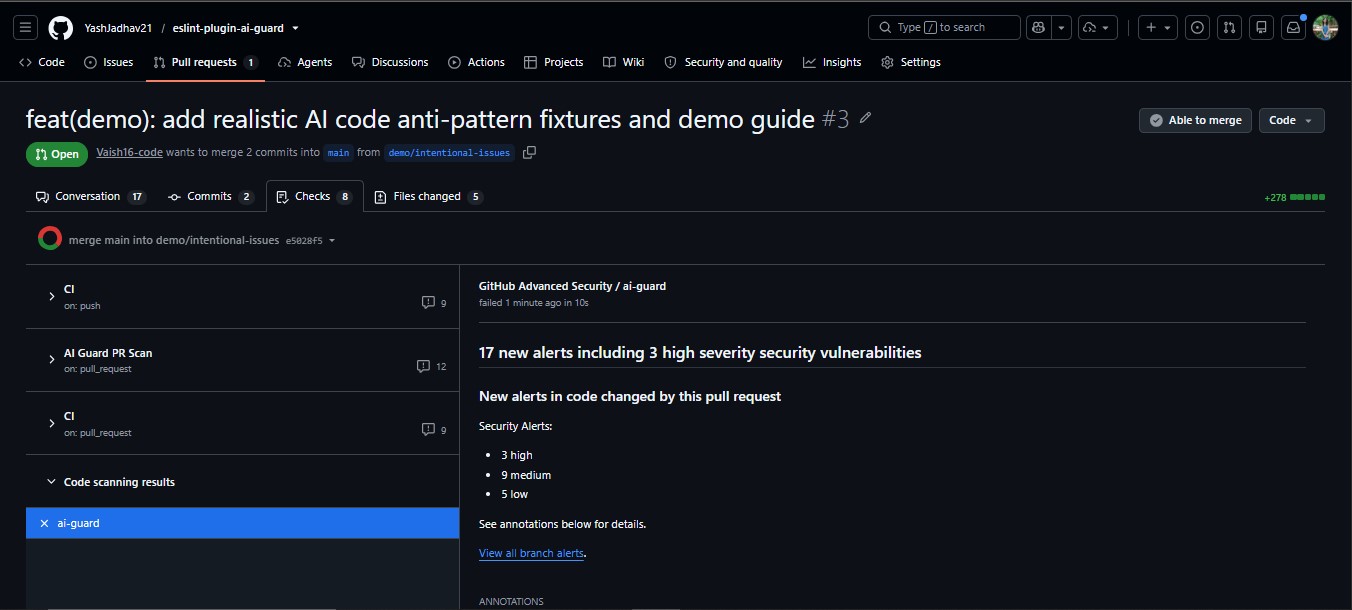
AI Guard natively outputs SARIF 2.1.0 (Static Analysis Results Interchange Format). When uploaded via the GitHub Action or github/codeql-action/upload-sarif@v3, findings integrate directly with GitHub Advanced Security:
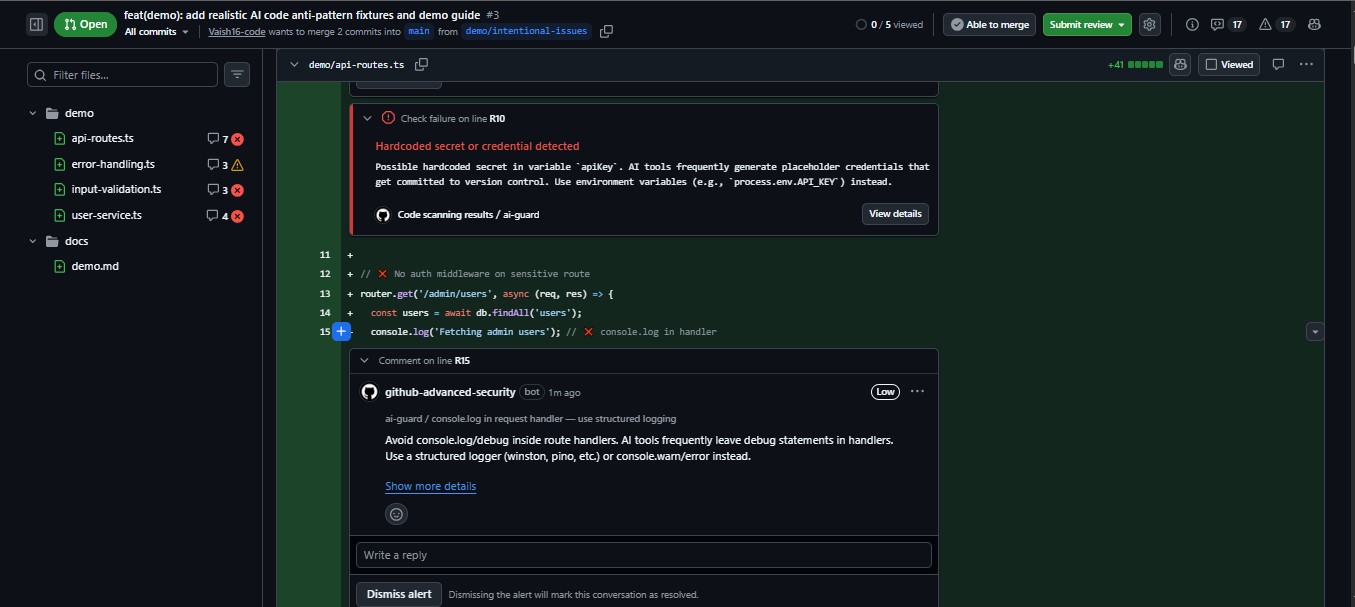
- Inline PR Annotations: Direct comments on the exact source lines where flaws exist.
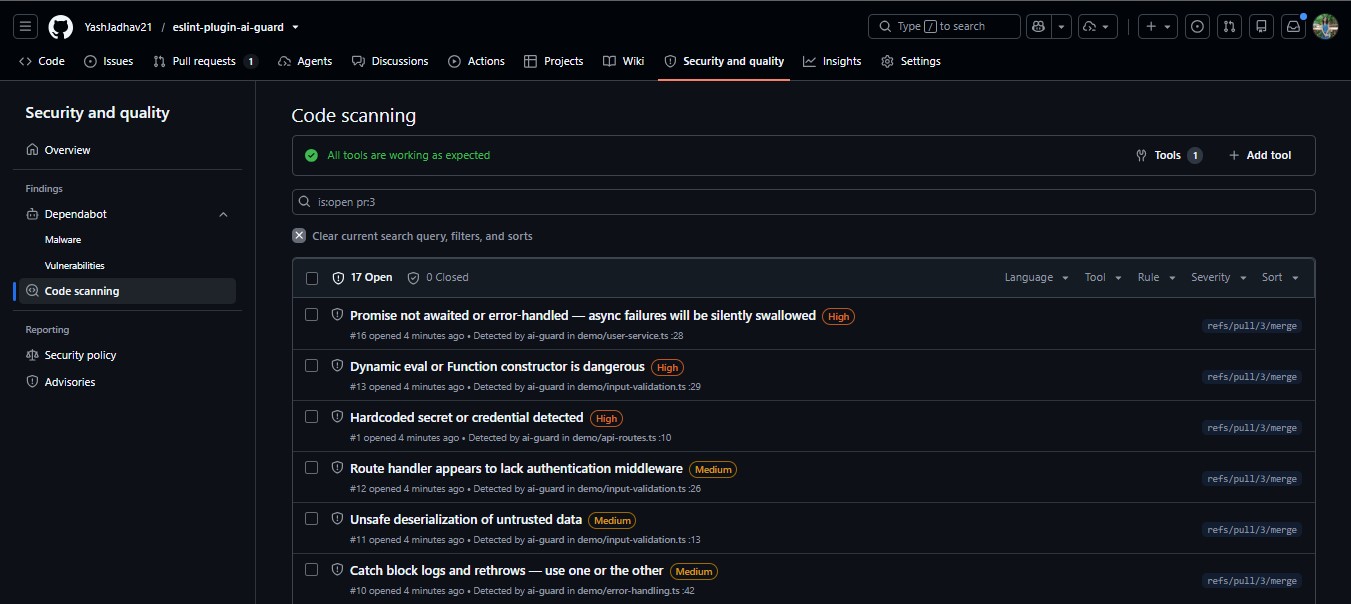
- Security Dashboard: Persistent alerts under your repository's
Security → Code scanningtab. - Merge Protection: Block merges automatically when high-confidence security or async bugs are detected.
Visual Previews
Inline Pull Request Annotations
GitHub Advanced Security Summary
Persistent Code Scanning Dashboard
Rule Examples (Before & After)
1. no-floating-promise (Unhandled Promises)
// ❌ BAD: Floating promise. Errors are dropped silently.
async function syncUserProfile(user: User) {
  sendTelemetryEvent('user_sync', user.id);
  database.save(user);
}

// ✅ GOOD: Awaited, explicitly handled, or marked with void
async function syncUserProfile(user: User) {
  await database.save(user);
  void sendTelemetryEvent('user_sync', user.id); // Explicitly unhandled
}
2. no-hardcoded-secret (Committed Credentials)
// ❌ BAD: Secret committed inline
const client = new PaymentGateway({
  apiKey: 'sk-prod-983427598273498273948273',
});

// ✅ GOOD: Read from environment variable (Autofixable!)
const client = new PaymentGateway({
  apiKey: process.env.API_KEY,
});
3. no-await-in-loop (Sequential Latency Trap)
// ❌ BAD: Consecutive awaits block each iteration sequentially
async function fetchAllUsers(ids: string[]) {
  const users = [];
  for (const id of ids) {
    users.push(await fetchUser(id));
  }
  return users;
}

// ✅ GOOD: Concurrently fetched with Promise.all (Autofixable!)
async function fetchAllUsers(ids: string[]) {
  return await Promise.all(ids.map((id) => fetchUser(id)));
}
4. no-empty-catch (Swallowed Errors)
// ❌ BAD: Exception swallowed without trace
try {
  parseConfiguration(rawConfig);
} catch (e) {}

// ✅ GOOD: Logged, rethrown, or documented (Autofixable!)
try {
  parseConfiguration(rawConfig);
} catch (e) {
  logger.error('Configuration parsing failed', { error: e });
  throw e;
}
5. no-sql-string-concat (SQL Injection)
// ❌ BAD: Dynamic string interpolation in SQL
const query = `SELECT * FROM users WHERE organization_id = '${orgId}' AND role = '${role}'`;
await db.query(query);

// ✅ GOOD: Parameterized query binding
const query = 'SELECT * FROM users WHERE organization_id = $1 AND role = $2';
await db.query(query, [orgId, role]);
Automatic Remediation (Autofix)
Rules that have deterministic solutions provide automatic autofix handlers. Run ESLint's native --fix flag to automatically resolve them:
npx eslint . --fix
| Rule | Automatic Fix Behavior |
|---|---|
no-hardcoded-secret |
Replaces hardcoded string literal with process.env.VARIABLE_NAME |
no-await-in-loop |
Rewrites straightforward sequential loops to await Promise.all(...) |
no-empty-catch and no-floating-promise have no automatic fix on purpose. A fix that inserted a comment or void would make the finding disappear without handling the error, and an agent running --fix would do exactly that. Editors offer them as suggestions instead (rethrow; await, or void for an intended fire-and-forget call), which a person applies one at a time.
Benchmarks & Empirical Evaluation
AI Guard has been empirically evaluated across multiple benchmarks comparing runtime scan performance, coverage gaps vs. standard tooling, and detection accuracy across real-world codebases.
1. What AI Guard Catches vs. Conventional Linters
Conventional linters either omit AI-specific hazards entirely or require heavyweight TypeScript type-checking (parserOptions.project) that significantly slows down CI:
| Pattern | AI Guard Rule | ESLint Core | @typescript-eslint |
|---|---|---|---|
| Floating Promises (unawaited async call) | no-floating-promise |
❌ None | @typescript-eslint/no-floating-promises (requires type info) |
Async Array Callbacks (.map(async ...)) |
no-async-array-callback |
❌ None | Partial: no-misused-promises (requires type info) |
| Empty Catch Blocks (swallowed errors) | no-empty-catch |
no-empty (weaker) |
❌ None |
| Hardcoded Secrets / API Tokens | no-hardcoded-secret |
❌ None | ❌ None |
| Raw SQL String Concatenation | no-sql-string-concat |
❌ None | ❌ None |
| Missing Route Auth Middleware | require-auth-middleware |
❌ None | ❌ None |
| Missing Route Authorization Checks | require-authz-check |
❌ None | ❌ None |
Dynamic eval() / new Function() |
no-eval-dynamic |
no-eval (blanket ban) |
❌ None |
Unsafe JSON.parse(req.body) |
no-unsafe-deserialize |
❌ None | ❌ None |
| Async Without Await | no-async-without-await |
❌ None | require-await |
| Sequential Await in Loop | no-await-in-loop |
no-await-in-loop (no fix) |
❌ None |
Dead Code Branches (if (true)) |
no-dead-branch |
❌ None | ❌ None |
Secrets exposed to the browser (NEXT_PUBLIC_*_SECRET) |
no-client-exposed-secret |
❌ None | ❌ None |
| Trojan Source / hidden Unicode instructions | no-invisible-unicode |
Partial: no-irregular-whitespace (whitespace only) |
❌ None |
| Hallucinated / undeclared packages | no-undeclared-import |
❌ None | ❌ None |
| Unsanitized HTML sinks (XSS) | no-unsanitized-html |
❌ None | ❌ None |
| Hardcoded secret fallbacks | no-silent-fallback |
❌ None | ❌ None |
| Elided / stubbed code left by agents | no-placeholder-implementation |
Partial: no-warning-comments (TODO text only) |
❌ None |
[!TIP]
Minimal Type-Information Dependency: 26 of 27 AI Guard rules operate in pure syntax/scope-analysis mode withoutprojectServiceortsconfig.json. Theno-floating-promiserule optionally uses TypeScript parser services for higher recall on cross-module Promise calls, with syntax/scope-based heuristics as a zero-config fallback.
2. Runtime Performance
Benchmark: scanning 196 TypeScript / JavaScript files (algorithm-automata-simulator, Windows 11, Node.js 20, median of 3 runs):
| Tool / Mode | Scan Time | Configuration Overhead |
|---|---|---|
ai-guard run --strict |
~1.8s | Zero config (18 AST heuristic rules, no tsconfig.json needed) |
eslint . (recommended) |
~2.5s | Core syntax rules only (misses floating promises & secrets) |
eslint . (type-aware @typescript-eslint) |
~8–12s | Requires full TS compiler graph binding (4x–6x slower) |
AI Guard executes 4x–6x faster than type-aware linting suites because it leverages deterministic AST heuristics rather than reconstructing the full TypeScript symbol graph.
3. Empirical Bug Detection & Precision Study
Two comprehensive empirical benchmark evaluations were conducted to measure real-world precision and detection yields:
A. Accuracy & False Positive Audit (4 Real-World Repositories, 378 Files)
| Category | Findings | True Positives | False Positive Rate |
|---|---|---|---|
Security (no-hardcoded-secret, no-eval-dynamic, etc.) |
15 | 15 | 0% |
Reliability (no-empty-catch, broad exceptions) |
53 | 53 | 0% |
Async Stability (no-floating-promise, async callbacks) |
43 | ~40 | ~7% |
| AI Patterns (duplicate logic, dead branches) | 58 | 43 | 26% (reduced in v1.2.8+) |
B. Dual-Mode Detection Study (48 Call Sites & Real Production Target)
Audited across a controlled multi-file test corpus (13 files, 48 call sites) and a real-world Express + MongoDB production application (Truvita New):
- High Precision: 100% precision on type-aware exclusive findings (26 of 26 verified True Positives; 0 false alarms on synchronous controls).
- Critical Detection: Detected 1 critical database startup race condition in production (
server/index.ts connectDB()) where an unawaited connection call allowed requests to hit the database before initialization. - Single-File Actionability: 100% of findings were resolvable locally at the call site (
await,.catch(), orvoid).
For the complete methodology, raw findings, and benchmark harness, see docs/benchmarks.md.
Performance & Philosophy
- Zero LLM Overhead: AI Guard does not call external APIs, does not incur token costs, and does not add LLM latency. A scan of 100+ files executes in milliseconds.
- 100% Deterministic: Every finding is derived strictly from Abstract Syntax Tree analysis. No probabilistic drift, no non-deterministic hallucinated findings.
- Low False Positives: Built with precision-first design. Context-sensitive rules are configured at
warnoroffin the recommended preset so developers are never blocked by noise. - Self-Scanning: AI Guard enforces its own rules on its own codebase in CI using the
strictpreset.
MCP Server (Model Context Protocol)
AI Guard includes a local MCP server that exposes its deterministic analysis engine to MCP-capable AI clients (Claude Code, Claude Desktop, and other MCP-compatible integrations).
npx --yes --package eslint-plugin-ai-guard ai-guard-mcp
Available tools:
| Tool | Description |
|---|---|
ai_guard_scan_file |
Scan a single JS/TS file with structured findings |
ai_guard_scan_diff |
Scan changed files in git diff (including newly created untracked JS/TS files) |
ai_guard_scan_project |
Scan a bounded workspace directory (at most 500 files; fails instead of truncating) |
ai_guard_rules |
List rules and presets, or look up specific rules (rules: ["no-floating-promise"]) with remediation and docs link |
ai_guard_check_integrity |
Report checks weakened by current Git changes (new suppressions, skipped/removed tests, lowered configs, removed CI steps), with tier and hasBlockingFindings |
All tools declare an outputSchema; the text content is the same result as compact JSON. Scan tools accept maxIssues (default 50, errors first, exact totalIssues and truncated). The verify_changes prompt runs the scan → fix → rescan loop.
Claude Code configuration (project-root .mcp.json):
{
  "mcpServers": {
    "ai-guard": {
      "type": "stdio",
      "command": "node",
      "args": ["/absolute/path/to/ai-guard/dist/mcp/server.js"],
      "env": { "AI_GUARD_WORKSPACE": "/absolute/path/to/project" }
    }
  }
}
The SDK in-memory and built STDIO integrations are tested, plus a headless Claude Code CLI smoke test (see the MCP guide for scope). Use the built checkout to test unreleased changes. Scan, fix, then rescan; a partial or failed scan is never clean. For setup, result status, limits, and client verification scope, see docs/mcp-server.md.
Learn More & Ecosystem
Visit getaiguard.dev to explore interactive documentation, rule catalogs, benchmarks, and deep-dive engineering articles.
Official Links
- Website: https://getaiguard.dev
- GitHub Organization: https://github.com/ai-guard-dev
- Repository: https://github.com/ai-guard-dev/eslint-plugin-ai-guard
- npm Registry: https://www.npmjs.com/package/eslint-plugin-ai-guard
- GitHub Action: ai-guard-dev/eslint-plugin-ai-guard@v1
Contributing
We welcome contributions, new rule ideas, bug reports, and false-positive reports!
- Check out our Contributing Guide for local setup and testing standards.
- Review our Security Policy to report vulnerabilities responsibly.
- Check open issues or submit new ones on our Issue Tracker.
License
MIT © AI Guard Authors. Free and open source forever.
Reviews (0)
Sign in to leave a review.
Leave a reviewNo results found