aipermission
Health Warn
- License — License: AGPL-3.0
- Description — Repository has a description
- Active repo — Last push 0 days ago
- Low visibility — Only 5 GitHub stars
Code Warn
- process.env — Environment variable access in frontend/playwright.config.js
Permissions Pass
- Permissions — No dangerous permissions requested
No AI report is available for this listing yet.
Local-first permission gateway for AI agents: connector-based SSH, Postgres, and Redis access with scoped tokens, human approval, audit logs, and encrypted local credentials.

AIPermission
Local permission gateway for AI agents.
Give AI assistants temporary, scoped action access to your local connector targets without sharing SSH keys, database passwords, cache credentials, queue credentials, or future connector secrets.
Quick Start · MCP Setup · Security Model · Principles · Docs




What It Is
AIPermission is a local developer tool that lets you run a small gateway on your machine, register connector targets, create API tokens for AI tools, and decide per token/target/action whether work runs automatically or waits for your approval.
In practical terms, it is a local AI action gateway, MCP permission gateway,
and connector runtime for developer-owned systems.
It is built for a very specific workflow:
| You keep control of | The AI gets |
|---|---|
| connector credentials inside the local gateway | scoped MCP connector tools |
| per-token target/profile/action permissions | only approved connector targets and actions |
| Run / Decline approval flow | action results, structured output, and SSH console output when relevant |
| encrypted local database and backups | no SSH keys, database passwords, or API credentials |
Local-only security boundary: run AIPermission on your own machine and keep Docker ports bound to
127.0.0.1. The localhost port bind is the real security boundary. The web REST API uses a local browser session cookie after database unlock, but it is not a remote multi-user auth system and must not be exposed to LAN or the public internet. Do not change Compose port bindings to0.0.0.0; Docker NAT can make external traffic appear local to the container, and Host-header checks are only defense in depth.
AIPermission is not a DevOps platform. It does not try to own Kubernetes, DNS, VPN, deployments, or incident management. It gives your AI assistant a controlled execution layer for the systems you already manage.
Release status: AIPermission is pre-1.0 local developer software. It is not production-ready, not a hosted operations service, and not designed for LAN/public exposure.
Design Decision: Local Developer Gateway Only
AIPermission is intentionally designed as a local developer gateway.
- The gateway runs on the developer's own machine.
- Remote systems are connector targets reached from that local gateway.
- SSH, Postgres, Redis, RabbitMQ, and Docker are built-in connector types, not separate product modes.
- The web UI, REST API, and MCP API are not designed to be shared on a LAN.
- The project does not support running the gateway as a remote hosted service.
- The project provides a local browser session after database unlock, not multi-user web auth, team RBAC, or public network hardening.
- The backend refuses non-loopback bind addresses such as
0.0.0.0. - Docker Compose publishes only
127.0.0.1by default and the backend is not exposed as a separate host port. - The frontend nginx layer rejects non-local Host headers before serving UI or proxying
/api. - Host-header checks do not make LAN/public exposure safe. Keep the published port on
127.0.0.1.
If you need a shared remote operations platform, AIPermission is the wrong shape today. Its purpose is narrower: give a developer's AI assistant temporary, scoped, auditable connector action access without giving the AI SSH keys, database passwords, or API credentials.
Project boundaries are documented in Project Principles
and the Architecture Decision Records. Requests for
hosted SaaS mode, multi-tenant architecture, remote gateway hosting, shared team
deployments, LAN-accessible gateway mode, or cloud-managed execution conflict
with the core design and are normally closed as wontfix.
Why
Without a tool like this, an AI assistant usually says:
- run this command,
- paste me the output,
- now run this other command,
- paste the next output.
That loop is slow when you are debugging servers, containers, Kubernetes nodes, databases, logs, memory pressure, disk usage, or suspicious system behavior.
With aipermission, the AI can inspect approved connector targets directly through MCP while you keep control:
- SSH private keys, database credentials, cache credentials, queue credentials, and future connector secrets stay inside the local gateway.
- The AI sees only targets and actions allowed for its token.
- You can require approval before actions run.
- You can watch the same persistent SSH console live when the connector has a terminal surface.
- You can send notes to the AI while it is working.
- You can revoke the token or remove permissions when the work is done.
Screenshots
The UI is built around the live control loop: approve connector actions, inspect structured activity, watch the persistent SSH console when relevant, send notes while the AI works, and audit what happened afterwards.
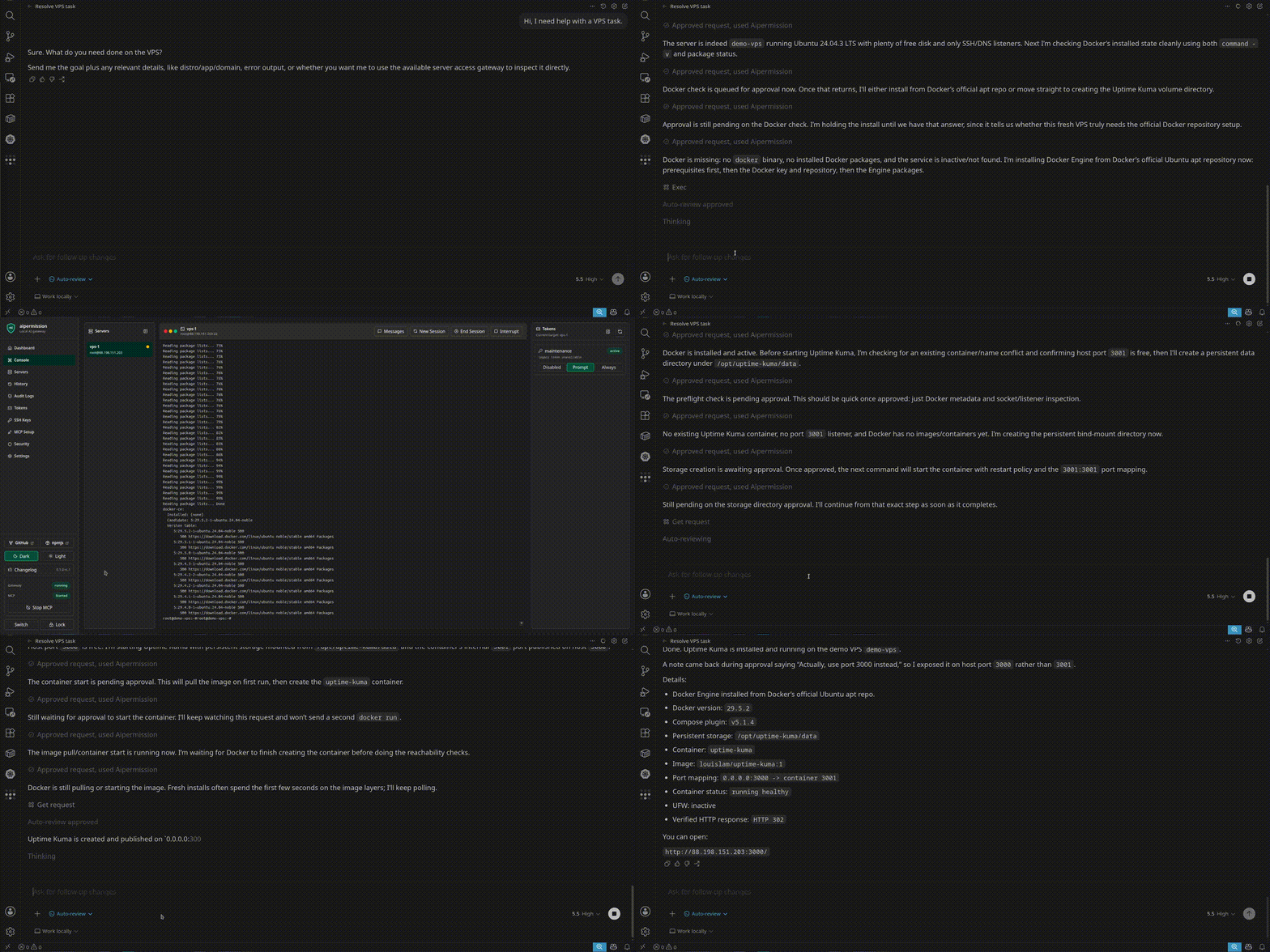
Watch the accelerated demo video
| Human approval before execution | Live console with AI/user messages |
|---|---|
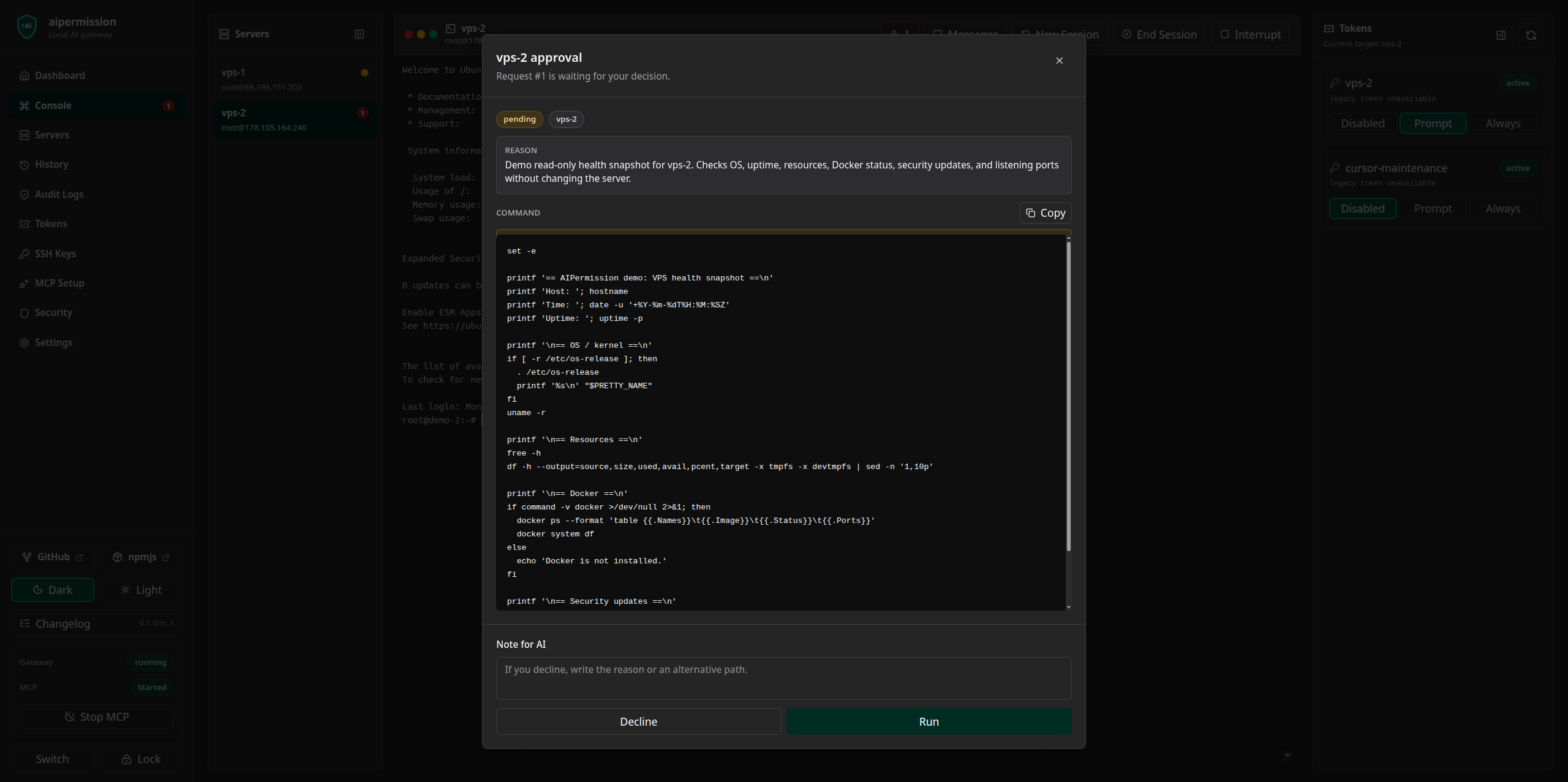 |
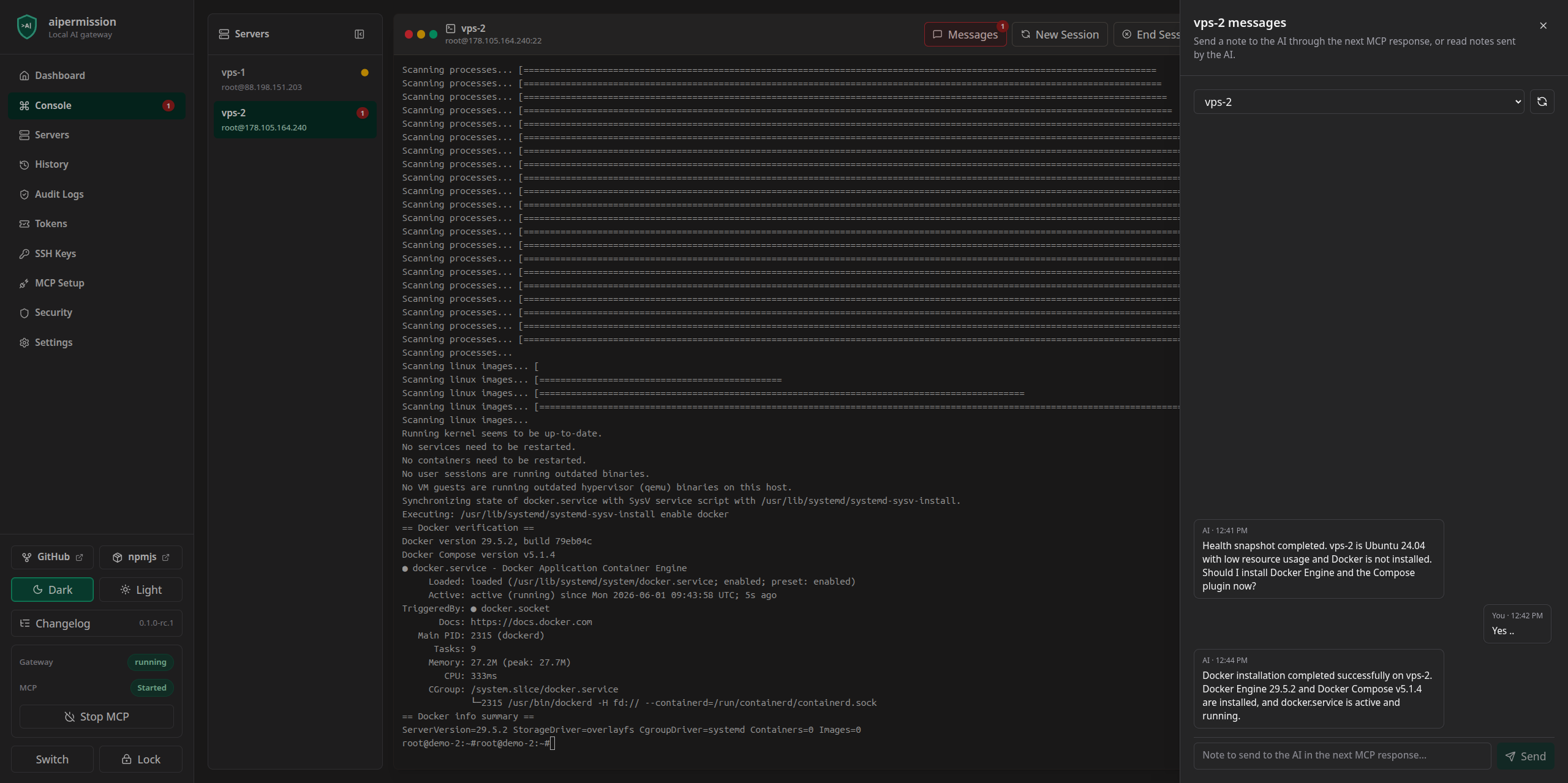 |
| Token-scoped access | Auditable command history |
|---|---|
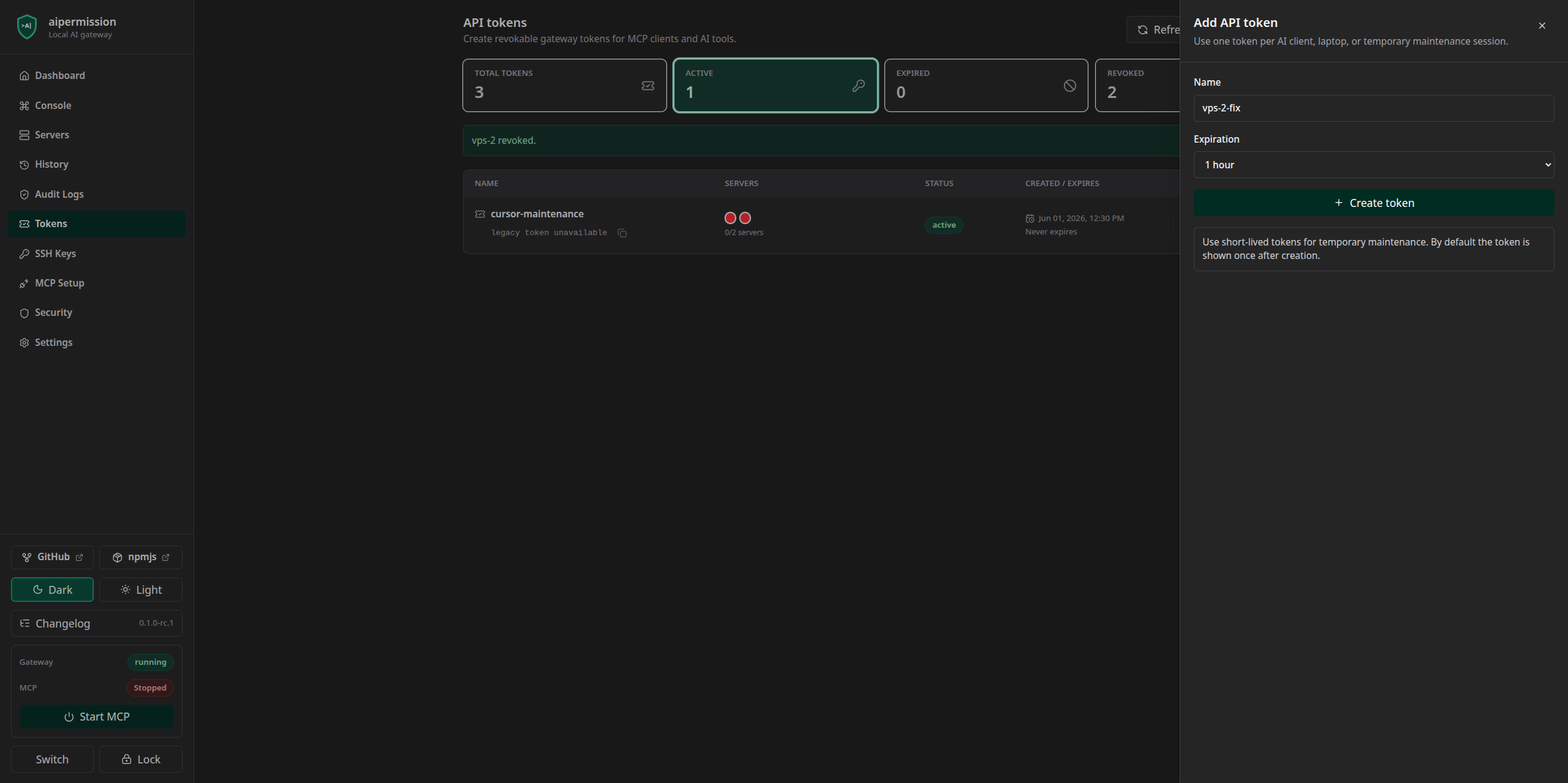 |
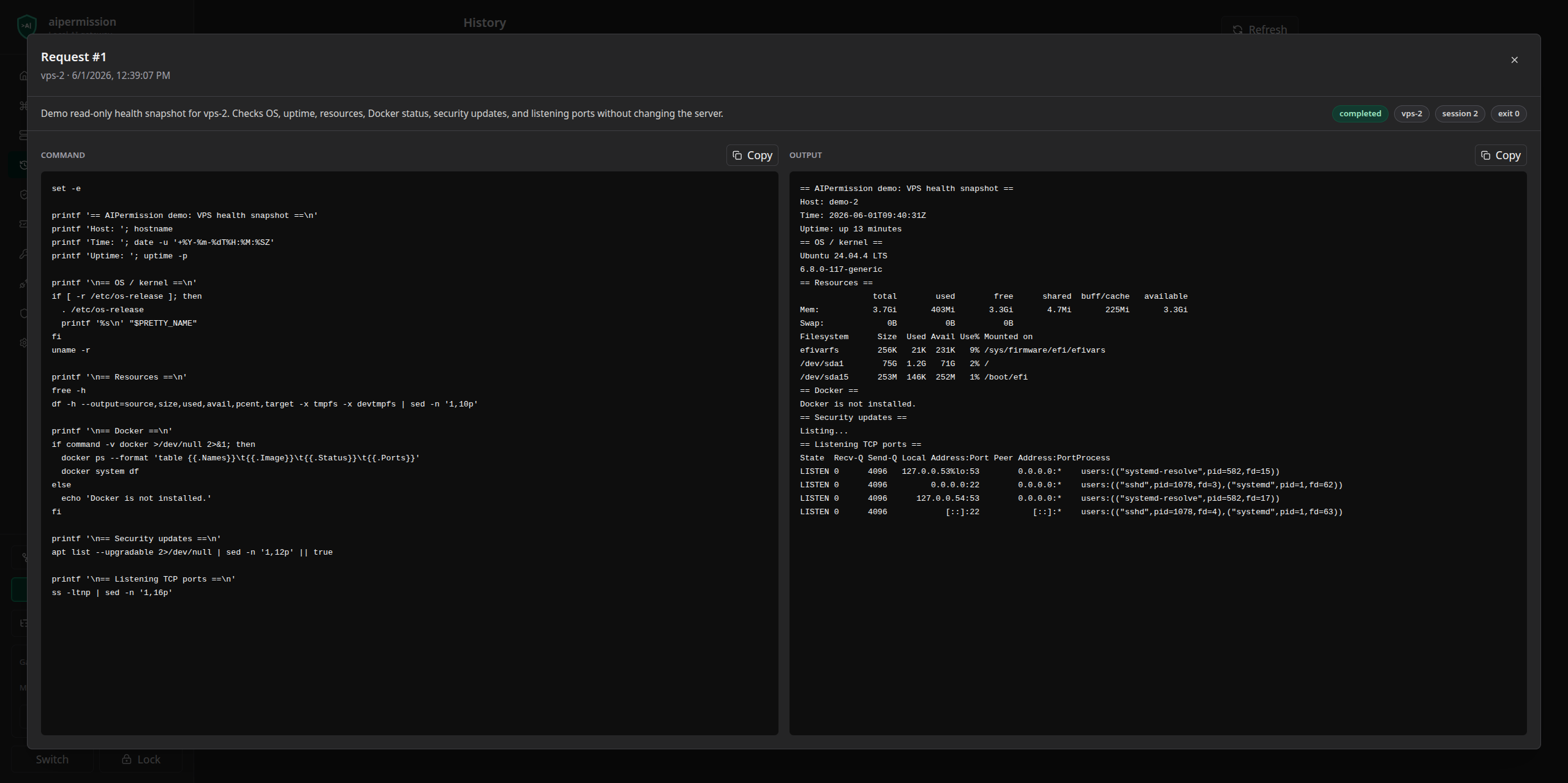 |
Current MVP
Implemented:
- Docker Compose local runtime
- Go backend with SQLite storage
- React web UI
- connector target/profile/action pipeline for SSH, Postgres, Redis, RabbitMQ,
Docker, and future local
integrations - generic connector network transport so protocol connectors can use Direct or
reviewed Over SSH TCP paths without importing SSH-specific code - generic connector command transport so structured connectors can run reviewed
command templates through connector transports without importing SSH-specific
code - connector template architecture for target forms, credential forms, list rows,
console/activity surfaces, and connector-owned operations - built-in SSH connector with persistent shell, file transfer, remote browsing,
host-key approval, and command actions - built-in Postgres connector with Direct and Over SSH connection modes,
schema/table inspection, bounded read-only SQL actions, managed scoped
database-user provisioning, and SQL backup/restore - built-in Redis connector with Direct and Over SSH connection modes, bounded
key scanning, key inspection, string writes, TTL updates, and explicit deletes - built-in RabbitMQ connector with Direct and Over SSH connection modes, queue
browsing, vhost metadata, binding inspection, bounded message peeking, and
explicit message publishing - built-in Docker connector over an SSH transport profile, with scoped
container inventory, redacted inspect metadata, bounded logs, and explicit
start/stop/restart actions - Docker credential profiles can scope MCP access to all containers, selected
container names/IDs, or name patterns, so one token can be limited to a
single container on a shared Docker host. - gateway-generated SSH keys (
ed25519andrsa) - explicit existing SSH private key import into the encrypted local vault
- SSH host import from OpenSSH config files for prefilling connector targets
- copy/paste public key install command for SSH targets
- connector target management and connection tests
- optional advanced SSH startup settings for menu-based NAS/appliance shells
- API token create, copy, revoke
- token expiration for temporary MCP access
- token-to-target/action permissions with optional temporary expiration
- execution rules:
always_run,approval_required,blocked - global MCP Started/Stopped switch that preserves permissions while blocking live execution
- persistent web console with live PTY streaming
- UI bulk SSH command execution across selected connector targets with per-target history rows
- MCP bridge with connector action tools for SSH, Postgres, Redis, RabbitMQ,
Docker, and future local integrations - approval dialog with Run / Decline / note
- approval-context snapshots that stale old pending connector actions after
permission, connector target, credential profile, connector metadata, or
prepared action payload drift - unread message badges and AI-to-user/user-to-AI notes
- SQLCipher FTS4-backed searchable command history and audit log pages
- queued SSH/SFTP upload and download from the local web UI
- remote SFTP browser for upload folders and download file selection
- pause/resume/cancel transfer queues with live progress, speed, ETA, checksum, server, and path metadata
- configurable local data retention for unified history, audit logs, console sessions, and messages
- Settings-only realtime Maintenance Console for local gateway diagnostics
- SQLCipher-backed full SQLite database encryption
- first-run database password setup and unlock screen
- local browser session cookie for the web REST API after unlock
- encrypted database download/import (
.aipdb) - remote encrypted-backup providers, with Google Drive as the first provider type
for encrypted.aipdbupload, download, and restore-as-new-local-database
after local user consent.
See the Google Drive backup provider guide. - first-connect SSH host fingerprint approval with later
known_hostsverification
Out of scope for the current MVP:
- advanced command risk analysis
- directory transfer, recursive copy, remote glob expansion, and restart-surviving resumable file transfers
Quick Start
Requirements:
- Docker and Docker Compose
- Node.js only if you are running the MCP bridge from source during development
Start the gateway:
docker compose up -d --build
On Windows, clone the repository with Git's default text handling or make sure
shell scripts keep LF line endings. The repository includes .gitattributes and
a CI check for this because Docker Linux containers cannot run CRLF shell
entrypoints.
Open the UI:
http://localhost:3210
If port 3210 is busy:
AIPERMISSION_FRONTEND_PORT=3211 docker compose up -d --build
The browser talks to the backend through the local frontend proxy:
http://localhost:3210/api
MCP clients use:
http://localhost:3210
The Docker Compose UI port binds to 127.0.0.1 by default. The backend is not published as a separate host port in Docker Compose; the frontend proxies /api to the backend inside the shared local container namespace. The backend itself refuses to start when AIPERMISSION_BACKEND_HOST is set to 0.0.0.0 or any non-loopback address. AIPermission is local-only: do not publish Compose ports on 0.0.0.0 or a LAN interface. Remote/LAN mode is intentionally not supported.
If AIPermission runs in Docker on a Linux host and a connector target points at
a service running on that same host, use host.docker.internal as the connector
host instead of localhost. The connector network transport resolves that name
to the Docker host gateway when Docker does not provide it automatically.
For example, a Postgres service listening on the Linux host can be configured ashost.docker.internal:5432 in Direct mode. Use Over SSH only when the service is
reachable from another SSH target rather than from the Docker host.
Basic Flow
- Open the web UI.
- Create the local database password on first run, import a database file, or unlock an existing database. New database passwords must be at least 14 characters and include uppercase letters, lowercase letters, and numbers. Unlock issues a local browser session cookie for web REST calls; if the cookie is deleted or expires while the backend is still unlocked, the UI asks for the same database password again and continues.
- Create a credential profile in
Credentials. SSH profiles can use generated or imported keys; Postgres profiles store database credentials; future connectors define their own profile fields. - Add a connector target in
Connectorsand select the credential profile. - For SSH targets, copy the generated public-key install command and paste it on the remote machine when needed.
- Test the connector target.
- Create a token in
Tokens. - Give that token permission for one or more target/profile/action combinations.
- Configure your MCP client with the token.
- Start MCP from the sidebar when you are ready to let the AI execute through saved permissions.
- Ask your AI assistant to use
aipermission.
The public key install command looks like:
mkdir -p ~/.ssh && chmod 700 ~/.ssh && printf '%s\n' 'ssh-ed25519 <PUBLIC_KEY> aipermission' >> ~/.ssh/authorized_keys && chmod 600 ~/.ssh/authorized_keys
The private key never leaves the local gateway. Imported private keys are parsed
locally, normalized, and stored inside the encrypted local vault. Import
passphrases are used only during import and are not saved.
Execution Rules
Each token/target/action grant has one execution rule:
blocked: the token cannot use that connector action through MCPapproval_required: the action creates a pending approval in the UIalways_run: the action runs immediately after permission checks
In API/MCP data, denied access is represented as blocked. In the UI, an unset permission can appear as disabled because there is no token/target/action permission row yet.
Use approval_required for real systems until you trust the workflow. Use always_run for low-risk maintenance sessions or temporary local/dev servers.
Token action permissions can be permanent or temporary. A temporary grant has anexpires_at timestamp; after it expires, MCP no longer treats that permission
as effective. This is useful for short maintenance windows, especially temporaryalways_run access.
Saved permissions are not the same as live execution. Each unlocked database has
a global MCP Started/Stopped switch in the sidebar. By default, MCP execution
starts stopped after gateway startup or database unlock, so saved always_run
rules do not immediately become live. Security settings can opt into automatic
MCP start for a database when that is the intended workflow.
MCP Setup
Official npm package names:
@aipermission/mcpis the real MCP bridge package.aipermissionis a tiny unscoped placeholder package that points users to@aipermission/mcp.
Recommended install:
npx -y @aipermission/mcp init \
  --provider codex \
  --name aipermission
The init command asks for the API token with a hidden prompt. Avoid passing tokens in shell arguments unless you intentionally accept shell-history exposure. For project-local MCP configs, init refuses to write into files already tracked by Git unless --force is passed; use --print if you prefer to copy the config manually.
Example MCP config:
{
  "mcpServers": {
    "aipermission": {
      "command": "npx",
      "args": ["-y", "@aipermission/mcp"],
      "env": {
        "NODE_ENV": "production",
        "AIPERMISSION_API_URL": "http://localhost:3210",
        "AIPERMISSION_API_TOKEN": "YOUR_TOKEN_HERE"
      }
    }
  }
}
Expected MCP tools:
list_connector_targets()
get_connector_help(target_ref)
get_connector_actions(target_ref)
call_connector_action(target_ref, action_name, input?, reason?)
get_connector_action_request(request_id)
The MCP surface is connector-first. SSH, Postgres, Redis, RabbitMQ, Docker, and future integrations use
the same target/profile/action permission pipeline. list_connector_targets is
permission-scoped, not a live health check. Current reachability is learned when
the connector action actually runs and returns a dial, timeout, authentication,
host-key, credential, or service error.
For SSH, call get_connector_actions(target_ref) to discover actions such asexec, read_console, restart_console_session, browse_remote_files, andstart_file_download.
For Redis, call get_connector_actions(target_ref) to discover actions such asscan_keys, get_key, set_string, expire_key, and delete_keys.
For RabbitMQ, call get_connector_actions(target_ref) to discover actions such
as overview, list_vhosts, list_queues, get_queue, list_bindings, andpeek_messages, and publish_message. Treat message payload previews and
message publishing as sensitive queue access; previews use bounded
count/truncation limits and ack_requeue_true.
If an action returns approval_pending or running, the response includes anassistant_hint telling the AI to poll get_connector_action_request until the
request reaches a terminal state.
Pending connector approvals store an approval-context snapshot. If the token
permission, token validity, target profile, connector metadata, or action
payload hash changes before the operator clicks Run, the request becomesstale and must be sent again.
SSH connector exec is intended for non-interactive commands. Use explicit
flags such as -y/--no-pager, create files inside the command when needed, or
use the web console for interactive work.
Approved SSH connector commands run through the target server's shell. Shell
operators such as ;, &&, pipes, redirects, command substitution, and globs
are interpreted by that shell, so review approval dialogs as shell command
bodies.
Optional operator instructions:
npx -y @aipermission/mcp install-skill --client codex
Supported clients are codex, claude-code, cursor, vscode, windsurf, antigravity, gemini, and custom. Restart the AI client after installing, then ask it to use the aipermission MCP server. The instructions guide connector discovery, approval polling, reasons, and secret-safe action habits.
More detail: MCP client setup
Security Model
aipermission is designed for local, developer-controlled usage.
Important boundaries:
- Connector credentials stay inside the encrypted local gateway. SSH private
keys, database passwords, API tokens for future connectors, and similar
secrets are never sent to the AI client. - SSH private keys can be generated by the local gateway or explicitly imported
by the user, then stored as SSH connector credential resources. - AI clients authenticate with API tokens, not connector credentials.
- API tokens are shown once by default. Security can enable reusable token copy for newly created tokens; reusable values are stored with gateway vault encryption.
- API tokens and token action permissions can use expiration timestamps for
temporary maintenance access. - Tokens only see connector target/profile/action grants explicitly permitted for that token.
- Revoked tokens, expired tokens, and expired token action permission grants are
rejected by MCP permission checks. - Connector credentials are not returned by REST or MCP responses.
- SSH host keys require first-connect fingerprint approval and are verified on later connections.
- The SQLite database is encrypted with SQLCipher and requires the local database password after startup.
- The database password is not recoverable. If it is lost, the local DB, tokens, history, and gateway connector credentials are lost.
- The database password can be changed from Settings while the current password is known.
- The database password is escaped before SQLCipher key/rekey handling, so quotes or semicolons in the password cannot change PRAGMA SQL parsing.
- Connector action input, command text, action output, notes, console transcripts, and audit payloads may be stored in the encrypted local database. Basic redaction is enabled by default for common secret patterns, and Security can add custom regex rules that are stored inside the encrypted database. Redaction is best-effort. Approval execution keeps the raw action payload in an encrypted internal payload so redaction never changes what runs, while UI, MCP response fields, messages, and audit display fields stay redacted. Do not put secrets directly in connector action inputs, commands, or prompts, and use judgment when asking AI to inspect files or environment values.
- File transfer contents are not stored in SQLCipher. Uploads and downloads use private short-lived temporary files under the local data directory; transfer history stores metadata, status, progress, speed, ETA, checksum, and errors only. Uploads are staged to a temporary remote file and moved into place only after completion, so canceled uploads do not leave partial target files behind. Download queues are capped at 1 GiB total remote file size. Pause/resume works for the active local gateway process; if the gateway, Docker container, or computer restarts, unfinished transfer queues should be started again. The local web UI owns full upload/download queue management. MCP uses the generic connector-action tools; today the SSH connector exposes remote browsing and remote-to-local download queue creation through
browse_remote_filesandstart_file_download. MCP transfer responses never include file contents, gateway temporary paths, or archive staging paths. - Secret fields are also encrypted with the gateway vault secret inside the SQLCipher database.
- The gateway vault secret is sensitive. Losing it prevents vault payload decryption; exposing it together with unlocked database contents compromises vault-protected payloads.
AIPERMISSION_GATEWAY_SECRETis optional and should be left unset for normal local installs. The gateway auto-generates a high-entropy local vault secret at startup. If it is set explicitly for advanced local testing, use at least 32 random characters.- SSH host key pins live in a local
known_hostsfile outside the encrypted database. That file stores remote host key fingerprints/public host keys only; it does not contain SSH private keys. Theknown_hostsfile is gateway-level state shared by all named local databases in the same data directory, so approving a host key in one workspace also trusts that host key for the other workspaces handled by that gateway. - API token authentication uses SHA256 hashes of high-entropy random tokens. User database passwords are not treated as bearer tokens.
- AIPermission does not claim protection against a compromised developer machine or a malicious browser extension installed in the active browser profile. Use a trusted browser/profile and avoid untrusted extensions while the gateway is unlocked.
For the storage model, see Storage Encryption.
Backup And Import
The UI can download the currently unlocked encrypted database file with the .aipdb extension.
The downloaded file is:
- a SQLCipher encrypted SQLite database
- protected by the database password
- portable across machines because the gateway vault secret is stored inside the encrypted DB settings
Import is available from the unlock screen: choose the .aipdb file, enter a database name, and enter that database password.
Changing the database password re-encrypts the current local database. Existing downloaded .aipdb files keep the password they had when they were created; new downloads use the new password.
The unlock screen can manage multiple named local databases. New Database creates a separate encrypted database for another project. Plain SQLite files are not supported as runtime databases or imports; AIPermission stores local state in SQLCipher-encrypted .aipdb databases.
During one backend process, multiple named databases can stay unlocked. Switch changes the active UI database without closing already-unlocked workspaces, so MCP commands and persistent console sessions in another workspace can keep running.
If the same token exists in more than one unlocked database, MCP authentication returns a conflict instead of guessing which workspace to use. Revoke or rename/recreate duplicate token copies before using MCP.
The database password is only used to open or re-authenticate the local database. It is not used as an API bearer token. Web REST calls use an HttpOnly browser session cookie, while MCP calls continue to use the configured MCP API token.
Database Migration
Version 0.2.0 is a connector-native database baseline. Pre-0.2 preview
databases are not opened directly by the normal gateway, because the runtime no
longer keeps compatibility shims for the old SSH-only schema.
To migrate an important 0.1.x database into a new 0.2 database, start the
local-only migration helper:
docker compose --profile migrate up -d --build migration
Then open:
http://localhost:3211
The helper creates a new 0.2 database and never modifies the source database. It
migrates SSH keys, SSH targets, credential profiles, API tokens, SSH exec
permissions, settings, redaction rules, and history labels. It intentionally
does not migrate command history, audit logs, console sessions, or file transfer
history. Do not use the source database in the normal gateway while migration is
running.
After you verify the migrated 0.2 database, the old 0.1.x source database can be
removed from the unlock screen with Delete old local copy. AIPermission asks
for the old database password in the normal unlock form, then asks you to type
the database name before deleting the local file.
After migration, stop the helper:
docker compose --profile migrate stop migration
docker compose --profile migrate rm -f migration
See Database Migration for details.
Development
Common checks:
npm install
make test
make build
make audit
Browser smoke:
cd frontend
npm run test:e2e
Full local release check:
make release-check
Run the backend locally:
cd backend
go run ./cmd/aipermission
Docker smoke:
make docker-up
make docker-ps
Package dry runs:
cd packages/mcp && npm pack --dry-run
cd ../npm-placeholder && npm pack --dry-run
Before publishing, run the full release checklist.
Contributing
Contributions are welcome after the first public RC. Please read
CONTRIBUTING, SECURITY, and the
Code of Conduct before opening issues or pull requests.
Release notes will be tracked in CHANGELOG.
Documentation
Start here:
- What is aipermission
- MVP Scope
- Use Cases
- MCP Tools
- Threat Model
- Add A Connector
- Development Testing
- Roadmap
Developing Connectors
Most future connectors should be structured connectors: add a backend connector
package, a frontend template folder, docs, and tests. They use the shared
target/profile/action permission, approval, history, and audit pipeline without
adding connector-specific permission tables, MCP tool families, or route-level
branches. Frontend templates are folder-discovered fromfrontend/src/connectors/templates/<kind>/; normal connectors do not edit the
generic template registry or catalog.
Runtime-integrated connectors are different. SSH is the built-in example
because it owns a live terminal, SFTP file transfer, host-key approval, and
gateway-owned key resources. New runtime capabilities require a reviewed
adapter contract before touching generic API routes. Adapter contracts live ininternal/connectorapi; connectors should not create their own parallel
server/runtime/lifecycle interfaces.
See Add A Connector for the contributor
checklist, required template files, security invariants, and the exact places a
Redis/API-style connector should touch.
Project Status
This project is pre-1.0 local developer software. The current goal is to
validate the connector-native permission workflow with early users before a
stable release.
Version 0.2.0 is a connector-native baseline. Pre-0.2 preview databases are not
migrated automatically by the normal gateway; create a fresh 0.2 database or use
the local one-time migration helper for important 0.1.x data.
The current release line focuses on:
- simple local setup
- safe connector credential handling
- reliable MCP connector action flow
- approvals, structured activity, and SSH live console visibility when relevant
- clear documentation and honest security boundaries
License
AIPermission is licensed under AGPL-3.0-only from v0.1.14 onward. See
LICENSE.
Versions up to and including v0.1.13 were released under MIT. Those historical
releases remain available under their original MIT license.
Commercial use is allowed under the AGPL, but modified versions must comply
with the AGPL. The AIPermission name and logo identify the official project;
forks must not imply endorsement by the AIPermission project.
Reviews (0)
Sign in to leave a review.
Leave a reviewNo results found