clippy
Health Warn
- License — License: MIT
- Description — Repository has a description
- Active repo — Last push 0 days ago
- Low visibility — Only 6 GitHub stars
Code Fail
- process.env — Environment variable access in .github/workflows/release.yml
- fs.rmSync — Destructive file system operation in bin/clippy-hooks.js
- os.homedir — User home directory access in bin/clippy-hooks.js
- fs module — File system access in bin/clippy-hooks.js
- network request — Outbound network request in demo/demo.js
Permissions Pass
- Permissions — No dangerous permissions requested
No AI report is available for this listing yet.
A Clippy that watches your Claude Code sessions, knows what they're doing, and lets you approve/review/answer from a floating UI (incl. Agent-SDK Drive mode).
📎 Clippy for Claude Code + Codex
By AI Socratic.
Download the latest Apple-silicon DMG · Compatibility · Troubleshooting · Privacy
Current packaged release: Apple silicon, macOS 11+. Intel users can build
from source. The official v0.3.1 release and later are Developer ID signed
and Apple-notarized; they should open normally without a Gatekeeper bypass.
One little Clippy per Claude Code or Codex session, living on your MacBook, each one
knowing what its session is doing right now — and letting you answer it right
there: approve or deny permission requests, approve or revise a plan, pick an
answer to Claude's question, and review the work when it finishes. No hunting
through terminal tabs.
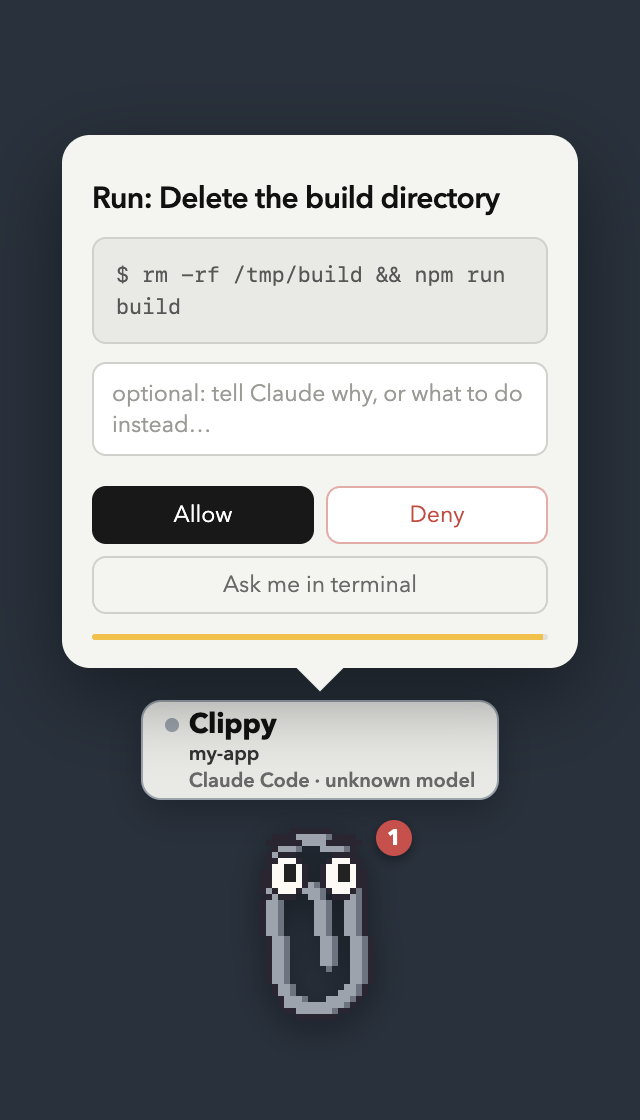
"Hey! Claude wants to run
rm -rf /tmp/buildin “my-app” — allow it?"
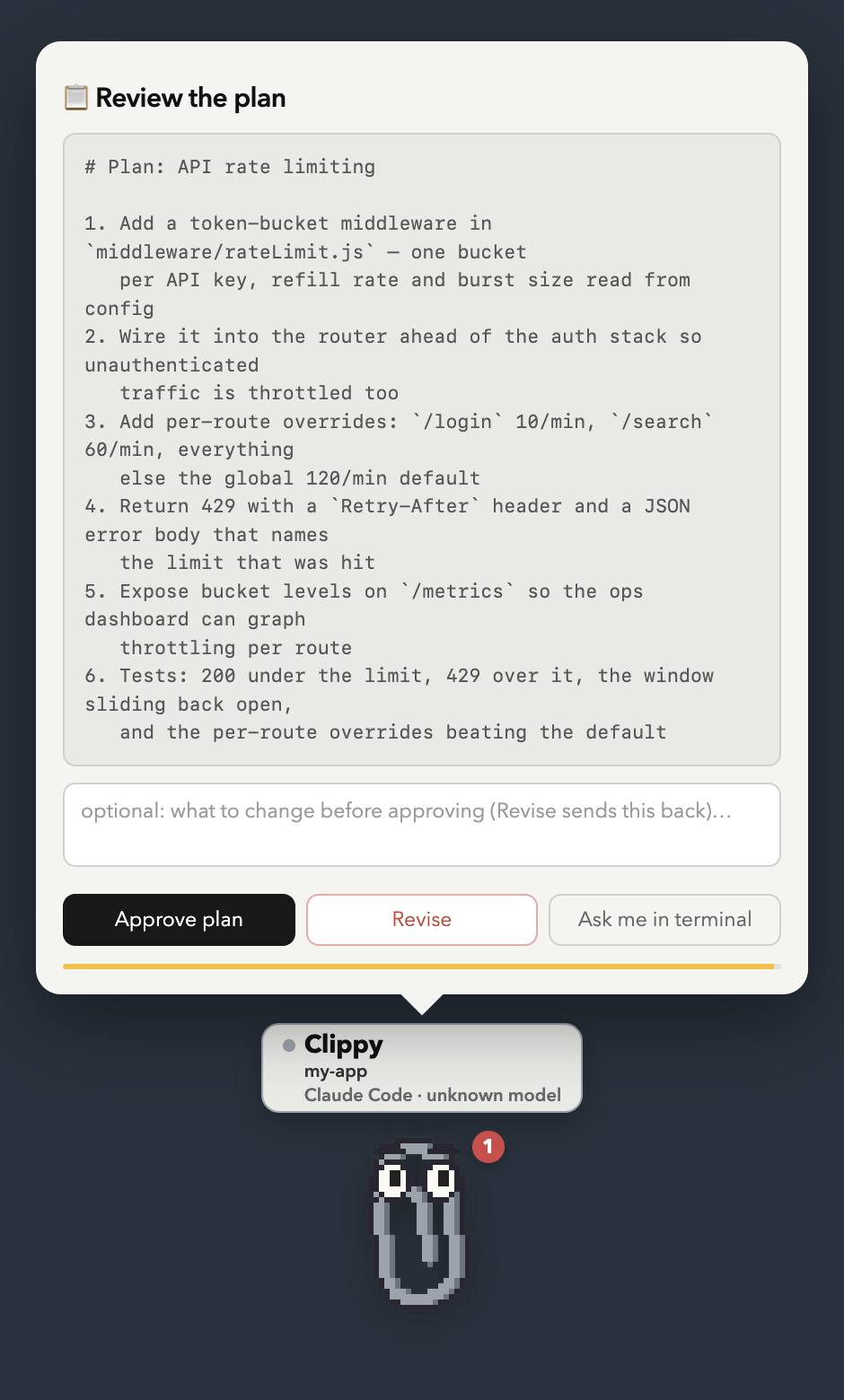
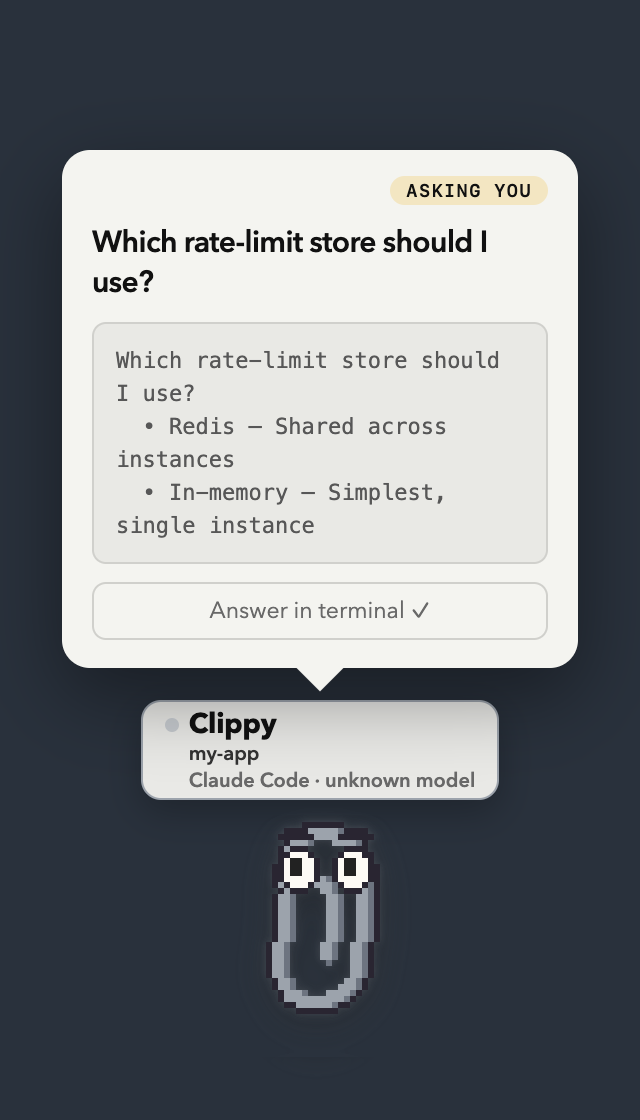
| Approve or deny | Approve or revise a plan | Answer a question |
|---|---|---|
 |
 |
 |
Each buddy wears an RPG-style name plate in its own colour: hover and it
names just the project; open any popup and the full plate appears — an energy
bar of how much context this session has left, the buddy's own pet name
(Biscuit, Nori — dealt from the session id, so it sticks), and the quest
details in small print (my-app · gpt-5.5). Concurrent agents in the same folder are assigned different available buddy
animations, so five parallel agents are distinguishable characters rather than one confused paperclip. A live
activity line under each shows what that session
is doing — ⚙ my-app — Running: npm test, ✏ Editing server.js,✓ done — your turn, ⚠ Bash failed.
(Real captures of the app driven by simulated hook events — regenerate withnpx electron scripts/demo-screenshots.js, or under xvfb-run on Linux. The
dark backdrop stands in for your desktop: the real window is transparent.)
You kick off a long coding-agent task, switch to Slack, and twenty minutes later
discover it's been sitting at a permission prompt the whole time. Clippy fixes
that: floating, draggable paperclips (always on top, on every Space) that know
the live state of every session — and they don't give up, re-nudging every 90
seconds until you respond, snooze, or dismiss.
Clippy stays hidden while Claude works. A buddy only appears when its
session actually wants you — it finished a turn, needs a permission or plan
approved, or is asking a question — and slips away again the moment you've
answered or typed a new prompt in the terminal. Nothing pops up for ordinary
tool activity. Show any buddy on demand from the 📎 menu bar (it then stays put
until you hide it).
And it shows up where the session lives: when a buddy has something to say
it appears on that session's own terminal/editor window — top-right corner,
following the window as you move it — rather than in a corner of the screen.
Every card carries a button that brings that window to the front, so you land in
the right session instead of hunting for it — and it is named after whatever
that session actually lives in: go to Ghostty ↗, go to ChatGPT ↗,
go to Claude ↗, or attach a terminal ↗ for a tmux session Clippy
started. Each card also says who is asking, as project · agent · app, which is
what tells two sessions of the same agent apart.
And when you are already in that window, Clippy says nothing at all: the
agent's own prompt is right there on the screen you are typing on, so a held
question is handed straight back to it rather than answered here. Turn it off
under 📎 → Stay quiet when I'm already in that window.
Clippy is a small buddy by default and only grows a window when there's
something to read — as tall as that thing needs, no more. Click him and he
goes straight to the useful thing: a message you haven't seen yet, or — when
there's nothing waiting — one panel that answers "how is this session doing?":
what the agent is doing right now, how much context it has spent (660k left of 1.0M · 340k used (34%) over a progress bar) and, under that, the real allowance
bars covering the rolling 5-hour block, the week, and Opus's own week once you
tell Clippy your plan. 📊 in the bar under the buddy opens the same panel,
whole — there is no fold to open first. It is a panel of numbers and nothing
else; the bar has just 📊 and hide. Typing to the buddy (or, picking its name
from the row above the box, into that session's own terminal) has no button of
its own: a chat you parked mid-sentence comes back with a click on the buddy.
Right-click for everything else — the same stats, Settings, and hide.
Double-click just says hi back, for about a second. The built-in buddies are
all drawn in code: Clippy, the cat, and Clod are generated pixel art; Orbit and
Loopy are live SVG that stays smooth at every size. Any sprite pack you drop in
is swappable from the menu too.
How it works
Claude Code / Codex session(s)
   │  hooks: PermissionRequest / Stop / Pre+PostToolUse / Notification / SessionEnd
   ▼  curl POST → http://127.0.0.1:43117/hook/<event>   (response = hook decision)
Clippy app (Electron)
   ├─ session tracker: who's working, waiting, blocked — and what they're doing now
   ├─ decision broker: holds interactive hooks open until you click (or timeout)
   ├─ one floating Clippy per session (hidden until it needs you): name plate, activity line,
   │    approval/plan/question/review cards, snooze
   ├─ native macOS notifications (clickable)
   └─ menu bar item 📎 with a count of sessions waiting on you
Claude Code and Codex lifecycle hooks fire shell
commands on lifecycle events, and a hook's stdout JSON can answer the event.
The installer registers tiny curl hooks in ~/.claude/settings.json and~/.codex/hooks.json that POST each event's JSON to the app on localhost. Interactive hooks are
interactive — their HTTP response is the hook's decision:
| Hook event | Clippy reaction |
|---|---|
PermissionRequest |
🛂 Approval card — Allow / Deny (with a reason Claude sees) / send to terminal. For ExitPlanMode it becomes a plan card: Approve / Revise (your note sends Claude back to planning) |
Stop |
✅ Review card — answered immediately, the chat is never held. "Looks good" puts Clippy away; typed feedback is typed into that session's terminal as your next prompt |
PreToolUse (AskUserQuestion) |
❓ Question card — Claude's options as buttons. What you pick is fed straight back, so the terminal picker never appears |
PreToolUse (Bash, Edit, Write, Web, Task, …)* |
⚙ Activity line — what Claude is doing now |
PostToolUse (same tools) |
✓ marks the action done |
PostToolUseFailure (same tools) |
⚠ turns the activity line red with the tool name — no popup. A failed command is routine inside a session; the agent sees the error and carries on |
Notification (permission_prompt) |
🔴 Urgent bounce — a prompt is waiting in the terminal |
Notification (idle_prompt) |
🟡 Reminder — Claude has been waiting for your reply |
SubagentStart / SubagentStop |
a helper the session spun up: listed under it in Settings → Sessions, and the activity line says "Delegating to Explore" and then "Explore: Running: npm test" while it works |
UserPromptSubmit |
clears alerts & pending cards for that session (you're on it) |
SessionEnd |
the session's buddy leaves the screen. (There's deliberately no SessionStart hook: a session announces itself with its first real activity) |
statusLine (Claude Code only) |
a small 📎 tucked against the right edge of the line under the input box — cmd+click it (iTerm2, Ghostty, kitty, WezTerm) to open this session's buddy. Installed only if you don't already have a statusline of your own |
The activity hooks match only meaningful tools (Bash|Edit|Write|…|mcp__.*)
— Read, Grep, Glob, and TodoWrite are excluded, so the noisy read-only
tools never even fire a hook (no latency, no spam).
How answering a question works: the PreToolUse hook can rewrite a tool's
arguments before it runs (permissionDecision: "allow" + updatedInput). AnAskUserQuestion whose input already carries an answers map has nothing left
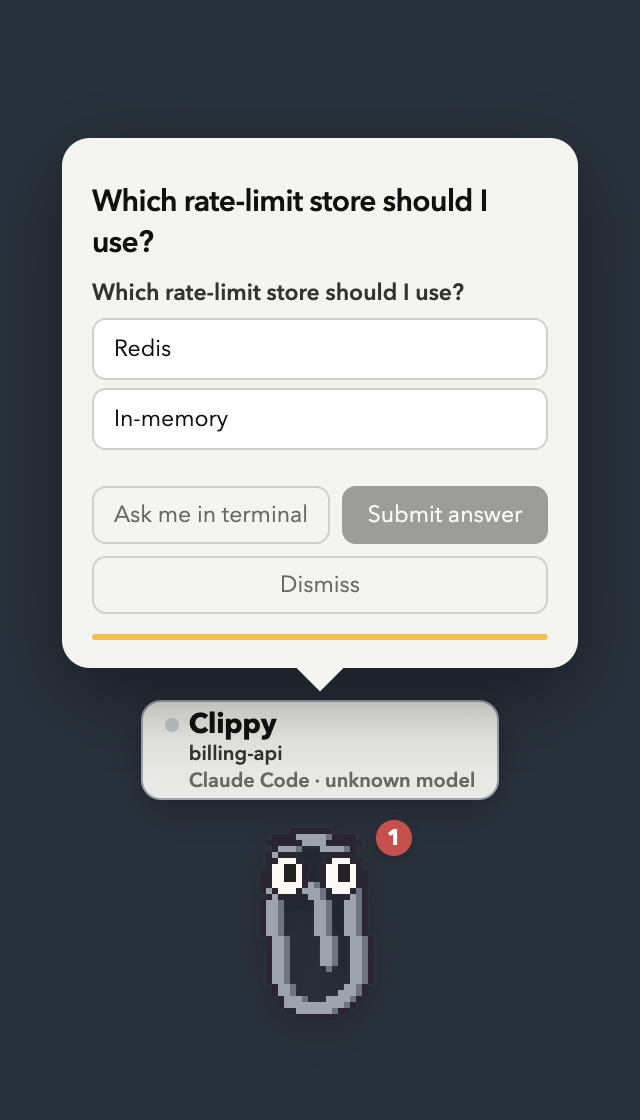
to ask, so filling it in is the answer — Claude Code printsUser answered Claude's questions: · Which store? → Redis and the terminal
picker never appears. Multi-select answers are the chosen labels comma-joined,
and an answer that isn't one of the offered options is read as a typed "Other".
If you don't answer in Clippy (dismiss, timeout, app not running), the hook
returns {} and the normal terminal picker comes up exactly as before.
Safety properties of the interactive hooks:
PermissionRequestfires only when Claude Code would actually show a
permission prompt — allowlisted commands run at full speed, untouched.- If you don't answer in time (60s for approvals, 90s for questions — typing
extends the hold), Clippy answers "no decision" and the normal terminal
prompt takes over. Nothing is ever auto-approved. Reviews hold nothing at
all: theStophook is answered the moment it fires. - When the app isn't running, the hooks fail instantly
(--connect-timeout 1 … || true) and Claude Code behaves exactly as if
Clippy didn't exist. - Both behaviors can be toggled from 📎 menu bar → Quick settings
("Permission requests" / "Review when Claude finishes"), and the toggles persist.
Codex support
Codex uses its native lifecycle hooks and reports into the
same local server. Clippy tracks Codex sessions, tool activity, permission requests, completed
turns, terminal windows, review feedback, and token/context totals from local rollout transcripts.
The permission decision format is compatible with the Claude path, so Allow and Deny work from the
same cards — and reviews behave identically too, since feedback is typed into the terminal for both.
There are three deliberate differences in the current Codex integration:
- Codex has no
NotificationorPostToolUseFailurehook. Clippy detects non-zero shell exits
fromPostToolUse, while idle reminders rely on the turn/question/permission hooks it does have. - A Codex
request_user_inputcall is held by its own interactivePreToolUsehook and rendered
with the same option buttons as Claude. Submitting consumes the tool call and gives Codex the
selected values as its model-visible result; moving to the terminal, dismissing, or timing out
returns no decision and leaves Codex's native picker in charge. - Drive mode and Claude plan/allowance calibration remain Claude-specific. Codex context and token
totals are shown from its rollout files without pretending they are account-limit percentages.
OpenClaw support
OpenClaw sessions get a buddy too, in watch mode only: the buddy shows
an activity line while the gateway works and nudges you when a reply lands, but there are no
interactive cards (no permission/review/question buttons) in this integration yet.
npm run hooks:install -- --agent openclaw
This copies a dependency-free handler to ~/.openclaw/hooks/clippy-hook.mjs and registers it in~/.openclaw/openclaw.json (hooks.internal.handlers, for the message and command event
families). Restart the OpenClaw gateway to load it. The plain npm run hooks:install also picks
OpenClaw up automatically when ~/.openclaw exists. The handler fires and forgets with a 1s
timeout, so a stopped Clippy never slows the gateway down.
Quick start
npm install            # pulls Electron
npm run hooks:install  # registers Claude + Codex hooks in both user config files
npm start              # Clippy appears bottom-right; 📎 appears in the menu bar
Restart any already-running agent sessions so they pick up the hooks. Codex requires one extra
trust step: open /hooks, review the new Clippy definitions, and trust them. Then ask either agent
to do something that needs permission — Clippy will let you know.
Start an agent through Clippy
Clippy can start Claude Code or Codex in a persistent tmux session instead of
waiting for an existing terminal to report through hooks. Install tmux first:
brew install tmux
Click the 📎 menu bar icon → New agent. Pick Claude Code or Codex and
a local folder, or choose Over SSH… and enter an SSH host plus the project
path on that machine. An SSH config alias works anywhere user@host would.
The agent CLI must already be installed and authenticated on the machine where
it will run.
The tmux session lives on the Mac running Clippy, even for an SSH target. It
keeps running when Clippy quits, accepts prompts directly from the buddy, and
can be opened at any time from the session's Attach in Terminal menu item.
If SSH needs a first-time host-key/password answer, or the agent asks whether
to trust the folder, attach once and answer it in the terminal. Remote
transcripts are then read over the same multiplexed SSH connection.
Mobile companion
The Expo-based iOS and Android companion lives in mobile/. It
brings Clippy's sessions, approval inbox, activity timeline, context usage, and
prompt composer into a touch-first interface. The current milestone includes a
deterministic demo workspace while the secure Mac-to-phone relay is developed.
cd mobile
npm install
npm run ios       # or npm run android / npm run web
Use npm run hooks:install -- --agent claude or --agent codex to install only one integration.
The matching options also work with hooks:status and hooks:uninstall.
Installing the app
npm start is fine for development, but you can also build a real, installable
app — still with zero dependencies, the way Electron's docs describe manual
distribution:
npm run package # dist/Clippy for Claude Code.app + dist/Clippy-for-Claude-Code.dmg
That command intentionally makes an ad-hoc local build. Maintainers producing
a public artifact must follow the release checklist and
use npm run package:release, which fails unless Developer ID signing and
Apple notarization are configured.
That copies the prebuilt Electron.app out of node_modules, puts this app's
source into Contents/Resources/app/ with the buddy art pre-drawn, rewrites
the bundle's name/identifier/icon, ad-hoc signs it, and wraps it in a .dmg
with an Applications shortcut. Open the .dmg, drag the app across, done.
Two things worth knowing:
The app is unsigned (ad-hoc only — no Apple developer certificate), so
the first time a downloaded copy is opened Gatekeeper will object.
Right-click the app → Open → Open to get the "open anyway" button, or
clear the quarantine flag yourself:xattr -dr com.apple.quarantine "/Applications/Clippy for Claude Code.app"A copy you built on your own machine was never quarantined and opens
normally.The permission rows finally make sense. Run from source, macOS
attributes everything to Electron's own bundle — which is why the
Accessibility and Automation lists say "Electron" and nobody can find
Clippy in them. The packaged app is its own bundle
(dev.aisocratic.clippy), so those rows say Clippy for Claude Code,
and its grants don't disappear when Electron updates undernode_modules.
The hooks are still registered from the checkout (npm run hooks:install) —
they just POST to a local port, and the packaged app listens on the same one,
so the two are interchangeable. Run one at a time, though: whoever binds the
port first wins.
Using it
Hidden by default: a buddy is only on screen when its session is done or
has something to ask (approval, plan, question, review, or a terminal prompt
waiting on you). Answer it — or type a new prompt in the terminal — and it
hides itself again.Activity line: the small line under Clippy shows what each session is
doing right now (⚙ Running: npm test,✏ Editing server.js,✓ done,⚠ Bash failed). Ambient — it never pops the window; you'll see it on the
buddies you've brought up yourself.Approval card: when Claude asks for permission, the card shows the exact
command/edit. Allow runs it, Deny blocks it (anything you typed in
the box is sent to Claude as the reason — "use rg instead", "wrong dir"),
Ask me in terminal hands it back to the normal prompt.Plan card: when Claude presents a plan (plan mode), the card shows the
plan. Approve plan lets it start; type a change and Revise to send it
back to planning with your note.Question card: when Claude or Codex asks a multiple-choice question, its options
become buttons. Pick one per question (multi-select takes several), hit
Submit answer, and the agent carries on with your choice — no terminal
round-trip. Move to terminal ↗ hands the question back to the normal
picker and brings that terminal to the front. (A held question can't be in
both places at once: while Clippy holds the hook, the agent hasn't run the
tool yet, so there is no picker in the terminal to look at. Releasing it is
what makes one appear.) If answering from Clippy is off — or the question
arrives malformed — you get a read-only card with the question and a
go to …↗ button instead, named after the app it is waiting in.Review card: when Claude finishes, the card shows what it just said and
waits as long as you like — the chat is already free. Looks good puts
Clippy away; type what's missing and Send feedback and your note is
typed into that session's terminal as the next prompt.Perched on your window: a buddy pops up on the top-right corner of the
window its session runs in (its editor or terminal), follows it around, and
leaves when you've answered. Turn it off under 📎 menu bar → Quick settings →
Perch on the session's own window if you'd rather they always sit in the
screen corner.Click Clippy and he does the one useful thing directly, no menu in the
way: reopens a message you haven't seen yet, or — if there's nothing
waiting — opens the session panel, which is one click for the three
things you'd otherwise go looking for separately:- what the agent is doing — its state and the tool it's on right now
(working… · ⚙ Running: npm test), kept live while the panel is open. - what it has spent — how much context is left in this conversation
(progress bar turning amber past 60% and red past 85%, 1M window detected
automatically), then three bars for what every session on this machine has
spent in the windows/usagereports on — the rolling 5-hour block, the
week across all models, and Opus's own week — plus the models you leaned on
most. When Claude Code has cached its own/usagepercentages, Clippy reads
them and shows the real allowance bars automatically — nothing to configure.
Until then the bars are hatched shares of the week: spend, with nothing to
compare it to. Claude Code keeps the real 5-hour/weekly allowances
server-side, so/usageis the source of truth either way. - a box to keep chatting — type what you want and hit Enter: Clippy
raises that session's terminal and types it onto the prompt line for you
(simulated keystrokes via the same Accessibility access perching uses,
flattened to one line since Return submits). Escape closes the panel.
Right-click for the rest, in a short RPG-style menu about this session:
- 📨 See what's waiting — re-open the latest message, when there is one.
- 📊 Stats & token usage — the same panel as a left click.
- ⚙ Settings… — opens the settings window (everything that applies to all
buddies lives there, not here). - × Hide Clippy.
- what the agent is doing — its state and the tool it's on right now
Just being there: hovering the buddy reveals the name plate above him
(otherwise hidden so it isn't always taking up room) and the two small
buttons underneath — open session ↗ and hide. Hovering does nothing
to the buddy himself: his pose is only ever about the session. A plain click
gets a quick acknowledgingwaveon top of whatever it just did;
double-click is purely for fun — a bigger one-offcheerfor about a second,
no action attached. Neither ever papers over a real signal — a card, an
urgent nudge, the stress pose — they only show when there's nothing more
important going on.Messages you have to act on stay put: "macOS blocked me from driving that
window" and friends no longer fade after four seconds — they sit there with an
Open Settings ↗ button that takes you straight to Privacy & Security →
Accessibility (and Clippy opens that pane for you when it hits the wall).“Answer here”: when a card goes back to the terminal — you clicked
Ask me in terminal ↗, Move to terminal ↗ or Answer in terminal ✓,
or the hold timed out — and Clippy is already perched on that window, he walks
down from his corner to the input box at the bottom, stands above it with an
answer here ▼ tag for a few seconds, and strolls back to his perch. The
spot comes from the window's own geometry (bottom-left, above the input box):
the real cursor lives inside the terminal's text buffer, which nothing outside
it can read, so this points at the line rather than at the character.One size, always: the buddy is drawn at the size you picked in every mode
— a card appearing never shrinks or grows him. Small/Medium/Large are 2×, 3×
and 4× the 32×40 sprite (pixel art only looks right at whole multiples); XS is
1.5×, which is still whole on a Retina screen at 3 device pixels a sprite
pixel. Size is per project, like the character: the repo you're working in
can be Large while the two you're keeping half an eye on sit at XS. The choice
sticks across restarts.Which way he looks: toward the middle of the screen when he's idle — a
buddy parked on the left edge looking further left has his back to everything
you care about — the way he's walking while he crosses a window, and the way
you're carrying him while you drag him, changing direction mid-drag if you do.
Turning around is a mirror, so each pack says which way its art is drawn (and
each animation may disagree with its pack: sheets often run left but sit
facing the viewer, and art drawn facing the viewer is never mirrored at all).The menu bar: click 📎 (either button) for the quick menu — per-session
actions (show, perch, open window), Drive mode, every on/off switch under
Quick settings (permission requests, questions, review on finish, perch),
the settings window (above), and quit.go to …↗ (on every card, named after that session's own app) and
open session ↗ (hover below
Clippy) both raise that session's window and keep Clippy perched on it as a
small happy paperclip until you send it away. The menu bar can perch it
again.The window is only as big as the card: the renderer measures what it has
to show and asks for exactly that much height (clamped to your display), so a
long plan or a queue of approvals isn't cut off and a bare buddy isn't sitting
in a tall pane of empty glass.Five buddies in the box, more a download away: 📎 Clippy himself, a
🐱 pixel cat, and ✳️ Clod — a squat terracotta box in the spirit of a
certain mascot, transcribed into the cast (he was already pixel art) — plus
two live-SVG buddies: Orbit, a round floating robot with smooth curves and
a session-colour halo, and Loopy, the paperclip redrawn as pure vector —
the same wire, no pixels, blinking and waggling his eyebrows in the session
colour. They are all drawn in code: the pixel frames are primitives inscripts/make-buddies.js, encoded by this repo's own GIF encoder, which is
what lets Clippy ship with no third-party art, while Orbit and Loopy live insrc/renderer/vector-buddies.jsand never become pixels. Clippy is
built once per session colour, since a GIF can't be recoloured by CSS. His
silhouette is traced from the original 1997 paperclip's own path data — one
continuous wire, round over the top, down both sides, the inner hook left
open — rather than a blockier stand-in, so there's no separate "classic"
variant to pick between anymore;clipjust is that shape now.All five speak the full nine-pose vocabulary — and the buddy picks its own
pose from what the session is doing:pose when idlequiet thinkClaude is working excitedthis session wants you — bouncing, with a glow stressa tool failed, or the context window is past 30% walkcrossing a window on the way to a prompt pointstanding on the prompt, pointing at the line sleepthe turn is over, nothing left to do cheera turn finished cleanly wavehello — this session just started npm run make-buddiesrebuilds them;node scripts/make-buddies.js --preview clip:walkprints a frame as ASCII if you want to redraw one.Drag Clippy anywhere; he floats above full-screen apps on all Spaces, and
he stays put where you dropped him — cards and the right-click menu grow
around him instead of nudging him sideways.Got it acknowledges everything; the buddy's right-click menu can sleep notifications for 5 minutes, 15 minutes, or 1 hour.
The red badge and the menu bar
📎 Nshow how many sessions need you.hide (hover below Clippy) hides that buddy early; Show “name” in the
menu bar brings it back and keeps it on screen until you hide it again.
Quit from the menu bar too.
One Clippy per session
Every Claude Code session that reports in gets its own little buddy, so
parallel agents never fight over one window:
- a name plate above each buddy says its character name, which session it's
watching (the project directory), and the harness + model running it, with a dot that
pulses while that session is working - concurrent sessions in the same project use different available character
animations (until every installed buddy is already on duty) - each buddy has its own colour, derived from the project name, so the same
project looks the same every run and two agents are rarely twins - buddies tile from the bottom-right corner leftwards, wrapping onto a row
above when you run a lot of them - the status line under each one is about that session (
working…,finished — your turn,needs your permission) - the menu bar
📎 Nstill counts every session waiting on you, and lists them
so you can bring a specific buddy forward
Perching on a session's window
Each hook also reports where it ran: TERM_PROGRAM, the tty of the claude
process, and its pid (as X-Clippy-* headers, so the hook payload is
untouched). From that Clippy can find the window:
- Terminal.app / iTerm2 expose a tab's
ttyto AppleScript, so the exact
tab is selected — not just the app. - Everything else (VS Code, Cursor, Ghostty, WezTerm, Warp, kitty…): Clippy
walks up the process tree fromclaudeto the owning.appbundle —
skipping the windowless Electron helper that editors run terminals in — and
drives that process through System Events.
The first time it raises or measures a window, macOS asks you to allow Clippy
under Privacy & Security → Accessibility; if you decline, Clippy says so
(and the 📎 menu has Fix window access…) and stays in its own corner. Older
hook installs don't report any of this, so the buttons stay hidden until you
re-run npm run hooks:install.
Two macOS quirks are handled for you: a window that lives on another Space or
in fullscreen isn't in the accessibility list until its app is frontmost (so
"go to terminal" raises the app first, then looks), and macOS's System Events helper occasionally wedges and reports every app as having zero
windows — Clippy restarts it once and retries rather than concluding your
terminal is gone.
Sessions whose terminal disappears without a SessionEnd (a killed tab, a
machine that slept) are swept automatically — after 30 minutes of silence if
they were working, or 6 hours if they were parked waiting on you — so the
count never lies about sessions that no longer exist.
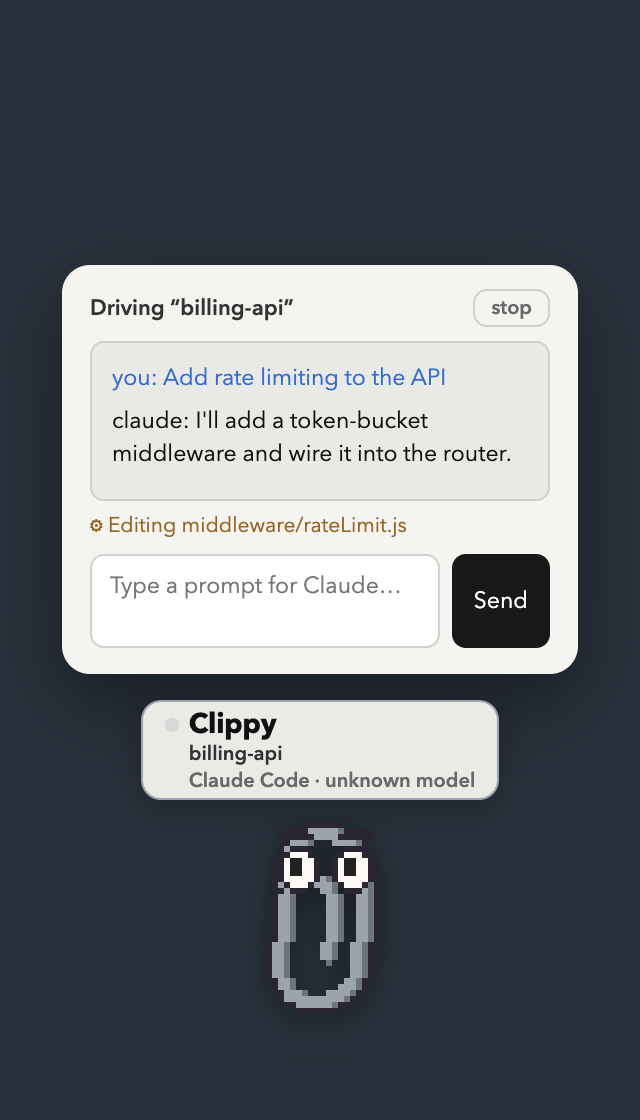
Drive mode — answer everything from Clippy (Agent SDK)
Watch mode reacts to sessions you started in a terminal. Drive mode goes
further: Clippy owns the session, so it can also send prompts and show a full
transcript. From the 📎 menu bar, New Clippy-driven session…
picks a folder and launches a headless Claude session that Clippy runs via
the Claude Agent SDK. You type
prompts in the GUI and get a streamed transcript — and every interaction is
answerable from Clippy:
| Drive panel | Answer a question | |
|---|---|---|
 |
 |
The SDK's canUseTool callback routes each request to the same cards watch
mode uses — permission requests, plan approvals, and clickable question
options — so the two modes behave identically once a card is on screen.
It's a separate headless session from your terminal claude, with its own
auth:
- The SDK is an optional dependency — install it with
npm install @anthropic-ai/claude-agent-sdk(it bundles theclaude
binary). The app runs fine without it; you just can't start a driven session. - It uses whatever credentials
claudeuses on this machine — your existing
Claude Code login,claude setup-token(CLAUDE_CODE_OAUTH_TOKEN), orANTHROPIC_API_KEY. Billing note: subscription-plan SDK usage draws from
a separate Agent SDK credit; an API key bills per token. Watch mode (hooks)
has no such cost — it's just your normal terminal sessions.
Granting window access (the “I can't find Clippy in Accessibility” bit)
Perching, raising a terminal and walking to a prompt all need macOS
Accessibility. Running from source, the app is Electron's own bundle, so the
list in Privacy & Security ▸ Accessibility says Electron, not "Clippy" —
and it may not be there at all until it's added by hand:
- Open the settings window (📎 in the menu bar). If access is missing, the
Sessions section explains it, with the exact path and a Copy path button. - Hit Open Accessibility ↗. Asking is what puts the app in the list, so
usually there's already an Electron row waiting to be switched on. - If the list still has no entry, click +, press ⌘⇧G and paste
<repo>/node_modules/electron/dist/Electron.app, then switch it on.
No restart needed: Clippy watches for the switch and picks up what it was doing.
No app can add itself — that list is a SIP-protected database, writable only
by you through System Settings (or an MDM profile on a managed Mac); tccutil
can reset permissions but never grant them. Packaging Clippy as a signed .app
would at least make the row say "Clippy" instead of "Electron".
The settings window
Click 📎 in the menu bar → Settings… and Clippy's settings window opens. It's
the one part of Clippy you sit and read: Sessions, Sounds, Buddies, Updates and
Feedback, one page at a time.
- Sessions — Clippy's own row at the top, saying which agent it is speaking
for and what it wears, and under it every agent connected to it: project
name, which agent, what it is doing, and a strip of its last 24 hours: when
it was working, waiting on you, or done and it was your turn, with now at the
right edge (hover a stretch for its times). The strip is what this Clippy saw
while it was running. Clippy never changes with the session, so
the agent rows have nothing to pick; click one and Clippy comes to the front
for it. - Sounds — the only noise Clippy makes: a short cue when a hidden buddy
appears, off until you pick one. Nothing plays for a buddy already on screen. - Buddies — one buddy stands in for every agent, so three agents running
is still one paperclip on your desk rather than three. It keeps the face you
pick whoever it is speaking for, so there is one look to learn; the name
under its feet and the card say which agent it is talking about. Its chat
has a row of everyone running: talk to the buddy, or pick an agent and type
straight into its session. This is the one place Clippy's look is set: the
size picker, and the cast — click a character and Clippy wears it (the
paperclip until you do); ▶ on a card plays its next animation.
Add a buddy searches the OpenPets catalog
by name, a page of thumbnails at a time: click one and it downloads,
installs, and joins the cast on the spot. A pet's page link pasted into the
same box (or intonpm run add-sprite-pack -- <pet url>in a terminal) does
the same. - Updates — which copy you're running (checkout vs packaged app, version,
commit), and a button that compares it with the tip ofmainon GitHub.
Like the pet search and downloads above, it's a deliberate, user-initiated
request: the catalog is fetched when you open Add a buddy, kept for an
hour, and its thumbnails are saved next to the settings rather than loaded
by the window.
Along with Feedback below, these are the only times Clippy talks to
anything but localhost — and never on its own. - Feedback — a thumb and a box, going privately to the people who make
Clippy. It's the only thing Clippy ever sends that came from you, it goes
only when you press send, and it carries nothing but the thumb, your words,
and the build number — no project names, no paths, no code, and nothing that
says who you are (src/feedback.jsis the whole payload, and a test holds it
to that).
The full catalogue of what Clippy does — what triggers each behaviour, which
hook it rides on, and the exact JSON Claude Code receives for each button —
lives in src/actions.js, rendered on the web bench's feature catalog. The
strings come from the same toHookResponse the app answers with, and a test
asserts it.
The on/off switches for what Clippy answers aren't in this window at all: they
live in 📎 menu bar → Quick settings, one click from anywhere. Turn one
off and that moment goes back to the terminal exactly as if Clippy weren't
running.
Bring your own buddy (sprite-sheet themes)
The built-in characters are drawn in code. If you'd rather use a sprite pack
you downloaded, drop it in and Clippy wears it — no code change:
~/Library/Application Support/Clippy for Claude Code/themes/my-cat/
├── theme.json
├── idle.png        # a horizontal strip: frame, frame, frame…
└── excited.png
{
  "label": "🐈 My cat",
  "frameWidth": 32,
  "frameHeight": 32,
  "fps": 6,
  "idle":    { "file": "idle.png",    "frames": 4 },
  "excited": { "file": "excited.png", "frames": 6 }
}
(That is the packaged app's folder; a checkout run with npm start keeps its
own under ~/Library/Application Support/clippy-for-claude/themes/, andCLIPPY_THEMES_DIR points either somewhere else.) The folder name is the
character id, label is what the menus show, and each strip is stepped frame
by frame at fps. Frames must sit in one horizontal row,
all the same size. Only idle is required — anything missing falls back toexcited, then idle. Restart the app (or reload the bench) and the theme
appears in the settings window and in the buddy's own 🎨 Buddy & size menu.
Add "facing" if the art isn't drawn facing right: "left", or "center" for
art that looks straight out of the screen. Clippy turns a buddy around by
mirroring the sprite, so a left-drawn pack that doesn't say so walks backwards,
and a "center" one is never mirrored at all. Any single animation can override
it — sheets are often inconsistent with themselves, running to the left but
sitting facing the viewer:
"poses": {
  "idle": { "file": "sheet.webp", "row": 0, "frames": 6, "facing": "center" },
  "walk": { "file": "sheet.webp", "row": 1, "frames": 8, "facing": "left" }
}
add-sprite-pack takes the same thing as --facing left and a third field on
any pose flag: --walk 1:8:left --idle 0:6:center.
A pack can name any of the poses Clippy knows — idle, excited, walk,point, sleep, cheer, and the rest of the nine-pose vocabulary — under aposes object, and they're used wherever
the app needs them (the walk really does play while a buddy crosses a window).
Pixel art is scaled by whole numbers only, so a 32px-wide frame lands exactly on
the Small/Medium/Large steps (2×/3×/4×). Sheets of other sizes still work, they
just scale to the nearest whole multiple that fits.
Packs live in Application Support, not in the repo and not in the app bundle:
they stay on your machine, are never redistributed by this repo, and survive
every update (the updater replaces the whole .app, which is exactly why
nothing of yours is kept inside it — a pack an older build wrote there is
moved out the first time this one starts). That's deliberate: Clippy ships only
art it draws itself, so the MIT licence here covers everything in the tree. To
publish a theme, publish it as its own repo with its licence attached.
Most desktop-pet packs ship exactly this shape — a pet.json next to one big
sheet, as the ones on openpets.dev/gallery do —
so there's a script for it:
npm run add-sprite-pack -- https://openpets.dev/pets/miso-openpets/   # straight from the gallery
npm run add-sprite-pack -- miso                                        # a pet id works too
npm run add-sprite-pack -- ~/Downloads/fox --walk 1:8 --sleep 5:8 --cheer 2:8
Given a pet's page link, a pet id, or a direct .zip link it downloads the
pack into a temp folder first; from there all paths are identical. It reads
the sheet's size from the image header, works out the frame size from--grid (default 8x9), copies the sheet into place and writes thetheme.json. Defaults: --idle 0:6 and --excited 3:4, and on an 8x9
sheet — the OpenPets layout — --walk 1:8:right,--sleep 6:6 and --cheer 4:5 as well; the other poses take--walk ROW:FRAMES and friends. A frame count is a most, not a must: the sheet
is read, and each pose plays only the frames its row actually draws, so a pet
with four idle frames plays four instead of blinking out on two empty cells.
Rows differ between packs — the settings window
shows every unclaimed row, so you can look through a sheet and come back for the
good ones. (An OpenPets sheet's rows are idle, running right, running left,
waving, jumping, failed, waiting, running and review: the walk is the run to
the right, the cheer the jump, the sleep the wait.)
On other people's art. Check what you're allowed to do with a pack before
using it, and note that "free to download" is not the same as "free to
redistribute" — a page with no licence at all is all rights reserved by
default. That's why nothing here is committed for you.
Configuration
| What | How |
|---|---|
Port (default 43117) |
CLIPPY_PORT=5005 npm start and npm run hooks:install -- --port 5005 |
| Approval hold time (default 60s) | CLIPPY_APPROVAL_HOLD_SECS=120 npm start |
| Question hold time (default 90s) | CLIPPY_QUESTION_HOLD_SECS=120 npm start |
| Inspect live state | curl localhost:43117/status |
| Open a DevTools inspector per buddy | CLIPPY_DEVTOOLS=1 npm start — iterate on the cards/menu/bubble live, no real Claude Code turn needed |
| Check installed hooks | npm run hooks:status |
| Remove hooks | npm run hooks:uninstall (only touches entries tagged #claude-clippy) |
Try it without a real session (mock harness)
scripts/mock-session.js fires a realistic sequence of hook POSTs at the
running app so you can watch — and test — every reaction without starting a
real claude. Held cards block until you answer; the script prints the
decision that came back, exactly like a real session.
npm start              # one terminal
npm run mock-session   # another: drive it, click the cards in Clippy
You'll see the activity line update (including a ⚠ on a failed tool), an
approval card on rm -rf, an answerable question card on AskUserQuestion, a
plan card on ExitPlanMode, and a review card on Stop. For an unattended
end-to-end check that auto-answers via Chrome DevTools and asserts each
decision — including that the question comes back as updatedInput.answers:
npx electron . --remote-debugging-port=9333
npm run mock-session -- --auto --fast     # exits non-zero if any decision is wrong
Web test bench (no Electron, no Claude Code)
Clippy's renderer is an ordinary web page that only talks to the app throughwindow.clippyAPI, so it can be driven from a browser. npm run demo:web
serves the real src/renderer/ — same HTML, CSS and clippy.js, no copies
— inside an iframe with that bridge stubbed, plus a control panel that fires
the events the main process would:
npm run demo:web # → http://127.0.0.1:43119
Press ▶ Show run for the hands-off tour: idle → working → a failed tool →
an urgent nudge → approval → plan → question → read-only question → review →
the token panel → every character mid-bounce → all three sizes → Drive mode →
quiet again, each step captioned above the stage. It's the demo and the manual
test in one, so when you add a feature, add it to the show run
(SHOW_RUN() in scripts/demo-web.js) — a state that isn't in it is a state
nobody looks at until a user finds it broken.
Or click any single state on the left: the activity line, both nudges, each
card, a three-deep card queue, a card expiring on its countdown, Drive mode.
The panel also flips the settings, perches the buddy on a fake terminal window,
feeds the usage panel, and swaps colour, character and size.
Fidelity is deliberate: card titles and details come from the realdescribeToolCall / activityLabel, and every click is scored by the realtoHookResponse — the bridge log prints the exact JSON Claude Code would have
received ({} included, which means "no opinion, use the terminal").
It's for eyeballing states quickly, not a replacement for the real thing:
hook wiring, window placement, perching and terminal raising only exist in
Electron, so end-to-end still means npm start plus a real Claude Code session
(or the mock harness above).
scripts/demo-web.js— the server and the scenario definitionsdemo/stub-api.js— browser stand-in forsrc/preload.jsdemo/index.html,demo/demo.js,demo/demo.css— the control panel
The sandbox — see every state, click any state
npm run sandbox # opens http://127.0.0.1:43119/states — no Electron, no app
The fastest design loop: one page with a live tester on top — a big buddy
in an iframe of the real renderer, a character and size picker, and every
state as a button — over the lifecycle graph of a prompt (resting →
running → each flow's response and outcome), where every node is its own live
buddy and clicking one plays that state in the tester. Edit src/renderer/,
reload, click. No Electron running, no Claude Code attached. Held cards are
stamped with an hour so nothing expires mid-look, the frame sizes itself the
way main sizes the real window, and the buttons in a card work (their decisions
land nowhere, exactly like the bench). States whose whole point is the window
physically moving (perching, walking to the prompt) are labelled instead of
faked.
The app sandbox (Electron)
The other half — for when the thing you're changing is the window itself:
npm run sandbox:app # a buddy on screen + a "Clippy sandbox" control window
One pinned buddy with no Claude Code behind it, and a small window listing
every state; clicking one sends the same clippy-event payloads the real hook
handlers send, through the real preload bridge, with real placement and
sizing. ▦ Show all at once tiles one buddy per state across your desktop
(drag them to rearrange); ✕ Clear puts them away. The token panel
runs on canned numbers, card decisions carry made-up request ids the broker
declines, and the hook server still runs, so a real session can report in
alongside.
Rule of thumb: npm run sandbox for the page (markup, CSS, cards,
animations), npm run sandbox:app for the window (placement, growth,
perching, tray), npm start + npm run mock-session for end-to-end.
src/sandbox-scenarios.js— the states, as pure data (with a test that
keeps every one of them firing something)demo/states.html,states.js,states.css— the states page: the live
tester and the lifecycle graphsrc/renderer/sandbox.html,sandbox.js,sandbox.css— the app control
window;src/preload-sandbox.jsis its bridge: one method,sandboxAPI.fire(id)
Development
No build step and no runtime dependencies: the app is plain CommonJS run by
Electron, the tests are node:test, the pixel art is generated, and the vector
buddies are live SVG.
npm install     # Electron (dev) — that's the only dependency
npm test        # node:test: server, sessions, decisions, hooks, art, usage…
npm run test:watch  # rerun the focused tests as files change
npm run check   # syntax-check every JS file, then run the full suite
npm start       # builds any missing buddies, then launches the app
npm run dev     # the app under a file watcher — restarts when source changes
npm run sandbox     # every state on one page, click one to test it — no Electron
npm run sandbox:app  # the app + a sandbox control window, no Claude Code
npm run demo:web    # the single-state bench in a browser, with the show run
npm run mock-session  # drive a running app through a realistic session
src/renderer/assets/ is generated and gitignored — npm run make-buddies
redraws the pixel characters, and startup repairs any missing or stale built-in
art. The vector buddies' SVG source lives directly in src/renderer/vector-buddies.js.node scripts/make-buddies.js --preview prints the frames as ASCII, which is
the quickest way to iterate on a sprite.
Two things worth knowing before changing the UI:
Anything user-visible should show up in the show run (
SHOW_RUN()inscripts/demo-web.js) so it can be demoed and eyeballed in one place, and in
the sandbox (src/sandbox-scenarios.js) if it needs a real window.The renderer only talks to main through
window.clippyAPI(src/preload.js).
Keeping that surface small is what lets the whole UI run in a browser.src/server.js— dependency-free localhost HTTP server for hook events;
interactive hooks hold the response open until a decision arrivessrc/decisions.js— decision broker, hook-decision JSON, tool-call
rendering (describeToolCall) and the terseactivityLabelsrc/sessions.js— session state machine + liveactivity; turns hook
events into reactionssrc/main.js— Electron main: the one buddy window every session shares,
tray, notifications, settings, and the hook handlers (approvals, plans,
reviews, questions, activity)src/identity.js— per-session name and colour, hashed from the project namesrc/characters.js— the cast, the four buddy sizes, and which way each is
drawn; shared by the main process, the renderer's menu and the web test benchsrc/actions.js— what Clippy does with a session, as data, with the real
hook JSON for every button; the settings window is rendered from itsrc/sandbox-scenarios.js— the app sandbox's states, as data, in the event
shapes the real handlers send;npm run sandbox:appplays them (the web
states page has a list of its own, inscripts/demo-web.js)src/visibility.js— when a buddy is allowed on screen (done/asking) and
when it hides againsrc/terminal.js— finds a session's terminal window (hook-reported tty for
Terminal.app/iTerm2, process-tree walk to the owning.appplus a title match
on the project name for everything else), raises it, and works out where
Clippy should perchsrc/usage.js— token usage read from Claude Code's own transcripts: this
session's context, plus a single sweep that fills the three rolling windows/usagereports on (5-hour block, week, Opus's week) across every session on
the machine, and the Pro/Max/Custom plan estimates those windows are measured
againstsrc/gif.js— a small animated-GIF encoder (GIF89a + LZW), used byscripts/make-buddies.jsto draw and build the pixel characters' animationssrc/sdk-session.js— Drive mode: wraps the Agent SDKquery()and routescanUseTool(incl. answerable AskUserQuestion) to Clippy's cardssrc/renderer/— the buddy himself: one transparent always-on-top page with
the cards, the menu, and the sprite or live SVG the window is built aroundbin/clippy-hooks.js— hook installer/uninstaller for~/.claude/settings.jsonscripts/mock-session.js— mock Claude Code session (above)scripts/demo-web.js+demo/— the browser test bench (above); it also
serves the settings window at/settings/so that can be worked on in a
browser tooscripts/add-sprite-pack.js— install a downloaded sprite pack as a characterscripts/cdp-eval.js— drive the renderer over CDP for e2e checks
(npx electron . --remote-debugging-port=9333)
Security notes
The hook server binds to 127.0.0.1 only and accepts nothing but hook event
JSON; nothing is exposed to the network and no session content leaves your
machine.
Reviews (0)
Sign in to leave a review.
Leave a reviewNo results found