sotto
Health Warn
- License — License: MIT
- Description — Repository has a description
- Active repo — Last push 0 days ago
- Low visibility — Only 5 GitHub stars
Code Pass
- Code scan — Scanned 12 files during light audit, no dangerous patterns found
Permissions Pass
- Permissions — No dangerous permissions requested
No AI report is available for this listing yet.
Living, interactive terminal wallpaper for Hyprland: a clock and projects that react to your mouse, an AI prompt, a shell inside the wallpaper, plus a matching dock, app launcher, login screen and boot splash.
sotto
A living, interactive terminal wallpaper for Hyprland: a clock and your projects that react to the mouse, an AI prompt you open by double-clicking, and a real shell drawn inside the wallpaper, with a matching dock, app launcher, login screen and boot splash. Python, kitty and GTK4 on Ubuntu.
from sotto voce, Italian for "in a quiet voice", and sotto, "underneath": where a wallpaper lives.
A wallpaper that's alive. It knows what you're working on, it redraws itself from a JSON file, scripts can talk to it, and you can double-click it to ask anything.
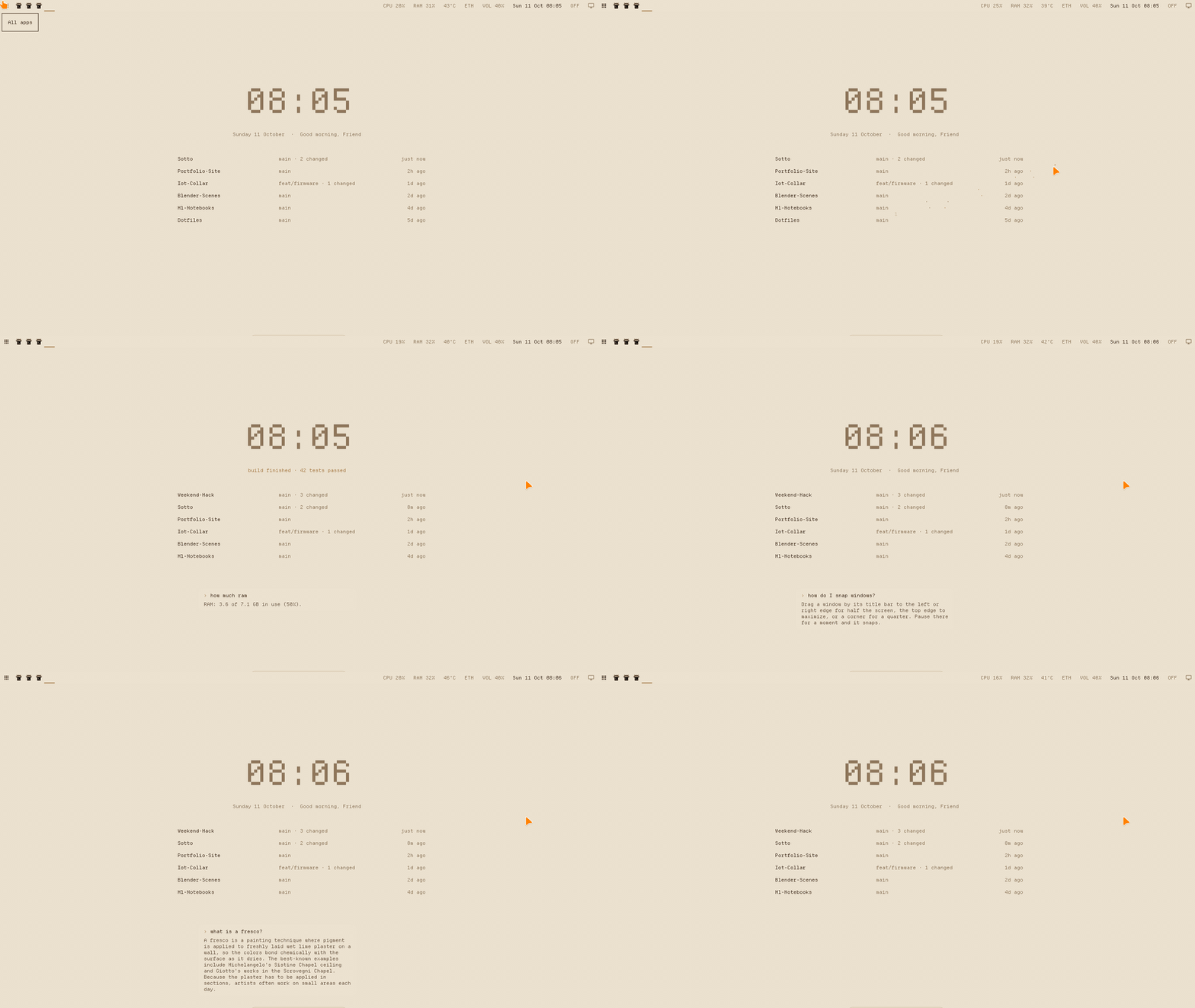
A glimpse
A shell inside the wallpaper. Type /terminal and it's written straight onto the wallpaper. Drag it over the clock and it shakes it loose; when you're not typing in it, its text dissolves under the mouse like everything else. 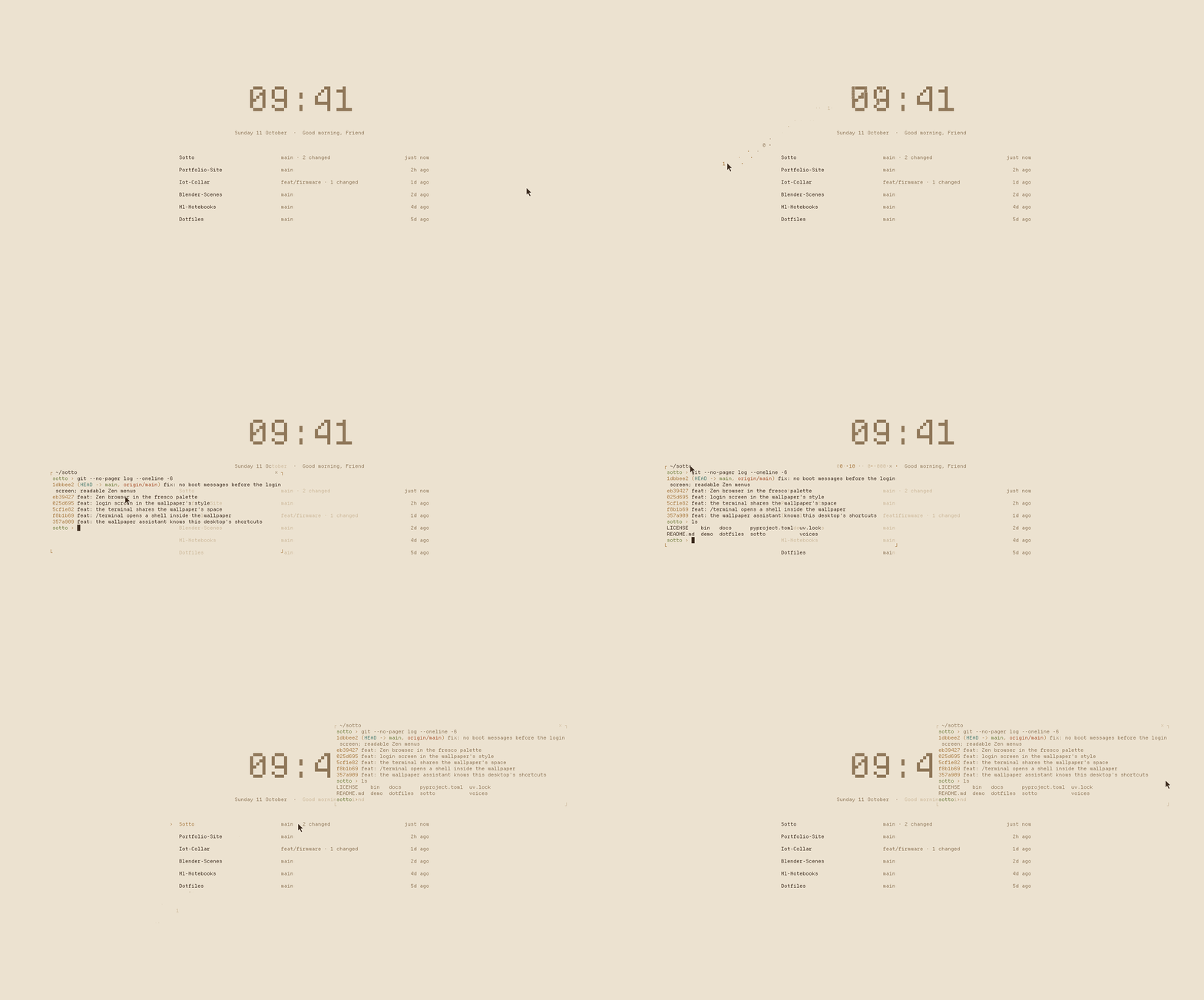 |
Login screen → desktop. The login screen is the wallpaper's own home screen. Log in and it dissolves, and the wallpaper fades in around a clock that never moved. 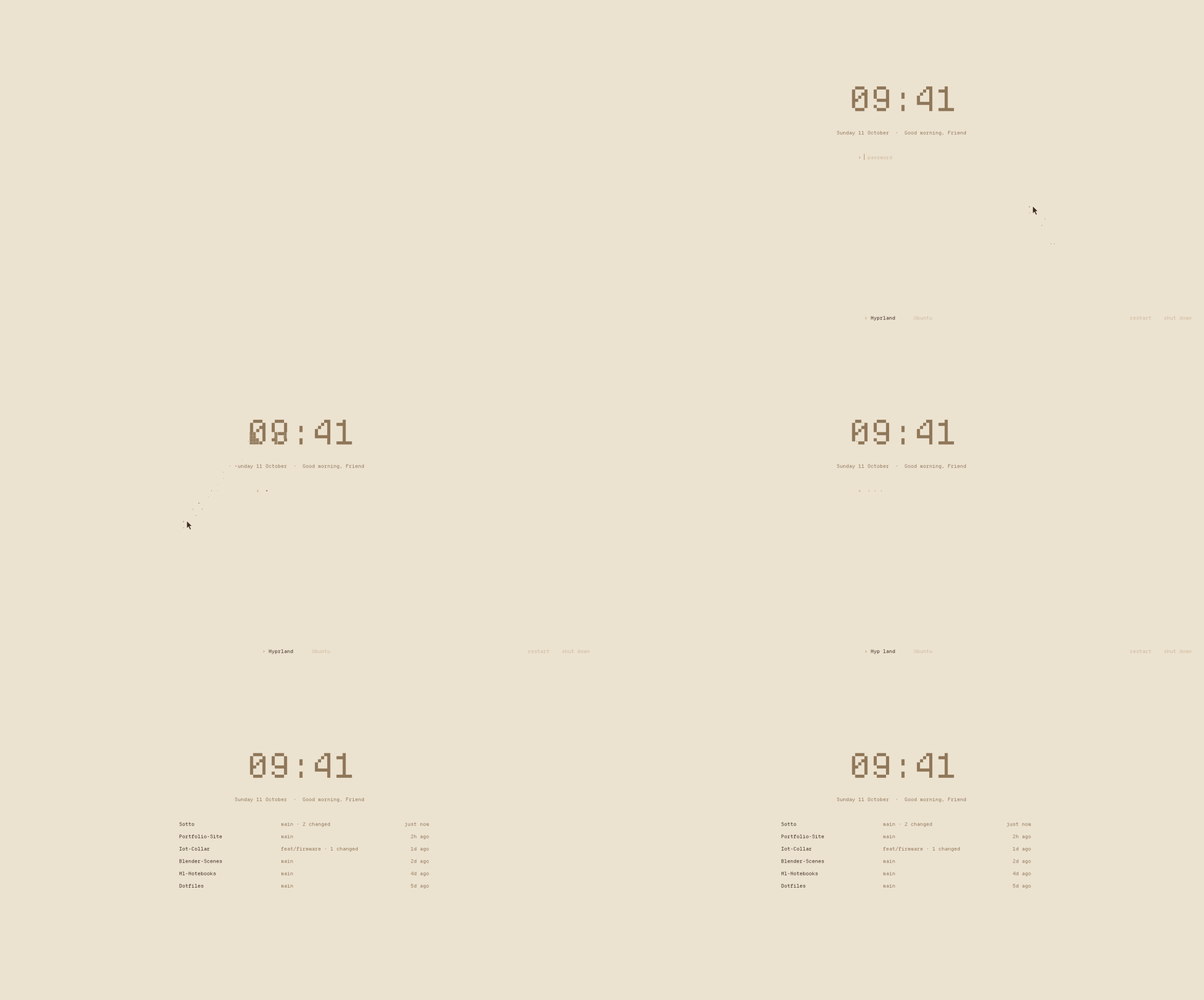 |
Apps. A floating list of every app, with when you last used each one and what it is. 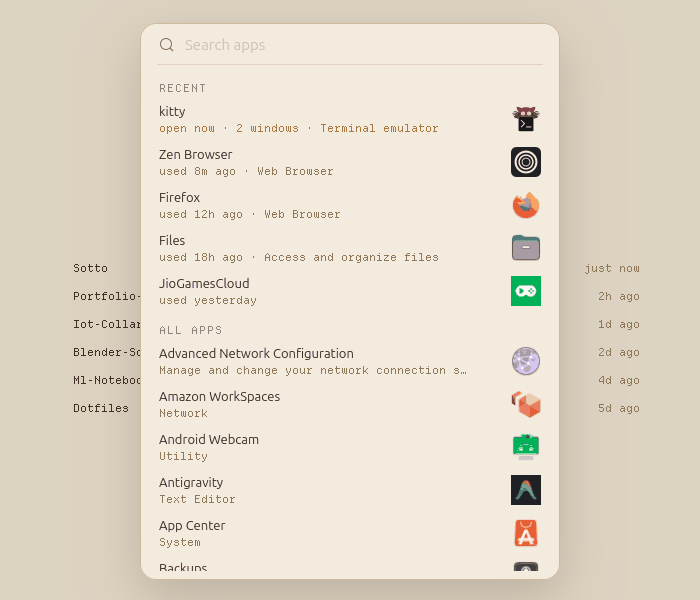 |
Search ranks names first, then what an app is: "br" finds browsers. 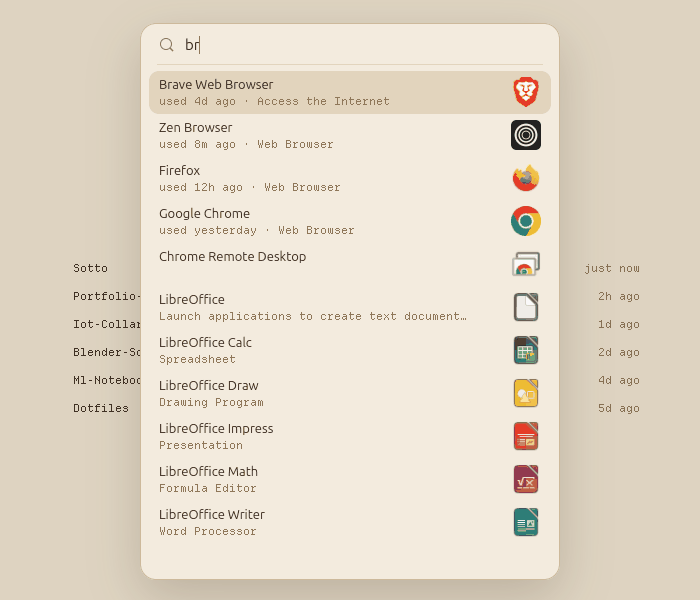 |
Boot screen. Parchment, the name in the clock's pixel font, a greeting, and the wallpaper's dot trail. 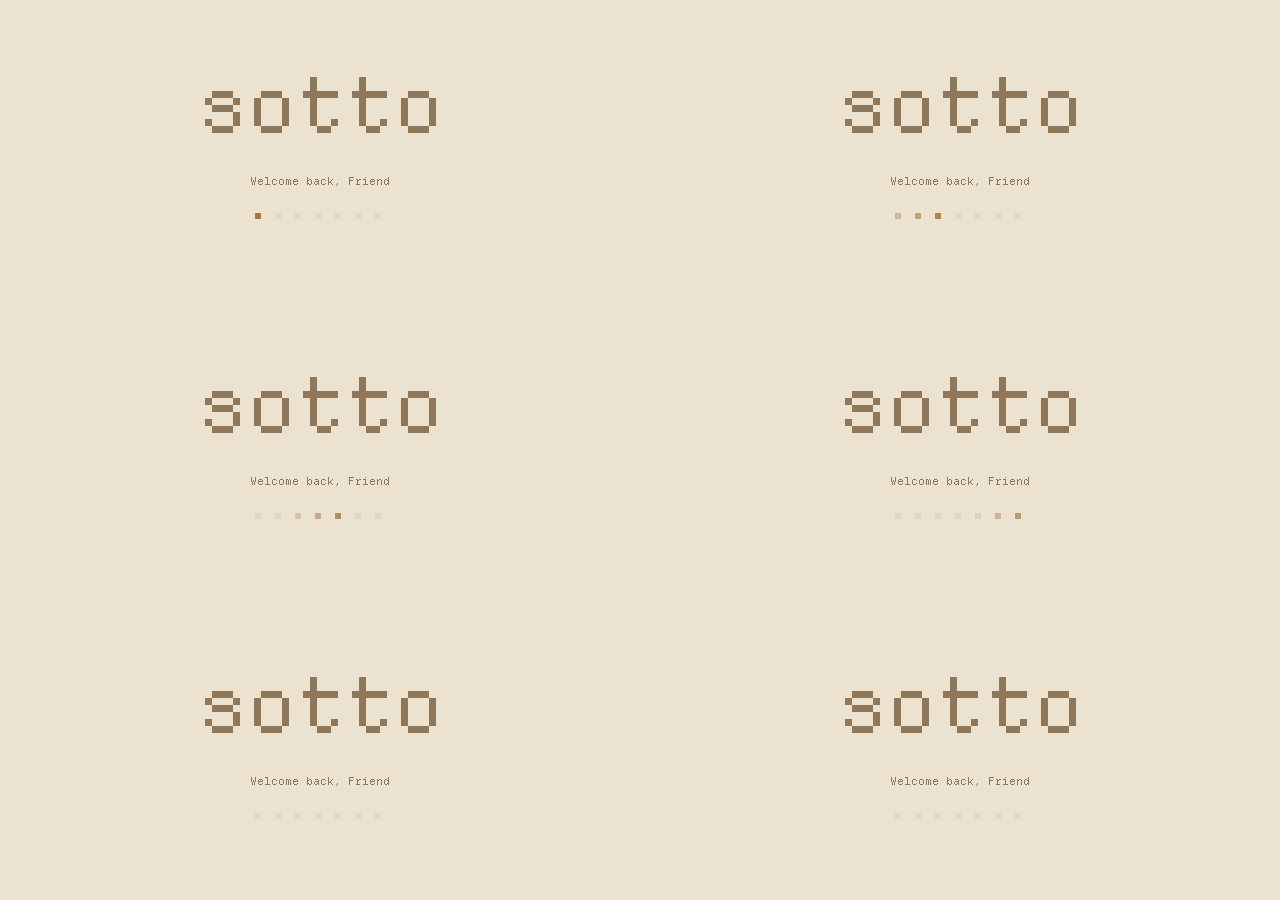 |
Windows, dock and snapping. Title bars, real minimize, drag-to-edge snapping and an auto-hiding dock. 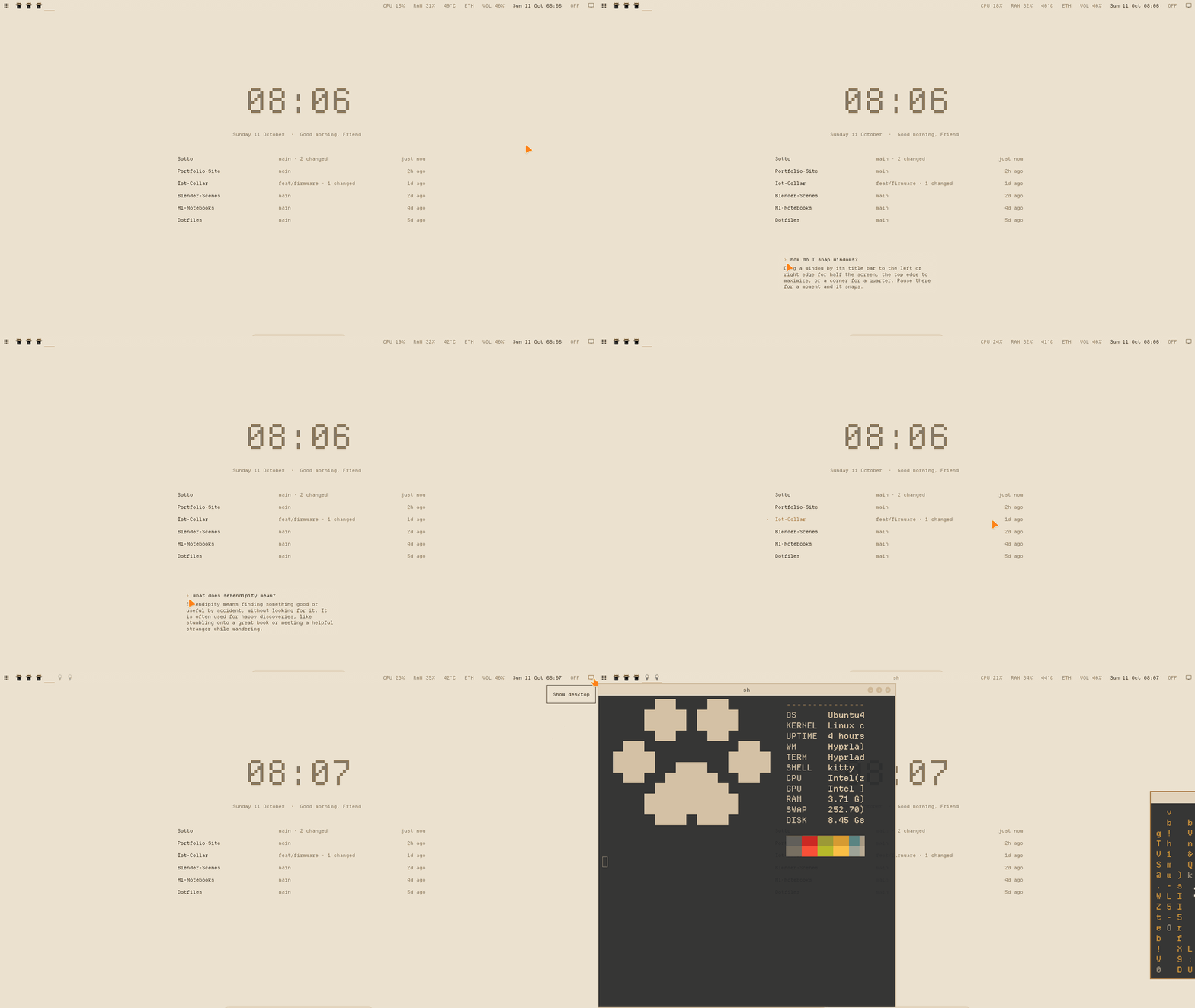 |
The pictures are rendered from the real code with the demo data: python demo/render.py (the Apps list is a screenshot).
The wallpaper is part of a calm, mouse-first Hyprland desktop. It also has a macOS-style dock and Windows-style window handling, in light colours taken from an old ceiling fresco.
The wallpaper
It isn't an image or a video. It's a small program drawing on the desktop itself: a terminal app running on Hyprland's background layer (kitty +kitten panel --edge=background), in a pixel font, one character cell at a time.
It shows what matters right now. A quiet clock, a greeting, and your six most recent projects. Projects are ranked from where you've actually worked:
- your Claude Code sessions
- commits you authored (cloned repos with someone else's commits don't count)
- uncommitted edits
Each row shows its branch, uncommitted changes and when you last touched it. Click a project to open it.
It's data-driven. Everything comes from
~/.cache/sotto/state.json. A collector refreshes it every few minutes, and anything else can write it too. When the file changes, only the changed cells re-assemble: they flicker as dots, then settle into the new text. In the GIF, a new project slides into the list that way.Scripts can talk to it.
make && python -m sotto say "build finished · 42 tests passed"The message takes the greeting's place for a few seconds. It's useful for long builds, test runs, deploys and reminders.
It costs nothing when idle. If nothing changes, it draws nothing: 0 bytes to the screen and no CPU. It takes about 115 MB of RAM including the terminal it runs in. Moving the mouse leaves a faint trail of dots that fades out, and whatever it touches comes loose for a moment: the clock's pixels dissolve into shades (░▒▓) and re-form, letters flicker into dots and settle.
Ask your wallpaper
Double-click anywhere on the empty wallpaper. A text line appears right where you clicked. Type and press Enter; the answer types itself out underneath.
Most requests never leave your computer. They're understood locally and happen instantly:
| You type | What happens |
|---|---|
open blender · launch chrome · discord |
opens the app (fuzzy-matched against your installed apps) |
open youtube · open github.com |
opens the site |
play lofi beats on youtube · search best laptop under 60000 |
searches |
open downloads · open my-project |
opens the folder, or the project in a terminal |
how much ram · what time is it · cpu temp · ip |
answers from the system |
lock · screenshot · volume up · mute |
does it |
how do I snap windows? · how do I minimize? · help |
explains this desktop |
shortcuts · how do I open a terminal? · which key opens the browser? |
the keyboard shortcuts, from the same list Super+F1 shows (it opens that list too) |
/terminal |
a real shell inside the wallpaper, right where you double-clicked (see below) |
Real questions ("what is a fresco?", "how does git rebase work?") go to Claude Haiku through your Claude Code login and come back in two or three sentences (about 3–6 s):
- It runs as
claude -pwith no tools, no MCP servers and no saved session. - It gets the desktop's shortcut list with every question, so "how do I move a window to another workspace?" gets this desktop's answer, not a generic Linux one.
- Claude can only ask for one of four safe actions (open a URL, open an app, search, show the shortcuts), which the desktop then carries out. It never runs commands.
- Without Claude Code installed, everything in the table above still works.
It behaves like a popup:
- While you type, it holds the keyboard.
- Esc, a click anywhere else, or switching windows closes it.
- After Enter it gives the keyboard straight back. Click the answer to ask something new.
A terminal inside the wallpaper
Type /terminal in the prompt and your shell opens right there, written straight onto the wallpaper: no window, just four corner marks and a label, in the wallpaper's font and colours. It shares the wallpaper's space:
- the clock and your projects stay visible behind it; the wallpaper fades only right around its text, and phrases it overlaps fade whole
- the mouse trail runs through it, and dragging it shakes the wallpaper loose along its edges
- when you're not typing in it, its text dissolves under the mouse like everything else and turns grey; click it and it sharpens, with ochre corners
Drag the label to move it, the bottom-right mark to resize it, × (or exit) to close it. The wheel scrolls back through its history. Click it to type in it; a click on the wallpaper or on a window, Alt+Tab or a top-bar click gives the keyboard back, and a window you click gets it straight away.
- Shift+drag selects text, Ctrl+Shift+C and Ctrl+Shift+V copy and paste.
The wallpaper is itself a terminal (kitty), so this is a terminal inside a terminal: sotto/term.py runs your shell in a pty, pyte keeps its screen, and the wall draws it. To take the keyboard, the wallpaper asks its own kitty through remote control, on a socket in $XDG_RUNTIME_DIR that only you can reach. kitty's own shortcuts are turned off in the wallpaper, so Ctrl+Shift+W can't close it.
Try the brain from a terminal: python -m sotto ask "open youtube" (add --do to actually do it). New commands are a pattern and an action in sotto/assistant.py.
The rest of the desktop
- Apps. A floating list of every app: name on the left, icon on the right, and under each name whether it's open now or when you last used it. Your five most recent apps sit at the top. Type to search, use the arrows and Enter, or click. Right-click an app to keep it in the dock. Open it from the top bar, the first dock icon or
Super+Space. - Dock. It hides until the mouse touches the bottom edge, then slides up. Pinned apps sit in it, and a dot marks the running ones (no duplicate icons). Right-click an icon for its windows, New Window, Maximize, Keep in Dock / Remove, Quit and Dock Settings, where you choose, order and size the apps.
- Windows like Windows and macOS.
- Title bars with × + – buttons.
- Click to focus and raise. Real minimize and restore.
- Maximize that stays a normal window.
- Alt+Tab.
- Drag-to-edge snapping (halves, quarters, top for maximize), with an outline preview. Drag a snapped window away and it gets its old size back.
- Top bar.
- An Apps button that opens the app list.
- One icon per window: click to switch, click again to minimize, middle-click to close.
- System status, and a show desktop button in the corner (also
Super+D).
- Zen browser in the same palette: parchment instead of Zen's gradient, umber text, an ochre accent, tabs on paper (
dotfiles/zen/, copied into Zen's profile byinstall.shordotfiles/zen/apply.sh; restart Zen to see it). - Login screen. The wallpaper's own home screen: the same clock in the same place, the same greeting and dot trail, and a password line where your projects will be. Pick Hyprland or Ubuntu at the bottom (Tab or click); restart and shut down sit in the corner. When you log in it dissolves to bare parchment and the wallpaper fades in around a clock that never moved. It runs under greetd in kitty inside cage:
bin/sotto-greeter install, thenpreviewto try it in a window, thenenable(disablebrings back GDM). If it ever fails to start you get a plain text login instead. - Boot screen. Instead of the Ubuntu logo: parchment, "sotto" in the clock's pixel font, a greeting ("Welcome back", "See you soon" when shutting down), and the wallpaper's dot trail sweeping underneath. Install it with
bin/sotto-bootsplash(uses sudo;--undobrings back Ubuntu's).
Install
Tested on Ubuntu 26.04 with Hyprland 0.53, on one 1366×768 screen and a 2016 Intel desktop with 8 GB of RAM.
git clone https://github.com/ajstars1/sotto ~/Developer/sotto
cd ~/Developer/sotto
sudo apt install $(cat dotfiles/packages.txt)
uv sync --managed-python --python 3.12          # the wallpaper's Python env; immune to OS Python upgrades
./dotfiles/install.sh                           # links configs into ~/.config, backing up what it replaces
Set $sotto near the top of dotfiles/hypr/hyprland.conf to where you cloned the repo. Then log out, pick Hyprland on the login screen, and log in. For AI answers, install and log in to Claude Code.
Configuration
# ~/.config/sotto/config.toml
name = "Sam"                          # the greeting
hide = ["~/Developer/some-fork"]      # projects to leave off the wallpaper

[[pin]]                               # always shown, with your own open commands
path = "~/Developer/my-app"
label = "MY-APP"
open = ["kitty --directory {path}", "kitty --directory {path} -e npm run dev"]
- The dock: Dock Settings (right-click any dock icon), saved to
~/.config/sotto/dock.json. - Palette, keybinds, title bars, bar, launcher, notifications, lock screen:
dotfiles/. - Shortcuts:
Super+F1lists every one.
How it works
| Part | What it does |
|---|---|
sotto/collect.py |
builds state.json: projects (Claude sessions, your commits, uncommitted edits) and system info. It rewrites the file only when something changed. |
sotto/wall.py |
the wallpaper: watches state.json and the say inbox, re-assembles only changed cells, dot trail, clicks, and the double-click that opens the prompt |
sotto/assistant.py |
the prompt's brain: local intents first, Claude only for real questions, a whitelist of safe actions |
sotto/dock.py |
GTK4 + gtk4-layer-shell: the dock, the Apps list, the wallpaper prompt, and the snap preview outline. It notes which app has focus, so the Apps list knows when you last used each one (~/.cache/sotto/app-usage.json; before that it uses GNOME's record). |
sotto/term.py |
the terminal inside the wallpaper: your shell in a pty, its screen kept by pyte and drawn by the wall as a card |
sotto/greeter.py |
the login screen: the wallpaper's effects (it reuses Wall) with a password line, talking to greetd over its socket |
sotto/bootsplash.py |
draws the boot screen as a Plymouth script theme. Plymouth starts before your fonts are available, so all the text is drawn into PNGs. |
dotfiles/hypr/scripts/ |
the desktop behaviour Hyprland doesn't have: snapping (snap.py notices a drag by a window moving exactly with the cursor), minimize, maximize, show desktop, top-bar clicks |
demo/state.json is the sample data used in the GIFs. Run the wallpaper with SOTTO_DEMO=1 SOTTO_STATE=demo/state.json to show it. To render a frame without a screen: python -m sotto preview out.png.
Known limits
- One monitor so far.
- Snapping happens when the drag pauses at an edge, because Hyprland doesn't report the mouse release during title-bar drags.
- Hyprland has no built-in minimize, so minimized windows live on a hidden workspace.
- The terminal inside the wallpaper is emulated by pyte: shells, git, ssh and most full-screen programs work, but programs can't use the mouse there or show images. One at a time.
License
MIT
Reviews (0)
Sign in to leave a review.
Leave a reviewNo results found