Saathi-Alexa
Health Warn
- License — License: MIT
- Description — Repository has a description
- Active repo — Last push 0 days ago
- Low visibility — Only 5 GitHub stars
Code Warn
- fs module — File system access in .github/workflows/ci.yml
Permissions Pass
- Permissions — No dangerous permissions requested
No AI report is available for this listing yet.
Saathi (साथी, “companion”) helps elders living alone stay safe and close to family, in their own language: tablets, check-ins, scam calls, help when it matters. An MCP server for Alexa+ and any MCP client, with a formally verified Rust/WASM core, post-quantum E2EE, passkeys and TPM-sealed keys. Try it: npx -y saathi-alexa
Saathi (साथी) - a companion on Alexa+ for elders, and the families who love them
Saathi means "companion" in Hindi and Marathi.
Kamala is 78. Everyone calls her Aaji. She lives alone in Pune, speaks Marathi, has early-stage Alzheimer's and doesn't hear as well as she used to. Her granddaughter Riya is in Toronto and grew up speaking English. They love each other, but they share less and less language, and Riya worries every day she doesn't hear from her.




Get started in one minute
| Where | What to do |
|---|---|
| Windows | Download Saathi-Setup.exe and double-click it. No administrator rights, no Node.js to install: it adds a desktop icon, starts with Windows, keeps the key in the computer's security chip and shows your recovery key once. Step by step: docs/INSTALL_WINDOWS.md. To reach it from anywhere, Start menu → Saathi → Reach Saathi from anywhere (free, with Tailscale). |
| Android | Download Saathi-….apk from the latest release on Aaji's tablet or a family phone, type your Saathi address, done. A locked-down app that only ever opens your own Saathi: docs/ANDROID.md. |
| Sahay | The helper that does things on the PC for you, included in Saathi's Windows installer (Start menu → Saathi → Sahay) and able to ask Saathi about medicines, visits and family. Sahay is its own project now: source, datasets, the Android app and releases are at akshatinnovate-png/Sahay. |
| Mac or Linux | Download and unzip the same file, then run ./start.sh in that folder. |
| Online, for the whole family |  Saathi gets its own web address that everyone can open, including the tablet by your elder's chair. |
| Docker | docker run -p 8787:8787 -v saathi-data:/data ghcr.io/akshatinnovate-png/saathi-alexa |
Then open Saathi, tap Continue with Google (or use an email and password), and answer four short steps about the person you care for. On their tablet or Echo Show, open /device.html and type the six-digit code from the family app, then tap Approve when the family app shows the same three pictures as the device. That's all.
Deploying to Render uses its paid Starter plan, because Saathi keeps your family's data on a small disk and Render's free plan erases disks on every restart. Add SAATHI_GOOGLE_CLIENT_ID and SAATHI_GOOGLE_CLIENT_SECRET in Render to switch on Google sign-in, with https://<your-app>.onrender.com/auth/google/callback as the redirect address.
Saathi is an Alexa+ integration (a self-hosted MCP server, spec 2025-11-25, Streamable HTTP) that closes that gap. Aaji talks to Alexa the way she talks to anyone, in her own language and at her own pace. Saathi:
- Orients her gently. "What day is it?" and "Who is Riya?" get patient answers. She is never quizzed or corrected. Memory support is built into the tools, not added on top.
- Keeps her tablets straight. Each tablet is described by colour and purpose ("the small white round one, for blood pressure"), and a second dose is refused if she already took it today.
- Listens to how she feels. Every check-in runs through sentiment analysis plus a multilingual safety screen. Loneliness sends the family a gentle nudge, not an alarm: "Aaji said she feels lonely today; a voice note from you would mean a lot."
- Calls for help when it matters. If she mentions a fall, chest pain, breathlessness or being lost, a Step Functions escalation starts. Her family hears first. If nobody responds, her neighbour Meera is asked to check on her. If still nobody responds, everyone gets emergency guidance. As soon as anyone taps "I'm on it", the escalation stops and Aaji hears that someone is coming.
- Translates in both directions. Riya writes in English and Aaji hears it in Marathi. Aaji replies in Marathi, and Riya reads it in English while her uncle Anand reads it in Hindi.
- Keeps her stories in a memory book. The stories she tells Alexa are saved in her words, translated into every family language and narrated with Amazon Polly, so a granddaughter who can't read Marathi can still hear her grandmother's childhood.
- Watches the front door with a Ring doorbell. A ring after the neighbour has been sent for closes the emergency: help has physically arrived. A morning with no door activity, no check-in and no tablets earns the family one gentle "a quick call would be kind".
- Lets her hear their voices. Riya records a voice note in the family app, and Aaji's Alexa plays it: her granddaughter's actual voice, not a translation.
- Keeps the medicine cabinet stocked. Every dose counts down the supply. With five days left, the family is told (with the pharmacy's number), and whoever taps "Refilled" is named to Aaji: "Anand has arranged more of your blood pressure tablets."
- Gets her to the doctor. Alexa tells her about upcoming visits in her language. The day before, if nobody has volunteered, the family is asked "Who can take Aaji?", and whoever taps "I'll take her" is named to her.
- Writes the family a letter every Sunday, in each person's language: tablets taken, how she has been feeling (private check-ins are counted, never quoted), new stories, front-door activity, alerts and the week ahead.
- Remembers where things are kept. The family walks around the house once with an Android phone (WebXR, ARCore hit-testing): tap each corner, name the room, and Saathi builds a 3D floor plan. Pin her glasses, keys and tablet box on it, and "माझा चष्मा कुठे आहे?" gets "चष्मा: झोपायच्या खोलीमध्ये, पलंगाजवळच्या टेबलावर". A memory aid, never a test.
- Has an assistant on both sides. Aaji gets a frosted, large-type Saathi assistant on her Echo Show that answers in Marathi and asks "Shall I send this?" before anything leaves the house. Riya gets the same assistant in the family app, which looks things up through the MCP tools (tablets, visits, letters, the house map) instead of guessing.
- Respects her choices. She can say "keep this between us" and ordinary sadness stays private. Danger always overrides privacy. Nothing she says leaves the house until she confirms "yes, send it".
Inclusion runs through the whole design, not a single feature. Saathi is built for people with memory loss, hearing loss or low vision, for people who don't read well, for people who speak a language voice assistants rarely support, and for families spread across continents.
Screenshots
 Intro: the forest video with the halftone dots and the Saathi logo |
<img src="docs/screenshots/02-landing.webp" alt="Landing page with the photo slideshow and "Ask Saathi""> Landing page with the photo slideshow and "Ask Saathi" |
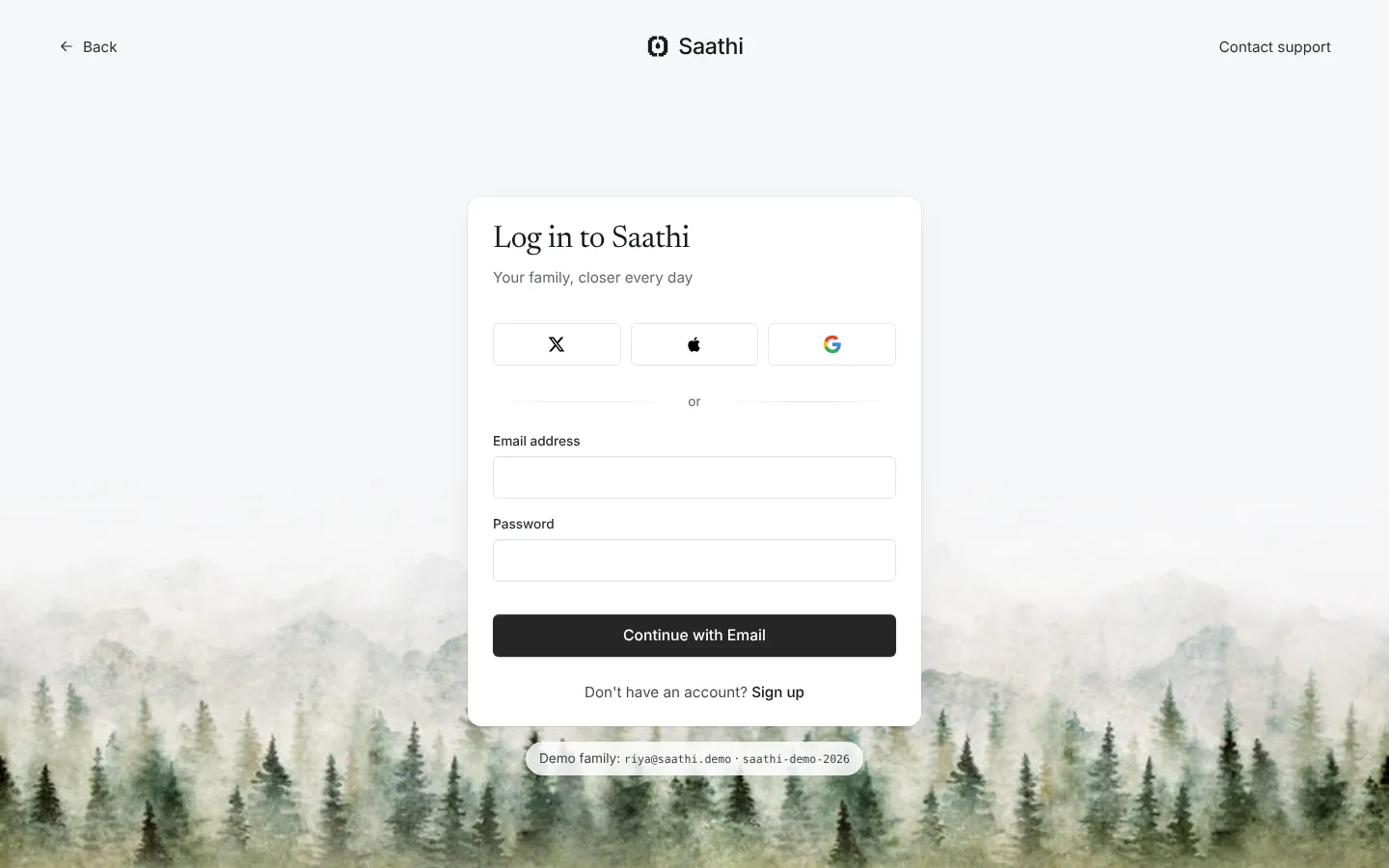 Log in |
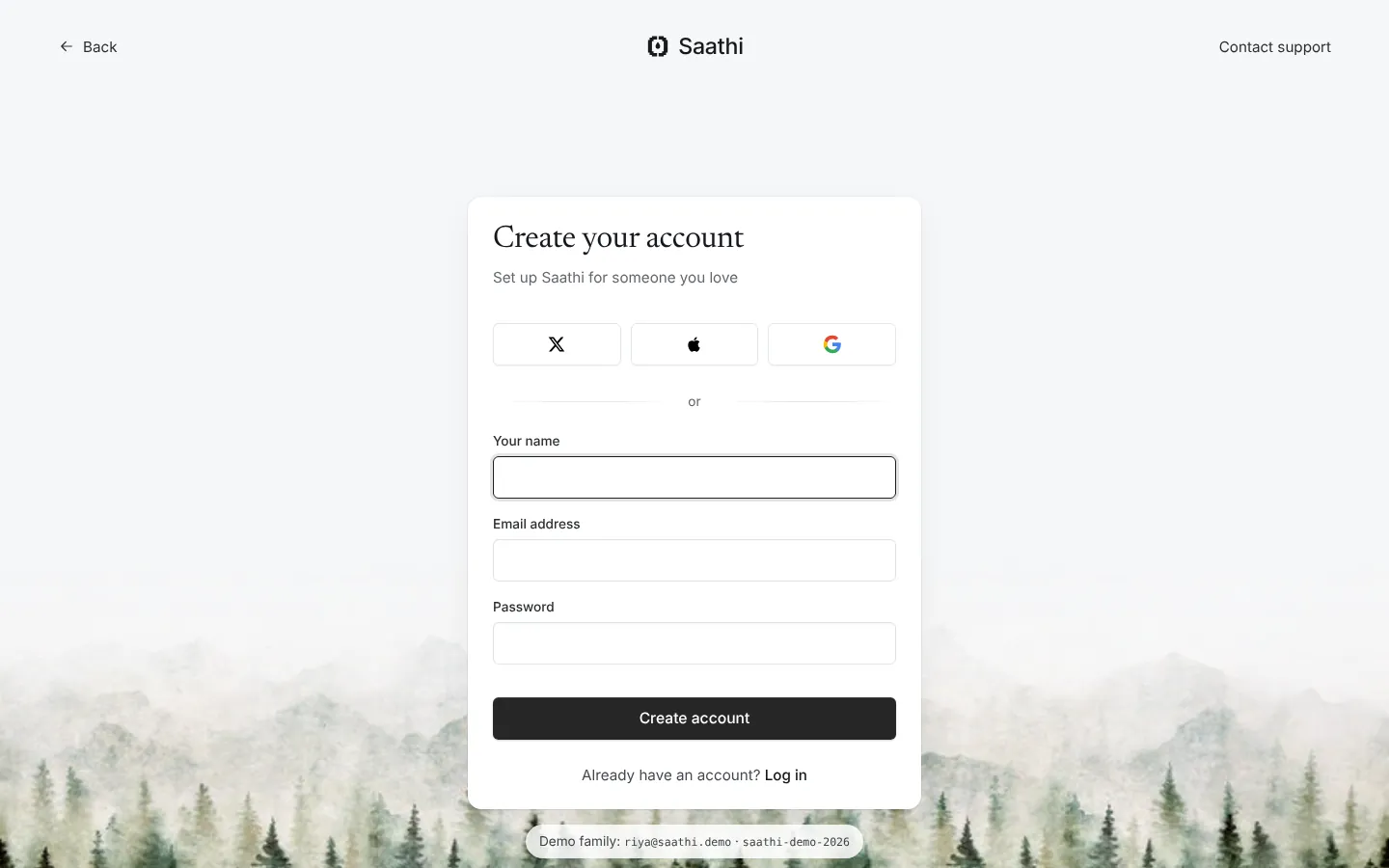 Create an account |
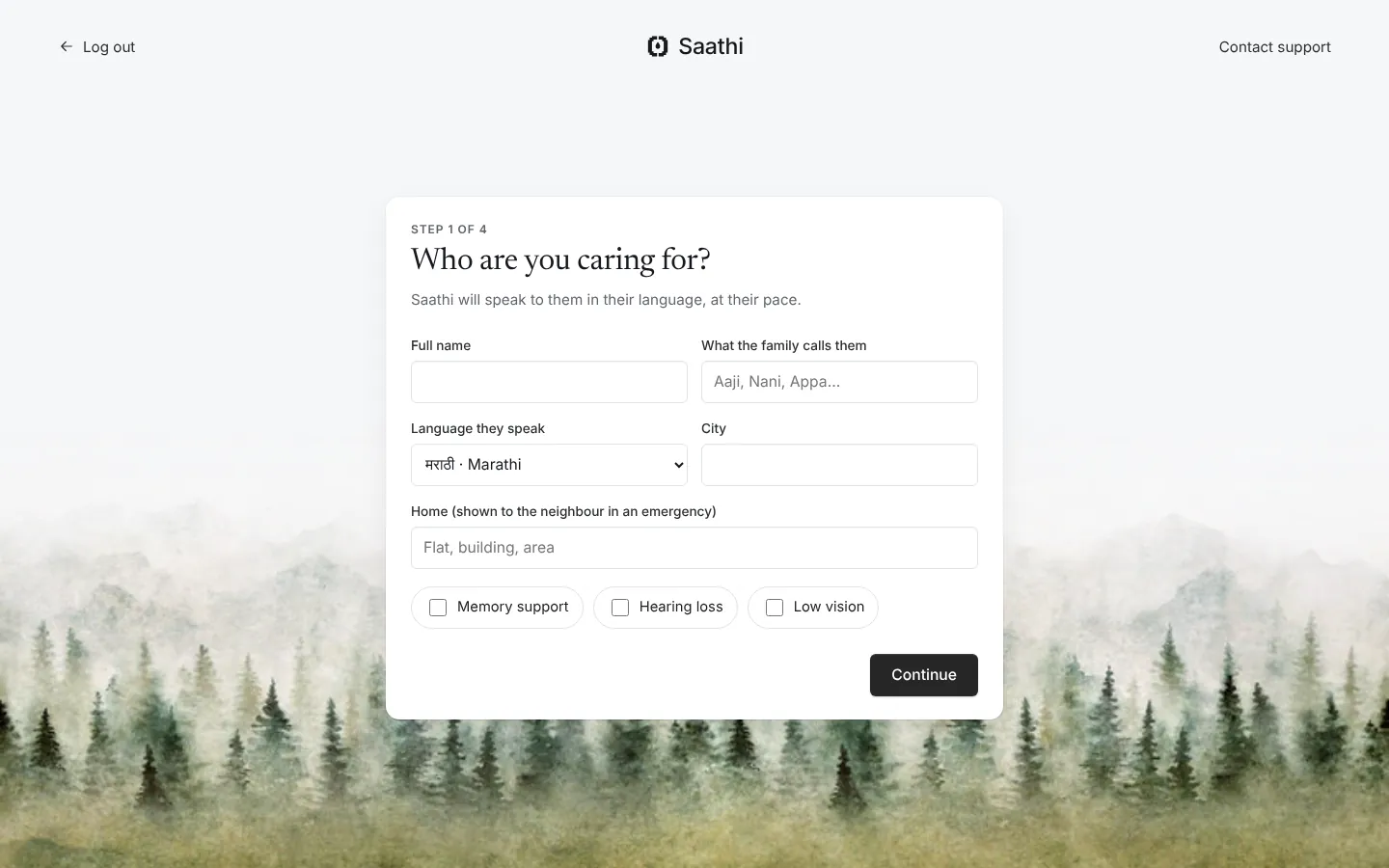 Setting up a household, step 1 of 4 |
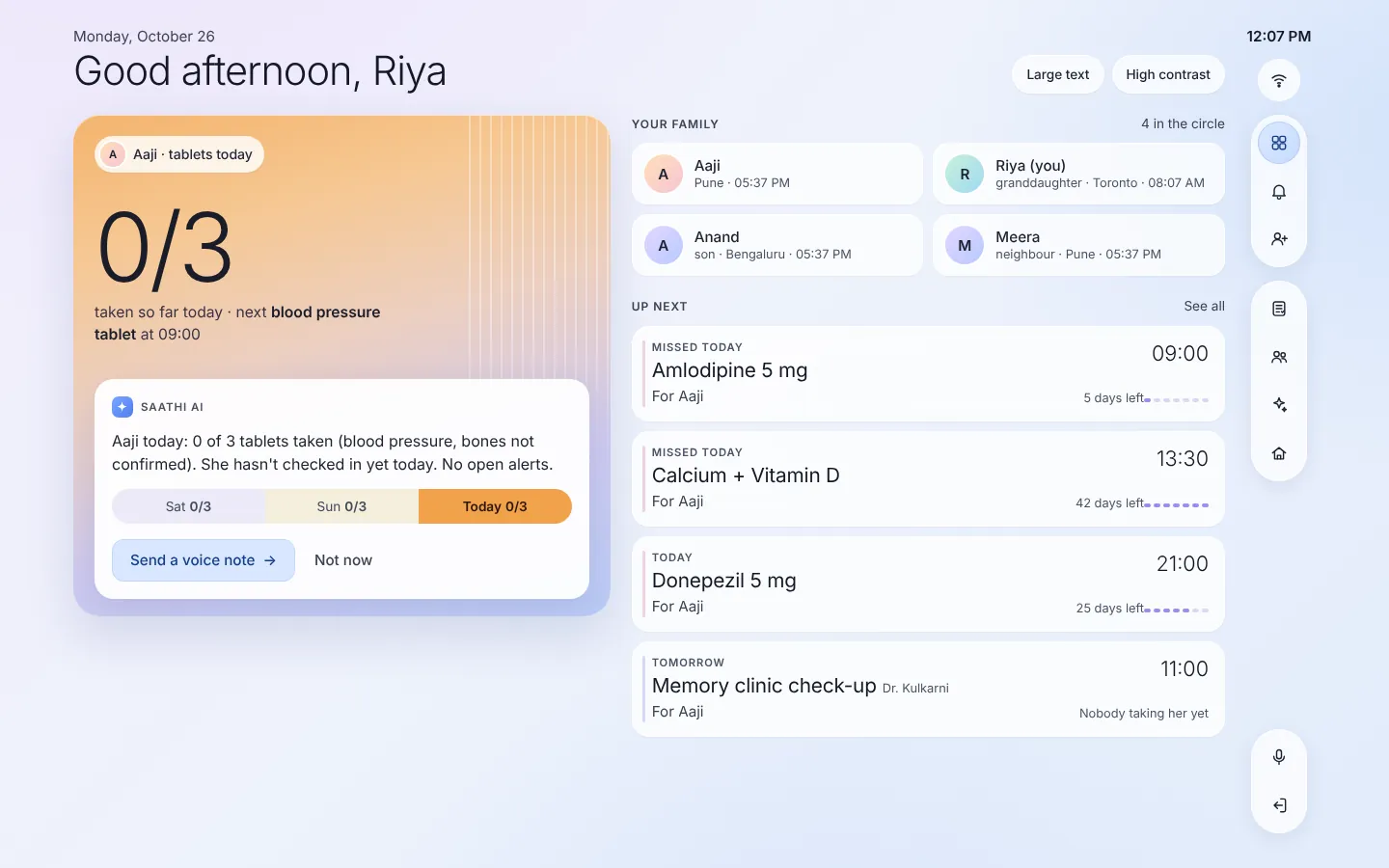 Family app: today's tablets, Saathi AI summary, the family, what's next |
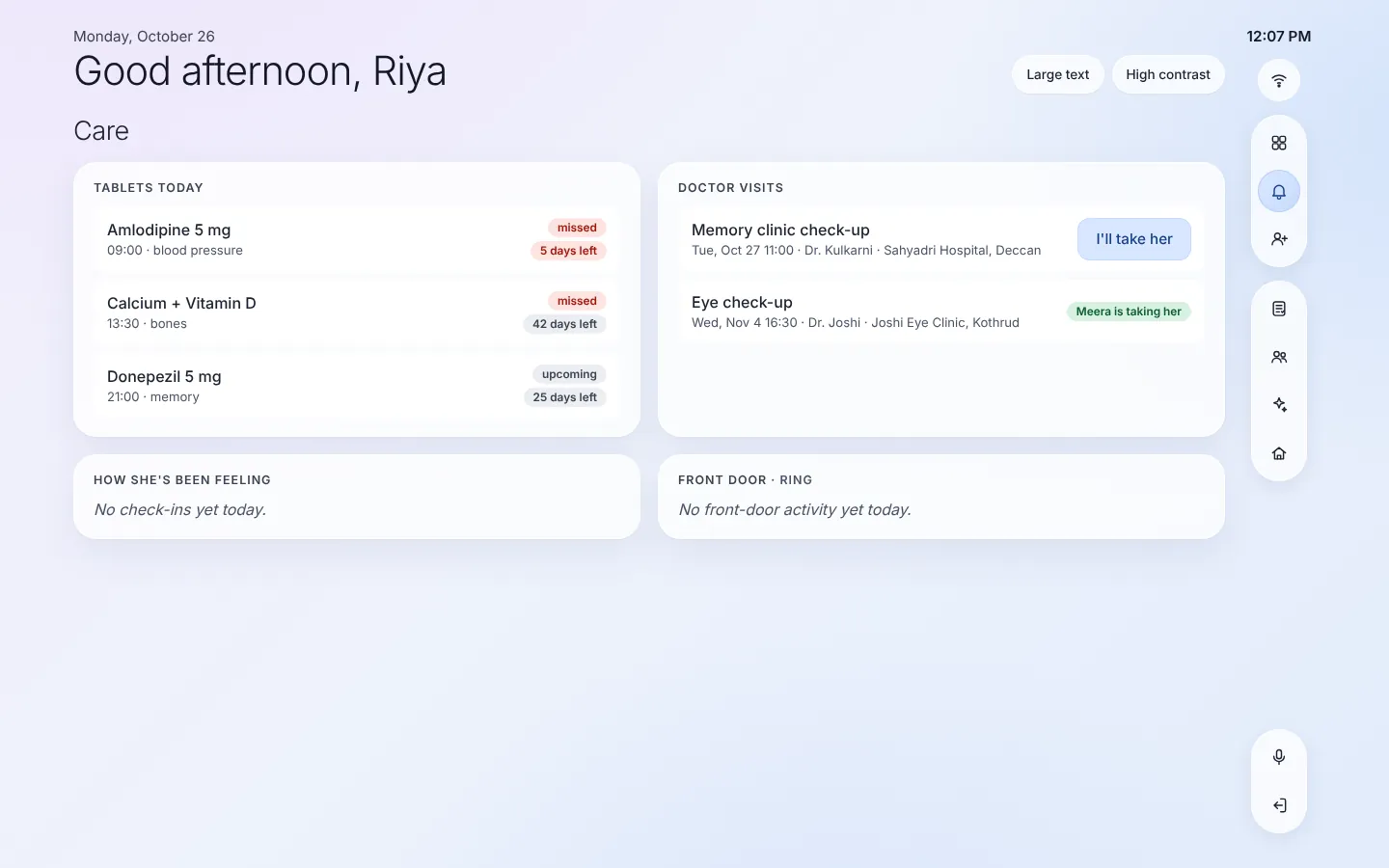 Care: tablets with days of supply left, doctor visits and who is taking her |
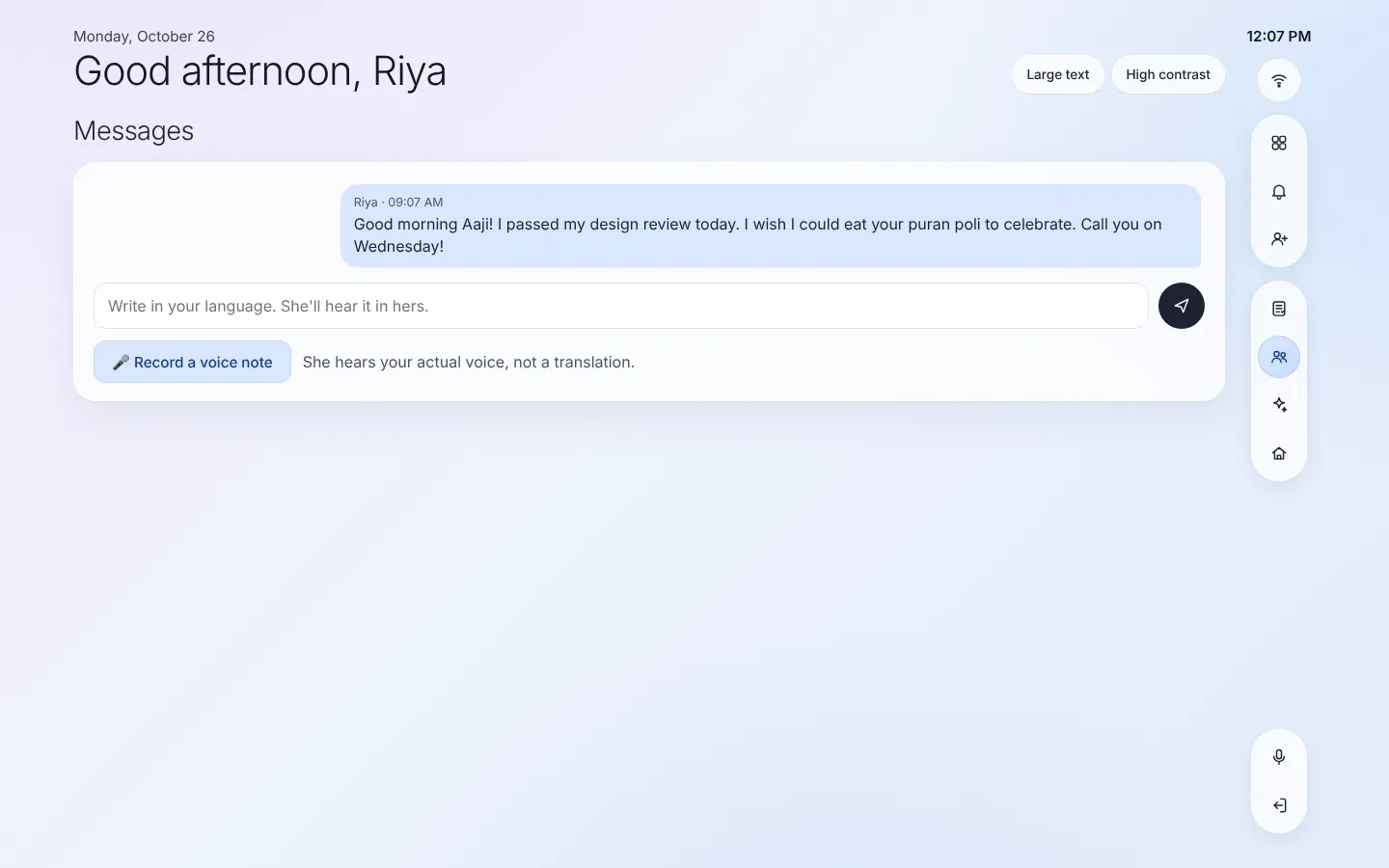 Messages: write in your language, she hears hers. Voice notes |
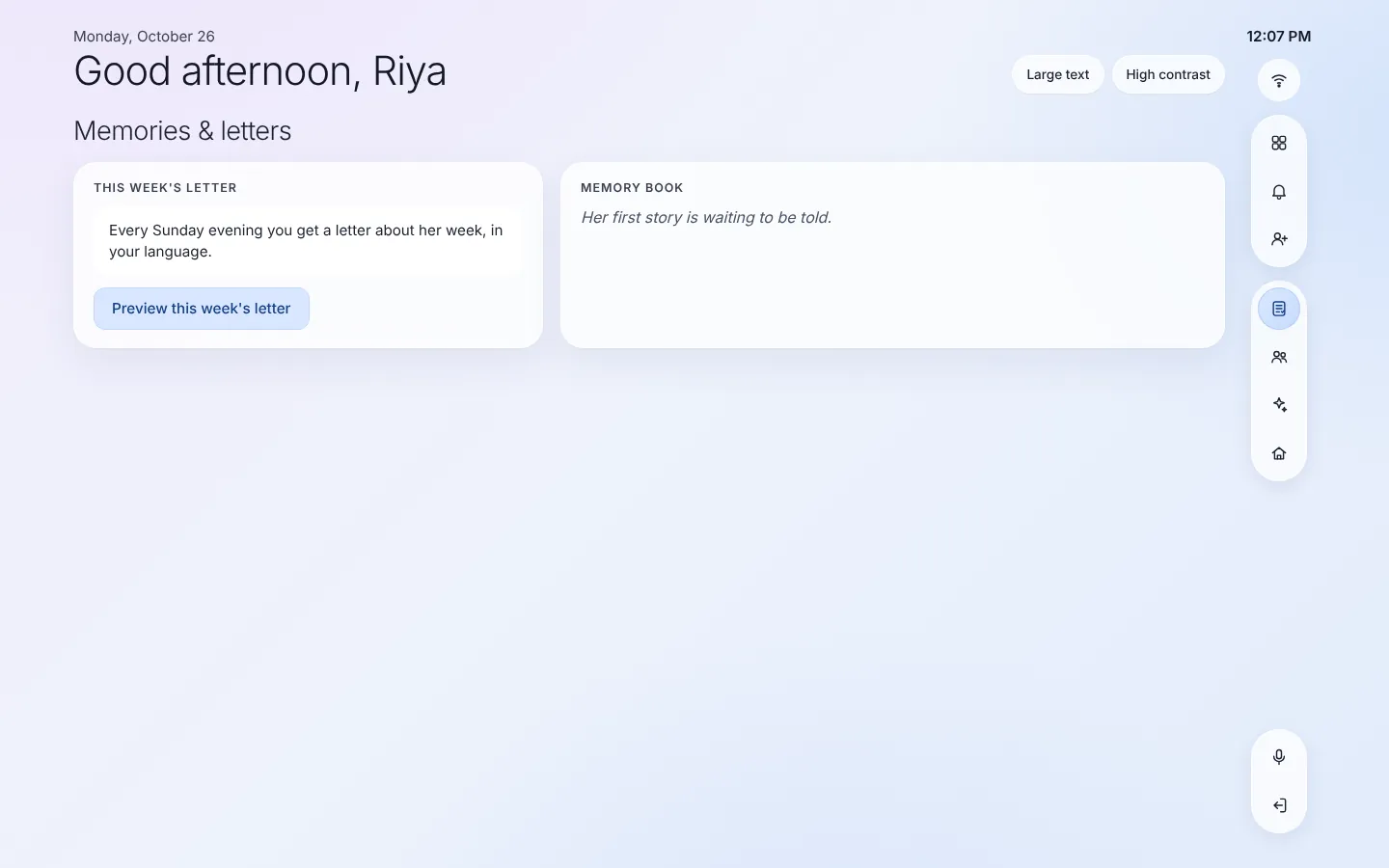 Memories: the weekly letter and her memory book |
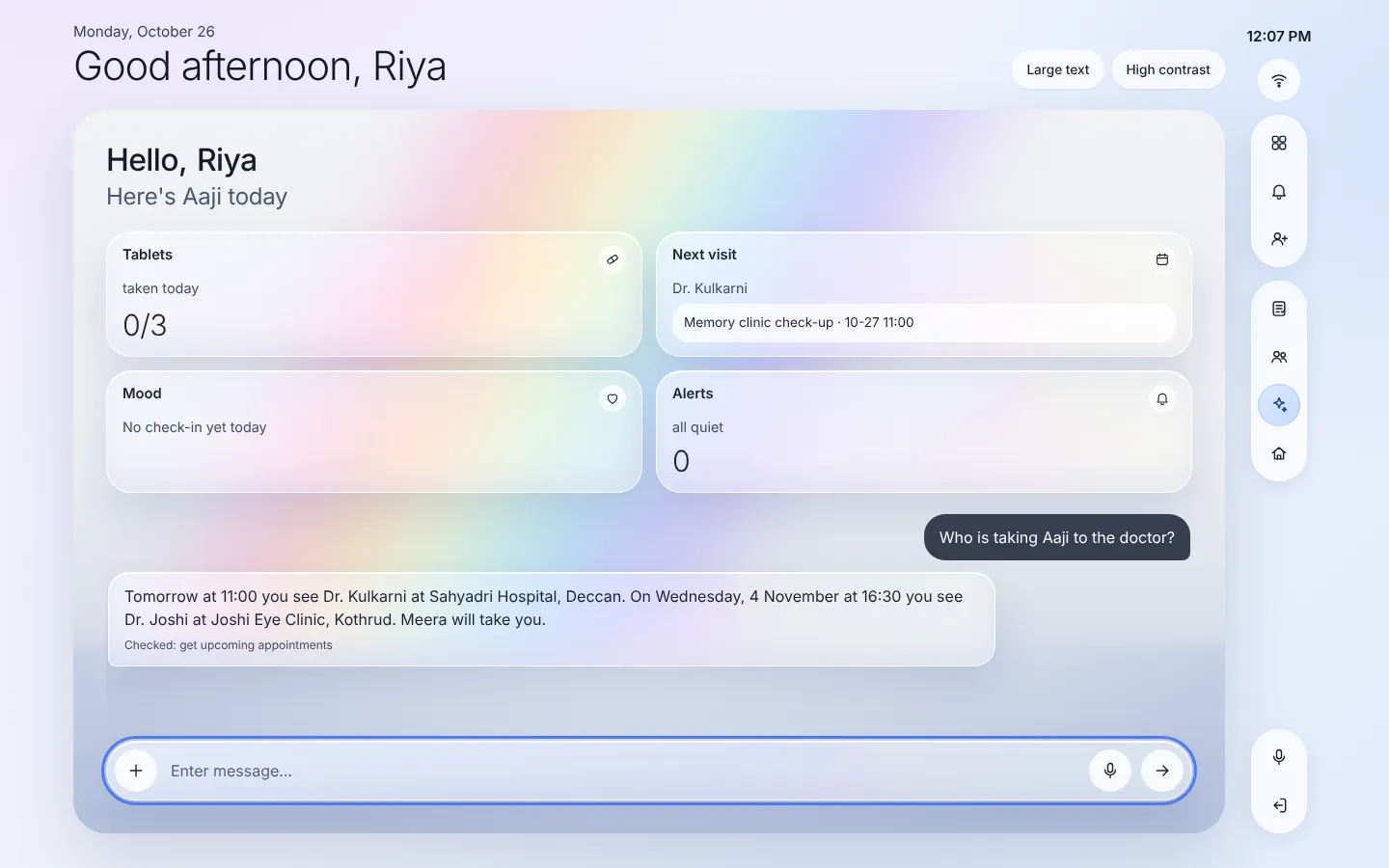 Family assistant: answers by calling the MCP tools |
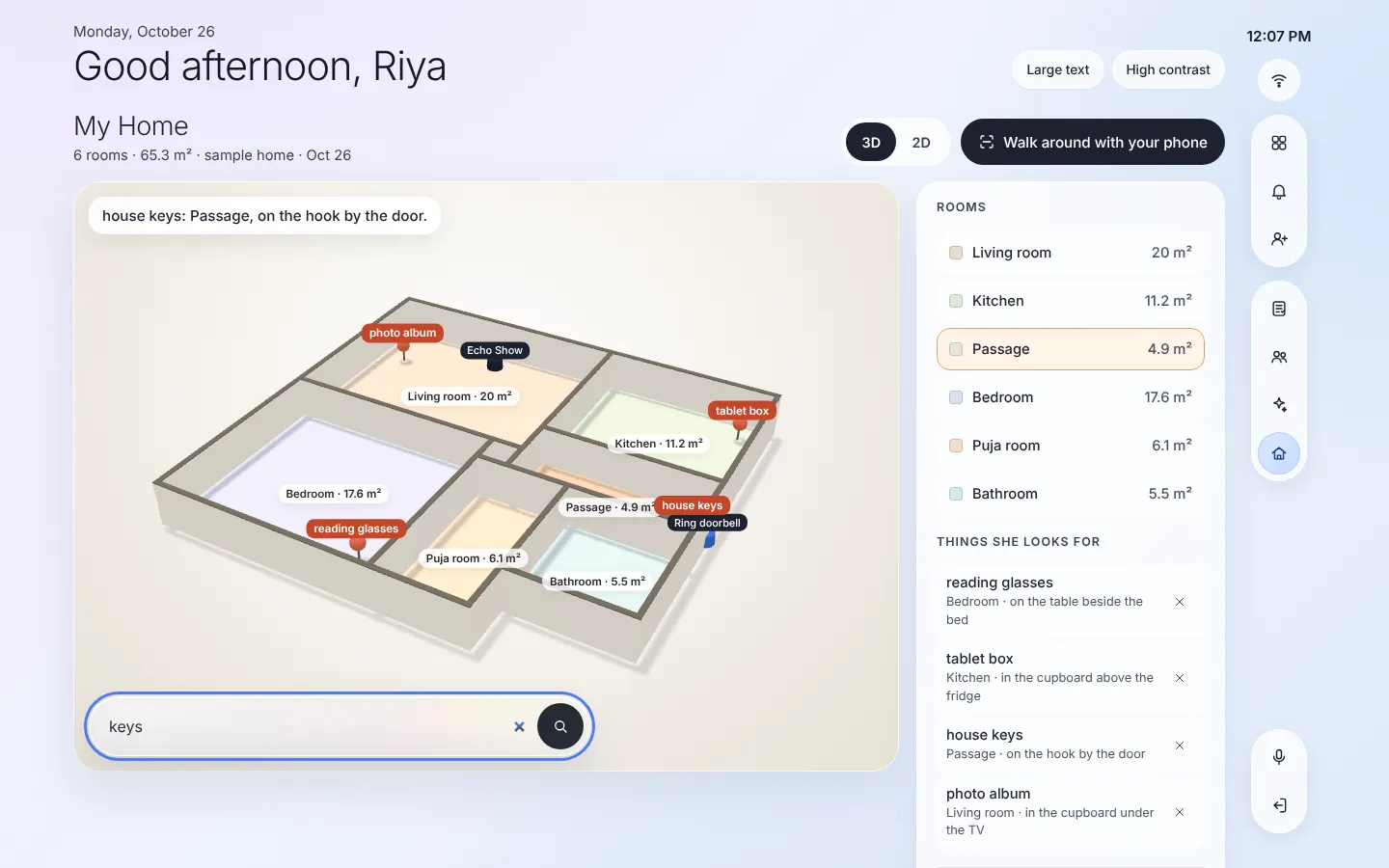 My Home in 3D: rooms, the Echo and Ring doorbell, things she looks for |
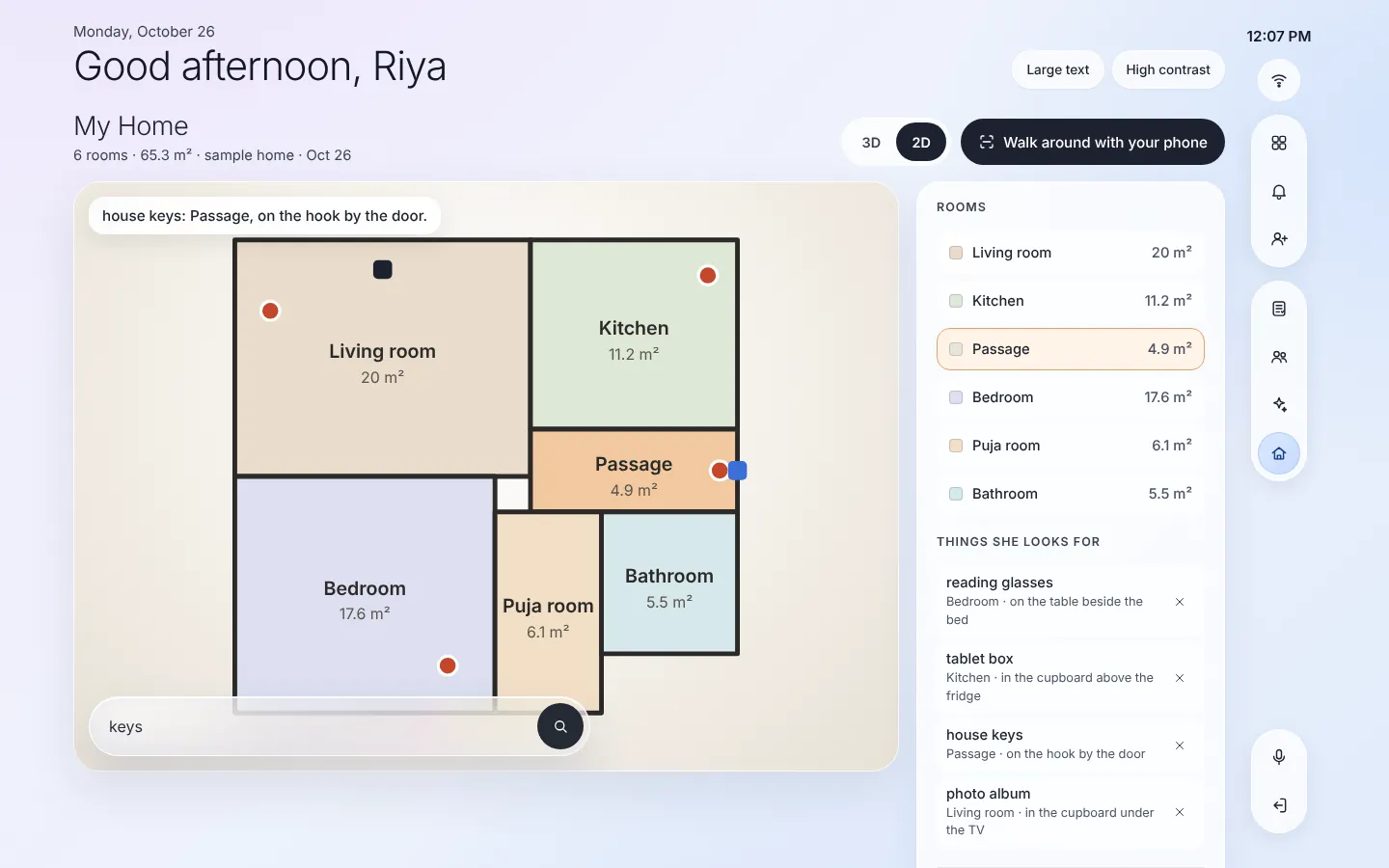 The same house as a 2D plan |
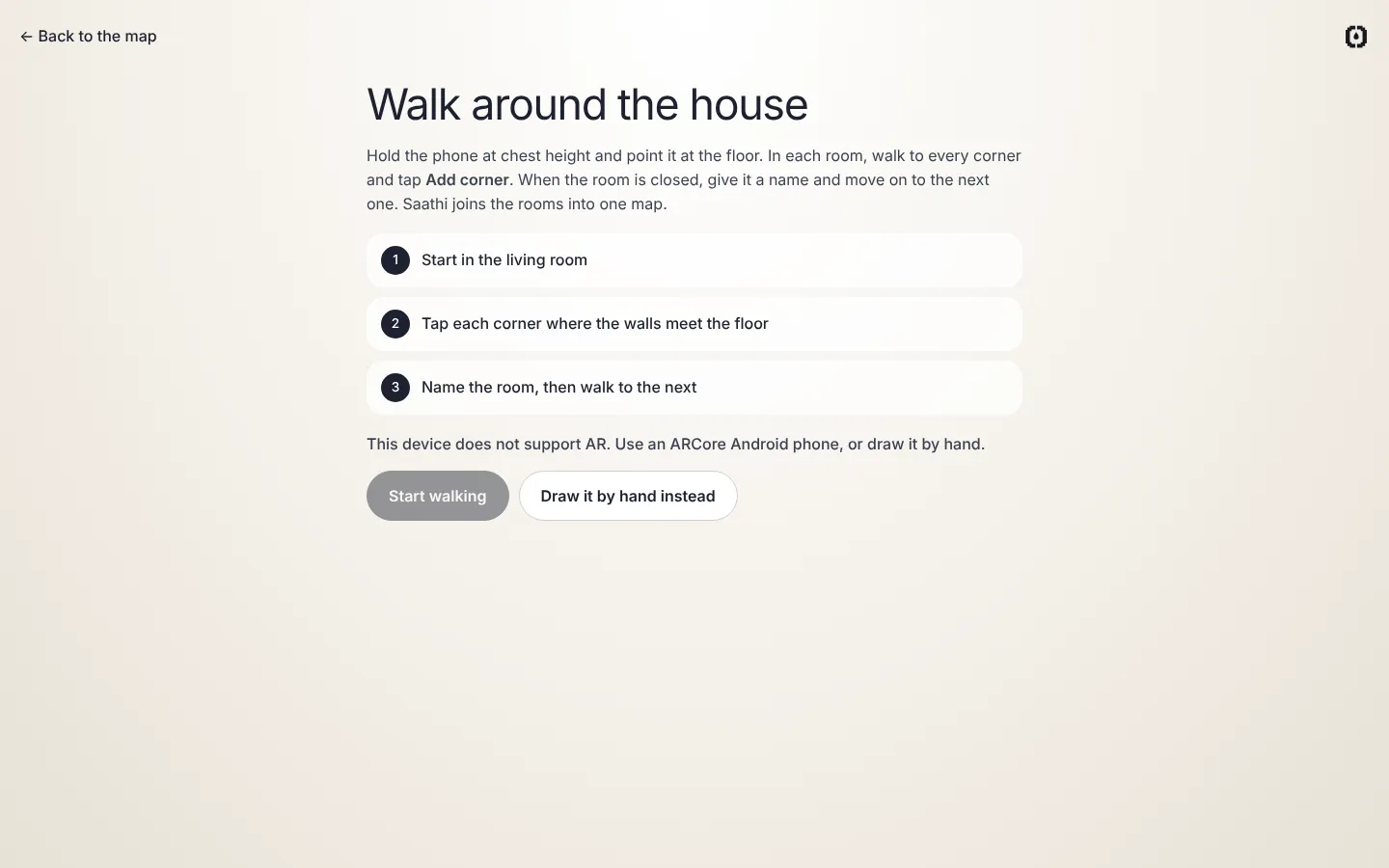 Walk the house: an ARCore Android phone captures each room |
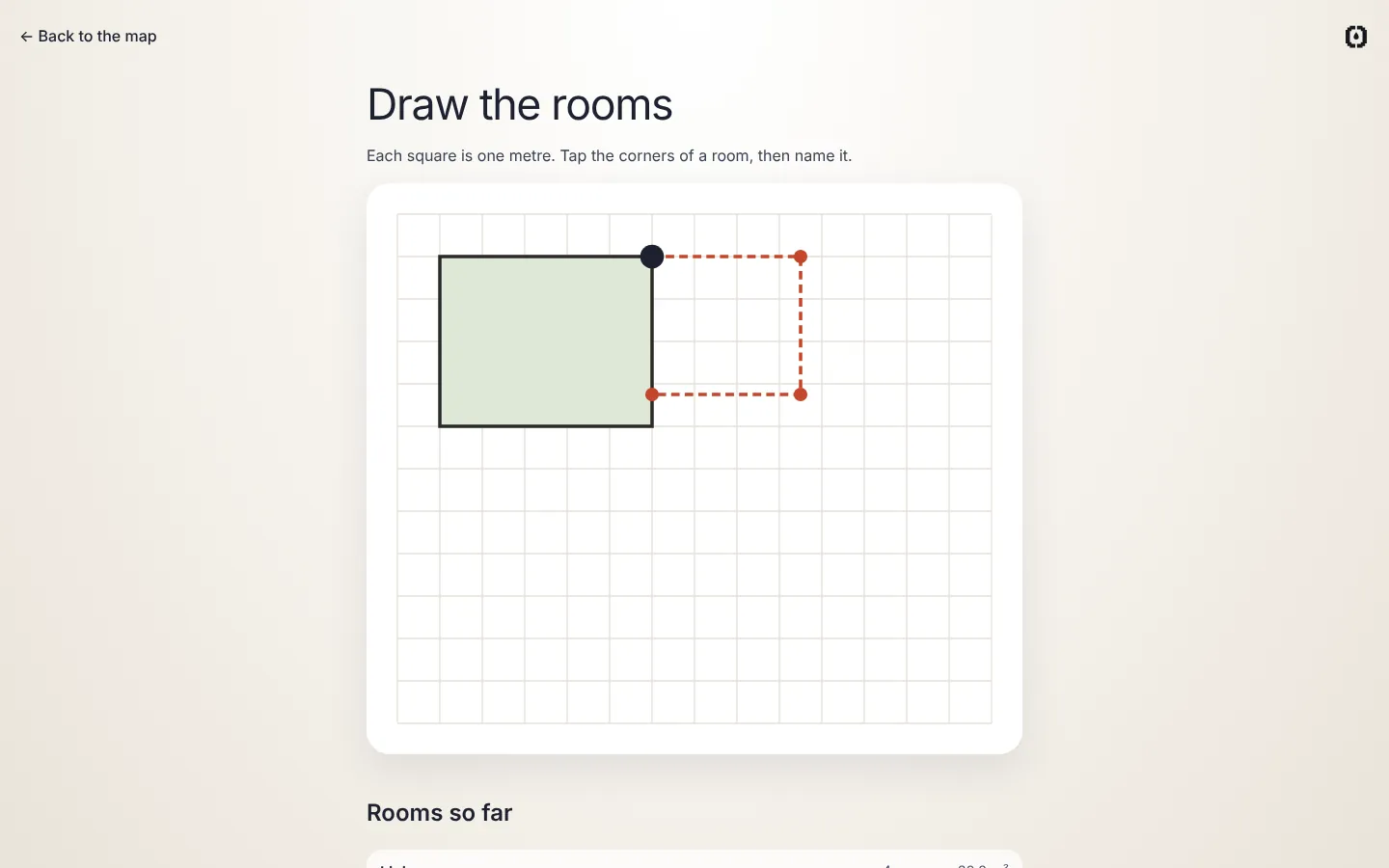 Or draw the rooms by hand |
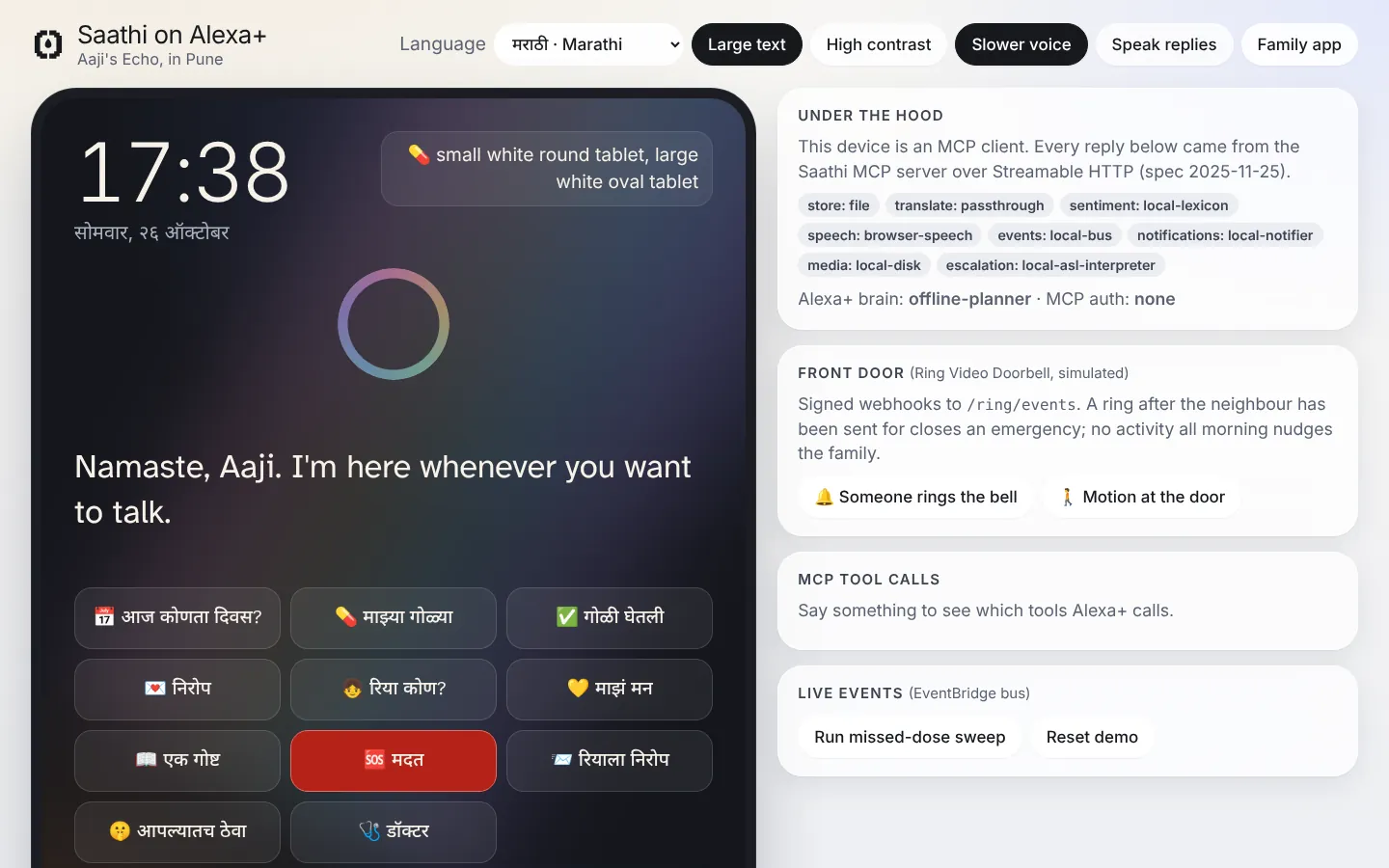 Aaji's Alexa+ in Marathi, with large text and slower speech |
<img src="docs/screenshots/16-alexa-confirm.webp" alt="Nothing leaves the house until she says "yes, send it""> Nothing leaves the house until she says "yes, send it" |
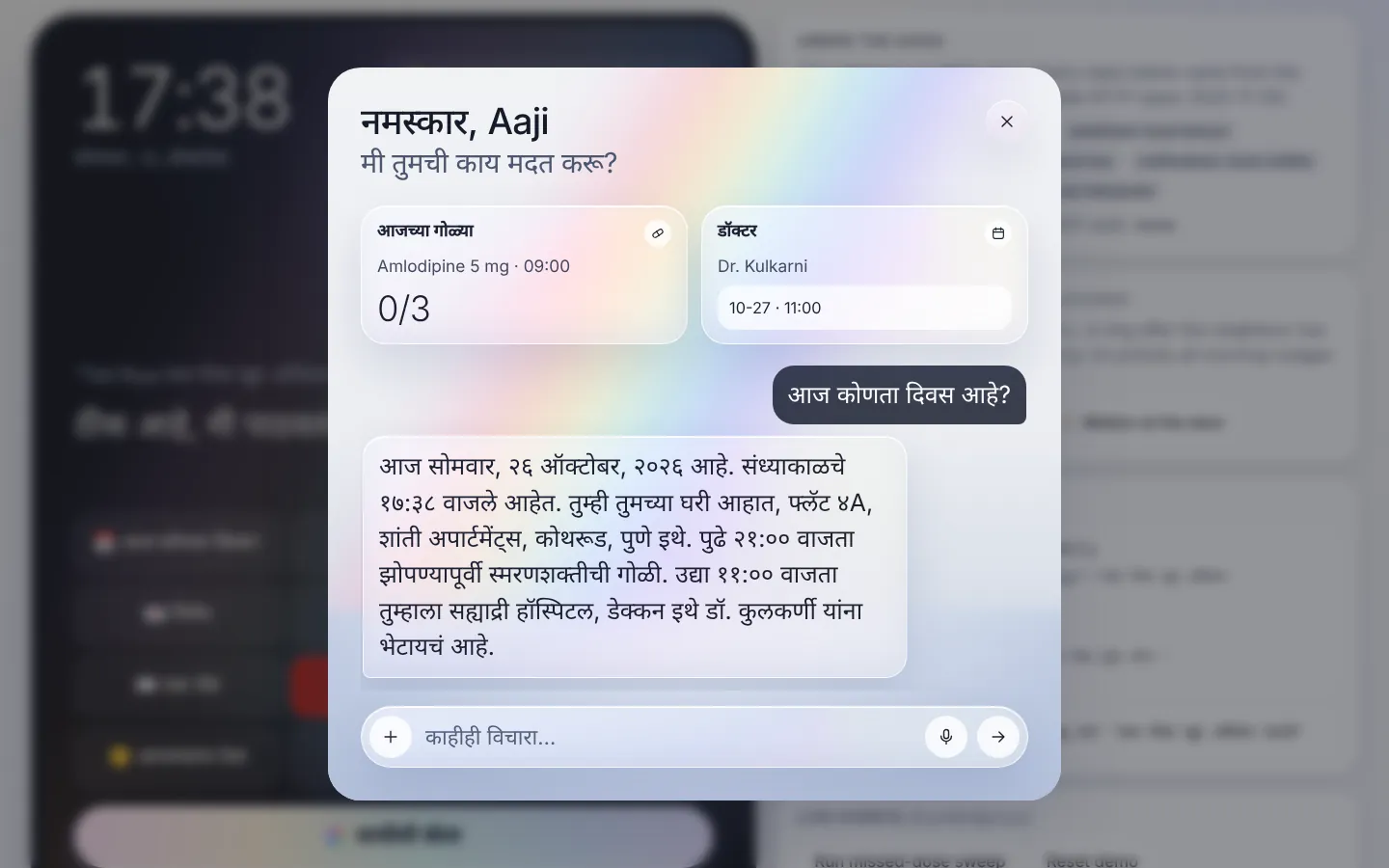 Aaji's Saathi assistant, answering in Marathi |
On a phone:
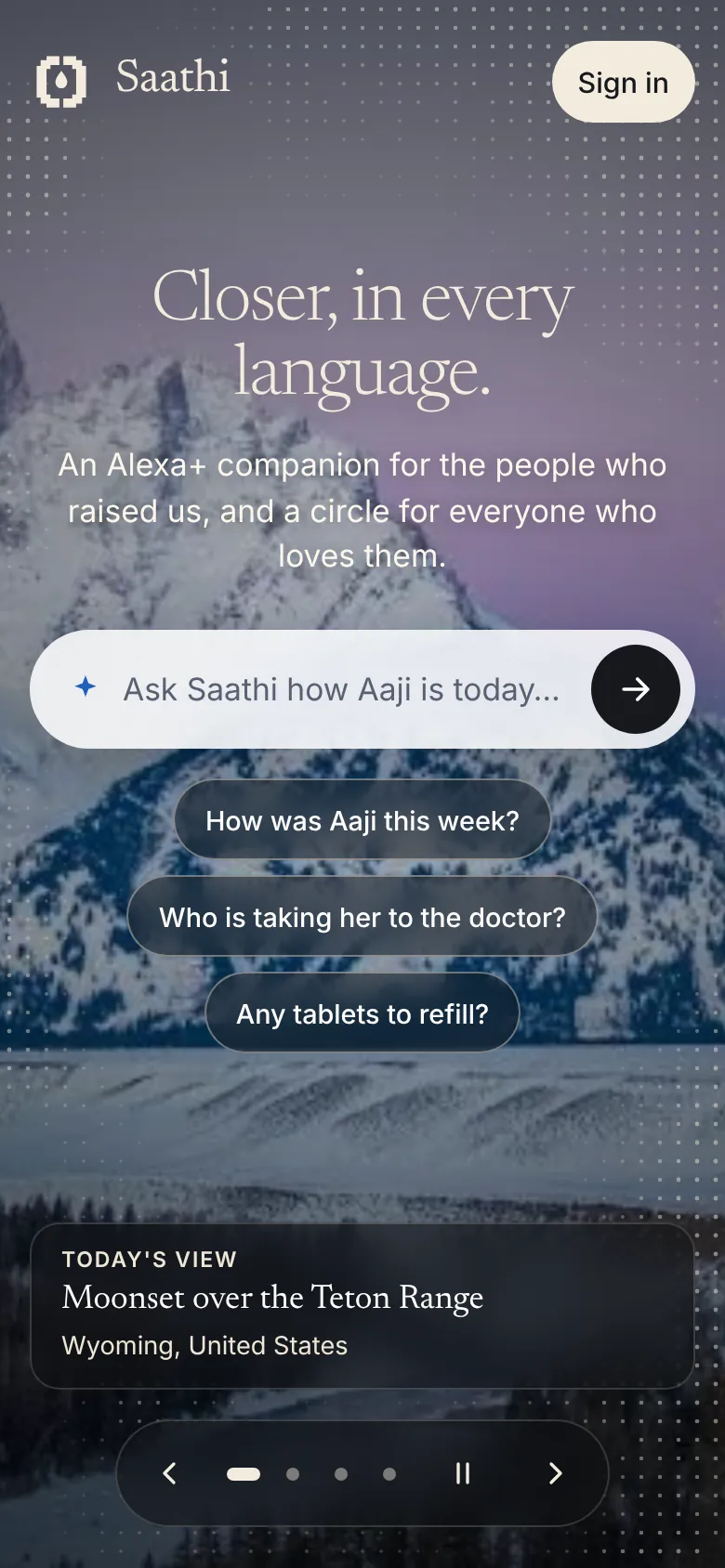 Landing |
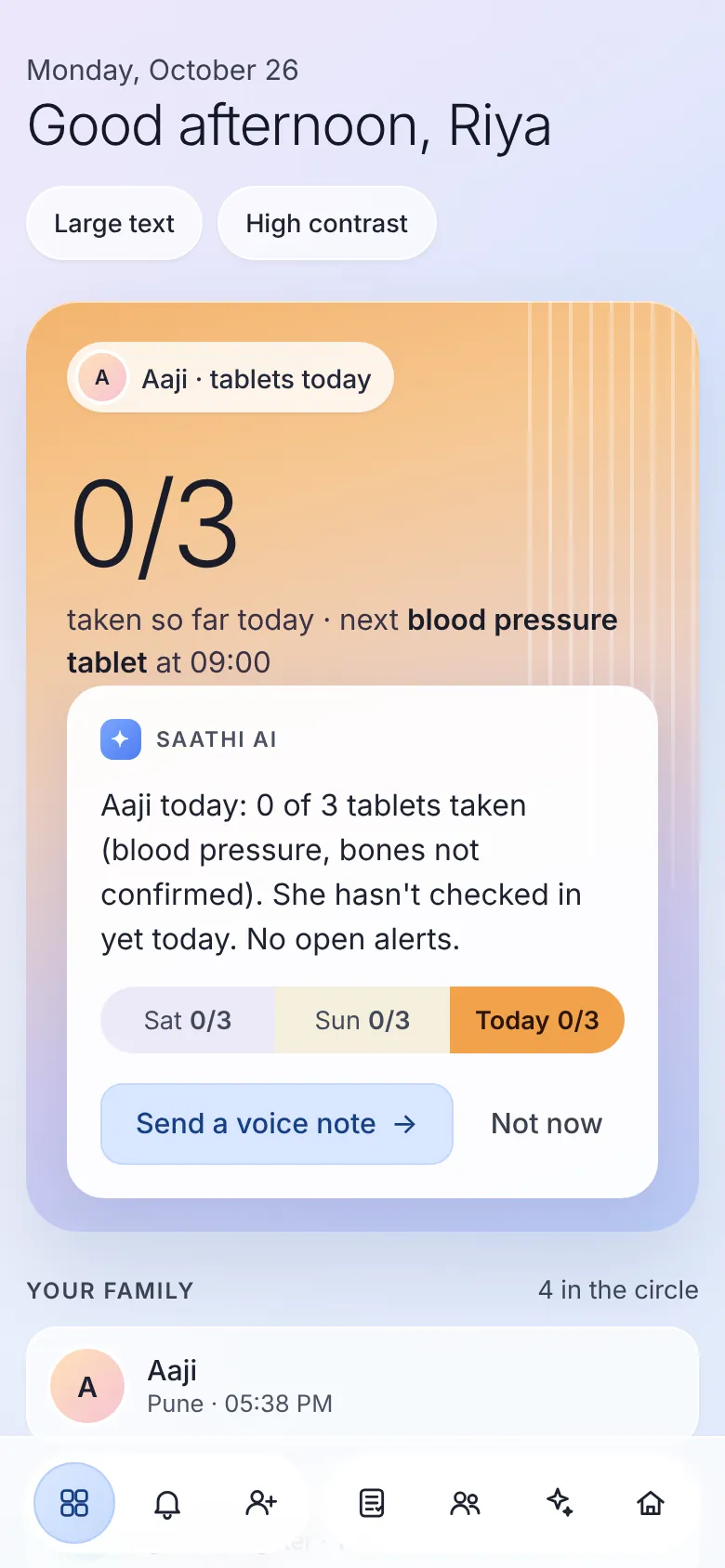 Family app |
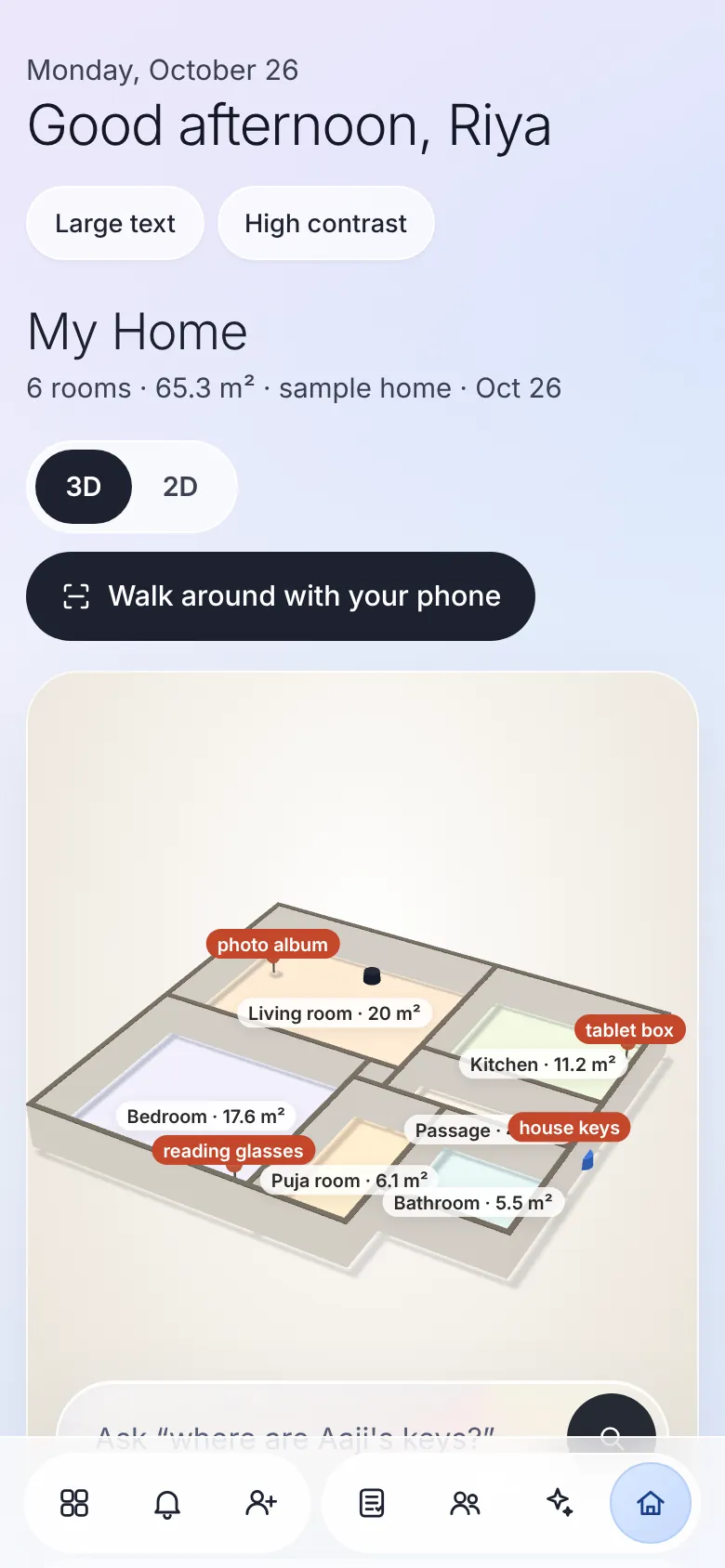 My Home |
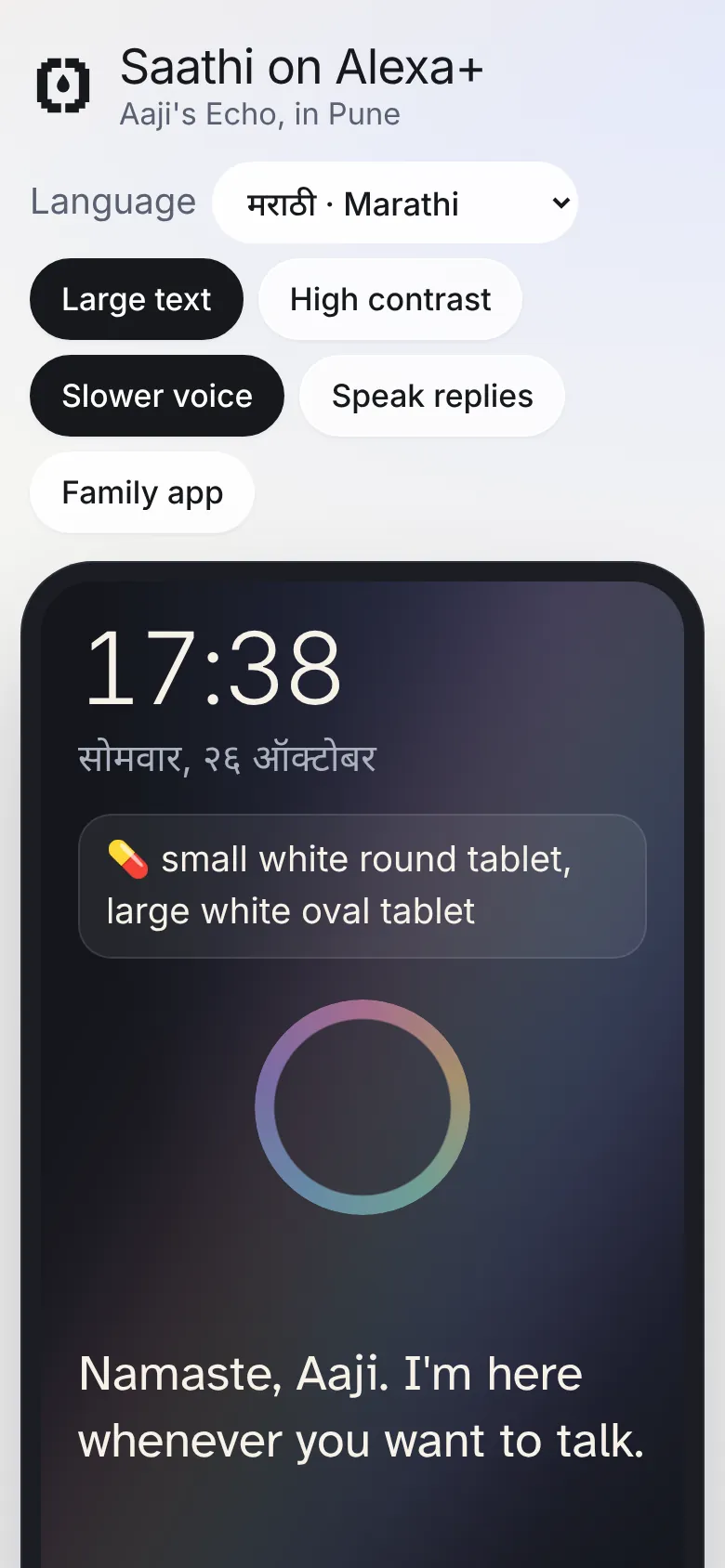 Aaji's Alexa+ |
What's in this repository
| Piece | What it is | Where |
|---|---|---|
| Saathi MCP server | 18 tools, 3 resources, a resource template, 2 prompts. Streamable HTTP, protocol 2025-11-25, OAuth 2.1 |
src/mcp/server.js, src/http/mcpRoute.js |
| Serverless deployment | The same server as a stateless AWS Lambda behind API Gateway | src/lambda/mcp.js |
| Simulated Alexa+ device | Echo Show-style web app. It is a real MCP client: Claude (on Amazon Bedrock or the Claude API) decides which tools to call. Voice in and out, 8 languages, large text, high contrast, slower speech, and the Saathi assistant for Aaji | public/alexa.html, src/agent/ |
| Family Circle app | Live dashboard for Riya, Anand and Meera, each in their own language. Alerts with escalation progress, mood timeline, memory book, translated messages, profile photos, the family assistant and the 3D house map | public/family.html, public/assistant.js, public/home3d.js |
| House walkaround | WebXR immersive-ar with hit-testing on an ARCore Android phone: corners become room polygons, squared up and joined into one plan. Draw-by-hand fallback for everything else |
public/scan.html, public/scan.js |
| Real accounts | Sign up with email or Google (OpenID Connect with PKCE, ID tokens verified against Google's keys), onboard a household, and invite family. Every household's data is isolated. scrypt passwords locally, Amazon Cognito on AWS | src/accounts/, src/households/ |
| Real email | Invites (in each person's language, with a one-time join link), alerts and weekly letters. Sent through Amazon SES, Gmail, any SMTP provider, or the family's own Gmail through the Gmail API (refresh token encrypted with AES-256-GCM) | src/mail/ |
| Device pairing | A six-digit code (or QR) plus a family approval of three matching pictures turns any tablet, Echo Show or phone into Aaji's Saathi screen. No passwords on her device, family-only actions blocked, removable from the family app | public/device.html, src/accounts/accounts.js |
| Landing, intro and login | Video intro with an animated halftone, a photo slideshow, and the login page | public/index.html, public/login.html |
| Escalation workflow | One Amazon States Language definition. It is deployed to AWS Step Functions and executed offline by a built-in ASL interpreter | src/escalation/ |
| Infrastructure as code | AWS CDK stack: 65 resources across 15 AWS services, four esbuild-bundled Lambdas. The template passes cfn-lint and the state machine passes asl-validator, both in CI |
infra/ |
| Front doorbell | A real Ring account connects from Settings (email, password and Ring's 2-step code; Ring's push events for presses and motion; the token stored encrypted). Any other doorbell or smart-home system can call a private per-household link. An HMAC-signed webhook with its own Lambda remains for integrations | src/doorbell/, src/ring/, src/lambda/ring.js |
| OAuth 2.1 authorization | Per the MCP authorization spec: Amazon Cognito is the authorization server, Saathi the protected resource (RFC 9728 metadata), with saathi/elder and saathi/family scopes |
src/auth/ |
| Safety and routing evals | 44 multilingual safety cases (100% emergency recall, zero false alarms required) and 25 routing cases | evals/ |
| Spoken in her language, offline | Every reply Saathi speaks is written in Marathi, Hindi and English, with her routine, tablets and family described in each. Aaji hears Marathi even with no translation service or model | src/domain/i18n.js |
| Accessibility audit | axe-core in a real browser across 23 page states (landing, login, invite join page, device pairing, the elder's screen, both assistants, family app with its care view, medicines editor, invite and device dialogs, house map in 3D and 2D, walkaround, high contrast, phone width): 0 violations, enforced in CI | scripts/a11y.js |
| Deployment smoke test | One command checks a live endpoint: OAuth token, RFC 9728 metadata, 401 without a token, protocol 2025-11-25, tools, a Marathi reply, scopes | scripts/smoke.js |
| Tests | 75 server tests (no fictional data in a fresh install, data never wiped, time zones, pronouns, emergency numbers, medicines several times a day, reminders, doorbells, MCP protocol features, OAuth, accounts and household isolation, Google sign-in, email, invites, device pairing, the house map, Ring, dignity, retry safety, localisation, refills, appointments, voice notes, weekly letters, Lambda, escalation, AWS SDK mocks, evals) and 12 infrastructure tests, 3 of which load the exact production Lambda bundles and drive them with API Gateway, Ring and Scheduler events | test/, infra/test/ |
Architecture
flowchart LR
  subgraph Home["Aaji's home"]
    A["Alexa+ device<br/>(or the simulator)"]
  end
  subgraph Family["Family, anywhere"]
    F["Family Circle app<br/>Riya · Anand · Meera"]
    FA["Riya's own Alexa+<br/>(family_summary, acknowledge_alert)"]
  end

  A -- "MCP 2025-11-25<br/>Streamable HTTP + OAuth 2.1" --> APIGW["Amazon API Gateway<br/>HTTP API /mcp"]
  FA -- "MCP (saathi/family scope)" --> APIGW
  A -. "authorization code" .-> COG["Amazon Cognito<br/>OAuth 2.1 server<br/>saathi/elder · saathi/family"]
  APIGW --> L["AWS Lambda (arm64)<br/>Saathi MCP server<br/>stateless, X-Ray"]
  COG -. "JWKS" .-> L
  RING["Ring Video Doorbell<br/>(simulated)"] -- "HMAC-signed webhook" --> APIGW
  APIGW --> RL["Lambda<br/>Ring events"]
  SM["AWS Secrets Manager<br/>Ring signing secret"] -.-> RL
  RL --> DDB

  L --> DDB[("Amazon DynamoDB<br/>single table")]
  L --> TR["Amazon Translate"]
  L --> CO["Amazon Comprehend<br/>sentiment"]
  L --> PO["Amazon Polly<br/>neural voices"] --> S3[("Amazon S3<br/>memory book audio")]
  L --> EB{{"Amazon EventBridge<br/>custom bus + archive"}}

  EB -- "HelpRequested" --> SF["AWS Step Functions<br/>escalation"]
  SF --> SNS["Amazon SNS<br/>care circle topic<br/>(filter policies)"]
  SF <--> DDB
  SNS --> F

  SCH["EventBridge Scheduler<br/>every 15 min"] --> SW["Lambda<br/>missed-dose sweep"] --> DDB
  L -. EMF .-> CW["Amazon CloudWatch<br/>dashboard + alarms"]
  SF -. metrics .-> CW

  SIM["Simulator brain:<br/>Claude on Amazon Bedrock"] -. drives .-> A
AWS services used in code: Amazon Bedrock, Amazon Translate, Amazon Comprehend, Amazon Polly, Amazon DynamoDB, Amazon S3, Amazon EventBridge (bus, archive and Scheduler), AWS Step Functions, Amazon SNS, Amazon Cognito, AWS Lambda, Amazon API Gateway, AWS Secrets Manager, Amazon CloudWatch (EMF metrics, dashboard, alarms), AWS X-Ray, and AWS CDK for all of it. Plus a Ring doorbell integration.
A deeper tour, with sequence diagrams for escalation, elicitation and OAuth, is in docs/ARCHITECTURE.md.
Every AWS integration sits behind a small adapter and has an offline stand-in: a JSON-file store, an in-process event bus, the local ASL interpreter, a lexicon-based sentiment model and the browser's own voice. So the whole project runs with npm start and no cloud account, and each service can be switched to AWS on its own. Adapter code is in src/aws/ and src/local/, and the wiring is in src/services.js.
Design decisions worth calling out
- One escalation definition, two runtimes.
src/escalation/escalation.asl.jsonis deployed verbatim to Step Functions (infra/lib/saathi-stack.js).src/escalation/interpreter.jsruns the same JSON locally, with the SNS and DynamoDB service integrations mapped to local adapters. The tests run the real workflow logic, not a mock of it. - Comprehend doesn't do Marathi sentiment, so Saathi translates first. Languages DetectSentiment doesn't support are routed through Amazon Translate to English before analysis (
src/aws/language.js). - Safety doesn't depend on sentiment scores. A multilingual phrase screen (English, Hindi, Marathi, romanised forms) runs on every check-in, so "मी पडले" ("I fell") always escalates. It also avoids false alarms like "blood pressure tablet" (
src/domain/safety.js). - Nudge, don't alarm. Low mood or loneliness notifies family gently, with no escalation. Real alerts are kept for real danger, so families don't start ignoring them.
- Stateless on Lambda, stateful locally. The Lambda transport runs in stateless JSON-response mode, so it scales horizontally with no sticky sessions. The local Express server keeps per-client sessions and SSE streams.
- An elder should never hear an error. If the model is rate-limited or unavailable, the simulator falls back to the offline planner for that turn.
- Exactly one escalation per emergency. Alexa+ may retry a tool call, and a frightened person asks twice. Help requests and urgent check-ins join an open alert instead of starting a second workflow (
openHelpAlertinsrc/domain/saathi.js). - Measured safety. The phrase screen is scored by
npm run evalagainst multilingual cases. That eval found real bugs: "prices have fallen" and Hindi "leaves are falling" raised false alarms, and romanised "seene mein dard" (chest pain) was missed. Falls are now matched in the first person, and CI fails if recall drops below 100%. - Her language is the default, not an add-on. Spoken replies are authored in Marathi, Hindi and English (
src/domain/i18n.js), with Devanagari numerals in Marathi, so the voice never mixes scripts mid-sentence. Translation services are only needed for what people write to each other, and each message is translated once per language and cached. - A ring at the door is evidence, not proof. It only closes an emergency once the neighbour has been sent for. Before that it could be a delivery, so the family is told but the workflow keeps going.
Try it in your MCP client (30 seconds)
Add this to Claude Desktop, Claude Code or any MCP client, and talk to Saathi as if you were Aaji, the fictional elder of the demo family:
{ "mcpServers": { "saathi": { "command": "npx", "args": ["-y", "saathi-alexa"] } } }
All 18 tools work. Everything stays in memory and is gone when the client closes it, and Saathi refuses every outside connection in this mode. For a real family, run the full server below.
Run it locally (2 minutes, no cloud account)
1. Install Node.js (20 or later) and Git
Check what you have with node -v and git --version. If Node is missing or older than v20:
| System | Install |
|---|---|
| Windows | winget install OpenJS.NodeJS.LTS Git.Git, or download the LTS installer from nodejs.org and Git from git-scm.com. Reopen the terminal afterwards |
| macOS | brew install node git (with Homebrew), or the LTS installer from nodejs.org |
| Ubuntu / Debian | curl -fsSL https://deb.nodesource.com/setup_22.x | sudo -E bash - && sudo apt-get install -y nodejs git |
| Any system, with nvm | curl -o- https://raw.githubusercontent.com/nvm-sh/nvm/v0.40.1/install.sh | bash, reopen the terminal, then nvm install 22 |
npm comes with Node.js.
2. Get the code and start it
git clone https://github.com/akshatinnovate-png/Saathi-Alexa.git
cd Saathi-Alexa
npm install
npm start
To use another port: PORT=3000 npm start (PowerShell: $env:PORT=3000; npm start).
3. Turn on "Sign in with Google" (once, about 5 minutes)
npm run setup
Google only lets apps that are registered in Google Cloud use "Sign in with Google", so the person running Saathi registers it once. The setup walks through it link by link: create a project, enable the Gmail API, publish the consent screen, and make a Web client with the redirect address it shows you. Paste the Client ID and secret, and that's it.
After that, nobody types a password or sets up email:
- Everyone in the family taps Continue with Google.
- At the end of sign-up, the person setting up the family taps Connect Gmail. Invites, calls for help, missed-tablet nudges and the Sunday letter are then sent automatically from their own Gmail. Saathi can only send, never read.
npm run setup can also use one Gmail account with an app password, Amazon SES or any SMTP provider instead, and add Claude or Amazon Translate for translation. Without any email set up, invites can still be shared on WhatsApp from the app.
4. Open it
- Saathi: http://localhost:8787/ — a fresh install is empty: sign up and set up your own household
- The elder's screen: http://localhost:8787/device.html on their tablet or Echo Show (pair it with a code from the family app)
- Family app: http://localhost:8787/family.html
- Walk the house:
/scan.htmlon an ARCore Android phone in Chrome. WebXR needs HTTPS, so reach your laptop through a tunnel (for examplecloudflared tunnel --url http://localhost:8787) or deploy - MCP endpoint:
http://127.0.0.1:8787/mcp
Just want to look around? npm run demo starts a separate demo with a fictional family (Aaji in Pune, her granddaughter Riya in Toronto). Log in as [email protected] / saathi-demo-2026. The demo keeps its data in data/demo.json, has short escalation waits, a pretend doorbell and a Reset demo button, and never touches your real data.
How a family uses it
- Set up. One person signs up (email or Google) and answers four short steps about their elder: name, language, pronouns, country (which sets the emergency number), time zone, tablets and a neighbour.
- Invite the family. In the family app, tap the invite button. Each person gets an email in their own language with a Join button. You can also copy the link or send it on WhatsApp. The link works once, for 30 days.
- Set up their device. Tap the tablet button. On an Echo Show (Silk browser), a tablet or an old phone, open
/device.htmlor scan the QR code, and type the six numbers. The device shows three pictures; the family app pops up the same three, and you tap Approve. That device becomes their Saathi screen: big text, their language, no logins and no settings to get lost in. It speaks tablet reminders when they are due, reminds them about visits, and reads new messages and plays voice notes as they arrive. You can remove it from the family app at any time. - Keep it up to date. In Care, manage medicines (up to six times a day, on chosen weekdays, with supply tracking), doctor visits and the daily routine. In Settings, change their details, remove someone from the circle, and connect the front door: a Ring account (with its 2-step code) or a private link for any other smart doorbell.
- That's it. Alerts, nudges and the weekly letter (Sunday evening in their time zone) arrive by email. Emergencies go to the neighbour too, even if they never made an account.
Connecting a real Alexa+ through MCP is still there for developers, under Set up their device → Connect a real Alexa+ (for developers).
Everything that used to be a demo, a simulation or a built-in assumption, and how it was made real, is listed in docs/REALITY_AUDIT.md.
In the demo, try tapping 💛 माझं मन ("how I feel") in Marathi and watch the family app get a gentle nudge. Then tap 🆘 मदत ("help") and watch the escalation move from family to neighbour to emergency, and stop the moment you press "I'm on it".
With no model configured, an offline rule-based planner stands in for Alexa+. It still replies in Marathi, Hindi or English, because every spoken line is localised in the server itself. Add a Claude key for free-form conversation and translation of anything family members write:
ANTHROPIC_API_KEY=sk-ant-... npm start          # Claude API
SAATHI_USE_BEDROCK=true AWS_REGION=us-east-1 npm start   # Claude on Amazon Bedrock
With a model, Claude also stands in for Amazon Translate when Translate is off, so messages and stories are translated even without AWS.
Inspect the MCP server directly
npm run inspect # MCP Inspector; connect to http://127.0.0.1:8787/mcp (Streamable HTTP)
Tests, evals and audits
npm test                    # 92 tests: MCP protocol, OAuth, Ring, dignity, retry safety, localisation, care logistics, Lambda, escalation, AWS adapters, and 17 security tests
npm run eval                # multilingual safety + routing evals with a per-language report
npm run a11y                # axe-core accessibility audit in Chromium (CHROME_PATH=... to pick a browser)
cd infra && npm install && npm test   # 12 tests: CDK assertions + the real Lambda bundles
CI runs all four on every push, plus npm audit, registry signature checks, a lockfile-origin check and a committed-secrets scan. CodeQL and OpenSSF Scorecard run on their own schedule.
Authentication modes
SAATHI_AUTH_MODE |
Use | How |
|---|---|---|
none (default locally) |
Development | No Authorization header |
static |
Demos through a tunnel | SAATHI_MCP_TOKEN (all scopes) and optionally SAATHI_FAMILY_TOKEN (family scope only) |
cognito (default on AWS) |
Production | Cognito access tokens (JWT) verified against the pool's JWKS. /.well-known/oauth-protected-resource/mcp advertises the authorization server, and a 401 carries WWW-Authenticate: Bearer resource_metadata=... |
Deploy to AWS
cd infra
npm install
npx cdk bootstrap                       # once per account/region
npx cdk deploy \
  -c [email protected],[email protected] \
  -c [email protected] \
  -c [email protected]
The stack outputs McpEndpoint (register this with Alexa+), the Cognito OAuthIssuer, OAuthDomain and client IDs, and RingWebhookUrl with its RingWebhookSecretArn. To smoke-test with a machine token:
curl -s -u "<ServiceClientId>:<client secret>" -d grant_type=client_credentials -d scope=saathi/elder \
  "<OAuthDomain>/oauth2/token"
Pass -c oauthCallbackUrls=<Alexa+ redirect URI> so the elder and family device clients can complete the authorization code flow.
Then check the live deployment end to end:
SAATHI_URL=<McpEndpoint> SAATHI_OAUTH_DOMAIN=<OAuthDomain> \
SAATHI_CLIENT_ID=<ServiceClientId> SAATHI_CLIENT_SECRET=<secret> npm run smoke
Seed the demo household and point the simulator and family app at the deployed resources:
export AWS_REGION=us-east-1 SAATHI_USE_AWS=true SAATHI_USE_BEDROCK=true \
  SAATHI_TABLE=... SAATHI_EVENT_BUS=... SAATHI_FAMILY_TOPIC_ARN=... \
  SAATHI_MEDIA_BUCKET=... SAATHI_ESCALATION_SFN_ARN=...
npm start
That starts with an empty table. For a judged demo, npm run seed:aws -- --demo writes the fictional demo family into it instead.
Prerequisites: Amazon Bedrock model access for Claude in your region. Family members confirm their SNS email subscriptions.
Connecting a real Alexa+ device
Register the McpEndpoint URL as a remote MCP server in your Alexa+ Preview integration, with the Cognito authorization server (or a static bearer token). To use a laptop instead of Lambda, run with HOST=0.0.0.0 SAATHI_MCP_TOKEN=... SAATHI_ALLOWED_HOSTS=<tunnel host> behind an HTTPS tunnel.
MCP surface
| Tool | For | What it does |
|---|---|---|
what_day_is_it |
Aaji | Day, date, time, where she is, what's next in her routine |
who_is |
Aaji | Who someone is, by name or relationship in English/Hindi/Marathi, with their last message |
get_medication_schedule |
Aaji | Today's tablets by colour, purpose and status |
confirm_medication_taken |
Aaji | Records a dose and refuses a double dose |
daily_check_in |
Aaji | Sentiment plus safety screen; nudges family or escalates |
ask_family_for_help |
Aaji | Starts the escalation workflow |
get_family_messages |
Aaji | Messages from family, translated into her language |
send_message_to_family |
Aaji | Sends her words, translated per recipient |
save_memory_story |
Aaji | Memory book entry, translated and narrated |
list_memory_stories |
Aaji | Retell her stories |
get_upcoming_appointments |
Aaji | Doctor visits: when, where, with whom, who is taking her |
where_is |
Aaji, Family | Where something is kept, from the house map, in her language |
family_summary |
Family | "How is Aaji today?" in the asker's language |
record_refill |
Family | Closes a low-supply alert and tells her it's handled |
claim_appointment_escort |
Family | "I'll take her": she hears who is coming |
weekly_family_letter |
Family | This week's letter, in the asker's language |
acknowledge_alert |
Family | "I'm on it": stops escalation and reassures her |
Resources: saathi://elder/profile (accessibility needs that shape how Alexa+ speaks), saathi://circle, saathi://today (subscribable), saathi://home (the house map), and the template saathi://stories/{storyId}.
Prompts: gentle_morning_check_in, memory_lane (with argument completion).
The server also sends instructions on initialize: short, warm sentences, never quiz her memory, follow her language.
MCP spec coverage (2025-11-25)
| Feature | How Saathi uses it |
|---|---|
| Streamable HTTP | Stateful sessions with SSE locally; stateless JSON mode on Lambda |
| Authorization (OAuth 2.1, RFC 9728) | Cognito authorization server, protected resource metadata, scope-gated tools |
| Tool annotations | readOnlyHint, idempotentHint, destructiveHint, openWorldHint on every tool |
| Structured output | outputSchema on 5 tools; structuredContent validated against it |
| Elicitation (form) | "Shall I send this to Riya?" before any message leaves the house, with big yes/no buttons on the device |
| Progress notifications | Story translation and narration report each step |
| Resource subscriptions | saathi://today pushes notifications/resources/updated on tablets, check-ins, alerts and door activity |
resources/list_changed |
Sent when a new story joins the memory book |
| Resource templates and completions | saathi://stories/{storyId} with ID completion; memory_lane theme completion |
| Logging | Escalation steps stream to the client as notifications/message |
| Server instructions | Persona and safety guidance for Alexa+ |
Accessibility
- Voice first, with captions always on screen
- Atkinson Hyperlegible typeface (designed for low-vision readers), a large-text mode and a high-contrast black/white/yellow mode
- Slower speech with SSML prosody, respects
prefers-reduced-motion, keyboard-navigable with visible focus,aria-livecaptions - Eight languages: English, Hindi, Marathi, Tamil, Bengali, Spanish, French and Arabic. Polly neural voices where they exist, the browser's voice otherwise
- Works on a phone (the family app is what Riya actually opens)
Security
Saathi is built for people scammers like to target, so it is deliberately over-engineered. The short version (the full version is SECURITY.md and the attacker-by-attacker threat model):
- Everything on disk is encrypted. The data file and every voice note and photo are sealed with AES-256-GCM. Keys come from one master key through HKDF, a different key for every purpose.
- Private messages the server cannot read. Voice notes, photos and private messages are encrypted on your family's devices before they leave them (post-quantum hybrid keys). A new phone or Aaji's screen joins only when both screens show the same three pictures, and a fingerprint or face can lock them on each device.
- Attacked on every push.
npm run attackthrows 47 attacks at a public install (another family trying to read yours, forged requests, brute force, path tricks), alongside Semgrep and OWASP ZAP. What we found and fixed is in the self-audit; friends who want to try harder start from the pen-test brief. - The key lives outside the web server. A small Rust key broker holds it and can lock it into your computer's TPM chip (
npm run protect-key), so a copied disk is useless anywhere else. - Saathi only talks to the services it needs. Every other outbound connection is refused.
- Passwords are hard to steal and hard to use. scrypt plus a secret pepper, checked against breached passwords without revealing them, progressive lockout, equal timing for unknown emails.
- Two-step sign-in and passkeys. Authenticator codes with single-use recovery codes, and passkeys (fingerprint, face or screen lock) with cloned-key detection. Turn them on in the family app under Security (the shield).
- Sessions live on the server. See every place you are signed in, sign out everywhere else, and changing your password ends every other session.
- A pairing code is not enough. A new device shows three pictures and joins only when someone in the family sees the same three and taps Approve.
- A strict browser sandbox. CSP with hashed scripts and no
unsafe-inline, Trusted Types, HSTS, cross-origin isolation, Fetch-Metadata CSRF protection, rate limits. - A history nobody can rewrite. Every sensitive change is chained with HMACs; the owner sees a green "intact" badge, or a warning if anything was edited or deleted.
- Short-lived, signed media links, replay-proof doorbell webhooks, an MCP server that refuses anonymous callers once it is reachable from the network, and start-up checks that refuse unsafe configurations.
- A verifiable supply chain. No install scripts,
npm auditand signature checks on every push, CodeQL, Scorecard, Dependabot, SBOMs and signed build provenance on every release.
Run
npm run protect-keyonce and keep the recovery key it shows on paper. Until then, back updata/saathi.keytogether withdata/saathi.json: without the key nobody can read the data, including you.npm run restore-keybrings it back on a new computer. On a server you can setSAATHI_MASTER_KEY(32 random bytes, base64) instead.
Found something? Please report it privately, as described in SECURITY.md.
Honest limitations
- Not yet deployed to a live AWS account. The stack is synthesized, linted with
cfn-lint, its state machine validated withasl-validator, and its exact Lambda bundles are loaded and exercised in tests. But it has not run against real AWS services yet. Deploy it and runnpm run smoketo close that gap. - This is not a medical device. Saathi supports care and doesn't replace it. Emergency guidance points to 112 (India).
- The Marathi and Hindi replies were written without a native-speaker review; have someone who speaks them read
src/domain/i18n.jsandsrc/domain/seed.jsbefore a real deployment. - Polly has no Marathi or Tamil voice. Marathi falls back to the Hindi voice (Kajal) and Tamil to the browser's voice.
- The offline sentiment model is a small lexicon. Use Comprehend for real deployments.
- The safety eval cases were written by the same team as the phrase screen. Real-world phrasing needs clinician- and family-sourced cases before anyone relies on it.
- A new Google OAuth app starts in "testing" mode: only the Google accounts you add as test users can sign in, and Send from my Gmail uses a restricted Gmail scope that Google must verify before the public can use it. Gmail app passwords, SES and SMTP have no such limit.
- Real email was exercised against mocked SES, Gmail API and Google token endpoints in tests, and the Gmail SMTP path through nodemailer; send yourself a test from the invite dialog (Send me a test) after
npm run setup. - Ring has no official public API. Saathi connects through the community
ring-client-apilibrary, the same one Home Assistant and Homebridge rely on; Ring could change its private API. Its dependency chain carries a high-severity advisory, so it is not installed by default: runnpm run add-ringto turn it on. It was tested against a faithful stand-in for Ring's login and push events, not a live Ring account. - Without Claude or Amazon Translate configured, messages are delivered in the language they were written in, and the family app says so.
- The walkaround measures what the phone's AR tracking measures: expect a few centimetres of drift over a whole house. It captures floor outlines, not furniture or a textured mesh.
- The intro video, slideshow photos and login illustration are credited in
docs/ASSETS.md; confirm each licence before any commercial use.
Project
- Contributing: how to report bugs, propose changes, the test policy, DCO sign-off and code review
- Governance, maintainers and the Code of Conduct
- Roadmap and changelog
- Privacy policy, building and reproducible builds, security assurance case
License
MIT. See LICENSE. Per-file copyright and licence are declared in REUSE.toml (SPDX-License-Identifier: MIT).
Reviews (0)
Sign in to leave a review.
Leave a reviewNo results found