translation-workbench
Health Warn
- License — License: MIT
- Description — Repository has a description
- Active repo — Last push 0 days ago
- Low visibility — Only 6 GitHub stars
Code Pass
- Code scan — Scanned 11 files during light audit, no dangerous patterns found
Permissions Pass
- Permissions — No dangerous permissions requested
No AI report is available for this listing yet.
Agent Skill for long-form translation in Claude Code and Codex: the AI drafts and reviews, you approve every glossary entry and every final wording.
Translation Workbench
English | 简体中文
See past the source-language barrier. Write with your own voice.
Translation Workbench is a set of Agent Skills for translation projects in Claude Code and Codex. The AI helps you understand the source, find supporting evidence, and draft a translation. What you learn from editing it can then guide later work.
Current version: 0.2.0
What's new in 0.2.0: Distillation is now a separate skill that draws on drafts, final translations, and your reasons for edits across several units. Drafting notes also flag source passages worth checking and wording that still reads awkwardly, giving you concrete places to begin the discussion. See the changelog
Features
- See the evidence behind the source, not just a finished draft. The AI unpacks difficult sentences, checks dialect and idioms, and looks at surrounding context. That gives you something to judge the translation against.
- Turn your reasons for edits into reusable translator style. The separate distillation skill finds recurring patterns in your actual revisions and explanations, then updates style guidance and character profiles so later drafts have better references.
- Carry project memory across chapters and sessions. Terminology, character information, and confirmed choices stay in the project even when you move to another chapter or start a new conversation.
- Get feedback that knows its place. The source and confirmed terms are evidence; AI drafts and notes are working material. The AI can help you think through a choice without treating its earlier guesses as settled facts.
Built through actual translation work
These skills grew out of my ongoing Simplified Chinese translation of Franz Lohner's Chronicle. They are not a one-click translation button. Here is what they do:
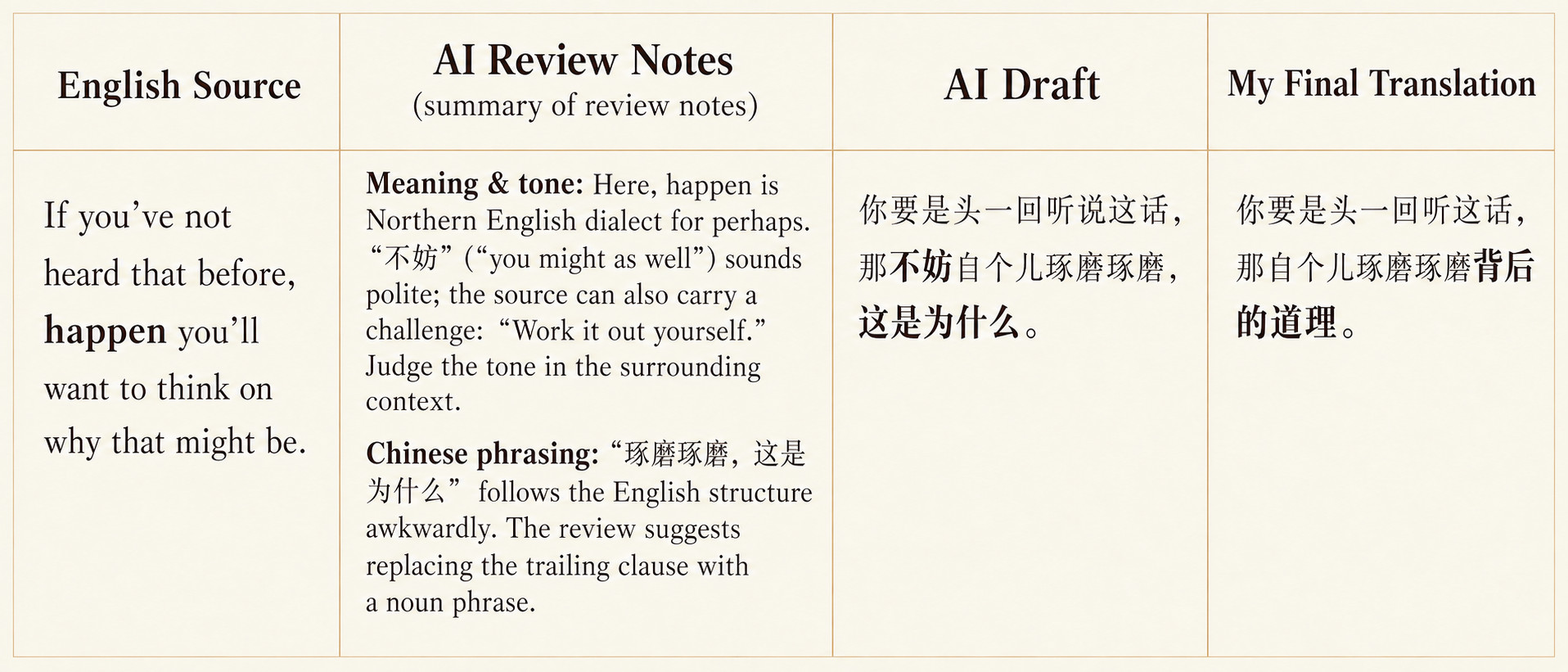
In The Fate of Grungni's Whisper, the AI unpacked the dialect, phrasing, and evidence behind a line. I gave the final version its natural Chinese voice.
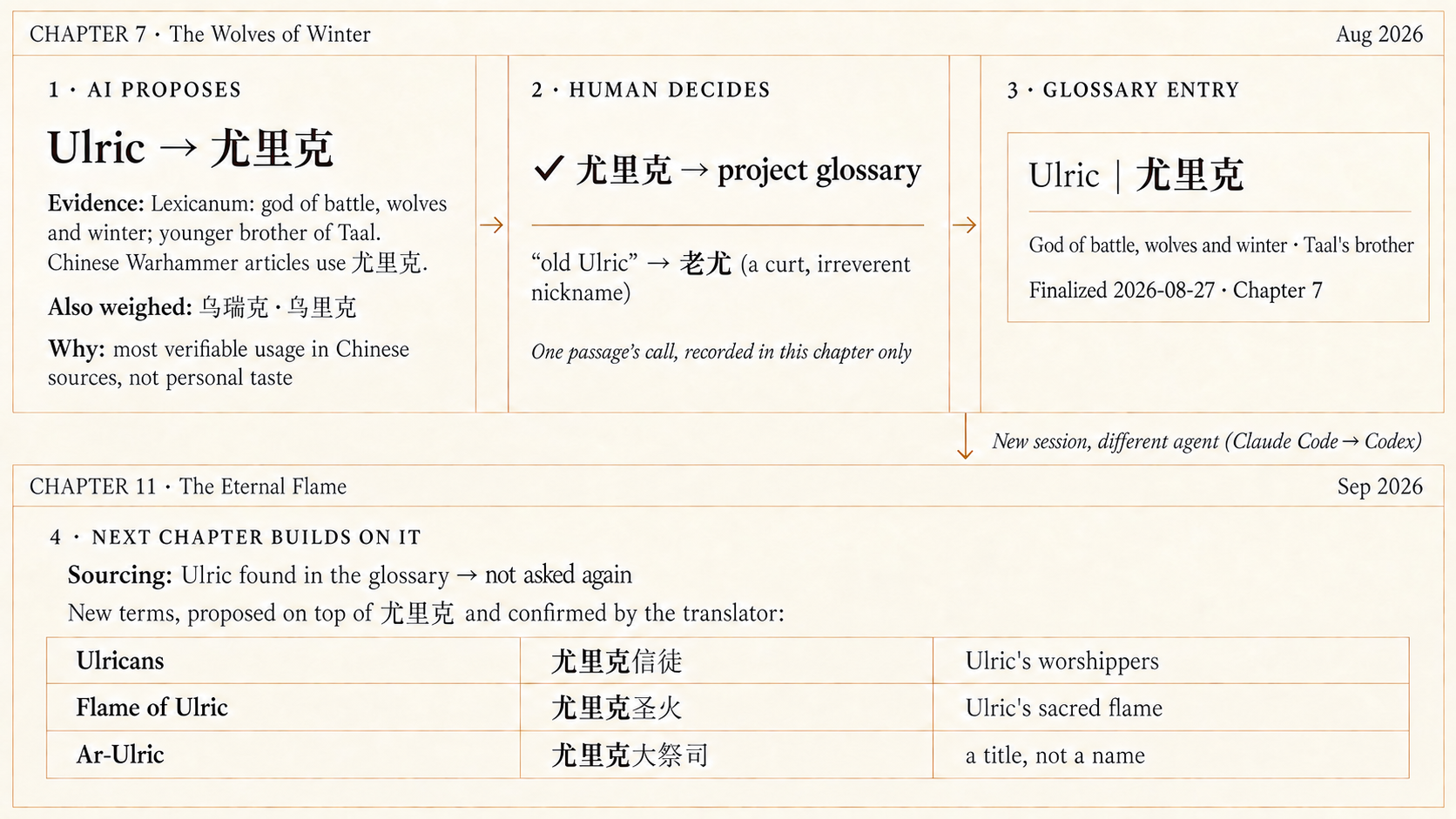
A term confirmed in Chapter 7, The Wolves of Winter, carried through to related terms in Chapter 11, The Eternal Flame, even after switching sessions and moving from Claude Code to Codex.
How to use the skills
Workflow at a glance
| Stage | What you do | What the AI does |
|---|---|---|
| Initialization | Provide material and say where you want to begin | Read or create the project entry point and preserve a workable directory layout |
| Source preparation | Supply the source and existing references | Check provenance and completeness, search terminology, and prepare unresolved terms and relevant context |
| Translation | Decide the translations of pending terms | Produce a draft and drafting notes, then save an initial-draft copy |
| Finalization | Discuss passages, choose the wording, and explain your reasons | Present source and translation, record decisions, apply them together, and check the final saved text |
| Distillation (separate skill) | Decide which proposed insights belong in your translator style | Read work from earlier units and ask about the reasoning behind your edits to identify patterns worth keeping |
Start with a message
Give the AI your source text, a file path, or a link. State the source and target languages and the chapter or section where you want to begin. If you have a glossary, character notes, or previous translations, point it to those too. You can still start without them; the AI inspects what exists and asks only for material it needs.
For a new project, you might say:
Use translation-workbench. I want to translate [work title] from [source language] into [target language]. The source is at [file or link]. Please start with [chapter or section], inspect the material, and help me set up the project.
To continue an existing project, name its location, the translation unit, and the work you want done:
Use translation-workbench. Read the README and existing files in [project folder] for [translation unit], then continue source preparation / translation / finalization.
You can use the same pattern in a new session. The AI picks up from the saved project files instead of relying on the previous conversation.
Or invoke a skill directly
| Purpose | Codex | Claude Code (direct skill installation) |
|---|---|---|
| Prepare source material, translate, or finalize | $translation-workbench |
/translation-workbench |
| Distill lessons from several completed units | $translation-distillation |
/translation-distillation |
For example: $translation-workbench Work through chapter 4 with me and finalize the translation. Or: $translation-distillation Distill style guidance from the completed chapters I specify.
With the Claude plugin installation, the full commands are /translation-workbench:translation-workbench and /translation-workbench:translation-distillation.
In Codex, the distillation skill appears in the skill list as “沉淀 / Translation Distillation”.
Two working records
Drafting notes: The AI creates these while translating to record why it made particular choices and where it ran into problems. You do not have to read them in advance; during finalization, the AI brings up the relevant notes passage by passage.
Finalization record: Created during finalization to preserve your decisions and reasons.
Getting more out of it
- Use your own writing voice: If a passage feels awkward, point out where it loses you and how you would say it. Understanding the source and writing well are different skills; the creative choices that give a translation its soul are yours.
- Explain your edits when you can: “This is better” leaves little to work with. “Each sentence makes sense alone, but together they leave the subject unclear” can become useful guidance for later work.
- Distill across several completed units: A group of finalization records helps distinguish one-off wording from recurring problems. Terminology, facts, character voice, and general style go into their respective references, and existing entries can be revised or removed.
- Use a separate session for each stage: Keeping the stages in separate conversations gives the AI a clearer context and better performance.
- Keep asking the AI: If material is missing, terms are undecided, or a file might be overwritten, the skills explain what needs attention.
Installation
Ask Claude Code or Codex to install both skills:
Install both translation-workbench and translation-distillation from this repository for me, globally: https://github.com/Alexu0317-FATHER/translation-workbench
Globally means they are available across your projects. Replace it with “for this project only” to use them only in the current folder.
Claude Code plugin, skills.sh, and manual installationClaude Code plugin
/plugin marketplace add Alexu0317-FATHER/translation-workbench
/plugin install translation-workbench@translation-workbench
skills.sh (Codex and Claude Code)
Select both skills explicitly. The default scope is the current project:
npx skills add Alexu0317-FATHER/translation-workbench --skill translation-workbench --skill translation-distillation
Add -g for a global installation, or -a codex -a claude-code to select agents. To update these two skills:
npx skills update translation-workbench translation-distillation
Use -p for project updates or -g for global updates. More options are in the skills CLI documentation.
Manual installation
Copy both translation-workbench/ and translation-distillation/ from this repository's skills/ directory into .agents/skills/ for Codex or .claude/skills/ for Claude Code. Prefix the destination with ~/ for a user-level installation.
After one translation unit
your-translation-project/
├─ README.md                  # Project entry point
├─ <a translation unit>/
│  ├─ source.md               # Working copy of the source
│  ├─ sourcing-handoff.json   # Source-preparation handoff
│  ├─ <translated-title>.md   # Working translation, finalized here
│  ├─ initial-draft.md        # Preserved draft for later comparison
│  ├─ drafting-notes.md       # Drafting choices and passages to discuss
│  └─ review-notes.md         # Finalization decisions and reasons
├─ glossary.md                # Terminology
├─ character-profiles.md      # Character references
├─ translator-style.md        # Translator style
├─ background-notes.md        # Background reference
└─ sources.md                 # Source inventory
This is an example layout; existing projects keep their own paths. Files are created only when there is real content for them.
Tested scope and license
Experience comes from an English-to-Chinese serialized-fiction project using Claude Code and Codex. The drafting comparison for this revision used Opus; the revised workflow has not been retested across other models, language pairs, and genres. Please share your own results in an Issue. The checkers use only the Python standard library; CI runs on Python 3.11.
The original translation project's bilingual website is built with separate scripts. These skills provide translations, work records, and reusable project references. The code is released under the MIT License; see CHANGELOG.md for release history.
Reviews (0)
Sign in to leave a review.
Leave a reviewNo results found