sofos-code
Health Warn
- License — License: MIT
- Description — Repository has a description
- Active repo — Last push 0 days ago
- Low visibility — Only 7 GitHub stars
Code Pass
- Code scan — Scanned 7 files during light audit, no dangerous patterns found
Permissions Pass
- Permissions — No dangerous permissions requested
This is a terminal-based, interactive AI coding assistant written in pure Rust. It connects to models like Claude or GPT to generate code, edit local files, search the web, and answer questions directly from the command line.
Security Assessment
Overall Risk: Medium. The tool inherently handles sensitive data by requiring your Anthropic or OpenAI API key to function, though no hardcoded secrets were found in the scanned code. It makes external network requests to send prompts to these AI providers, perform web searches, and fetch documentation. Additionally, it features file system access (reading, writing, and editing files) and the ability to execute Bash commands. While it claims to run these commands in a read-only sandbox and offers a "Safe Mode," any tool with shell execution capabilities should be monitored closely. A light code audit found no dangerous or malicious patterns.
Quality Assessment
The project is actively maintained, with its most recent code push happening today. It is properly licensed under the permissive MIT license. However, it currently has very low community visibility with only 7 GitHub stars. Consequently, the tool has not undergone widespread peer review or extensive real-world testing, meaning you are largely relying on the sole developer's implementation.
Verdict
Use with caution. The tool requires elevated system access, so while its initial code scan is clean, it is very new and lacks the community testing needed to fully establish trust.
AI coding agent for your terminal, implemented in pure Rust
Sofos Code


A blazingly fast, interactive AI coding assistant powered by Claude or GPT, implemented in pure Rust, that can generate code, edit files, and search the web - all from your terminal.
Tested on macOS but should work on Linux and Windows as well.
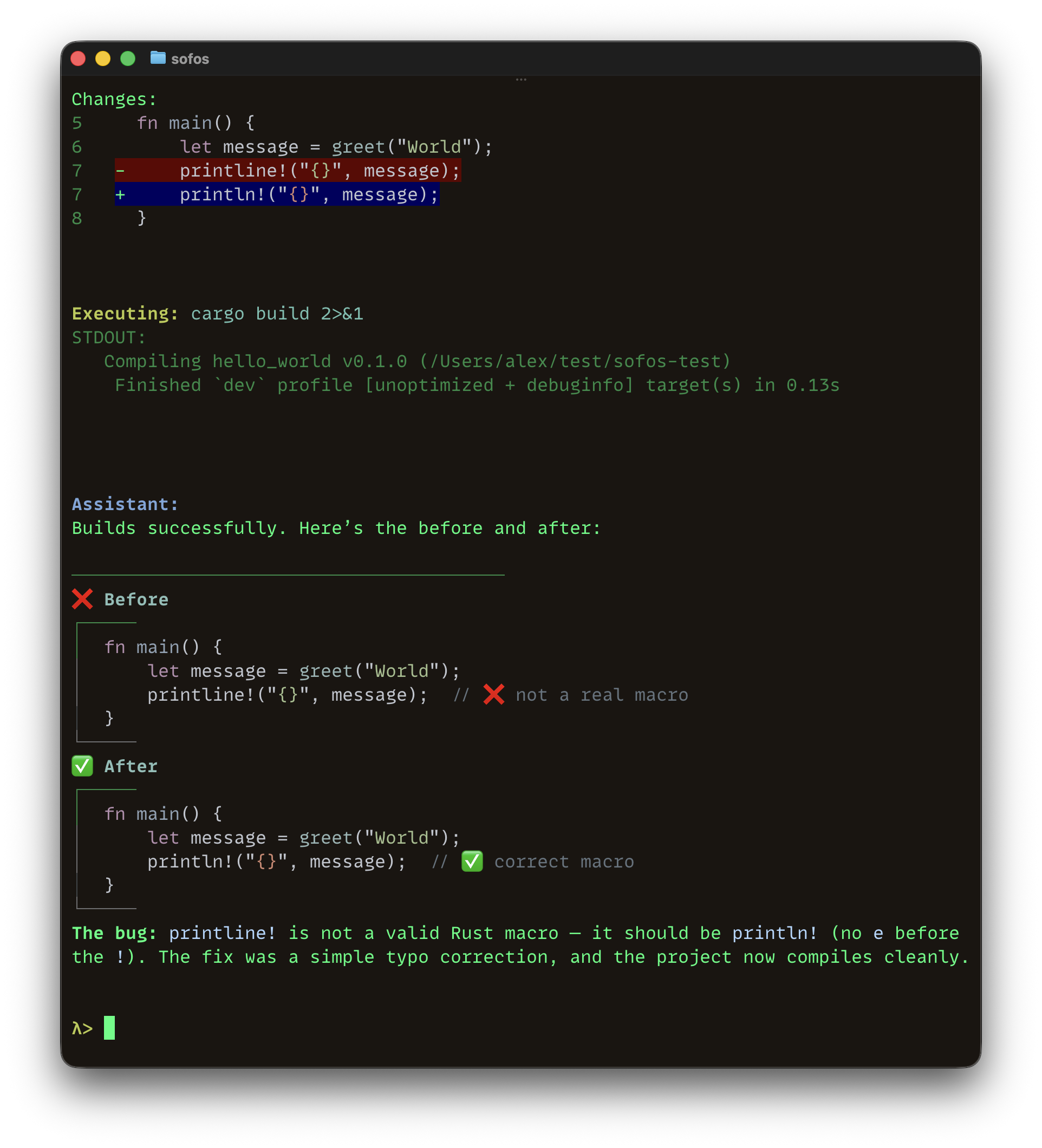
Table of Contents
- Features
- Install
- Usage
- Custom Instructions
- Session History
- Available Tools
- MCP Servers
- Security
- Configuration
- Development
- Release
- Troubleshooting
- Morph Integration
- License
- Acknowledgments
- Links & Resources
Features
- Interactive REPL - Multi-turn conversations with Claude or GPT
- Markdown Formatting - AI responses with syntax highlighting for code blocks
- Image Vision - Analyze local or web images, paste from clipboard with Ctrl+V
- Session History - Auto-save and resume conversations
- Custom Instructions - Project and personal context files
- File Operations - Read, write, edit, list, create (sandboxed)
- Targeted Edits - Diff-based
edit_filefor precise string replacements - Ultra-Fast Editing - Optional Morph Apply integration (10,500+ tokens/sec)
- File Search - Find files by glob pattern (
**/*.rs) - Code Search - Fast regex search with ripgrep
- Web Search - Real-time info via Claude's/OpenAI's native search
- Web Fetch - Read documentation and web pages
- Bash Execution - Run tests and builds (read-only, sandboxed)
- MCP Integration - Connect to external tools via Model Context Protocol
- Visual Diffs - Syntax-highlighted diffs with line numbers
- Iterative Tools - Up to 200 tool calls per request
- Context Compaction - Summarizes older messages instead of dropping them
- Cost Tracking - Session token usage and cost estimates
- Safe Mode - Read-only operation mode
Install
Requirements: Anthropic API key (get one) or OpenAI API key (get one)
Optional (but highly recommended): ripgrep for code search (install), Morph API key for ultra-fast editing (get one)
Prebuilt binary
Download from GitHub Releases (macOS, Linux, Windows):
# macOS / Linux
tar xzf sofos-*.tar.gz
sudo mv sofos /usr/local/bin/

# Windows — extract the .zip, then add the folder to your PATH
macOS: On first run, macOS may block the binary. Go to System Settings → Privacy & Security and click Allow Anyway.
With Rust
cargo install sofos
From source
git clone https://github.com/alexylon/sofos-code.git
cd sofos-code && cargo install --path .
Important: Add .sofos/ to .gitignore (contains session history and personal settings). Keep AGENTS.md (team-wide instructions).
Usage
Quick Start
# Set your API key (choose one)
export ANTHROPIC_API_KEY='your-anthropic-key'
# or
export OPENAI_API_KEY='your-openai-key'

# Optional: Enable ultra-fast editing
export MORPH_API_KEY='your-morph-key'

# Start Sofos
sofos
Commands
/resume- Resume previous session/clear- Clear conversation history/think [on|off]- Toggle extended thinking (shows status if no arg)/compact- Compress conversation history to free up context (also triggers automatically at 80% token usage)/s- Safe mode (read-only, prompt:λ:, blinking underscore (_) cursor)/n- Normal mode (all tools, prompt:λ>, default cursor)/exit,/quit,/q,Ctrl+D- Exit with cost summaryESC- Interrupt AI response
Tab completion: Press Tab for command suggestions, Shift+Tab to navigate backwards.
Image Vision
Include image paths or URLs directly in your message, or paste images from clipboard:
# Paste from clipboard
Ctrl+V                        # Shows ① marker, paste multiple for ①②③
                               # Delete a marker to remove that image

# Local images
What's in this screenshot.png?
Describe ./images/diagram.jpg

# Paths with spaces - use quotes
What do you see in "/Users/alex/Documents/my image.png"?

# Web images
Analyze https://example.com/chart.png
Formats: JPEG, PNG, GIF, WebP (max 20MB local) | Clipboard: Ctrl+V pastes images on macOS, Linux, and Windows | Spaces: Wrap in quotes "path/with space.png" | Permissions: Outside workspace requires config
Cost Tracking
Exit summary shows token usage and estimated cost (based on official API pricing).
CLI Options
-p, --prompt <TEXT>          One-shot mode
-s, --safe-mode              Start in read-only mode (only read/list/web-search/image tools; no writes or bash commands)
-r, --resume                 Resume a previous session
    --api-key <KEY>          Anthropic API key (overrides env var)
    --openai-api-key <KEY>   OpenAI API key (overrides env var)
    --morph-api-key <KEY>    Morph API key (overrides env var)
    --model <MODEL>          Model to use (default: claude-sonnet-4-6)
    --morph-model <MODEL>    Morph model (default: morph-v3-fast)
    --max-tokens <N>         Max response tokens (default: 8192)
-t, --enable-thinking        Enable extended thinking (default: false)
    --thinking-budget <N>    Token budget for thinking (Claude only, default: 5120, must be < max-tokens)
-v, --verbose                Verbose logging
Extended Thinking
Enable for complex reasoning tasks (disabled by default):
sofos -t                                             # Default 5120 token budget (Claude only)
sofos -t --thinking-budget 10000 --max-tokens 16000  # Custom budget (Claude only)
Note: Extended thinking works with both Claude and OpenAI models.
For Claude, it enables the thinking protocol and --thinking-budget controls token allocation.
For OpenAI (gpt-5 models), /think on sets high reasoning effort and /think off sets low reasoning effort.
The --thinking-budget parameter only applies to Claude models.
Custom Instructions/Context
AGENTS.md (project root, version controlled) - Project context for AI agents, team-wide conventions, architecture.sofos/instructions.md (gitignored) - Personal preferences
Both loaded at startup and appended to system prompt.
Session History
Conversations auto-saved to .sofos/sessions/. Resume with sofos -r or /resume.
Available Tools
File Operations:
read_file- Read file contentswrite_file- Create or overwrite filesedit_file- Targeted string replacement edits (no API key needed)morph_edit_file- Ultra-fast code editing (requires MORPH_API_KEY)list_directory- List a single directory's contentsglob_files- Find files recursively by glob pattern (**/*.rs,src/**/test_*.py)create_directory,delete_file,delete_directory,move_file,copy_file- Standard file ops
Code & Search:
search_code- Fast regex-based code search (requiresripgrep)web_search- Real-time web information via Claude's/OpenAI's native searchweb_fetch- Fetch URL content as readable text (documentation, APIs)execute_bash- Run tests and build commands (read-only, sandboxed)
Image Vision:
image- View and analyze images (JPEG, PNG, GIF, WebP)
MCP Tools:
- Tools from configured MCP servers (prefixed with server name, e.g.,
filesystem_read_file)
Note: Only read_file, list_directory, and image can access paths outside workspace when explicitly allowed in config. All other operations are workspace-only.
Safe mode (--safe-mode or /s) restricts to: list_directory, read_file, glob_files, web_search, web_fetch, image.
MCP Servers
Connect to external tools via MCP (Model Context Protocol). Configure in ~/.sofos/config.toml or .sofos/config.local.toml (see the example in the "Configuration" section).
Tools auto-discovered, prefixed with server name (e.g., filesystem_read_file). See examples/mcp_quickstart.md.
Popular servers: https://github.com/modelcontextprotocol/servers
Security
Sandboxing (by default):
- ✅ Full access to workspace files/directories
- ✅ Read-only access to outside workspace (requires explicit config)
- ❌ No writes, moves, or deletes outside workspace
- ❌ Bash always sandboxed to workspace
Bash Permissions (3-Tier System):
- Allowed (auto-execute): Build tools (cargo, npm, go), read-only commands (ls, cat, grep), system info (pwd, date), git read-only
- Forbidden (always blocked): rm, mv, cp, chmod, sudo, mkdir, cd, kill, shutdown
- Ask (prompt user): Unknown commands require approval; can be remembered in config
Configuration
Permissions are stored in .sofos/config.local.toml (workspace-specific, gitignored) or ~/.sofos/config.toml (global, optional). Local config overrides global.
Example:
[permissions]
allow = [
  # Read permissions - for accessing files/directories outside workspace
  "Read(~/.zshrc)",           # Specific file
  "Read(~/.config/**)",       # Recursive
  "Read(/etc/hosts)",         # Absolute path

  # Bash permissions - for command execution
  "Bash(custom_command)",
  "Bash(pattern:*)",
]

deny = [
  # Read denials
  "Read(./.env)",
  "Read(./.env.*)",
  "Read(./secrets/**)",

  # Bash denials
  "Bash(dangerous_command)",
]

ask = [
  # Only for Bash commands (prompts for approval)
  "Bash(unknown_tool)",
]

[mcp-servers.company-internal]
command = "/usr/local/bin/company-mcp-server"
args = ["--config", "/etc/company/mcp-config.json"]
env = { "COMPANY_API_URL" = "https://internal.company.com" }

[mcp-servers.github]
command = "npx"
args = ["-y", "@modelcontextprotocol/server-github"]
env = { "GITHUB_TOKEN" = "ghp_YOUR_TOKEN" }

[mcp-servers.api]
url = "https://api.example.com/mcp"
headers = { "Authorization" = "Bearer token123" }
Rules*:
- Workspace files: allowed by default unless in
denylist - Outside workspace: denied by default unless in
allowlist - Glob patterns supported:
*(single level),**(recursive) - Tilde expansion:
~→ home directory askonly works for Bash commands, not Read permissions
* These rules do not restrict MCP server command paths
Development
cargo test                    # Run tests
cargo build --release         # Build release
RUST_LOG=debug sofos          # Debug logging
Structure:
src/
├── main.rs              # Entry point
├── cli.rs               # CLI argument parsing
├── clipboard.rs         # Clipboard image paste (Ctrl+V)
├── error.rs             # Error types
├── error_ext.rs         # Error extensions
├── config.rs            # Configuration
│
├── api/                 # API clients
│   ├── anthropic.rs     # Claude API client (+ streaming)
│   ├── openai.rs        # OpenAI API client
│   ├── morph.rs         # Morph Apply API client
│   ├── types.rs         # Message types and serialization
│   └── utils.rs         # Retries, error handling
│
├── mcp/                 # MCP (Model Context Protocol)
│   ├── config.rs        # Server configuration loading
│   ├── protocol.rs      # Protocol types (JSON-RPC)
│   ├── client.rs        # Client implementations (stdio, HTTP)
│   └── manager.rs       # Server connection management
│
├── repl/                # REPL components
│   ├── mod.rs           # Main REPL loop
│   ├── clipboard_edit_mode.rs # Ctrl+V interception via custom EditMode
│   ├── conversation.rs  # Message history and compaction
│   ├── prompt.rs        # Prompt rendering
│   ├── request_builder.rs   # API request construction
│   └── response_handler.rs  # Response and tool iteration
│
├── session/             # Session management
│   ├── history.rs       # Session persistence
│   ├── state.rs         # Runtime session state
│   └── selector.rs      # Session selection TUI
│
├── tools/               # Tool implementations
│   ├── filesystem.rs    # File operations
│   ├── bashexec.rs      # Bash execution
│   ├── codesearch.rs    # Code search (ripgrep)
│   ├── image.rs         # Image handling
│   ├── permissions.rs   # Permission system
│   ├── tool_name.rs     # Type-safe tool name enum
│   ├── types.rs         # Tool definitions
│   └── utils.rs         # Confirmations, HTML-to-text
│
├── ui/                  # UI components
│   ├── mod.rs           # UI utilities, markdown renderer
│   ├── syntax.rs        # Syntax highlighting
│   └── diff.rs          # Syntax-highlighted diffs with line numbers
│
└── commands/            # Built-in commands
    └── builtin.rs       # Command implementations
See AGENTS.md for detailed conventions.
Release
This project uses cargo-release for automated versioning and publishing.
Quick commands:
# Preview the release
cargo release patch

# Execute the release
cargo release patch --execute

# Release specific version
cargo release [patch|minor|major] --execute
The release workflow automatically:
- Bumps version in
Cargo.toml - Runs tests and formatting checks
- Updates
CHANGELOG.md - Publishes to crates.io
- Creates release commit and Git tag
- Pushes to remote repository
For detailed instructions, see RELEASE.md.
Troubleshooting
- API errors: Check connection and API key
- Path errors: Use relative paths for workspace, or add
Read(path)to config for outside access - Build errors:
rustup update && cargo clean && cargo build - Images with spaces: Wrap path in quotes
Morph Integration
Optional ultra-fast code editing via Morph Apply API (10,500+ tokens/sec, 96-98% accuracy). Enable with MORPH_API_KEY.
License
MIT License
Acknowledgments
Built with Rust and powered by Anthropic's Claude or OpenAI's GPT. Morph Apply integration for fast edits. Inspired by Aider and similar tools.
Links & Resources
Disclaimer: Sofos Code may make mistakes. Always review generated code before use.

Reviews (0)
Sign in to leave a review.
Leave a reviewNo results found