repomon
Health Warn
- License — License: Apache-2.0
- Description — Repository has a description
- Active repo — Last push 0 days ago
- Low visibility — Only 6 GitHub stars
Code Fail
- rm -rf — Recursive force deletion command in install.sh
Permissions Pass
- Permissions — No dangerous permissions requested
No AI report is available for this listing yet.
Run a fleet of AI coding agents (Claude Code, Codex, Aider) across many repos — Rust TUI, tmux-backed.
repomon
Run a fleet of AI coding agents across all your repos, from one terminal.
Many repos × many worktrees × many agents on one screen. Durable in tmux, the ones waiting
on you float to the top, and you can approve a prompt from your phone.





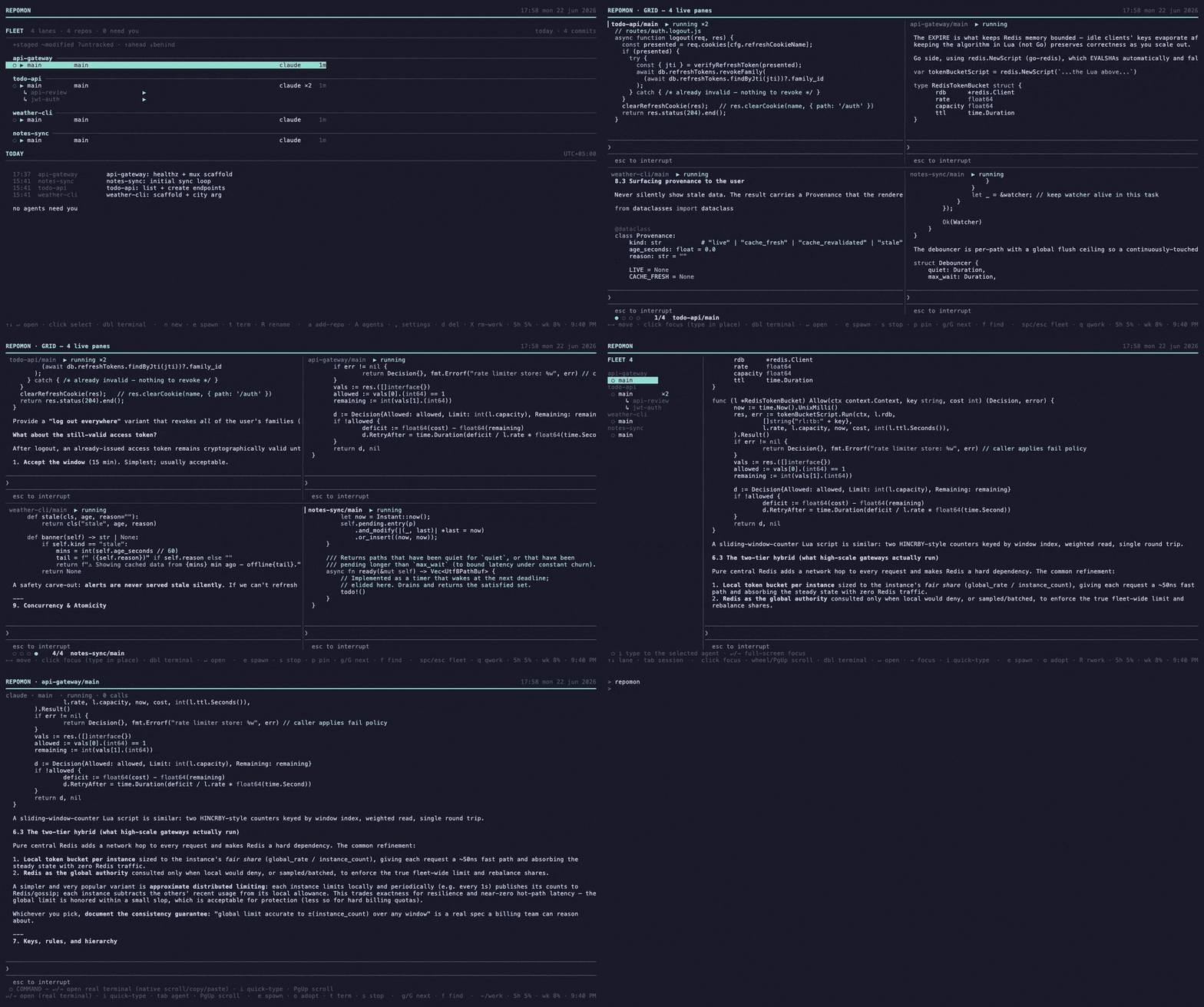
Other tools run parallel agents in one repo, many worktrees (Claude Squad, Conductor,
Crystal, ccmanager). repomon is built for the developer juggling 5–15 active projects with
a fleet of agents running at once: many repos × many worktrees × many agents, spawned and
steered from one place.
REPOMON                                              14:02 fri 29 may 2026
━━━━━━━━━━━━━━━━━━━━━━━━━━━━━━━━━━━━━━━━━━━━━━━━━━━━━━━━━━━━━━━━━━━━━━━━━━━━━
FLEET   8 agents · 4 repos · 3 need you                    ↑ sorted: needs-you
─────────────────────────────────────────────────────────────────────────

  pos-saas ────────────────────────────────────────────────────────────
  ⏸ wt-checkout  hotfix/checkout-bug     claude  needs you   89↻   3m
  ▶ main         feat/supabase-migration claude  running    142↻  18m
  ○ wt-ui        spike/new-pos-ui                idle              2h

  montage-ai ──────────────────────────────────────────────────────────
  ⏸ wt-mcp       spike/mcp-batch         codex   needs you   44↻   8m
  ▶ main         phase-2-studio-floor    claude  running    201↻   2m

  ↑↓ select   ↵/→ open   spc babysit   n new-lane   / filter   g needs-you   q
repomon is one tool with four zoom levels, one selection that follows you the whole way:
- Fleet: every agent on one screen; the ones waiting on you float to the top.
- Split: fleet sidebar + the selected agent's live output and an input line.
- Babysit grid: live tiles auto-sized to your window; watch and nudge several at once.
- Focus: one agent full-screen with full live terminal, input, and controls.
Arrow keys drive everything (↵/→ zoom in, esc/← zoom out, space the grid). Agents
run in durable tmux sessions, so they survive closing the UI and reattach (a) with full
scrollback. ⏸ flags an agent that needs you; g jumps to the next one.
Beyond the live views, three Phase-3 dashboards (keys 2/3/4): a per-repo timeline
of commit density with cross-repo correlations, detected work sessions (focused vs
parallel, exportable to Markdown), and global commit search.
Agents: Claude Code is first-class (rich status from its transcript); Codex and Aider also
run, with a tmux-alive fallback for any kind. See docs/agents.md.
Remote access: an optional token-gated WebSocket bridge serves the same JSON-RPC API
over a private network (Tailscale). The daemon detects per-session state changes (including
interactive permission dialogs read from the pane), broadcasts them as event.notification,
and can push them to Apple devices via APNs directly (no relay). The bridge and protocol are
open, so any client can drive it today (see docs/protocol.md). A
polished iOS companion app (fleet view, live conversations, and an Approve button for
pending dialogs) is built and ships once an Apple Developer account is in place.
How it compares
| repomon | Claude Squad / ccmanager | GUI apps (Conductor, Crystal) | built-in claude agents |
|
|---|---|---|---|---|
| Scope | many repos × worktrees × agents | one repo, many worktrees | one repo, many worktrees | one tool, flat list |
| Runtime | durable tmux: survives close, reattach | tmux | app process | inside the CLI |
| Triage | needs-you float to top, g to jump |
flat list | varies | grouped by state |
| Usage limits | live usage corner + auto-continue | ✗ | ✗ | ✗ |
| Remote | open WebSocket bridge + APNs over Tailscale (iOS app soon) | ✗ | ✗ | ✗ |
| Lives in the terminal | ✅ (4-zoom TUI) | ✅ | ❌ (GUI) | ✅ |
Honest take: if you work in one repo, Claude Squad/ccmanager or a GUI may be simpler.
repomon earns its keep once you're running agents across several projects at once.
Architecture
A background daemon (repomond) owns SQLite, file watchers, the git layer, and the
tmux-backed agent runtime, exposing a JSON-RPC API over a Unix socket. The TUI (repomon)
is a thin client. Three crates:
repomon-core: data model, gix git layer, SQLite store, watchers, agent runtime.repomon-daemon: therepomondsocket server and background services.repomon-tui: therepomonterminal UI.
Install
One line, no deps (macOS & Linux x86_64, incl. WSL2; prebuilt binaries, no Rust or Xcode):
curl -fsSL https://github.com/AliHamzaAzam/repomon/releases/latest/download/install.sh | sh
Homebrew (macOS):
brew install AliHamzaAzam/tap/repomon      # or: brew tap AliHamzaAzam/tap && brew install repomon
brew services start repomon                # optional: run the daemon at login
Or grab a tarball from the latest release:
per-arch (aarch64/x86_64) or the universal build, then extract, and put repomon and repomond
on your PATH.
From source: any platform with the Rust toolchain (e.g. ARM Linux, or anywhere without a
prebuilt binary):
cargo install --git https://github.com/AliHamzaAzam/repomon repomon-tui repomon-daemon
repomon needs tmux (agents run in tmux) and git at runtime. Windows isn't supported natively
yet; use WSL2 (the Linux build runs there).
Don't have tmux? Install it: brew install tmux (macOS), sudo apt install tmux (Debian / Ubuntu / WSL2), sudo dnf install tmux (Fedora), sudo pacman -S tmux (Arch).
Then enable cd-on-exit by adding to your ~/.zshrc (or ~/.bashrc):
eval "$(repomon shell-init zsh)"
Usage
repomon                                # just run it: starts the daemon if needed, then the TUI
repomon add ~/code/pos-saas            # register a repo
repomon discover ~/code --add          # or find and register many at once

# headless / scripting (also auto-start the daemon)
repomon lane list
repomon lane new --repo pos-saas --branch feat/inventory --source main
repomon lane delete feat/inventory --delete-branch
repomon is the single command. With no daemon running it launches a detachedrepomond (which then survives across UI sessions), connects, and opens the TUI. If therepomond binary can't be found it falls back to an in-process daemon. Use --embedded to
force in-process always, or manage the daemon withrepomon daemon start | stop | restart | status | logs | install | uninstall.
Building from source? After a rebuild, run
repomon daemon restartso the new code is
served (the daemon outlives the UI). The dev build runs from./target/debug/repomon.
Shell integration (cd-on-exit)
Pressing c on a lane exits repomon and changes your shell into that worktree. repomon
writes the path to the file descriptor in $REPOMON_CD_FD; add the wrapper to your~/.zshrc / ~/.bashrc so the shell acts on it:
eval "$(repomon shell-init zsh)" # bash: repomon shell-init bash · fish: repomon shell-init fish
Remote access (open bridge over Tailscale)
The daemon serves the same JSON-RPC API over a token-gated WebSocket bridge, so you can drive
it from any client; the protocol is documented in docs/protocol.md. A
native iOS companion app (fleet view, live conversations, Approve button) is built and
ships once an Apple Developer account is in place; until then the bridge and remote pair
pairing work for any client you point at them. Bind it to your private tailnet address,
never a public interface; anyone holding the token can read your panes and type into your agents.
- Install Tailscale on the Mac (and any device you'll connect
from), signed into the same tailnet, so it can reach the Mac at its100.x.y.zaddress. - Enable the bridge, then restart the daemon to apply:
No Tailscale detected? Pass the address yourself:repomon remote enable # detects the Tailscale IPv4, binds ws://<ip>:7878, mints a token repomon daemon restartrepomon remote enable --bind <ip:port>. - Pair a client:
repomon remote pairprints a QR (and arepomon://<host:port>#<token>
link) for a client to connect.
Manage it with repomon remote status (shows the bind and a masked token),repomon remote enable --rotate-token (mint a new token, then re-pair), andrepomon remote disable (stops serving; keeps the token). Each change needs arepomon daemon restart to take effect.
Documentation
- docs/architecture.md: how the daemon, TUI, and core fit together.
- docs/protocol.md: the JSON-RPC socket reference.
- docs/agents.md: how agents run and how status is detected.
Status
The fleet view (lanes/today), the agent multiplexer (spawn, live output, input, attach,
babysit grid, multi-agent lanes), the history dashboard (timeline/sessions/search),
per-session notifications (pane-sniffed permission-dialog detection, fired as desktop popups
even when the TUI is closed or parked full-screen in an agent), and the remote access layer
(WebSocket bridge + APNs + pairing) are all in. The iOS companion app is built and ships once
an Apple Developer account is in place. Deferred: an embedded PTY renderer (vs the tmux pivot),
a web dashboard, and Windows support.
If repomon saves you a few context-switches a day, a ⭐ helps other people find it.
License
Apache-2.0 © Ali Hamza Azam
Reviews (0)
Sign in to leave a review.
Leave a reviewNo results found