entente
Health Pass
- License — License: MIT
- Description — Repository has a description
- Active repo — Last push 0 days ago
- Community trust — 15 GitHub stars
Code Fail
- exec() — Shell command execution in apps/cli/src/cast.ts
- exec() — Shell command execution in apps/cli/src/cli.ts
- process.env — Environment variable access in apps/cli/src/cli.ts
- network request — Outbound network request in apps/cli/src/cli.ts
- fs.rmSync — Destructive file system operation in apps/launcher/src/launcher.test.ts
Permissions Pass
- Permissions — No dangerous permissions requested
No AI report is available for this listing yet.
Entente — provenance engineering for coding agents: handoffs become confirmable, verifiable, retryable contracts; agents form a network with evidence and a way back

Entente
Provenance Engineering for Agent Teams
Every handoff carries a contract. Every result carries evidence.



Interactive hackathon report · Install · Replay demo · How to contribute · Design discussions
Turn ambiguous handoffs between coding agents into scoped, verifiable work. Entente's coordination core runs above agent runtimes such as Claude Code and Codex. It defines what must be delivered, checks the evidence, and requests targeted repair when a criterion fails.
- Clarify before execution — the recipient accepts a Task Contract or asks material questions before starting work.
- Check evidence, not just status — relayd runs declared checks in the task worktree and records mismatches with the agent's self-report.
- Repair the failed task — a delta repair identifies the failed criteria and requested corrections, with an explicit repair budget.
- Keep the delivery history — contracts, checks, human decisions, and repairs become JSONL events that drive state, graph, and replay.
Built at the FUTUREMODE BUILDMODE Gen-AI Hackathon 2026.
Our scope: from prompts to provenance
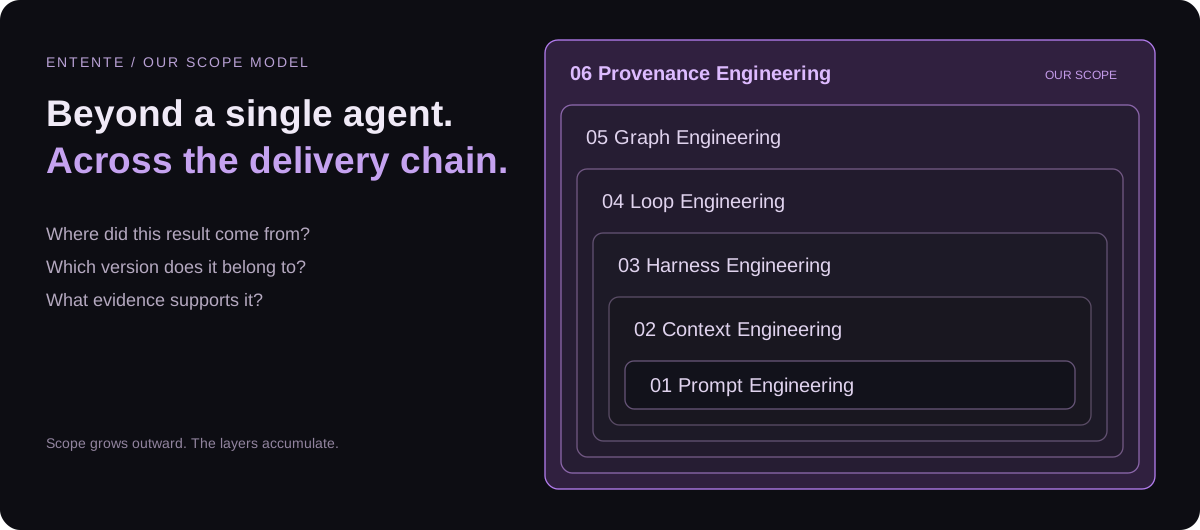
We propose Provenance Engineering as Entente's outermost scope: preserving where decisions and results came from, which version they concern, what verified them, and whether that evidence still applies. This is our product framing; the layers accumulate rather than replace one another.
| Scope, small → large | The question it addresses |
|---|---|
| Prompt Engineering | How do we express this instruction? |
| Context Engineering | What information does the agent need? |
| Harness Engineering | Which tools, permissions, and environment support one agent? |
| Loop Engineering | How does a task execute, receive feedback, repair, and stop? |
| Graph Engineering | How do agents, tasks, and dependencies coordinate? |
| Provenance Engineering — our proposed scope | Where did this delivery come from, and what evidence supports it? |
Today: Task Contracts, linting, daemon-executed checks, bounded repair, event replay, and Relay Terminal are implemented. Versioned context checkpoints and a delivery Passport are next-step proposals. A traceable log alone does not prove semantic correctness, and running a check separately does not make its test author independent.
Install
On macOS, Linux, or WSL, install once:
curl -fsSL https://raw.githubusercontent.com/allenchenhan99/entente/main/install.sh | sh
Then open Entente from your own Git project:
cd my-project
entente
The installer downloads the original repository, builds the coordination daemon
and native terminal UI, and installs an entente command on your existing PATH.
The current directory is your project; installation files live separately under~/.local/share/entente. Run the same installer again to update. A failed build
leaves the previous command working.
Prerequisites: Git, curl, tar, and a C compiler. On macOS, usexcode-select --install; on Ubuntu/WSL, install build-essential and Git first.
An existing Node.js 22+ and Rust toolchain are reused. Missing Node.js and Rust
are installed privately for Entente. The first native build can take several
minutes. If no user-writable command directory is already on PATH, the installer
uses sudo only to place the launcher in /usr/local/bin, provided that directory
is on PATH. Otherwise, follow the user-owned directory example below.
Log in to Claude Code or Codex before starting a live agent. You can inspect the
installation without running an agent:
entente --help
entente status
entente down
ENTENTE_INSTALL_DIRchooses a dedicated, absolute application directory.ENTENTE_BIN_DIRchooses a writable command directory already onPATH.ENTENTE_REFselects a branch or tag instead ofmain.sh install.sh --no-nativebuilds only the TypeScript daemon and Ink TUI.
For example, use a user-owned directory without sudo:
export PATH="$HOME/.local/bin:$PATH"
curl -fsSL https://raw.githubusercontent.com/allenchenhan99/entente/main/install.sh \
  | ENTENTE_BIN_DIR="$HOME/.local/bin" sh
Keep that directory on your shell's PATH in future terminals. Windows users run
the .sh installer inside WSL.
Quick start: no agent or API key
Requirements: Node.js 22+ and Git. The following replay path needs no agent login, daemon, or live model calls after dependencies are installed.
git clone https://github.com/allenchenhan99/entente.git
cd entente
npm ci
npx tsc -b

# Open a recorded run in the terminal UI. Press Ctrl+C to quit.
npx tsx apps/tui/src/index.tsx --replay fixtures/events-live-1.jsonl
Prefer a single command that prints and exits?
npx tsx apps/cli/src/index.ts explain planner --replay fixtures/events-live-4.jsonl
This prints a recorded mission, its six clarification answers, three planned tasks, and integration outcome. Explore the same history through the inbox, a contract, or a task:
npx tsx apps/cli/src/index.ts inbox --replay fixtures/events-live-4.jsonl
npx tsx apps/cli/src/index.ts explain contract:t-auth-routes --replay fixtures/events-live-4.jsonl
npx tsx apps/cli/src/index.ts story --replay fixtures/events-live-4.jsonl --task t-login-page
The completed live-4 fixture has an empty inbox; that is expected. In a live mission, the inbox lists handoffs that need human attention.
Open the two-minute, seven-page report → Team Atrophied Intelligence presents the handoff problem, Contract and context design, terminal Demo, case results, contribution paths, and engineering scope. Diagrams animate automatically; the team Demo video is linked from the deck.
How a handoff works
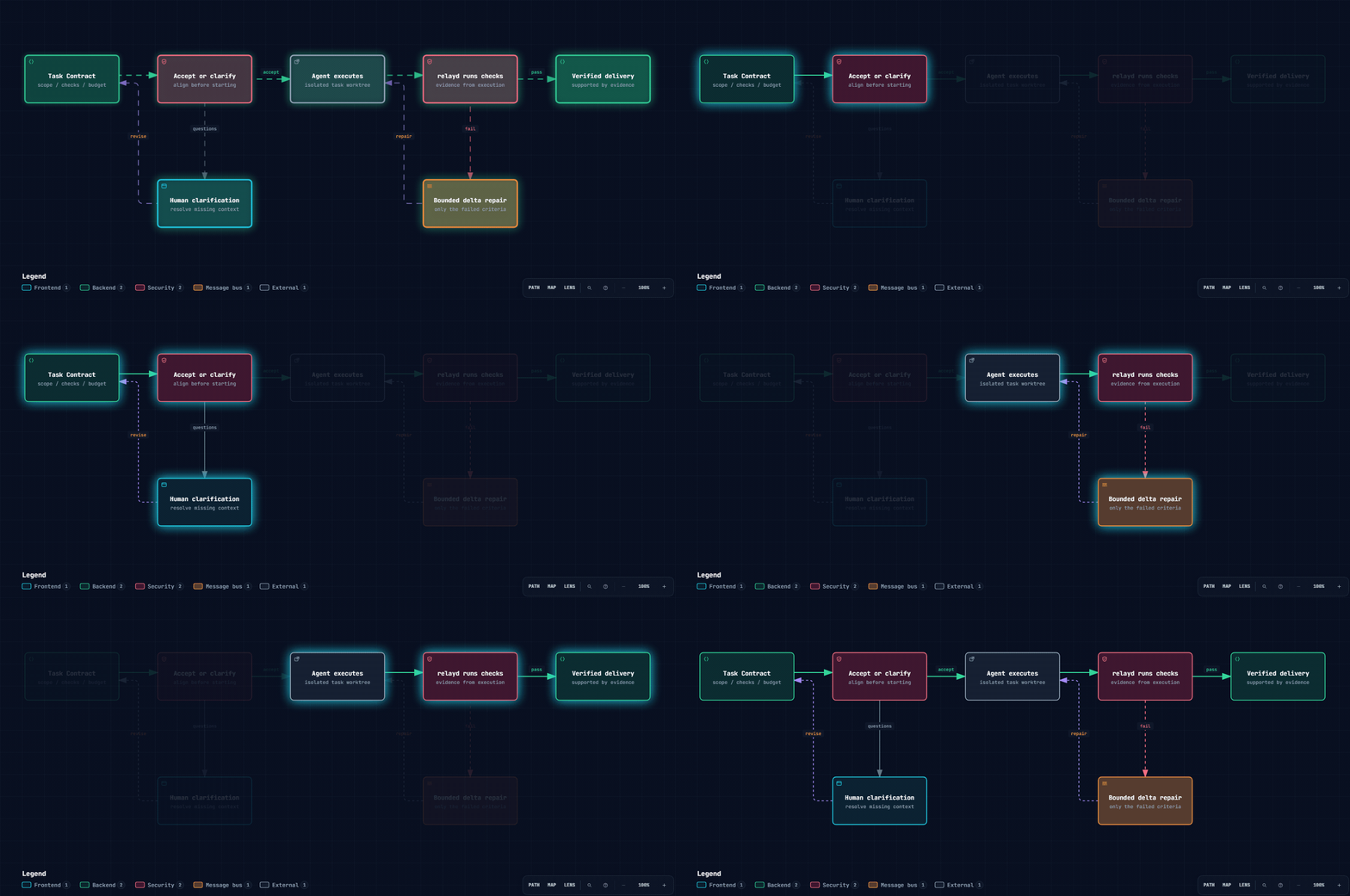
Clarify before work. Verify before delivery. Repair only what failed.
17-second loop · Open interactive diagram · View static SVG · Diagram source
A Task Contract defines the goal, inputs, constraints, non-goals, allowed paths, acceptance criteria, declared checks, and repair budget. Lint errors block spawning. Checks include command, diff_scope, file_exists, human_review, and llm_judge; their evidence should be interpreted according to how they were produced.
See example contracts, the protocol reference, and the original product design. The live-7 event log records a scope-check failure, a self-report mismatch, a repair request, and eventual mission verification.
Run a live mission
In addition to the quick-start dependencies, configure and log in to a supported runtime (claude and/or codex). Use a disposable demo repository. The commands below use a Bash-compatible shell; the demo initialization script and command checks depend on shell tools. On Windows, use a suitable Bash environment such as WSL for this path.
# Create the demo app as its own Git repository and install its dependencies.
bash demo-repo/scripts/init-demo.sh ../entente-demo
cd ../entente-demo
npm ci
cd ../entente

# Launch using the checked-out CLI; no global npm link is required.
node bin/entente.mjs --repo ../entente-demo
From another terminal in this checkout:
node bin/entente.mjs status --repo ../entente-demo
node bin/entente.mjs down --repo ../entente-demo
The launcher starts or reuses relayd, then opens the TUI. Entente hosts the agent terminals itself.
Native Relay Terminal, host selection, and runtime configurationWith a Rust toolchain, build the native terminal daemon and Ratatui client:
cargo build -p termd -p relay-tui
cargo run -p relay-tui -- --replay crates/relay-tui/tests/fixtures/live-7
The launcher selects relayterm when it finds termd and rust when it finds relay-tui; otherwise it uses the TypeScript relay host and Ink TUI. Override with --host, --tui, RELAY_TERMD, or RELAY_TUI as appropriate. The default daemon port is 7420; use --port N to change it, --dir <relayDir> to change local run storage, or --no-spawn to require an existing daemon.
| Terminal host | Implementation |
|---|---|
relay |
relayd hosts PTYs with node-pty and serves pane, PTY, and metrics routes in-process |
relayterm |
Rust termd hosts PTYs; relayd proxies the same routes |
RELAY_CLAUDE_MODEL and RELAY_CODEX_MODEL choose the model passed to spawned runtimes. Without an override, each runtime uses its configured default. Codex agents use an isolated CODEX_HOME, so the user's ordinary Codex configuration is not automatically inherited.
The MCP server is available at /mcp. Task-scoped bootstrap configuration provides the agent's credentials and lifecycle instructions. Recipient tools include relay_get_contract, relay_respond_to_contract, relay_report_progress, relay_submit_evidence, and relay_await_verdict; planner tools include relay_propose_task, relay_revise_task, and relay_ask_human.
What we considered — and did not adopt
| Approach | Why we did not select it as the current design |
|---|---|
| Re-read and summarize all history at every delegation | Repeated work adds cost and handoff latency |
| One mutable rolling summary shared by all children | Unrelated context accumulates, and concurrent updates can overwrite one another |
| Entropy as the primary context selector | Information quantity does not establish task relevance; a short requirement can be decisive |
These are design tradeoffs, not claims of measured benchmark wins. The current context proposal prioritizes fixed versions, task-relevant handoffs, and end-to-end task validation before cost comparisons. Read #4, the consolidated earlier proposal #6, and research discussion #7. Closing #6 consolidated the discussion; it did not mark the feature implemented.
How to contribute
You can make a useful first contribution without running a live agent. Pick a small, reviewable change:
| Contribution | Start here | What a useful submission includes |
|---|---|---|
| Improve onboarding | This README and CONTRIBUTING.md | The confusing step, environment, and corrected instructions |
| Report a reproducible bug | Bug form | Command, expected/actual result, and a sanitized replay when possible |
| Add a lint rule | Rule proposal, packages/protocol/src/lint/rules |
One passing contract and one failing contract |
| Add a demo scenario | Scenario form, examples |
A clear failure, expected clarification or repair, and replay evidence |
| Extend a runtime or terminal host | Adapter request, ports.ts |
An adapter behind the existing port, with injected-fake tests |
- Fork the repository and create a focused branch.
- Describe the problem and expected behavior; discuss changes to protocol or product semantics before implementation.
- Run the narrow relevant check, then the integration checks when behavior changes.
- Open a PR with what changed, how you verified it, and any remaining limits.
# Example: work on contract linting without launching agents.
npx vitest run packages/protocol/src/lint/lint.test.ts

# TypeScript integration checks (also run by CI).
npx tsc -b
npx vitest run
Read the contribution guide → It maps changes to tests, explains fixtures and generated docs, and includes a first-PR checklist.
Repository map
| Area | Responsibility |
|---|---|
packages/protocol |
Zod contracts, events, reducer, graph model, lint rules, public schemas |
apps/relayd |
Orchestration, MCP, HTTP/SSE, checks, repairs, worktrees, runtime and host adapters |
apps/launcher, apps/cli |
Launch Entente; inspect and operate missions |
apps/tui |
Ink terminal interface and live/replay clients |
crates/termd, crates/relay-tui |
Native PTY host and Ratatui terminal client |
demo-repo, examples, fixtures |
Demo application, task plans, replayable event logs |
docs |
Protocol reference, implementation plans, and research |
The Relay Terminal plan records the Phase 2 web-terminal work package; it is design context, not a claim that every planned UI is shipped.
License
MIT — contributions and reproducible coordination failures are welcome.
See third-party sources, licenses, and data provenance
for dependency inventories, runtime terms, assets, and synthetic fixture data.
Reviews (0)
Sign in to leave a review.
Leave a reviewNo results found