kuzgun
Health Pass
- License — License: MIT
- Description — Repository has a description
- Active repo — Last push 0 days ago
- Community trust — 27 GitHub stars
Code Fail
- rm -rf — Recursive force deletion command in .github/scripts/cask.sh
Permissions Pass
- Permissions — No dangerous permissions requested
No AI report is available for this listing yet.
A native macOS kanban board for mattpocock/skills tickets. Live agent sessions with their steps and changed files, read-only, free and open source.
Kuzgun
A raven's-eye view of your agents' work.
A native macOS kanban board for mattpocock/skills
tickets. It's written in Rust on GPUI, the
GPU-accelerated UI framework behind the Zed editor.



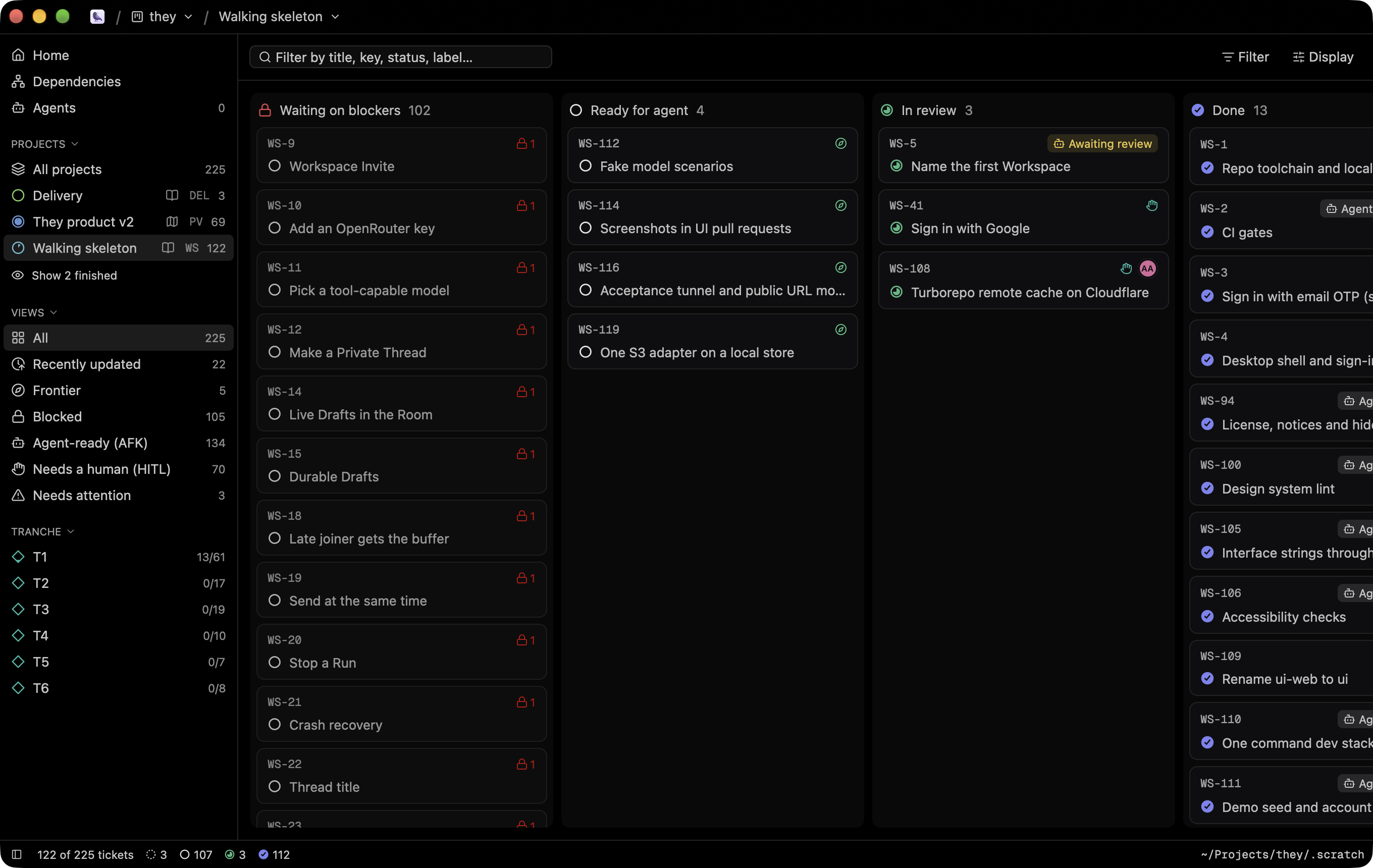
A native macOS kanban board for mattpocock/skills
tickets. Kuzgun reads the local issue tracker the skills write under.scratch/ (/to-tickets, /triage, /wayfinder), and follows the files live. It shares its look with Tusk.
Kuzgun only reads. The ticket files belong to the agents and skills that
write them (/to-tickets, /triage, /wayfinder, /implement). To act
on a ticket, copy its slash command or open it in your editor.
What it shows
- Welcome screen: open a folder (
cmd-o), or drop one on the window.
Opened folders are saved;cmd-1…5reopens them. Right-click a saved
board to pin it, reveal it or remove it. - Board: one column per status, in workflow order (
needs-triage,needs-info,draft,open,ready-for-agent,ready-for-human,claimed,in-progress,in-review,done,resolved,wontfix).
Each column has a Linear-style state icon. Columns collapse. Card lists
are virtualized. - Cards: ticket key, title, AFK / HITL badge, frontier mark, open
blockers (red lock), tickets it blocks (yellow), "Needs a human",
sub-task progress ring, comment count, days in the current status (git),
and every short field that repeats across tickets (Type, Tranche,
Priority, Labels…). - Sidebar: projects with progress rings and their
spec.md/map.md,
the views (All, Frontier, Blocked, Agent-ready, Needs a human), a filter
for every repeating field, and the workflow legend. - Wayfinder projects: the map's Destination above the board, and the
"Not yet specified" (fog) and "Out of scope" bullets as read-only columns. - Detail (
spaceto peek,enterfor the full view): status and its
triage meaning, readiness, AFK / HITL, type, project, spec link, every
field, blocked by / blocks / related, sub-tasks with progress, the
rendered body, comments (AI triage comments are marked), and an activity
feed from git: who moved the status, when, and which sub-tasks they
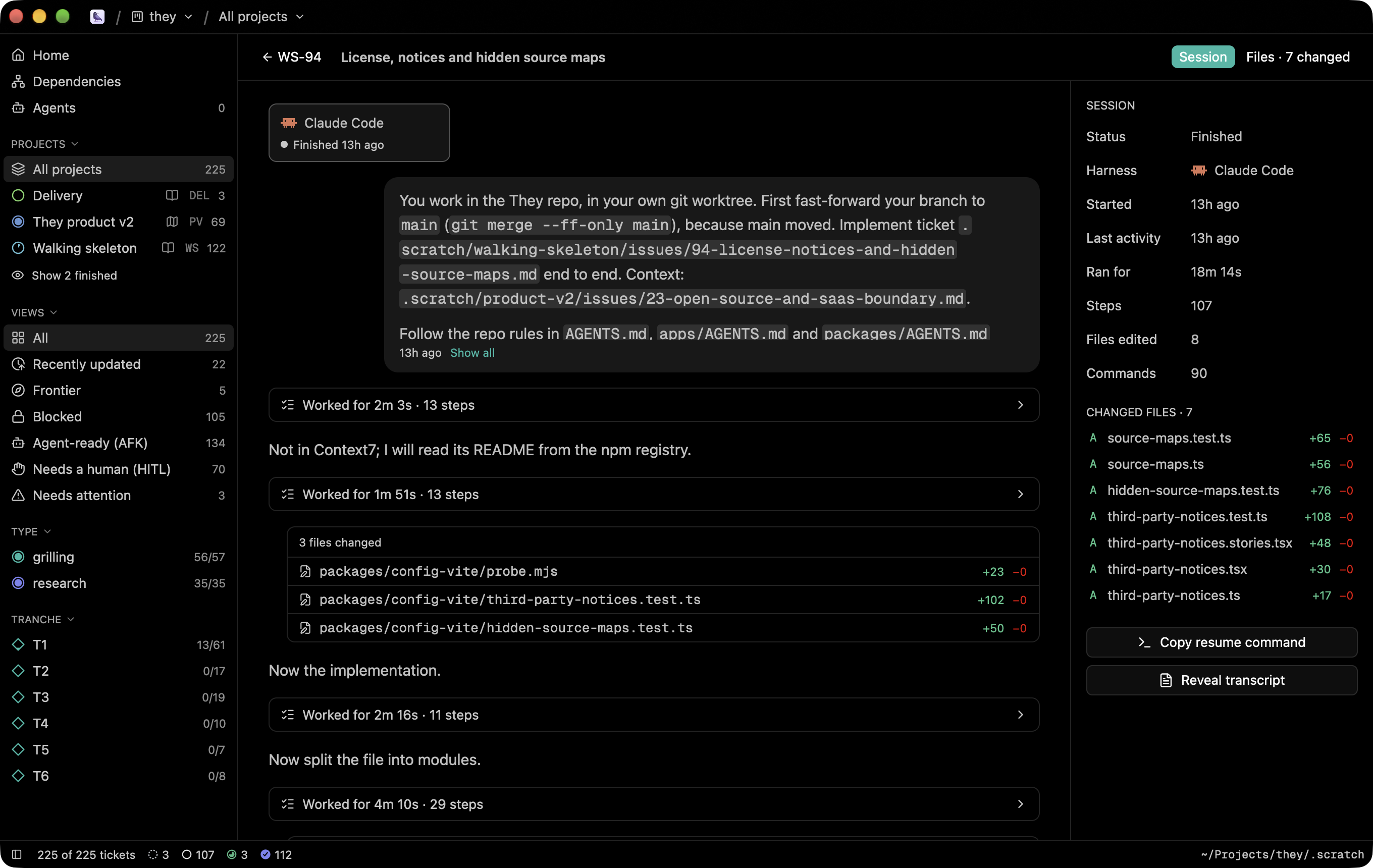
checked. File, size, created, time in status, branch and git state. - Agents: the runs of your coding agents on the board's tickets, read
from each harness's own session files: Claude Code, Codex, Cursor,
Gemini CLI, OpenCode, Kimi, GitHub Copilot CLI, Junie, Hermes, Pi, Amp
and Grok CLI. A run maps to the ticket its prompt names. The session
page shows the prompts, the replies, every step and the changed files,
live while the agent works, and copies the command that resumes it. - Live: a file watcher reloads the board as files change. Changed cards
glow for a moment, and the status bar says what changed and when. - Search (
cmd-f,/): key, title, status, fields and body. - Command palette (
cmd-shift-p,cmd-k) and ticket quick open
(cmd-p). - Settings (
cmd-,): Tusk's themes, accent colors, fonts; board column
width, density, empty columns and card properties; the editor command.
Kuzgun reads docs/agents/triage-labels.md above the board folder when it
exists, so renamed triage labels still land in the right columns.
Keys
| Key | Action |
|---|---|
j k h l / arrows |
Move between cards and columns |
space |
Peek (side panel) |
enter |
Full view |
esc |
Back / close |
i |
Copy the /implement command for the ticket |
0–4 |
All, Frontier, Blocked, Agent-ready, Needs a human |
t |
Swimlanes by project |
cmd-e |
Open in editor |
cmd-. / cmd-shift-. |
Copy ID / path |
cmd-b |
Toggle the sidebar |
cmd-r |
Reload |
cmd-w |
Close the board |
Getting started
[!IMPORTANT]
Kuzgun runs on macOS 14 (Sonoma) or later on Apple Silicon.
Download
Get the latest Kuzgun-<version>-arm64.dmg from the
Releases page. Open it and
drag Kuzgun into Applications.
Or install it with Homebrew:
brew install alpcanaydin/kuzgun/kuzgun
Releases are signed with a Developer ID and notarized by Apple, so they open
without Gatekeeper warnings.
Updates
Kuzgun updates itself. It checks for a new version once a day and downloads it
in the background. When the update is ready, a Restart to Update button
appears in the status bar. If you don't click it, the update installs the next
time you quit Kuzgun. You can also check right away with Kuzgun ▸ Check for
Updates…. Updates are signed, and Kuzgun verifies each one before installing it.
If you installed with Homebrew, brew upgrade kuzgun works too.
Build from source
Prerequisites: the Rust toolchain in rust-toolchain.toml and the Xcode
Command Line Tools.
cargo run --release -- ~/Projects/they/.scratch   # open a folder directly
cargo run --release -- ~/Projects/they --ticket WS-5 --files   # a ticket's session, on its files
scripts/bundle.sh                                # → target/release/bundle/Kuzgun.app
kuzgun --inspect <folder> prints what Kuzgun reads from a tracker, andkuzgun --conversation <harness> <file> sums up an agent transcript, andkuzgun --harnesses <repo> [days] lists the sessions Kuzgun finds for a repo.
Releasing (maintainers)
Releases are built by GitHub Actions (.github/workflows/release.yml). The workflow:
- Builds the app and signs it with the Developer ID.
- Notarizes and staples both the app and the DMG.
- Signs the DMG for Sparkle and writes the update feed (
appcast.xml). - Publishes a GitHub release with the DMG and the feed.
- Updates the Homebrew cask.
One-time setup: run scripts/setup-release.sh. The wizard walks you through
the certificate, the notarization key, the update-signing key and the Homebrew
token, and checks each one. It writes the update key's public half toassets/sparkle-public-key; commit that file. After that, a release is one command:
scripts/tag-release.sh 0.2.0 # bumps the version, commits, tags v0.2.0, pushes
To build a release locally, run scripts/release.sh. It uses the same signing
and notarization credentials, stored in your keychain.
[!TIP]
If you have an Apple Development certificate,cargo runsigns the dev
binary with it (seescripts/sign-dev.sh). Then macOS keeps the
notification permission across rebuilds.
Checks
CI runs the same checks you can run locally (mise install once):
cargo fmt --check
cargo clippy --locked --all-targets -- -D warnings
cargo test --locked
mise exec -- actionlint
mise exec -- shellcheck --severity=warning scripts/*.sh .github/scripts/*.sh
Where your data lives
Settings, saved boards and view state live in~/Library/Application Support/kuzgun/. Kuzgun never writes to a board.
Built with
GPUI and gpui-component
for the UI, Sparkle for updates, and tree-sitter for
highlighting. Kuzgun vendors small patches to gpui-component and gpui-base invendor/, and those keep their Apache-2.0 licenses.
License
Reviews (0)
Sign in to leave a review.
Leave a reviewNo results found