tiny-vision
Health Warn
- License — License: Apache-2.0
- Description — Repository has a description
- Active repo — Last push 0 days ago
- Low visibility — Only 7 GitHub stars
Code Fail
- eval() — Dynamic code execution via eval() in bench.py
- eval() — Dynamic code execution via eval() in caption.py
- eval() — Dynamic code execution via eval() in smoke_test.py
- eval() — Dynamic code execution via eval() in train.py
Permissions Pass
- Permissions — No dangerous permissions requested
No AI report is available for this listing yet.
Let your AI assistant watch videos: a 36M-param local image/video captioner (frozen DINOv2 + COCO-trained decoder) with an MCP server. Runs on CPU.
tiny-vision
Let your AI assistant watch videos. Many assistants, Claude included, can look at
images but can't open a video file. tiny-vision runs next to them and turns a video into a
scene-by-scene description they can read, so you can ask "what happens in this video?"
and get a real answer. Everything runs locally on your machine: the video never gets
uploaded.
Under the hood it's a 36M-parameter image and video captioner, small enough to run on
a laptop CPU. It uses Meta's DINOv2-small as a frozen image encoder (not fine-tuned) and
adds its own adapter and caption decoder (14M parameters), trained from scratch on COCO.
It plugs into any MCP app (Claude Desktop, Claude Code, Cursor, VS Code, LM Studio and
more; see where it works), and its text output works with any LLM at all.
Try it in your browser, no install:
(free; upload a photo or a video)
you: "summarize ~/Movies/trip.mp4"
  → tiny-vision splits it into scenes, captions several frames per scene
  → your assistant reads the scene breakdown and writes the summary
image / video frames → DINOv2-small (frozen) → adapter → tiny caption decoder → text
                                               └→ planned: adapters into Qwen / Llama embeddings
v1.0: 89% of Florence-2-base's COCO caption score at 1/6 the size, 8× faster on GPU,
75× faster on CPU. Model: amartomar683/tiny-vision.
Results
Same 1,000 COCO test images, same scorer, Apple M5 (GPU batch 16; CPU = single image).
| Model | Params | CIDEr | BLEU-4 | GPU img/s | GPU peak memory | CPU ms/img |
|---|---|---|---|---|---|---|
| tiny-vision v1.0 (greedy) | 36M | 1.196 | 0.339 | 52 | 1.2 GB | 54 |
| tiny-vision v1.0 (beam 3) | 36M | 1.213 | 0.348 | 24 | 1.2 GB | 101 |
| Florence-2-base | 231M | 1.348 | 0.364 | 6.7 | 7.0 GB | 4,063 |
| SmolVLM-256M-Instruct* | 256M | 0.126 | 0.051 | 0.5 | 23 GB | 55,800 |
*SmolVLM is a chat model that writes long descriptions, which caption metrics punish, so
only its speed and memory numbers are comparable. On the full COCO Karpathy test (5,000
images), v1.0 scores CIDEr 1.163 and BLEU-4 0.351 with beam 3. Details, training and
limitations are in the model card.
Setup
Quickest: run it with uv, no clone needed (the first run
installs dependencies, about a minute):
uvx --from git+https://github.com/amar683/tiny-vision tiny-vision photo.jpg
uvx --from git+https://github.com/amar683/tiny-vision tiny-vision clip.mp4 --summary
Or install it with pip install git+https://github.com/amar683/tiny-vision, which gives you the tiny-vision andtiny-vision-mcp commands.
To change the code or train, clone it:
git clone https://github.com/amar683/tiny-vision && cd tiny-vision
uv venv .venv && uv pip install --python .venv/bin/python -r requirements.txt
Runs on Apple Silicon (MPS), NVIDIA (CUDA) or CPU. The examples below use the clone
(.venv/bin/python caption.py ...); with the installed version, write tiny-vision ... instead.
Use the pretrained model
.venv/bin/python caption.py photo.jpg
.venv/bin/python caption.py clip.mp4 --scenes --json
.venv/bin/python caption.py clip.mp4 --every 2
--run picks the model: a Hugging Face repo id, downloaded on first use (defaultamartomar683/tiny-vision), or a local folder. --beams sets the beam search width
(default 3; --beams 1 is greedy and about 2× faster).
Videos are sampled one of two ways:
--scenes: caption a frame whenever the picture changes (a cut or new shot), plus one
every 10 s on long static shots. Segment boundaries land on the real cuts and static
stretches cost one caption. Only ~5 frames per second are decoded, so high-frame-rate
video stays cheap.--scene-threshold(default 0.3, range 0-1) sets how big a change
counts: lower catches camera moves, higher only hard cuts.--every N(default): one frame every N seconds.
Both use the video's real timestamps, so variable-frame-rate phone video lines up.
Video summaries, scene by scene
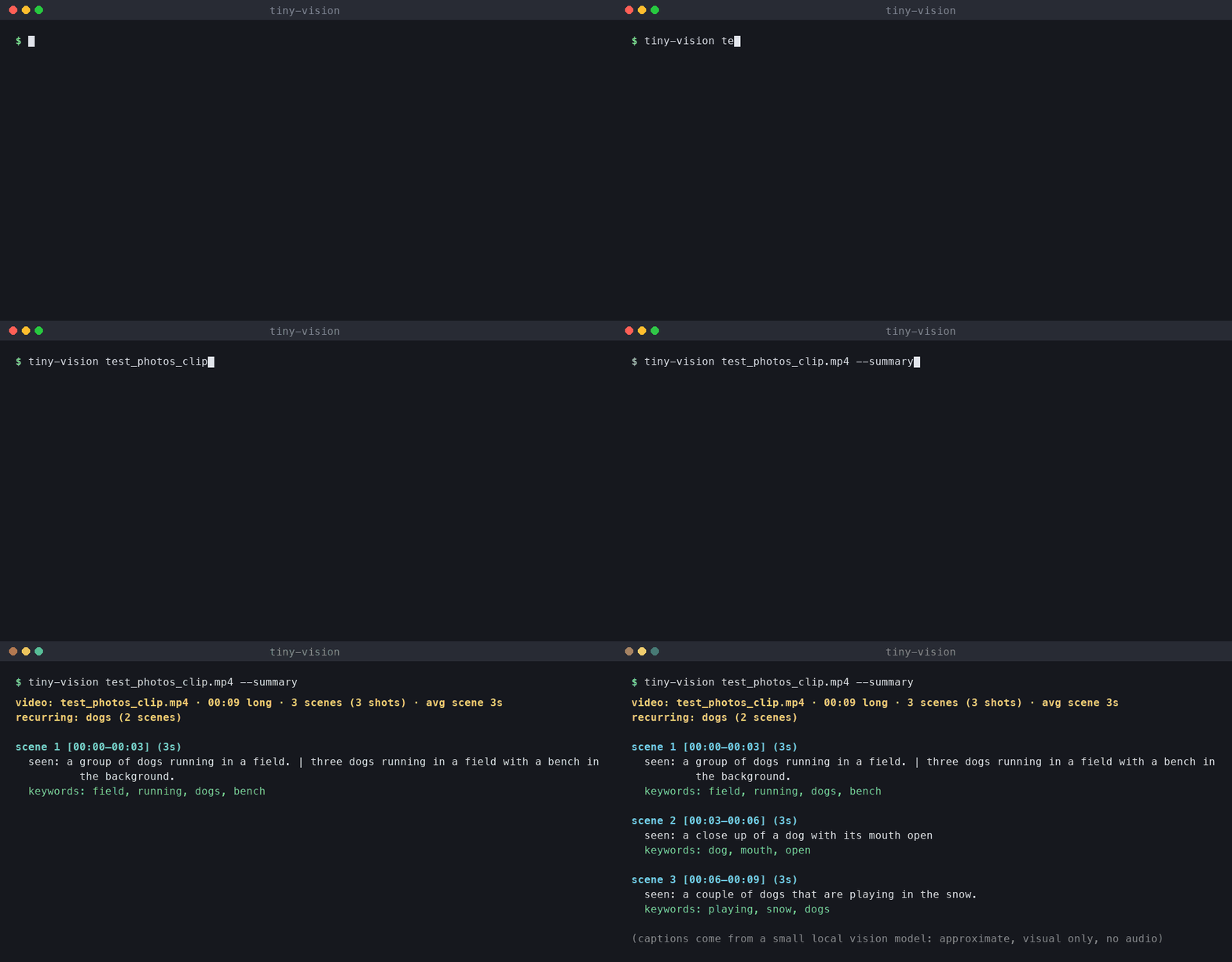
.venv/bin/python caption.py clip.mp4 --summary      # scene breakdown: paste into any LLM
.venv/bin/python caption.py clip.mp4 --summarize    # + summary written by a local LLM
--summary splits the video into shots (hard cuts plus slow camera drift) and captions
the start, middle and end of each shot. It then groups consecutive shots that show the
same thing into scenes, so a back-and-forth conversation stays one scene. Each scene gets
its time range, what's seen and keywords, and the top of the breakdown lists what recurs
across the video:
video: trip.mp4 · 00:09 long · 3 scenes (3 shots) · avg scene 3s
recurring: dogs (2 scenes)

scene 1 [00:00–00:03] (3s)
  seen: a group of dogs running in a field. | three dogs running in a field with a bench in the background.
  keywords: dogs, running, field, bench
...
Long videos. The whole video is always covered, however long it is: shots are
captioned as they're found, so memory stays flat. Long or fast-cut videos are condensed by
merging similar neighbouring scenes, keeping the breakdown to at most 100 scenes
(--max-scenes, or max_scenes over MCP). Videos over 10 minutes caption 2 frames per
shot, and over 30 minutes 1. A 17.5-minute, 338-shot video takes about 50 seconds on an
Apple M5 and comes out as 100 scenes (about 20 KB of text).
--summarize passes that breakdown to a local LLM (default Qwen2.5-1.5B-Instruct, ~3 GB,
downloaded on first use; pick another with --llm) and prints a plain-English summary.
Over MCP you don't need it, because your assistant writes the summary itself. tiny-vision
is visual only for now: speech and audio are planned for a later release.
Use it from an MCP client
mcp_server.py exposes three tools over stdio:
| Tool | Does |
|---|---|
summarize_video(path, scene_threshold=0.3, frames_per_shot=0, max_scenes=100, max_shots=0) |
Scene-by-scene breakdown of a whole local video, any length, for the assistant to summarize or answer questions about. frames_per_shot=0 picks it by length; long videos are condensed to max_scenes |
caption_image(path) |
One-sentence caption of a local image |
describe_video(path, mode="scenes", scene_threshold=0.3, every_seconds=2, max_frames=120) |
Timestamped text timeline of a local video. mode="scenes" samples on scene changes; mode="interval" samples every every_seconds |
Add it to your MCP client's config. Easiest, with uv (no clone):
{
  "mcpServers": {
    "tiny-vision": {
      "command": "uvx",
      "args": ["--from", "git+https://github.com/amar683/tiny-vision", "tiny-vision-mcp"]
    }
  }
}
The first start installs dependencies and downloads the model, which can take longer than
some apps wait. Run uvx --from git+https://github.com/amar683/tiny-vision tiny-vision --help once in a terminal first. If the
app says uvx isn't found, use its full path (which uvx).
Long videos take a while (about 50 s for 17 minutes on an M5). summarize_video sends
progress updates as it works, which keeps most apps waiting. If yours still gives up early,
raise its tool timeout; in Claude Code, for example, set MCP_TOOL_TIMEOUT=300000 (ms).
From a clone instead (use absolute paths):
{
  "mcpServers": {
    "tiny-vision": {
      "command": "/path/to/tiny-vision/.venv/bin/python",
      "args": ["/path/to/tiny-vision/mcp_server.py"]
    }
  }
}
Then just ask, for example "what happens in ~/Downloads/talk.mp4?" or "find the part of
this video where people are on the beach".
- Model source: the
TINY_VISION_MODELenv var (local folder or HF repo id), elseruns/coco_dinov2if you trained locally, else the published v1.0 model. - Beam width:
TINY_VISION_BEAMS(default 3).
Where it works
mcp_server.py is a standard local (stdio) MCP server, so it works in any app that can
run local MCP servers. Use the JSON config above, in that app's MCP settings file.
| App | Status |
|---|---|
| Claude Desktop, Claude Code | tested |
| Cursor, VS Code (GitHub Copilot agent mode), Windsurf, Cline, Zed, Goose | standard local MCP; not tested yet |
| LM Studio (0.3.17+) | standard local MCP; with a local model it's fully offline, video and LLM both on your machine |
| Codex (CLI, IDE, desktop app) | local MCP via Codex's config; not tested yet |
| ChatGPT chat, other web-only apps | they only connect to remote MCP servers, so use the CLI output instead |
No MCP? caption.py clip.mp4 --summary prints plain text, so you can paste it into any
chat or pipe it into a local model:
.venv/bin/python caption.py clip.mp4 --summary | ollama run qwen2.5 "Summarize this video:"
Evaluate and compare
.venv/bin/python eval.py --run amartomar683/tiny-vision --dataset jxie/coco_captions --beams 3
.venv/bin/python bench.py --model tiny-vision --run amartomar683/tiny-vision
.venv/bin/python bench.py --model florence-2-base
.venv/bin/python bench.py --report
eval.py reports BLEU-4 and CIDEr-D on any Hugging Face caption test set, scoring one
generated caption per image against all of that image's references. bench.py runs other
small models on the same images with the same scorer, and also measures speed and memory.
Train your own
.venv/bin/python smoke_test.py      # ~1 min end-to-end check

# v1.0: frozen DINOv2-small encoder, adapter + decoder trained on COCO (~3 h on an M5)
.venv/bin/python train.py --dataset jxie/coco_captions --encoder dinov2-small --preset tiny \
    --steps 40000 --warmup 1500 --eval-every 2000 --workers 6 --amp --out runs/coco_dinov2

# fully from scratch (our own ViT encoder)
.venv/bin/python train.py --dataset umaru97/flickr30k_train_val_test --preset tiny --steps 15000 \
    --warmup 1000 --eval-every 1000 --amp --out runs/flickr30k
--datasettakes any Hugging Face image-caption dataset; image and caption columns are
auto-detected. The best checkpoint by validation loss is kept.--resumecontinues an interrupted run from<out>/last.pt.
| Preset / encoder | Params | Use |
|---|---|---|
| nano, scratch | ~1.3M | smoke tests (64px) |
| tiny, scratch | ~25M | fully from-scratch model |
tiny, --encoder dinov2-small |
36M (14M trained) | v1.0 |
| small, scratch | ~56M | larger datasets / cloud GPU |
Publish a model to Hugging Face
.venv/bin/python export_hf.py --run runs/coco_dinov2 --out hf_export/tiny-vision
hf upload <user>/tiny-vision hf_export/tiny-vision
The export writes model.safetensors (including the frozen encoder, so it runs offline),config.json, tokenizer.json and the model card (MODEL_CARD.md → README.md).
Layout
vlm/encoder.py: from-scratch ViT, frozen DINOv2 wrapper, token pooling, per-frame time embeddingvlm/captioner.py: adapter + prefix-LM caption decoder, greedy and beam searchvlm/video.py: interval and scene-change frame sampling, text timelinevlm/scenes.py: shot detection, scene grouping and keywords for video summariesvlm/summarize.py: optional local-LLM summary for the CLIvlm/metrics.py: BLEU and CIDEr-D (pure Python)vlm/data.py: Hugging Face loader and a synthetic shapes datasetvlm/tokenizer.py: word-level tokenizer built from captionscaption.py,train.py,eval.py,bench.py,export_hf.py,mcp_server.py,smoke_test.pynotebooks/demo.ipynb: the Colab demo;space/: the same Gradio demo as a Hugging Face Space apppyproject.toml: packaging (tiny-visionandtiny-vision-mcpcommands)
Roadmap
- Speech: a per-scene transcript of what's said, so summaries cover audio too
- v1.1: embedding adapters for open LLMs (Qwen, Llama), exportable as llama.cpp
mmproj.gguf - Self-critical (CIDEr-reward) fine-tuning, subword tokenizer, COCO + Flickr30k mix
- Distil DINOv2 into a smaller encoder of our own
- Clip-level training for motion understanding
License
- Code: Apache-2.0 (see
LICENSE). - v1.0 weights: Apache-2.0. The encoder is DINOv2-small (Meta AI, Apache-2.0).
- Training data: COCO captions (CC BY 4.0, images under Flickr licenses). See the model
card for details.
Reviews (0)
Sign in to leave a review.
Leave a reviewNo results found