study-dashboard
Health Warn
- License — License: MIT
- Description — Repository has a description
- Active repo — Last push 0 days ago
- Low visibility — Only 5 GitHub stars
Code Pass
- Code scan — Scanned 12 files during light audit, no dangerous patterns found
Permissions Pass
- Permissions — No dangerous permissions requested
Security Assessment: The tool handles personal academic data and course files. Because it is designed to connect to Claude via MCP and features file rendering capabilities (turning PDF slides into PNGs for AI vision processing), it requires self-hosting a backend and managing a database. A light code scan of 12 files found no hardcoded secrets, no dangerous permission requests, and no malicious code execution patterns. The primary risk is standard for self-hosted apps: ensuring your local instance and Supabase Postgres database are secured with proper credentials. Overall risk: Low.
Quality Assessment: The project is licensed under the permissive MIT license and was actively updated as of today. However, it has a very low community footprint with only 5 GitHub stars and is explicitly labeled as being in "alpha" status. The README is highly detailed and outlines a clear, practical use case, indicating the creator is actively using and refining the tool for personal productivity.
Verdict: Safe to use, but keep in mind that you are adopting an early-stage, low-visibility alpha project, so you should secure your self-hosted instance appropriately.
Self-hostable study dashboard with an MCP connector so Claude (claude.ai, iOS, or Claude Code) can read and write your coursework.
study-dashboard
A self-hostable personal study dashboard. Track your courses, schedule, lectures, study topics, deliverables, and tasks in one place — and let Claude use the app from your browser, phone, or Claude Code.






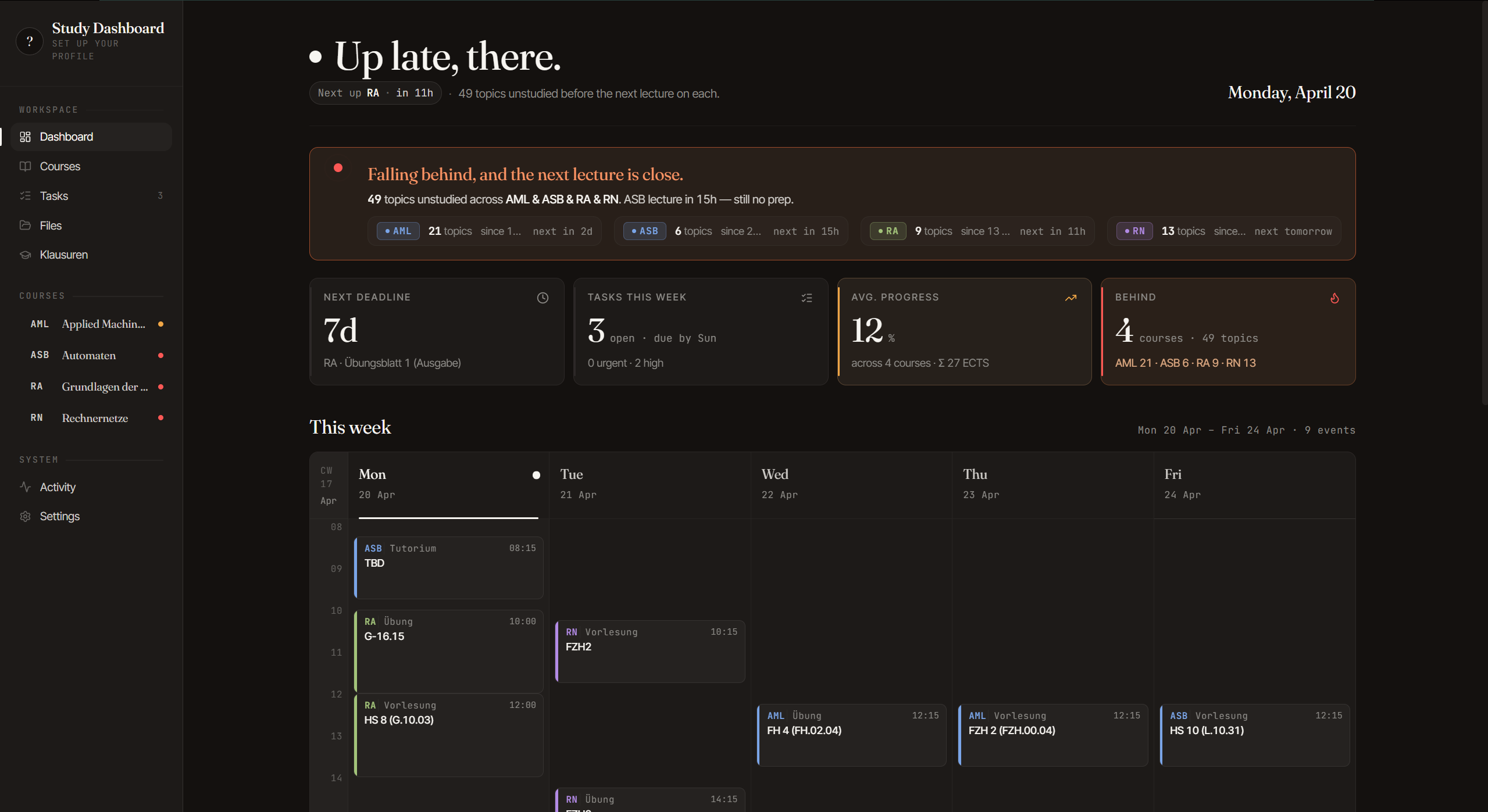
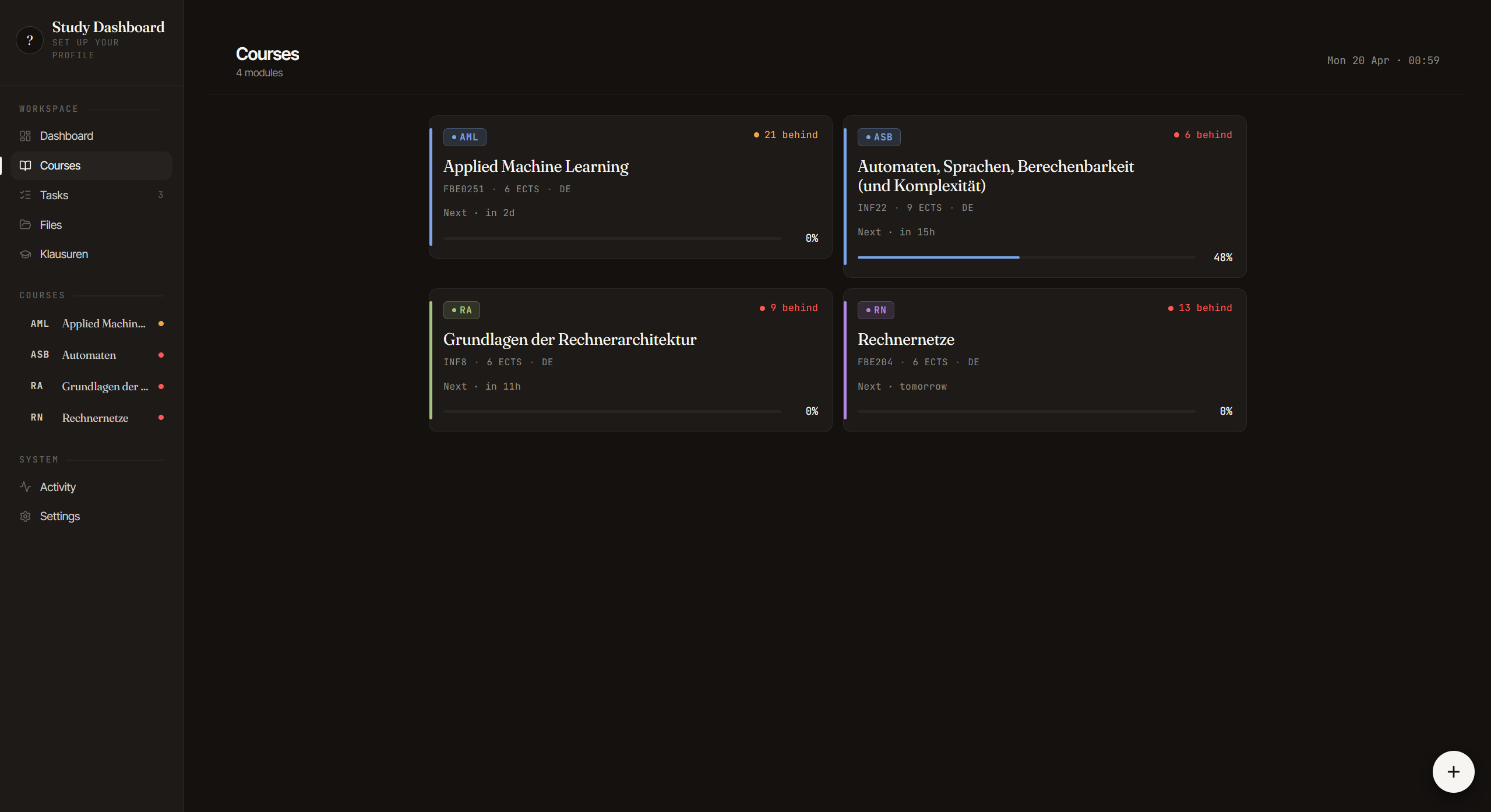
Demo — Claude reading a lecture PDF from the app over MCP
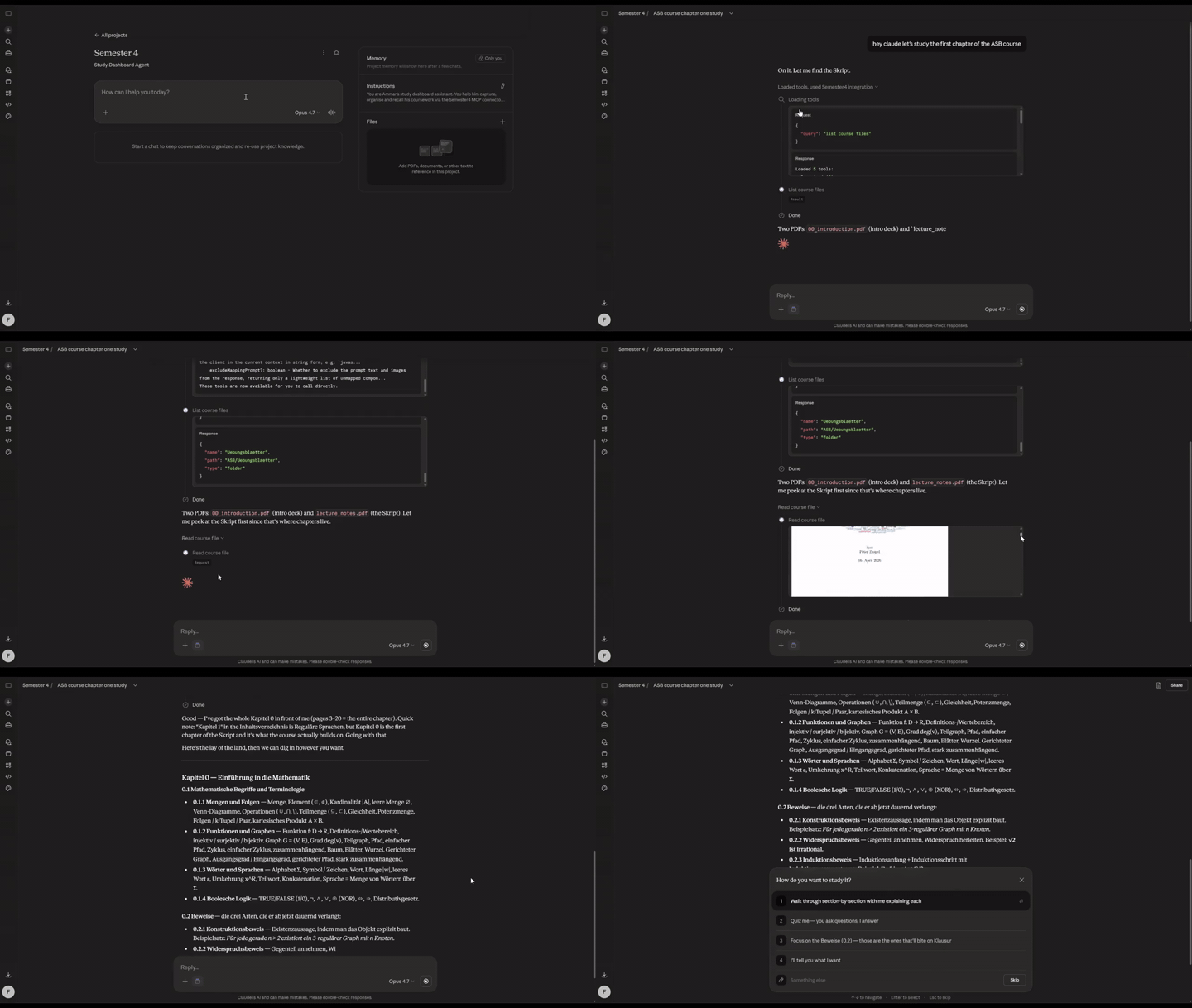
Claude calls list_course_files to locate the PDF in the app's file store, then read_course_file — which renders each page to a PNG and streams it back as vision input. Claude answers questions about the lecture without you uploading anything.
How I use this
A typical week of studying with Claude + the dashboard:
Right after a lecture. Walking out of class, I open Claude on my phone: "We just finished VL 4 of ASB, covered pumping lemma, closure properties, and non-regularity of aⁿbⁿ." Claude creates the lecture #4, adds the study topics with proper descriptions linked to lecture #4, marks it attended. couple of seconds. The dashboard is caught up.
Later that day, I drop the slides in. I upload the slides of the lecture to the app. Claude can now fetch and read the slides on demand (Through the MCP) and use them to teach me. (it can also fetch only the pages of the slides it needs to teach me, so it doesn't have to read the whole PDF).
Evening, sitting down to actually study. "Am I falling behind in anything?" Claude pulls the fall-behind list — "3 ASB topics unstudied, next lecture in 7h." I pick the first one:
"Walk me through pumping lemma §2.4. Pull the ASB VL4 slides and use the actual definition and example from there. Ask me a check question halfway through."
Claude calls list_study_topics to find the topic row, list_course_files + read_course_file to fetch the slides (pages rendered to PNGs — Claude literally sees them, not OCR text), then teaches from the prof's slide wording. When it hits the check question I answer, it either corrects me or moves on. When I confirm I've got it: "mark §2.4 studied," and Claude calls mark_studied.
Then the next topic. Same loop. The "3 unstudied" count on the dashboard ticks down in real time.
Before bed, planning tomorrow. "What's due this week?" One list, sorted by due date. "Add a task: finish ASB Blatt 3 by Monday 16:00, high priority." Done.
On the dashboard itself. Everything Claude did — the lecture, the topics, the mark-studied, the task — is already there when I open the UI. The falling-behind banner only fires when I have unstudied topics and the next lecture on them is close. The weekly grid shows what's coming. Course cards show per-course progress. I don't have to tell the dashboard what I did because Claude already did.
The dashboard is where I see things. Claude is how I edit them. Same database behind both. (You can also use the dashboard UI to edit things, of course, It does have CRUD operations for everything).
What makes it different
The MCP server ships with ~45 tools — anything you can do in the UI, Claude can do too. Create a study topic, mark something studied, upload a file, render a PDF as images, whatever.
Plug it into Claude.ai as a custom connector (full OAuth 2.1) and those tools are live in Claude Code on your laptop, claude.ai in your browser, and the Claude iOS app on your phone. Open Claude anywhere and it has the same view of your coursework that you do.
You'll need
Before you start, have:
- A Supabase account (free tier is fine) — database + file storage
- A Vercel account (free hobby tier is fine) — hosts the app at a public URL so Claude.ai and the Claude iOS app can reach the MCP endpoint. Any other Python-capable host (Fly, Railway, your own VPS) works if you prefer;
vercel.jsonis pre-configured for Vercel. - Node 20+ and pnpm (via corepack)
- Python 3.12 and
uv - ~15 minutes for first-time setup
If you only ever want to use the dashboard locally from your laptop — no Claude.ai, no phone — you can skip Vercel and run it on localhost.
Quick start
Get the app running on your laptop against a free Supabase project. No deploy, no MCP yet — that comes after.
1. Clone + install deps.
git clone https://github.com/AmmarSaleh50/study-dashboard
cd study-dashboard
uv sync                              # Python deps
cd web && pnpm install && cd ..      # frontend deps
2. Create a Supabase project. Go to supabase.com → New project. Set a database password and save it somewhere secure (you can't retrieve it later). Once it provisions: copy the Project URL from the project overview (top of the page → Copy → Project URL), and grab the service_role key from Project Settings → API Keys → "Legacy anon, service_role API keys". You'll paste both in the next step.
3. Fill in .env.
cp .env.example .env
uv run python -m app.tools.hashpw 'pick-a-strong-password'     # → APP_PASSWORD_HASH
python -c 'import secrets; print(secrets.token_urlsafe(48))'   # → SESSION_SECRET  (use `py` on Windows if `python` isn't on PATH)
Open .env, paste the Supabase URL, the service key, the password hash, and the session secret. Create web/.env.local with VITE_API_BASE_URL=http://localhost:8000.
4. Apply the migrations. In Supabase → SQL Editor, paste and run each file under db/migrations/ in order (0001_init.sql → 0002_lectures.sql → 0003_oauth.sql → 0004_app_settings.sql).
5. Run it.
# Terminal 1
uv run uvicorn app.main:app --reload        # → http://localhost:8000

# Terminal 2
cd web && pnpm dev                          # → http://localhost:5173
Open http://localhost:5173 and log in with the password you hashed. That's it — you're running.
Stuck? Full walkthrough with screenshots-of-setup-steps, Supabase CLI alternative, and troubleshooting is in INSTALL.md.
What you do inside the app
On first boot, everything's empty. You build it up in the UI (or via Claude through the MCP connector):
- Settings → Profile: name, monogram, institution
- Settings → Semester: label (e.g. "Fall 2026"), start/end dates, timezone, locale
- Courses → +: create each course with a short code (ASB, CS101…), a full name, and an accent color
- Course detail: add schedule slots (weekday / time / room), upcoming deliverables, and the study topics you're expected to cover
- Dashboard: lives here. Greeting, falling-behind banner, metric tiles, weekly grid, course cards, deadlines + tasks.
The MCP connector
Prerequisite: the app needs to be reachable at a public URL. Claude.ai and the iOS app can't talk to
localhost— so before connecting the MCP, deploy to Vercel (or Fly / Railway / your own VPS). Full steps in INSTALL.md §6. Claude Code is the exception: it can hithttp://localhost:8000/mcpdirectly.
Once the app is live at https://your-project.vercel.app, it serves a Streamable HTTP MCP endpoint at /mcp, OAuth-gated. One endpoint, every client:
# Claude.ai (browser + iOS app): Settings → Connectors → Add custom connector
#   paste: https://your-project.vercel.app/mcp

# Claude Code (local CLI, any directory):
claude mcp add --transport http --scope user \
  study-dashboard https://your-project.vercel.app/mcp
Both flows open your dashboard's login in a browser for the one-time OAuth consent. After that, the same ~45 tools are live wherever you use Claude:
- "list my courses" / "what's due this week?" / "what did we cover in RN last week?"
- "we just finished VL 3 of ASB, we covered topics X, Y, Z — create the lecture and topics" → Claude calls
create_lecture+add_lecture_topics - "mark chapter §1.4 as studied" →
list_study_topics+mark_studied - "open the ASB lecture 2 slides and tell me what §0.1.3 is about" →
list_course_files+read_course_file(PDFs are rendered to PNGs and streamed back as vision — Claude literally sees the slides) - "I'm falling behind in AML, help me prioritise" →
get_fall_behind+ plan
Claude.ai Projects get a bigger quality boost when you paste a tailored system prompt alongside the connector. Template: docs/claude-ai-system-prompt.md.
Full walkthrough (including curl-based verification): INSTALL.md#5-connect-an-mcp-client.
What's in here
app/                FastAPI + MCP server (Python, uv-managed)
  routers/          HTTP endpoints
  services/         Supabase queries + business logic
  mcp_tools.py      The ~45 MCP tools
  schemas.py        Pydantic models
db/
  migrations/       Four SQL files — apply in numeric order to any Postgres
web/
  src/              Vite + React 19 + Tailwind + shadcn/ui frontend
scripts/
  sync.py           Optional: mirror a local folder to the course_files bucket
docs/
  claude-ai-system-prompt.md    Template + walkthrough for a Claude.ai Project
  claude-design-brief.md        Template for writing a Claude Design redesign brief
  examples/                     Real lived-in versions of both
Stack
- Frontend: Vite + React 19 + TypeScript + Tailwind + shadcn/ui
- Backend: FastAPI (Python 3.12)
- Database: Supabase Postgres
- MCP: Python
mcpSDK, mounted at/mcpover Streamable HTTP with OAuth 2.1 - Hosting: Vercel (one project hosts both the static frontend and the Python functions)
Design
The visual design was prototyped in Claude Design. The brief that produced it — plus a reusable template for writing your own briefs — is at docs/claude-design-brief.md.
The one that i used to transform the UI is at (If you are coming from the reddit post) docs/examples/design-brief-example.md.
Heads up
This started as a personal project for a German university, so don't be surprised if you spot hardcoded German strings here and there — slot kinds (Vorlesung, Übung, Tutorium, Praktikum), the odd UI label, sample data. PRs to genericize or i18n any of it are very welcome.
License
MIT — do whatever you like. Credit / a star / a link back is appreciated but not required.
Contributing
Yes, please. If you self-host this and something breaks, something feels off, or you wish it did one more thing — open an issue or a PR. No ceremony. Typo fixes, a clearer sentence in INSTALL.md, a new MCP tool you wrote for your own use, a CSS tweak that makes the mobile layout less cramped — all welcome.
If you're unsure whether a bigger change is in scope, a quick "would you take a PR that does X?" issue is the easy way to find out.
Full contributor notes (setup, style, testing, what's likely in vs. out of scope) live in CONTRIBUTING.md.
Reviews (0)
Sign in to leave a review.
Leave a reviewNo results found