logdeck
Health Pass
- License — License: GPL-3.0
- Description — Repository has a description
- Active repo — Last push 0 days ago
- Community trust — 83 GitHub stars
Code Fail
- Hardcoded secret — Potential hardcoded credential in docs/app/docs/configuration/page.tsx
- Hardcoded secret — Potential hardcoded credential in docs/app/docs/installation/page.tsx
Permissions Pass
- Permissions — No dangerous permissions requested
No AI report is available for this listing yet.
logs viewing and container management shouldn't be that hard. shipping 🚢
LogDeck
LogDeck is an open-source, high-performance Docker container monitoring and management tool. Built for speed and ease of use, it provides real-time log streaming, multi-host support, and a beautiful interface for managing your containers.
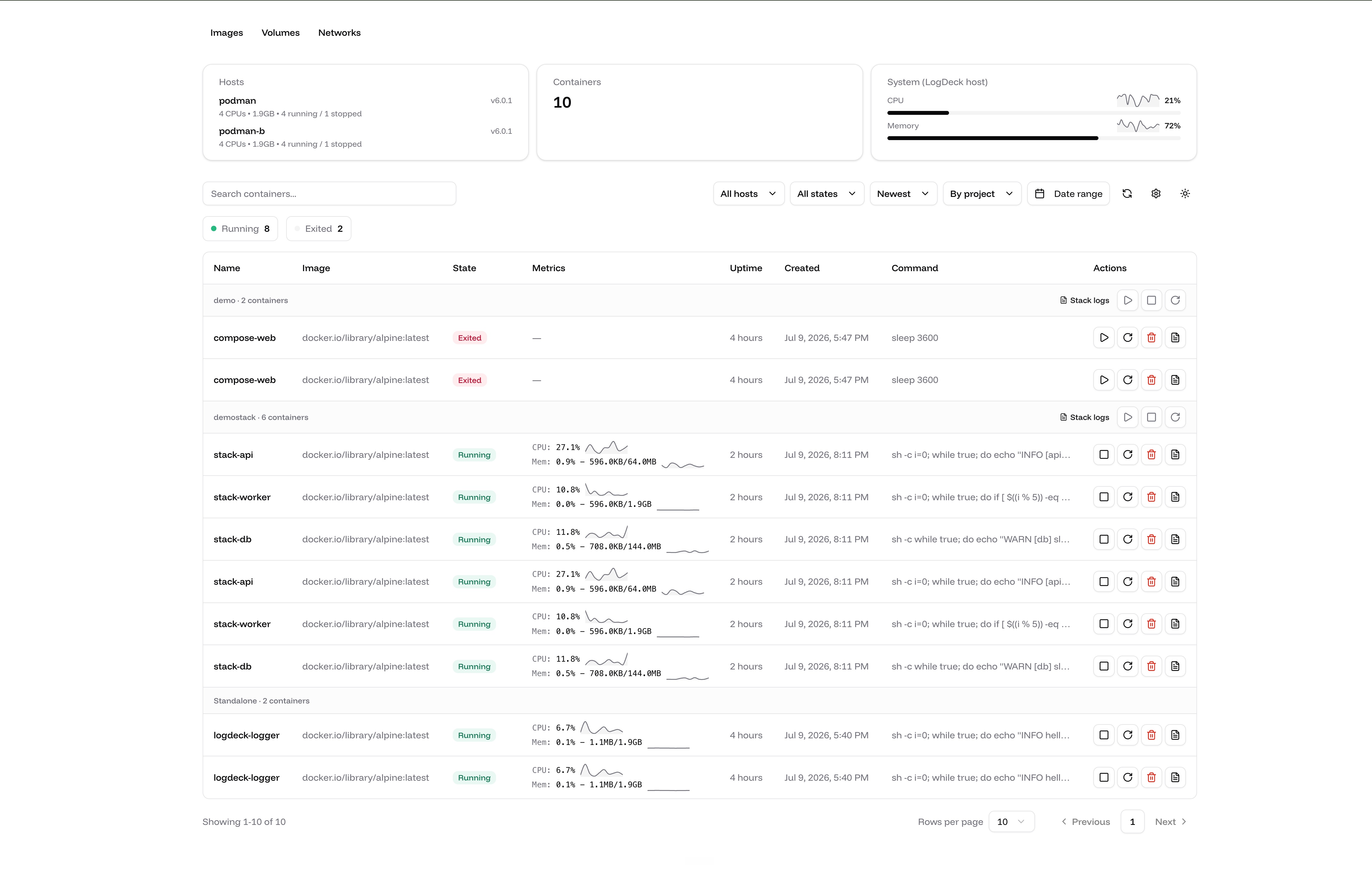
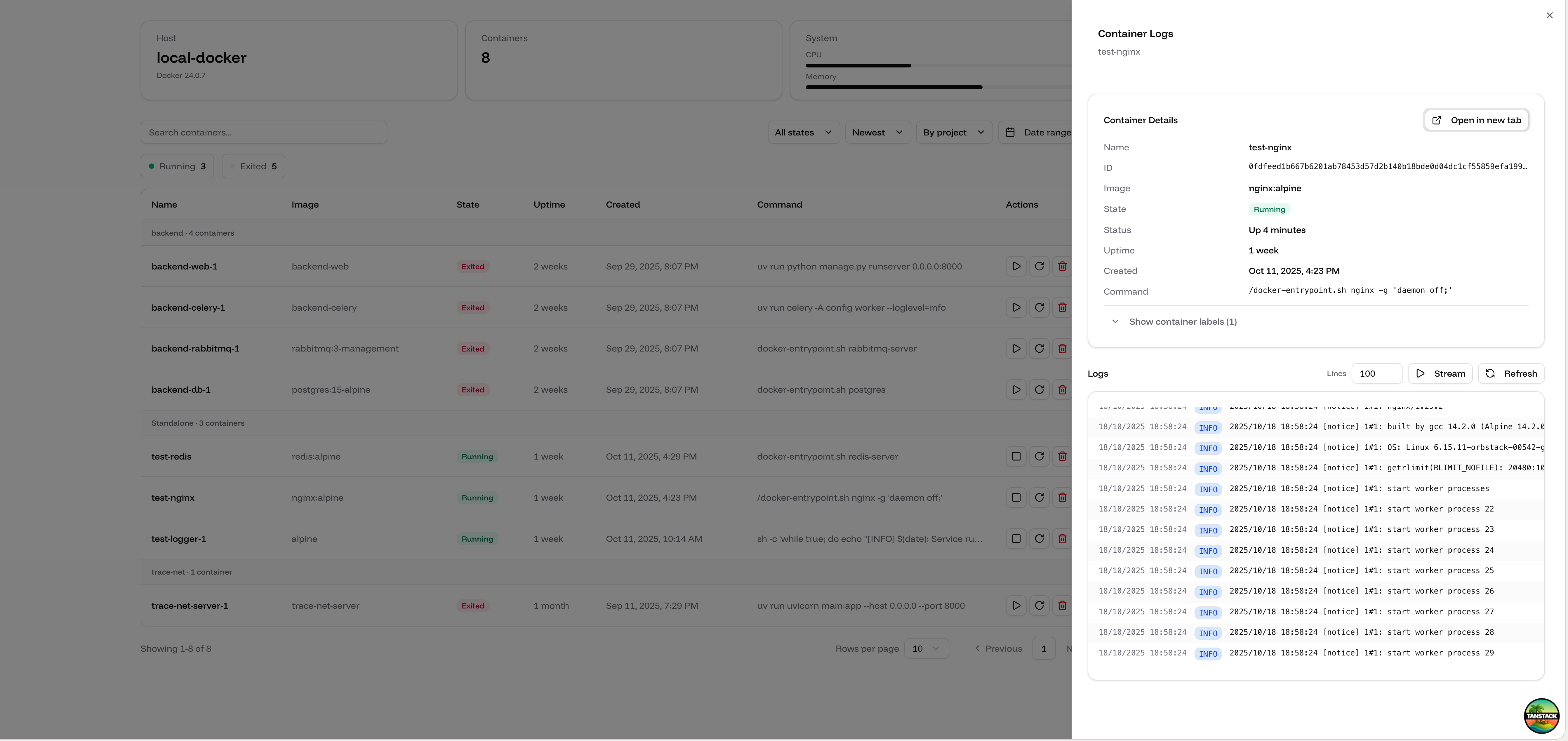
Features
Real-Time Log Streaming
- Live log streaming (tail -f style) with play/pause controls
- Historical log viewing with configurable line counts
- Auto-scroll toggle during streaming
- Toggleable timestamps and text wrapping
- Log download in JSON or TXT format
Log Persistence & History
Logs are stored locally, so history outlives the container that produced it:
- Every container on every host is tailed into a local SQLite store (enabled by default)
- A Live | History toggle in the log viewer searches everything stored, server-side
- History survives restarts and rebuilds that give a container a new ID (
docker compose up --build) - Containers that no longer exist show up under a Removed filter with their stored logs still readable
- Retention caps (50 MB per container, 1024 MB total by default) evict oldest-first
- Aggregated stack logs remain live-only
Requires the /data volume (see docker-compose.yml). Full details in the Log History guide.
Alerting
- Event rules on container death (non-zero exit) and OOM kills
- Log rules on a minimum level, a regex pattern, or both
- Rate thresholds ("5 matches in 60 seconds") and per-rule cooldowns that report suppressed counts
- Target rules by host, container name, or Compose project
- One JSON webhook that Slack and Discord incoming webhooks accept unchanged
- Alert history with the delivery result of every notification
- Manage it from Settings, or with
logdeck alertsfrom the terminal
See the Alerting guide.
Advanced Log Filtering & Search
- Full-text search with highlighting, plus highlight or exclude modes
- Search navigation (previous/next match with match counter)
- Filter by log level (TRACE, DEBUG, INFO, WARN, ERROR, FATAL, PANIC)
- Time range presets and a custom calendar range
- Color-coded log level badges, collapsible JSON lines, and line pinning
Multi-Host Docker Support
Manage containers across multiple Docker hosts from a single interface:
- Connect to local Unix sockets, remote SSH, or TCP endpoints
- Filter and view containers by specific host or across all hosts
- Real-time container state synchronization
- Secure SSH-based connections with key authentication
- Host-aware operations and log streaming
For detailed configuration, see the Multi-Host Setup Guide.
Podman Support
LogDeck works with Podman as well as Docker, using Podman's Docker-compatible API:
- Automatic detection of local Docker and Podman sockets (rootless and rootful)
- Logs, stats, lifecycle actions, events, and the terminal all work unchanged
- Compose grouping recognizes both Docker Compose and podman-compose projects
- Mix Docker and Podman hosts in a single multi-host setup
- Caveat: health badges are Docker-only. LogDeck reads health from the engine's container list; Docker embeds it there, Podman's Docker-compatible list API does not.
For setup instructions, see the Podman Setup Guide.
Command-Line Interface
A scriptable logdeck CLI talks to the server's HTTP API — built for automation and AI agents:
- List containers and stacks, inspect, read/follow/search logs, and check stats from the terminal
logdeck grepsearches the recent logs of every running container across all hosts- Lifecycle actions, resource limits, and compose stack controls
- Manage alert rules, the webhook, and alert history with
logdeck alerts - Table output for humans, JSON/NDJSON output (
-o json) for machines
See the CLI Guide for installation and every command.
Container Lifecycle Management
- Start, stop, restart, and remove containers
- Confirmation dialogs for destructive actions
- Health status badges (healthy, unhealthy, starting) for containers with a healthcheck
- Read-only mode for monitoring-only deployments
- Real-time state updates
Compose Stack Tools
- Start, stop, or restart a whole Compose stack from its group header
- Aggregated stack logs: every container's logs merged by timestamp in one view, with color-coded container badges
- Works with Docker Compose and podman-compose projects
Stats & Trends
- Live CPU and memory readings per container
- Sparkline trend lines showing the last five minutes of CPU and memory history
- Per-host engine stats (CPUs, memory, container counts, version) in multi-host setups
- System stats for the machine running LogDeck
Resource Limits & Restart Policies
- Edit memory limits, CPU limits, and restart policies from the container page
- Applied live via the engine's update API — no container recreate, no downtime
Images, Volumes & Networks
- Read-only views of images, volumes, and networks across all configured hosts
- Text filtering and per-host error reporting
Container Discovery & Organization
- Automatic discovery of all running containers
- Group containers by Docker Compose project
- Filter by state (running, exited, paused, restarting, dead)
- Search by container name, ID, or image
- Sort by creation date
- Date range filtering
Interactive Terminal
- WebSocket-based container terminal access
- Full terminal emulation with XTerm.js
- 10,000 line scrollback history
- Copy-to-clipboard support
Environment Variables Management
- View and edit container environment variables
- Bulk import from .env files
- Support for quoted values and comments
Modern UI/UX
- Clean, intuitive dashboard with summary cards
- Dark mode support
- Responsive design (mobile, tablet, desktop)
- URL state persistence for shareable views
- Accessible UI components
Authentication & Security
- Optional authentication — enable it from Settings, pin it with environment variables, or run open
- JWT session login for the web UI, with a rate-limited login endpoint
- Scoped API tokens (
ldk_...) for the CLI and external tools:admin— full accessread— can read logs, history, stats, events, and container details, but cannot mutate anything, open the web terminal, read container environment variables, or read settings
- Read-only mode: blocks container actions, stack actions, environment and resource edits, and the web terminal
Configuration & Storage
LogDeck reads environment variables and a JSON config file that the Settings page writes; environment variables win and pin the value so the UI cannot change it.
Everything it persists lives in one directory (/data by default, CONFIG_PATH to move it):
config.json— hosts, Coolify hosts, read-only mode, auth, API tokens, alert rules, log-store settingslogs.db— the SQLite log storealerts-history.json— recently fired alerts
Mount it as a volume. Without one, all of the above is written inside the container and lost when it is recreated.
See the Configuration guide for every environment variable.
Reviews (0)
Sign in to leave a review.
Leave a reviewNo results found