hermes-meshtastic-adapter
Health Warn
- License — License: MIT
- Description — Repository has a description
- Active repo — Last push 0 days ago
- Low visibility — Only 5 GitHub stars
Code Pass
- Code scan — Scanned 10 files during light audit, no dangerous patterns found
Permissions Pass
- Permissions — No dangerous permissions requested
No AI report is available for this listing yet.
Hermes Agent platform plugin that connects Hermes to a Meshtastic LoRa mesh. It receives plain-text messages from mesh nodes, forwards them into Hermes sessions, and sends replies back over LoRa as direct messages or channel broadcasts.
Hermes Meshtastic Adapter
hermes-meshtastic-adapter is a Hermes Agent platform plugin that connects Hermes to a Meshtastic LoRa mesh. It receives plain-text messages from mesh nodes, forwards them into Hermes sessions, and sends replies back over LoRa as direct messages or channel broadcasts.
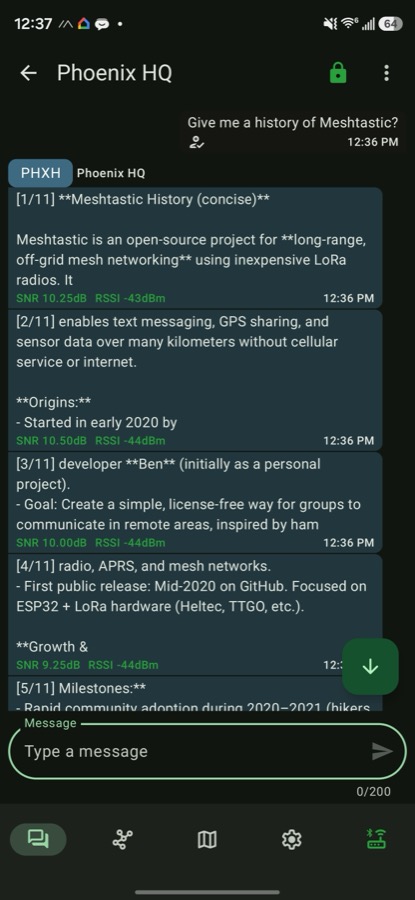
Talking to the Hermes agent over LoRa from the Meshtastic app: long replies are split into numbered chunks, each tagged with live signal quality.
Public naming:
- GitHub repo:
hermes-meshtastic-adapter - Hermes plugin name:
meshtastic-platform - Hermes platform name:
meshtastic
What It Does
- Bridges Meshtastic text messages into Hermes Agent.
- Creates separate Hermes sessions for individual node DMs, such as
meshtastic:!da1b1613. - Creates shared Hermes sessions for channel broadcasts, such as
meshtastic:channel:0ormeshtastic:channel:Primary. - Sends Hermes replies back to the source node or channel.
- Splits long replies into numbered LoRa-safe chunks.
- Exposes mesh tools for listing nodes, checking node info, reading signal quality, sending mesh messages, and querying telemetry.
- Stores telemetry, position, and signal history in SQLite.
Supported Hardware
The adapter connects to a gateway node over USB serial or over TCP/IP.
- ESP32 USB-serial boards such as Heltec WiFi LoRa 32 V3 are supported and are the recommended gateway hardware.
- The gateway node should be wall-powered or USB-powered and configured as a stable base/client node.
- SenseCAP T1000-E and similar nRF52 tracker devices are BLE-first; their USB port is primarily for flashing and serial logs, not reliable control. They are not supported over USB serial by this plugin.
- BLE support is not included in v1.
Recommended gateway node settings:
- Role:
CLIENTorCLIENT_BASE. - Power: USB or wall power.
- Disable deep sleep and aggressive power saving on the gateway-connected node.
- Bluetooth may be disabled after initial Meshtastic app configuration.
- Region and modem preset must match your mesh.
LongFastor your chosen preset must be configured consistently across nodes.
Installation
Clone or download the plugin, then copy it into Hermes' plugin directory:
git clone https://github.com/amscotti/hermes-meshtastic-adapter
mkdir -p ~/.hermes/plugins/meshtastic
cp -R hermes-meshtastic-adapter/* ~/.hermes/plugins/meshtastic/
Install dependencies into the Hermes virtual environment:
~/.hermes/hermes-agent/venv/bin/python -m pip install -r ~/.hermes/plugins/meshtastic/requirements.txt
Enable the plugin:
hermes plugins enable meshtastic-platform
Restart the Hermes gateway after changing plugin files or environment variables.
Configuration
Copy the bundled template and edit it for your node and mesh:
cp .env.example .env
Minimum .env example:
MESHTASTIC_SERIAL_PORT=/dev/cu.usbserial-0001
MESHTASTIC_ALLOWED_NODES=!da1b1613
MESHTASTIC_HOME_CHANNEL=meshtastic:!da1b1613
MESHTASTIC_CHUNK_BYTES=170
MESHTASTIC_CHUNK_DELAY=4.0
MESHTASTIC_ACK_TIMEOUT=0
Environment variables:
| Variable | Required | Default | Description |
|---|---|---|---|
MESHTASTIC_SERIAL_PORT |
No* | auto |
Serial path such as /dev/cu.usbserial-0001, or auto for discovery. *Configure either this or MESHTASTIC_TCP_HOST. |
MESHTASTIC_BAUD_RATE |
No | 115200 |
Informational only — the meshtastic library always opens serial at 115200. |
MESHTASTIC_TCP_HOST |
No | None | Hostname or IP of a WiFi/Ethernet node. When set, the adapter connects over TCP instead of serial. |
MESHTASTIC_TCP_PORT |
No | 4403 |
TCP API port of the Meshtastic node. |
MESHTASTIC_ALLOWED_NODES |
No | Empty | Preferred allowlist. Comma-separated node IDs that may talk to Hermes. |
MESHTASTIC_ALLOWED_USERS |
No | Empty | Legacy alias for MESHTASTIC_ALLOWED_NODES. |
MESHTASTIC_ALLOW_ALL_USERS |
No | false |
If true, any mesh node may talk to Hermes. Use with caution. |
MESHTASTIC_ALLOW_CHANNELS |
No | false |
If true, the agent also answers channel/broadcast messages (replying into the shared channel). Off by default so the agent only responds to direct messages and never spams a public channel's airtime. |
MESHTASTIC_HOME_CHANNEL |
No | Empty | Cron/default delivery target, such as meshtastic:!da1b1613 or meshtastic:channel:0. |
MESHTASTIC_CHUNK_BYTES |
No | 170 |
Max UTF-8 bytes per outbound LoRa chunk. 170 is conservative for multi-hop reliability and leaves headroom for encrypted-DM (PKI) overhead; the raw protocol payload ceiling (and the clamp for this value) is 233. |
MESHTASTIC_CHUNK_DELAY |
No | 4.0 |
Delay in seconds between chunk sends. |
MESHTASTIC_ACK_TIMEOUT |
No | 0 |
Seconds to wait for ACK/NACK per outbound chunk. 0 is non-blocking. Set 30 to fail sends on NAK or timeout. |
MESHTASTIC_SEND_RETRIES |
No | 0 |
Extra delivery attempts for un-ACKed direct-message chunks. > 0 implies waiting for the ACK; transient failures (timeout, no-route) are re-sent, permanent ones (e.g. TOO_LARGE) are not. Broadcasts are never retried. |
MESHTASTIC_RETRY_BACKOFF |
No | 5.0 |
Seconds to wait between delivery retries. |
MESHTASTIC_TELEMETRY_RETENTION_DAYS |
No | 30 |
Age (days) at which persisted telemetry/position/signal rows are pruned from SQLite. 0 disables pruning. Pruning runs at most hourly, lazily on writes. |
Connecting Over IP (TCP)
WiFi- or Ethernet-capable nodes expose a TCP API (default port 4403). Set MESHTASTIC_TCP_HOST to connect over the network instead of USB serial:
MESHTASTIC_TCP_HOST=192.168.1.50
MESHTASTIC_TCP_PORT=4403
When MESHTASTIC_TCP_HOST is set it takes precedence and serial discovery is skipped — the adapter uses a single transport at a time. Enable WiFi/Ethernet and the network API on the node through the Meshtastic app first. Reconnect with exponential backoff and the outbound queue work the same as over serial.
Chat IDs
Direct messages use node-scoped chat IDs:
meshtastic:!da1b1613
Channel messages use group-scoped chat IDs:
meshtastic:channel:0
meshtastic:channel:Primary
Tools
The plugin registers these Hermes tools:
mesh_list_nodes: list visible nodes and signal status.mesh_node_info: inspect a node by ID or name.mesh_signal_quality: check current and recent SNR/RSSI.mesh_send_dm: send a direct message to a node.mesh_send_broadcast: send a channel broadcast.mesh_telemetry: read recent telemetry from a node.mesh_telemetry_history: query persisted telemetry, position, or signal history.
Node Freshness
The meshtastic library only refreshes a node's lastHeard from periodic NodeInfo packets, so it lags a node's actual transmissions. The adapter therefore tracks a live overlay from the packet stream: on every received packet it updates the sender's last_heard (from the packet's rxTime) and, for direct (0-hop) packets, its snr/rssi — mirroring the official Meshtastic client. This is done for every heard node (including ones not on the allowlist, so you can watch a node you don't bridge), and mesh_list_nodes / mesh_node_info / mesh_signal_quality report the freshest of the library value and this overlay. mesh_node_info also returns last_heard / last_heard_epoch.
Delivery Semantics
Meshtastic and LoRa delivery are best-effort.
- The adapter requests ACKs with
wantAck=Truefor outbound packets. - The adapter registers an
onAckNakcallback and records/logs ACK/NACK responses by packet ID when Meshtastic surfaces them. - The adapter distinguishes a real end-to-end ACK (sent by the destination itself) from an implicit ACK relayed by another node (the packet reached the mesh but the destination did not confirm receipt) — mirroring the official client's RECEIVED vs DELIVERED. Only a real ACK counts as delivered; an implicit-only ACK is treated as un-confirmed (and, with retries enabled, re-sent).
- By default, sends are non-blocking:
sendText()returning success means the local radio accepted the packet, and later ACK/NACK callbacks are logged if they arrive. - Set
MESHTASTIC_ACK_TIMEOUT=30or pass send metadatameshtastic_ack_timeoutto wait for ACK/NACK per chunk. In this mode, NAKs and timeouts makeSendResult.successfalse. - ACK results are exposed in
SendResult.raw_response["chunks"][i]["ack"]for waited sends, and can be inspected later in code withadapter.get_ack_status(packet_id). - Set
MESHTASTIC_SEND_RETRIES=3to automatically re-send un-ACKed direct-message chunks. A retry only fires on a transient failure (ACK timeout, no-route, max-retransmit); permanent NAKs (TOO_LARGE,NO_CHANNEL, auth/PKI errors) are not retried, and broadcasts are never retried (no per-recipient ACK). Each retry waitsMESHTASTIC_RETRY_BACKOFFseconds; the per-chunk attempt count is exposed inSendResult.raw_response["chunks"][i]["attempts"]. Note: if a message was actually delivered but its ACK was lost, a retry sends a duplicate. - Long responses are split and paced, but any chunk may still be dropped by the mesh.
Even with ACK waiting enabled, delivery is still best-effort because ACK behavior depends on route quality, node firmware behavior, and whether the destination is awake.
Cron Delivery
Set MESHTASTIC_HOME_CHANNEL to let Hermes cron jobs deliver output over Meshtastic.
Examples:
MESHTASTIC_HOME_CHANNEL=meshtastic:!da1b1613
MESHTASTIC_HOME_CHANNEL=meshtastic:channel:0
The standalone cron sender creates a short-lived adapter connection when needed and disables queueing so cron failures are visible. A future improvement should prefer reusing the already-connected gateway adapter when available.
Power And Sleep
The plugin does not modify Meshtastic power settings or force remote nodes to stay awake.
What it does:
- Maintains an open USB serial connection to the gateway node.
- Runs reconnect checks.
- Drains queued outbound messages after reconnect.
What it does not do:
- Disable light sleep or deep sleep.
- Change Meshtastic power config.
- Send radio keepalive packets.
- Prevent battery-powered nodes from sleeping.
For a gateway/base station, configure power behavior on the node itself through Meshtastic settings.
Safety Notes
- Do not enable
MESHTASTIC_ALLOW_ALL_USERS=trueunless you understand the risk. - Prefer node allowlists and DMs.
- Broadcast sending can consume shared mesh airtime quickly.
- Long AI responses may be impolite on public or busy meshes.
- Mesh messages may be overheard depending on channel configuration and key sharing.
- Do not expose channel keys or private keys to Hermes prompts, logs, or tools.
Troubleshooting
Plugin Uses Mock Serial Connection
This usually means the Hermes Python environment is missing dependencies or no serial port was discovered.
Install dependencies into the Hermes venv:
~/.hermes/hermes-agent/venv/bin/python -m pip install -r ~/.hermes/plugins/meshtastic/requirements.txt
Then set MESHTASTIC_SERIAL_PORT explicitly instead of auto.
Serial Port Not Found
- macOS ports often look like
/dev/cu.usbserial-*or/dev/cu.usbmodem*. - Linux ports often look like
/dev/ttyUSB*or/dev/ttyACM*. - Install CP210X or CH34X drivers if your board requires them.
- Make sure no other Meshtastic client is holding the serial port.
Direct Messages Fail Silently
The target node may not have initialized public key metadata. Pair the node with the official Meshtastic mobile app at least once, then let node info propagate through the mesh.
Long Replies Are Missing Chunks
- Set
MESHTASTIC_CHUNK_BYTES=170. - Increase
MESHTASTIC_CHUNK_DELAYto5.0or higher. - Prefer shorter prompts and replies on weak or multi-hop meshes.
Battery Nodes Miss Messages
Sleeping or power-saving nodes may not receive messages immediately. Configure device-side power behavior in Meshtastic.
Development
Install runtime and development tools into the Hermes virtual environment:
~/.hermes/hermes-agent/venv/bin/python -m pip install -r requirements.txt -r requirements-dev.txt
Run tests using the Hermes virtual environment:
~/.hermes/hermes-agent/venv/bin/python -m unittest test_meshtastic.py
The tests use a mock Meshtastic serial interface and a temporary SQLite database.
Run formatting, linting, and type checks:
~/.hermes/hermes-agent/venv/bin/python -m ruff format .
~/.hermes/hermes-agent/venv/bin/python -m ruff check .
~/.hermes/hermes-agent/venv/bin/python -m pyrefly check --python-interpreter-path ~/.hermes/hermes-agent/venv/bin/python --search-path ~/.hermes/hermes-agent
Pull requests are checked by GitHub Actions for Ruff formatting, Ruff linting, Pyrefly type checking, and unit tests.
Known Limitations
- USB serial and TCP/IP transports are supported; BLE is not implemented.
- Serial and TCP cannot be used at the same time; setting
MESHTASTIC_TCP_HOSTselects TCP. - ACK/NACK waiting is optional via
MESHTASTIC_ACK_TIMEOUT; default sends are non-blocking and log later ACK/NACK callbacks when they arrive. - Delivery retry (
MESHTASTIC_SEND_RETRIES) is opt-in and DM-only; a lost ACK on an already-delivered message causes a duplicate. - Cron delivery uses a short-lived serial connection rather than the live gateway adapter.
- The outbound queue is in-memory only (bounded at 100, oldest-first eviction); messages queued during a disconnect are lost if the gateway restarts before the queue drains.
- The plugin does not manage node sleep or power settings.
- Broadcast tools should be used sparingly to avoid wasting shared airtime.
Reviews (0)
Sign in to leave a review.
Leave a reviewNo results found