nokar-fully-autonomous-ai-assistant
Health Warn
- License — License: NOASSERTION
- Description — Repository has a description
- Active repo — Last push 0 days ago
- Low visibility — Only 5 GitHub stars
Code Fail
- eval() — Dynamic code execution via eval() in actions/desktop.py
- exec() — Shell command execution in actions/desktop.py
- network request — Outbound network request in actions/email_manager.py
Permissions Pass
- Permissions — No dangerous permissions requested
No AI report is available for this listing yet.
NOKAR is an open-source, fully autonomous AI desktop assistant for intelligent automation, agentic workflows, and personalized AI-powered productivity.
NOKAR – Fully Autonomous AI Desktop Assistant
The Best Open-Source AI Desktop Assistant for Intelligent Automation, Real-Time Duplex Voice, Multimodal Vision, and Agentic Productivity.







Explore Features •
Quick Start •
Architecture •
Documentation •
FAQ •
Maintainer
What Is NOKAR?
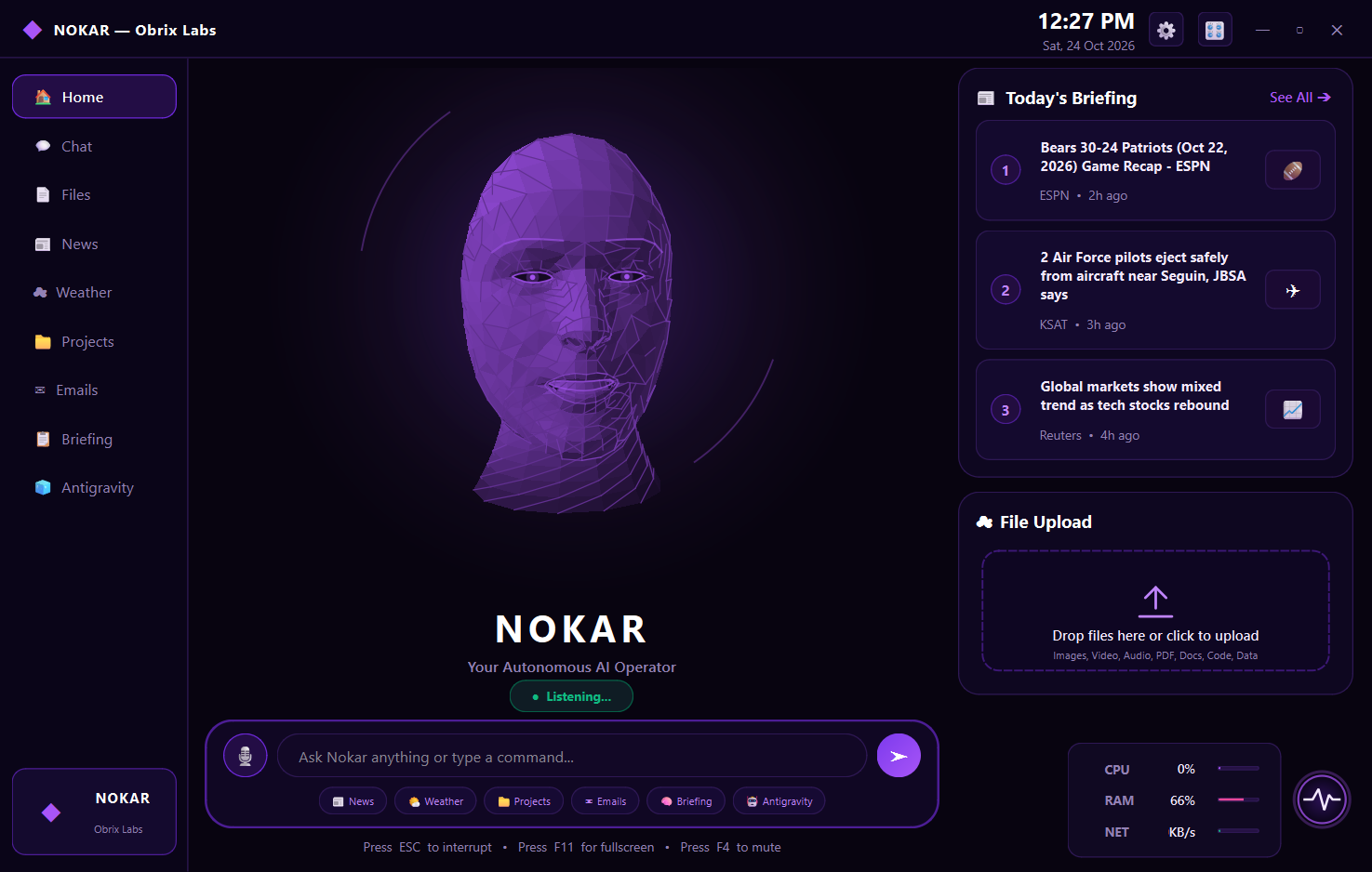
NOKAR is a production-ready, open-source, fully autonomous AI desktop assistant engineered to give you complete digital autonomy over your computer. Built on the Google Gemini Live API for native bidirectional audio streaming and powered by a modern PyQt6 frosted-glass HUD, NOKAR can hear, see, speak, reason, and operate your desktop environment in real time.
Unlike traditional text-based chatbots or rigid voice wrappers, NOKAR functions as a true agentic desktop assistant: it can actively inspect your foreground applications, manage files, search the web, execute complex multi-step workflows, monitor system telemetry, manage emails, control IDE processes, and remember your projects across sessions—all with zero subscription fees and complete local privacy.
Why Choose NOKAR as Your AI Desktop Assistant?
| Capability | NOKAR Autonomous Assistant | Traditional Web Chatbots | Standard Voice Assistants |
|---|---|---|---|
| Real-Time Duplex Audio | Native Gemini Live streaming (no turn-taking lag) | ❌ Text only / Turn-based | ⚠️ High latency, cloud-locked |
| Active Screen Vision | Real-time monitor & foreground context inspection | ⚠️ Static manual file upload | ❌ No screen awareness |
| Desktop Automation | Direct OS control (apps, files, shell, settings) | ❌ Sandboxed in browser | ⚠️ Proprietary / locked ecosystem |
| Model Resiliency | 9-Model automatic failover ladder with cooldowns | ❌ Single point of failure | ❌ Proprietary model locked |
| Personal Document RAG | Local Vector Vault (zero external database) | ❌ Cloud storage only | ❌ No codebase awareness |
| Safety & Control | Hardware-level confirmation gate & Universal Undo | ❌ No desktop rollback | ❌ No undo capabilities |
| Proactive Watchdog | Background email, hardware & deadline monitoring | ❌ Passive waiting for prompt | ⚠️ Simple fixed alarms |
| Hardware Overhead | Software 3D rendering (No GPU required) | N/A | High resource usage |
| Privacy & Security | Local credentials & zero centralized telemetry | ❌ Cloud telemetry tracking | ❌ Proprietary telemetry logging |
Key Features
🎙️ Real-Time Voice Duplex & Lip-Sync
- Gemini Live Streaming: Ultra-low latency voice conversation powered by Gemini Live for continuous human-speed dialogue.
- Push-to-Talk (
Ctrl+Space): Seamless hardware-level microphone control on Windows, macOS, and Linux. - Formant-Based Lip-Sync: ~50 facial mouth poses per second generated from audio formants and phoneme analysis.
- Acoustic Echo Guard: Dynamically isolates the assistant's audio output to prevent self-triggering feedback.
👁️ Screen Understanding & Multimodal Vision
- Active Window Context Awareness: Win32 foreground inspection automatically tags the active application window into Gemini's prompt context.
- Instant Screen Capture (
F9): Quick-action capture button and global hotkey allowing NOKAR to inspect your screen and answer questions about code, designs, or documents.
⧉ In-App Video Picture-in-Picture (PiP)
- Floating Glass Card: Dedicated 360×240 draggable overlay (
VideoPipWidget) with mute, expand, and close controls. - Simultaneous Avatar Presentation: Plays YouTube videos, local media, and HLS streams while keeping the 3D animated avatar active and visible.
🐕 Proactive Autonomous Watchdog (Executive Assistant)
- Email Inbox Monitoring: Background IMAP integration (Hostinger / custom email) alerts you to high-priority unread communications.
- Hardware Telemetry Protection: Continuously tracks CPU and RAM usage, alerting via voice and HUD when usage exceeds 90%.
- Project Milestone Tracking: Scans
memory/ongoing_projects.jsonfor impending task deadlines and delivers scheduled briefings.
🧠 Local Codebase & Personal Document RAG (Vector Vault)
- Local Semantic Retrieval: Built-in TF-IDF and cosine similarity engine indexing
.py,.js,.md,.txt,.pdf,.csv, and configuration files. - Automatic Upload Indexing: Dropping or attaching any file into the UI automatically ingests and vectors the content into
memory/rag_vault.json. - Integrated Action: Discoverable tool
query_rag_vaultallows the AI agent to search and cite exact snippets from your local files.
🔍 System-Wide Quick Summon (Spotlight Bar)
- Global Hotkey (
F8/Alt+Space): Summons a translucent frosted-glass command bar from any desktop screen. - Instant Dispatch: Send quick voice or typed commands, trigger screen vision, check system stats, or dismiss with
Escape.
⚡ Bidirectional Antigravity IDE Automation
- Process Inspection & Control: Launch, inspect, and verify the health of Antigravity IDE instances directly from the HUD.
- Workspace Navigation: Built-in folder browser and task prompt dispatcher for agentic coding workflows.
🪜 9-Model Resilient Fallback Ladder
- Automatic Failover: When a model hits rate quotas (429) or timeouts (503/504), requests automatically step down a 9-model ladder:
gemini-3.5-flash-lite→gemini-3.1-flash-lite→gemini-flash-lite-latest→gemini-2.5-flash→gemini-2.5-flash-lite→gemini-3.5-flash→gemini-3-flash-preview→gemini-3.6-flash→gemini-flash-latest. - Intelligent Cooldowns: Dead models rest for 30 minutes, quota limits rest for 5 minutes, preventing blocked API requests.
🛡️ Safety Gates & Universal Undo
- Hardware Confirmation Gate: Destructive actions (system shutdown, reboot, Wi-Fi disabling) require explicit user clicks on a physical HUD banner.
- Universal Reversible Undo: Say "undo" in any language to reverse the last file action (create, move, copy, rename, delete) or desktop setting change.
System Architecture
graph TD
    User([User Voice / Keyboard / Hotkeys]) -->|Duplex Audio / F8 / F9| UI[PyQt6 Cyber-HUD]
    UI -->|Upstream Audio 16kHz| Core[Main Loop: main.py]

    subgraph Audio & Vision Subsystem
        Core -->|Live Duplex Protocol| GeminiLive[Gemini Live API]
        GeminiLive -->|Downstream Audio 24kHz| Core
        Core -->|Phoneme Analysis| LipSync[Software Viseme Engine]
        LipSync -->|Render Mouth Shapes| Avatar[3D Holographic Head]
        ScreenProc[Screen & Camera Processor] -->|Active Window Context| Core
    end

    subgraph Intelligence & Resiliency
        Core -->|Tool Invocation| ActionLoader[Core Action Loader]
        Core -->|One-Shot Prompts| ModelLadder[9-Model Resilient Ladder]
        ModelLadder -->|Auto-Cooldown & Fallback| GeminiAPI[Google Gemini Models]
    end

    subgraph Local Storage & Proactive Daemons
        ActionLoader -->|Vector Search & Index| RAGVault[Local RAG Vault]
        Watchdog[Proactive Executive Watchdog] -->|Email & Hardware Alerts| UI
        ActionLoader -->|Inverse Closures| UndoStack[Universal Undo Stack]
        ActionLoader -->|Critical System Actions| ConfirmGate[Hardware Confirmation Gate]
    end

    subgraph Desktop Execution Layer
        ActionLoader -->|Files / Apps / Browser / Settings| DesktopActions[Actions & Custom Plugins]
        ActionLoader -->|Agent Process Automation| Antigravity[Antigravity IDE Automation]
    end
Supported Platforms
| Platform | Support Tier | Details |
|---|---|---|
| Windows 10 / 11 | Tier 1 (Full) | Native Win32 foreground inspection, global push-to-talk (Ctrl+Space), hardware telemetry |
| macOS (Sonoma / Sequoia) | Tier 1 | Windowed push-to-talk, desktop automation, sound routing |
| Linux (Ubuntu / Debian / Fedora) | Tier 1 | X11/Wayland desktop automation, systemd integration |
Technology Stack
| Category | Technologies |
|---|---|
| Programming Language | Python 3.11, 3.12, 3.13 |
| Frontend & HUD | PyQt6, QGraphicsView, QPropertyAnimation, Frosted Glass CSS |
| AI & Multimodal Models | Google Gemini Live API, Gemini 3.5 Flash, Gemini 2.5 Flash |
| Audio & DSP | PyAudio, SoundDevice, NumPy, Custom Formant Viseme Analyzer |
| Vision & Video | OpenCV (cv2), yt-dlp, Qt Multimedia |
| Hardware Telemetry | psutil, pynvml (NVIDIA GPU telemetry) |
| Automation & Protocols | Win32 API, Playwright, IMAP4 / SMTP, Subprocess IPC |
Installation and Setup
Prerequisites
- Python: Version 3.11, 3.12, or 3.13 installed (python.org).
- Git: Installed on your system.
- Hardware: Working microphone and speakers / headphones.
- Google Gemini API Key: A free key from Google AI Studio.
1. Clone the Repository
git clone https://github.com/anasraheemdev/nokar-fully-autonomous-ai-assistant.git
cd nokar-fully-autonomous-ai-assistant
2. Create and Activate a Virtual Environment
# Windows (PowerShell)
python -m venv .venv
.\.venv\Scripts\Activate.ps1

# macOS / Linux
python3 -m venv .venv
source .venv/bin/activate
3. Install Dependencies
NOKAR includes an OS-aware installer that skips packages not relevant to your current operating system:
python setup.py
Alternatively, install via pip:
pip install -r requirements.txt
4. Configure Credentials
Copy the example configuration files and add your Gemini API key:
# Copy the environment template
cp .env.example .env

# Or copy the configuration JSON
cp config/api_keys.example.json config/api_keys.json
Open config/api_keys.json in your editor and enter your Gemini API key:
{
  "gemini_api_key": "YOUR_GEMINI_API_KEY_HERE",
  "assistant_name": "Nokar",
  "user_name": "Commander",
  "default_city": "London",
  "voice_name": "Puck"
}
5. Launch NOKAR
python main.py
Windows shortcut: You can also double-click start_nokar.bat to launch the assistant.
Real-World Use Cases
- Autonomous Coding & Debugging: Press
F9while viewing a code error in your IDE. NOKAR captures the screen, notes the active IDE window, and immediately explains the solution via voice. - Executive Morning Briefing: Boot your PC in the morning to receive a spoken summary of the local weather, top technology headlines, unread high-priority emails, and pending project milestones.
- Hands-Free Desktop Control: Say "Open Chrome and search for quantum computing papers", "Turn down the volume by 20%", or "Organize my desktop" while working on other tasks.
- Codebase & Document Research: Drop a 50-page PDF report or project folder into the HUD. Ask "What are the key findings in section 3?" and NOKAR instantly retrieves citations from the local RAG Vault.
- Video Learning in Picture-in-Picture: Say "Play the new Python tutorial". The video begins playing in a compact, floating PiP card while the 3D avatar remains active to answer questions.
Documentation Index
- docs/ARCHITECTURE.md: Detailed internal architecture, Gemini Live streaming protocol, Model Ladder logic.
- docs/CONFIGURATION.md: Comprehensive configuration settings, environment variables, audio device routing.
- docs/TOOLS.md: Complete catalog of all 16+ bundled tools, actions, and plugin development guide.
- CONTRIBUTING.md: Contributing guidelines, development setup, code standards, and PR process.
- CODE_OF_CONDUCT.md: Contributor Covenant v2.1 code of conduct.
- SECURITY.md: Security policy, vulnerability reporting SLA, and local privacy guarantees.
- CHANGELOG.md: Complete chronological release history.
- SUPPORT.md: Support channels, issue tracking, and enterprise contact.
Frequently Asked Questions
Q: Is NOKAR completely open source?
A: Yes. NOKAR is released under the Creative Commons Attribution-NonCommercial 4.0 International License (CC BY-NC 4.0) for personal, educational, and research use. Commercial licensing is available through Obrix Labs.
Q: Does NOKAR require an expensive dedicated GPU?
A: No. Unlike heavy local LLM wrappers, NOKAR leverages Google's ultra-fast Gemini Live streaming cloud models. The 3D holographic avatar is rendered in pure software geometry using PyQt6 and NumPy, consuming minimal CPU and zero dedicated VRAM.
Q: How does NOKAR protect my personal data and privacy?
A: NOKAR stores all API keys, email credentials, long-term memory, and RAG document indexes locally on your computer in git-ignored files. There are no centralized telemetry backends, tracking scripts, or analytics servers. Audio is only streamed to Google's official Gemini endpoint during active voice interactions.
Q: Can NOKAR perform destructive system actions without asking?
A: No. Destructive actions such as system shutdown, restarting, or disabling Wi-Fi pass through our Hardware Confirmation Gate, which generates an unforgeable UI banner that only executes when physically clicked by the user.
Q: How do I create a custom skill or plugin?
A: Simply copy plugins/_template.py, define a TOOL dictionary and a handle(params) function, and save it in the plugins/ directory. NOKAR automatically discovers and registers your new skill at launch.
Roadmap
- v1.0.0: Gemini Live streaming, 3D software avatar, 9-model ladder, Screen Vision, In-App Video PiP, Local RAG Vault, Spotlight Bar, Proactive Watchdog.
- v1.1.0: Native speech interruption handling & real-time audio ducking.
- v1.2.0: Multi-monitor screen selection and regional visual OCR.
- v1.3.0: Obsidian vault bi-directional note synchronization.
- v2.0.0: Distributed local agent mesh for multi-device desktop control.
Contributing
We welcome contributions from developers worldwide! Please review CONTRIBUTING.md and our Code of Conduct before submitting pull requests.
# Run the verification suite before opening a PR
python tests/test_ui_features.py
License & Third-Party Notices
- License: Licensed under Creative Commons Attribution-NonCommercial 4.0 International (CC BY-NC 4.0).
- Copyright: © 2026 Muhammad Anas Raheem (Obrix Labs).
- Third-Party Assets:
core/face_model.obj: Derived from the MediaPipe canonical 3D face model, Copyright © Google LLC, licensed under the Apache License 2.0.
About the Developer

|
Muhammad Anas RaheemAI Engineer | Full-Stack Developer | Founder, Obrix Labs
|





Reviews (0)
Sign in to leave a review.
Leave a reviewNo results found