architecture-drawer
Health Pass
- License — License: MIT
- Description — Repository has a description
- Active repo — Last push 0 days ago
- Community trust — 17 GitHub stars
Code Pass
- Code scan — Scanned 12 files during light audit, no dangerous patterns found
Permissions Pass
- Permissions — No dangerous permissions requested
No AI report is available for this listing yet.
Skill for Claude Code & Codex: describe your system architecture in text → get an editable PowerPoint diagram (native shapes, not a flat image).
architecture-drawer
English · 简体中文
A skill for Claude Code, Codex, Open Code, Pi Agent, and other AI coding agents: turn a text description of your system architecture into an editable PowerPoint architecture diagram.

What it is
Turn text descriptions of an architecture into editable PPT diagrams: the agent generates an SVG from your description, auto-validates the layout, then exports to native PowerPoint shapes.
vs. direct image generation
| This project | Nano Banana / GPT-Image etc. | |
|---|---|---|
| Output | Editable PPT (every shape draggable, recolorable, retextable) | Flattened image |
| Control | High (code-generated, precisely adjustable) | Low (prompt-driven, hard to reproduce) |
| Iteration | Fine-tune directly in PPT | Regenerate from scratch |
| Cost | Low | High (per-image billing) |
Showcase
All diagrams below were generated entirely from text descriptions by the skill, then scored by the 13-dimension evaluator (each scored ≥76/100). They double as the regression suite under evals/ — including the first non-architecture case (a process flowchart).
vLLM — High-Throughput LLM Inference Serving (PagedAttention)
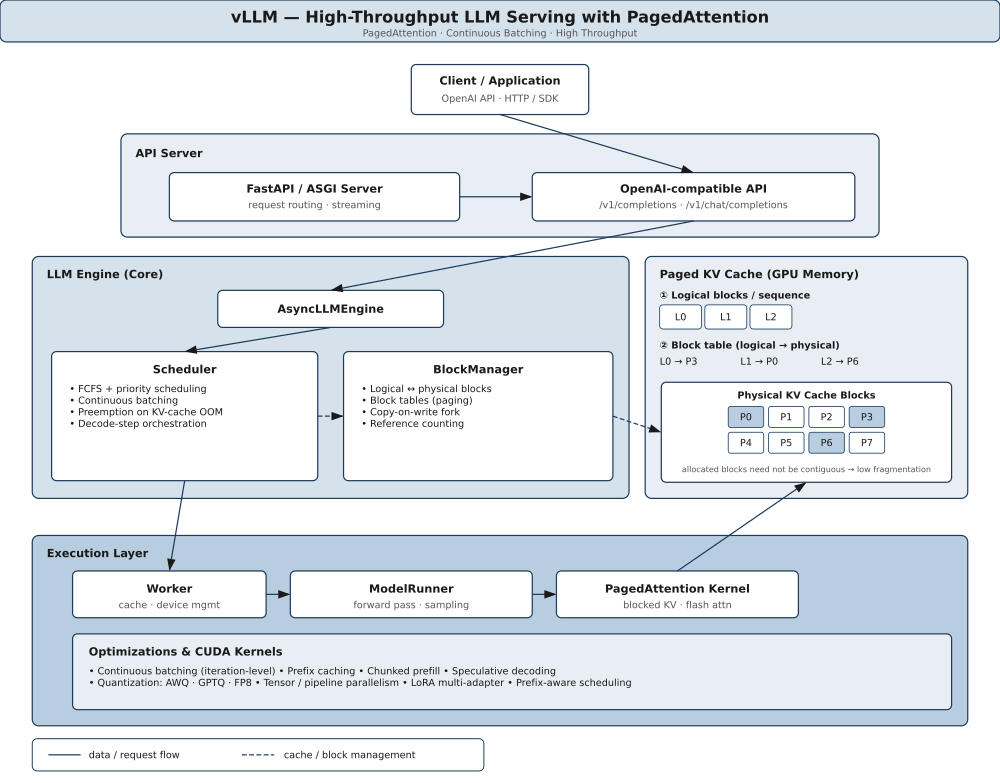
Six-layer request pipeline (client → API server → engine → paged KV cache → execution → optimizations). Solid edges = data flow; dashed = cache/block management. Scheme S1 Monochrome Blue.
MLIR AI Compiler — Multi-Stream Execution Pipeline
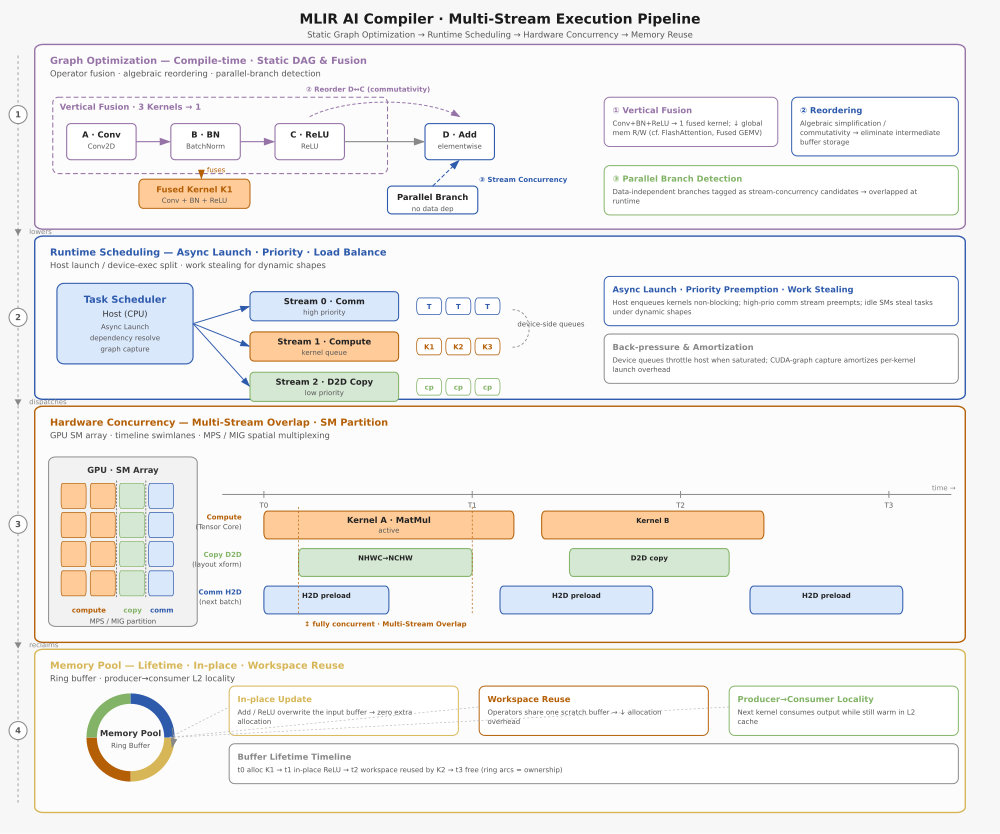
A 4-layer × multi-column matrix (graph optimization → transformation → lowering → codegen) with vertical-fusion grouping and a concurrent multi-stream overlap timeline. 8-accent categorical palette.
Agent Infrastructure — Layered Architecture
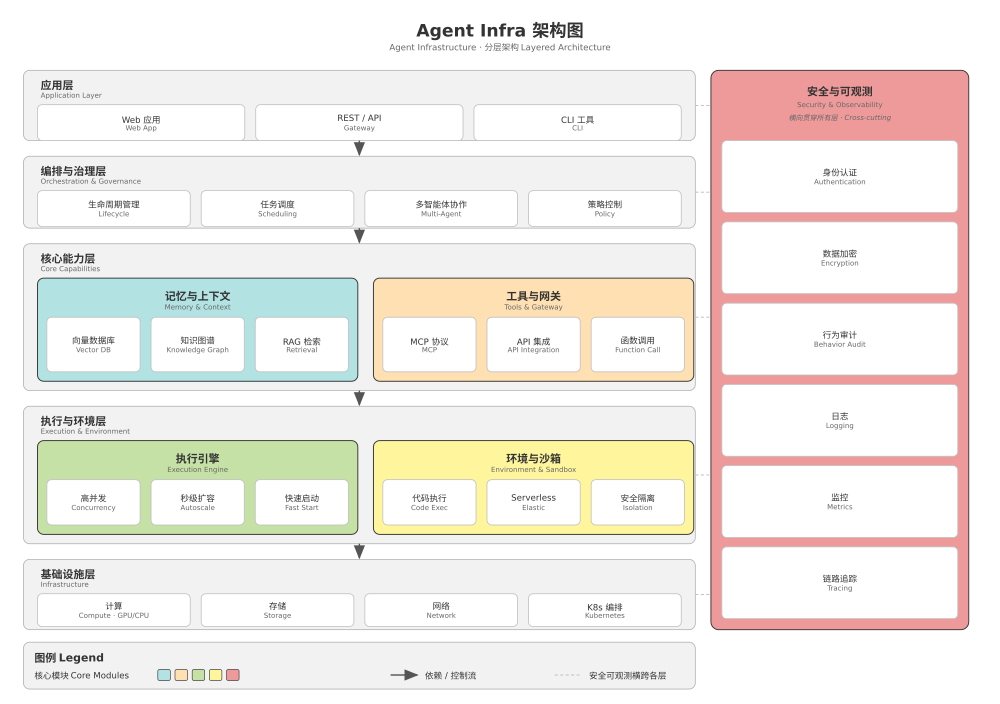
Five horizontal layers (application → orchestration → core capabilities → execution → infrastructure) with a cross-cutting security/observability band. Bilingual CN/EN labels. Neutral grays + 5 colored core modules.
CI/CD Deployment Pipeline — Process Flowchart
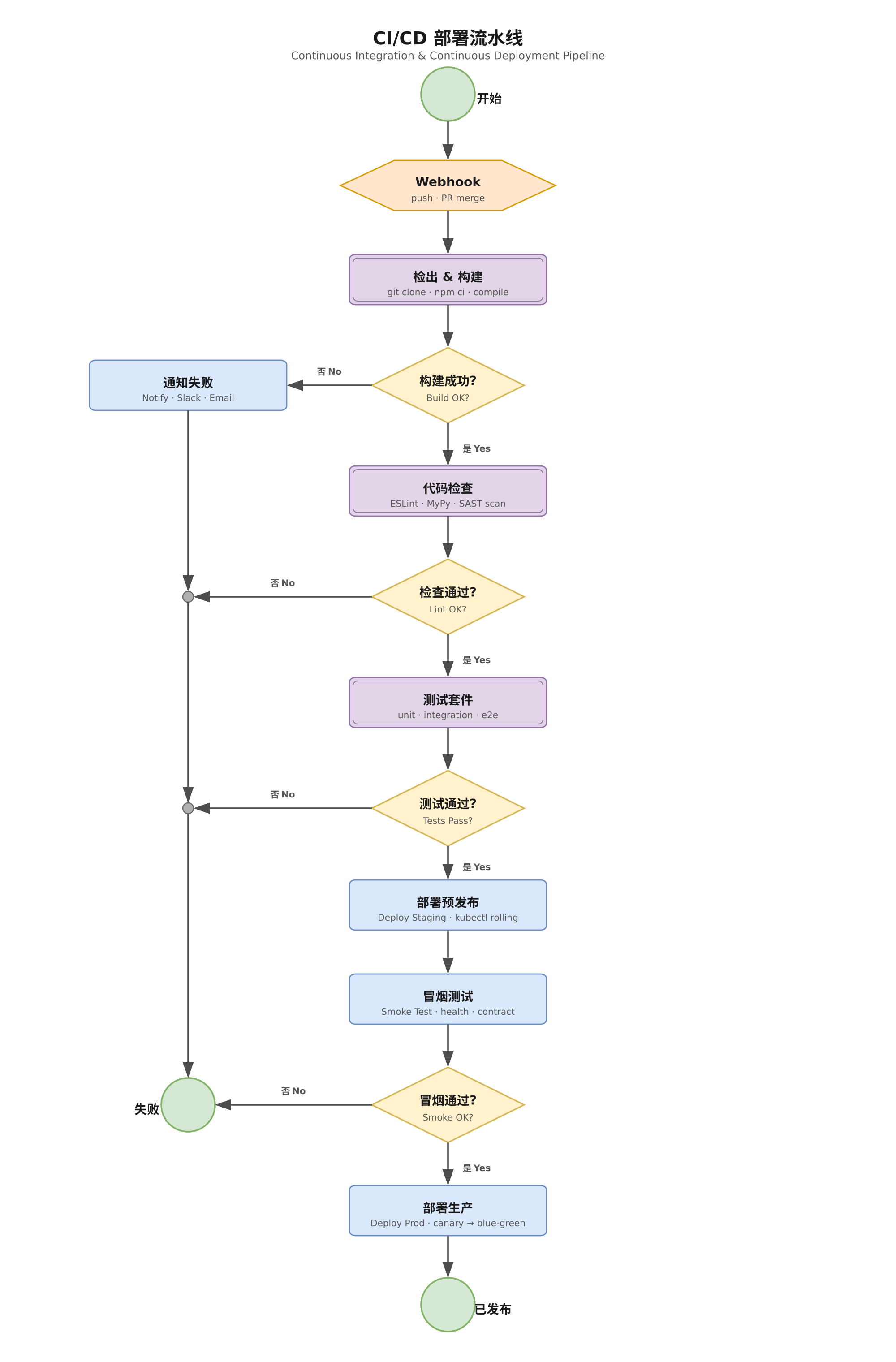
The first non-architecture case: a top-to-bottom process flowchart with four quality-gate decisions (Build → Lint/SAST → Tests → Smoke) whose "No" branches converge via gray junction merge points onto a single Failed terminator. Green terminators · yellow decision diamonds · orange I/O hexagon · purple double-border subprocesses. Flowchart role palette (color = role).
Best Practices
- Start with a clear text description. Before coding, describe the architecture in prose—how many layers, what components each layer has, how they connect, and any special annotations. A crisp text spec (like the specs in
evals/*/input.md) is the single biggest predictor of a quality diagram. For open-source projects, you can use the system architecture description from DeepWiki. - Let the skill generate. Submit the text description to the skill and let it generate the initial
gen.pyand SVG. The evaluator automatically catches overlaps, dangles, and crossings. - The skill auto-reviews the score. If the score is ≥80, the diagram is structurally sound. If <80, the agent can automatically fix layout issues via
auto_refineor multi-round LLM correction (--llm-iter). - Export to PPTX for final polish. Run
svg_to_pptx()to get an editable PowerPoint file. Tweak colors, fonts, arrows, and layout there to match your brand or publication style—these belong in the presentation layer, not the generator code.
Suggested workflow: first discuss with DeepWiki or your agent to produce a clear text description of the system architecture, then use this skill to quickly generate a PPTX diagram, and finally fine-tune colors, labels, and other details directly in PPT.
Install (Claude Code)
This repo is a plugin marketplace. Add it and install the plugin:
/plugin marketplace add Andy1314Chen/architecture-drawer
/plugin install architecture-drawer@architecture-drawer
Or from the CLI:
claude plugin marketplace add Andy1314Chen/architecture-drawer
claude plugin install architecture-drawer@architecture-drawer
Scope with --scope project (shared via version control) or --scope local (gitignored). Default is user.
Codex CLI
Codex CLI fully supports the Agent Skills directory structure.
Copy the skill directory into Codex's skills folder (usually ~/.codex/skills/):
cp -r plugins/architecture-drawer/skills/architecture-drawer ~/.codex/skills/architecture-drawer
Or install project-scoped (recommended):
mkdir -p .codex/skills
cp -r plugins/architecture-drawer/skills/architecture-drawer .codex/skills/
Once installed, ask Codex naturally — the workflow in SKILL.md is consumed automatically:
> Draw the architecture of vLLM and export to PPTX
Other agent platforms (Gemini CLI, Cursor, Copilot)
Each skill is a standalone Agent Skills spec directory. Copy it into your platform's skills location (typically .agents/skills/):
| Platform | Default skills path |
|---|---|
| Gemini CLI | ~/.gemini/skills/ |
| Cursor (@rules) | .cursorrules or cursor/skills/ |
| Copilot CLI | Per-platform instructions |
cp -r plugins/architecture-drawer/skills/architecture-drawer .agents/skills/architecture-drawer
Dependencies
The agent generates a gen.py that imports three pure-Python modules (svg_utils.py, evaluator.py, svg2pptx.py) co-located in the skill. You don't write this code — the agent does. Install these once so generated diagrams can render and export:
| Dependency | Required by | Install |
|---|---|---|
python-pptx >= 1.0 |
PPTX export (svg2pptx.py) |
pip install python-pptx |
rsvg-convert |
PNG rasterization (rasterize_svg) |
apt install librsvg2-bin / brew install librsvg |
pytest >= 8 |
Running the test suite | pip install pytest |
Testing
The suite is layered so each layer is cheap, deterministic, and covers a distinct failure mode:
| Layer | Command | What it gates | Runs in CI |
|---|---|---|---|
| Deterministic regression | pytest |
each evals/<name>/gen.py scores ≥ its threshold and matches its golden SVG |
✅ always |
| Spec compliance | pytest |
SKILL.md frontmatter, name↔directory, relative refs, core scripts present |
✅ always |
| Doc ↔ API drift guard | pytest |
every drawer.<m>( documented in SKILL.md/references/*.md exists on SVGDrawer; curated public API importable |
✅ always |
| LLM replay (Protocol A) | pytest --llm-replay |
regenerate gen.py from input.md+SKILL.md (no golden), iterate, assert score ≥80 |
nightly / local |
| Agent replay (Protocol B) | pytest --agent-replay |
install the skill into a leak-free sandbox, let the Pi coding agent author gen.py, assert score ≥80 + full SVG/PPTX/PNG artifact triplet |
nightly / local |
The agent-replay layer is the closest to real usage: the skill is installed (never inlined), a real agent discovers it via its native skill mechanism, and the harness — not the agent — re-runs the produced gen.py deterministically. It needs the pi CLI and a provider key; backend wiring lives in tests/agent_backends.py. Options: --agent-iter N caps the stateless refine rounds (default 3), --agent-eval <name> scopes it to one case for cheap debugging (a name matching nothing fails loudly rather than silently skipping), and --agent-keep retains each case's output (agent-written gen.py + SVG/PNG/PPTX + score_report.txt) under output/agent_replay/<name>/ for review (gitignored).
Repository layout
architecture-drawer/
├── .claude-plugin/marketplace.json              # Claude Code marketplace registry
├── plugins/architecture-drawer/
│   ├── .claude-plugin/plugin.json               # plugin manifest
│   └── skills/architecture-drawer/
│       ├── SKILL.md                             # agent-consumable workflow (spec-compliant)
│       ├── scripts/                             # svg_utils.py · evaluator.py · svg2pptx.py
│       ├── references/design_specs.md           # 4 preset color schemes (S1–S4)
│       ├── evals/                               # 8 regression cases (7 architecture + 1 flowchart, gen.py each)
│       └── assets/
├── tests/                                       # pytest: layered regression (see "Testing")
│   ├── conftest.py                              # fixtures, thresholds, score helpers, CLI options
│   ├── agent_backends.py                        # Pi coding-agent backend + leak-free sandbox builder
│   ├── test_regression.py                       # deterministic quality+snapshot; opt-in LLM replay
│   ├── test_skill_spec.py                       # Agent Skills spec compliance
│   ├── test_doc_api.py                          # doc ↔ API drift guard (always on)
│   ├── test_agent_replay.py                     # opt-in real-agent replay (Protocol B)
│   └── golden/*.svg                             # snapshot baselines
└── examples/                                    # minimal demo of the generate-evaluate-export loop
Community
Thanks to the LINUX DO community. The project gained wider reach, discussion, and real-world feedback after being shared there, and those conversations have helped me keep finding issues and improving architecture-drawer.
References & acknowledgments
The geometry/connection detection draws on several open-source projects (their reference docs and validators were studied): ink-graph, fireworks-tech-graph, svg-animations, svg-design, and svg2pptx (the architectural blueprint for the PPTX export module). See the full credits in SKILL.md.
License
MIT — see LICENSE.
Reviews (0)
Sign in to leave a review.
Leave a reviewNo results found