claude-skill-playwright-browser
Health Warn
- License — License: MIT
- Description — Repository has a description
- Active repo — Last push 0 days ago
- Low visibility — Only 7 GitHub stars
Code Fail
- eval() — Dynamic code execution via eval() in scripts/pw.mjs
- execSync — Synchronous shell command execution in scripts/pw.mjs
- fs.rmSync — Destructive file system operation in scripts/pw.mjs
- os.homedir — User home directory access in scripts/pw.mjs
- process.env — Environment variable access in scripts/pw.mjs
- network request — Outbound network request in scripts/pw.mjs
- execSync — Synchronous shell command execution in scripts/setup.mjs
Permissions Pass
- Permissions — No dangerous permissions requested
No AI report is available for this listing yet.
Claude Code skill: a background Playwright browser for screenshots (desktop/tablet/mobile), frontend health checks, visual diffs, scripted UI flows and logged-in pages — in any project. | 讓 Claude Code 擁有背景瀏覽器:多尺寸截圖、前端健檢、視覺比對、操作流程與登入頁面,適用任何專案。
claude-skill-playwright-browser
English | 繁體中文





Gives Claude Code a browser that runs in the background. Ask in plain language — "screenshot the homepage on mobile", "why does the Submit button do nothing on this page?", "health-check the checkout page" — and Claude opens a browser, clicks around, takes screenshots, runs checks, and hands you the results and files. It never touches the browser you're using, and it works in any project (frontend, backend, even non-Node projects).
What it does
| Feature | Details |
|---|---|
| 📸 Screenshots | Desktop / tablet / mobile, full page or a single element, many pages in one batch |
| 🩺 Frontend health check | Console errors, failed API calls (4xx/5xx), broken images, broken links, mobile layout overflow (and which element causes it), accessibility issues (axe), performance (LCP / CLS) |
| 🔍 Visual comparison | Save a baseline before a CSS change, compare afterwards, get a diff image with changes highlighted in red |
| 🧭 UI flows | Log in, click through menus, fill forms, page through lists, assert results — with a screenshot at each step and an automatic screenshot on failure |
| 🔐 Sites that need login | You log in once yourself; Claude then reuses that session in the background (your password is never stored) |
| 🧪 Real tests | When you want it, turn a flow into a Playwright Test in your project and run it in CI |
See it in action
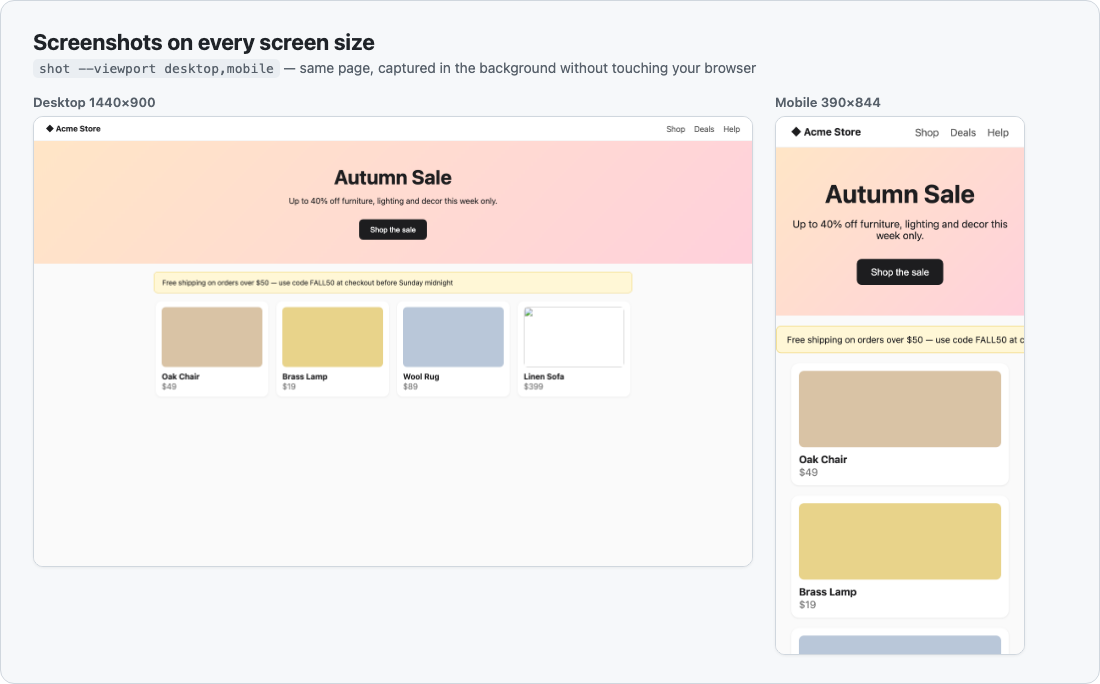
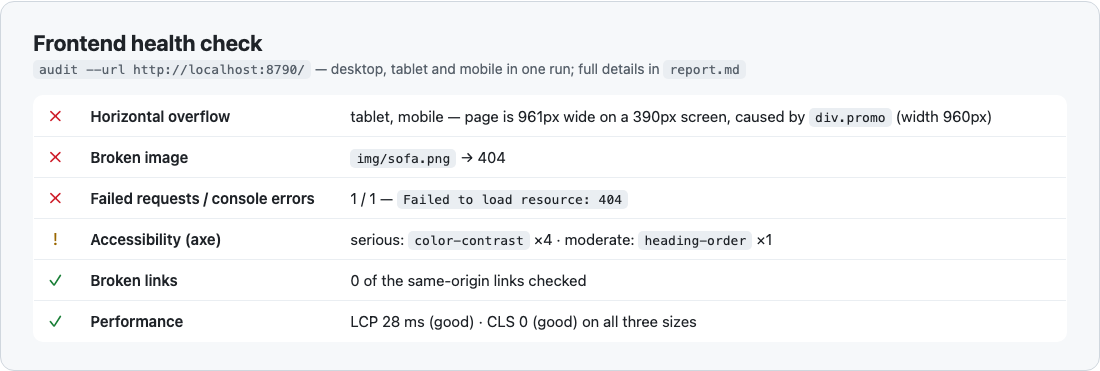
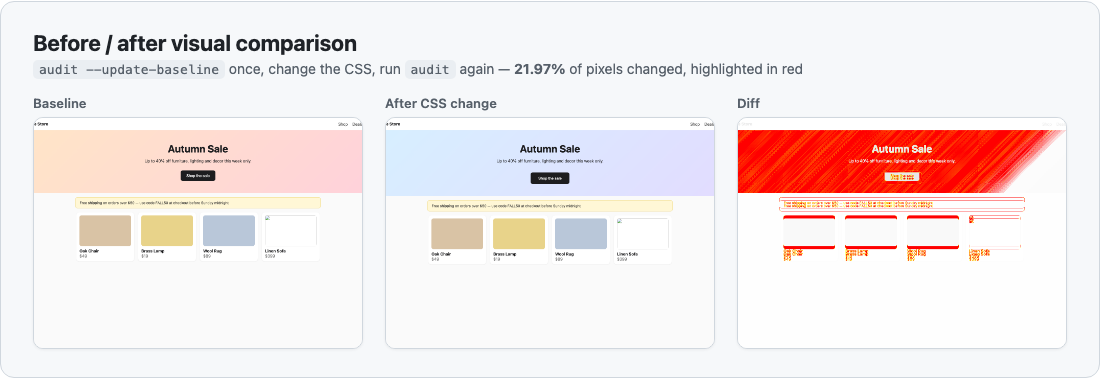
All images were produced by this skill against a small demo site.
Examples
Just talk to Claude — no need to mention "Playwright":
Take mobile and desktop screenshots of the homepage at localhost:5173
A customer says our site scrolls sideways on iPhone — find the element that's too wide
Health-check the new checkout page before we ship it
I changed the header CSS — compare before and after
On the admin "Orders" page, does going to page 2 actually load different data?
This issue says "Submit" does nothing — reproduce it on dev and capture screenshots
Screenshot every page in the admin menu and save them to my Desktop
Claude sticks to what you asked: ask for a screenshot and you get a screenshot; ask about one bug and it deals with that bug. A full check with a list of recommendations only happens when you ask for a review or a health check.
Claude in Chrome or this skill?
| Better with Claude in Chrome | Better with this skill |
|---|---|
| Uses the tab you have open right now, in your logged-in browser | Runs in the background, doesn't touch your browser |
| You want to watch it work | Must be repeatable with consistent results |
| A quick one-off look | Several sizes or many pages in one batch |
| Health checks, reports, before/after comparisons, tests |
When both would work, Claude asks which one you prefer and suggests one.
Head-to-head test
Same task for both, run by two fresh Claude agents: "take mobile screenshots of these 3 report pages" on a logged-in internal admin app (URLs given).
| Claude in Chrome | This skill | |
|---|---|---|
| Tokens | 48,045 | 48,853 |
| Time | 93 s | 47 s |
| Tool calls | 9 | 7 |
| Mobile size | 500×667 — Chrome windows can't go narrower than 500 px | 390×844 (real iPhone size, 3× scale) |
| Output | JPEG in a temp folder, had to be moved | PNG saved where you asked |
| Full-page capture | Not available | Available |
| Login | Your Chrome's existing login | Session saved earlier with this skill |
Takeaways: tokens were a wash for a small job like this — most of both totals is each agent's fixed overhead. The skill was twice as fast and produced true phone-width screenshots; Chrome can't emulate widths below ~500 px, so layout bugs that only appear at 390 px are out of its reach. One run each with URLs provided — tasks with more pages or steps should favour the skill further, but that part hasn't been measured.
Install
Requirements: Claude Code, Node.js 18+ (node -v), macOS / Linux / Windows, about 150 MB of disk for Chromium.
1. Clone into a skills directory (the folder must be named playwright-browser)
# Just for you, available in every project
git clone https://github.com/AndyShiu/claude-skill-playwright-browser.git ~/.claude/skills/playwright-browser

# Or for a single project (commit it with the project to share with your team)
git clone https://github.com/AndyShiu/claude-skill-playwright-browser.git <project>/.claude/skills/playwright-browser
On Windows the personal location is %USERPROFILE%\.claude\skills\playwright-browser.
Windows / Git Bash: Claude Code on Windows uses Git Bash by default, which rewrites arguments that start with
/into Windows paths (--until-url /dashboardbecomesC:/Program Files/Git/dashboard). The skill undoes this for its own options automatically. If you run other commands by hand and hit the same thing, drop the leading/(e.g.--until-url dashboard), prefix the command withMSYS_NO_PATHCONV=1, or use PowerShell / cmd.
2. That's it. The first time Claude uses the skill it notices the runtime isn't installed, tells you, and runs the one-time setup. To install up front instead:
node ~/.claude/skills/playwright-browser/scripts/setup.mjs                  # Chromium only
node ~/.claude/skills/playwright-browser/scripts/setup.mjs firefox webkit   # also Firefox and WebKit (Safari's engine)
npm packages go into node_modules/ inside the skill folder (git-ignored); browsers go into Playwright's shared cache, so every project and every copy of the skill shares one download. Your projects are never touched.
Sites that need login
- Tell Claude you want to work on a site that needs login — it opens a browser window for you
- Log in yourself in that window (only you type your credentials; they're never stored)
- Close the window when you're done — or Claude sets it to save and close automatically once you reach a given page
From then on Claude can use that session in the background. After every run, any tokens the site refreshed are saved back, so a session you keep using stays logged in. If it sits idle past the site's login lifetime, Claude detects the redirect to the login page and asks you to log in again — it will never hand you a login screen as the result.
Where files go
The skill folder contains no personal data, so it's safe to share or commit.
| What | Where | Notes |
|---|---|---|
| Login sessions | ~/.claude/playwright/sessions/<project>/ |
Contain cookies / tokens, readable only by you. Never commit or share them |
| Visual baselines | ~/.claude/playwright/baselines/<project>/ |
Reference screenshots for before/after comparisons |
| Screenshots & reports | claude-playwright/ in the system temp dir |
Deleted after 7 days; Claude asks where to save anything you want to keep |
Token usage
Rough extra cost of one use inside an existing conversation:
| Task | Approx. tokens |
|---|---|
| One screenshot | 5k–7k |
| Three screen sizes | 8k–10k |
| Full health check of one page | 12k–18k |
| Investigating one issue / walking through a flow | 20k–40k |
| Batch screenshots of many pages | 25k–40k (samples a few instead of opening every image) |
The main cost is looking at screenshots (~1.5k–2k each). Asking only for the sizes you need, and giving a URL instead of having Claude find the page, saves a lot.
Troubleshooting
| Symptom | What to do |
|---|---|
| The screenshot shows a login page | The session expired — ask Claude to log in again |
| The screenshot shows a loading spinner | Ask Claude to wait for specific content before capturing (it uses --wait-for) |
| Certificate error on an intranet site | Self-signed certificate — once you've confirmed the host is trusted, ask Claude to add --insecure |
Can't reach localhost |
The dev server isn't running — Claude will tell you and can start it |
| A button "does nothing" but actually shows a confirm dialog | Browser dialogs are dismissed by default; Claude knows to accept them when needed |
| Need to test Safari compatibility | Run setup.mjs webkit to install WebKit |
Manual use (advanced)
You normally don't need this — Claude calls it for you. To run it yourself:
PW="$HOME/.claude/skills/playwright-browser/scripts/pw.mjs"

node "$PW" inspect --url https://example.com --click "Pricing"        # text outline of the page
node "$PW" shot    --url https://example.com --viewport desktop,mobile --full
node "$PW" audit   --url https://example.com                           # full health check, writes report.md
node "$PW" run     --script flow.mjs --url https://example.com         # custom flow
node "$PW" login   --session admin --url https://example.com/login --until-url dashboard   # log in; saves once you reach dashboard
node "$PW" sessions                                                    # list saved sessions
node "$PW" clean   --days 0                                            # delete all temp screenshots
Each command prints one line of JSON. See SKILL.md for every option.
Update & uninstall
- Update: run
git pullin the skill folder; ifpackage.jsonchanged, runnode scripts/setup.mjsagain - Uninstall: delete the skill folder and
~/.claude/playwright/. For the browser cache, runnpx playwright uninstall --allin the skill folder before deleting it, or remove~/Library/Caches/ms-playwright(macOS),~/.cache/ms-playwright(Linux) or%LOCALAPPDATA%\ms-playwright(Windows)
Repository layout
SKILL.md                     Instructions Claude reads (when and how to use the skill)
scripts/pw.mjs               The CLI: inspect / shot / audit / run / login / diff / sessions / clean
scripts/setup.mjs            Cross-platform one-time setup
references/analysis.md       How to read audit results, thresholds, tracing issues to code
references/project-tests.md  Turning flows into real project tests (Playwright Test + CI)
docs/images/                 README screenshots (made with this skill)
CHANGELOG.md                 Release notes
License
MIT © AndyShiu · See CHANGELOG.md for release notes.
Reviews (0)
Sign in to leave a review.
Leave a reviewNo results found