ccx-rs
skill
Warn
Health Warn
- License — License: MIT
- Description — Repository has a description
- Active repo — Last push 0 days ago
- Low visibility — Only 5 GitHub stars
Code Pass
- Code scan — Scanned 12 files during light audit, no dangerous patterns found
Permissions Pass
- Permissions — No dangerous permissions requested
Purpose
This tool is a Rust-based AI coding assistant that runs in your terminal. It provides a command-line interface to interact with AI models for writing and editing code.
Security Assessment
Overall risk: Medium. While a light code scan found no dangerous patterns or hardcoded secrets, and the tool explicitly requests no overly broad system permissions, the inherent nature of the software requires caution. Because it is an AI assistant, it naturally features tools for executing Bash commands, reading and writing local files, and making network requests (WebFetch, WebSearch, Anthropic API). Sensitive data handling is a factor, as you must supply an Anthropic API key via an environment variable. However, it does include built-in mitigations: a permission system that prompts the user (allow/deny) before executing actions, and an OS-native sandbox.
Quality Assessment
The project is exceptionally well-structured, utilizing a clean 14-crate workspace in Rust. It is actively maintained, with repository updates pushed as recently as today. The code is fully open-source under the standard MIT and Apache-2.0 licenses. The only significant drawback is its low community visibility; it currently has only 5 GitHub stars. This means it has not yet undergone widespread peer review or real-world testing by a large user base.
Verdict
Use with caution: the code itself is clean and well-structured, but its low community adoption means it lacks the extensive peer review typical of more established AI coding tools.
This tool is a Rust-based AI coding assistant that runs in your terminal. It provides a command-line interface to interact with AI models for writing and editing code.
Security Assessment
Overall risk: Medium. While a light code scan found no dangerous patterns or hardcoded secrets, and the tool explicitly requests no overly broad system permissions, the inherent nature of the software requires caution. Because it is an AI assistant, it naturally features tools for executing Bash commands, reading and writing local files, and making network requests (WebFetch, WebSearch, Anthropic API). Sensitive data handling is a factor, as you must supply an Anthropic API key via an environment variable. However, it does include built-in mitigations: a permission system that prompts the user (allow/deny) before executing actions, and an OS-native sandbox.
Quality Assessment
The project is exceptionally well-structured, utilizing a clean 14-crate workspace in Rust. It is actively maintained, with repository updates pushed as recently as today. The code is fully open-source under the standard MIT and Apache-2.0 licenses. The only significant drawback is its low community visibility; it currently has only 5 GitHub stars. This means it has not yet undergone widespread peer review or real-world testing by a large user base.
Verdict
Use with caution: the code itself is clean and well-structured, but its low community adoption means it lacks the extensive peer review typical of more established AI coding tools.
Rust implementation of an AI coding assistant CLI. 20MB binary, 5ms startup, OS-native sandbox. Built on Codex crates.
README.md
ccx-rs
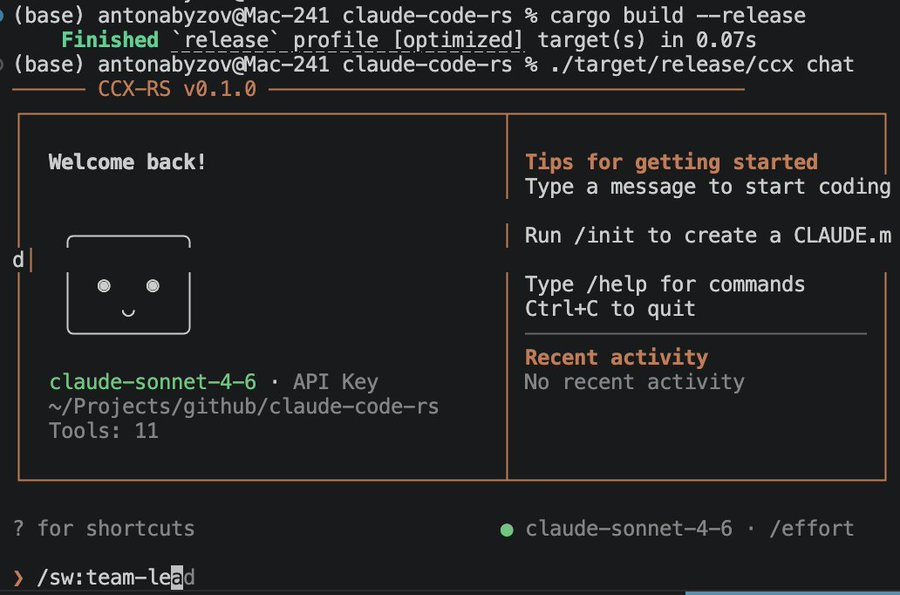
AI coding assistant CLI in Rust. 4.7MB binary, 11 tools, Claude Code-style TUI.
Quick Start
git clone https://github.com/anton-abyzov/ccx-rs.git
cd ccx-rs
cargo build --release
export ANTHROPIC_API_KEY="your-key-here"
./target/release/ccx chat
Features
- Inline TUI with welcome panel, styled chat, tool execution display
- 11 built-in tools (Bash, FileRead, FileWrite, FileEdit, Glob, Grep, WebFetch, WebSearch, Agent, TodoWrite, NotebookEdit)
- Tab completion for slash commands + discovered skills
- Persistent command history
- Streaming responses with markdown rendering
- Tool permission prompts (allow/deny/always)
- Context compression
- MCP client
- Cost tracking
Slash Commands
| Command | Description |
|---|---|
/help |
Show available commands |
/exit |
Exit the session |
/clear |
Clear conversation history |
/cost |
Show token usage and cost |
/model |
Switch model |
/tools |
List available tools |
/version |
Show version info |
Discovered skills from CLAUDE.md and MCP servers are also available as slash commands.
Architecture
14-crate workspace:
| Crate | Purpose |
|---|---|
ccx-cli |
CLI entry point |
ccx-core |
Core agent loop |
ccx-api |
Anthropic API client with streaming |
ccx-auth |
API key management |
ccx-tools |
Tool interface + 11 implementations |
ccx-permission |
Permission DSL and rules |
ccx-compact |
Context compression |
ccx-memory |
Memory persistence |
ccx-skill |
Skill loading and execution |
ccx-prompt |
System prompt builder |
ccx-config |
Settings and CLAUDE.md |
ccx-mcp |
MCP client |
ccx-tui |
Ratatui-based terminal UI |
ccx-sandbox |
OS-native sandboxing |
Building
cargo build --release    # optimized binary
cargo test               # run test suite
cargo install --path crates/ccx-cli
License
MIT + Apache-2.0
Reviews (0)
Sign in to leave a review.
Leave a reviewNo results found