OpenCovibe
Health Pass
- License — License: Apache-2.0
- Description — Repository has a description
- Active repo — Last push 0 days ago
- Community trust — 97 GitHub stars
Code Pass
- Code scan — Scanned 12 files during light audit, no dangerous patterns found
Permissions Pass
- Permissions — No dangerous permissions requested
No AI report is available for this listing yet.
Local-first desktop app for AI coding agents (Claude Code, Codex). Built with Tauri v2 + Svelte 5.
Local-first desktop app for AI-assisted vibe coding
Why · Capabilities · Quick Start · Providers · Architecture · License
English | 简体中文
Why OpenCovibe?
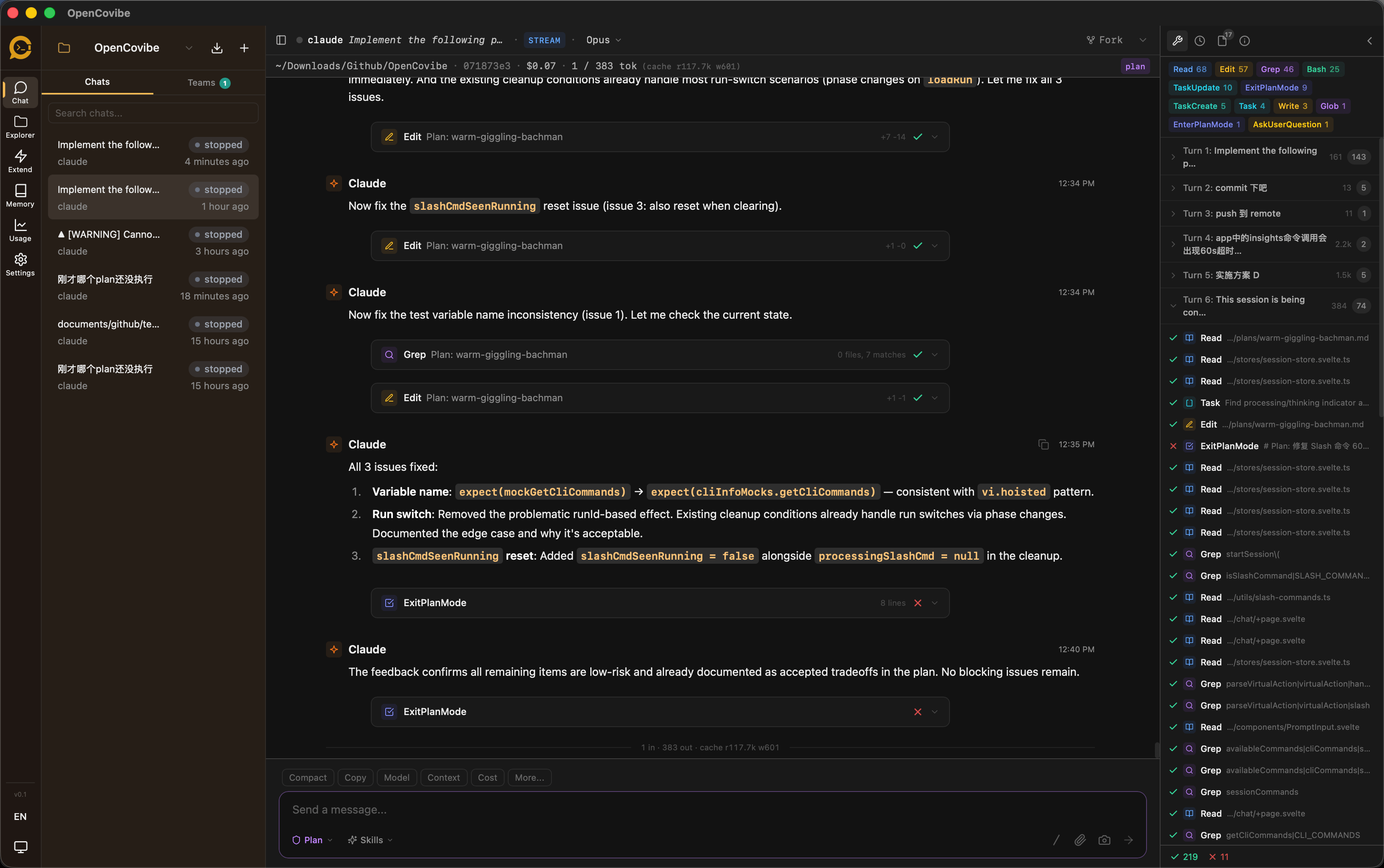
AI coding CLIs like Claude Code are powerful, but they run inside a terminal. That means no persistent dashboard, no visual diff review, no cross-session history, and no multi-provider switching. OpenCovibe wraps these CLIs with a native desktop UI that adds the layers the terminal can't provide — while keeping all your data stored locally. (Remote model APIs require network access; the app itself has no cloud backend.)
| Agent | Status |
|---|---|
| Claude Code | Supported |
| Codex | In progress |
Platform status: Currently developed and tested primarily on macOS. Windows and Linux builds are functional but have not been thoroughly tested for compatibility — contributions and bug reports are welcome.
Core principle: Wrap the CLI, surface the work, keep it local.
Key Capabilities
What the CLI doesn't give you
| Capability | What OpenCovibe adds |
|---|---|
| Visual Tool Cards | Every tool call (Read, Edit, Bash, Grep, Write, WebFetch, …) rendered as an inline card with syntax-highlighted diffs, structured output, and one-click copy |
| Run History & Replay | Browse all past sessions, full event replay, resume / fork from any point, soft-delete with recovery |
| Multi-Provider Switching | Use Claude Code with 15+ API providers (DeepSeek, Kimi, Zhipu, Bailian, DouBao, MiniMax, OpenRouter, Ollama, …) — hot-switch without restarting |
| Remote Browser Access | Embedded web server for browser-based access over LAN or HTTP tunnels (ngrok / cloudflared) |
| File Explorer | Browse and edit project files with syntax highlighting, markdown preview, image preview, and git diff view |
| Memory Editor | Create and edit CLAUDE.md, project-scoped and user-scoped memory files with live preview |
| Agent Management | Visual editor to create, edit, and manage custom agent definitions (.md files) with form and source modes |
| Permission Rules | Manage CLI permission allow/deny rules at user and project level with a visual rule editor |
| Usage Analytics | Per-model token breakdown, cost tracking, daily heatmap, stacked model chart, session-level stats |
| Team Dashboard | Read-only view into Claude Code multi-agent teams — task lists, teammate status, message flow |
| Activity Monitor | Real-time hook event stream, tool activity timeline, file tracking panel, subagent tracking with nested tool cards |
| Plugin Marketplace | Browse, install, and manage Claude Code plugins and skills from a visual marketplace |
| MCP Management | Discover MCP servers, view per-server status, reconnect / toggle from a panel |
| Inline Permissions | Rich permission review UI with batch Allow/Deny panel, CLI-suggested "Always Allow" rules, and AskUserQuestion rendering |
| CLI Session Import | Discover and import existing Claude Code CLI sessions into OpenCovibe |
| Rewind | Checkpoint and selectively revert file changes with dry-run preview |
| Remote Hosts | Configure SSH hosts for remote CLI execution with key generation wizard and connectivity testing |
| Preview & Element Picker | Open a localhost preview in a companion window, interactively pick page elements, and insert structured context (DOM path, styles, HTML snippet) into the chat |
| Ralph Loop | Auto-iterate the same prompt until a completion condition is met — hands-free coding with configurable max iterations |
| Doctor Diagnostics | System health checks for CLI, platform, SSH, and proxy configuration |
Features
- Rich Chat UI — Markdown, syntax highlighting, thinking blocks, image attachments, file diffs, collapsible tool burst groups
- Session Control — Create, resume, fork, rename sessions; plan mode toggle; model hot-switch; context history tracking
- Drag & Drop — Native file drag-drop for images, PDFs, directories, and path references
- Project Folders — Sidebar project selector with per-project scoping for memory, permissions, and sessions
- Inline Slash Commands —
/model,/diff,/todos,/tasks,/doctor,/copy,/stats,/preview,/ralph, and more — rendered natively in-app - Keyboard Shortcuts — Fully customizable keybindings with chord support and conflict detection
- Hook Manager — Configure upstream CLI hooks for event-driven automation
- i18n — English and Chinese (Simplified) with lightweight reactive runtime
- System Tray — Hide to tray; background sessions keep running with native notifications
- Dark / Light Theme — CSS variable-based theming with UI zoom control
- Auto Update — In-app update checker with download links
- Setup Wizard — Guided CLI detection, authentication, and provider configuration on first launch
Quick Start
Option A: Download Pre-built Binary (macOS)
Download the latest .dmg from Releases — universal binary, supports both Apple Silicon and Intel Macs.
Note: The app is not code-signed. On first launch, right-click and select "Open" to bypass macOS Gatekeeper.
Option B: Automated Setup (macOS)
git clone https://github.com/AnyiWang/OpenCovibe.git
cd OpenCovibe
./scripts/setup.sh          # add --yes to skip confirmation prompts
npm run tauri dev
The setup script detects missing dependencies (Xcode CLI Tools, Homebrew, Node.js, Rust) and installs them automatically.
Option C: Manual Setup
Prerequisites:
macOS:
xcode-select --install
brew install node
curl --proto '=https' --tlsv1.2 -sSf https://sh.rustup.rs | sh
Linux (Debian/Ubuntu):
sudo apt install libwebkit2gtk-4.1-dev build-essential curl wget file \
  libxdo-dev libssl-dev libayatana-appindicator3-dev librsvg2-dev
curl --proto '=https' --tlsv1.2 -sSf https://sh.rustup.rs | sh
Windows:
# Install Rust from https://rustup.rs
# Install Node.js from https://nodejs.org
Build & Run:
git clone https://github.com/AnyiWang/OpenCovibe.git
cd OpenCovibe
npm install
npm run tauri dev
Setup Wizard
On first launch, OpenCovibe guides you through:
- CLI Detection — Auto-detects Claude Code CLI, offers installation if missing
- Authentication — OAuth login or API key for 15+ providers
- Ready — Start coding
You can re-run the wizard anytime from Settings > General > Setup Wizard.
Supported Providers
LLM Providers
| Provider | Endpoint | Auth |
|---|---|---|
| Anthropic | Official API | API Key |
| DeepSeek | api.deepseek.com/anthropic |
Bearer |
| Kimi (Moonshot) | api.moonshot.cn/anthropic |
Bearer |
| Kimi For Coding | api.kimi.com/coding/ |
Bearer |
| Zhipu (智谱) | open.bigmodel.cn/api/anthropic |
Bearer |
| Zhipu (智谱 Intl) | api.z.ai/api/anthropic |
Bearer |
| Bailian (百炼) | coding.dashscope.aliyuncs.com/apps/anthropic |
Bearer |
| DouBao (豆包) | ark.cn-beijing.volces.com/api/coding |
Bearer |
| MiniMax | api.minimax.io/anthropic |
Bearer |
| MiniMax (China) | api.minimaxi.com/anthropic |
Bearer |
| Xiaomi MiMo (小米) | api.xiaomimimo.com/anthropic |
Bearer |
API Gateway
| Platform | Endpoint | Auth |
|---|---|---|
| Vercel AI Gateway | ai-gateway.vercel.sh |
Bearer |
| OpenRouter | openrouter.ai/api |
Bearer |
| AiHubMix | aihubmix.com |
Bearer |
| ZenMux | zenmux.ai/api/anthropic |
Bearer |
Local
| Platform | Endpoint |
|---|---|
| Ollama | localhost:11434 |
| CC Switch | localhost:15721 |
| Claude Code Router | localhost:3456 |
| Custom | Any Anthropic-compatible endpoint |
Architecture
Tech Stack:
| Layer | Technology |
|---|---|
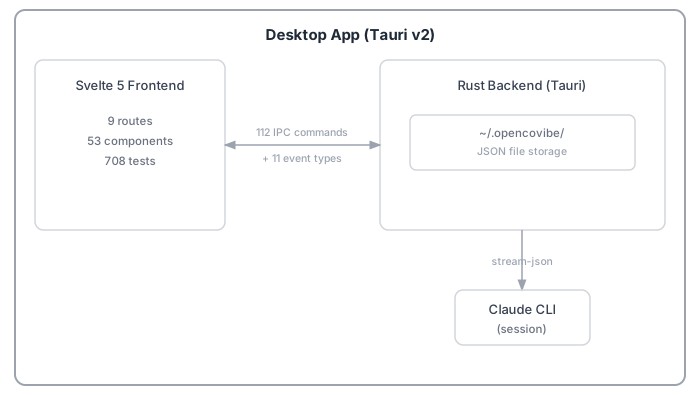
| Framework | Tauri v2 (Rust backend + WebView) |
| Frontend | Svelte 5 + SvelteKit (adapter-static) |
| Styling | Tailwind CSS v3 + CSS variables |
| Terminal | xterm.js |
| Markdown | marked + highlight.js + DOMPurify |
| i18n | Custom lightweight runtime (en + zh-CN) |
| Testing | Vitest |
Agent Communication:
The app communicates with Claude Code CLI via bidirectional stream-JSON protocol (stdin/stdout). Each session is a long-lived, multi-turn process managed by a per-run session actor. Three communication modes are supported: stream-JSON (primary), PTY (interactive terminal), and pipe (Codex).
Data Storage:
All data is stored locally at ~/.opencovibe/ — no cloud, no database.
~/.opencovibe/
├── settings.json          # User settings
├── runs/                  # Session history
│   └── {run-id}/
│       ├── meta.json      # Run metadata
│       ├── events.jsonl   # Event log
│       └── artifacts.json # Summary
└── keybindings.json       # Custom shortcuts
Development
npm install              # Install dependencies
npm run tauri dev        # Dev mode with hot-reload
npm test                 # Run tests
npm run lint:fix         # Lint
npm run format           # Format
Contributing
Contributions are welcome! Please read CONTRIBUTING.md for development setup, coding conventions, and PR guidelines.
Star History
License
Licensed under the Apache License 2.0.
Copyright 2025-2026 OpenCovibe Contributors.
Reviews (0)
Sign in to leave a review.
Leave a reviewNo results found