seris
Health Pass
- License — License: Apache-2.0
- Description — Repository has a description
- Active repo — Last push 0 days ago
- Community trust — 11 GitHub stars
Code Warn
- process.env — Environment variable access in .github/workflows/release.yml
Permissions Pass
- Permissions — No dangerous permissions requested
No AI report is available for this listing yet.
Open-source desktop AI trading assistant for market research: chat beside live charts, price alerts, local backtests, bring your own model.

Seris — open-source desktop AI trading assistant
Your AI market research desk: talk through a market move, open its chart, and turn an idea into a local backtest.
Crypto, stocks, ETFs, commodities, FX and indices · bring your own model.
seris.im · Download for macOS · Docs · 中文 · Watch the walkthrough · Build from source
v0.1.1 stable · macOS Apple Silicon · Apache-2.0
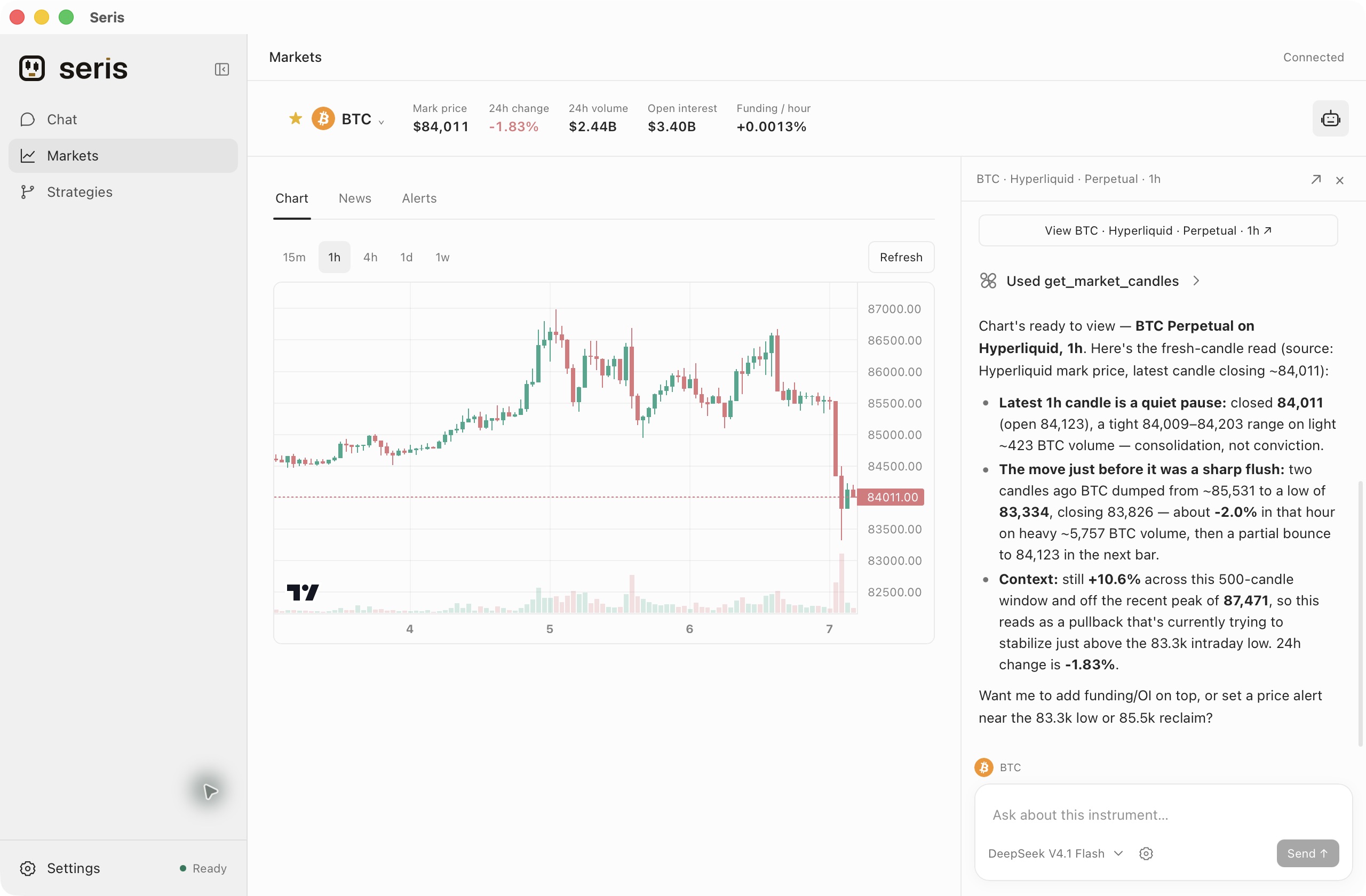
The market workspace, with real Hyperliquid data and a response from a connected DeepSeek model. Captured in the released macOS client.
Research in one workspace
| What you want to do | How Seris helps |
|---|---|
| Understand a market move | Ask in Chat or alongside a chart. Share the current instrument, timeframe and selected range with the agent. |
| Follow your markets | Search instruments, build a watchlist, switch candlestick intervals and set conditional price alerts. |
| Test a strategy idea | Ask for a TypeScript strategy, review its source before saving, and backtest against historical Binance spot candles. |
| Use your preferred model | Connect a cloud provider, a custom OpenAI/Anthropic-compatible endpoint, or a running Ollama or LM Studio server. |
Conversations, watchlists and saved strategies persist across app upgrades. The interface supports English and Chinese.
Choose Ask every time or Allow all actions below the chat input. The choice applies to that conversation and persists across restarts; new chats start with Ask every time. Tasks can continue through as many model and tool calls as needed, and Stop remains available.
Explore the markets
Search for an instrument, choose its market and change the chart timeframe.
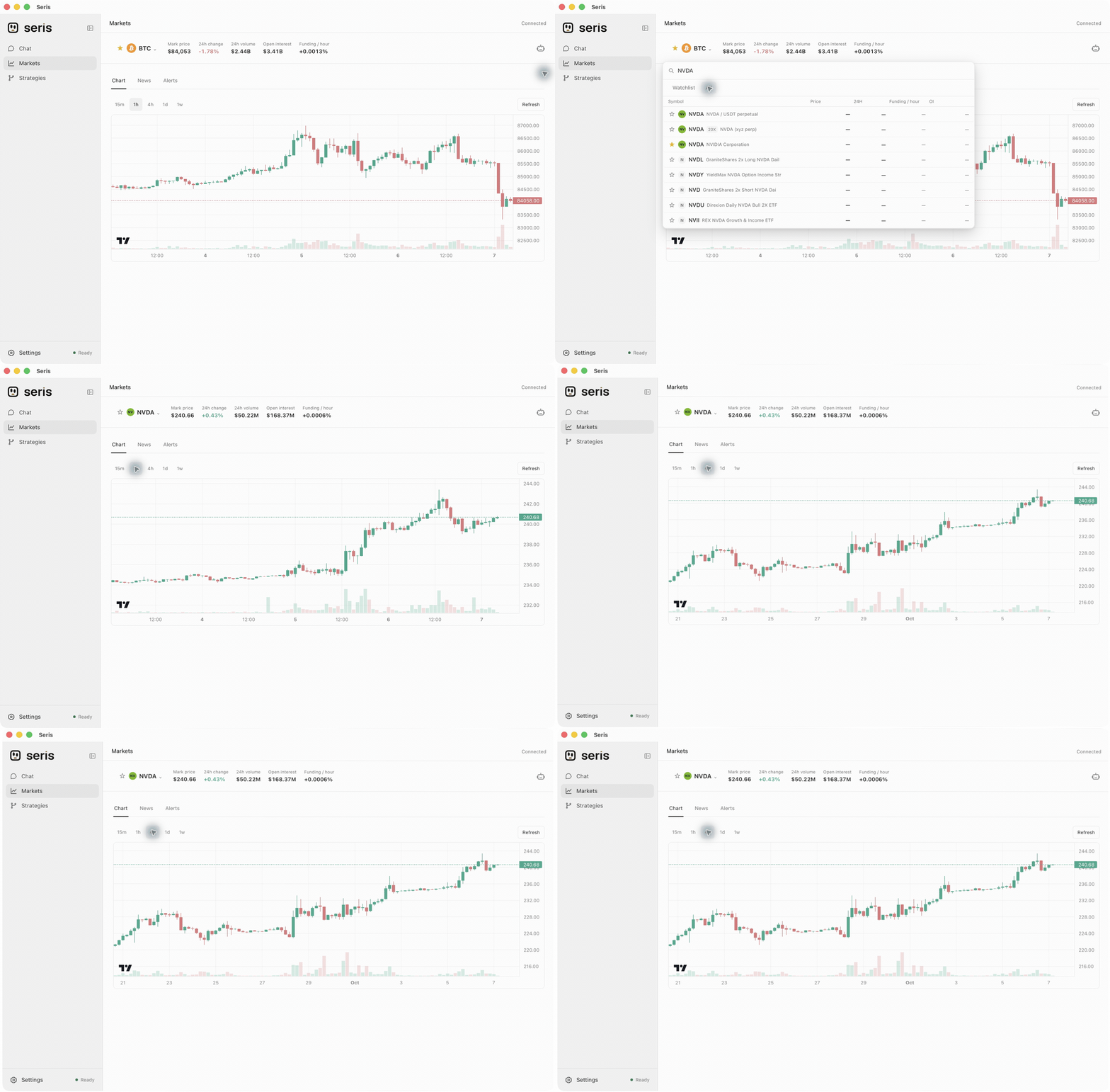
A shortened walkthrough of the actual client. NVDA is shown as a Hyperliquid xyz perpetual contract; quotes in this recording are historical snapshots.
Open the assistant beside a chart to discuss what you see. For example:
Summarize this chart in three short bullets.
Compare BTC funding on Hyperliquid and Binance.
Alert me when BTC crosses $90,000.
Inspect a strategy, then its results
Review the strategy's code and parameters, then inspect its return, drawdown, fees, trade markers and equity curve. Backtest runs remain available in Strategies.
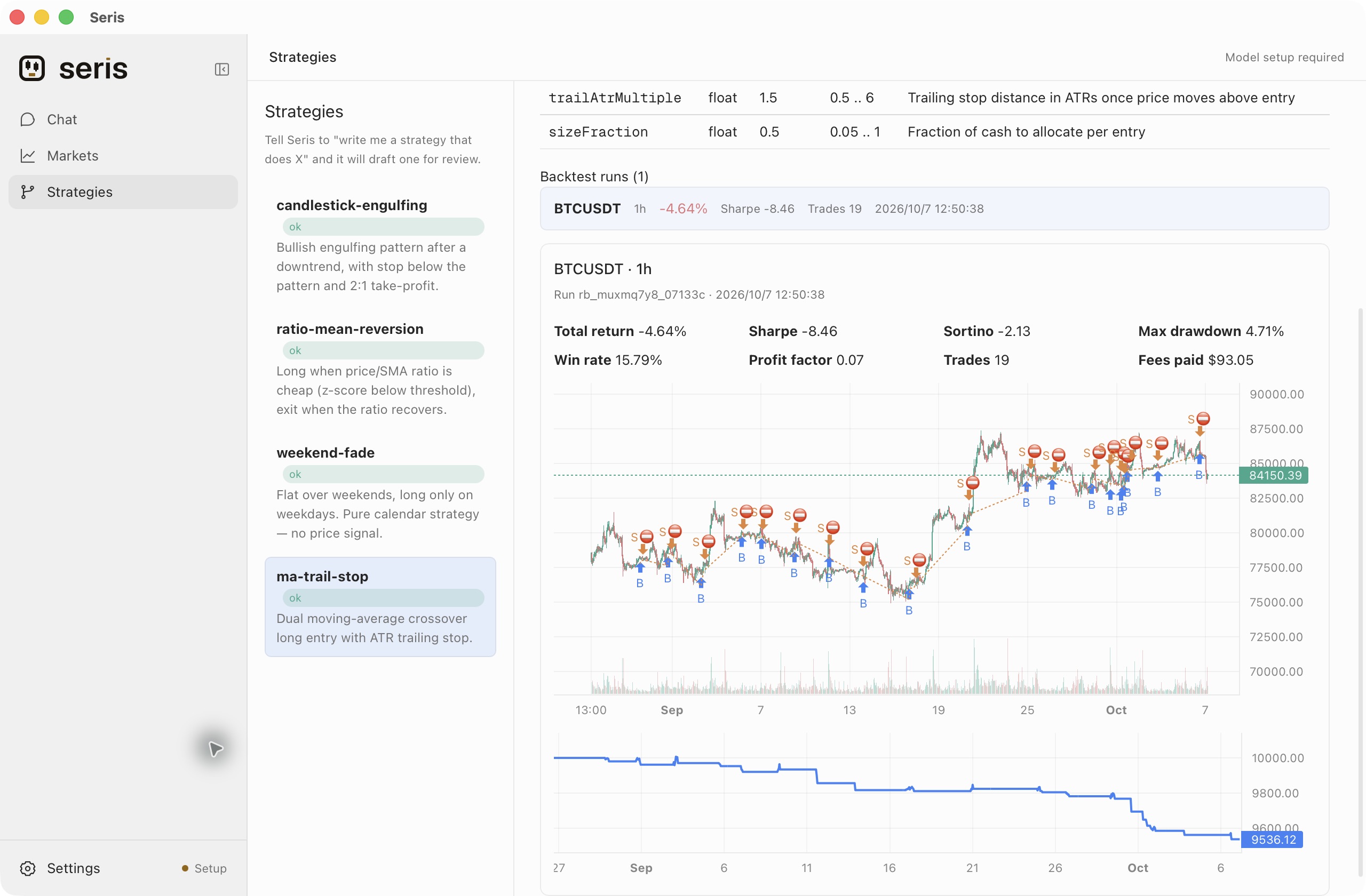
The bundled moving-average strategy, run locally against 999 closed Binance BTCUSDT hourly candles. These are simulated historical results.
Try this in Chat:
Write a BTC strategy that enters on a moving-average crossover and uses an ATR trailing stop.
Backtest ma-trail-stop on BTCUSDT 1h for the last 30 days.
Get started
- Install Seris. Download the Apple Silicon DMG from the latest release, open it, and drag Seris to Applications.
- Connect a model. Open Settings → Models, configure a provider and select a default model. For Ollama or LM Studio, start the local server first.
- Start researching. Ask in Chat, or open Markets and bring the assistant alongside your chart.
First launch on macOS: Seris is ad-hoc signed and is not Apple-notarized. If macOS blocks the first launch, open System Settings → Privacy & Security → Open Anyway and approve Seris. See Apple's instructions.
For upgrades, quit the old app before replacing it. Your local data is retained; macOS may ask you to authorize access to an existing model credential again.
Models, data and local storage
Bring your own model. Seris supports cloud providers and local models through Ollama or LM Studio, including custom endpoints. Model requests go to the provider you configure and use its pricing and data policies. Desktop API keys are saved in the operating system credential store.
Know the data source. Public market data comes from Hyperliquid, Binance spot, Binance traditional-finance perpetuals and Hyperliquid xyz. Stock, ETF, commodity, FX and index instruments on perpetual venues show contract prices. For US stocks and ETFs, connect Longbridge from Markets and complete browser authorization; access depends on your account permissions. Crypto news requires CRYPTOCOMPARE_API_KEY in the startup environment.
Keep your workspace. Conversations, watchlists, strategies and backtest results are stored locally. Approved browser and terminal tools can use your local environment; see Security for the permission model.
Release scope. v0.1.1 supports Chat, Markets, model settings and local strategy backtests on macOS Apple Silicon. Alerts run while the app is running. Live order execution, wallet transfers and connected portfolio balances are unavailable. Windows, Linux and Intel Mac installers are not included in this release.
Development
Use the Node version in .node-version, pnpm 12.5.1, Rust and the Tauri build prerequisites for your operating system.
pnpm install --frozen-lockfile
pnpm tauri:dev
pnpm typecheck
pnpm test        # Existing regression checks, when needed
pnpm tauri:build
| Directory | Role |
|---|---|
apps/core |
Agent runtime, local gateway, tools, skills and persistent sessions |
apps/desktop-ui |
React, Vite and Tailwind interface |
apps/desktop |
Tauri/Rust shell and desktop packaging |
See Contributing for gateway development, local data paths and release checks. Found a problem? Open an issue with your app version and reproduction steps.
License
Project-owned code and public documentation use Apache-2.0. Seris branding has separate terms; dependencies retain their own licenses.
Reviews (0)
Sign in to leave a review.
Leave a reviewNo results found