coincide
Health Warn
- License — License: MIT
- Description — Repository has a description
- Active repo — Last push 0 days ago
- Low visibility — Only 7 GitHub stars
Code Pass
- Code scan — Scanned 12 files during light audit, no dangerous patterns found
Permissions Pass
- Permissions — No dangerous permissions requested
No AI report is available for this listing yet.
Native macOS (AppKit) app for Claude Code, Codex, Cursor, Grok Build, OpenCode and Antigravity — one window, one model picker, switch agents mid-thread. A native port of T3 Code.
Coincide


A native macOS app for the coding agents you already pay for — Claude Code, Codex, Cursor, Grok Build, OpenCode and Antigravity — in one window, with one model picker, and the ability to switch agents in the middle of a thread.
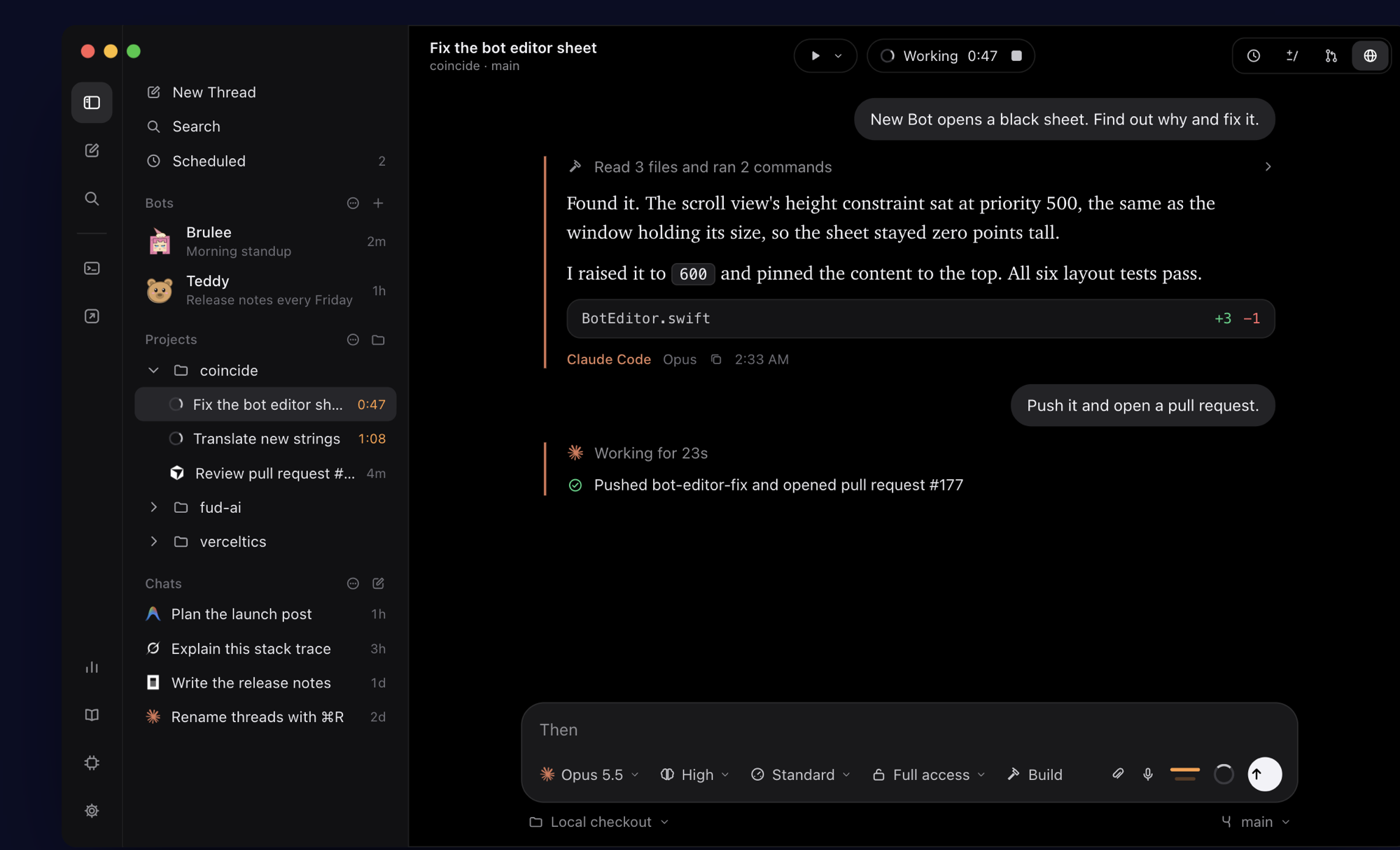
Coincide is a native AppKit port of T3 Code. It drives each agent's own command-line tool with the login you already have, so your existing subscriptions keep working. Coincide never sells, proxies or meters tokens.
Website and docs: coincide.dev · Features · Docs · FAQ
Status: early development. Expect rough edges.
Install
Coincide runs on macOS 26 or later, on Apple silicon and Intel Macs. Pick one:
Download Coincide.dmg, open it and drag Coincide to Applications.
Homebrew
brew install --cask apoorvdarshan/tap/coincidenpm (Node.js 18 or later): downloads the latest release, checks its checksum, signature and notarization, and installs it in Applications.
npx coincide-dev
Every release is signed with Developer ID and notarized by Apple. Coincide → Check for Updates installs newer ones. Release notes are in CHANGELOG.md and on the releases page.
Why native
T3 Code is an Electron app with a Node server behind a web UI. Coincide is built with AppKit (and SwiftUI where it fits, like Settings) and talks to the agents in-process, so it starts instantly, idles at a fraction of the memory, scrolls long streaming transcripts smoothly, and gets macOS 26 Liquid Glass, menus, shortcuts, accessibility and notifications for free.
Features
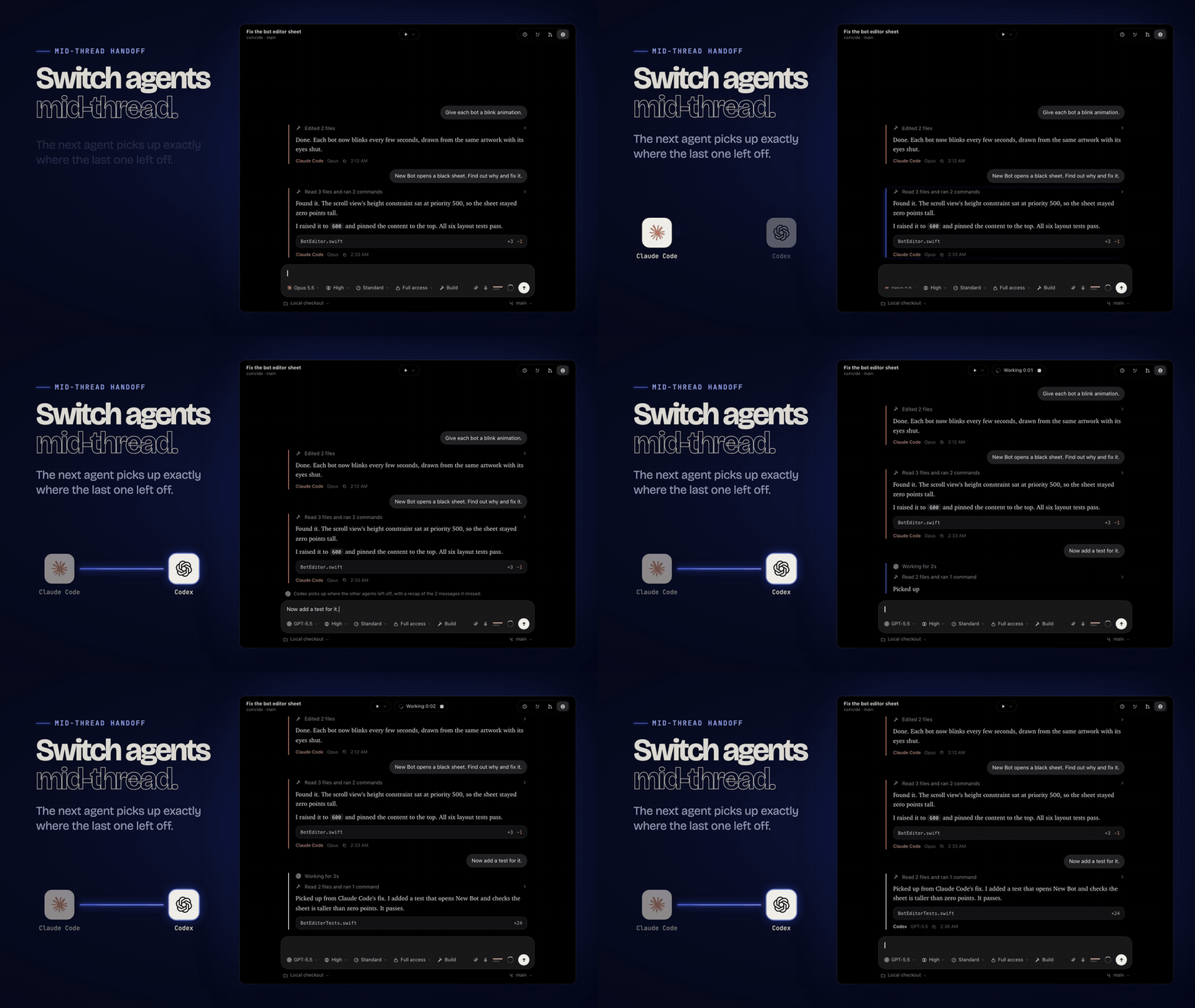
Images show demo data.
- Every agent, one picker. Models from all installed and signed-in agents appear in one menu, grouped by agent, with favorites, hidden models, reasoning effort and fast mode where the provider supports them.
- Switch mid-thread. Each agent keeps its own native session for the thread. When you switch, the next agent gets a recap of the turns it missed and continues in the same working directory. Switch back and the earlier agent resumes its own session.
- Projects and threads in a sidebar with search, pinning and archiving, plus a ⌘K command palette.
- Chats without a project have their own sidebar heading. Each project can set defaults for the model, effort, speed, permissions and plan/build mode of new threads.
- Inbox actions: select several threads to archive, unarchive or delete together. Settle quiet conversations until new activity arrives. Undo and redo (⌘Z, ⇧⌘Z or the Edit menu) apply to whole batches during the current app session.
- Snooze threads until later today, tomorrow or next week. They return automatically; running agents and requests for input stay visible. Find hidden conversations through search or Show Snoozed Threads.
- Full access or approvals. Let agents run freely, or approve each command and file edit. Agents can also ask you questions, which you answer inline.
- Plan mode, image and file attachments,
@file mentions,/commands (including/claude,/codex, … to switch agents), queued follow-up messages and per-thread drafts. Quotes, terminal selections and diff comments stay attached through drafts, sending and provider handoffs. - A native transcript with Markdown, inline images, audio/video controls and self-contained interactive HTML/SVG previews, syntax-highlighted code, collapsible work logs per turn, and each reply labelled with the agent and model that wrote it.
- Git built in: unified or side-by-side diffs for uncommitted changes, the branch and each turn; checkpoints to revert a turn; per-thread worktrees; commit, push and pull requests with agent-written messages.
- Steer or queue. While an agent works, steer the running turn (Claude Code, Codex, OpenCode) or queue a follow-up; Settings picks which one sending does. The composer shows your plan's usage limits for Claude Code, Codex, Cursor, OpenCode Go, Grok Build and Antigravity.
- Fork and rewind. Fork a thread from any turn, or edit an earlier message and continue from there.
- Pull and merge requests on GitHub, GitLab, Bitbucket, Azure DevOps and Forgejo/Codeberg, through each host's CLI or its web page.
- A native GitHub PR workspace lists requests, checks and reviews, and supports reviewing, merging the reviewed revision, checking out a PR in its own thread, and
#mentions in messages. - Scheduled tasks send a message into a thread (bots' conversations included) or start a fresh thread in a project: once, daily, on weekdays or chosen days, weekly, every few minutes or hours, or on a cron expression, in a chosen time zone. Ask the agent in a thread to do something later or on a schedule and it sets one up through a private local connection for that thread; by default you allow it from a card in the thread first. The clock at the toolbar's top right (View › Scheduled Tasks, ⌥⌘S) lists every schedule beside the conversation, starting on the open thread's when it has some, and shows that thread's next run. Schedules run while Coincide is open, wait for a busy thread to finish its turn, and skip runs missed after quitting or sleep.
- Integrated terminal per thread, with tabs and splits.
- Keep Awake (Settings → General) keeps a MacBook running agents 24/7: it never sleeps, closing the lid included, and the display turns off when the lid closes. It can also keep displays off and sound muted until the lid opens. Turning it on or off asks for your password once to run
pmset; turning it off puts back the exact sleep settings from before. A small lid watcher, started by launchd at login while it's on, follows the lid's notifications instead of polling. Sleep normally on battery keeps the Mac awake only on the charger: on battery it sleeps as usual, closing the lid included. Becausepmset disablesleepcovers every power source and only an administrator can change it, this adds a small battery helper (a launchd daemon running as root, allowed once in Login Items). It takes no input, only switches that setting when the Mac is plugged in or unplugged, and is registered only while the option and Keep Awake are on. Based on macbook-24x7-agents, which it can replace. - A browser in every thread, a WebKit page beside the conversation with its own page and back/forward history. Threads share one persistent browser profile, so sign-ins last across threads and relaunches (Settings → Browser offers private, per-thread sessions instead, and clearing browsing data). Import cookies, history and bookmarks from Safari, Chrome, Arc, Brave, Edge, Firefox and other Chromium and Firefox browsers; nothing leaves your Mac. With Agent Control (on by default, per thread), an agent with local shell tools can navigate, read, click, fill inputs and take screenshots through a private local connection, in the background while the panel is closed. When it needs you, to sign in, pass a CAPTCHA or enter a code, it opens the panel and shows what to do, then waits for Done. Agents can't read cookies, site storage or password fields; control ends when Coincide quits. Sign-ins can fill from 1Password and Bitwarden (through their command-line tools) or from logins Coincide saves in your Keychain (including ones imported from a browser's or password manager's CSV export), from the key in the address bar; agents can ask Coincide to sign in on a page, which it does only after you allow that site, without ever showing them the password or one-time code. Web links you click in a conversation open there (⌘-click opens your default browser; Settings › General can swap the two).
- Computer Use (Settings › Computer Use, off by default) lets agents see and operate other Mac apps: list apps and windows, read a window's controls, click, type, scroll and take screenshots. Coincide bundles Cua Driver and runs it as its own helper, so the Accessibility and Screen Recording permissions you grant belong to Coincide, and every agent reaches it through a private connection for its thread, with no MCP setup per agent. Coincide draws the agent's cursor on whichever display it acts on (optional). Browser control and scripts aren't exposed, one thread acts on the desktop at a time, and access ends when you turn it off or quit Coincide.
- Usage dashboard in Settings, with provider account limits and the extra figures each provider reports (Claude extra usage, Codex credit limits, OpenRouter key credits, Anthropic API-key rate limits on request), activity charts and local history of the latest 10,000 finished turns. Provider token snapshots and reported session costs are shown with their scope; they are not added together as billing totals.
- Custom keyboard shortcuts for every menu command, with conflict warnings.
- Fast with long histories: thread lists load from a small index and transcripts load only when opened.
- Notifications when a turn finishes or needs you while Coincide is in the background. With Coincide Remote in use and the Mac idle, they go to the iPhone or iPad instead, never to both, and seeing a thread anywhere clears them everywhere. Optional lock-screen alerts reach a locked phone through your own iCloud account, in Mac builds signed for iCloud (see
Signing.xcconfig). - 19 languages: English, Chinese (Simplified and Traditional), Dutch, French, German, Hindi, Indonesian, Italian, Japanese, Korean, Polish, Portuguese (Brazil), Russian, Spanish (Spain and Latin America), Turkish, Ukrainian and Vietnamese. The translations are machine-made and marked for review; corrections are welcome.
Drive Coincide from an agent or Terminal
The bundled coincide tool can list projects, agents and threads; create project threads or projectless chats; send messages; wait for replies; read, stop, approve, answer questions, archive, or open a thread in the window. Every agent Coincide starts gets it on its PATH and can use this for its own thread. Run coincide help for commands and --json for structured output. Coincide automatically sets up the Terminal command at launch. Settings → General → Command Line shows its detected location and any setup issue. Command-line control is on by default and can be disabled there. It uses an owner-only local Unix socket, without network access or pairing; processes running as your Mac user can control threads while it is enabled.
coincide agents
coincide new --chat --agent claude --title "Research" "Summarize this topic"
coincide threads --chats --json
coincide read THREAD_ID
The browser also supports real key presses, typing into rich editors, page dialogs, history, scrolling, waiting for elements and paged reads. Agents can list embedded frames and operate inside them, including cross-origin frames. Downloads stay in unique folders under ~/Downloads/Coincide; polling reports completion and the file path, without opening files. Console messages and JavaScript errors stay in a bounded in-memory buffer. Mobile/tablet viewport presets change layout dimensions, and full-page screenshots capture up to 20,000 CSS pixels in height, reporting truncation. These controls are described in the thread's runtime browser instructions; they do not expose an arbitrary JavaScript command.
Import earlier CLI conversations
Choose File → Import CLI Session… to browse local Claude Code and Codex histories, search by title or folder, and preview a conversation before importing it. Choose File… also accepts a specific session JSONL file. Importing never starts an agent; imported threads begin in approval mode. Their provider session IDs allow normal native resume, and switching agents uses Coincide's conversation handoff. Existing sessions open their existing Coincide thread instead of creating duplicates.
The original CLI file stays untouched. Coincide keeps an exact private copy alongside its app data; File → Reveal Imported Source reveals that copy. Unsupported records, attachments, excluded conversation branches, and text beyond the transcript limit stay in this source copy. The readable transcript follows Claude's latest main conversation branch and Codex rollback events. Deleting an imported thread also deletes its saved source copy; Undo restores both.
Imports accept up to 32 MB per file, 4 MB per record, and 100,000 records. Individual displayed transcript fields are capped at 100,000 characters, and the preview at 200,000. The scanner respects CLAUDE_CONFIG_DIR and CODEX_HOME, lists up to 2,000 files, and offers manual selection when a history cannot be listed. It does not scan Claude subagent histories automatically. If a CLI changes a file after preview, refresh the preview before importing.
Agents
Install and sign in to at least one:
| Agent | How Coincide talks to it | Install and sign in |
|---|---|---|
| Claude Code | claude stream-json control protocol (as the Agent SDK does) |
Install, then claude auth login |
| Codex | codex app-server (JSON-RPC) |
Install, then codex login |
| Cursor | cursor-agent acp (Agent Client Protocol) |
Install, then cursor-agent login |
| Grok Build | grok over ACP |
Install, then grok login |
| OpenCode | opencode serve HTTP API |
Install, then opencode auth login |
| Antigravity | Antigravity's ACP runtime | Install Antigravity and sign in with Google |
Antigravity account risk. Google's Antigravity terms call accessing the service with third-party software, tools or services a breach. Since February 2026 Google has suspended accounts for this, mostly personal Google AI Pro and Ultra sign-ins used through third-party tools, and a suspension also cuts off Gemini CLI and Code Assist. Coincide drives Google's own Antigravity agent, but Google staff have given conflicting answers about tools that do. Use it at your own risk, and consider a separate Google account. Gemini API keys from Google AI Studio or Gemini Enterprise aren't affected. Settings › Antigravity shows this notice, and Coincide asks you to acknowledge it once before you sign in or turn Antigravity on.
Full access runs agents without asking first (for Claude Code that is --permission-mode bypassPermissions, the same as T3 Code's full-access mode). Choose Ask for approval in the composer to approve each command and file change.
Requirements
- macOS 26 or later
- To build: Xcode 27 or later and XcodeGen
Build from source
brew install xcodegen
git clone https://github.com/apoorvdarshan/coincide.git
cd coincide
xcodegen generate
open Coincide.xcodeproj
SwiftTerm runs a small build plug-in that reads its own repository metadata and terminfo source to generate Swift. Xcode asks once to trust it (Trust & Enable); on the command line, pass -skipPackagePluginValidation to xcodebuild, as below and in scripts/.
xcodegen generate first runs scripts/fetch-cua-driver.sh, which downloads the pinned Cua Driver release for Computer Use once (it is cached in ~/Library/Caches/Coincide), checks its checksum and Cua AI's signature, and places it in the gitignored Vendor/ folder.
Run the unit tests:
xcodebuild -project Coincide.xcodeproj -scheme Coincide -skipPackagePluginValidation test
Live provider tests talk to the real agent CLIs with your own account, so they only run when you ask:
xcodebuild -project Coincide.xcodeproj -scheme Coincide -skipPackagePluginValidation test TEST_RUNNER_COINCIDE_LIVE_TESTS=1
After changing user-facing text, update the string catalog with scripts/sync-strings.sh.
Project layout
| Path | What's there |
|---|---|
CoincideKit/ |
Framework with everything that isn't UI: models, storage, the provider interface and each provider, the turn runner, mid-thread handoff, git, worktrees and checkpoints |
Coincide/ |
The AppKit app: window, sidebar, command palette, transcript, composer, diff inspector, terminal, settings |
CoincideAlwaysOn/ |
coincide-always-on, the Keep Awake lid watcher in Contents/Helpers (shares CoincideKit/AlwaysOn/) |
CoincidePowerHelper/ |
coincide-power-helper, Keep Awake's battery helper, a launchd daemon run as root only while "Sleep normally on battery" is on |
CoincideKitTests/ |
Unit tests (Swift Testing) and opt-in live provider tests |
Data lives in ~/Library/Application Support/Coincide (set COINCIDE_DATA_DIR to use another folder).
Rich agent output
Agents can embed actual images with  and playable audio or video with [description](/absolute/path/clip.mp4) (also HTTP/HTTPS URLs). Local .html and .svg links open inline previews. Codex native image-generation results are copied into Coincide attachments and displayed even if the final reply omits an image link. Rendering does not give an agent a generation tool it does not have.
For interactive charts or small tools, use a coincide-html or coincide-svg fenced block. Inline JavaScript and CSS work; external scripts, network requests, logins, forms, downloads and app access do not. Use self-contained SVG/canvas or embedded data. Ordinary html fences remain code. Previews wait until a streamed response finishes; media never autoplays. Up to eight previews are shown per response.
Credits
Coincide ports the design and behavior of T3 Code by T3 Tools Inc., released under the MIT License. The terminal uses SwiftTerm (MIT). Computer Use runs Cua Driver by Cua AI (MIT). See THIRD_PARTY_NOTICES.md.
The agents' logos are trademarks of Anthropic, OpenAI, Anysphere, xAI, SST and Google. Browser names and icons belong to their owners (Apple, Google, Microsoft, Mozilla, Brave, The Browser Company, Opera, Vivaldi and others); The password managers' names and logos are trademarks of AgileBits (1Password) and Bitwarden, Inc. Coincide shows the icons of browsers installed on your Mac, and these logos, only to identify them. Coincide isn't affiliated with or endorsed by any of these owners.
License
Coincide is released under the MIT License.
Made by Apoorv Darshan · X @apoorvdarshan · Instagram @apoorvcodes
Reviews (0)
Sign in to leave a review.
Leave a reviewNo results found