AIMA
Health Warn
- License — License: Apache-2.0
- Description — Repository has a description
- Active repo — Last push 0 days ago
- Low visibility — Only 6 GitHub stars
Code Pass
- Code scan — Scanned 12 files during light audit, no dangerous patterns found
Permissions Pass
- Permissions — No dangerous permissions requested
No AI report is available for this listing yet.
AI-Inference-Managed-by-AI: Go binary for managing AI inference on edge devices



AI Inference Managed by AI — A single Go binary that detects hardware, resolves optimal configs from a YAML knowledge base, deploys inference engines via K3S, and exposes 61 MCP tools for AI Agents to operate everything.
News
- 2026-04 — v0.4.0 ships: Explorer Agent Planner (PDCA), Central Advisor + Analyzer, MCP consolidation 101→61, aima-service device identity Phase 1, onboarding wizard with 5-dimension 0–100 scoring, multi-modal benchmark (chat/TTS/ASR/T2I/T2V).
- 2026-03 — v0.3.x: OpenClaw full-stack integration, smart agent routing, Engine Profile system with SGLang-KT, AMD RDNA3 (W7900D) 8-GPU validated.
- 2026-02 — v0.2.0: Support service, Web UI redesign, OpenClaw integration.
- 2026-01 — v0.0.1: Initial foundation release (hardware detection, multi-runtime).
Features
- Zero-config hardware detection — automatically discovers GPUs (NVIDIA, AMD, Huawei Ascend, Hygon DCU, Apple Silicon), CPU, and RAM.
- Knowledge-driven deployment — YAML catalog of hardware profiles, engines, models, and partition strategies; no engine-specific code branches.
- Multi-runtime — K3S (Pod) for clusters, Docker for single-node containers, Native (exec) for bare-metal inference.
- 61 MCP tools — full programmatic control for AI Agents over hardware, models, engines, deployments, fleet, and more.
- Fleet management — mDNS-based auto-discovery of LAN peers; remote tool execution across heterogeneous devices.
- Offline-first — all core functions work with zero network; network is enhancement, not requirement.
- Single binary, zero CGO — cross-compiles to Windows, macOS, Linux (amd64/arm64) with no C dependencies.
60-Second Genesis
Download
Grab a pre-built binary from the Releases page, or build from source:
git clone https://github.com/Approaching-AI/AIMA.git
cd AIMA
make build
For published product releases, the binary installer can be one line:
curl -fsSL https://raw.githubusercontent.com/Approaching-AI/AIMA/master/install.sh | sh
On Windows PowerShell:
irm https://raw.githubusercontent.com/Approaching-AI/AIMA/master/install.ps1 | iex
Notes:
- The installer resolves the latest installable
vX.Y.Zproduct release instead of GitHub'slatestrelease, because bundle tags such asbundle/stack/2026-02-26are not product binaries. - If tags are ahead of published binaries, the installer warns and stays on the latest installable release until the new assets are uploaded.
- Override the source repo for forks with
AIMA_REPO=<owner>/<repo>. - Pin a release with
AIMA_VERSION=v0.2.0. - Windows installer currently targets
windows/amd64and installs to%LOCALAPPDATA%\Programs\AIMA.
Server Setup (Linux)
# 1. Detect your hardware
aima hal detect

# 2. Initialize infrastructure (installs K3S + HAMi + aima-serve daemon)
#    Downloads airgap images for offline container startup.
#    --tier k3s pulls in K3S + HAMi on top of the docker baseline.
#    Requires root for systemd service installation.
sudo aima onboarding init --tier k3s --yes

# 3. Deploy a model (auto-resolves engine + config for your hardware)
aima deploy qwen3.5-35b-a3b
After aima onboarding init --tier k3s, three components are running as systemd services:
| Component | What it does |
|---|---|
| K3S | Container orchestration (containerd, airgap images pre-loaded) |
| HAMi | GPU virtualization for multi-model sharing (skipped on unsupported hardware) |
| aima-serve | API server on 0.0.0.0:6188 with mDNS broadcast |
The server is now discoverable on the LAN and ready to serve inference requests.
Client Usage (Any Platform)
On another device with the AIMA binary — no onboarding init or serve needed:
# List AIMA devices auto-discovered on the LAN via mDNS (no IP needed)
aima fleet devices

# Query a remote device
aima fleet exec <device-id> hardware.detect
aima fleet exec <device-id> deploy.list

# Call the OpenAI-compatible API directly
curl http://<server-ip>:6188/v1/chat/completions \
  -H "Content-Type: application/json" \
  -d '{"model":"qwen3.5-35b-a3b","messages":[{"role":"user","content":"hello"}]}'
Web UI
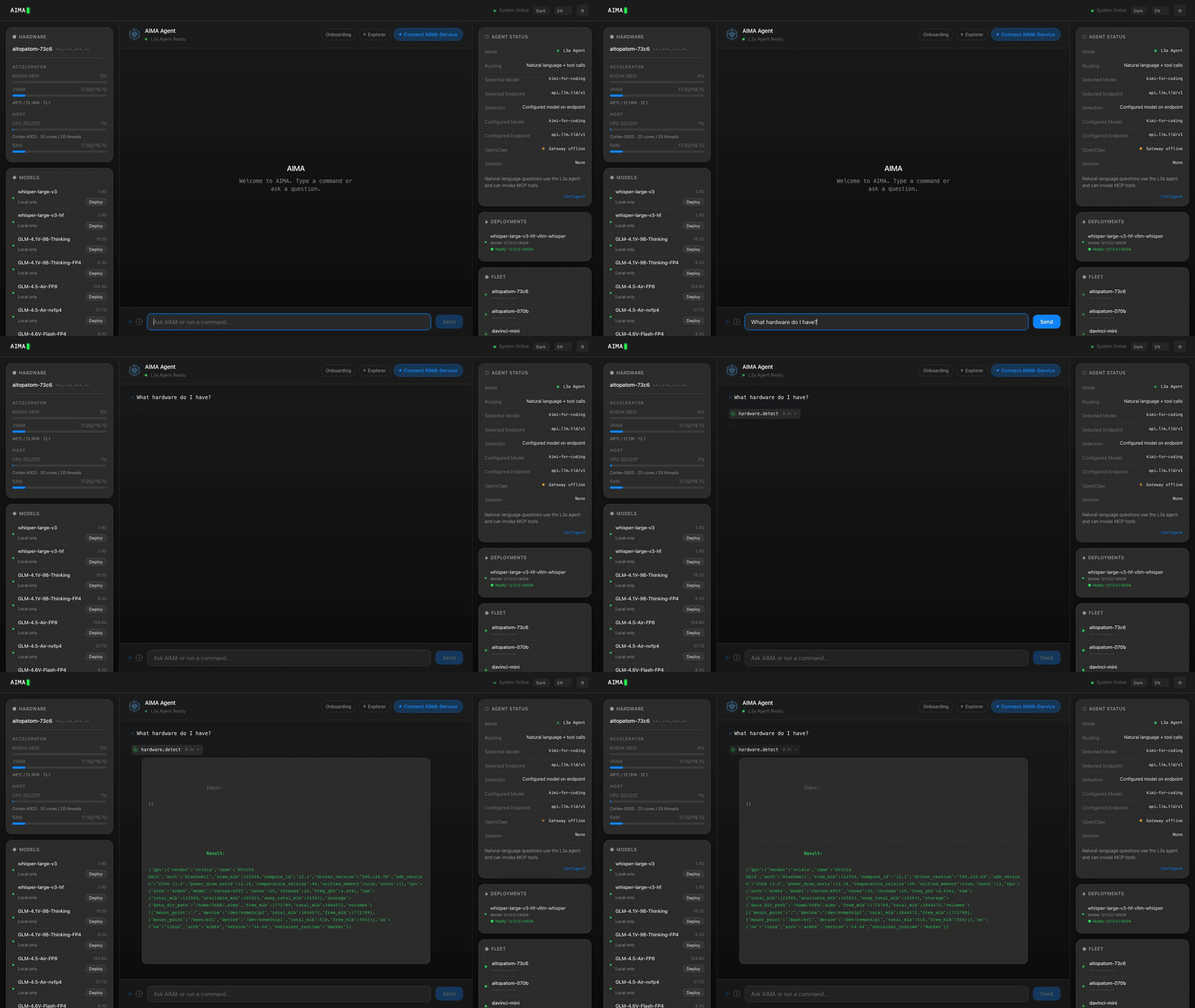
Every AIMA server hosts a built-in Web UI at http://<server-ip>:6188/ui/.
To discover the server IP first: aima fleet devices.
To get a Fleet dashboard that auto-discovers all LAN peers, run aima serve --discover on your own device and open http://localhost:6188/ui/.
Security
aima onboarding init starts the server without authentication (LAN trust model). To enable API key authentication:
# Set API key (hot-reloads, no restart needed)
aima config set api_key <your-key>

# All API/MCP/Fleet requests now require: Authorization: Bearer <your-key>
# Web UI will prompt for the key automatically.

# Remote fleet commands with authentication
aima fleet devices --api-key <your-key>
Eight Silicon Ecosystems
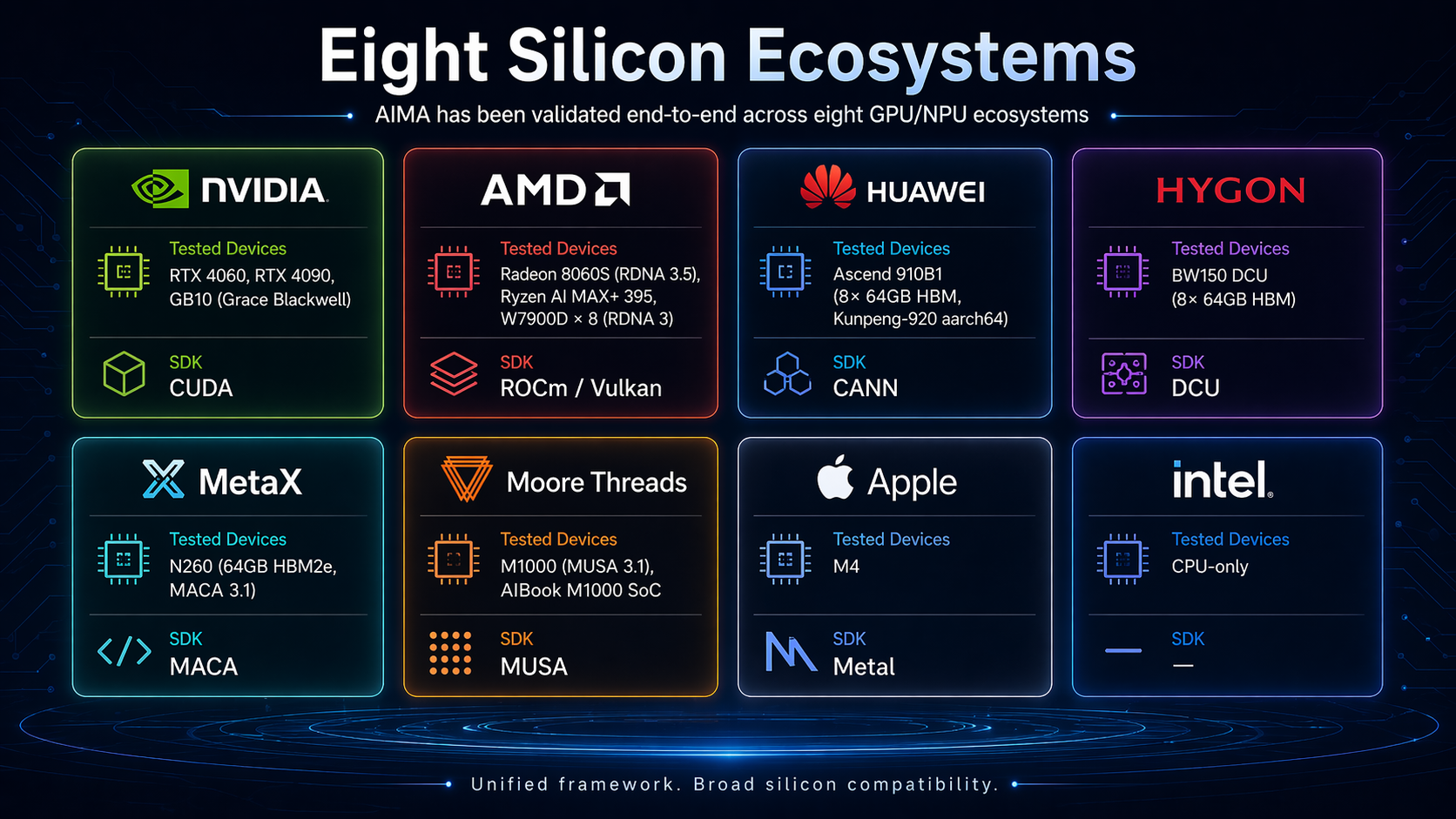
AIMA has been validated end-to-end across eight GPU/NPU ecosystems — NVIDIA (CUDA), AMD (ROCm / Vulkan), Huawei Ascend (CANN), Hygon (DCU), MetaX (MACA), Moore Threads (MUSA), Apple (Metal), and Intel (CPU-only):
Supported Engines
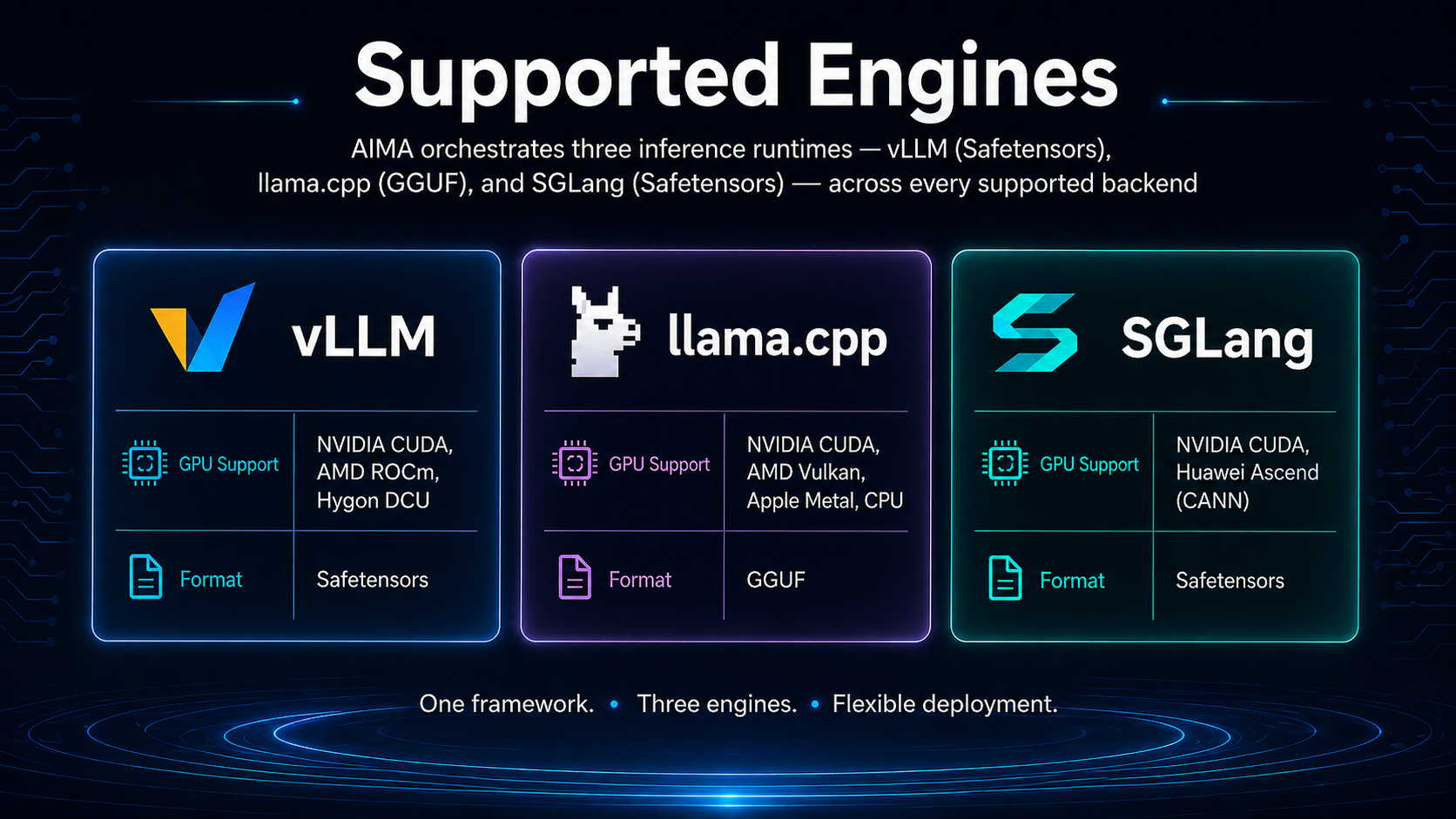
AIMA orchestrates three inference runtimes — vLLM (Safetensors), llama.cpp (GGUF), and SGLang (Safetensors) — across every supported backend:
The L0→L3 Intelligence Ladder
AIMA resolves every deployment decision by climbing four layers of intelligence. Each layer can override the layer below it, and every layer fails gracefully to the one underneath.
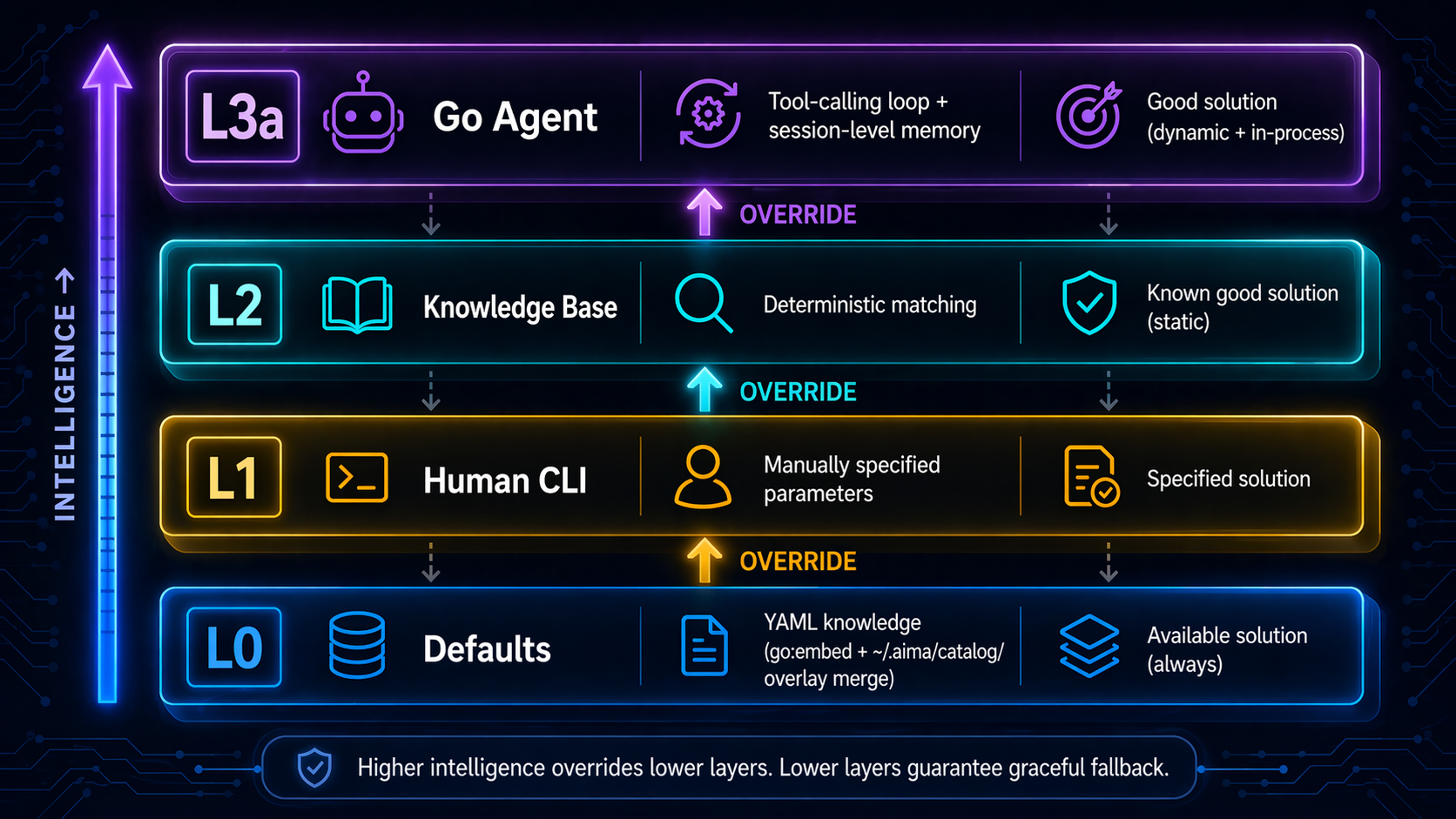
The system is built around four invariants: no code branches for engine/model types (YAML-driven), no container lifecycle management (K3S handles it), MCP tools as the single source of truth, and offline-first operation.
See design/ARCHITECTURE.md for the full architecture document.
The Forge
Every AIMA release passes through The Forge — an end-to-end UAT matrix run on real hardware.





- Eight vendors × multiple devices (NVIDIA GB10, RTX 4090, AMD W7900D × 8, Huawei Ascend 910B × 8, Hygon BW150 DCU × 8, MetaX N260 × 2, Moore Threads M1000, Apple M4, Intel CPU)
- Three runtimes validated per release: K3S Pod, Docker container, Native exec
- 16 UAT items per release covering install / hardware detect / model deploy / API / MCP / fleet / onboarding wizard / failover
- 1,200+ evidence files and ~1,000 hours of logged runtime across the fleet
Per-release UAT report lives in docs/uat/v0.4-release-uat.md, with raw per-device evidence (logs, configs, reproducer commands) under artifacts/uat/v0.4/ — u1…u15 covering install, hardware detect, model deploy, API/MCP, fleet, onboarding, and failover on GB10, RTX 4090, AMD W7900D, Apple M4, and others.
Agent-native
AIMA is built to be driven by AI agents first, humans second.
- 61 MCP tools expose hardware / model / engine / deploy / fleet / knowledge / agent / device identity as JSON-RPC 2.0 functions
- The Dispatcher routes any request through L0→L3 with automatic fallback — agents get the same API whether the local LLM is loaded or not
- Explorer Agent Planner runs document-driven PDCA cycles with a SQLite-backed workspace and seven bash-like tools; every decision leaves a structured trace
| Domain | Representative tools | Purpose |
|---|---|---|
| hardware | hardware.detect · hardware.metrics |
GPU/CPU/RAM inventory + live telemetry |
| model | model.list · model.scan · model.pull · model.import · model.info · model.remove |
Local model catalog + download + import |
| engine | engine.list · engine.pull · engine.scan · engine.import · engine.info |
Inference engine lifecycle |
| deploy | deploy.apply · deploy.dry_run · deploy.list · deploy.logs · deploy.delete · deploy.approve · deploy.status |
Start / monitor / stop model serving |
| fleet | fleet.info · fleet.exec |
LAN auto-discovery + remote tool execution |
| knowledge | knowledge.resolve · knowledge.search · knowledge.promote · knowledge.evaluate · knowledge.save · knowledge.analytics |
YAML catalog + golden-config lifecycle |
| agent | agent.ask · agent.status · agent.rollback |
L3a Agent invocation + decision trace |
| device | device.register · device.status · device.renew · device.reset |
aima-service identity lifecycle |
| benchmark | benchmark.run · benchmark.matrix · benchmark.record · benchmark.list |
Reproducible performance testing |
| central | central.advise · central.scenario · central.sync |
Central knowledge server + advisory feedback |
| system | system.config · system.status |
Hot-reload config + overall health |
See internal/mcp/ for the complete registry.
Connect any MCP-compatible client (Claude Desktop, Cursor, custom agent) and AIMA becomes your AI-inference control plane.
Project Structure
cmd/aima/          Entry point + dependency wiring split by domain
internal/
  hal/             Hardware detection
  knowledge/       YAML knowledge base + SQLite resolver
  runtime/         K3S (Pod) + Docker (container) + Native (exec) runtimes
  mcp/             MCP server + 61 MCP tool registrations/implementations
  agent/           Go Agent loop (L3a)
  cli/             Cobra CLI (thin wrappers over MCP tools)
  ui/              Embedded Web UI (Alpine.js SPA)
  proxy/           OpenAI-compatible HTTP proxy
  fleet/           mDNS fleet discovery + remote execution
  sqlite.go        SQLite state store (`package state`, modernc.org/sqlite, zero CGO)
  model/           Model scan/download/import + metadata detection
  engine/          Engine image management
  stack/           K3S + HAMi infrastructure installer
catalog/
  hardware/        Hardware profile YAML
  engines/         Engine asset YAML
  models/          Model asset YAML
  partitions/      Partition strategy YAML
  stack/           Stack component YAML
Building
Local build
make build
# Output: build/aima (or build/aima.exe on Windows)
Cross-compile all platforms
make all
# Output:
#   build/aima.exe          (windows/amd64)
#   build/aima-darwin-arm64 (macOS/arm64)
#   build/aima-linux-arm64  (linux/arm64)
#   build/aima-linux-amd64  (linux/amd64)
Package GitHub release assets
make release-assets
# Output:
#   build/release/<version>/aima-darwin-arm64
#   build/release/<version>/aima-linux-amd64
#   build/release/<version>/aima-linux-arm64
#   build/release/<version>/aima-windows-amd64.exe
#   build/release/<version>/checksums.txt
To upload those assets to the matching GitHub release with gh:
make publish-release-assets
Annotated SemVer tag pushes such as v0.2.1 also trigger .github/workflows/release.yml, which builds the same assets and uploads them automatically.
Run tests
go test ./...
License
Apache License 2.0. See LICENSE for details.
Reviews (0)
Sign in to leave a review.
Leave a reviewNo results found