arc
Health Warn
- License — License: MIT
- Description — Repository has a description
- Active repo — Last push 0 days ago
- Low visibility — Only 7 GitHub stars
Code Pass
- Code scan — Scanned 12 files during light audit, no dangerous patterns found
Permissions Pass
- Permissions — No dangerous permissions requested
No AI report is available for this listing yet.
Architecture diagrams as code — typed JSON schema, React renderer, visual editor, Mermaid import, ASCII/SVG/PNG export, CLI + MCP server

Arc
Architecture diagrams as code.
Arc turns typed, diffable config into clean, themeable architecture diagrams.
Design in the visual studio, render with React, or export as TypeScript, JSON,
SVG, PNG, or crisp ASCII — with a CLI, generated JSON Schema, Mermaid import,
and an MCP server so AI agents can author diagrams too. The diagram lives with
the system it describes.



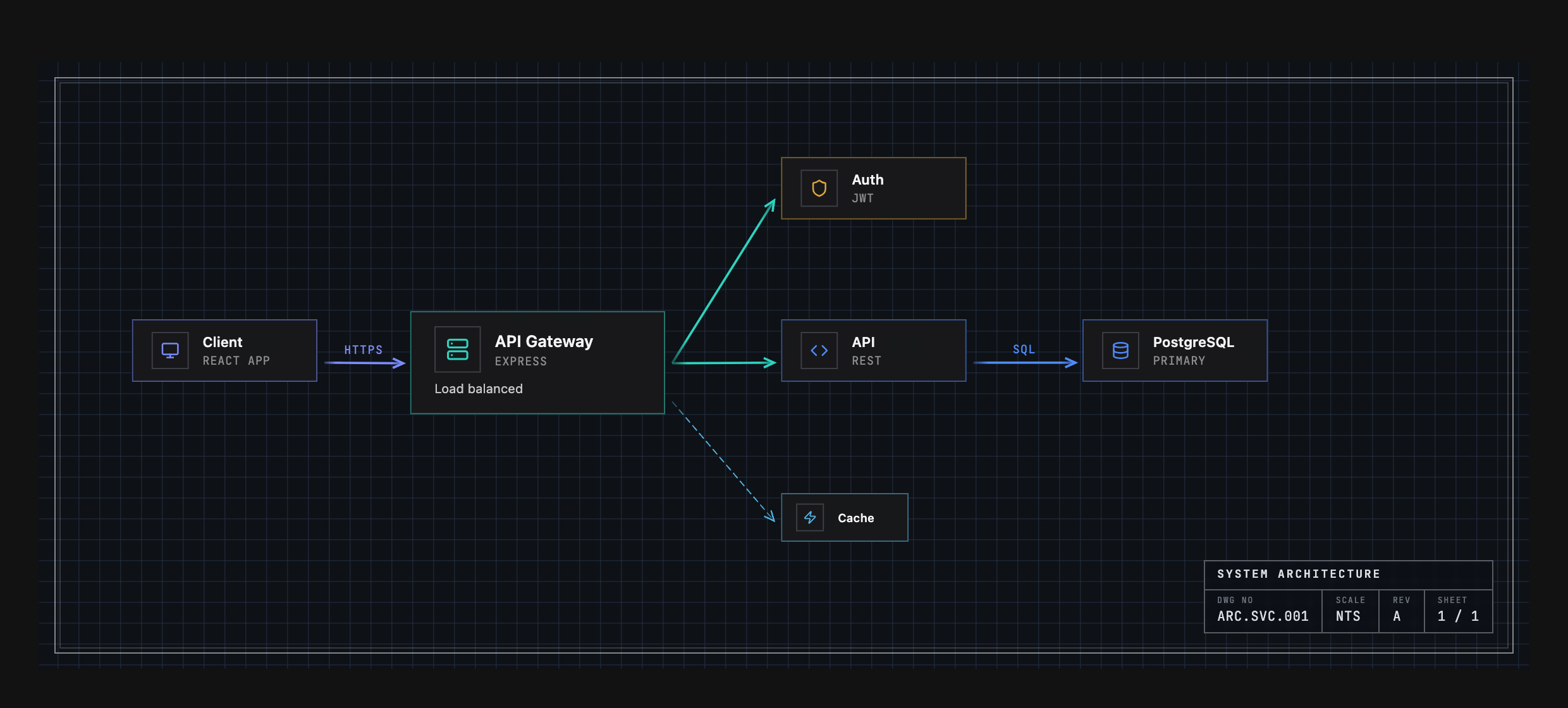
Not a screenshot of a drawing tool — that's the config in Example Output, rendered by <ArcDiagram /> in the Engineering theme.
Install
npm install @arach/arc
# or:  bun add @arach/arc  ·  pnpm add @arach/arc  ·  yarn add @arach/arc
react and react-dom are peer dependencies. Arc bundles its icon renderer and
has no production dependencies of its own.
Quick Start
Render any diagram config as a polished, interactive component:
import { ArcDiagram } from '@arach/arc'
import type { ArcDiagramData } from '@arach/arc'

export function Architecture() {
  return (
    <ArcDiagram
      data={diagram}      // your ArcDiagramData (see below)
      theme="default"     // eleven themes, each with light & dark
      mode="dark"         // light · dark
      defaultZoom="fit"   // auto-fit to the container
    />
  )
}
You get pan/zoom, hover highlighting, light/dark modes, and eleven color themes
out of the box.
Key props
| Prop | Type | Notes |
|---|---|---|
data |
ArcDiagramData |
The diagram config (required) — see Example Output. |
theme |
'default' | 'warm' | 'cool' | 'mono' | 'engineering' | 'workbench' | 'tactical' | 'command' | 'spacex' | 'claude' | 'codex' |
Palette + drafting grammar (grid, frame, type). |
mode |
'light' | 'dark' |
Appearance. |
frame |
'hairline' | 'inset' | 'brackets' | 'ticks' | 'cropmarks' | 'corners' | 'sheet' | 'none' |
Override the theme's edge treatment. |
interactive |
boolean |
Pan/zoom controls. |
defaultZoom |
number | 'fit' |
Initial zoom, or 'fit' to auto-fit (maxFitZoom caps it). |
showControls / showMinimap |
boolean |
Zoom controls / minimap for read-only chrome. |
hoverEffects |
boolean | { dim, lift, glow, highlightEdges } |
Hover highlighting (granular). |
label |
string |
Override the bottom-left label. |
The Studio
Prefer to design visually? Arc ships a full drag-and-drop studio — infinite
canvas, floating toolbar, reusable connector styles, live properties panel, and
a minimap. Try the hosted studio, or clone the repo and
open it locally:
git clone https://github.com/arach/arc && cd arc
bun install && bun dev      # → http://localhost:5188/editor
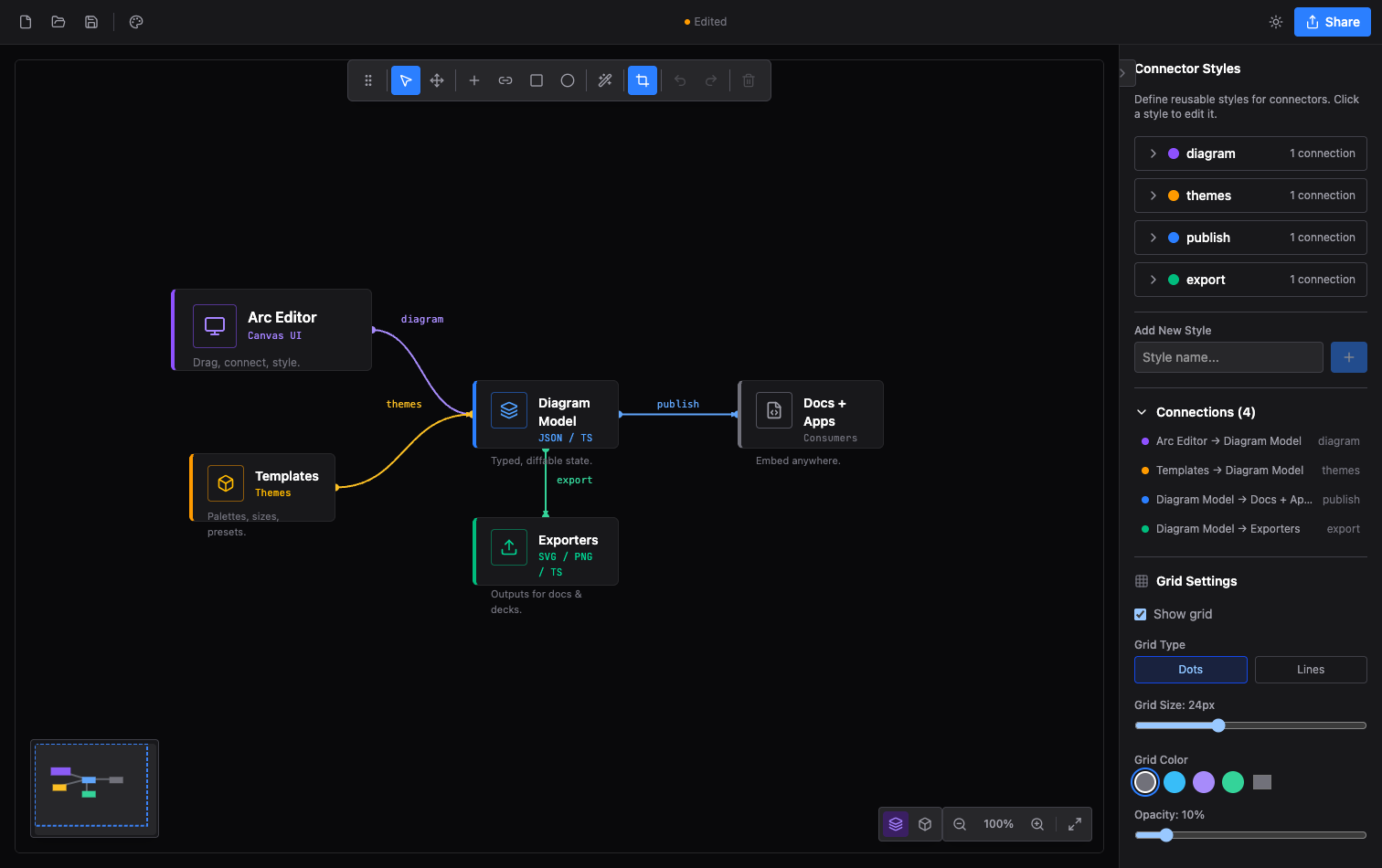
Design on the canvas, then Export to TypeScript, JSON, SVG, PNG, or a
shareable link — and drop the result straight into <ArcDiagram />.
Features
<ArcDiagram />player - Interactive React renderer with pan/zoom, hover highlighting, minimap, and light/dark modes- Eleven themes - Drafting grammars (grid, frame, type, geometry), each with light & dark palettes
- Visual studio - Drag-and-drop editor with anchors, connector styles, groups, images, and templates
- Typed schema -
ArcDiagramDataTypeScript types plus a generated draft-07 JSON Schema with coded diagnostics - Semantic node kinds -
frontend,database,queue,gateway… supply default icon + color - CLI -
arc check,arc diff,arc render,arc bench,arc schema, andarc-ascii - MCP server -
@arach/arc-mcpgives AI agents validate/layout/render/diff tools over stdio - Mermaid - Native sequence-diagram player and flowchart import via
@arach/arc-viewer - Isometric -
ArcDiagramIsometricfor 3D diagrams, plus@arach/arc-isofor vanilla JS - ASCII renderer - The same document as precise box-drawing text for terminals and docs
- Exports - TypeScript, JSON, SVG, PNG, ASCII, and shareable links
- Zero runtime dependencies - React is the only peer
Native Mermaid Sequences
@arach/arc-viewer turns canonical Mermaid sequenceDiagram source into a
typed Arc document and a native, interactive React player—without embedding the
generic Mermaid runtime.
npm install @arach/arc-viewer
import { ArcMermaidPlayer } from '@arach/arc-viewer'

const source = `sequenceDiagram
  participant App
  participant API
  App->>API: Load architecture
  API-->>App: Typed diagram`

export function Sequence() {
  return <ArcMermaidPlayer source={source} mode="light" />
}
Existing Mermaid flowcharts and state diagrams can also be projected intoArcDiagramData:
import { importMermaid } from '@arach/arc-viewer'

const { diagram, warnings, unsupported } = importMermaid(source)
This compatibility adapter is intentionally lossy. Use the native Mermaid APIs
above when sequence semantics must remain intact. See
Mermaid architecture projection for the supported
grammar and diagnostic contract.
Themes
One diagram, several drafting grammars. The nodes and palette stay the same —
what changes is the grid system, edge treatment, type, and geometry. Here's
Arc's own architecture rendered three ways:
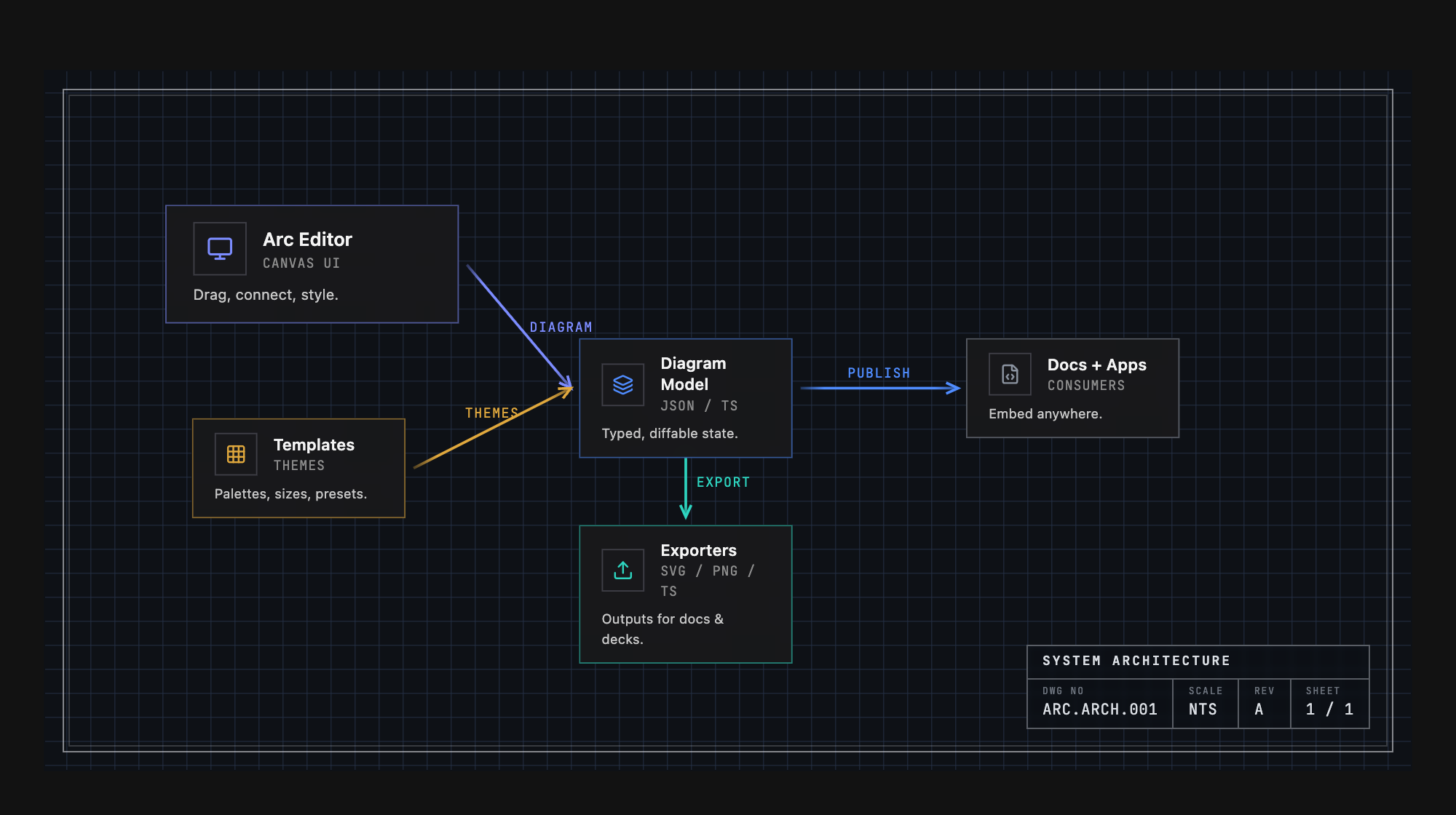
Engineering — graph grid, drawing-sheet border, title block, uppercase mono
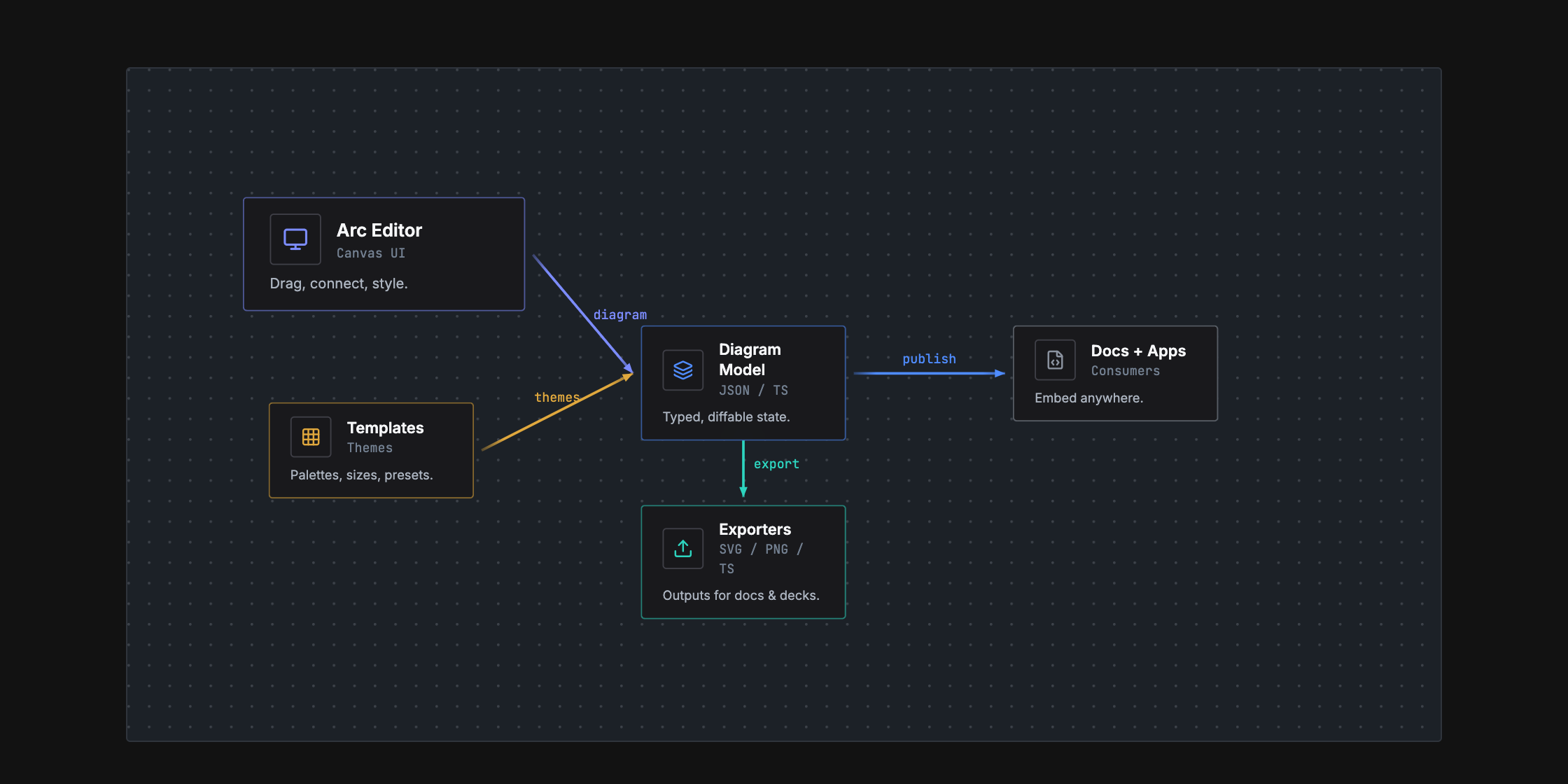
Workbench — dot grid, hairline frame, soft corners
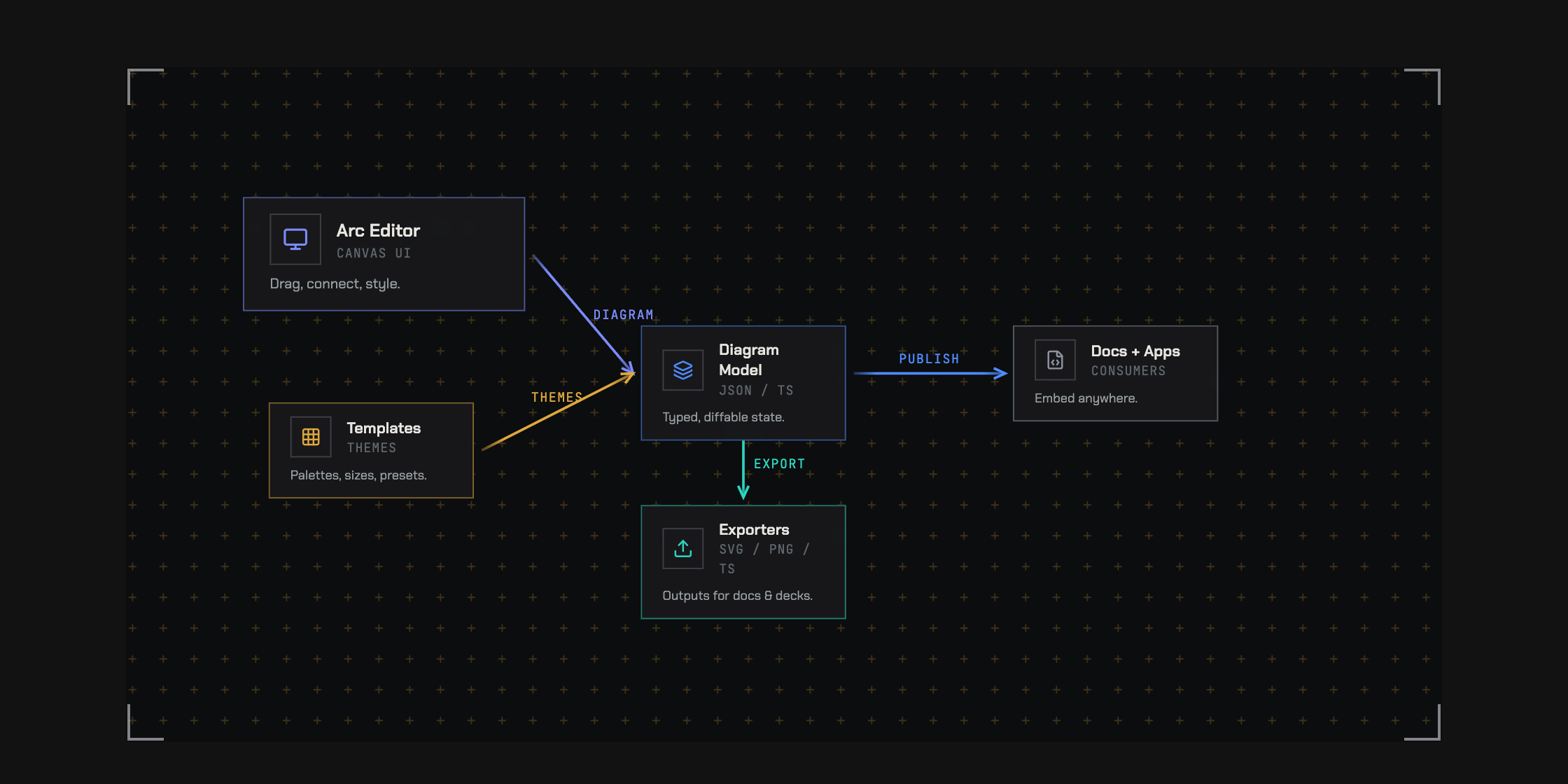
Tactical — crosshair grid, corner brackets, hard edges
Plus default, warm, cool, mono, command, spacex, claude, andcodex — eleven in all, each with light and dark modes.
Example Output
Arc stores diagrams as plain, typed data — the same config that renders the
diagram at the top of this README:
const diagram: ArcDiagramData = {
  layout: { width: 850, height: 340 },
  nodes: {
    client:  { x: 40,  y: 130, size: 'm' },
    gateway: { x: 220, y: 130, size: 'l' },
    auth:    { x: 460, y: 40,  size: 'm' },
    api:     { x: 460, y: 140, size: 'm' },
    cache:   { x: 460, y: 240, size: 's' },
    db:      { x: 680, y: 140, size: 'm' },
  },
  nodeData: {
    client:  { icon: 'Monitor',  name: 'Client',      subtitle: 'React App', color: 'violet' },
    gateway: { icon: 'Server',   name: 'API Gateway', subtitle: 'Express', description: 'Load balanced', color: 'emerald' },
    auth:    { icon: 'Shield',   name: 'Auth',        subtitle: 'JWT', color: 'amber' },
    api:     { icon: 'Code',     name: 'API',         subtitle: 'REST', color: 'blue' },
    cache:   { icon: 'Zap',      name: 'Cache',       color: 'sky' },
    db:      { icon: 'Database', name: 'PostgreSQL',  subtitle: 'Primary', color: 'blue' },
  },
  connectors: [
    { from: 'client',  to: 'gateway', fromAnchor: 'right',       toAnchor: 'left', style: 'https' },
    { from: 'gateway', to: 'auth',    fromAnchor: 'right',       toAnchor: 'left', style: 'internal' },
    { from: 'gateway', to: 'api',     fromAnchor: 'right',       toAnchor: 'left', style: 'internal' },
    { from: 'gateway', to: 'cache',   fromAnchor: 'bottomRight', toAnchor: 'left', style: 'cache' },
    { from: 'api',     to: 'db',      fromAnchor: 'right',       toAnchor: 'left', style: 'sql' },
  ],
  connectorStyles: {
    https:    { color: 'violet',  strokeWidth: 2, label: 'HTTPS' },
    internal: { color: 'emerald', strokeWidth: 2 },
    cache:    { color: 'sky',     strokeWidth: 1, dashed: true },
    sql:      { color: 'blue',    strokeWidth: 2, label: 'SQL' },
  },
}
ASCII Renderer
The same diagram renders as precise monospace text — for READMEs, CLI output, or anywhere you can't embed a React component:
                                                     ┌──────────────────┐
                                                     │ ◆ Auth           │
                                                   ┌▶│ JWT              │
                                                   │ └──────────────────┘
                                                   │
┌──────────────────┐   ╔═════════════════════════╗ │
│ ◆ Client         │   ║ ◆ API Gateway           ║ │ ┌──────────────────┐       ┌──────────────────┐
│ React App        │─┐ ║ Express                 ║ │ │ ◆ API            │ SQL   │ ◆ PostgreSQL     │
│                  │ └▶║ Load balanced           ║─┴▶│ REST             │──────▶│ Primary          │
└──────────────────┘   ║                         ║╌┐ └──────────────────┘       └──────────────────┘
                       ╚═════════════════════════╝ ╎
                                                   ╎
                                                   ╎ ┌───────────┐
                                                   └▶│ ◆ Cache   │
                                                     └───────────┘
Programmatic
import { renderAscii } from '@arach/arc'

const ascii = renderAscii(diagram)                          // Unicode box-drawing
const plain = renderAscii(diagram, { charset: 'ascii' })    // +-- style
const narrow = renderAscii(diagram, { maxWidth: 80 })       // Auto-scale to 80 cols
CLI
arc schema                              # generated draft-07 JSON Schema
arc check diagram.json                  # coded diagnostics, human-readable
arc check diagram.json --json --strict  # machine output; fail on warnings too
arc diff base.json head.json            # structural DiagramDelta JSON
arc diff base.json head.json --summary  # human-readable counts
arc render diagram.json --out diagram.svg --json
arc bench benchmarks/                     # score outputs/ against each case's expect.json
arc-ascii diagram.json --charset ascii --max-width 80
arc check exits non-zero when error-severity diagnostics remain; --strict
also fails on warnings. arc diff validates both inputs before diffing.arc render validates, writes the SVG to a temp file, atomically replaces the
target, and emits a receipt with source/output SHA-256 hashes; invalid diagrams
leave an existing artifact untouched. arc bench is the first-pass benchmark —
see benchmarks/README.md; each case is a plain-language prompt.md plus anexpect.json of required nodes/edges, and candidates are scored on validity,
semantic coverage, direction, size, and renderability.
Visual regression
bun run visual              # compare renders to visual/golden/ (exit 1 on diff)
bun run visual:update       # rewrite goldens after an intentional render change
bun run visual -- --png     # also compare Chrome-rasterized PNGs (non-strict)
Cases and variants live in visual/manifest.json — see visual/README.md.
MCP server
@arach/arc-mcp exposes Arc's
toolchain over the Model Context Protocol — AI agents can author, validate,
lay out, render (ASCII/SVG/PNG/HTML), and diff diagrams from any MCP client:
claude mcp add --scope project arc -- npx -y @arach/arc-mcp
# or: devin mcp add arc -- npx -y @arach/arc-mcp
Tools include validate_diagram, auto_layout, diff_diagram, render_svg,render_png, render_html, render_ascii, diagram_to_typescript, andeditor_handoff — plus the JSON Schema, generation skill, and LLM briefing as
MCP resources.
Isometric diagrams
ArcDiagramIsometric renders architecture in 3D isometric space — tiers,
floors, and nodes on a grid instead of an x/y canvas. For non-React
environments, @arach/arc-iso
provides the same renderer as vanilla JS.
Retro print material
Set material: 'retro-print' on an isometric DiagramConfig for mineral inks,
warm paper, and deterministic stipple. It works in the React diagram and static
SVG renderer. Omit the option (or use 'standard') to keep the existing finish.
React technical styles such as blueprint and cyanotype take precedence over
the material setting.
Styling
Arc ships a compiled stylesheet — import it once in your app entry:
import '@arach/arc/arc.css'
react and react-dom (18+) are the only peer dependencies; no Tailwind setup
is required.
Packages
@arach/arc— this package:<ArcDiagram />,<ArcDiagramIsometric />, the studio,arcCLI, ASCII renderer@arach/arc-viewer— native Mermaid sequence diagrams + Mermaid import for React@arach/arc-iso— standalone isometric renderer for vanilla JS and the browser@arach/arc-mcp— MCP server: diagram tools for AI agents
Tech Stack
- React 19
- Vite 7
- TailwindCSS 4
- Lucide React (icons)
License
Reviews (0)
Sign in to leave a review.
Leave a reviewNo results found