tuipo
Health Pass
- License — License: Apache-2.0
- Description — Repository has a description
- Active repo — Last push 0 days ago
- Community trust — 16 GitHub stars
Code Pass
- Code scan — Scanned 2 files during light audit, no dangerous patterns found
Permissions Pass
- Permissions — No dangerous permissions requested
No AI report is available for this listing yet.
Grammarly for your terminal — underlines typos in Claude Code, Codex, Aider & any other terminal app
tuipo
Grammarly for your terminal.
The red squiggly line from your editor — now for the prompts you type into Claude
Code, Codex, Aider, and any other terminal app.



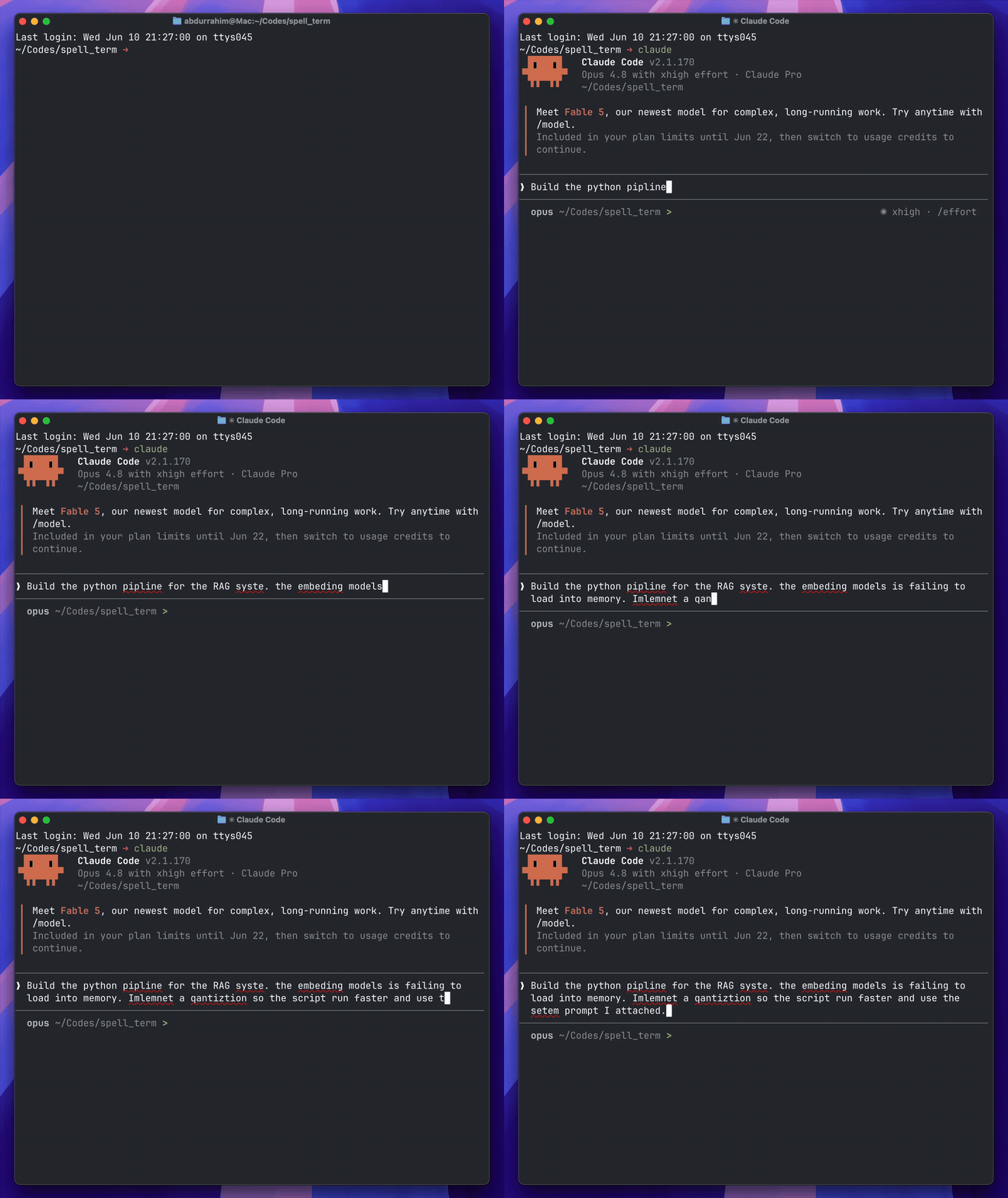
tuipo catching typos in a prompt to Claude Code. It never touches the app it's wrapping — the underlines are drawn on top.
Why I made this
I type a lot of prose into terminal apps — long prompts for Claude Code, Codex and other
AI agents, commit messages, SQL, quick notes. None of them spell-check, so my typos
just sail straight through into prompts and history. My editor has had the red
squiggly line for years; my terminal never got it.
So I built it. You wrap a terminal program once, and you get that squiggly line
back — in Claude Code, Aider, Codex, vim, psql, your shell, whatever. It only
shows up when you actually misspell something, and it never changes how the app
you're running behaves.
To be fair: modern LLMs shrug off everyday typos — mistype "recieve" and Claude
knows what you meant. But that robustness comes from the model having seen a word
(and its common misspellings) countless times, so it fades exactly where the
stakes are highest: rare words, names, and jargon, where the model quietly
guesses — and an agent doesn't ask, it acts on its guess. It shrinks with model
size, too: what a frontier model shrugs off, the local Qwen or Gemma behind your
coding agent has to guess at. Spelling also outlives the prompt: agents echo
your words into commit messages, PR text, comments, and docs. And plenty of what you type in a terminal is read by humans in the first
place — commit messages, SQL, notes — where a typo just stays a typo.
A few things I cared about while building it:
- It stays invisible until you need it. Nothing pops up while you type; the
underline appears in the small pause after you stop, which is when your eyes are
actually scanning back over the line. - It never gets in the app's way. tuipo sits between your keystrokes and the
program and draws on top of the screen — it never rewrites what the app prints.
The wrapped app behaves exactly as if you'd run it directly. - It only nags about real words. Code-shaped tokens (
snake_case,--flags,paths/like/this,CamelCase, backtick spans, numbers) are skipped, so it
underlines your sentences, not your identifiers. - It's quiet by default. Out of the box you get spelling underlines and nothing
else. Grammar hints, the suggestion picker, Tab-to-fix — all off until you turn
them on fromconfig.
Install
# Homebrew (macOS & Linux)
brew install ARahim3/tuipo/tuipo

# or with cargo
cargo install tuipo

# or the shell installer (URL is in each release's notes)
curl --proto '=https' --tlsv1.2 -LsSf \
  https://github.com/ARahim3/tuipo/releases/latest/download/tuipo-installer.sh | sh
git clone https://github.com/ARahim3/tuipo
cd tuipo
cargo build --release
# binary at ./target/release/tuipo
Getting started
Turn it on everywhere (recommended)
Install a shell hook once, and every new terminal session is wrapped automatically —
you never have to think about it again:
tuipo init            # adds the hook to ~/.zshrc or ~/.bashrc
tuipo init --dry-run  # just print the line it would add, don't write anything
Open a new terminal and you're covered everywhere. (The hook guards against
re-entry, so it won't wrap itself.)
Or just for one app
If you'd rather not have it always-on and only want it inside a specific app — say,
just Claude Code — skip the hook and wrap that command directly:
tuipo -- claude
tuipo -- aider
tuipo -- psql mydb
tuipo -- bash
Anything after -- is the command tuipo wraps, run exactly as you normally would.
Settings
tuipo is intentionally minimal by default. Turn on more when you want it:
tuipo config           # interactive settings editor
tuipo config --print   # print current settings as TOML
tuipo config --path    # show where the config file lives
Settings live in ~/.config/tuipo/config.toml (all keys optional):
| Key | Default | What it does |
|---|---|---|
paint |
true |
The inline underline overlay. Turn off to make tuipo do nothing. |
underline |
"auto" |
Underline style: auto, plain, or fancy (curly red). |
tab_fix |
false |
Tab fixes the most recent misspelling with the top suggestion. |
picker |
false |
Pick among suggestions inline (hover tooltip + Tab). |
grammar |
false |
A small, careful set of grammar hints on top of spelling (below). |
status_row |
false |
A little issue-count line at the bottom. |
pause_ms |
150 |
How long you have to pause before underlines show up. |
hover_ms |
250 |
Idle time before the picker tooltip appears. |
dict_path |
— | Path to your own word list (one word per line). |
Got project names or jargon that keep getting flagged? Drop them in~/.config/tuipo/dict.txt, one per line.
Every setting also has an env-var override for one-off sessions (env wins over the
file) — e.g. TUIPO_PAINT_OFF=1, TUIPO_TAB_FIX=1, TUIPO_GRAMMAR=1. Runtuipo --help for the full list.
What about grammar?
Spelling is the default; grammar is opt-in and kept deliberately small. Terminal
prompts aren't essays — they're full of imperatives, lowercase starts, fragments,
and no end punctuation, so broad grammar checking misfires constantly. Withgrammar = true, tuipo surfaces only a narrow, high-confidence slice (subject–verb
agreement, malapropisms, eggcorns, common usage slips) and leaves the noisy stuff
off. It's tuned for how people actually type in a terminal, not lifted from a
desktop grammar checker.
How it works
tuipo opens a pseudo-terminal, runs your command inside it, and passes bytes both
ways. On the way in, it reconstructs what you've typed and runs it through the
open-source Harper checker. On the way out,
it watches the screen the app draws so it can place each underline exactly under the
flagged word — using only relative cursor moves, so it never messes with scrollback
or the app's layout. When you pause, it paints. If you ask it to fix something, it
"types" the correction into the app's input (backspaces + the replacement), so the
app reacts as if you'd typed it yourself. The app is never modified and never sees
anything unusual.
A few things you might wonder
Does it slow down or interfere with the app I'm wrapping?
No. Passthrough is byte-for-byte and the app behaves exactly as if you launched it
directly. Painting only happens during idle pauses, when the app is idle too.
Will it mess with tab-completion or my keybindings?
No. Tab passes straight through to the app by default, so shell completion, vim
indent, and slash-command menus keep working. Fixing is opt-in, and even then it
stays out of the way while you're typing forward.
Which terminals work?
macOS and Linux. You get curly red underlines where the terminal supports them, with
an automatic fallback to a plain underline where it doesn't (e.g. Apple Terminal).
How do I turn it off for a bit?TUIPO_PAINT_OFF=1 tuipo -- <cmd>, or set paint = false.
Uninstall
Nothing here is sticky:
# 1. if you ran `tuipo init`, delete the hook line from your shell rc
#    (~/.zshrc or ~/.bashrc) — it's the single line containing TUIPO_ACTIVE
# 2. remove the binary
brew uninstall tuipo
brew untap ARahim3/tuipo      # optional: drop the tap too
# 3. optional: remove your settings + custom dictionary
rm -rf ~/.config/tuipo
If you skip step 1, no harm done — the hook is guarded ([[ -x … ]]), so once the
binary is gone it simply does nothing. Deleting the line just tidies up the file.
Contributing
Issues and PRs welcome. cargo build, cargo test, and please keepcargo clippy --all-targets -- -D warnings clean before opening a PR.
Credits
Spell and grammar checking is powered by Harper.
Built in Rust with portable-pty,
vte, and crossterm.
License
Dual-licensed under MIT or Apache-2.0, your choice.
Unless you say otherwise, anything you contribute is licensed the same way.
tuipo is an independent project and isn't affiliated with, endorsed by, or sponsored by Grammarly, Anthropic (Claude), or anyone else mentioned here. Those names are only used to describe what tuipo works with, or — for "Grammarly for your terminal" — to give a quick feel for what it does. It's not the same engine or feature set. All trademarks belong to their owners.
Reviews (0)
Sign in to leave a review.
Leave a reviewNo results found