timestamps
Health Warn
- License — License: MIT
- Description — Repository has a description
- Active repo — Last push 0 days ago
- Low visibility — Only 5 GitHub stars
Code Pass
- Code scan — Scanned 12 files during light audit, no dangerous patterns found
Permissions Pass
- Permissions — No dangerous permissions requested
No AI report is available for this listing yet.
Time awareness for coding agents, in Claude Code and Codex: timestamps and turn durations on screen, timing notes the agent receives, per-project command durations and session history.
Timestamps
Time awareness for coding agents, in Claude Code and Codex.
Formerly Claude Timestamp (claude-timestamp), renamed in 0.0.38.
In Claude Code, every message stamped with the time it happened and how long it took.
The agent hears when a turn runs long, a command is slow, or work resumes after a gap.
At the end, where the session's time actually went.







Two fast turns render dim. The third crosses the slow threshold, so its duration is coloured and, with TOOL_TIMING on, named after the tool that caused it. Tool timing is off by default, so a plain install will not show the tool on its own. A real session, played back at real speed.
A coding agent has no clock. It cannot tell a two-minute turn from a
forty-minute one, does not know the test suite always takes four minutes, and
picks up yesterday's work as if no time had passed. Timestamps gives it
that sense of time, and shows you the same numbers.
There is nothing to set up. The defaults work as soon as it is installed.
What you get
On your screen
In Claude Code, every assistant message carries the local time and how long
the turn took, from the moment you pressed enter to the moment the reply
appeared. A slow turn changes colour, and a gap between messages is marked, so
a session you return to the next morning still reads in order. On exit you get
the totals.
Session lasted 1h30m over 12 turns, 24m18s of it waiting, 35m00s away.
slowest tools: Bash 41.2s (18 calls), WebFetch 8.1s (1 call), Read 2.0s (37 calls). 2 failed
Waiting and away never cover the same seconds, so together they add up to no
more than the session. The second line appears with TOOL_TIMING on.

While a turn runs, a dim label in the footer counts it up
(⏱ 1m12s · session 1h03m). When a command runs past its usual time, the
line under it says so (1m10s · usually ~40s · ctrl+b to run in background),
and any other slow tool gets a line above the prompt. Nothing new appears for
a quick turn. Claude Code only, and display only: Claude is told nothing more.
What the agent is told
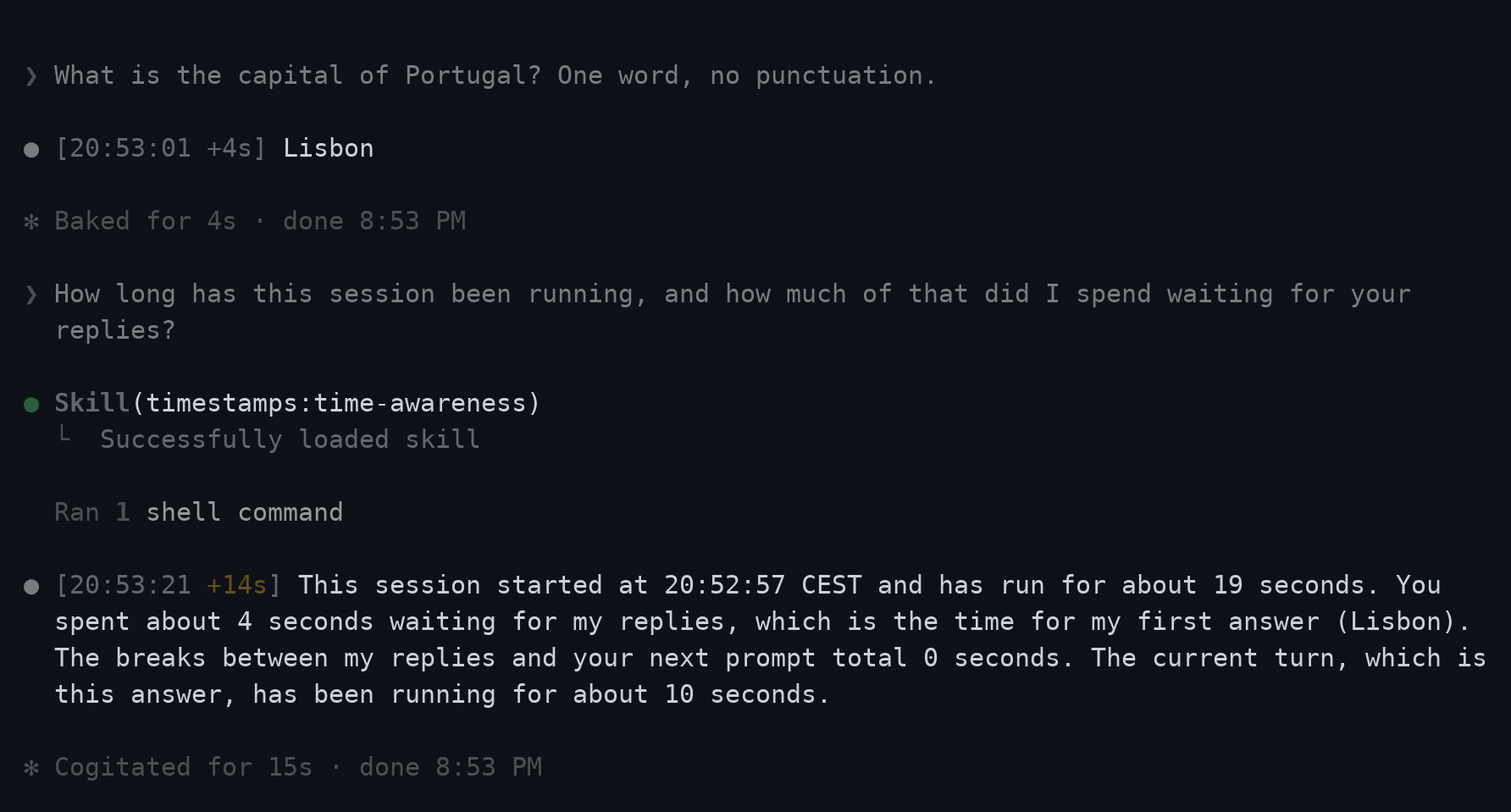
The agent receives the time each prompt was sent, a short note when a turn
runs long or a tool call is slow, how long ago a project or conversation was
last active, and its own timeline after a compaction. A bundled skill tells it
what each note is a reason to do, and lets it answer "how long has this
session run?" from measurement. See What Claude is told.
What it learns
Every turn goes into a timeline, and every shell command into a memory of how
long it usually takes in this project. A new session starts with the slow ones
named, so the agent runs them in the background and waits for CI as long as CI
actually takes.
Usually slow in this project: gh run watch ~7m40s (5 runs), bash tests/run.sh ~4m02s (12 runs).
That Bash call took 6m10s (usually 4m02s).
Where your time went
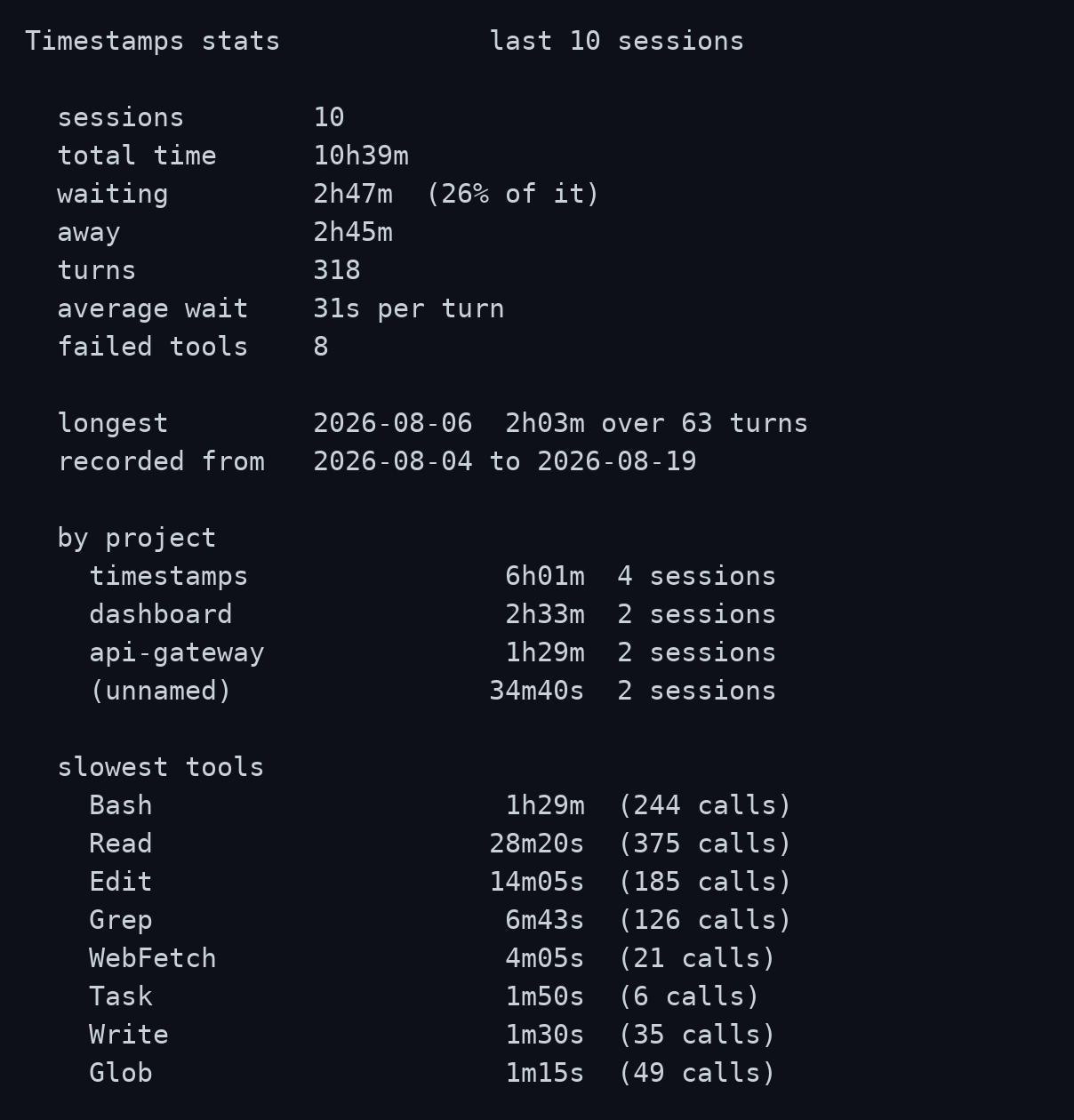
Finished sessions are logged, and --stats adds them up: how long, how much of
it waiting and how much away, and, when you turn those on, per project and per
tool. See Reports and history.
Install
It needs bash and jq.
Claude Code
Install from the Aranea marketplace:
claude plugin marketplace add https://github.com/AraneaDev/aranea-marketplace
claude plugin install timestamps@aranea
Start a new session afterwards: hooks are bound when a session starts.
Installed as claude-timestamp before 0.0.38? Uninstall that first: see
Upgrading from claude-timestamp.
Codex
codex plugin marketplace add AraneaDev/timestamps
codex plugin add timestamps@aranea
Start a new session afterwards, and trust the plugin's hooks when Codex asks.
For installing jq and for Windows with WSL, see Install.
Works in
Claude Code in the terminal, the IDE extensions and the Code tab of the
desktop app, and Codex. What works depends on the client, not on the model.
Checked against Claude Code and Codex CLI 0.154.0.
| Feature | Claude Code | Codex | Note |
|---|---|---|---|
| Timestamp marker on each message | ✓ | ✗ | Codex has no event for drawing on a message |
| Idle divider and slow-turn colour | ✓ | ✗ | Drawn by the same marker |
| Live turn clock in the footer | ✓ | ✗ | Needs a Claude Code build with hooks modules; LIVE=off hides it |
| A slow tool's time, live, beside its usual time | ✓ | ✗ | Same; Codex has no module support |
| Prompt time told to Claude | ✓ | ✓ | |
| Turn-length and slow-tool notes | ✓ | ✓ | Codex timings are whole seconds |
| Resumption note, for a project or a conversation | ✓ | ✓ | |
| Note after a compaction | ✓ | ✓ | |
| Command memory and the usually-slow note | ✓ | ✓ | |
Turn timeline, --turns |
✓ | ✓ | |
A turn that ends in an API error recorded as error |
✓ | ✗ | Codex has no StopFailure event |
| Session summary at exit | ✓ | ✓ | Recorded in the history; codex exec does not display it |
History and --stats |
✓ | ✓ | |
time-awareness skill |
✓ | ✓ | |
/timestamps:configure command |
✓ | ✗ | Codex uses the timestamps skill or setup.sh |
The Chat and Cowork tabs of the desktop app are not Claude Code and
have no hooks, so nothing here reaches them. Cloud sessions on the web read
hooks from the repository and from managed settings rather than from your~/.claude, so a personal install does not apply there either.
Configure
Run /timestamps:configure in Claude Code to pick a timezone, a clock format, a colour
or a preset; it takes effect on the next message. Every setting, the marker's
layout, colours and per-project settings are in
Configuration.
In Codex, use the bundled timestamps skill or hooks/scripts/setup.sh to change settings. The visual message marker remains specific to Claude Code.
Documentation
- Install: requirements, both clients, Windows and WSL.
- Configuration:
/timestamps:configure, the marker's layout, colours, every setting. - What Claude is told: every note the agent receives, and the skill.
- Reports and history:
--session,--turns,--commands,--stats. - Troubleshooting: when something is wrong, platform notes.
- How it works: the hooks, what they cost, and why.
- Contributing: setup, checks, screenshots, releases.
Further reading
License
MIT
Built by Tim Schipper and released as open source under
aranea.dev.
Reviews (0)
Sign in to leave a review.
Leave a reviewNo results found