claudeline
Health Warn
- License — License: MIT
- Description — Repository has a description
- Active repo — Last push 0 days ago
- Low visibility — Only 6 GitHub stars
Code Pass
- Code scan — Scanned 12 files during light audit, no dangerous patterns found
Permissions Pass
- Permissions — No dangerous permissions requested
No AI report is available for this listing yet.
Cross-platform statusline for Claude Code — model, context, rate limits, effort, thinking
claudeline


A cross-platform statusline for Claude Code.
TypeScript, single binary, zero config.
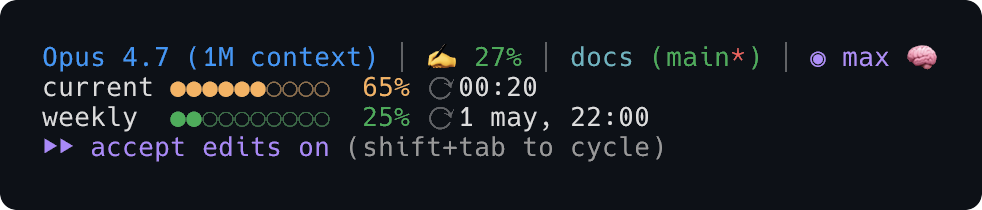


Features
- Model + context % — colored by usage threshold (green → orange → yellow → red)
- Cost per session —
💸 $X.XXfrom Claude Code's authoritative server-side total, with a token×pricing fallback for older runtimes - Working directory + git — branch, dirty flag, worktree marker (
⎇:branch), optional⚡for--dangerously-skip-permissions - Session duration — elapsed since session start
- Effort indicator — distinct glyphs for
max,xhigh,high,medium,low - Thinking indicator — 🧠 when extended thinking is enabled
- Fast mode badge — 🐇 when running with
--fast - 1M context warning — 📚 when the session exceeds 200K tokens
- Rate limits — 5-hour, weekly, and optional extra credits, sourced from Claude Code stdin first, OAuth API as fallback
- Rate-limit projection —
~38mnext to the bar tells you when you'll hit 100% at the current burn rate - Latency badge —
🐢 Xmswhen the OAuth API is slow (yellow ≥1 s, red ≥3 s) - Locale-aware — 12h / 24h auto-detected, timezone from system
- Glyph modes —
CLAUDELINE_GLYPHS=emoji(default),nerd(NerdFont),plain(ASCII for SSH/no-emoji terminals) - Cross-platform — macOS, Linux, Windows. Node ≥ 18, Bun, or one of our self-contained binaries
Why this vs the bash original
There's an excellent bash statusline by @kamranahmedse that inspired claudeline. If you're choosing between them, here's where claudeline diverges:
| claudeline | bash original | |
|---|---|---|
| macOS, Linux | ✅ | ✅ |
| Windows | ✅ (npm shim + native binary) | ❌ requires bash + jq + curl |
| Cost source | server-side cost.total_cost_usd from Claude Code (truth) |
derived from token math (drifts from reality) |
| Rate-limit projection | ~38m at current burn rate |
not present |
| Latency badge | yes, with yellow/red thresholds | not present |
| Worktree-aware git | ⎇:branch |
branch-only |
| Fast mode + 1M context warnings | yes | not present |
| Tests | comprehensive suite (TDD) | 0 |
| Schema validation | Zod, tolerant of null and unknown fields |
none |
| Distribution | npm + Homebrew + Bun-compiled binaries (5 platforms) | source only |
| Cold start (single render) | ~85–140 ms p50 | ~30–60 ms (no Node runtime) |
| Runtime deps | zod only |
jq, curl, bash, git |
If you want the leanest, no-runtime-deps option and you're macOS/Linux-only, the bash original is great. If you want a single tool that works the same on every platform with tested rendering, accurate cost, projections, and richer signals — that's what claudeline ships.
Install
One-line installer (macOS, Linux — no Node required)
curl -fsSL https://raw.githubusercontent.com/arcasilesgroup/claudeline/main/scripts/install.sh | bash
Detects your platform, downloads the right Bun-compiled binary from the latest GitHub release, verifies the SHA256, drops it in ~/.local/bin/, and runs claudeline install to wire it into Claude Code. Re-run any time to upgrade. The script is short and unobfuscated — read it before piping if you're cautious: scripts/install.sh.
npm (any platform with Node ≥ 18)
npm install -g @arcasilesgroup/claudeline
# or pnpm add -g @arcasilesgroup/claudeline
# or bun install -g @arcasilesgroup/claudeline
Homebrew (macOS, Linux)
brew tap arcasilesgroup/claudeline
brew install claudeline
Self-contained binary (manual)
Download the right asset from the releases page, make it executable, drop it on your PATH:
# example for macOS arm64
curl -fsSL -o claudeline \
  https://github.com/arcasilesgroup/claudeline/releases/latest/download/claudeline-darwin-arm64
chmod +x claudeline && mv claudeline /usr/local/bin/
Wire it into Claude Code:
claudeline install
This adds the following to ~/.claude/settings.json:
{
  "statusLine": {
    "type": "command",
    "command": "claudeline render"
  }
}
Restart Claude Code. Done.
To revert:
claudeline uninstall
What it shows
The first line is composed of these segments, separated by │:
| Segment | Source |
|---|---|
| Model | model.display_name from stdin |
| Context % | context_window (tokens / size or used_percentage) |
| Directory | cwd basename + git branch + dirty flag + worktree |
| Cost | current_usage tokens × Anthropic price for model.id |
| Session | elapsed since session.start_time |
| Effort | effort.level from stdin, fallback effortLevel |
| Thinking | thinking.enabled, fallback alwaysThinkingEnabled |
| Latency | ⚡ Xms when the OAuth API takes >1 s |
When Claude Code provides rate limits in the stdin JSON, those are used
directly. Otherwise claudeline calls the OAuth usage API once per minute and
caches the response under the OS temp directory with 0600 permissions.
Effort glyphs
| Level | Glyph | Color |
|---|---|---|
max |
◉ | magenta |
xhigh |
◉ | magenta |
high |
● | magenta |
medium |
◑ | dim |
low |
◔ | dim |
Glyph modes
Set the CLAUDELINE_GLYPHS environment variable in your shell or in~/.claude/settings.json env block:
| Mode | When to use |
|---|---|
emoji |
(default) emojis + Unicode geometric shapes |
nerd |
Patched NerdFont terminal |
plain |
SSH / screen / terminals without Unicode or emoji |
Rate-limit projection
When the 5-hour bar moves between two consecutive renders, claudeline
estimates how long until you hit 100% at the current pace and renders~38m (or ~2h5m) next to the percentage. The previous sample is
kept under <tmpdir>/claudeline-<uid>/state.json (0o600).
12h vs 24h
Detected automatically:
- macOS preference
AppleICUForce24HourTime(if explicitly set) - macOS
AppleLocale LC_TIME/LC_ALL/LANGenvironment variables- Default: 24h, except regions
US/CA(12h)
Timezone comes from Intl.DateTimeFormat().resolvedOptions().timeZone.
OAuth token sources (fallback only)
When Claude Code does not supply rate limits in stdin, claudeline looks up
the OAuth token to call the usage API:
CLAUDE_CODE_OAUTH_TOKENenvironment variable- macOS Keychain (
security find-generic-password -s "Claude Code-credentials") - Linux
secret-tool(libsecret) ~/.claude/.credentials.json
The token is never written to disk, logged, or sent to any host other
than api.anthropic.com.
CLI usage
claudeline render                Read JSON from stdin and emit the statusline
claudeline render --json         Same input, structured JSON output (for editors/scripts)
claudeline install               Wire claudeline as the statusLine in ~/.claude/settings.json
claudeline uninstall             Remove claudeline from ~/.claude/settings.json
claudeline doctor                Run diagnostics and print a pass/warn/fail report
claudeline doctor --json         Same checks, structured JSON output (for scripts/editors)
claudeline summary               Show local session history (cost, models, top windows)
claudeline summary --enable      Start tracking sessions in ~/.claudeline/sessions.jsonl
claudeline summary --disable     Stop tracking and delete the local session log
claudeline refresh               Force a fresh OAuth-API fetch (bypasses the cache)
claudeline --help                Show this help
claudeline --version             Show version
claudeline summary (opt-in local cost tracking)
Run claudeline summary --enable once to start logging one record per render to~/.claudeline/sessions.jsonl. The reader dedups by session id (last value
wins), so the cost shown for each session is the final server-reported total.
All data stays on this machine — no network egress, no telemetry.
  claudeline summary
  log: /Users/me/.claudeline/sessions.jsonl

  Today       $7.65 across 2 sessions
              · Claude Opus 4.6              $5.50 (1 session)
              · Claude Sonnet 4.6            $2.15 (1 session)

  This week   $42.10 across 14 sessions
              · Claude Sonnet 4.6           $28.40 (10 sessions)
              · Claude Opus 4.6             $13.70 (4 sessions)

  This month  …
  All time    …
Stop tracking and delete the log: claudeline summary --disable. JSON output for
dashboards: claudeline summary --json.
claudeline render --json and claudeline doctor --json
Both subcommands accept --json for editor / dashboard integrations. The render
output is the structured data behind the ANSI line (model, cost, context,
session, rate limits, latency); the doctor output is the same checks the human
report covers, in a stable schema you can parse without ANSI.
Freshness, cache, and claudeline refresh
claudeline only renders when Claude Code calls it. Between renders the
statusline is frozen — that's a property of Claude Code's hook contract,
not something we can change. What we can do is be fresh when called.
The OAuth-API rate-limit data is cached locally with a default TTL of
30 seconds (override with CLAUDELINE_CACHE_TTL_SEC=15 etc., clamped
to 1–300). Each render does one of three things based on cache age:
- 0–5 s old: serve cached, no network
- 5 s–TTL old: serve cached and spawn a background refresh so the
next render sees fresh data (stale-while-revalidate) - >TTL or missing: fetch synchronously
If you want the freshest numbers right now, run claudeline refresh —
it does a synchronous OAuth fetch and updates the cache immediately.claudeline doctor shows the current cache age and configured TTL so
you can debug "claudeline says X, claude.ai says Y" mismatches.
Important caveat — stdin priority and the "fresh mode" escape hatch:
recent Claude Code versions pass rate_limits directly in stdin on every
render. By default claudeline uses that source (it's whatever the active
session itself sees) and bypasses the cache entirely for the 5-hour /
weekly bars. That means claudeline refresh updates the cache but you
won't see the change in your statusline — Claude Code is already
overriding it with stdin data on the next render.
If you want claudeline refresh to actually drive what's shown:
claudeline config set prefer-api true
This persists in ~/.claudeline/config.json so you don't have to bet
on env-var propagation through your shell rc and Claude Code's
subprocess. The env var (CLAUDELINE_PREFER_API=1) still works as a
runtime override, with this precedence:
env > ~/.claudeline/config.json > default (false)
The trade-off is one extra OAuth-API call when the cache expires (every
30 s by default; tune via claudeline config set cache-ttl-sec 15). You
also lose the "always as fresh as my session knows" property of stdin
priority. Run claudeline doctor or claudeline config get to see
which source is in effect, plus the verbatim env values claudeline
actually sees — useful when "I exported X but it doesn't seem to be
taking" turns out to be a propagation surprise.
claudeline doctor
Eight read-only diagnostic checks against your environment, grouped into
sections and rendered in claude doctor style. Always exits 0 —
informational only, never modifies anything.
────────────────────────────────────────────────────────────────────────

  Diagnostics
  ├ Version: claudeline 0.3.2
  ├ Engine: Node 25.9.0
  ├ Platform: darwin-arm64
  └ Cache directory: /var/folders/.../claudeline-501

  Configuration
  ├ statusLine wired in ~/.claude/settings.json
  ├ effortLevel in settings.json: "high"
  ├ Cache directory exists with 0o700 permissions
  └ Stdin schema parses a synthetic test payload

  Health
  ├ Cache entry shape parses cleanly
  └ State file shape parses cleanly

  ⚠ CLAUDE_CODE_EFFORT_LEVEL=max in environment
    ├ This overrides settings.json effortLevel and blocks /model.
    └ Unset it or comment out the export in your shell rc to use /model freely.

  Summary: 0 errors, 1 warning, 6 ok
Warnings and errors are surfaced in their own block beneath the report
(eye lands at the end, per clig.dev). The output respectsNO_COLOR, TERM=dumb, and non-TTY pipes — ANSI is dropped
automatically when the consumer isn't a colour-capable terminal, so
piping to grep/awk produces clean text.
Local development
You need Bun ≥ 1.3.
git clone https://github.com/arcasilesgroup/claudeline
cd claudeline
bun install
bun test          # 100 tests
bunx tsc --noEmit # strict TS, exact optional, no implicit any
bun run build     # produces dist/cli.js for npm
Run against a fixture:
echo '{"model":{"display_name":"Opus 4.7"},"effort":{"level":"max"},"cwd":"."}' \
  | bun src/cli.ts render
Build a self-contained binary for your platform:
bun build src/cli.ts --compile --outfile=dist/claudeline
./dist/claudeline --version
Project principles
This codebase is small on purpose:
- TDD — every module has tests written alongside (or before) the code.
Seetests/. - SDD —
src/schemas.ts(Zod) is the source of truth
for the input JSON contract, the OAuth usage API response, and~/.claude/settings.json. - DRY / KISS / YAGNI — no plugin systems, no abstractions for
unimplemented features, no half-finished code. - SOLID — segments are pure functions; side-effecting code (git,
network, filesystem) is injected into the orchestrator
(renderStatusline) so it can be tested without mocks.
Security
claudeline is non-privileged and minimal-surface. Highlights:
- Single runtime dependency:
zodfor input validation - All external commands invoked with
child_process.spawnSyncusing fixed
argv arrays (no shell interpolation) - HTTP calls bounded by a 5 s
AbortControllertimeout - Cache files written with
0600inside a0700directory, contain only
rate-limit metadata - CI runs CodeQL, gitleaks, OSV-Scanner, and
bun auditon every PR
and weekly
Found a security issue? Please use
private vulnerability reporting
or follow the process in SECURITY.md. Do not open a
public issue.
Contributing
PRs welcome. Read CONTRIBUTING.md and follow the
Code of Conduct.
License
MIT © Arcasiles Group
Reviews (0)
Sign in to leave a review.
Leave a reviewNo results found