circle-claude-plugin
Health Warn
- License — License: MIT
- Description — Repository has a description
- Active repo — Last push 0 days ago
- Low visibility — Only 8 GitHub stars
Code Fail
- process.env — Environment variable access in plugins/orchestre/scripts/migrate.mjs
- spawnSync — Synchronous process spawning in plugins/orchestre/scripts/progress.mjs
- process.env — Environment variable access in plugins/orchestre/scripts/progress.mjs
- process.env — Environment variable access in plugins/orchestre/scripts/settings.mjs
Permissions Pass
- Permissions — No dangerous permissions requested
No AI report is available for this listing yet.
Write the plan. orchestre plays it through. A Claude Code plugin that runs a long dev plan with a team of agents.

Write the plan. orchestre plays it through.
A plugin for Claude Code.



Use · Why · Install · Reference · Docs
A long dev plan does not fit in one Claude Code session: the context fills up, and someone has to track what is done, what failed and what is left. orchestre splits the work into a plan of phases and tasks, and runs it with a team of agents. Each task is done on its own branch, in its own worktree when tasks run side by side, then verified, evaluated and merged into an integration branch, until that branch is ready for a pull request. You step in only when a decision is yours.
Follow a long run without watching it. A banner above the prompt shows the phase, the progress and the task in progress. /progress opens a pane: what waits for you comes first, each item with its buttons (review it with Claude, mark it done, move it to tickets, fix its text), then the run, the tasks as timelines and the log. A notification comes only when a task needs you or a run stops, and when you come back after a break, one says what changed. To see it without a run: /progress demo.
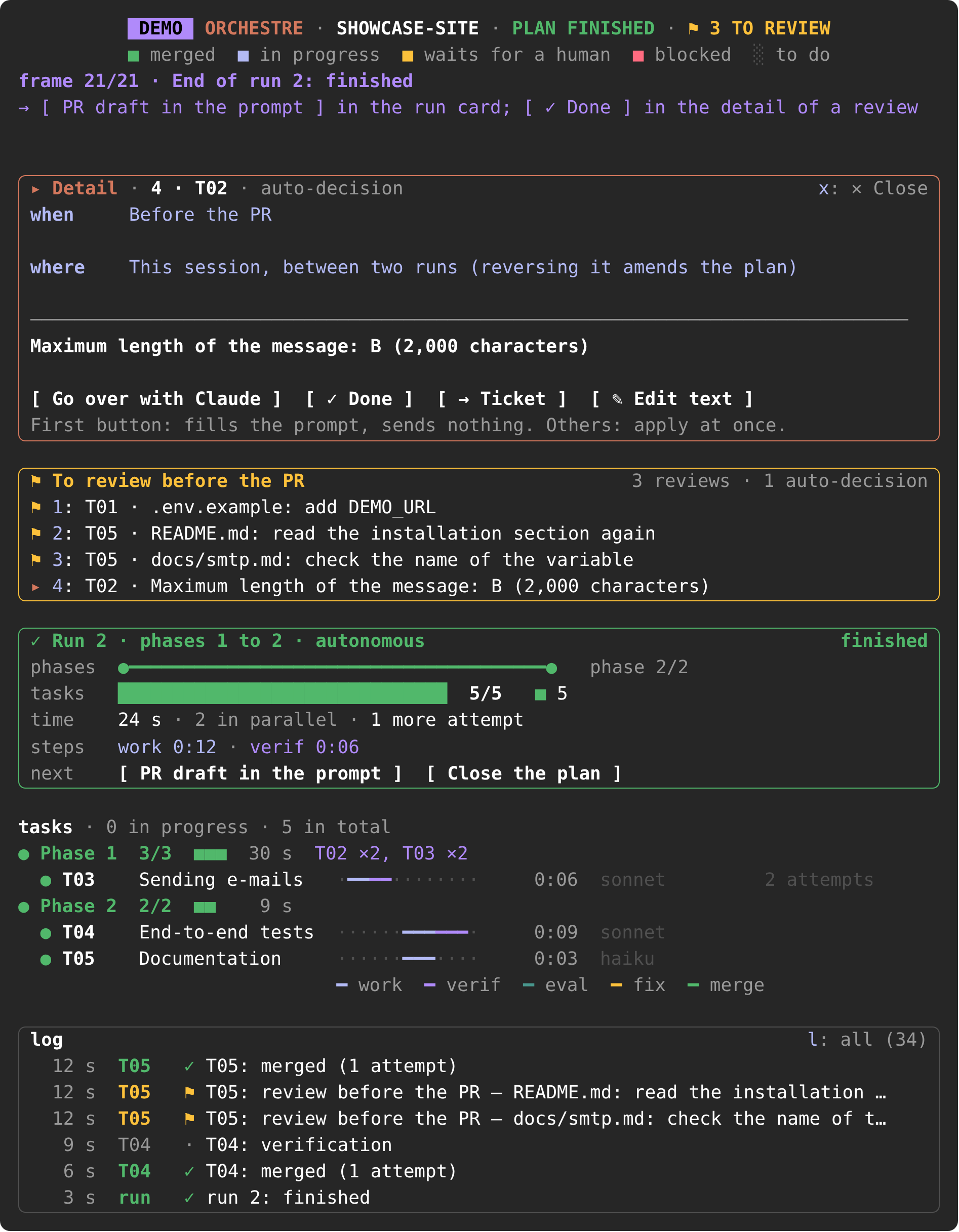
The /progress pane, last frame of /progress demo, key 4 pressed: what waits for you comes first, with when and where to act.
Use
Once orchestre is installed, at the root of your repository, on its base branch, with no uncommitted change:
/orchestre:prepare <goal or existing plan>   # write the plan: phases, tasks, decisions
/orchestre:ready plans/<name>                # the day before: settings, prerequisites, dry run
/orchestre:run plans/<name>                  # in a new session: one run per phase, up to the PR
/orchestre:status                            # where the plan stands, even during a run
/progress                                    # the live pane: what waits for you
/orchestre:prepareinstalls orchestre in the repository first if needed. It gives each task a model, and asks every open decision; you can defer some./orchestre:runasks the mode: stop at each phase (advised for a first plan), stop on a major deviation, or autonomous.- At the end,
plan/<name>is ready for a pull request. The summary lists the auto-decisions and the files to review, and[ PR draft in the prompt ]in/progressdrafts the PR text, with the reviews as a task list. What is left in "Your turn" closes from the pane, or with/orchestre:done plans/<name>in one answer, and[ Close the plan ]makes the plan disappear from the display. Pushing, merging intomainand deploying stay with you.
The path of each task during a run:
flowchart LR
    work["work<br/>on the task's model"] --> verif["verification<br/>commands replayed"]
    verif -- pass --> evaluation{"evaluation<br/>on opus"}
    evaluation -- pass --> merge["merge<br/>into the integration branch"]
    merge --> pr(["ready for a pull request"])
    verif -- fail --> fix["fix<br/>never below the task's model"]
    evaluation -- gaps --> fix
    fix --> verif
After two fixes by default, a task still rejected stops as blocked, with the exact reason. Every option and key: Reference.
Why orchestre
|
Isolated work Each task has its own branch, task/<id>, and its own worktree when tasks run side by side. It is merged with --no-ff into plan/<name>. No agent is allowed to push, merge into main or deploy: the settings deny git push in its usual forms, and the workers have no MCP tools.
|
Evaluation on evidence A verifier replays the task's verification commands. An evaluator on opus judges each criterion of done on the diff and those results, not on what the worker says it did. Up to two fixes follow by default ( max_fixes).
|
A model per task The preparation gives each task haiku, sonnet or opus, with a one-line reason; fable only on the tasks you choose. A fix never runs on a model below the task's. |
|
Scripts for the state, agents for the work Node scripts without dependencies validate the plan ( plan-lint.mjs), write the progress (progress.mjs) and the settings (settings.mjs), and clean up the worktrees. The agents write the code and make the judgment calls.
|
A human only when needed Real data, production and deployment stay yours, and the agents are denied reading .env files, at any depth. A file the agents may not touch becomes a review to do before the pull request, without stopping the run.
|
Resume and follow An interrupted run is never continued: the next /orchestre:run starts a new run from the plan and git, and skips the merged tasks. A banner and the /progress pane show what waits for you.
|
Install
This repository is the plugin marketplace circle; orchestre is its only plugin. Once per machine, in a Claude Code session:
/plugin marketplace add Archibald0/circle-claude-plugin
/plugin install orchestre@circle
/reload-plugins
git, Node.js 18 or later
- Claude Code 2.1.287 or later, with dynamic workflows: paid plans; on Pro, the Dynamic workflows line of
/config. The commands need 2.1.271; the progress display needs 2.1.287. gitand Node.js 18 or later.
To try orchestre on a toy repository first: First try.
Reference
Commands and options| Command | What it does |
|---|---|
/orchestre:prepare <goal or existing plan> |
Converts a written plan, or writes a new one from a goal. Installs orchestre first if needed. |
/orchestre:install [--team] |
Writes the repository settings orchestre needs. --team also offers the plugin to the people who open the repository. |
/orchestre:ready plans/<name> [--no-dry-run] |
Checks that the plan can run, without running any task, and gives a verdict phase by phase. |
/orchestre:run plans/<name> [--resume] |
Runs the plan, one workflow run per phase. --resume first recalls where the plan stands. |
/orchestre:status [plans/<name>] |
Shows the progress of the plan as a table. Read-only, also during a run. |
/orchestre:done plans/<name> [ticket] [review|decision <task|-> <text>] |
With the plan alone, lists the reviews before the PR and the auto-decisions still open and closes them on a one-line answer (1-6 done, 8 ticket). With an item, marks it done, or moves it to tickets with ticket. The buttons of /progress do the same without a turn. |
/progress [plans/<name> | auto] |
Opens the progress pane. A plan path picks the plan; auto follows the last one written. |
/progress text |
Gives the same state as text. |
/progress demo |
Plays two runs of a made-up plan in a little over a minute, without reading or writing the repository. |
/progress sound |
Turns on or off a sound when something waits for you (macOS). |
/progress pane
↑ ↓, Page Up and Page Down scroll the pane.
| Key | Action |
|---|---|
| 1 to 9 | Show a line of "Your turn" in the detail card: when and where to act, what it is (the steps of a prerequisite included), its buttons. A second press closes it. |
| l | Switch the log card between its last entries and the whole log (its counter, "l: all (24)"). |
| Esc | Close the pane. |
The actions are buttons, in brackets, without a key:
| Button | Where | What it does |
|---|---|---|
[ Review with Claude ], [ Go over with Claude ], [ Resume the run ]… |
Detail card | Prepares the item's request in the prompt; nothing is sent without you. |
[ ✓ Done ], [ → Ticket ], [ ✎ Edit text ] |
Detail card of a review or an auto-decision | Marks it done, moves it to the tickets to open after the PR, or changes its text. At once, without a turn of Claude. |
[ Undo ] |
Under "Your turn" | Cancels the last of these actions. |
[ Next 3 › ] |
Under "Your turn" | Shows the items beyond the 9th. |
[ Resume command in the prompt ], [ PR draft in the prompt ] |
Run card | Prepares what comes next after a run. |
[ Close the plan ] |
Run card, once every task is merged | Closes the plan: the banner and the status line go at once, the pane closes at your next prompt, and nothing shows for the plan in the next sessions. What is left open stays in the PR draft. A run that starts on the plan opens it again. |
[ Reopen ] |
Card of the closed plan (/progress plans/<name>) |
Opens the plan again: it is followed as before. |
In the banner, "⤢ Details" opens the pane and, after a run, "✕ Hide" hides the banner. Both are clicked; they have no key.
More:
docs/reference.md: installation, each command in detail, the progress display, what a run does, known limits, development.docs/configuration.md: the settings orchestre writes into a repository, sharing with a team,orchestre.config.json.docs/upgrading.md: from 0.12 and from 0.11.- Plan format,
format.md: tasks,PROGRESS.md,PREREQUISITES.md,HANDOFF.md,DISCOVERY.md,orchestre.config.json. CHANGELOG.md.
Upgrading
Update between two runs, never during one: /plugin marketplace update circle, then /reload-plugins.
- From 0.17. The next
/orchestre:prepare,/orchestre:readyor/orchestre:runoffers to replace four settings rules and to add the new denials ofgit push, in one agreement. - From 0.12. The next
/orchestre:prepare,/orchestre:readyor/orchestre:runoffers to replace the settings rules of 0.12, in one agreement. - From 0.11. The commands move to English (
/orchestre:lancerbecomes/orchestre:run,/suivibecomes/progress…)./orchestre:readyor/orchestre:runmigrates each plan to the new format, after your agreement.
Details: docs/upgrading.md.
License: MIT.
orchestre is an independent project, not affiliated with or endorsed by Anthropic.
Reviews (0)
Sign in to leave a review.
Leave a reviewNo results found