semantics
Health Pass
- License — License: AGPL-3.0
- Description — Repository has a description
- Active repo — Last push 0 days ago
- Community trust — 22 GitHub stars
Code Pass
- Code scan — Scanned 12 files during light audit, no dangerous patterns found
Permissions Pass
- Permissions — No dangerous permissions requested
No AI report is available for this listing yet.
A semantic layer for your data: archmax describes it, you sharpen it, agents query it.
archmax semantics
A semantic layer for your data: archmax semantics describes it, you sharpen it, AI agents query it.
Documentation · Issues · GitHub
Heads up: archmax semantics is experimental. The core ideas are stable, but APIs, file formats, and configuration may change between releases. We try to avoid breaking changes, but can't guarantee stability yet. Pin your version and check the changelog before upgrading.
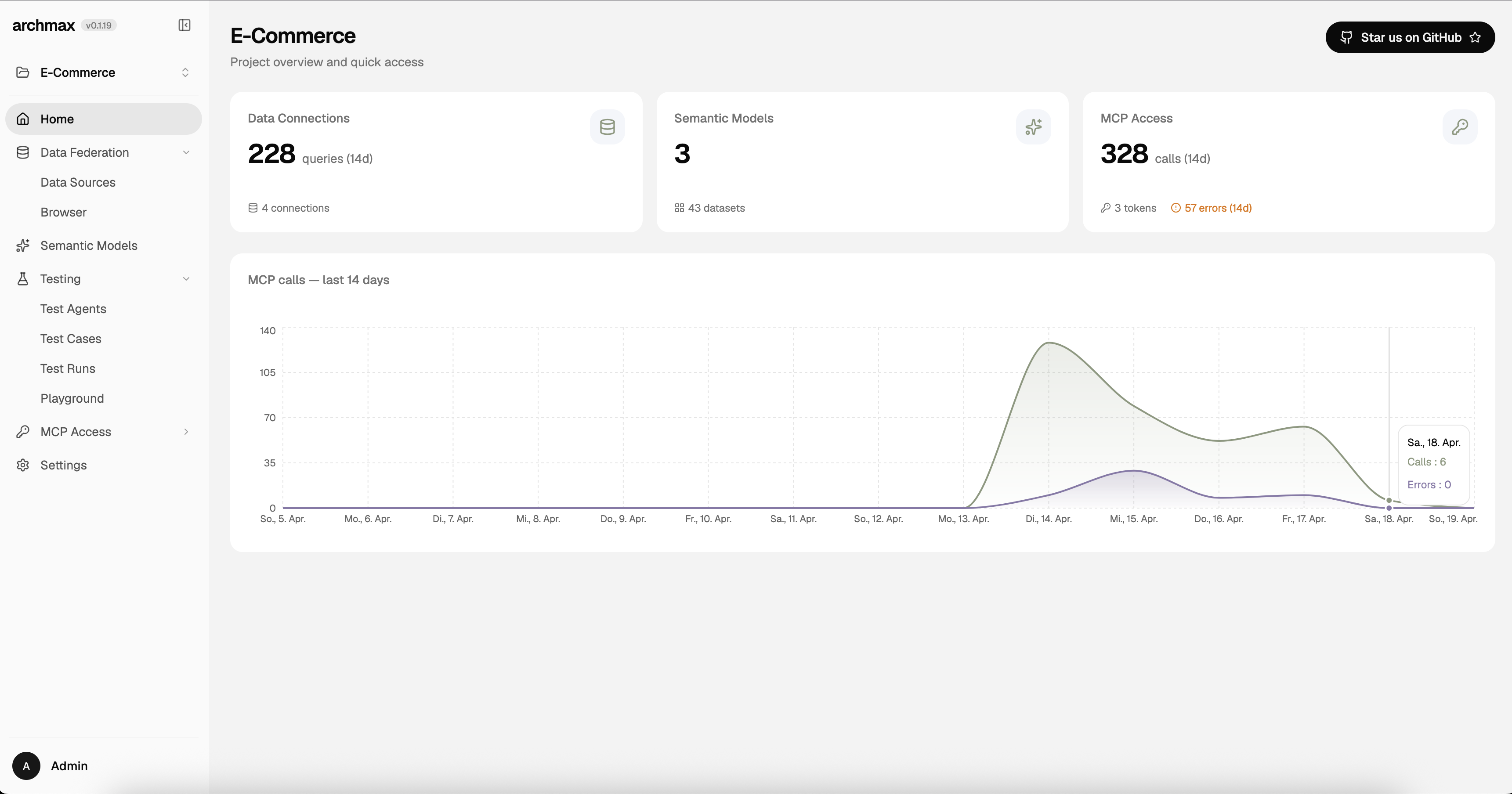 |
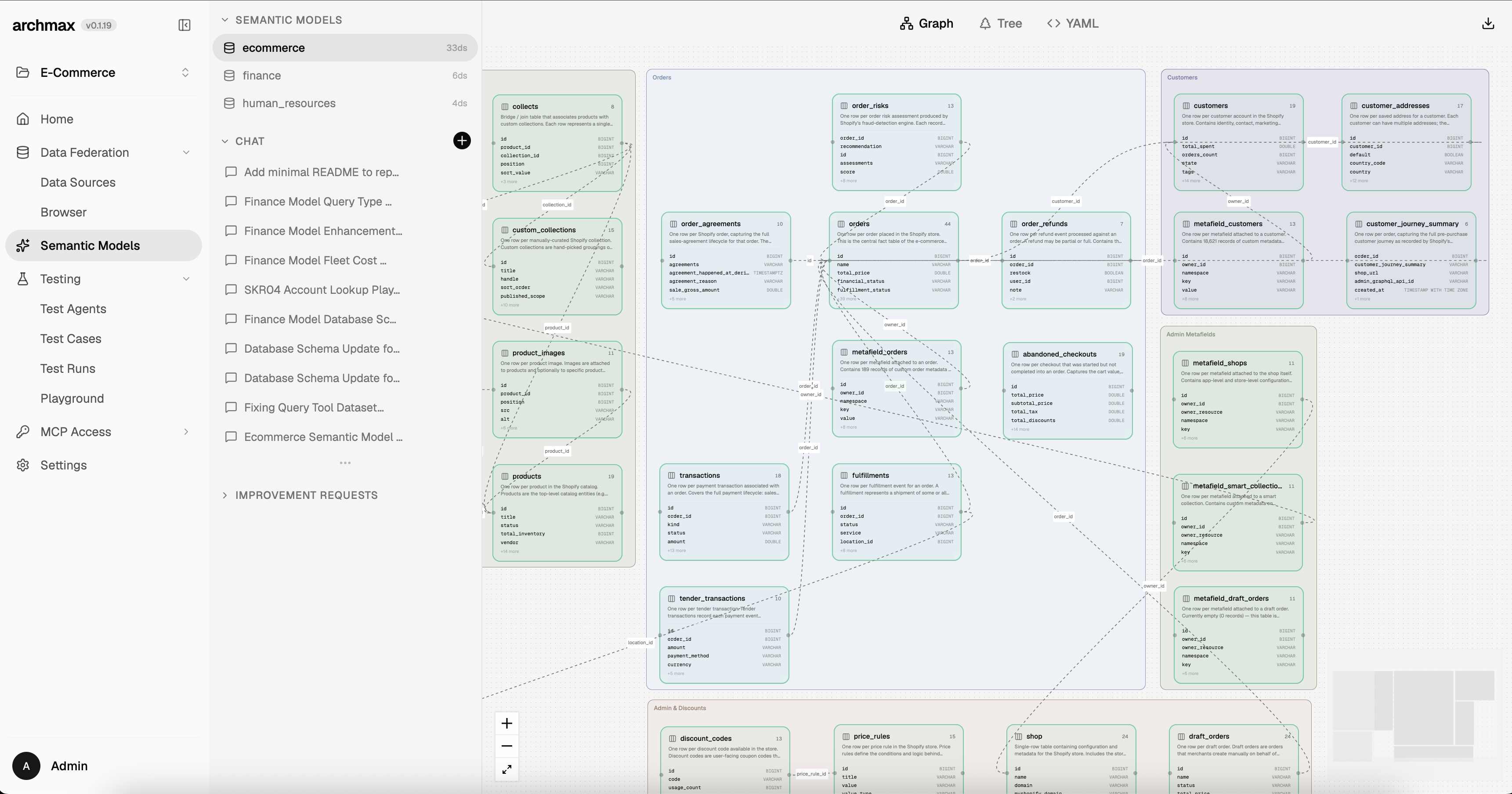 |
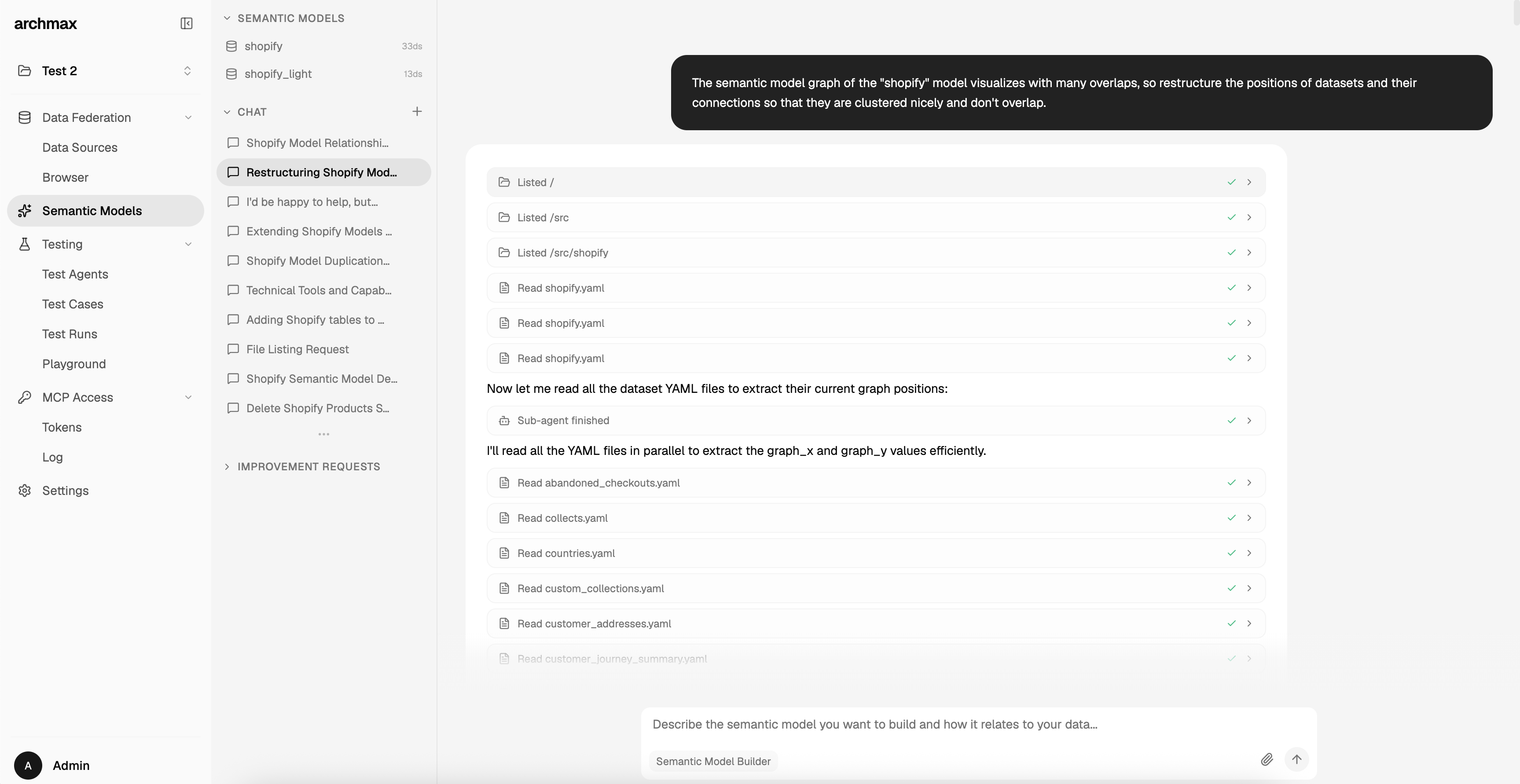 |
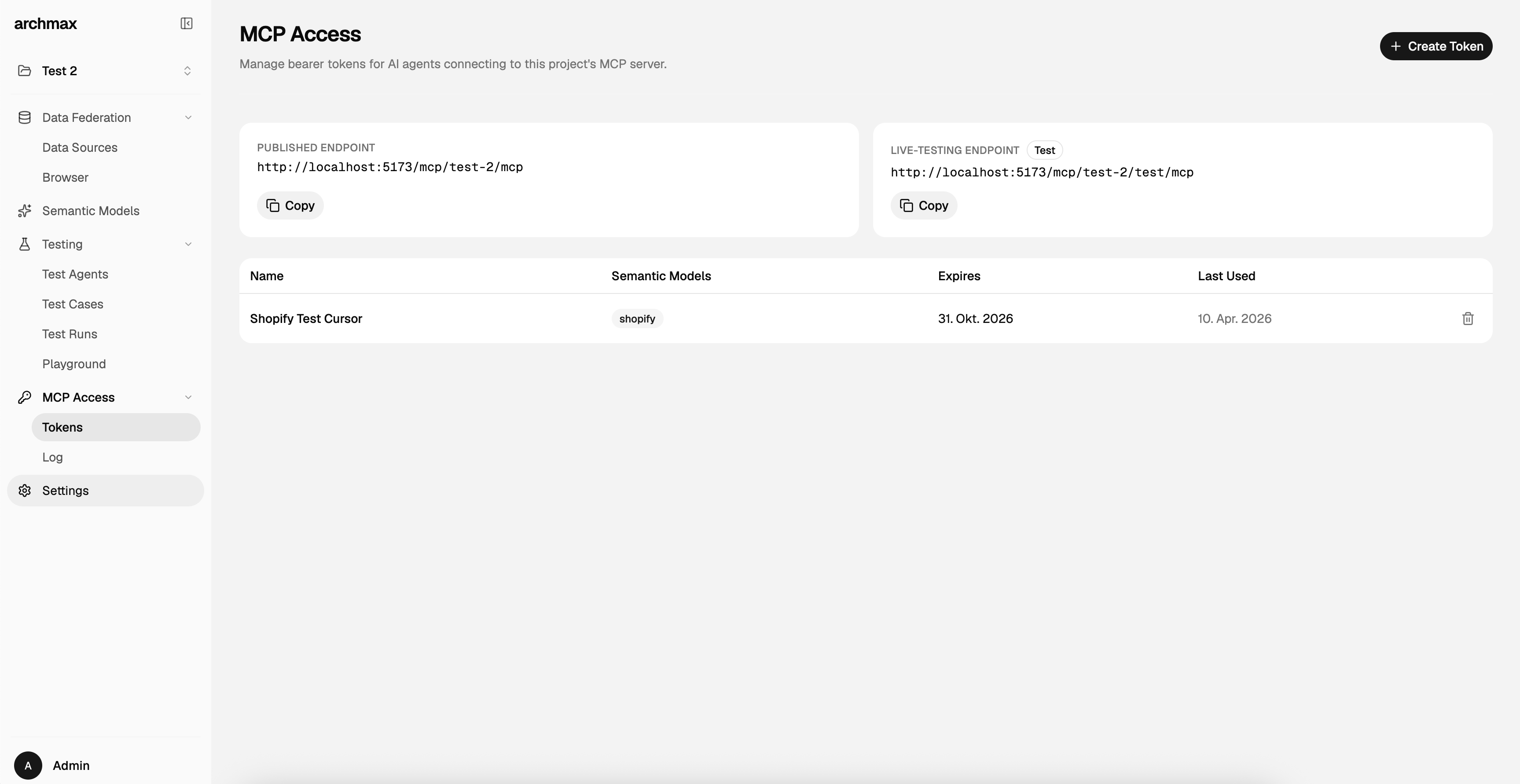 |
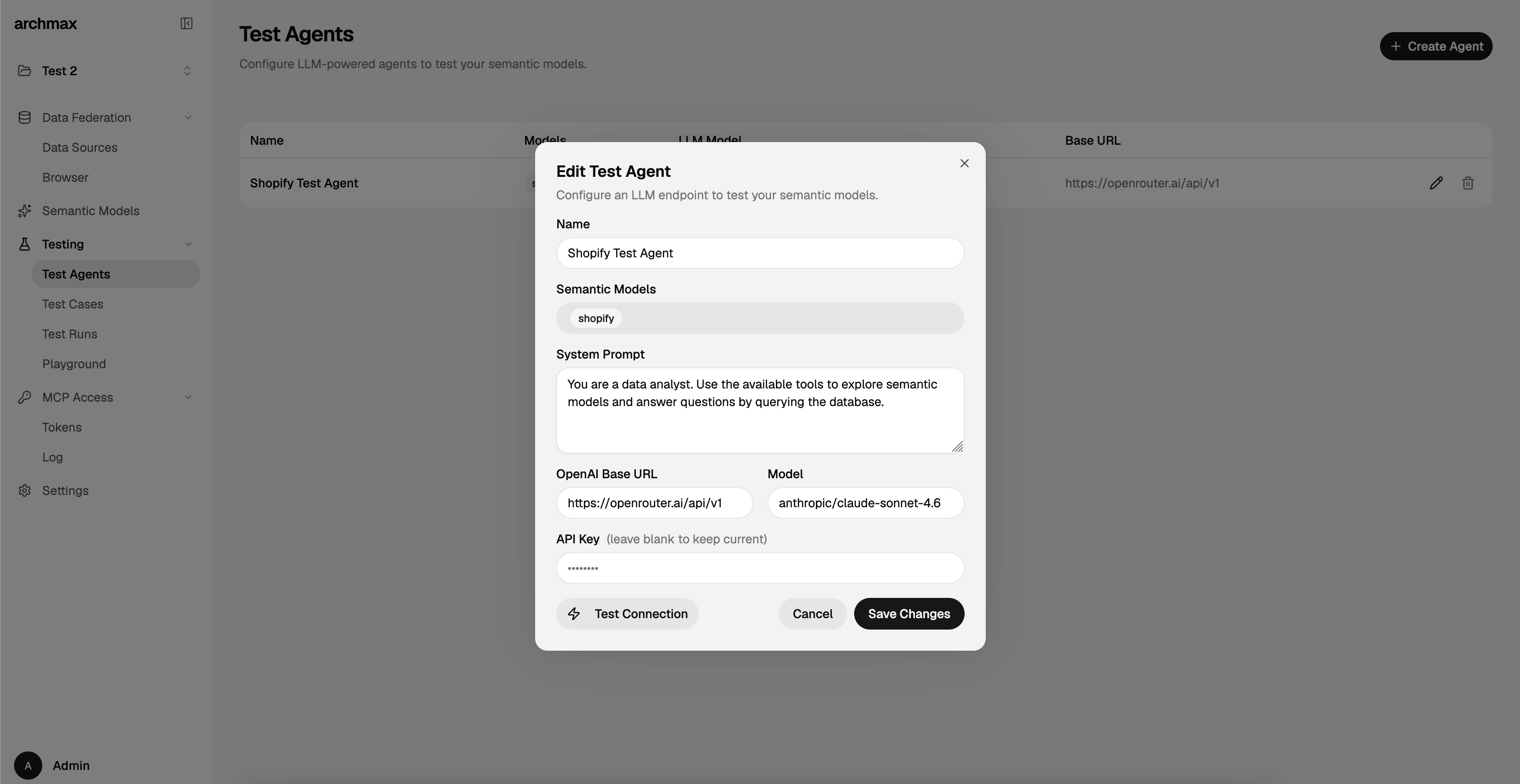
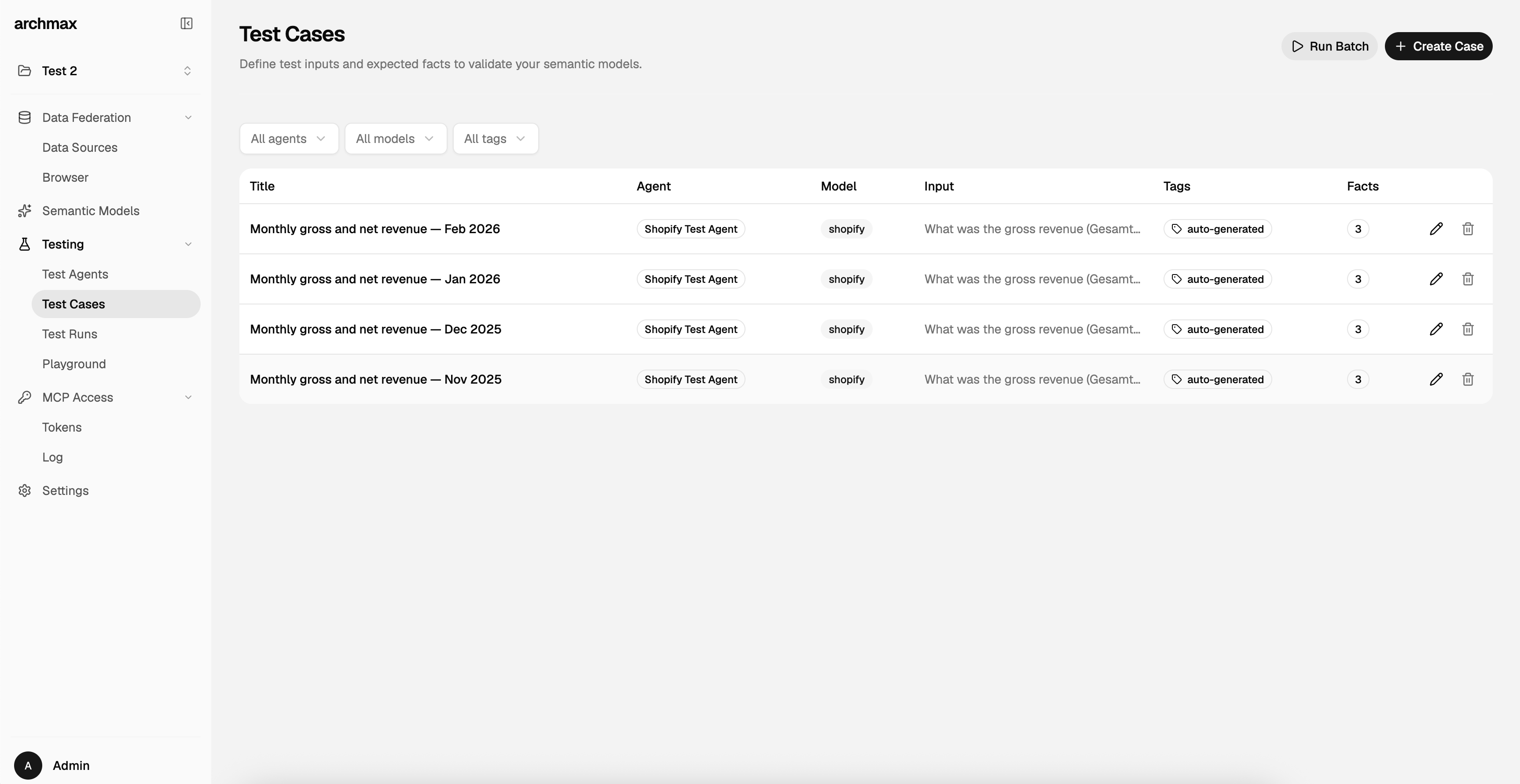
| Project Home | Graph View | Model Builder | MCP Access |
 |
 |
 |
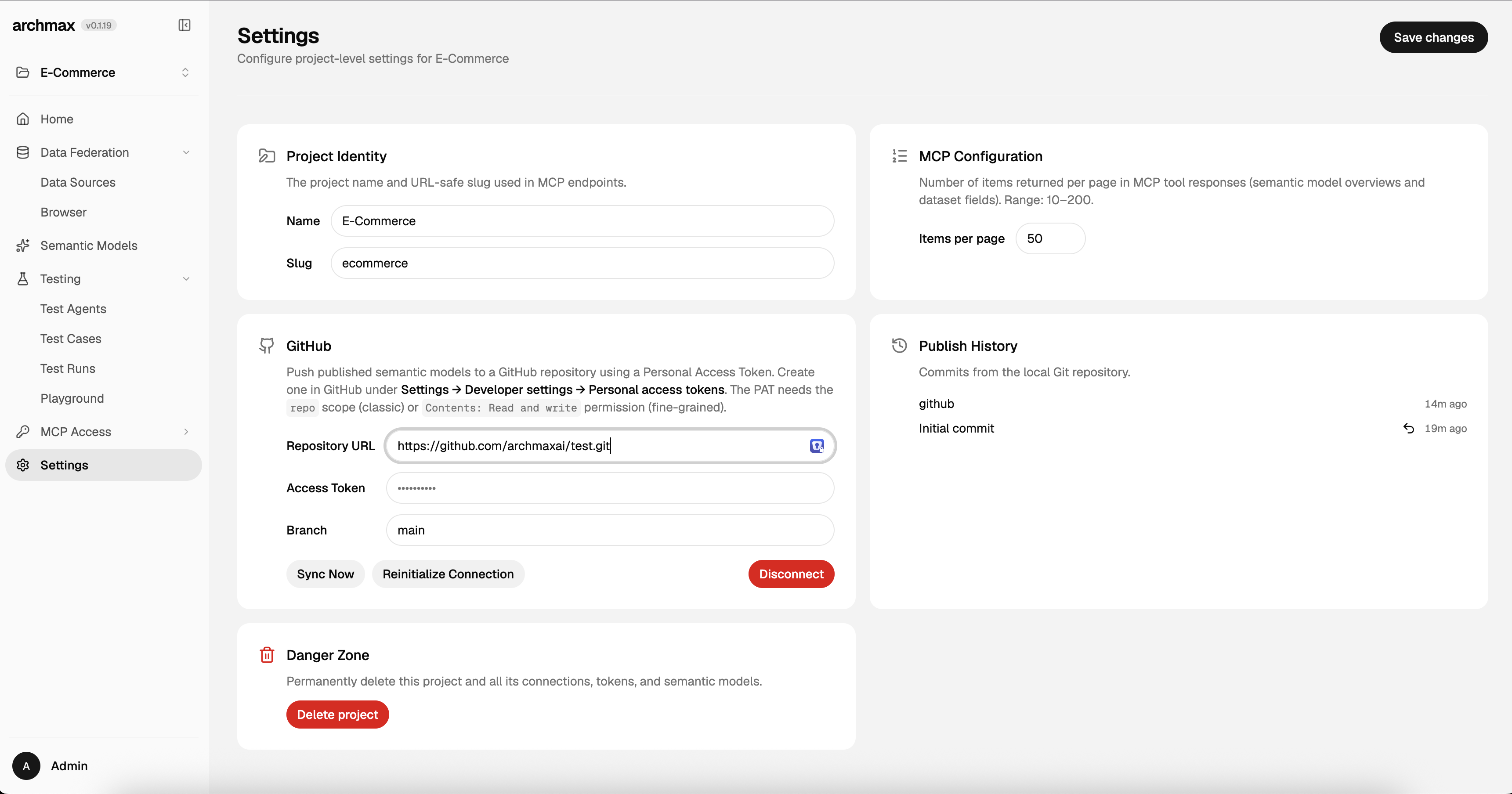 |
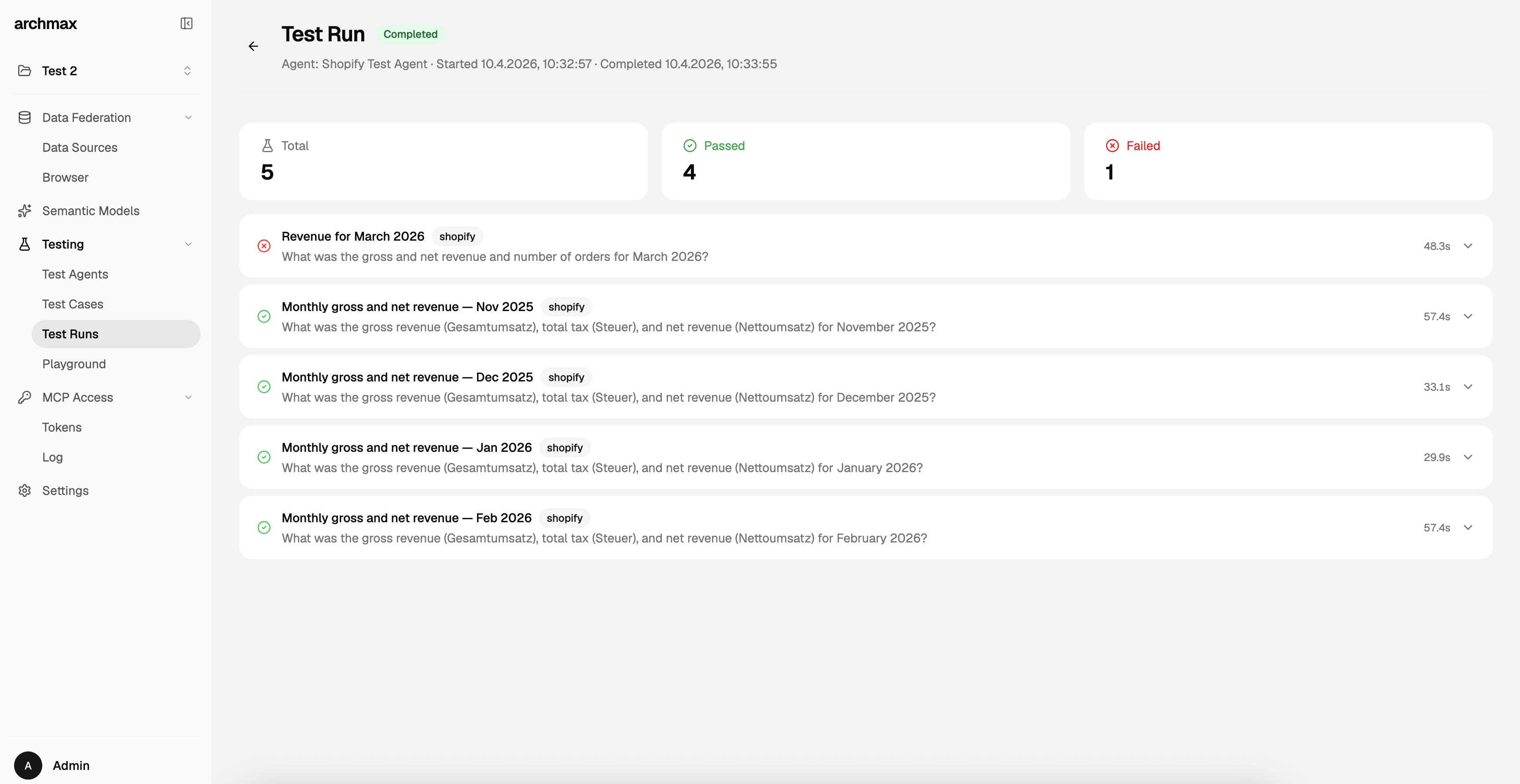
| Test Agents | Test Cases | Test Runs | Settings |
The Problem
Connecting AI agents to databases today is a gamble. You either hand over raw SQL access and hope the LLM doesn't hallucinate column names, run destructive queries, or leak sensitive data, or you spend weeks writing bespoke tool integrations that break the moment your schema changes.
Even when agents can query your database, they have no idea what the data actually means. A column called amt_01 could be revenue, tax, or a refund. A table called dim_cust is meaningless without business context. Without that context, agents guess, and guessing on real data has real consequences.
The gap between "AI can write SQL" and "AI understands our data" is where most agent-database projects stall.
How archmax semantics Solves This
archmax semantics puts a semantic layer between your databases and AI agents. archmax semantics describes your data; you sharpen it with the context that matters; agents query through the Model Context Protocol (MCP).
Instead of raw database access, agents get:
- Business context: field descriptions, synonyms, examples, and enum values so the agent knows
amt_01is "gross revenue in EUR" - Guardrails: read-only queries scoped to sandboxed VIEWs, not raw tables; token-based access with model-level permissions
- Federation: a single query interface across Postgres, MySQL, MSSQL, SQLite, DuckDB, and Iceberg REST Catalogs, powered by DuckDB's in-process engine
- Structure: typed datasets, explicit relationships, and reusable metric definitions stored as OSI YAML
- Token efficiency: OSI models are converted to compressed markdown digests before being sent to agents, reducing token usage by 3–5× compared to raw YAML
The result: AI agents that query your data reliably, safely, and with understanding, not guesswork. The approach is conceptually similar to Snowflake Semantic Views: Both layer business meaning (metrics, dimensions, relationships) over physical tables so consumers get consistent definitions instead of raw column names. The key difference is that archmax semantics is database-agnostic (federating across Postgres, MySQL, MSSQL, SQLite, DuckDB, and Iceberg REST Catalogs).
Built on the Open Semantic Interchange (OSI) spec, an open standard for describing datasets, relationships, and metrics in a vendor-neutral way. archmax semantics uses OSI YAML as its internal storage format for semantic model definitions — every dataset, field, relationship, and metric is persisted as spec-compliant YAML files on disk.
Because the OSI YAML format is verbose and token-intensive, archmax semantics does not serve raw YAML to AI agents. Instead, when an agent requests model information through MCP tools, the OSI model is converted on-the-fly into a compressed markdown digest that preserves all semantically relevant information (field types, descriptions, enums, relationships, examples) while using 3–5× fewer tokens than the equivalent YAML. This makes agent interactions significantly cheaper and faster without sacrificing context quality.
Features
- Semantic Models: describe tables as datasets with typed fields, relationships, and metrics in YAML
- MCP Server: expose your semantic layer to any MCP-compatible AI agent (Claude, Cursor, custom agents)
- Data Federation: query across Postgres, MySQL, MSSQL, SQLite, DuckDB, and Iceberg REST Catalogs from a single project
- AI-Assisted Model Builder: a chat-based agent discovers schemas, maps fields, detects enums, and infers relationships
- Scoped Query Execution: agents run read-only SQL against sandboxed VIEWs, never raw tables
- Token-Based Access Control: MCP tokens with configurable model scopes and expiry
- Testing Suite: test cases that validate whether agents can use your semantic models correctly
- Version Control: built-in Git tracks every publish; optional GitHub sync pushes models to a remote repository
- Self-Hosted: deploy with Docker in minutes, keep your data on your infrastructure
Quick Start
Docker (Standalone)
Run archmax semantics as a single container with embedded MongoDB and Redis:
docker run -d \
  --name semantics \
  -p 8080:8080 \
  -e BETTER_AUTH_SECRET=$(openssl rand -base64 32) \
  -e UI_USERNAME=admin \
  -e UI_PASSWORD=changeme \
  -e AGENT_API_KEY=your-openrouter-api-key \
  -v ~/.archmax:/data \
  ghcr.io/archmax-ai/semantics:latest
Volume mount: The
-v ~/.archmax:/databind mount persists all application data on the host — semantic model YAML files (projects/), embedded MongoDB data (mongodb/), and the DuckDB extension cache (.duckdb/). Without this mount, all data is lost when the container is removed.
Save your
BETTER_AUTH_SECRET. If you lose this value or change it on a restart, all sessions and authentication data become invalid. Generate it beforehand and store it in a safe place.
AGENT_API_KEYis required for AI features. The Semantic Model Builder, Testing Playground, and automatic title generation all need an API key for an OpenAI-compatible provider. The default endpoint is OpenRouter. Without this key, agent features will be unavailable.
Open http://localhost:8080 and log in with username admin (or your UI_USERNAME) and the password you set in UI_PASSWORD.
Docker Compose (Recommended for Production)
Runs archmax semantics with dedicated MongoDB and Redis containers instead of the embedded services:
# 1. Clone the repo (or copy docker-compose.yml + .env.example)
git clone https://github.com/archmax-ai/semantics.git
cd semantics

# 2. Create your .env from the example and fill in the required values
cp .env.example .env

# 3. Start the stack
docker compose up -d
The .env file needs at minimum:
BETTER_AUTH_SECRET=<random-32+-char-secret>   # openssl rand -base64 32
UI_PASSWORD=<your-admin-password>
AGENT_API_KEY=<your-openrouter-api-key>       # required for AI features
Optional overrides (defaults shown):
| Variable | Default |
|---|---|
UI_USERNAME |
admin |
AGENT_API_BASE_URL |
https://openrouter.ai/api/v1 |
AGENT_MODEL |
anthropic/claude-sonnet-4.6 |
The stack exposes port 8080 and persists data in two Docker volumes:
| Volume | Container Path | Contents |
|---|---|---|
archmax-data |
/data |
Semantic model YAML files, DuckDB extension cache |
mongo-data |
/data/db (mongo container) |
MongoDB database files |
These volumes are created automatically by Docker Compose. To use host bind mounts instead, edit docker-compose.yml and replace the named volumes with paths (e.g. ./data/semantics:/data).
Local Development
git clone https://github.com/archmax-ai/semantics.git
cd semantics
cp .env.example .env.local   # Edit with your settings
pnpm install
pnpm dev
| Service | URL |
|---|---|
| Frontend | http://localhost:5173 |
| API | http://localhost:3000 |
| Docs | http://localhost:4321 |
| MCP | POST http://localhost:3000/mcp/<project-slug>/mcp |
Architecture
semantics/
├── apps/
│   ├── api/          # Hono API server
│   ├── e2e/          # Playwright end-to-end tests
│   ├── frontend/     # Vite + React SPA (TanStack Router)
│   ├── worker/       # BullMQ worker for agent jobs
│   └── docs/         # Documentation site (Astro Starlight)
├── packages/
│   ├── core/         # Shared models, services, config (@archmax/core)
│   └── ui/           # React UI components (@archmax/ui)
└── openspec/         # Specifications and change proposals
Tech stack: TypeScript, Hono, React 19, Vite 6, MongoDB, DuckDB, Tailwind CSS 4, Turborepo, Playwright
MCP Tools
| Tool | Description |
|---|---|
list_semantic_models |
List semantic models the token has access to |
get_semantic_model |
Overview of a model with datasets, relationships, and metrics |
get_datasets |
Fields for one or more datasets with types, examples, enums, and instructions |
execute_query |
Run a read-only SQL query scoped to a semantic model's VIEWs |
request_improvement |
Submit an improvement request for a semantic model |
Connecting an AI Agent
Configure your MCP client with:
- Endpoint:
https://your-server/mcp/<project-slug>/mcp - Auth:
Bearer <your-mcp-token>
{
  "mcpServers": {
    "archmax-semantics": {
      "url": "https://your-server/mcp/your-project/mcp",
      "headers": {
        "Authorization": "Bearer sk-your-token"
      }
    }
  }
}
Version Control & GitHub
Every project has a built-in Git repository that automatically tracks changes. Each time you publish, archmax semantics commits the current state of your semantic models (source YAML and assembled build output) with your publish message.
Optionally connect a GitHub remote in Settings → GitHub to keep an external copy in sync. The publish flow becomes: pull → build → commit → push. You need a Personal Access Token with the repo scope (classic) or Contents: Read and write (fine-grained).
Key capabilities:
- Automatic change detection — the Publish button appears when any file in the project changes
- Publish history — paginated list of publishes with messages and timestamps in Settings
- Revert — restore your project to any previous publish with one click (creates a new commit, rebuilds, and pushes)
- Sync Now — pull remote changes without publishing
- Conflict detection — blocks publishing when merge conflicts exist and tells you which files need attention
- Re-init — reset local Git history if needed (working files are preserved)
See the Version Control guide for details.
Configuration
Key environment variables (see .env.example for the full list):
| Variable | Description |
|---|---|
BETTER_AUTH_SECRET |
Session encryption secret (min 32 chars). Save and reuse across restarts. |
UI_USERNAME / UI_PASSWORD |
Admin credentials (default username: admin). UI_PASSWORD is reapplied to the admin account on every API startup; update it and restart to rotate the password. |
APP_BASE_URL |
Public URL of this instance (e.g. https://semantics.example.com). Set when behind a reverse proxy to auto-configure CORS and auth. |
ENCRYPTION_KEY |
Optional. Encrypts database connection passwords and API keys at rest (AES-256-GCM). Generate with openssl rand -base64 32. |
MONGODB_URI |
MongoDB connection string (optional in Docker; embedded when omitted) |
AGENT_API_BASE_URL |
OpenAI-compatible API endpoint (default: OpenRouter) |
AGENT_API_KEY |
API key for the AI agent (required for agent features) |
AGENT_MODEL |
LLM model identifier (e.g., anthropic/claude-sonnet-4) |
REDIS_URL |
Optional. Enables BullMQ worker queue (embedded in Docker when omitted) |
Contributing
archmax semantics uses OpenSpec for spec-driven development. Every feature PR must include a corresponding spec change.
Setup
npm install -g @fission-ai/openspec
Workflow
OpenSpec installs skills and slash commands into your AI coding assistant (openspec init). Use these prompts in Claude Code, Cursor, or any OpenSpec-aware agent:
| Prompt | What it does |
|---|---|
/opsx:explore |
Thinks a change through before proposing it |
/opsx:propose |
Scaffolds a new change proposal with proposal.md, tasks.md, and spec deltas |
/opsx:apply |
Implements an approved proposal by following the task checklist |
/opsx:sync |
Folds delta specs into the main specs without archiving |
/opsx:archive |
Archives a completed change and updates specs |
The typical flow:
- Propose — Run
/opsx:proposeand describe the change. The agent creates the proposal directory, writes spec deltas, and validates withopenspec validate <change-id> --strict. - Review — Get the proposal approved before any code is written.
- Implement — Run
/opsx:applyto work through the task list. - Archive — After merging, run
/opsx:archiveto move the change to the archive and update the canonical specs.
You can also drive the workflow manually with the CLI (openspec list, openspec show, openspec validate, openspec archive). Project conventions fed to the agents live in the context: block of openspec/config.yaml.
See the Contributing guide for details.
License
Reviews (0)
Sign in to leave a review.
Leave a reviewNo results found